8 min read
Windows 10 after end of support costs more
Compare the cost of Windows 10 after end of support, including three years of ESU, IT labor, and replacement of incompatible PCs.
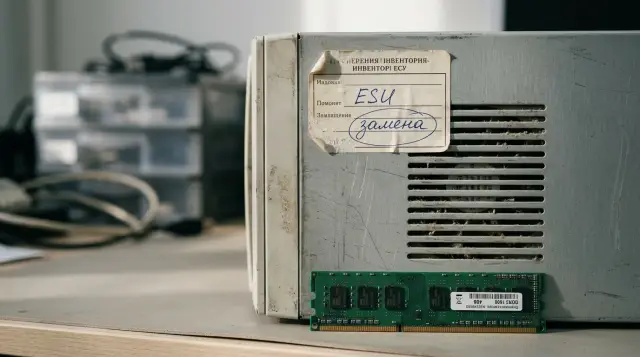
Support for standard Windows 10 editions ended on October 14, 2025. Computers did not shut down the following day, but they stopped receiving normal security, quality, and reliability fixes. An organization now has three choices: upgrade compatible machines to Windows 11, buy Extended Security Updates (ESU) for those that cannot yet be retired, or replace the hardware.
Buying three years of ESU for the entire fleet is almost always the wrong decision. A three-year license costs USD 427 per device at Microsoft's published commercial price, while the machine itself remains old. Yet replacing the whole fleet at once often burns through the budget for no reason: some devices already support Windows 11, some need only a UEFI setting or firmware update, and a small number of workstations may depend on an application or peripheral that cannot be moved within one quarter. The calculation must use device groups, not one answer for the entire asset list.
Separate upgrades from replacements first
A compatible Windows 10 computer does not need to be replaced solely for a move to Windows 11. Confirm compatibility first, test applications and drivers with a pilot group, and then upgrade the operating system. In the cost model, this machine belongs in the upgrade row, which includes IT labor, possible user downtime, and a reserve for fixing errors, but not the price of a new desktop.
The initial assessment divides the fleet into four groups:
- Compatible devices in good condition can be upgraded now.
- Formally compatible but weak or worn machines are better replaced because of their condition.
- Incompatible devices used for routine office work should be replaced on a schedule.
- Incompatible devices tied to old software, a medical instrument, industrial machine, or another system receive ESU as a temporary bridge.
This split prevents two expensive mistakes. The first happens when procurement treats every Windows 10 computer as obsolete. The second happens when IT buys ESU for working, compatible machines because migration has not yet been scheduled. The free upgrade entitlement for an eligible device and the paid security extension for an old operating system solve different problems.
Do not rely on the purchase year alone. One batch may contain different processors, TPM versions, and firmware, and repairs cause configurations to diverge even further. Make the decision from the actual processor, boot mode, TPM, memory, storage, drive condition, and manufacturer support, not from the label on the case.
ESU buys time, not full support
The Windows 10 ESU program supplies Critical and Important security updates as classified by the Microsoft Security Response Center. It does not add new features, customer-requested fixes, Windows design changes, or general technical support for the operating system. Microsoft states separately that ESU assistance covers activation, installation, and possible regressions in the ESU package itself; an organization needs an active support plan to receive that assistance.
This distinction matters in a budget. An ESU row does not turn an old computer into a fully supported workstation. The supplier of a business application, scanner driver, or endpoint protection agent may stop supporting Windows 10 on its own schedule. Even Microsoft 365 Apps runs under restricted support after the operating system reaches end of support, although Microsoft announced a separate period for security fixes to those apps on Windows 10 through October 10, 2028.
For commercial ESU, a device must run Windows 10 version 22H2 and receive the required preparation updates. After purchase, an administrator activates the annual license on each physical device with a MAK, or uses the appropriate method for a cloud environment. The slmgr.vbs /dlv command should show the relevant ESU program name and the Licensed status. The license price must therefore be supplemented with the costs of inventory, bringing devices to the required state, key deployment, activation checks, and monthly monitoring of update installation.
Windows 10 LTSC and LTSB editions have their own lifecycles. They cannot be added mechanically to the standard ESU calculation for version 22H2. Export the exact operating system edition and version first, then check the end-of-support date for each edition in Microsoft Lifecycle. Otherwise, the organization may buy unnecessary licenses or, worse, leave devices unprotected after mistakenly classifying them as supported.
Three years of ESU cost USD 427 per device
Microsoft publishes a first-year ESU price of USD 61 per device for commercial organizations. The price doubles in each following year: year two costs USD 122 and year three costs USD 244. The full period totals 61 + 122 + 244 = USD 427 per device before taxes, exchange-rate movements, and administrator labor.
- Through October 13, 2026: USD 61 per device, USD 61 cumulative.
- Through October 12, 2027: USD 122 per device, USD 183 cumulative.
- Through October 10, 2028: USD 244 per device, USD 427 cumulative.
Licenses cover full years, and a partial period cannot be purchased. A late purchase does not save money either: an organization that joins the program in year two must also pay for year one. Microsoft documentation calls this rule cumulative. The idea of waiting several months and paying only for the remainder does not work.
For a calculation in tenge, use the internal budget exchange rate and its approval date, not today's rate from a search result. The license formula is simple:
ESU_3Y_KZT = N_ESU × 427 × FX_USD_KZT
Here, N_ESU is the number of devices that will actually remain on Windows 10 for all three years. Do not insert the entire fleet. If 300 machines receive ESU for only one year and 80 remain for three years, calculate 300 × 61 × exchange rate and separately 80 × 366 × exchange rate for years two and three. The first USD 61 for those 80 devices is already part of the first-year purchase.
Special licensing arrangements exist for some education and cloud scenarios. For example, Microsoft says that eligible Windows 10 virtual machines in several Azure environments and existing Windows 365 Cloud PCs receive ESU at no additional cost. Do not apply that condition to physical office computers without checking the agreement and the entitlement of each device.
One inventory produces four different decisions
An inventory must produce one row per device, not an average readiness percentage. If the fleet is managed through Microsoft Intune, the Work from anywhere report in Endpoint analytics shows Capable, Not capable, Upgraded, or Unknown and the reason for incompatibility. Do not automatically treat Unknown as a failure: Microsoft warns that this group often contains inactive devices.
For a local sample, PowerShell can collect technical indicators. This snippet does not replace the official supported-processor list, but it quickly finds missing TPM, Secure Boot, memory, or free-space requirements:
$cpu = Get-CimInstance Win32_Processor | Select-Object -First 1
$pc = Get-CimInstance Win32_ComputerSystem
$os = Get-CimInstance Win32_OperatingSystem
$tpm = Get-Tpm
$secureBoot = try { Confirm-SecureBootUEFI } catch { $false }

[pscustomobject]@{
  ComputerName = $env:COMPUTERNAME
  WindowsVersion = $os.Caption
  Build = $os.BuildNumber
  CPU = $cpu.Name.Trim()
  Cores = $cpu.NumberOfCores
  RAM_GB = [math]::Round($pc.TotalPhysicalMemory / 1GB, 1)
  TPM_Present = $tpm.TpmPresent
  TPM_Ready = $tpm.TpmReady
  SecureBoot = $secureBoot
}
A typical result is one record with ComputerName, WindowsVersion, Build, CPU, Cores, RAM_GB, TPM_Present, TPM_Ready, and SecureBoot fields. Store the result centrally and add the model, serial number, age, warranty, drive health, owner, and critical applications.
After the technical check, assign one action and date to every device: Upgrade, Replace, ESU-1Y, ESU-2Y, or ESU-3Y. Keep a separate Investigate status for machines with incomplete data. Do not license a device with no owner or last sign-in date just in case until you confirm that it exists and remains active.
The most useful column in this table is not Windows 11 ready, but Blocker. Values such as CPU unsupported, TPM disabled, app incompatible, device attached, and warranty expired send money to different places. A disabled TPM may need a setting change, an unsupported processor usually leads to replacement, and an incompatible application requires work with the process owner.
The Windows 11 minimum is not a workplace standard
The official minimum Windows 11 requirements include a compatible 64-bit processor running at 1 GHz or faster with two cores, 4 GB of memory, at least 64 GB of storage, UEFI with Secure Boot capability, TPM 2.0, DirectX 12 graphics with a WDDM 2.0 driver, and a display of at least 720p. The processor must appear on Microsoft's supported list for the relevant Windows 11 version.
Those numbers answer whether installation is allowed. They do not answer whether an employee can comfortably use a browser, video conferencing, office documents, an accounting system, and security software at the same time. Buying computers with 4 GB of memory and 64 GB of storage in 2026 solely because they meet the minimum means ordering complaints and the next upgrade in advance.
Create an internal standard around the actual workload. For each profile, specify processor class, memory, usable SSD capacity, number and type of ports, support for two monitors, network interfaces, repairability, warranty, and expected service life. A cashier, a CAD engineer, and a call-center administrator should not receive one configuration merely because it makes the tender easier.
Also separate a missing TPM from a disabled TPM. Some eligible systems already have the module integrated into the platform, but it is disabled in UEFI. After changing the setting, test BitLocker recovery and key procedures if encryption was already in use. A fleet-wide firmware change without a pilot can cause downtime even though no hardware purchase was required.
Bypassing Windows 11 checks on an unsupported processor looks cheap only in the procurement spreadsheet. It leaves the organization with an unsupported configuration and shifts the risk to every future release and driver. Such an experiment may be acceptable on a personal test computer; it is a poor budget foundation for a managed fleet with audit requirements.
Compare full cost on one timeline
ESU and a new machine incur costs at different times, so comparing one license with the price of a desktop is misleading. Use a horizon through October 2028 and include every cash flow for each device or group. If finance uses discounting, bring future payments to one date; otherwise, at least use the same exchange rate and record the payment years explicitly.
For the ESU scenario, include:
- licenses by year and an exchange-rate reserve;
- labor for preparation, activation, monitoring, and update troubleshooting;
- repairs and spare parts after warranty;
- planned replacement at the end of the bridge period;
- the cost of application support limits and isolation controls.
For the replacement scenario, include the equipment and license price, delivery, image deployment, profile migration, application installation, employee time, disposal, or the old machine's residual value. Then subtract costs that a new warranty and a lower repair burden actually remove. Do not assign a vague productivity gain to a new machine in tenge without measuring it: that figure can easily turn the calculation into advertising.
Two measures are useful. Bridge cost shows the cost of keeping a device on Windows 10 until its assigned replacement date. Replacement TCO shows the net cost of a new workstation over the same horizon. If a machine will be replaced in 12 months anyway, compare one year of ESU with deferring the purchase for a year, not with canceling the purchase forever.
Add a constraint for team capacity. If four administrators can prepare only 200 workstations per month without neglecting current work, replacing 2,000 machines in one month is impossible regardless of the budget. The cost of a contractor, a temporary team, or phased deployment must enter the model before the procurement contract is signed.
A calculation for a fleet of 1,000 devices
Consider a hypothetical organization with 1,000 active computers. The figures below are input assumptions that demonstrate the mechanics, not market benchmarks. Finance approved an exchange rate of 500 tenge per dollar, a new workstation costs 360,000 tenge, preparation and data migration cost 25,000 tenge, and the old machine has a residual value of 35,000 tenge. ESU administration is estimated at 12,000 tenge per device per year.
The inventory produced this result:
- 420 compatible devices in good condition are upgraded to Windows 11.
- 130 compatible but worn devices are replaced now.
- 330 incompatible machines for routine work are replaced in two waves.
- 120 incompatible machines with blocking software receive one year of ESU and a new assessment.
If the organization mistakenly buys three years of ESU for all 1,000 devices, the licenses alone cost 1,000 × 427 × 500 = 213,500,000 tenge. Three years of administration under the assumption above add another 36,000,000 tenge. The organization spends 249,500,000 tenge even though 420 machines can be upgraded without ESU and 460 are already scheduled for replacement because of condition or incompatibility.
The segmented plan buys first-year ESU only for the 120 blocked devices: 120 × 61 × 500 = 3,660,000 tenge. Administration adds 1,440,000 tenge. The one-year bridge costs 5,100,000 tenge, after which the organization either migrates the application and replaces the machines or buys year two with a documented reason.
The immediate net replacement cost for the 130 worn devices under these assumptions is 130 × (360,000 + 25,000 - 35,000) = 45,500,000 tenge. The remaining 330 replacements are distributed across quarters according to team capacity and delivery lead time. Their model needs a payment calendar, not a price multiplied by quantity with the project then treated as finished.
This example has no universal winner between ESU and procurement. It demonstrates a more important result: the largest saving comes from forming the right groups. ESU is useful as a short bridge for 120 devices, but expensive and pointless for compatible machines. Replacement makes sense for worn hardware, but not for every device displaying a Windows 10 logo on its screen.
One year of ESU often beats three
The first year of ESU costs far less than the next two combined, so it suits a managed deferral. During that period, the team migrates the critical application, tests peripherals, prepares the Windows 11 image, runs procurement, and replaces devices in waves. Every computer with ESU needs an exit date and an owner for the reason blocking migration.
Three-year coverage can make sense when the constraint really lasts almost until 2028. A certified business system or costly equipment, for example, may depend on a particular driver, while the entire setup cannot be replaced sooner. Even then, price the alternatives: a segmented network, restricted access, application virtualization, remote access to a supported workstation, or replacement of the interface controller. ESU covers only part of the operating-system risk.
Do not present ESU as permission to postpone the project. If an application has not passed its Windows 11 test, assign an owner, test environment, acceptance criteria, and deadline. If a peripheral is unsupported, record the cost of replacing it together with the computer. A year later, the statement that the vendor has not responded must not automatically release the budget for year two.
The reverse case also exists. A rushed replacement during a shortage of the required configuration or before the deployment infrastructure is ready can cost more than a controlled bridge. One year of ESU provides time for proper acceptance testing and avoids locking an unsuitable model into the entire service period. The price of that time is known in advance: USD 61 plus labor per device.
Test application compatibility with real work
A successful installer launch does not prove that an application is ready for Windows 11. Test user sign-in, database connectivity, printing, document signing, exchanges with external systems, client updates, and recovery after a restart. For a specialized workstation, the acceptance scenario must reproduce an employee's normal shift, not an administrator's five-minute inspection of shortcuts.
Create an application register with an owner, version, installation method, supplier, user count, and test result. Statuses must be unambiguous: Passed, Failed, Vendor pending, Retire, or Replace. A note that something seems to work supplies neither a migration date nor a basis for ESU.
The application supplier may support the current product on Windows 11 but not the old version installed in your environment. The blocker is then a separate application, database, or license upgrade project rather than the computer. Add its cost to the replacement scenario. If the supplier promises a compatible release in six months, record the date and acceptance conditions, and purchase ESU only until the next decision point.
Peripherals need the same discipline. Check more than driver availability; test the full data path: scanning in the required format, printing special forms, reading a card, communicating with an instrument, operating the utility, and restoring a connection. An old USB printer can be replaced separately, while costly laboratory or production equipment sometimes determines the service life of the whole workstation. These cases must not be mixed into one average price.
Select the pilot by risk, not convenience. It should include the most common office profiles, remote sites, users with specialized peripherals, and owners of critical applications. Record installation duration, support requests, downtime, and rollback reasons. These observations replace a guessed contingency percentage with an actual deployment cost.
Do not delay testing until the new batch arrives. One reference computer with the required configuration or a small preproduction order lets the team test the image, firmware, drivers, and applications before mass delivery. If the test reveals a blocker, the organization can change the specification or schedule instead of storing hundreds of unsuitable machines.
Update the financial model after the pilot. Failed installations affect IT labor, incompatible peripherals add a separate purchase, and slow profile migration increases downtime. This recalculation may move some machines from upgrade to replacement or prove that others do not need a new purchase yet. The decision rests on a completed scenario, not a compatibility promise in a specification.
Procurement must cover the entire replacement cycle
Delivering boxes completes only half the migration. Before the tender, agree on workstation profiles, the Windows 11 image, the application list, encryption rules, management enrollment, user-data migration, asset labeling, the warranty process, and disposal of old drives. Otherwise, new equipment sits in storage for weeks while the old machines continue consuming ESU.
In Kazakhstan, the calculation also includes procurement requirements for local content, equipment origin, delivery schedules, and regional service. GSE manufactures L200 Series desktop PCs in Kazakhstan, holds official domestic manufacturer status, and provides 24/7 technical support through a nationwide service network. Compare these properties with the requirements of the particular tender and workload profile rather than using them as a substitute for technical acceptance.
Use measurable conditions when accepting a batch. The image must deploy without manual installation of unknown drivers, TPM and Secure Boot must be enabled, devices must enroll in management, critical applications must run, and connected peripherals must complete the work scenario. Record the acceptable failure rate and correction period in the contract where procurement rules allow it.
Plan the retirement of old devices at the same time as commissioning the new ones. Data removal, write-off records, transfer for reuse, and environmentally responsible disposal all need time and accountable owners. Residual value can enter the calculation only if the organization may sell or transfer the equipment and knows the preparation cost.
The exit date decides, not the age of Windows
Every machine needs one route and a final date. Compatible devices move to Windows 11 after the pilot. Worn and incompatible machines receive a procurement date. Devices with a genuine blocker receive ESU for the shortest necessary period, a plan to remove the blocker, and a review point before the next year is purchased.
Run the calculation in three versions: replace now, buy one year of ESU and then replace, or buy three years of ESU and replace at the end. Show licenses, labor, repairs, downtime, procurement, and residual value separately. Record nonfinancial constraints beside them: an unsupported driver, mandatory software, team capacity, and delivery lead time.
If the ESU option wins only because its future replacement was omitted, the calculation is wrong. If new equipment wins only because of an invented productivity saving, that calculation is wrong too. A sound model keeps assumptions visible and changes its decision when the exchange rate, equipment price, or number of blocked devices changes.
Before the next budget committee meeting, one action is enough: approve an inventory table with Device, Owner, Windows edition, Build, Windows 11 status, Blocker, Action, Exit date, and Cost fields. The argument over ESU or a new fleet then separates into specific decisions that the organization can buy, execute, and verify.
Frequently asked questions
Will Windows 10 work without ESU?
Yes, the computer will continue to boot and run installed applications. Standard Windows 10 editions no longer receive normal security updates or technical support after October 14, 2025, so they should not remain on a production network without a plan.
How much does Windows 10 ESU cost an organization for three years?
At Microsoft's published commercial price, year one costs USD 61, year two USD 122, and year three USD 244 per device. The total is USD 427 before taxes, exchange-rate movements, and IT labor.
Can an organization buy only year two of ESU?
No, commercial ESU licenses are cumulative. An organization that joins in year two must also pay for year one, and it cannot buy a partial year.
What exactly does a computer receive with ESU?
It receives Critical and Important security updates that Microsoft releases for the program. ESU does not add features, normal quality fixes, or full Windows 10 technical support.
Must a computer be replaced if it supports Windows 11?
Not because of the operating system alone. Check device condition, applications, and drivers first, run a pilot, and upgrade suitable machines; replace them when workload, wear, or another requirement calls for it.
Which Windows 11 requirements most often block migration?
Checks usually come down to a supported processor model, TPM 2.0, UEFI and Secure Boot capability, memory, and storage. Export the reason for each device because a disabled TPM and an unsupported processor call for different decisions.
Is 4 GB of memory enough for a new Windows 11 PC?
It is the official installation minimum, not a sensible office procurement standard. Choose the configuration for actual applications and concurrent workloads, or a formally compatible machine will soon become a bottleneck.
Should an organization bypass processor and TPM checks for Windows 11?
I would not base a corporate fleet plan on that bypass. The organization gets an unsupported configuration, uncertainty over future updates, and additional audit questions.
When is ESU cheaper than immediate replacement?
Usually when a workstation cannot migrate this year because of a verified constraint and the organization already has a plan to remove it. Compare the bridge cost and future replacement on one timeline, including administration and repair.
What data is needed to calculate a fleet replacement?
You need the actual configuration and condition of every device, Windows 11 compatibility, owner, applications, warranty, blocker, action, and exit date. Add annual ESU prices, the budget exchange rate, and the costs of equipment, deployment, repairs, downtime, and retirement.
