8 min read
How do you set up UPS and temperature monitoring?
Practical UPS and temperature monitoring: sensors, thresholds, unattended alerts, and a monthly server room inspection routine.
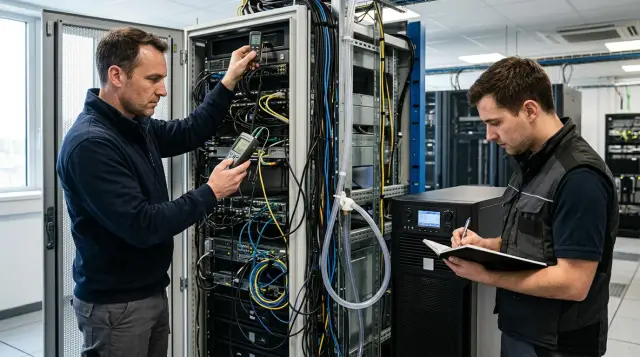
Monitoring for a small server room must answer two questions before the equipment stops: is power still available, and is each rack receiving enough cool air? You do not need an expensive control center for that, but you do need a complete signal path from an individual sensor to a person who will actually wake up and act.
I have seen server rooms with an accurate thermohygrometer on the wall and a green light on the UPS where an incident still went unnoticed. The wall instrument measured a convenient spot by the door, the indicator reported nothing outside the room, and the mail server went down with the rack. A minimum setup starts with failure consequences rather than a sensor count: overheating at server inlets, a UPS switching to battery, exhausted runtime, loss of contact with the monitoring system itself, and water wherever it could appear.
The minimum setup consists of five signals
For one server room with one or several racks, monitor five groups of events: UPS state, temperature at rack air inlets, humidity or dew point, water leaks, and availability of the alerting chain. A door sensor helps with investigations and security, but it does not replace any of these signals.
At a minimum, the UPS should report its power source, battery charge, estimated runtime, load, battery condition, and active alarms. If the device exposes input voltage, output voltage, frequency, and battery compartment temperature, retain those values too. They explain why the UPS frequently transfers to battery, how close it is to overload, and the conditions in which its batteries are aging.
Measure temperature in front of the rack, where servers take in air. An average reading near the ceiling or air conditioner can look calm while the upper servers in a distant rack draw in hot air. For one short rack, put one sensor at the front in the upper third and another at the front in the lower third. For a full rack, a sensible minimum is top, middle, and bottom on the cold aisle side. If you have several racks, equip the densest rack, the rack farthest from cooling, and the rack with the most important equipment first, then check the wider pattern with a portable instrument.
Humidity is not there to make the graph look complete. Air that is too dry raises the risk of electrostatic discharge, while high humidity combined with cold surfaces creates a condensation risk. ASHRAE recommends assessing moisture content by dew point because relative humidity changes with temperature even when the amount of moisture stays constant. A controller that reports only relative humidity is still useful, but choose a sensor that calculates dew point when you replace or expand it.
Place a rope leak sensor at the lowest point, below pipe joints, near the air conditioner drain, and along the likely path of water. A spot sensor by the door will do little if condensate first gathers under the raised floor near the indoor cooling unit. The final required signal is synthetic: the monitoring system must report when it stops receiving data from the UPS, environmental controller, or gateway. Sensor silence is also an incident.
Measure temperature at the inlet, not in the room center
Tie operating thresholds to air temperature at IT equipment inlets and to the requirements of the actual servers, not to how the room feels. ASHRAE guidance for classes A1-A4 gives a recommended inlet temperature range of 18-27 °C. This is a range for sustained normal operation, not a ready-made pair of alarm setpoints for every room.
For an ordinary server room, I start with a warning at 27 °C and a critical alert at 30 °C on any inlet sensor. A warning requires inspection within the working response interval, while a critical alert requires immediate escalation. Teams often use 18 °C for a low warning and 15 °C for a low critical event unless equipment documentation says otherwise. Cold alone rarely shuts servers down, but a sudden temperature drop can reveal an automation fault, an open window in winter, or a condensation risk after humidity changes.
Do not copy these numbers without measurements. During the first week, record values every minute or every five minutes under ordinary and heavy loads. Review the daily swing and the difference between the top and bottom of the rack. If the top holds at 26.5 °C with healthy cooling, a 27 °C threshold will make constant noise. Correct recirculation and cable openings first. If that is not possible, set the warning just above the stable normal maximum while preserving margin below the manufacturer's limit.
A threshold needs a dwell time and hysteresis. For example, open a warning after three minutes above 27 °C and close it after five minutes below 26 °C. Open a critical event after one minute above 30 °C and close it after five minutes below 28 °C. This logic filters a brief spike when the door opens and avoids repeated events at the boundary.
The rate of increase can matter more than the absolute value. A temperature of 25 °C looks normal, but an increase of 4 °C in ten minutes after the air conditioner stops already warrants a call. Add a separate rate warning if the system can calculate change over a time window. If it cannot, a short delay on the 27 °C threshold remains an acceptable minimum, though the operator will see the failure later.
Do not average rack sensors for alarms. The average of 24, 25, and 32 °C is 27 °C, which hides the hot upper zone. An average graph helps with reporting, while the alert must operate on the maximum value from each inlet sensor. You can retain an exhaust air sensor for airflow diagnosis, but you must not compare it with ASHRAE's inlet range.
A humidity threshold protects against two different risks
For a small server room, a practical initial relative humidity band is 30-60%, with warnings below 25% and above 65%. Critical thresholds depend on equipment, climate, cooling, and humidification, so check them against equipment manuals and design conditions. A universal hard alarm at 60% often creates false calls during a brief temperature change.
Dew point makes condensation risk easier to understand. Moisture can form on a cold pipe, panel, or other surface when that surface is colder than the air's dew point. The useful measurement is therefore not merely an upper dew point threshold but the difference between the coldest accessible surface temperature and dew point. In a simple room without surface sensors, the operator should at least see a rising dew point at the same time as a falling temperature.
Do not mount a temperature and humidity sensor on an outside wall, directly in the air conditioner's stream, above the UPS, or behind a hot rack when the goal is to measure inlet conditions. Heat from the controller also skews readings, which makes a remote probe more dependable than a sensing element inside the controller enclosure. Secure its cable so cleaning or opening the rack door cannot move the probe.
Compare every sensor with one reference instrument during commissioning and at least once a year afterward. Repeatability matters in operational monitoring: you can account for a sensor that consistently reads 1.5 °C high, while you should replace one that drifts unpredictably. Do not give every probe a different threshold merely to hide disagreement.
Monitor UPS state, runtime, and load
Battery charge percentage does not tell you how long the rack will run. Estimated time depends on current load, battery condition, and temperature, and it can change sharply after a load change. To respond to a power failure, you need minutes remaining and a tested shutdown procedure. Charge percentage remains a supporting signal.
RFC 1628 defines the standard UPS-MIB under 1.3.6.1.2.1.33. It includes battery state, time on battery, estimated minutes, charge, battery temperature, input voltage, output source, load percentage, and known alarms. The standard requires support for several basic alarms, including on battery, low battery, bad input, and output off, but a particular UPS may implement only some objects. Poll the device first and make a list of metrics it actually exposes instead of importing a template blindly.
If the UPS or a connected server runs Network UPS Tools, you can make a basic check like this:
upsc ups@localhost ups.status
upsc ups@localhost battery.runtime
upsc ups@localhost ups.load
A healthy line commonly returns a shape such as:
OL
1840
37
OL means line power, 1840 means 1,840 seconds of estimated runtime, and 37 means 37% load. Available names depend on the driver. The NUT manual specifically recommends checking ups.status first: OB and LB mean on battery and low battery. Capture the real output from your device and keep it with the monitoring configuration so you have a baseline after a driver update.
Send the transfer-to-battery event immediately, but distinguish a brief transfer from a continuing outage. After 30-60 seconds on battery, repeat the notification with remaining minutes and load. Tie critical escalation to the time services need for an orderly shutdown, plus a reserve. If managed shutdown takes eight minutes, a five-minute threshold is already useless. Measure the actual shutdown duration and add margin for command delay and battery aging.
For load, a warning at a sustained 70-80% and a critical state near 90% are reasonable starting points, but the UPS manual and redundancy design take precedence over general advice. You need margin for inrush current, load growth, and the loss of one module in a parallel system. Monitor overload, bad battery, active bypass, input voltage failure, and loss of communication as separate events.
Temperature strongly affects the service life of sealed lead-acid batteries. APC documentation offers a rule of thumb: an 8 °C temperature increase cuts expected battery life roughly in half, and the battery inside a UPS is warmer than the surrounding room. That is not a law for every chemistry and design, but it is enough reason to keep the UPS out of hot rack exhaust and to avoid treating a room sensor as a substitute for battery compartment temperature.
A threshold matrix must describe the action
A threshold without an owner and response time is a colored line on a graph. For each event, record its opening condition, dwell time, closing condition, first delivery channel, escalation time, and a concrete action. This produces a short working matrix instead of a list of arbitrary numbers.
For inlet temperature, set an initial warning above 27 °C for three minutes and a critical event above 30 °C for one minute or on a rapid increase. The first action is to check cooling, rack doors, and airflow. For relative humidity, hold warnings below 25% or above 65% for ten minutes, while taking critical limits from equipment manuals and the condensation risk assessment.
Report a UPS transfer to battery immediately. If the state continues for more than 60 seconds or runtime approaches the shutdown threshold, the on-call person confirms building power and prepares to stop services. Open the estimated runtime warning below the operating reserve. The critical point is the sum of measured shutdown time and the agreed margin.
You can start warning on UPS load above 75% for five minutes and open a critical event above 90% for one minute or on the UPS's own overload alarm. Treat any confirmed water sensor activation as critical. For missing data, a warning after two missed intervals exposes instability, while five minutes without contact requires checking the gateway, network, sensor power, and monitoring server.
These numbers are a starting configuration, not a design standard. Match temperature limits to the equipment class and sensor location. Set runtime thresholds after testing with the real load. If there is a generator, include automatic start and stabilization time, but do not run the battery down to its final minute. A failed generator start must leave enough time for a controlled shutdown.
Events should close automatically only after a stable return to normal. Keep leaks and bad-battery alarms latched for manual acknowledgment because a cleared contact does not prove that someone removed the cause. Retain the opening, acknowledgment, escalation, and closing times in the log along with the measured value.
Alerting must survive the same incident
Email through a local mail server is not an emergency channel when that server, the switch, and the internet gateway all use the same UPS. During an outage, the network may disappear before the system sends the email. Draw the alert path on paper: sensor, controller, switch, monitoring, DNS, mail or push gateway, and operator. Any common failure in that chain needs a second path or an explicit acceptance of the risk.
A room without an attended shift needs at least one primary remote channel and escalation to a voice call, SMS, or another channel on separate infrastructure. The message should contain the site, room, exact signal, current value, threshold, start time, UPS state, and the first action. A message saying only "critical temperature" without a room number and reading forces the operator to search for data at the worst moment.
One person is not an on-call plan. Assign a primary recipient for the current period, a backup recipient, and an escalation manager. If the primary person does not acknowledge a critical event within five minutes, the system calls the backup. After another agreed interval, it sends the event to the next level. The roster must account for leave and illness, and every contact change needs a test.
Separate notifications by urgency. A transfer to battery, high temperature, leak, overload, and loss of all data require immediate delivery. A single self-test failure, slight humidity drift, or an approaching service date can wait for business hours. When every yellow event wakes people at night, they soon stop responding to red ones too.
The monitoring system needs external availability monitoring. One simple design sends a heartbeat every minute to an external service or a second site, and several missing heartbeats trigger an alert over an independent route. If no external service exists, a second node can poll the first, but both must not depend on the same switch and UPS.
Once a quarter, disable the primary channel during a controlled window and confirm that the backup route reaches the right person. A test message must identify itself as a test, and the recipient must acknowledge it. A local log entry saying "notification sent" proves that the application ran, but it does not prove delivery to a phone.
Configure SNMP as telemetry, not as a trusted network
A UPS SNMP card often outlives servers and rarely gets as much attention as an operating system. Restrict it to a separate management network, permit polling only from monitoring addresses, and use SNMPv3 with authentication and encryption when the card supports it. You cannot treat an SNMPv1 or v2c community string as a properly protected password.
Polling and traps solve different problems. Periodic polling builds graphs, confirms that the device is available, and recovers state after a lost packet. A trap reports a battery transfer quickly, but its UDP packet can be lost and the receiver may be unavailable. Enable both mechanisms: traps for speed and polling for confirmation.
An interval of 30-60 seconds is appropriate for UPS state and temperature in a small server room. Faster polling rarely changes human response, while it adds noise and load to old network cards. Retain raw measurements long enough to see temperature rise during a cooling failure, declining estimated runtime over several months, and recurring input voltage failures.
Do not enable SNMP SET commands unless they are needed. Monitoring requires read-only access. Remote shutdown of UPS output must use a separately protected and tested control path restricted to a small group of operators. A mistake in a monitoring template must not become a command that powers off the rack.
After a firmware update, card replacement, or new template import, compare the OID set and units. RFC 1628 specifies battery temperature in degrees Celsius, battery voltage in tenths of a volt, and input frequency in tenths of a hertz, for example. Vendor branches may use different scales. A value of 245 may mean 24.5 V rather than an alarming 245 V battery.
The monthly inspection tests the entire path
A monthly inspection should confirm sensors, batteries, cooling, and alert delivery, rather than ending with a "self-test passed" button. Assign a window, an owner, and a result record. A small server room check usually fits within an hour without stopping services if a full battery discharge test is scheduled separately.
- Inspect the UPS, battery modules, air conditioner, drain, and floor. Look for swelling, odor, traces of liquid, dust on ventilation, loose cables, and objects blocking airflow.
- Compare inlet sensor readings with a portable instrument at the top, middle, and bottom. Check the timestamp of the most recent value and the battery level of each wireless sensor.
- Run the UPS self-test prescribed by its manufacturer. Record the result, load, charge, and estimated runtime before and after. Do not simulate utility failure by pulling a plug if the grounding design, bypass, or operating procedure does not permit it.
- Create one controlled temperature or sensor input event and one UPS event, then verify receipt, acknowledgment, and escalation. Disconnect one sensor separately to test the "no data" alert.
- Review monthly trends: maximum temperature for each probe, the top-to-bottom difference, number of battery transfers, minimum runtime, peak load, input voltage deviations, and telemetry gaps.
A short self-test does not measure full runtime under the real load. Schedule periodic load testing according to the manufacturer's instructions and site requirements, with a risk assessment and a ready way to restore power. Frequency depends on battery type, age, criticality, and UPS capabilities. Do not schedule a deep discharge every month on generic advice. Extra cycles wear batteries, and an uncontrolled test can stop services.
Look beyond a successful result to the trend. If estimated runtime falls month after month under a comparable load, the battery needs attention before its built-in alarm appears. An increasing number of brief battery transfers may point to input power quality or overly narrow UPS input limits.
Create one record after each check: date, person performing it, measured values, test events, actual recipients, deviations found, correction deadline, and owner. You cannot compare a screenshot of a green panel without numbers and time against next month's result.
Model monitoring failures before the first incident
Acceptance ends when the team has reproduced a failure and received the expected response, not when graphs first appear. Simulate loss of UPS utility input according to the manufacturer's procedure, a cooling stop during a safe window, a broken sensor connection, loss of the management switch, and an unavailable primary recipient. Define a stop condition for every exercise in advance so the test does not create a real incident.
The most dangerous common failure often hides in network power. The UPS keeps the server running, but the sensor switch uses an ordinary outlet. When utility power fails, the controller disappears, monitoring sees only lost contact, and the battery trap cannot pass. Put the controller, management switch, and required gateway on backed-up power, then test how long the entire channel survives.
A second common failure hides in addressing. A router replacement changes a rule, SNMP polling stops, and the panel still displays the last green value. Every metric must show when it was received, and the interface must not present stale data as current. An alert based on data age matters more here than polished visualization.
A third failure comes from thresholds without context. The on-call person receives 32 °C, arrives, and turns off a working air conditioner because they do not know where the probe sits. Label sensors identically in the room and in the system: room, rack, side, and height. Add access instructions, the building contact, and permitted actions to the alert, but do not place access secrets in the message body.
When a new server room is designed or infrastructure is replaced, GSE.kz can combine servers, racks, power, monitoring, and support into one system based on components available in Kazakhstan. Even when an outside integrator does the work, the site owner must personally accept the threshold matrix, recipient list, and test protocol. Those decisions cannot be handed over with the boxes.
The minimum monitoring setup is ready when every latest value has a timestamp, every critical signal arrives by an independent path, the on-call person knows the first action, and a monthly record shows how the system is changing. Until then, the sensors merely produce numbers.
Frequently asked questions
How many temperature sensors does one server room need?
For one short rack, start with two air inlet sensors in the upper and lower thirds. Use three heights for a full rack. With several racks, monitor the densest rack and the one farthest from cooling first.
What is a normal server room temperature?
Use air temperature at server inlets. ASHRAE recommends 18-27 °C for equipment in classes A1-A4, but you must check operating setpoints against your equipment manuals and real measurements.
Can I use one wall-mounted temperature sensor?
One wall sensor often misses a hot zone at the top of the rack. It can show the general room condition, but alarm monitoring must measure the air in front of server inlets.
At what temperature should an emergency alert be sent?
A practical starting point is a warning above 27 °C with a three-minute dwell and a critical alert above 30 °C with a short dwell. After a week of measurements, adjust the warning around the normal maximum without exceeding manufacturer requirements.
Which UPS parameters are required for monitoring?
Monitor output source, on-battery state, estimated runtime, charge, load, battery condition, and active alarms. Input voltage, battery temperature, and bypass state add useful context when the UPS reports them.
Why is UPS charge alone not enough?
The same charge percentage produces different runtime at different loads and battery conditions. Base service shutdown decisions on tested estimated runtime and actual shutdown time with a reserve.
Does a small server room need a humidity sensor?
Yes. One combined temperature, humidity, and dew point sensor is inexpensive and reveals dry-air or condensation risk. Put it in the rack inlet air, not directly in the air conditioner's stream.
How do I receive alerts when nobody is on shift at night?
Assign primary and backup recipients, require acknowledgment, and configure automatic escalation over a separate channel. The delivery path must work when main power and the local network fail.
Is an SNMP trap enough to monitor a UPS?
No. A trap is fast, but its packet can be lost. Combine traps with polling every 30-60 seconds to build trends and detect lost communication.
What must I check on a UPS every month?
Inspect batteries and ventilation, run the built-in self-test, record load and runtime, and test an alert and its escalation. Then compare the monthly trend for runtime, battery transfers, and data gaps.
