8 min read
Post-ransomware checks matter more than recovery
Post-ransomware checks reveal the entry point, close compromised accounts, inspect startup persistence, and verify that backups are clean.
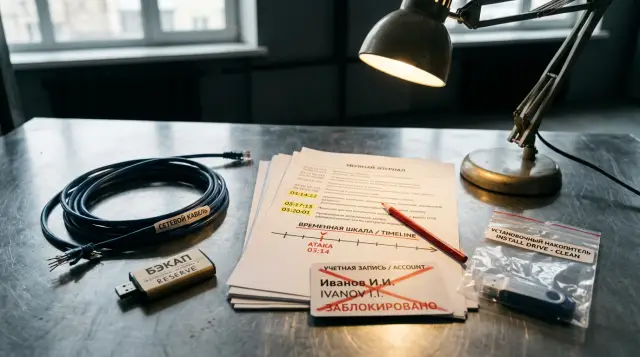
Restored files do not mean the incident is over. Until the team finds the entry point, revokes hijacked sessions, removes hidden startup mechanisms, and proves that the backup is clean, it is returning systems to an environment the attacker may still be able to access.
I have seen teams declare victory as soon as the file server came back online. Encryption returned a few days later because nobody had changed a service account password, a scheduled task had survived the reboot, and the VPN still accepted the old credentials. After a ransomware attack, investigation and recovery must run as two connected workstreams. The first explains what happened and what the attacker may still control. The second restores services from a verified source.
Preserve the evidence before changing the environment
Isolate affected hosts and preserve short-lived data before deleting files, reinstalling systems, or changing settings at scale. Disconnecting a network cable or placing a device in quarantine is usually better than powering it off. A shutdown destroys memory contents, active connections, and some traces of running malware.
The CISA #StopRansomware Guide explicitly advises taking a disk image and memory capture from at least a sample of affected workstations, servers, virtual machines, and cloud systems. It also names Windows Security logs and firewall buffers, whose retention may be short. That is a sensible minimum, but collecting one "most infected" computer is not enough. Take samples from different roles: the first host noticed, a domain controller, the backup server, the remote access gateway, and the system where mass file changes began.
Set one cutoff time and convert every timestamp to UTC. For each artifact, record the host name, source, collection time, file hash, and the employee who collected it. Make originals read-only and perform analysis on copies. Even when no legal examination is planned, this discipline stops the team from confusing an attack trace with a change made by an administrator during recovery.
Do not run a suspicious executable or submit it to an external analyzer without approval. The sample may contain confidential data, and an automatic upload may disclose details about the infrastructure. Calculate its hash first and follow the approved handling process.
The minimum incident record should state:
- who noticed the encryption and when;
- which hosts have been isolated and how;
- which accounts have been temporarily blocked;
- where immutable copies of logs and images are stored;
- who approves each action that returns a system to the network.
Do not trust the ordinary work chat at this point either. CISA warns that the attack operator may be monitoring the victim's communications. Coordinate through a prepared independent channel, and do not discuss which access paths remain open in compromised email.
Trace the entry point from the first reliable event
Search backward from the earliest confirmed malicious event, not from the time the ransom note appeared. Encryption often ends the chain. Before it, the attacker may have spent days using a VPN, email account, vulnerable public service, or remote administration tool.
Build one timeline from sources that do not depend on one another: domain controller, VPN, mail, EDR, DNS, proxy, firewall, hypervisor, and backup console logs. Match more than user names. Correlate the IP address, device name, session identifier, process, parent process, and time. If clocks differed between hosts, record the offset instead of manually changing old timestamps.
Start with four questions. Which host ran the first suspicious process? Which identity gave it permission? Where did that identity sign in from? How did the attacker reach the next host? "Phishing" is too broad. You need the message, attachment or address, account, endpoint, first process, and subsequent command. "RDP" does not complete the investigation either until you know the external address, gateway, logon type, account, and why the access was allowed.
On Windows, export a set of anchor events to CSV instead of trying to read thousands of lines in Event Viewer. Run the command against a copy of the log or on an isolated host with the permissions allowed by the investigation procedure:
$start = Get-Date "2026-07-20T00:00:00Z"
$ids = 4624,4625,4648,4672,4688,4697,4698,4720,4728,4732,1102
Get-WinEvent -FilterHashtable @{LogName='Security'; Id=$ids; StartTime=$start} |
  Select-Object TimeCreated, Id, MachineName, Message |
  Export-Csv .\security-timeline.csv -NoTypeInformation -Encoding UTF8
The result is a table containing time, event ID, computer name, and message. Event 4624 records a successful logon, but it does not prove an attack on its own. Check the logon type: 3 indicates network access, while 10 usually means a remote interactive logon. Event 4720 records user creation, 4728 and 4732 record a member being added to groups, 4698 records creation of a scheduled task, and 1102 records clearing the audit log. An absent event proves nothing if the relevant auditing was disabled or the log had already rolled over.
Review public-facing services across the entire likely intrusion period, including the days before the first EDR alert. Look for a successful logon after repeated failures, an unusual login time, a new VPN client, exploitation of a vulnerability, a web shell upload, or a web server spawning a command. If you cannot establish the entry point, state the gap honestly and retain stricter restrictions. Do not turn an assumption into a finding simply to make the report look complete.
Change the password and the account's trust
Remove every way a compromised account can return, not just its current password. Block sign-in, revoke active sessions and refresh tokens, change the password, remove unknown multifactor authentication methods, review delegated permissions, and only then restore the owner's access from a trusted device.
Sort accounts by their blast radius. Domain and local administrators, backup operators, service accounts, hypervisor accounts, VPN, email, cloud console, and management tool identities come first. Next, review users who signed in to infected hosts because their passwords, hashes, or tickets may have been present in memory. Finally, look for new accounts and quiet additions to privileged groups.
Resetting a password without revoking sessions leaves a stolen token working. Microsoft's Microsoft Entra risk remediation guidance lists separate actions for a confirmed compromised identity: block the user, revoke refresh tokens, disable compromised devices, and revoke access tokens when needed. The sequence applies beyond that particular product. Password, session, device, and second factor are separate trust boundaries.
Check each user's mail forwarding rules, mailbox delegates, application consents, new access keys, app passwords, and registered MFA methods. For a service account, determine where its secret is stored and which services will stop after rotation. Prepare the replacement first, change the secret in every dependency, and then disable the old one. A shared local administrator password across multiple machines requires rotation on every one of them, or a single surviving hash will reopen the entire fleet.
Do not force every employee to change a password at once unless there is evidence of broad credential theft and a safe channel for the change. A mass campaign overloads support, encourages predictable passwords, and may erase useful signals. Set the scope from logon locations, credential dumps, access to domain controllers, and authentication logs. If an attacker fully controlled a domain controller, ordinary user password rotation is not enough. You need a separate directory recovery plan and an ordered rotation of trust secrets.
Before removing a block, ask the owner to confirm recent sign-ins and actions, but do not treat human memory as a source of truth. Compare the answer with the logs. An attacker may appear from a familiar IP through a hijacked session or the corporate VPN.
Startup inspection goes far beyond the Startup folder
A startup review must cover scheduled tasks, services, drivers, WMI, Run and RunOnce keys, logon scripts, event subscriptions, and Group Policy changes. Looking at a single Task Manager tab creates a dangerous impression that the host is clean.
Microsoft Sysinternals Autoruns displays many automatic startup points, verifies digital signatures, calculates hashes, and exports CSV. Its official description specifically mentions tasks, services, Winlogon, shell extensions, AppInit DLLs, and configuration for other profiles. Hiding signed Microsoft entries helps with an initial review, but it cannot be the final filter. An attacker can replace a path, load a vulnerable signed driver, or abuse a legitimate binary.
Collect a repeatable data set before deleting a suspicious entry:
autorunsc.exe -accepteula -a * -c -h -s -t > autoruns.csv
schtasks /query /fo CSV /v > scheduled-tasks.csv
sc.exe query type= service state= all > services.txt
The autoruns.csv file includes the startup category, entry name, description, publisher, path, timestamp, and hashes. The Task Scheduler export shows the task name, command, user, triggers, and run time. Compare the output with a known clean host of the same role and build. A rare entry is not necessarily malicious, and a familiar name does not make a file safe.
For every finding, determine who created it, when, under which account, and which file or interpreter it launches. Then check the hash, signature, parent directory, write permissions, and network activity. A task that runs powershell.exe says little without its arguments. An encoded string or execution from a user profile, temporary directory, or shared folder deserves investigation even if the task has a harmless name.
Correlate the current state with audit records. Security event 4698 records scheduled task creation when auditing is enabled. For services, Security 4697 and System 7045 are useful. MITRE ATT&CK classifies scheduled tasks as technique T1053.005, but a technique identifier is not evidence. It helps investigators remember the mechanism and build queries, while the actual decision depends on the command, time, and context.
Do not delete a finding immediately. Export its configuration, preserve the executable in controlled storage, calculate the hash, and then disable the mechanism. Otherwise, you destroy the link between the account, command, and time and lose the ability to check other hosts for the same indicator.
Lateral movement connects hosts into one story
Measure the incident by where the attacker could sign in, not by the number of encrypted computers. An unencrypted domain controller, hypervisor, or backup server may matter more than dozens of damaged workstations if it still contains a hidden access path.
Build an "account - source host - target host - logon method - time" graph. For Windows, correlate 4624 with logon types 3 and 10, explicit use of other credentials in 4648, assignment of special privileges in 4672, and process creation in 4688. Add SMB, WinRM, RDP, WMI, remote management, EDR, and firewall logs. The same command appearing on five servers within minutes often tells you more than a standalone antivirus verdict.
Look for administrative shares, remote service creation, WMI execution, PsExec-like behavior, and service accounts logging on to workstations. A legitimate service normally follows a stable route. A backup account that suddenly logs on interactively to a user's computer needs an explanation.
Place hosts in four states: confirmed affected, likely affected, under observation, and verified clean. Assign the last state only after checking the criteria, not because antivirus found nothing. Record which logs support the decision and which period they cover. A telemetry gap should make the team more cautious.
Prioritize systems where privileges converge: domain controllers, management centers, virtualization servers, secret stores, backup systems, and deployment tools. An attacker can use one of these systems to spread tools again after recovery. It cannot return to the network under the same rules as an ordinary workstation.
Verify backup cleanliness and independence
A good backup contains the required data from before the intrusion, is not controlled by a compromised identity, and restores successfully in an isolated environment. A green status on the latest job confirms that the job ran. It does not confirm that the recovery point is clean.
Preserve backup console logs and policy change history first. Look for deleted recovery points, shortened retention, disabled immutability, added administrators, repository changes, and unusual restore jobs. Check whether the console uses the same directory, administrator accounts, and MFA boundary as the affected environment. The copy may be physically intact while the attacker already controls access to it.
Choose a recovery point from the intrusion timeline, not the encryption time. If the first confirmed access occurred on July 10, a July 19 backup may restore the scheduled task, web shell, or altered account as well. An earlier point loses more data, so system state and business data may need different treatment. Build a clean system again, then restore documents from a newer copy after inspection.
Test in a network with no route to production. Restore at least one instance of each important role, boot it, check the file system and applications, scan it with updated tools, and compare its configuration with a trusted baseline. Then perform an application-level test: open a sample of documents, bring up a database with an integrity check, run a test transaction, and verify permissions and dependencies. An archive hash cannot tell you whether the database inside it works.
Record the result of five checks for each critical system:
- The recovery point predates the earliest likely intrusion.
- The ordinary domain cannot write to the repository.
- Storage administration secrets were replaced from a trusted device.
- The isolated restore completed without errors.
- The service owner confirmed data integrity and the business function.
CISA recommends offline copies, encryption, and regular tests of availability and integrity. I would add one more requirement: the test must end with a measured duration and proof that the application works. "We restored a file once" says nothing about how long it will take to recover a directory, hypervisor, or large database during an incident.
Do not connect the old backup server to the new environment merely because it is convenient. If trust in its operating system or account is gone, deploy a clean console and attach the repository using the vendor's procedure. Otherwise, a reliable copy ends up behind the same compromised control plane.
A clean build is safer than repair in place
Reinstall confirmed affected hosts from a trusted image instead of "cleaning" them until the antivirus status turns green. A protection tool running inside the system cannot see every change, and an administrator cannot prove that there is no unknown service, driver, policy, or modified system file.
Build the image from a known source, verify its hash and signature, install current updates, and enable logging and detection before connecting it to production segments. Do not clone a machine simply because it looks healthy. The baseline also needs an owner, build date, package list, and reproducible process.
Dependency order matters. Restore identity and time services first, followed by DNS, protection and logging tools, configuration management, backup, and only then business applications. If applications come first, they start trusting old passwords, old certificates, and invisible logs.
Separate data from executable state. A document, spreadsheet, or database record needs content inspection, but it should not bring back an old task, logon script, or binary from a system directory. Inspect macros, archives, installers, and scripts from user folders more strictly. "Restore everything exactly as it was" remains convenient only until the second attack.
Repair in place is acceptable for preserving evidence or temporarily retrieving data when reinstalling is technically impossible. Such a host does not receive verified clean status and must not become an image source. Isolate it, limit its operating period, and plan its replacement.
Fix the cause, not one indicator
Post-incident measures must break the attack path, make lateral movement harder, and make recurrence visible. Blocking one IP address or hash is popular because it is quick and closes a report item. It does not stop an operator from changing the address, rebuilding the file, or signing in with stolen credentials.
Fix the specific cause of confirmed public access. Patch a vulnerable service or remove it from the internet, and keep it closed until testing is complete. For remote access, reduce the user and source list, require phishing-resistant MFA, prohibit direct RDP, and log attempts. For email, remove the rule or application the attacker used to retain access and inspect similar objects across the tenant.
Restrict administrative routes. An administrator should not read email or browse the web from a privileged session. A service account receives only the permissions it needs and cannot log on interactively. Different administration tiers use separate accounts and trusted workstations. Segmentation must block unexpected traffic, not merely draw zones on a diagram.
Enable auditing before the next incident. Store logs centrally so an endpoint administrator cannot erase the only copy. Alert on account creation, privileged group changes, a new task or service, disabled protection, cleared logs, backup policy changes, and unusual access to a management console.
NIST SP 800-61 Rev. 3 ties incident response to general cyber risk management instead of treating it as a separate job after an alert. That is practical. If the service owner, log retention periods, dependencies, and acceptable data loss are not defined in advance, the team will argue about them under pressure on the night of the attack.
Return systems through measurable gates
Authorize a return to the network against criteria, not team fatigue or a business request to "just test it." For each system, the investigation lead confirms the compromise scope, the engineer confirms a clean build, the application owner accepts the data, and the risk owner understands the remaining gaps.
Four gates work well. The first allows the system only into an isolated environment for updates and scanning. The second opens limited dependencies such as DNS, time, logging, and management. The third permits test user traffic. The fourth returns normal load after a period of heightened monitoring. Every stage needs a prepared way to isolate the host quickly.
Watch for indicators tied to the discovered chain and for general deviations. A fresh attempt by an old account, a connection to a closed management address, creation of a similar task, or disabling the protection agent should stop progress immediately. A quiet first few hours does not shorten the agreed monitoring period.
Change passwords before connecting restored devices, or an old host may expose the new secret again. Perform the change from a trusted device. If a user enters the new password on a machine that has not been rebuilt, the rotation achieves nothing.
Define rollback in advance: who makes the decision, which network access is removed, and which data point remains safe. Without rollback, the team tends to explain a suspicious signal as "noise" because another outage feels too expensive.
The incident review must change the architecture
The final review must turn confirmed facts and unknown areas into tasks with owners, deadlines, and a result check. A timeline without decisions helps an investigator but does not protect the organization from recurrence.
Separate causes, conditions, and consequences. An exposed public service may have been the cause. Excessive account privileges, a flat network, and short log retention were conditions. Several systems going offline was the consequence. This separation prevents the work from collapsing into a single patch and shows why one entry became an organization-wide incident.
Give every change a testable result. "Improve backup" cannot be tested. "Once per quarter, restore the directory and one database in an isolated segment, record the time, and obtain the owner's sign-off" can. "Enable MFA" is weaker than a list of systems, users, allowed methods, and an exceptions report.
Technical debt after ransomware often comes down to hardware that cannot support a current operating system, isolated management, or the required recovery time. During that modernization, GSE.kz can select and integrate server and data center infrastructure with local manufacturing, supply chain, and ongoing support requirements in mind, but the customer still needs to define the security and acceptance criteria.
Close the incident only after testing the measures. Reproduce the entry scenario in a controlled test, confirm that the new control blocks or detects it, restore a system again, and verify that old credentials have been revoked. If the entry point remains unknown, that is not a formality in the report. It is a reason to keep segmentation longer, extend monitoring, and withhold the previous level of trust.
Frequently asked questions
What should we do immediately after finding ransomware?
Isolate affected hosts from the network, preserve memory, logs, and images, then record every team action. Do not power systems off unless necessary because shutdown destroys memory data and active connections.
Can we close the incident after restoring the files?
No. You must establish the compromise scope, close hijacked accounts, inspect persistence mechanisms, and prove that the recovery point is clean. Otherwise, you restore data into an environment the attacker may still access.
How do we find the ransomware entry point?
Build a timeline backward from the earliest confirmed malicious event. Correlate VPN, email, domain controller, EDR, DNS, proxy, and firewall logs by time, account, IP address, device, and process.
Does every employee need to change their password?
A mass reset is appropriate only when there is evidence of broad credential access or directory compromise. First block clearly affected accounts and revoke sessions and tokens, then rotate secrets from trusted devices according to their blast radius.
Which accounts should we inspect first?
Start with domain and local administrators, backup, hypervisor, VPN, email, and service accounts. Then inspect every user who signed in to infected hosts, along with new accounts and changes to privileged groups.
Where can ransomware leave a startup mechanism?
Inspect scheduled tasks, services, drivers, WMI, Run and RunOnce keys, logon scripts, event subscriptions, and Group Policy. The Startup folder and a Task Manager tab are not enough.
How can we tell whether a backup is clean?
The recovery point must predate the earliest likely intrusion, and repository access must not depend on a compromised identity. Restore it in an isolated environment, scan the system, and test both the data and the service at the application level.
Can we clean an infected server without reinstalling it?
A clean build from a trusted image is safer for a confirmed affected server. Repair in place can preserve evidence or retrieve data temporarily, but it does not make the host verified clean.
When can systems return to the production network?
Return them after rotating affected secrets, completing a clean build, verifying data, connecting logging, and passing defined access gates. Restore load gradually and retain a quick way to isolate each host.
What should change after the incident review?
Every confirmed cause and weak condition needs a task with an owner, deadline, and testable result. Validate the fix by replaying the attack scenario safely and performing another recovery test, not by checking a box in a plan.
