8 min read
How many disks RAID can lose depends on the layout
A practical look at how many disks RAID can lose at each level, and how drive size and rebuild time change the risk of data loss.
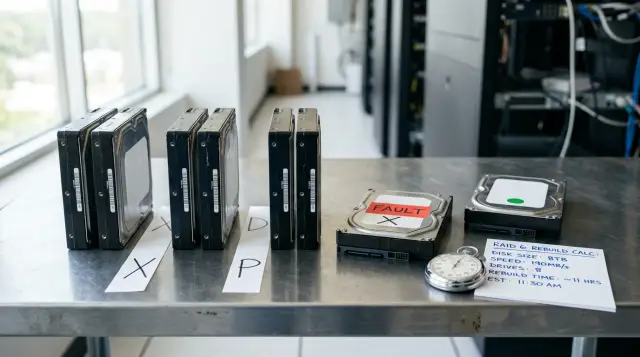
The statement "RAID 6 can withstand two disk failures" is correct, but it is not enough for design work. An array keeps its data while the number of simultaneous failures in one redundancy group does not exceed the layout's capacity. The degraded period begins after the first failure, and its duration often matters more than the attractive number in a specification.
The answer to how many disks RAID can lose therefore has four parts: how the data is laid out, which disks failed, how long the rebuild will take, and whether the array can read the remaining blocks. Drive capacity does not change the allowed number of failures. It changes how long the array operates without its full safety margin. This is where large drives alter the practical risk.
Count redundancy groups
The number of drives in a chassis says nothing about tolerated failures until you know the topology. Twenty-four drives could form one RAID 6, four six-drive RAID 6 groups, twelve mirrors, or a set with no redundancy. The answer differs in all four cases.
A redundancy group, or a layout-level fault domain, is the smallest set of drives that contains the data and the information needed to recover it. RAID 5 has one portion of parity in each group. RAID 6 has two. In a conventional RAID 10, the group for a particular block is its mirror pair, even though the controller presents one logical volume.
Two questions that people often blur need separate answers:
- how many failures the layout is guaranteed to tolerate regardless of which drives fail;
- how many failures it may tolerate when they fall in favorable locations.
An eight-drive RAID 10 is guaranteed to tolerate one failure. It may survive four if only one drive fails in each mirror pair. Two failures in the same pair, however, destroy the available copy of some data. Saying "RAID 10 can lose four drives" is dangerous without the location caveat.
The same logic applies to RAID 50 and RAID 60. RAID 50 consists of several RAID 5 groups joined by striping. It can lose one drive in each group, but two failed drives in the same group cause the whole volume to be lost. RAID 60 allows up to two failures in each child RAID 6 group. The total depends on the number of groups, while the guaranteed limit for arbitrary failure placement remains the margin of one group.
Start by drawing the actual layout with bay numbers, mirror pairs, parity groups, spare drives, controllers, and shelves. If the on-call engineer cannot reconstruct this map from the documentation in a few minutes, they will be working it out on an already degraded array.
The layout reveals each level's limit
The RAID level sets the mathematical limit, but its label does not describe the full failure path. The table gives the answer for classic layouts when the controller works, metadata remains available, and the surviving disks have no read errors.
| Layout | Minimum drives | Guaranteed tolerance | Conditional tolerance | What loses the array |
|---|---|---|---|---|
| RAID 0 | 2 | 0 | 0 | Any disk failure |
| Two-drive RAID 1 | 2 | 1 | 1 | Both copies fail |
| RAID 1 with N copies | N | N - 1 | N - 1 | All copies fail |
| RAID 5 | 3 | 1 | 1 | A second failure before recovery |
| RAID 6 | 4 | 2 | 2 | A third failure before recovery |
| RAID 10 made of pairs | 4 | 1 | One disk in every pair | Both drives in any pair are lost |
| RAID 50 | 6 | 1 | One in each RAID 5 group | Two failures in one child group |
| RAID 60 | 8 | 2 | Two in each RAID 6 group | Three failures in one child group |
OpenZFS describes the same model for RAIDZ: RAIDZ1 tolerates one failure, RAIDZ2 two, and RAIDZ3 three. The zpoolconcepts(7) manual expresses the capacity of a group with N drives of size X and P parity drives as approximately (N - P) × X, while the number of tolerated failures equals P. That wording is useful because it connects the capacity cost with the redundancy margin.
A three-device mirror differs from three mirror pairs. The former stores three copies of the same block set and tolerates any two failures. The latter stores two copies of separate data stripes and guarantees only one arbitrary failure. The same description, "six drives in mirrors," can conceal different limits.
The label on a management screen can also mislead. A hardware controller may present RAID 60 as one virtual disk, while a distributed system can place copies across nodes, shelves, or power zones. Count failed domains, not rows marked Failed. Two disks behind one SAS expander may disappear together because of a cable even when both drives still work.
RAID also does not protect against file deletion, data encryption by an application, an incorrect overwrite, controller damage that makes metadata unavailable, or a rack fire. A backup returns data to an independent past state. Redundancy keeps a service running after a component failure. Treating one as the other usually becomes obvious at the worst time.
RAID 10 fails by pair
Evaluate RAID 10 by the fate of each copy, not by the total number of live drives. With a classic mirror-pair layout, the array remains available as long as every pair retains at least one working member.
Consider eight drives:
Пара A: disk0 + disk1
Пара B: disk2 + disk3
Пара C: disk4 + disk5
Пара D: disk6 + disk7
Failures of disk0, disk2, disk4, and disk6 leave one copy in every pair, so the volume continues after four failures. Failures of disk0 and disk1 destroy pair A after only two events. The controller has nowhere to read the stripes stored in that pair.
Do not turn the probability of favorable placement into a guarantee. After the first failure, its mirror partner becomes a special drive: losing it is fatal, while losing any other drive usually leaves the array available. For an array of four pairs, if every one of the seven remaining disks has the same risk, the conditional probability that the partner fails next is 1/7. This is a teaching estimate. Drives in a real server differ in age, temperature, firmware, and error history.
Linux MD RAID10 layouts named near, far, and offset do not always place copies as simple adjacent pairs. The mdadm(8) manual explicitly discusses sets that each hold a complete copy of the data when the number of copies divides the number of devices. Inspect the actual layout, copy count, and device mapping before calculating. The rule "do not lose a pair" is correct in principle, but the physical pair may not match adjacent bay labels.
Two outputs help when checking Linux MD:
mdadm --detail /dev/md0
cat /proc/mdstat
In the first, look for Raid Level, Raid Devices, Total Devices, State, and the member table. During recovery, the second shows the operation direction, percentage, speed, and estimated duration, for example:
md0 : active raid10 sda1[0] sdb1[1] sdc1[2] sdd1[3]
      [====>................]  recovery = 23.4% (228514304/976630336) finish=84.2min speed=148127K/sec
Do not copy this minute-by-minute estimate into a design document as a promise. Speed changes with application load, slower areas of an HDD, read retries, controller limits, and background-task policy.
A large drive extends the risk window
Drive capacity does not change parity algebra: RAID 5 with 2 TB drives and RAID 5 with 22 TB drives both permit one complete failure. The second array usually has to read and write far more data to restore redundancy. Another failure can exceed the layout's limit throughout that period.
Estimate the lower time bound with:
T_rebuild = объем восстанавливаемого диска / устойчивая скорость перестроения
For an 18 TB drive at a sustained 150 MB/s, the ideal estimate is 120,000 seconds, or about 33.3 hours. At 100 MB/s, it is 50 hours. This calculation excludes competition from applications, read retries, controller pauses, and lower speed on parts of the surface. The same rebuild on a working system can easily take several days.
Use decimal or binary units consistently. A manufacturer normally labels 18 TB as 18 × 10^12 bytes, while an operating system may display about 16.37 TiB. Dividing TB by MiB/s without converting the units introduces an error close to ten percent before load even enters the calculation.
On a parity array, the amount read from healthy members can be much larger than one drive's capacity. To reconstruct a missing stripe block, the system needs the other data and parity blocks. Controllers optimize these operations differently, and a ZFS resilver often processes allocated data rather than empty space, so a capacity-based calculation is a bound rather than an exact completion time.
Measure actual speed on a loaded system. Record the start and end of a planned replacement exercise, average application load, occupied capacity, and read-error count. Then use a cautious percentile from several runs instead of the best result. If nobody has tested recovery, the T_rebuild value in the model remains a guess.
Do not blindly set rebuild priority to its maximum. High priority shortens the degraded window but can raise database latency and trigger application timeouts. Very low priority preserves performance at the cost of extra hours of risk. Define a degraded operating mode in advance: which services get limited, what latency is acceptable, and who may change background limits.
A "rebuild complete" state does not always mean full protection. After replacement, verify that the new drive joined the correct group, every virtual disk returned to an optimal state, background checks finished, and a spare is available again. I have seen arrays treated as recovered for weeks because a ticket was closed even though a second volume on the same controller remained degraded.
You can calculate the second-failure probability
An annual failure rate, the number of remaining drives, and rebuild time are enough for a rough estimate of independent failures. The model cannot predict a particular server, but it forces the assumptions into writing and shows the cost of an extra day.
Let AFR be the annual probability that one drive fails. Convert it to an hourly intensity:
lambda = -ln(1 - AFR) / 8760
After one disk fails in a group of N members, N - 1 working disks remain. The probability of at least one additional failure over T hours, assuming independent events, is:
P_second = 1 - exp(-(N - 1) × lambda × T)
Example: twelve drives, an assumed AFR of 2%, and a 72-hour rebuild. The hourly intensity is about 0.000002306. Then:
P_second = 1 - exp(-11 × 0,000002306 × 72)
         ≈ 0,001825
         ≈ 0,1825%
If the rebuild takes 24 hours, the estimate falls to about 0.061%. If it stretches to seven days, it rises to about 0.425%. This is the conditional probability of a new complete failure during one degraded episode. It is not the annual probability of data loss or a fleet forecast.
For RAID 5, that second failure exceeds the parity margin. With RAID 6, one more disk after the first failure is allowed, and danger begins with two additional failures before recovery. If m = (N - 1) × lambda × T, the probability of two or more independent events in a basic Poisson model is:
P_two_or_more = 1 - exp(-m) × (1 + m)
With the same N, AFR, and 72 hours, the result is about 0.000167%. The difference looks enormous, and dual parity does sharply reduce the risk from independent complete failures. Still, this number is not a final data-loss probability because the model excludes read errors, common-cause failures, operator mistakes, and chassis damage.
This short script repeats the calculation and avoids percentage errors during manual entry:
from math import exp, log

n = 12
afr = 0.02
hours = 72

failure_rate = -log(1 - afr) / 8760
mean = (n - 1) * failure_rate * hours

result = {
    "second_failure_percent": 100 * (1 - exp(-mean)),
    "two_or_more_percent": 100 * (1 - exp(-mean) * (1 + mean)),
}
print(result)
Its output shape is:
{'second_failure_percent': 0.182509..., 'two_or_more_percent': 0.000166...}
Use an AFR for your model, batch, and conditions if you have trustworthy statistics. A rated AFR helps compare assumptions, but it does not describe an aging fleet with common firmware and a shared commissioning date.
A read error is not a disk failure
An unrecoverable sector during a rebuild and the complete failure of a second drive have different consequences. People often merge both events into "the second disk started dying," which either creates exaggerated fear or hides the actual risk to a limited set of data.
The Seagate Exos manual for enterprise HDDs specifies an unrecoverable read error rate of less than one sector per 10^15 bits read. The manufacturer explains that the error is discovered during a read, but the read itself does not cause it. The words "less than" matter: this is a specification ceiling, not a claim that every 10^15 bits must contain a bad sector.
For a conservative estimate, suppose the rate u = 10^-15 per bit is an exact independent value. If R bits are read, the probability of at least one error is:
P_URE = 1 - (1 - u)^R ≈ 1 - exp(-u × R)
In an eight-drive RAID 5 made of 18 TB disks, a full rebuild may require reading roughly seven complete members. That is about 1.008 × 10^15 bits. Substitution gives about 63.5%. People often cite this result as proof that large RAID 5 arrays inevitably die, but that interpretation is too literal.
First, the specification gives a bound rather than a measured constant probability. Second, errors across sectors and drives need not be independent. Third, the system may read only allocated blocks, retry the operation, reconstruct a sector using parity, or report damage to a limited range instead of losing the entire array. The outcome depends on the controller, filesystem, and the redundancy still available in the affected stripe.
Dismissing the calculation is also a mistake. It shows why surface checking before an emergency matters. OpenZFS distinguishes a scrub from a resilver: a scrub walks the data, finds hidden damage, and rewrites a bad copy when redundancy is available; a resilver processes data that ZFS considers out of date after a device replacement or return. A scrub does not replace a rebuild, and a rebuild does not replace regular searches for silent errors.
Consistency checks and error-counter monitoring play a similar preventive role in Linux MD, although the exact commands and repair options depend on the configuration. A scheduled check should finish well before the next maintenance window, and its result should enter monitoring. A scrub run once a year whose alert nobody reads does not lower operational risk.
Dual parity leaves another degree of freedom when a read error appears during recovery from one disk failure. The array still has information to reconstruct the affected stripe. This is one reason to choose RAID 6 or RAIDZ2 for wide groups of large HDDs even when the independent second-failure calculation looks small.
A common cause breaks the independent model
The AFR formula assumes every disk fails independently at a constant rate. That is a strong assumption in a rack: drives from one batch age together, share temperature, draw power from a common component, and connect through the same controller or expander.
After the first disk is replaced, load on the survivors rises sharply. The array reads areas that may have stayed outside the active working set for months. A neighboring disk with accumulated defects exposes them during the rebuild. This does not prove that rebuilding "kills" healthy drives, but it explains why problems cluster around an incident.
Some failures do not appear in a RAID-level count at all. A firmware defect can affect identical models. Losing a shelf removes several members at once. A technician can pull a healthy drive instead of the failed one. A controller with corrupt cache can write incorrect blocks to every copy. Design around domains:
- the drive and its bay;
- cable, expander, and controller;
- power supply and shelf;
- server or node;
- room and administrative access.
Putting two copies on separate drives in one shelf helps against a drive failure but does nothing against losing the shelf. A distributed system with two copies on separate nodes remains vulnerable if both nodes use the same switchable power circuit. The layout must match the failure the organization has to survive, not the most convenient picture in a management interface.
Correlated risk is hard to compress into one percentage without your own statistics. Use scenario analysis instead of invented precision. Record what happens when two neighboring bays, one shelf, a controller, or a node is lost, and when a technician removes the wrong drive during a rebuild. For each scenario, note availability, recovery options, and the source of an independent copy.
Mixing purchase batches and delivery dates can sometimes reduce exposure to one series defect, but it complicates spares, firmware, and compatibility testing. It is not a universal rule. Separate power and connectivity domains, temperature control, firmware testing, and a verifiable backup are more dependable measures.
A hot spare removes delay, not the rebuild
A hot spare shortens the time between failure detection and the start of recovery, but it does not reduce the amount of data that must be read and written. If a spare is already installed, the controller can begin rebuilding without an engineer traveling to the site or waiting for delivery. That matters most at night and at remote locations.
A spare may be dedicated to one group or shared by several arrays. A global spare saves bays until two groups need it at once. A dedicated spare is easier to include in a model, but it sits idle and ages in the same chassis. In either case, verify capacity, sector format, interface, and controller-policy compatibility.
A hot spare does not add another parity level. RAID 5 with a spare remains a single-parity layout until the rebuild completes. If a second member fails ten minutes after the first, a target disk containing only a small reconstructed portion does not turn the array into RAID 6.
Some systems use distributed free space and recover data across many devices in parallel. OpenZFS dRAID, for example, describes integrated distributed spares for faster resilvering. The evaluation principle stays the same: measure actual time to full redundancy and calculate risk over that window, not over the time until a "spare activated" message appears.
Automatic start still needs observation. An alert should say which disk dropped out, which spare was selected, whether recovery began, its speed, and whether errors are rising on other members. A separate alert is needed if the operation stops or completes. Otherwise, automation can silently replace one failure with a state that has no spare left.
A cold spare in storage solves a different problem. It helps when the drive model is hard to buy quickly, but travel time from the storeroom to the rack belongs in the degraded window. Record the responsible person, room access, compatible-drive labels, and replacement procedure. Saying "we have a spare" without a tested route often adds a working day to the rebuild.
Change the layout before an incident
Single parity is insufficient when the calculated recovery window exceeds the tolerated one and the consequences of a second failure are unacceptable. There is no universal threshold in terabytes. The decision depends on group width, occupied capacity, measured speed, failure rate, common-cause domains, and backup restoration time.
Practical reasons to reconsider the layout include:
- rebuilds regularly take several days or exceed the agreed window;
- one read error in a degraded state can damage critical data;
- the group keeps widening for capacity even though the workload does not need it;
- backup restoration takes longer than the permitted outage;
- the array is at a remote site where a disk cannot be replaced quickly.
For wide HDD groups, dual parity, smaller RAID 6 groups, or mirrors usually make more sense than one enormous RAID 5. RAID 6 uses capacity more efficiently than mirrors but has heavier writes and recovery. RAID 10 rebuilds a copy faster and handles random writes well, but it gives up half of raw capacity and has a conditional multiple-failure limit.
Splitting one twenty-four-drive RAID 6 into several smaller groups reduces the number of disks in one parity domain and localizes a rebuild. The cost is more parity overhead, different performance, and more complex capacity placement. RAID 60 formalizes that tradeoff, but its child groups still need documentation.
Triple parity is justified by very wide groups, long recovery, or a requirement to survive more than two failures in one domain, not by a vague wish for "more reliability." OpenZFS RAIDZ3 provides that margin. A distributed erasure code that accounts for nodes and racks may sometimes be a better choice than RAID levels, but then availability calculations must cover fragments, quorum, and network recovery time instead of disks.
Do not plan migration as if it were a switch. Many controllers support online level changes, but the operation loads every disk for a long time and creates its own period of risk. Keep a verified copy, check compatibility, estimate conversion time, and define an abort point first. For a critical array, I prefer building a new group, testing it, and moving data with a rollback path.
When selecting S200 Series servers and data center infrastructure, GSE can connect the storage layout with capacity, load, service model, and local-supply requirements without tying the calculation to one component manufacturer. The system owner still owns the accepted data-loss risk: an integrator cannot infer RPO and RTO values that nobody has written down.
Recovery tests the design, not the RAID label
A finished design answers with both a number and a procedure: which simultaneous failures it tolerates, how many hours it stays degraded, and where the data will come from if that limit is exceeded. If the answer stops at the words RAID 6, the work is unfinished.
Keep the minimum calculation beside the layout:
Группа: 12 × 18 ТБ HDD
Схема: RAID 6, 10 data + 2 parity
Допустимо: любые 2 отказа в группе
Занято: 72%
Измеренный rebuild: 61 ч при типичной нагрузке
Принятый AFR для модели: 2% на диск в год
P еще одного отказа после первого: 0,155%
P двух и более после первого: 0,000120%
Scrub: ежемесячно, результат уходит в мониторинг
Spare: 1 global, автоматический запуск проверен
Резервная копия: отдельная система, тест восстановления ежеквартально
The probability figures use the same independent model and exclude common causes. Their purpose is to compare 24, 61, and 120-hour options, not prove safety. Keep the scenario analysis for shelf, controller, and technician error beside them.
During acceptance, induce a failure under a test load: remove a member with the supported command, verify that the alert reaches the on-call engineer, the spare activates, applications remain within the allowed latency, and the completion forecast stays within the limit. After the rebuild, run an integrity check and restore a selected file set from backup. This test catches incorrect bay mapping, dead notifications, and overly slow recovery before a real incident.
Repeat the measurement after adding capacity, changing drive models, updating firmware, changing background-operation limits, or materially increasing load. You cannot scale an old rebuild duration by a single ratio when the workload profile has changed.
Check the physical-drive identification procedure separately. The serial number in the console, bay number on the chassis, and indicator light must point to the same drive. Use the locate LED command only after matching the serial number. If anything is uncertain, stop the replacement and trace the connection through the documentation: pulling the healthy partner from a degraded mirror remains one of the shortest paths to losing a volume.
Monitoring must distinguish a warning sign from a completed failure. Rising reallocated-sector counts, interface errors, timeouts, and increased read latency require investigation, but no single SMART attribute provides a complete guarantee. Replacing a suspect disk before total failure may use a controlled copyback or replace operation while the old copy remains readable. This is safer than emergency reconstruction when the platform supports the procedure and the drive can still read data.
Write down the point at which the on-call engineer must limit a service or stop writes. An archive may tolerate slow degraded operation, while a transactional database can compete for the disks so heavily that the rebuild nearly stops. The decision to limit load needs two thresholds: application latency and the recovery completion forecast. Either measure by itself pushes the engineer toward an outage or an unjustifiably long risk window.
Finally, test the path beyond RAID. Select several files, a virtual-machine snapshot, and an agreed database segment, restore them to a separate location, and measure the time until the application verifies them. Successfully reading a backup catalog does not prove that recovery works. If the result misses the RTO, adding more redundancy to the array merely delays discovery of the problem.
Choose RAID 5, RAID 6, RAID 10, or another layout using the worst tolerated placement of failures and a measured recovery window. A large drive does not make an array unreliable by itself. It simply keeps the system longer in a state where the next fault costs more. Calculate that cost before a second red indicator lights up.
Frequently asked questions
How many drives can fail in RAID 5?
RAID 5 tolerates one failed drive in its group. A second complete failure before the rebuild finishes exceeds its parity margin and usually means the array is lost.
How many drives can fail in RAID 6?
RAID 6 tolerates any two failures within one group. After the first failure, the array remains protected against one more, but a third failure before full redundancy returns is fatal.
Can RAID 10 survive two disk failures?
Yes, if the drives belong to different mirror pairs and each pair retains a data copy. Two failures in the same pair remove part of the stripe set and bring down the logical volume.
Why do large HDDs increase RAID rebuild risk?
They do not change the number of tolerated failures, but they increase the amount of reading and writing. The rebuild takes longer, so the array spends more time with a reduced redundancy margin.
How do I calculate the probability of a second disk failure?
Convert AFR to an hourly intensity with `-ln(1 - AFR) / 8760`. For a group of N disks and T hours, use `1 - exp(-(N - 1) × lambda × T)` and state the independent-failure assumption clearly.
Does a URE mean the entire RAID is lost?
Not always. The result depends on remaining redundancy, the bad sector's location, and controller and filesystem behavior: a block, file, or array may be lost, while some systems can reconstruct the data.
Does a hot spare make an array rebuild faster?
It usually reduces the delay before the operation starts because nobody has to wait for a disk to be installed. It does not reduce the recovery volume, so rebuild speed still depends on drives, controller, layout, and workload.
Can RAID be treated as a backup?
No. RAID maintains availability through some hardware failures, but it repeats deletion, encryption, and incorrect writes across copies; a backup preserves an independent state that can be restored.
How often should I run a RAID scrub or check?
The interval depends on capacity, workload, and requirements, but the check must have time to finish and report into monitoring. A practical starting point for many HDD arrays is a monthly check, adjusted for measured duration and platform guidance.
When should RAID 5 be replaced with RAID 6?
The change is justified when rebuilds exceed the tolerated window, a second failure is unacceptable, or a read error while degraded would cause too much damage. Base the decision on measured speed, group width, and verified backup recovery time.
