8 min read
Will touchscreen all-in-ones pay off for a clinic in five years?
We examine when touchscreen all-in-ones for clinics pay off over five years through queues, disinfection, repairs, downtime, and peripherals.
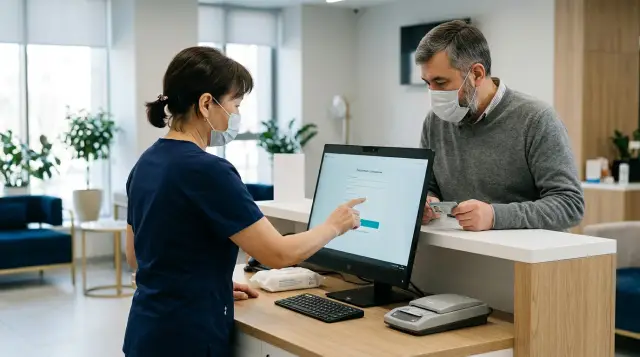
A touchscreen all-in-one pays off at reception because it saves time on specific tasks, frees usable space, and avoids turning a minor failure into a closed desk for half a day. Fewer cables and a modern screen do not create the return. If staff keep doing everything with a mouse and patients never touch the interface, the touch layer remains an expensive component.
Build the five-year calculation around patient flow, cleaning, and workstation recovery, not the difference between purchase prices. I have seen enough projects where the committee compared every letter in processor names but never asked what would be used to wipe the screen, who would replace the power supply, or how many registrations would be lost during an hour of downtime. That procurement looks good in a spreadsheet and performs badly on Monday morning.
First define what needs to pay off
Payback exists only relative to a baseline: a separate system unit and monitor, or a regular all-in-one without touch. Comparing a touchscreen all-in-one with an empty desk makes no sense. The clinic must buy a workstation anyway, so the model needs the added cost of the touchscreen option and the added effect it produces.
Set the same functional boundary for both options. It includes the computer, display, mount, keyboard, mouse, document or card reader, barcode scanner, printer, uninterruptible power supply, cables, splitters, and installation work. If one supplier includes installation and five years of service while another quotes only the box, you cannot compare the prices without adjustment.
Count five groups of costs: purchase, deployment, routine operation, repairs, and losses from downtime. Calculate the benefit separately: employee seconds saved, higher throughput during peak hours, fewer peripheral replacements, and less IT time spent maintaining the desk. Space savings have financial value only if the clinic actually uses the cleared surface or changes the layout.
Include taxes, cost of capital, and residual value according to the finance team's rules. A nominal five-year model often suffices for an internal choice. An investment committee may prefer discounted cash flows. The important part is to calculate both options with one method and over the same period.
Speed improves only for short actions
A touchscreen speeds up registration when the interface reduces a frequent action to one or two large buttons in a predictable place. Selecting the visit type, marking arrival, confirming an appointment slip, and calling the next patient suit touch input. Searching for a long surname, correcting an address, entering insurance details, and working across several windows are usually faster with a keyboard and mouse.
Break the receptionist's shift into tasks and measure each one. Do not ask whether the employee thinks the computer has become more convenient. Record the time from the start of the action to a confirmed result in the medical information system. Remove the conversation with the patient from the measurement if the equipment does not affect it, and retain errors, returns to the previous screen, and repeated scans.
A touch interface is particularly useful when staff work standing up, turn the screen toward a patient, or verify data together. A receptionist can point to a row and ask the patient to identify the error without passing a mouse across the counter. But a screen that requires reaching over a printer and a pile of forms slows the work and strains the shoulder. Device position and tilt belong in the pilot just as much as the software does.
Test the medical system interface before purchase. Small controls, drop-down lists, double-clicks, and pop-up windows make the touch layer nearly useless. Operating system scaling sometimes helps, but it can hide part of a form or change the number of visible rows. Test the same software version, permissions, and screen resolution that reception will use.
Convert seconds into money carefully. If the desk is still waiting for a doctor, a laboratory, or an available cashier, faster data entry will not increase throughput. Financial benefit appears when registration lies on the critical path and the saved time shortens the queue, lets the same staff serve more patients, or reduces overtime.
Disinfection determines whether the screen is suitable
Choose a reception screen together with the cleaning product and procedure. The phrase "can be wiped" guarantees nothing. The supplier should state in writing which active ingredients, concentrations, application method, contact time, coating restrictions, and expected resistance to repeated treatment are allowed.
The CDC's core infection control practices require organizations to consider compatibility with the manufacturer's instructions, contact time, and the effects of repeated exposure on the material. That is more useful than a general "medical" label because the actual pairing is always specific: a particular screen coating and a particular wipe. The EPA separately explains that the surface must remain wet for the contact time listed on the product label. A quick pass with an almost dry wipe is not enough.
Four design details matter at reception:
- a flat front surface without a deep bezel where dirt collects;
- a touch coating that tolerates the selected product;
- a way to lock touch input during wiping;
- an enclosure and stand without hard-to-reach grooves near the employee's hands.
Do not spray liquid directly onto the screen unless the manufacturer's instructions allow it. The product can enter the panel edge, connectors, or ventilation openings. The employee should first apply it to the wipe, maintain the required contact time, and clean the surface using the method agreed by infection control staff and the equipment supplier.
Testing compatibility on one new device is also weak evidence. During the pilot, use the real cleaning frequency and inspect the display after several weeks for clouding, tackiness, microcracks, coating separation, and ghost touches. Record the product name and the batch of consumables. If the clinic later changes the chemical, it must confirm compatibility again.
A touchscreen does not eliminate the keyboard. Staff will keep it on the desk for long text entry, so it also belongs in the cleaning schedule. If infection control requires frequent treatment, choose a keyboard with simple geometry or protection approved by its manufacturer. Otherwise the purchase reduces the number of cables but not the number of surfaces touched by hands.
Peripheral savings are smaller than they look
An all-in-one does remove a separate system unit, a video cable, and some power cables. In some cases, separate webcams, speakers, or microphones are unnecessary when those parts are integrated and clinic policy permits them. On a tight counter, this reduces clutter and speeds replacement of the whole workstation.
The remaining peripherals depend on the process, not the shape of the computer. Reception may need a document printer, label printer, barcode scanner, identity document reader, payment terminal, telephone headset, and UPS. A touchscreen replaces none of those devices. Keep a mouse for precise work and as a fallback when touch input is temporarily locked or has failed.
Prepare a port schedule before selecting a model. For each device, state the connection type, power source, cable length, and whether it can work through a hub. Do not count on a free USB port until you include the keyboard, mouse, scanner, reader, and service media. One cheap unpowered hub can cause intermittent disconnections that staff later blame on the computer or medical system.
Integrated components also carry a failure cost. A broken external webcam does not close the desk, while a fault in an integrated component can require sending out the entire all-in-one. An integrated function is therefore worthwhile when staff use it, its quality fits the task, and they can disable or bypass it with an external device.
Compare the complete kit for one operational desk. Quotes for regular PCs often omit the monitor arm, cable channel, power strip, installation, and assembly time. All-in-one quotes often omit adapters, a nonstandard mount, and a spare power supply. Once the scope is aligned, the difference usually becomes clearer, although it does not necessarily disappear.
Repairability matters more than a thin case
A good reception all-in-one should let support staff identify the failed component quickly and return the desk to service. Full disassembly at the counter is unnecessary. The clinic needs clear diagnostics, qualified access to replace storage and memory, a replaceable external power supply where the design provides one, documented mounts, and a known path for service requests.
Before signing the contract, ask the supplier to run a training failure exercise. Disconnect power, simulate a storage or touch failure, and observe what first-line support does, what the service team does, and what data the ticket requires. This quickly reveals whether a procedure exists beyond the phrase "contact support."
Distinguish repairability from repair at the counter. A healthcare organization does not have to open a device at reception. It is often faster to remove the all-in-one from a standard mount, install a prepared spare, and repair the failed unit in a workshop. For that to work, the image, encryption, user account, peripheral drivers, and medical system settings must be recoverable without manual improvisation.
Ask about four things: spare-part availability, initial response time, actual restoration time, and the replacement option. A response within minutes does not equal recovery within minutes. The contract needs a measure tied to a working desk, not an open ticket.
Keeping one complete spare all-in-one can cost less than stocking every component. A clinic network can hold the spare centrally if delivery fits within the allowed downtime. A single busy reception needs the device on site or very close. Include this cost in the model instead of calling it insurance outside the budget.
Measure downtime in unserved registrations
An hour of downtime in the morning and an hour after closing have different costs. Multiplying the clinic's average revenue by the failure duration creates a dramatic but useless number. Some patients will wait, some will move to another desk, and some will leave or arrive late to their doctor. Measure the change in flow and the labor the clinic spends clearing the resulting queue.
For each desk, record the allowed recovery time during a peak period. Then define a fallback route: let the employee sign in at the next desk, register temporarily on a laptop, use a paper queue, or send the patient to an administrator. Check whether the fallback has the scanner, printing, and required permissions. A fallback without peripherals and system access exists only on paper.
A useful unit of damage looks like this:
Стоимость простоя = потерянные регистрации × вклад с регистрации
                  + оплаченные переработки
                  + время ИТ и администраторов на восстановление
                  + подтвержденные расходы на перенос приема
If the clinic cannot reliably assign a contribution to each registration, keep the measure in natural units: minutes unavailable, number of redirected patients, and person-hours of recovery. The investment committee can assign monetary values later. Invented precision is worse than an honest range.
The incident log should distinguish a hardware fault, operating system problem, medical application, network, account, and peripheral. Otherwise every event at the desk ends up in the "all-in-one" column. Such a log cannot support model comparisons or a well-founded claim to the supplier.
The five-year model must expose its assumptions
A five-year calculation works best when organized by year and workstation. Do not hide everything in one TCO row. Procurement should see prices, IT should see work frequency, reception should see time savings, and finance should see the hourly cost. Anyone can then replace a disputed assumption without rebuilding the model.
Use this structure:
CAPEX = устройство + обязательная периферия + монтаж + резерв
OPEX_год = энергия + расходные материалы + плановое обслуживание
Ремонт_год = вероятность отказа × стоимость восстановления
Простой_год = часы недоступности × стоимость часа простоя
TCO_5 = CAPEX + сумма(OPEX_год + Ремонт_год + Простой_год)
Эффект_5 = стоимость сэкономленного времени + избегаемые покупки и работы
Чистый эффект = Эффект_5 - (TCO_5_сенсорный - TCO_5_базовый)
Take failure probability from the clinic's logs for similar devices, confirmed supplier statistics, or a range of scenarios. Do not insert a random percentage from a presentation. Build at least a base case and a stress case. In the stress case, increase downtime, repair cost, and peripheral replacement frequency, but do not change parameters for only one competing option.
Calculate time savings from observed tasks. The formula is simple: multiply the number of suitable actions per shift by the median seconds saved, the number of shifts, and the full cost of one employee minute. Then apply a realization factor that reflects how much of the released time became useful. If five minutes are scattered across the whole shift and do not change staffing or overtime, do not value them as five minutes of direct cash savings.
Account for replacement during the five-year horizon. The touch panel, storage, power supply, stand, and peripherals age differently. A warranty does not cover every type of damage and does not pay for the queue during repair. Read the exclusions, transport procedure, rules for retaining the storage device, and treatment of data before entering warranty repair as a zero cost.
The decision pays off when the net effect stays positive across a realistic range and restoration time meets reception's requirement. If the result depends on perfect acceleration for every patient and no failures at all, it is not a business case.
Spread costs across years even if the committee requests only a final total. Purchase and installation occur at the start, service renewal may begin later, and storage or UPS battery replacement depends on actual condition. An annual grid reveals the cash gap and prevents a five-year support agreement for one option from being quietly compared with a one-year warranty for another. For every line, state whether the price includes delivery, taxes, a technician visit, and return of failed equipment.
Measure power use on a configured sample instead of comparing the maximum ratings of power supplies. Record consumption during normal registration, at idle, and in sleep, then multiply by the actual schedule. Sleep policy can change the result more than a small difference between processors, but it helps only if the medical system and connected devices wake reliably. If reception operates around the clock, account separately for night mode and update windows.
Do not forget work that does not look like repair. IT applies security patches, updates drivers, checks encryption, replaces certificates, manages accounts, and restores settings after a failure. A touchscreen model adds another driver and another component to verify. Ask the supplier how long it will publish drivers for the selected operating system and how updates are obtained. A physically intact device that cannot run a supported system version has not reached year five in operational terms.
Patient data complicates replacement. The clinic cannot casually send the storage device to service inside the case if local files, cache, or credentials remain on it. Document whether the clinic may remove the storage device, who confirms its sanitization, how service works with encryption enabled, and what happens after a full board replacement. These actions take time and belong in the recovery scenario. Secure handling of data is part of ownership cost even when the commercial quote does not show it.
Treat residual value conservatively. An all-in-one is harder to repurpose when its touch layer is damaged, its panel is outdated, or its mount is nonstandard, although an intact device can move from the front desk to a less demanding position. That transfer makes sense only while the system remains supported and performance is adequate. Do not count the full price of a new purchase as savings when the old device merely moves and cancels no other purchase.
After completing the model, make a sensitivity table for the two most disputed parameters. These are usually seconds saved per registration and hours of downtime per year. Put a realistic range of acceleration in the rows and a range of unavailability in the columns, then recalculate net effect in every cell. If a small change reverses the decision, run a pilot first or negotiate a stricter service agreement. If the touchscreen option remains cheaper even with no time savings, check whether you overstated peripheral costs for the baseline computer.
Review the model after one year of operation. Compare forecast downtime, callout expenses, replaced components, and actual time savings with the logs. If the data diverges, correct the factors for the remaining term and future purchases without rewriting the old forecast after the fact. That turns the five-year calculation into a working tool instead of an appendix to the minutes.
The pilot must measure the queue, not impressions
The pilot tests the model's assumptions at a real counter. One device and two full weeks are often enough to reveal an incompatible interface, awkward angle, insufficient ports, and cleaning problems, although seasonal traffic may require longer observation. Choose a period that captures a normal peak rather than quiet days.
Before installation, capture baseline data at the same desk: median and 90th percentile registration time, queue length by interval, number of corrections, unavailable minutes, and IT person-hours. An average hides rare long delays that patients notice most. Use the same measurement method after installation.
Run the pilot in five actions:
- Choose one busy and one ordinary desk, or alternate the device at one position on a schedule.
- Install the standard image, medical system, and all real peripherals.
- Train staff on short touch actions without forcing them to touch the display when a keyboard is faster.
- Perform the approved cleaning at the required frequency and record surface defects.
- Simulate one failure and time how long it takes to reach a fully working spare position.
Do not change the furniture, medical system version, schedule, and computer at the same time. Otherwise you cannot attribute any improvement to the all-in-one. Collect staff comments separately from the metrics. A complaint about screen angle may explain poor timing, but it does not replace measurement.
Define acceptance criteria in advance. For example, touch input shortens the selected tasks without increasing errors, the surface tolerates the approved treatment, every peripheral works without spontaneous disconnection, and staff deploy the spare within the allowed time. The clinic sets specific thresholds from its own flow. The supplier should not set them for the customer.
Buy recovery together with the device
The technical specification should describe the operational result, compatibility, and service, not only display size, memory capacity, and processor frequency. State the touch scenarios, peripheral list, approved cleaning products, required ports, mounting method, image requirements, storage handling rules, and maximum desk recovery time.
Request a sample before final acceptance of the batch. Infection control can test the procedure, IT can deploy the image, and reception staff can run their frequent tasks on it. Attach the results to the acceptance documentation along with a list of agreed deviations. This reduces the risk of a dispute when the production batch technically meets the specification but does not fit the counter or conflicts with the scanner.
For a Kazakhstani clinic, equipment origin and service availability can affect procurement risk. GSE manufactures M200 Series touchscreen all-in-ones in Kazakhstan, controls the lifecycle from design through support, and states that it provides round-the-clock technical support through a nationwide service network. Verify these properties in the contract through delivery times, a spare-parts list, the replacement procedure, and measurable recovery time for the specific configuration.
Do not mix the manufacturer's warranty, integrator service, and internal support. Each line needs an owner, operating hours, and an escalation rule. If the receptionist calls three places during the peak and repeats the same problem, the clinic is already paying for poorly designed service.
Five years require a managed configuration. Fix driver versions, the update method, the list of compatible replacements, and the lead time for identical or equivalent devices. A mixed fleet complicates imaging, spare parts, and first-line training even when each individual computer costs less.
A threshold should decide, not appearance
Buy a touchscreen all-in-one if the pilot confirms faster frequent short tasks, the case withstands real disinfection, and staff restore the spare position within the required threshold. The advantage must remain in the five-year stress case after including peripherals, a spare device, and IT labor.
A regular all-in-one without touch makes more sense if the medical system works poorly with touch, patients do not interact with the display, and receptionists spend most of their time entering text. A separate system unit is better where the clinic replaces components on site, uses many cards and ports, or cannot take the display out of service together with the computer.
Do not force one answer on every desk. In the first-contact area, touch can speed arrival marking and joint data verification. In the back office, the same premium returns nothing. Different workstation profiles in one clinic are normal as long as IT retains a limited set of supported configurations.
Assign owners to the assumptions in the final table: reception owns flow and tasks, infection control owns treatment, IT owns recovery, procurement owns contract prices, and finance owns labor cost and discounting. A year later, the clinic can compare the forecast with its logs, correct the model, and make the next decision from evidence. Without that control, five-year payback remains an attractive number that nobody can reproduce.
Frequently asked questions
Does every reception desk need a touchscreen?
No. Touch makes sense at desks with frequent short actions, standing work, or joint data checks with patients. For a workstation dominated by long text entry, a regular display often delivers the same result for less.
How do I calculate an all-in-one's five-year payback?
Compare the full five-year cost of the touchscreen workstation with the baseline and subtract confirmed savings in time, peripherals, and IT work. Add repairs, the spare, and downtime cost. Test both a base case and a stress case instead of relying on one convenient number.
Can a touchscreen all-in-one be disinfected after every patient?
Only with a product and method approved for that particular display by its manufacturer. Agree on the active ingredient, concentration, contact time, and treatment frequency with infection control. The pilot should confirm that the coating does not cloud or produce ghost touches.
Does an all-in-one replace the keyboard and mouse?
Usually not. Touch works well for large buttons and short confirmations, while a keyboard and mouse are faster for text and precise editing. Include those devices in both the budget and the cleaning procedure.
Which workstation costs are most often omitted?
Quotes often omit the mount, adapters, cable channel, installation, UPS, spare power supply, and peripheral setup time. It is even riskier to exclude a spare device and employee labor during a failure. Compare operational desks, not box prices.
How much spare equipment does reception need?
The reserve depends on allowed downtime and service delivery speed. A single busy reception usually needs a prepared spare nearby, while a network may keep it centrally. Test the decision with a practice swap and include its cost in TCO.
Should an all-in-one be repaired at the reception counter?
Replacing the entire device and returning the failed unit to a workshop is often faster. That requires a standard image, a clear mounting method, prepared settings, and a safe storage procedure. Opening the case in front of patients rarely improves recovery time.
Which metrics should the pilot collect?
Measure median and 90th percentile registration time, errors, queue length, desk unavailability, and IT person-hours. Record cleaning results and peripheral failures separately. Convenience ratings can explain results, but they cannot replace these measurements.
Does an all-in-one reduce electricity costs?
That depends on the compared configurations, sleep settings, and actual operating hours. Use rated power only for an initial model, then measure the selected samples. Energy should not hide larger costs from downtime and service.
When is a separate system unit better than an all-in-one?
It is better when the clinic needs on-site access to components, many specialized ports, or independent replacement of the screen and computer. An all-in-one works well on a tight counter and when the entire workstation can be swapped quickly. The recovery process should decide the form factor, not fashion.
