8 min read
Choose a 1U or 2U server five years ahead
Compare how a 1U or 2U server will last five years across drives, PCIe, accelerators, cooling, noise, rack space, and expansion cost.
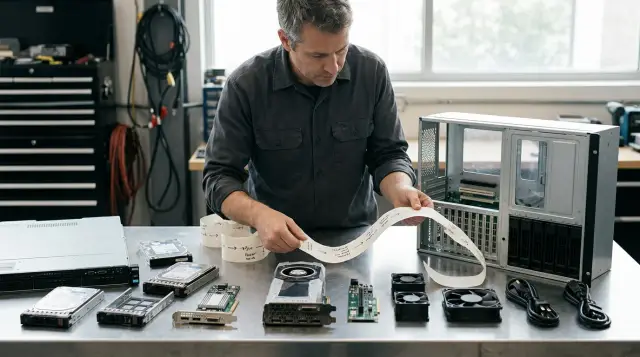
Buying 1U only because it takes half the rack space is risky. Buying 2U "just in case" is expensive too: empty bays and slots do not repay the investment. Choose the form factor for what the system will become in years three and five, not for the tidy specification on delivery day.
One rack unit is 44.45 mm high. Those few centimetres change the geometry of fans, heatsinks, drive cages, and expansion cards. They say little about the compute power of the initial configuration: modern 1U and 2U systems can take processors and memory from the same class. The difference appears later, when you need more drives, network ports, a controller, a DPU, or an accelerator.
My working position is simple. For stable virtualisation with external storage and a known network profile, 1U is often the more sensible choice. For growing local storage, heavy cards, and an uncertain workload, 2U usually costs less over its whole service life. Test that with a calculation, not with a blanket rule that "2U is better."
Chassis height sets the limit for change
The chassis limits tomorrow's permitted configurations, not today's performance. Inside 1U, the manufacturer must fit the motherboard, power supplies, fans, drives, and risers into a layer less than 45 mm high. A 2U chassis leaves more options for full-height cards, larger heatsinks, wider fans, and extra drive cages.
A comparison of current servers from one generation shows the scale, although it does not give universal numbers. In Dell's PowerEdge quick reference for the R660 and R760, the 1U model allows up to three PCIe Gen4 slots and as many as ten 2.5-inch drives in one configuration, while the 2U model allows up to eight of those slots and twenty-four drives. The same document lists compact 75 W accelerators for 1U, while the 2U model supports two 350 W double-width accelerators. This is an example from one product line, not a promise for every chassis. It shows the compromises created by height.
You cannot compare only the "number of bays" and "number of PCIe slots" rows. Different front panels, processors, heatsinks, controllers, and rear cages can exclude one another. A server may have eight physical mounting positions, but the selected backplane may connect only some of them as NVMe. A riser may expose three connectors, but a double-width card can block the adjacent one. A power supply of the required rating may be supported only with a particular fan set.
Ask for the specification of the selected configuration code and its restriction map, not the general family data sheet. The required processors, drives, risers, cards, fans, and power supplies must all coexist in that document. If the supplier confirms every part separately but not the complete set, the configuration has not been verified.
A five-year workload map starts with events
Build a five-year forecast around events that will force someone to open the chassis, not around a growth percentage. A percentage nearly always looks convincing and resolves almost nothing. Asking whether the workload will grow by 30 percent does not tell you whether you will need another network adapter, a local copy of the data, or an acceleration card.
Write the expected changes against each year and tie each one to a physical resource. For example, in year one the server starts a virtualisation cluster with two network ports. In year two a separate backup network appears, which needs a port or another adapter. In year three, recovery requirements force the team to keep a fast local repository, which needs bays, PCIe lanes, and power headroom. In year four, the analytics team asks for a GPU. In year five, the server moves into a standby role.
A useful map looks like this:
| Event | What changes inside | What to verify before purchase |
|---|---|---|
| More virtual machines | Memory, network traffic, sometimes CPU | Free DIMMs, channel count, NICs, and PCIe lanes |
| Local backups | Capacity and disk writes | Cage, backplane, HBA or RAID, and drive cooling |
| Move to 25/100 GbE | Adapter and optics | Slot width, card height, cables, and switch |
| Analytics or AI | GPU, power, and heat removal | Approval for the exact accelerator, power cables, and airflow path |
| New availability requirements | Mirrored boot and a spare path | Separate boot media and a second HBA or NIC |
Separate likely events from wishful thinking. If the organisation has approved a backup project, bays for it have a real value. If someone said, "Perhaps we will train a model one day," buying an empty GPU server is premature. Still, choosing a chassis that accepts the required accelerator class can make sense when the chance and the cost of replacing the server are both high.
Ask one more awkward question: will the server keep the same role for all five years? A virtualisation node often becomes a backup repository, a test system, or a disaster recovery host after three years. A 2U system offers more options for this second career. If company policy retires equipment strictly after five years and the role will not change, that flexibility may not pay for itself.
Count drive bays with lanes and failures
The number of visible bays is not the available capacity and does not guarantee easy expansion. Count the media type, connection scheme, usable capacity after protection, rebuild speed, and the number of free positions that preserve fault tolerance.
Start with the data profile. Latency and the number of NVMe lanes matter more for a database with many random operations. Capacity per bay and support for 3.5-inch disks matter more for an archive. A boot mirror needs two independent devices, but spending front bays on it often makes little sense when the platform offers a separate M.2 module. The same chassis with a SAS/SATA front panel and a full NVMe backplane can use different controllers, cables, and available PCIe lanes.
Then calculate usable capacity. Protection consumes some raw capacity, one or more bays may be reserved for hot spares, and the performance policy may limit acceptable fill level. A larger disk reduces the device count but increases the amount of data that must be rebuilt after replacement. There is no honest formula without details of the workload and protection scheme.
A typical failure unfolds in year two. A company buys a 1U server with eight bays and installs six drives, assuming that two empty positions are enough headroom. It then learns that one is needed for a hot spare, while the controller cannot expand the existing group with drives of another capacity, or doing so makes performance unpredictable. The next storage group needs at least another set of drives, and the physical room has gone. An external shelf solves capacity, but adds an HBA, cables, power, rack space, and another point of failure.
A 2U chassis usually has more headroom, but that is easy to overestimate too. Twenty-four mounting positions provide nothing if the selected backplane has only eight connected ports or the controller cannot run the future layout. Ask for the connection diagram for every bay, the supported-media list, and the rules for mixing SAS, SATA, and NVMe. Check whether technicians can replace the backplane on site or whether that requires a different base build.
A practical test is this: after the initial array is installed, there should be enough connected, contiguous free bays for the next storage group, not merely a few empty positions. If that group will not fit, future capacity already depends on an external system, and the architecture should say so today.
PCIe runs out before compute capacity
Treat a PCIe slot as a combination of connector, electrical lanes, card height, length, width, and airflow. An x16 label on the metal does not guarantee sixteen lanes, and an empty connector does not guarantee that the required card will fit.
List the adapters needed on day one and in year five. They commonly include network cards, an HBA or RAID controller, an accelerator, a DPU, and sometimes an external storage adapter. Integrated ports save slots but create a dependency on a specific motherboard. If an integrated four-port adapter can separate your networks, 1U gains a strong advantage. If policy requires physically separate cards for separate zones, that advantage disappears.
Check topology in the manufacturer's manual. PCIe lanes come from specific processors, so some slots may not work with only one CPU installed. Other connectors share lanes with the NVMe backplane or change mode with a particular riser. A full-length card may fit in only one position, while its cable connector or heatsink can obstruct the neighbour. Every future card needs confirmed answers to four questions:
- Does the server support the exact card model and its power rating?
- Does the selected riser provide the required electrical width?
- Will the card remain available with the chosen drives and processor count?
- Does it require another fan kit, power supply, or cable set?
The advice to "add an external PCIe enclosure if needed" is popular because it postpones the decision. In practice, it changes the project: you add enclosure compatibility, latency, cables, power, monitoring, and a service contract. This type of expansion can be correct, but it is not a free continuation of a 1U server.
If year five calls for one low-profile NIC and one HBA, a 1U system will usually cope. If the list contains a double-width accelerator, high-speed networking, and a separate storage controller, the project already calls for 2U or a dedicated accelerator node. The processor might remain unchanged. That is why CPU headroom cannot replace I/O headroom.
An accelerator changes the whole server
A GPU or another accelerator adds geometry, power, and cooling requirements at the same time. Checking for "a PCIe x16 slot" is almost useless without the server manufacturer's supported-card list.
NVIDIA specifies the L40S as a double-slot, passively cooled card with maximum power consumption of 350 W. A passive card does not cool itself with a dedicated fan: the server must generate the designed airflow. The chassis has to direct air through the heatsink, and the firmware must know the required fan curve. Putting that card in an empty but unapproved slot can cause throttling, constant maximum fan speed, or overheating of nearby components.
Some 1U servers support accelerators, but they often target low-profile, single-slot cards with lower power consumption. That is no disadvantage when the job is inference on a compact accelerator, traffic processing, or DPU work. The mistake appears when a purchaser writes only "GPU installation capability" in the requirements, and the team arrives two years later with a particular 300 W or 350 W double-slot card.
Define the class of future accelerator rather than the brand: full or low profile, length, single or double slot, maximum power, passive or active cooling, and card count. Then request a matrix of supported models and configurations. Ask which CPUs, drive panels, and risers are incompatible with that mode. Sometimes the GPU consumes the network card's position, sometimes it limits drive count, and sometimes it requires both processors because of lane topology.
Check the rack infrastructure as well. Adding 700 W for two accelerators produces almost the same amount of heat and raises the load on the PDU and UPS. The power supply rating is not average consumption, but it sets a possible upper limit and affects redundancy requirements. Two supplies in a 1+1 arrangement do not provide twice the usable power: after one fails, the other must carry the permitted configuration.
If an accelerator is only a possibility, compare two prices: the premium for an accelerator-ready 2U system today and the cost of a separate GPU node later. A separate node is sometimes better because accelerator life cycles are shorter than those of general-purpose servers. Make this a deliberate separation of roles, not an emergency purchase after discovering incompatibility.
Configuration determines cooling and noise
A 1U server is not always hotter than a 2U server, but it more often has to create the same airflow with smaller fans and through a narrower channel. Small fans run faster to generate the required pressure, so high-pitched tones and abrupt speed changes are more common. Exact noise depends on the processors, cards, drives, inlet temperature, BIOS mode, and firmware version. You cannot compare form factors using one number from a sales sheet.
Request acoustic data for a close configuration and read the measurement conditions. ISO 7779 describes how to measure equipment noise, while ISO 9296 defines how to declare the resulting levels. An idle figure at 23 °C does not predict behaviour under a sustained compute load in a room with warm inlet air. It predicts even less after a card activates a more aggressive thermal profile.
ASHRAE's Thermal Guidelines for Data Processing Environments distinguishes the recommended range from the allowable range. The allowable range means that equipment should function at its boundaries, but it does not promise the same longevity. For a five-year project, keep normal operation inside the recommended region and measure temperature at the server inlet, not on the room wall. Hot air from the back of a neighbouring rack can recirculate into upper units and make the fans speed up.
In a server room, noise usually affects maintenance conditions rather than users. In an office, clinic, teaching laboratory, or small branch, it becomes an architectural constraint. A server that sounds tolerable during the day can disturb the next room at night when the background is quieter. Do not plan an ordinary rack server as an office appliance without an acoustic specification and an on-site check.
A 2U chassis gives the manufacturer more heatsink area and the option of larger fans, but it does not guarantee silence. Two powerful CPUs and a pair of GPUs will make it louder than a lightly configured 1U system. A fair comparison uses two future configurations under the same load, inlet temperature, and performance policy. If those data do not exist, plan a separate room and do not present an assumption as a specification.
Watts and airflow limit rack density
Forty-two rack units do not mean that a rack can take forty-two 1U servers without consequences. Vertical space is only one constraint. PDU capacity, UPS capacity, row cooling, switch ports, permitted weight, or manageable cabling may run out first.
Calculate density on three axes: units per node, maximum and measured average power, and required ports. If two 1U servers do the same work as one 2U server, they take the same height but duplicate motherboards, power supplies, BMCs, boot media, and cables. If one 1U system does the same work, its density is genuinely higher. Compare per unit of useful workload.
Empty rack units do not cool equipment by themselves. Air must pass through the servers, and blanking panels should close unused positions to reduce recirculation from the hot aisle. Check chassis depth, room for the cable-management arm, and the bend radius of optical cables. A server that is compact in height can be deeper than an old rack, while a dense cable bundle at the rear can obstruct exhaust air.
Branch sites often reverse the economics. The rack may have twenty spare units, while the electrical circuit and air conditioner have little headroom. Saving one U there is pointless. A more spacious 2U server that accepts the required disks and cards without an external shelf can reduce the total device count. In colocation, where each U carries a separate charge and the site provides enough power, 1U has a cash advantage.
Do not use the power supply rating as a forecast for the electricity bill. Read telemetry from a similar workload or ask for a consumption curve for the chosen configuration. ENERGY STAR's server methodology calculates annual energy from average power and operating time. For continuous operation, the formula is simple: average power in kW multiplied by 8,760 hours and the tariff. Add cooling energy and infrastructure losses, but do not invent a universal multiplier.
A cheap 1U can require an expensive second project
Five-year total cost includes the purchase, space, energy, licences, expansion, labour, and downtime risk. The chassis price rarely decides the result by itself. The most expensive situation occurs when the cheap expansion planned on paper is physically impossible.
Calculate two scenarios within the same boundaries. In the first, the 1U server receives an external drive shelf in year two or is replaced because the slots are full. In the second, the 2U server receives drives and a card internally in the same year. Include not only components but rails, cables, optics, a switch port, PDU capacity, per-socket or per-node licences, spare parts, engineer hours, and a maintenance window.
You can copy this working template into the estimate:
TCO_5 = purchase
      + rack_5y
      + electricity_5y
      + cooling_5y
      + licenses_5y
      + planned_upgrades
      + migration_labor
      + expected_downtime

expected_downtime = probability_of_event * hours * business_cost_per_hour
The last line does not make risk precise, but it prevents the team from treating risk as zero. Process owners, not the server supplier, should provide the probability and hourly cost. If the organisation cannot price an hour of downtime, keep it as a separate line and at least compare the duration and number of maintenance windows.
Buying too early has a cost as well. A larger power supply usually has different efficiency at different loads, unused disks begin ageing when installed, and an accelerator bought in advance loses useful life while idle. Buy structural headroom instead: supported empty bays, lanes, and thermal capacity. Do not fill them with components that have no workload yet.
Read the licensing metric carefully. Software may charge by core, processor, node, or capacity. Replacing one 2U server with two 1U systems can double per-node charges and standby instances. In another product, excess cores in one server cost more. Form factor affects this indirectly through server count and architecture.
Verify the configuration in one matrix
The decision is ready when the entire five-year configuration fits in one table without any "confirm later" notes. Separate component data sheets do not replace compatibility verification for the complete server.
Create "now," "year 2," and "year 5" columns. Fill rows for CPU and thermal design power, DIMMs, front and rear drives, backplane type, RAID or HBA, PCIe riser, network cards, accelerators, power supplies, fans, average and peak power, occupied rack units, and switch ports. For every future component, add the document number or written compatibility confirmation.
Then apply these rejection rules:
- If a future card does not physically fit or is absent from the support matrix, reject the configuration.
- If losing one power supply requires a performance limit to hold the load, approve that as a degraded mode explicitly.
- If storage expansion requires replacing a populated backplane, include migration and downtime in the price.
- If noise is not specified for the installation location, move the server to a separate room or change platform.
- If the likely expansion leaves no spare slot or complete drive group, the headroom has already gone.
Ask the integrator for two bills of materials after this exercise: the minimum 1U and 2U systems with the same initial performance and every component required for the planned stages. Comparing bare chassis prices tells you nothing. GSE can build such a configuration in the S200 server family and check it against the data-centre infrastructure, but the customer still has to confirm the assumptions about growth.
A good acceptance test looks forward too. Record firmware versions, riser layout, backplane type, power-supply and fan part numbers, free connectors, power readings, and inlet temperature under a test load. In two years, that record is more useful than a photograph of the front panel because it shows what can be added without reconstructing the procurement history.
1U works when the role is known
Choose 1U when the node's role is clearly bounded, data lives on external storage, integrated network ports are sufficient, and future cards are low profile and known in advance. It is especially convincing for a uniform cluster: another node absorbs a failure or capacity shortage, while the application distributes the load. Density becomes a real advantage in that design.
A 1U server also makes sense when the organisation has standardised a small set of configurations and keeps ready spare nodes. Instead of complex expansion inside one server, the team adds another identical unit. This approach needs free ports, licences, and automated deployment. Without them, "we will scale out" is merely an expensive phrase.
Do not select 1U for growing local storage if the initial build occupies more than half the useful bays and the next drive group will not fit in full. Do not select it for an undefined GPU if the manual permits only low-power single-slot cards. Do not place it near people based on idle noise.
There is a simple honesty test for the design. Remove the words "we will be able to" from the justification. Leave exact actions: "add four supported NVMe drives to connected bays," "install an x16 NIC in the free full-height slot," and "connect the second supply to an independent PDU." If the sentence stops working without future research, there is no verified headroom yet.
A five-year term does not require the maximum configuration. It requires a verified path for likely changes. That path is narrower in 1U, so the design must be more exact. With a stable role, that precision saves space and money. With an uncertain role, it quickly creates dependence on external devices.
Buy 2U for verified room to grow
Choose 2U when the server will expand local storage, accept full-height cards or accelerators, combine several roles, or work where replacing the entire node is difficult. The extra rack unit has value only when the specification confirms the required bays, lanes, and thermal modes.
A 2U system often gives technicians an easier maintenance path. Components are easier to reach, cables and risers conflict less, and the manufacturer can use fans and heatsinks of another geometry. Verification still matters: a dense GPU configuration can have strict rules for inlet temperature, drives, and power.
Do not buy 2U for abstract "scalability." If the server boots from the network, stores data elsewhere, and will never receive cards, the second unit pays for empty metal and rack space for five years. In colocation, that amount recurs every month. Two simple 1U servers can sometimes provide better availability than one richly equipped 2U server because a chassis failure does not stop the whole workload.
You can make the final decision without a scoring model. First remove every platform that cannot accept the mandatory year-five configuration. For the remaining choices, calculate TCO within the same boundaries and verify the rack infrastructure. If 1U passes both tests and retains one real expansion path, take the density. If its expansion already needs an external enclosure, migration, or replacement, compare 2U with that full cost.
No one will thank the procurement team in two years for saving one rack unit if a new card requires a night migration. Nor will anyone thank them for an empty 2U server with no approved plan. A good purchase leaves specific, compatible places for the changes the business actually intends to make.
Frequently asked questions
How does a 1U server differ from 2U apart from height?
Height changes the room available for drives, risers, full-height cards, heatsinks, and fans. Processor and memory capacity can be similar in models from one generation, so compare complete configurations rather than compute specifications alone.
Is a 1U server always louder than 2U?
No. The exact configuration, air temperature, and fan profile determine noise. However, 1U more often uses smaller, faster fans, so installations near people need acoustic data under load.
Can I put a powerful GPU in any 2U server?
No. You need support for the exact card, a suitable riser, power cables, sufficient power supplies, and designed airflow. Check the manufacturer's matrix for the complete configuration.
How many empty drive bays should I leave for five years?
Leave room for the next complete storage group, including protection and a hot spare, rather than a random number of bays. All those positions must connect to a suitable backplane and controller.
When is external storage better than a large 2U chassis?
External storage fits when capacity grows independently of compute nodes or several nodes need shared data. Include the HBA, storage network, cables, rack space, power, and redundancy in the price.
Should I buy power supplies with a large margin?
The supplies must carry the permitted peak configuration under the chosen redundancy scheme. A high rating alone does not improve the system, and efficiency should be checked at the expected load.
How do I compare five-year costs for 1U and 2U?
Add purchase, rack fees, energy, cooling, licences, planned parts, migration work, and downtime impact. Use the same future workload and calculation boundaries for both options.
Does 1U suit a virtualisation cluster?
Yes, when storage is external, the network profile is known, and the cluster can accept more identical nodes. Verify port, licence, and rack-power costs in advance.
Does a backup server need 2U?
It often does when backups remain local and capacity will grow. If data goes straight to external storage, 1U may be the more sensible choice.
Which documents should I request before ordering?
Request the exact build specification, backplane diagram, PCIe topology, supported-card matrix, power and cooling requirements, acoustic data, and incompatible-option list. A general family brochure is not enough.
