8 min read
How to check computer cooling during batch acceptance
Learn how to check computer cooling during batch acceptance with load tests, noise readings, teardown samples, and defensible rejection records.
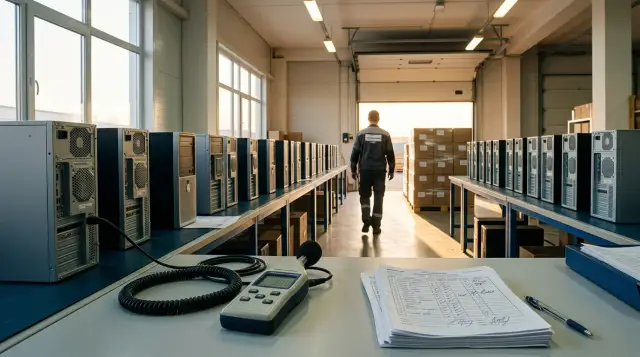
Cooling acceptance for a batch of computers must answer two questions: does every tested configuration maintain its stated performance under sustained load, and does the result remain consistent from one unit to another? A high temperature reading alone does not prove a defect. The dangerous combination is temperature near the limit, reduced clock speed, instability, excessive noise, and wide variation between identical machines.
I would not accept one hundred systems after running a short test on one computer. That approach misses a poorly secured cooler, an incorrect fan profile, or an entire assembly shift that applied the thermal interface material badly. There is no need to open every case either. A sound acceptance process combines quick checks on every unit, a justified sample for sustained load, and a few teardowns agreed in advance.
The method below is intended for desktop PCs and workstations. The same logic applies to all-in-one computers, but temperature and noise limits must come from the documentation for the exact model, and teardown must be handled by a party that will not breach the warranty terms.
Set the acceptance criteria first
Write down the criteria before switching on the first computer, or the acceptance team will start inventing limits after a disputed result appears. The contract, technical specification, approved sample, component data sheets, and a test method attached to the procurement documents form the basis. A threshold copied from an online discussion cannot replace any of them.
The minimum criteria include room air temperature, BIOS and power profile versions, exact processor, graphics card, and cooler models, duration of each load, permitted noise, absence of thermal throttling, allowed variation between units, and the rule for expanding the sample. State separately whether the case may be opened, whether the cooler may be removed, and who will restore the thermal interface after inspection.
One temperature limit cannot be assigned to different processors. Intel's "Information about Temperature for Intel Processors" defines Tjunction max as the junction temperature before internal thermal control reduces power and limits heating. Intel explicitly tells readers to find the value for the exact part number in its ARK specification database. AMD's catalog also assigns its Operating Temperature (Tjmax) field to a specific model. A rule that says "the processor must not exceed 80 °C" without listing the processors may therefore be too strict, or it may pass a system that is already losing performance.
The protocol should use two limits. A hard limit forbids thermal throttling, emergency shutdown, test errors, and any breach of the manufacturer's specification. An operating limit defines a margin below Tjmax and a minimum sustained clock at the agreed power. The customer and manufacturer must set that margin for the exact configuration. It cannot honestly be derived from the processor name alone, because power limits, case design, cooler, room temperature, and firmware version all affect the result.
Noise also needs a numerical condition. A statement that "the computer must run quietly" gives no basis for acceptance or rejection. Specify the idle mode, load mode, distance from the case, microphone position, background noise, and the dB(A) measurement. If the contract cites a manufacturer's declared figure, the verification method must be compatible with the declaration method.
Sampling must detect a production defect
Check serial numbers and completeness across the entire batch, then distribute thermal testing across a sample that covers different boxes, pallets, assembly dates, and serial number ranges. The first five boxes beside the door may all come from one shift even though the rest of the batch was assembled differently. A genuinely random sample matters more than an attractive percentage.
Sample size depends on risk, batch volume, and the agreed acceptance quality level, not on the habitual rule to "test ten percent." Increase the sample for critical workstations, high failure costs, or a new configuration. You may reduce it for a repeat delivery of a previously tested design if the contract permits that and the supplier's history shows no quality drift. A formal plan can follow an agreed statistical acceptance standard, but the standard number and its parameters must appear in the contract before delivery.
Three layers of control work well in practice:
- On every PC, verify the serial number, configuration, seals, BIOS version, fan detection, and absence of abnormal noise at startup.
- On the random main sample, run the full cycle of idle, separate loads, and combined load.
- On the smaller teardown sample, inspect cooler mounting, airflow direction, cables, filters, and the thermal interface contact pattern.
Do not combine results from different configurations. If one delivery contains two processor models, three case designs, or a discrete graphics card in only some machines, treat them as separate groups. A cool-running configuration does not offset defects in another.
Define the expansion rule before testing. For example, one critical failure may stop acceptance of the affected group; one noncritical outlier may trigger a repeat on the same unit and a doubled sample; a repeated defect of the same type may move the group to full inspection or justify a demand for replacement. The figures in this example are not universal. They become binding only when the acceptance program includes them.
A controlled test setup removes accidental excuses
Test all comparable computers in the same environment, or the supplier and customer will argue about the room instead of the cooling system. Measure air temperature next to the intake, not beside the air conditioner or on the opposite wall. Record it at the beginning and end of every run. If it changes materially, normalize the result using an agreed method or repeat the test under stable conditions.
Place the case as it will be used, with its intended feet, closed panels, and unobstructed standard openings. Do not remove a side panel to obtain a better reading. Do not test one PC on an open table and the next in a tight recess. Keep the same clearance around intakes and exhausts for every comparison.
Before taking the first measurement, put the software into a consistent state. Verify the BIOS, fan settings, processor power limits, operating system power plan, graphics driver, and background tasks. An automatic update during a test ruins the comparison. Disable overclocking, undervolting, and unapproved "quiet" profiles unless they are part of the supplied configuration.
The measurement kit does not need to be a laboratory system, but it must produce a record that others can inspect. You need monitoring software that exports sensors to CSV, a stopwatch, an air temperature meter, and a sound level meter. A phone can help find an obviously noisy unit, but it cannot prove compliance with a dB(A) value: microphones, automatic gain control, and phone cases introduce unpredictable error.
Run a short idle test on the reference or approved sample. It confirms that the scenario starts correctly, sensors can be read, and the log contains the required columns. The reference cannot become a loophole. If it breaches the processor or contract specification, comparison with it does not make the batch acceptable.
Measuring instruments and software introduce errors too. Record the sound meter and thermometer models, the date of their latest verification or calibration, display resolution, and averaging settings. With built-in digital processor sensors, comparison between identical units and distance from Tjmax usually matter more than pretending that the reading is a laboratory-accurate surface temperature. A contact thermocouple beside the intake measures the environment; it does not replace the on-die sensor.
Before testing the main sample, check repeatability on one PC by running a short control phase three times after complete cooling. If the same setup produces widely different power, clock, or temperature results, first look for unstable background activity, updates, a faulty scenario, or a sensor error. You cannot assess batch variation with a tool whose own variation is unknown.
Every test log should contain at least these fields:
timestamp,serial,ambient_c,cpu_package_c,cpu_clock_mhz,cpu_power_w,
cpu_throttle,gpu_c,gpu_clock_mhz,fan_cpu_rpm,fan_case_rpm,test_phase
If the monitoring tool uses different sensor names, retain the original names and attach a mapping. Do not manually copy a maximum value from a single screenshot. A CSV shows when heat rises, what happens to clock and power, and how the fan responds, so it distinguishes a normal plateau from a sharp move into throttling.
The load must test heat and performance
A full run should load the processor and graphics card separately, then test them together. A processor-only test will not heat the air inside the case like a workstation with discrete graphics. A short combined test may fail to show which component reached its limit first.
The following repeatable cycle works for a batch of ordinary office PCs. Before using it, add the names and versions of the selected utilities to the test program:
- Leave the powered-off computer in the room until its temperature equalizes, then boot it and leave it without tasks for 15 minutes.
- Record 10 minutes of idle operation, then apply a steady processor load for 30 minutes.
- After 10 minutes of recovery, load the discrete graphics for 20 minutes if present.
- Apply processor and graphics loads together for 20 minutes, then record a 10-minute cooldown.
- Repeat the full cycle on any unit with a borderline result after it has fully returned to its starting temperature.
These intervals are an acceptance starting point, not a physical law. Continue the test if temperature and fan speed are still rising at the end of a phase. An hour at the heaviest mode may make more sense for a compact case or a sustained computational workload. The report needs to prove that the system reached thermal equilibrium and maintained performance; duration by itself proves little.
Record peak temperature, but do not decide on that value alone. Calculate the mean or median temperature over the last 10 minutes of the steady phase, minimum sustained clock, average package power, and number of throttling events. A brief peak when a task starts and continuous operation at the limit do not mean the same thing.
Clock speed without power also misleads. One PC may run cooler because its BIOS limits power and performance. Compare temperature and clock at similar actual power. If the specification promises a performance mode, add a repeatable result test: completion time for one task, score from the selected benchmark, or processing rate for a fixed dataset. Cooling passes when the machine removes heat without secretly reducing the promised work.
Example of a result line for one unit:
S/N KZ240184 | ambient 23.4 C | CPU load 30 min |
steady 82.1 C | peak 85.0 C | min sustained 4380 MHz |
package 118 W | thermal throttle 0 | result PASS
This line does not make a universal promise that 85 °C is always acceptable. It only makes sense beside the processor model, its Tjmax, the agreed margin, power profile, and results from the other units. That context turns telemetry into acceptance evidence.
Treat a test error, freeze, unexpected restart, WHEA event, graphics artifacts, or emergency shutdown as a failure even if the last saved temperature looked normal. Logging may have stopped before the critical event. Preserve system events after a failure and do not run endless retries that erase the original conditions.
Variation between identical PCs matters more than a neat maximum
Identical systems under the same load should reach similar thermal plateaus and follow similar fan curves. Small differences are unavoidable because of sensors, silicon characteristics, and mounting conditions. A unit that is clearly hotter and louder than the rest at the same power requires investigation even when it remains a few degrees below Tjmax.
Compare the shape of the graph as well as the extremes. A normal system heats quickly, then the rise slows and the fan holds a plateau. A poorly seated cooler may cause a rapid temperature jump and early throttling. A blocked exhaust more often causes gradual heat accumulation, rising processor, graphics, and drive temperatures, and fans that remain at high speed long after the load ends.
It is useful to select the group median and mark each unit's deviation at the same power and room temperature. Set the tolerance before acceptance after testing preproduction samples. An arbitrary rule of "no more than five degrees from the average" cannot be copied to every case because sensor behavior and fan control algorithms differ by model. But if one of twenty identical PCs is consistently 10 °C hotter and returns to the group after the cooler is reinstalled, you found an assembly defect rather than a processor trait.
Do not average away a failure. Nineteen good machines and one with thermal throttling do not produce an "acceptable average temperature." Evaluate critical signs per unit and use the distribution to understand the scale of the cause. If several neighboring serial numbers show the same deviation, expand testing around that range and request information about the assembly shift or component batch.
After repairing the disputed unit, run the same cycle with the previous settings. A lower temperature at the same power, clock, and room temperature confirms a mounting-related cause. A lower temperature accompanied by lower power proves nothing.
The processor is not the only source of thermal failure
Cooling acceptance should cover drives, graphics memory, board power stages, and the power supply when their sensors are available or the operating conditions make them significant. A computer may pass a processor test and later lose speed because its SSD overheats, or shut down under combined load. Hot air inside the case reduces the margin for several components at once.
For every monitored component, take the limit from the exact model specification and distinguish the operating range, the throttling temperature, and the absolute permitted maximum. For an NVMe drive, record temperature and sustained speed during a long write of a prepared amount of data. Filling the system drive with random files during acceptance is unacceptable: agree on the test dataset, free space, and cleanup method in advance, before any working data is loaded.
Motherboard power stages do not always expose an understandable sensor. A label such as "VRM MOS" in one program may refer to a different point on another board. Match the reading to the board documentation. Without a reliable sensor, use a thermal imager or thermocouple only at agreed points and account for surface measurement error. Shiny metal and black plastic have different emissivity, so a casual thermal image can produce a convincing but wrong figure.
Do not open the power supply during normal acceptance. Dangerous voltages remain inside, and opening it breaches warranty terms. Check it indirectly through stability under combined load, absence of electrical crackle, fan operation, exhaust air temperature, and agreement between the installed model and the specification. Record electrical whine separately from aerodynamic fan noise because a new case fan curve will not remove it.
Do not bury drive, board, or power supply temperature in a single "system temperature" average. Add separate columns for available sensors and record a missing reading as N/A, not zero. Zero looks like excellent cooling in a report even though the software simply failed to read the sensor.
If every component warms gradually, inspect the balance of intake and exhaust flow first. Remove packing blocks, verify fan orientation, check clearance beneath the front panel, and make sure cables do not obstruct the air channel. If only one component remains hot, installing more fans across the batch may hide a local defect, increase noise, and alter the accepted configuration. Fix the identified cause and rerun the entire related scenario.
Measure noise together with fan behavior
Measure fan noise at a repeatable point and in a known mode, because one number without geometry says very little. ISO 7779 describes procedures for measuring and reporting noise from information technology equipment. Its primary comparable quantity relates to the A-weighted sound power level, while sound pressure is determined at the operator or bystander position. ISO 9296 describes how declared values are reported and verified for a batch of equipment.
An acceptance room rarely meets the requirements of an acoustic laboratory. Do not present a field measurement as a certification test. You can use it to compare units, find tonal hum or bearing crackle, and verify a contract figure if both parties agreed on the simplified method and permitted uncertainty in advance.
Fix one sound meter position, for example in front of the workstation at the distance stated in the test program. Mark the point on the desk, microphone height, and case orientation. Measure background noise with the computers switched off. If the background is close to the PC level or changes with air conditioning and conversation, you cannot reliably compare the result with the limit. Move the test or apply an agreed correction.
For every phase, record dB(A), fan speeds, and temperature. The dB(A) number shows level but does not describe character. Note crackle, grinding, panel rattle, periodic surging, and a pronounced tone separately. Two PCs with the same average level can sound very different if one fan continually changes speed.
Test transitions as well as steady operation. Some profiles briefly raise fan speed at cold startup for a self-test, which is different from a continuing noise excess. Another case is a fan that accelerates and slows every thirty seconds under an almost unchanged load. That cycle usually points to poor control thresholds, too little response delay, or a sensor oscillating around the switching point. Record the duration and frequency of the cycles, and attach a fan-speed timeline to the average level.
Check mechanical vibration transmission from case fans too. During diagnosis, you may lightly hold a panel by hand: if the hum stops immediately, mounting or panel resonance may be responsible. You cannot take an official reading that way because your hand changes the structure. After fixing the mount, repeat the measurement without touching the case and confirm that temperature did not rise.
Do not reduce fan speed in software to fix noise before completing the thermal test. A quiet profile that causes throttling does not solve the problem. Confirm cooling margin first, then adjust the fan curve and repeat the load. Any BIOS change after an acceptance run creates a new configuration and requires at least a shortened retest.
Teardown confirms the cause, not the result
Selective teardown is useful when telemetry reveals outliers or the contract explicitly requires assembly inspection. Removing the cooler before load testing destroys the original contact condition and takes away the strongest evidence. First measure the system as delivered and photograph its seals and fasteners, then open the unit under the agreed procedure.
Before work begins, state in writing who may open the case and remove the cooling assembly. Check warranty and sealing terms. For a batch under acceptance, teardown should be performed jointly with a supplier or manufacturer representative, with the serial number visible in every photograph. An unauthorized teardown can create a dispute over who damaged the mounting.
Inspection without cooler removal finds many causes: a loose or skewed fastener, forgotten shipping material, a cable in the fan blades, a fan facing the wrong direction, a disconnected case fan, a filter covered by packing film, or a deformed panel. Compare fan headers with BIOS settings and confirm that the system reads their speeds.
After removing the cooler, inspect the thermal interface contact pattern on the heat spreader and cooler base. Look for a large dry area, obvious contact skew, contamination, protective film, dried material, or almost all paste pushed out of the contact zone. Paste quantity in a photograph alone does not prove a defect, because different compounds and base designs leave different patterns.
Intel's "How to Apply or Remove Thermal Interface Material" says that the thermal interface transfers heat between the processor heat spreader and heatsink, advises against adding new material on top of old material, and requires replacement after reinstalling the processor or cooler. That is an important practical boundary. You cannot remove a cooler for a photograph, place it back on the old pattern, and call the next run a test of the original assembly.
After inspection, clean the surfaces using the manufacturer's permitted method, apply new compatible material in the specified amount, tighten the mount evenly, and repeat the full thermal run. Preserve before and after results. If temperature and clock return to the batch distribution, the report must identify the exact cause and the range of potentially affected units.
Documents and repeatability establish the right to return
A claim rests on demonstrated nonconformity with the contract, technical specification, sample, or mandatory requirements, not on a subjective feeling that the computer is "too hot." Article 422 of the Civil Code of the Republic of Kazakhstan requires the seller to deliver goods whose quality matches the contract, and goods sold by sample or description must match that sample or description. Article 428 lists remedies for inadequate quality, including correction, replacement, price reduction, and withdrawal from the contract with repayment.
For a supply contract, Article 471 also matters: it refers to the remedies in Article 428 but allows the supplier to replace deficient goods with conforming goods promptly after notice. Article 436 requires the buyer to notify the seller of a breach within the contractual period or a reasonable time. A statement that "we will return the entire batch" before reading the contract is therefore too confident. The acceptance team must document the defect quickly, preserve evidence, and send notice through the required procedure.
Strong technical grounds for stopping acceptance include:
- thermal throttling, emergency shutdown, restart, or an error during the agreed load;
- temperature outside the exact component specification or breach of the margin written into the technical specification;
- performance below the agreed level because of a thermal or power limit;
- noise above the contract limit with the agreed geometry and acceptable background;
- a repeated mounting defect in the sample that extends the decision to the group under the acceptance plan.
Returning the whole batch is justified when the contract and sampling plan apply a failure count in the sample to the batch, or when a production cause affects an unknown number of units and the supplier cannot separate conforming machines. If only one PC is defective and the documents call for unit replacement and expanded testing, a demand to return everything immediately may not survive a dispute.
Write the report so another engineer can reproduce the conclusion. Include the contract and technical specification clause, models and serial numbers, room conditions, firmware and utility versions, load scenario, raw logs, photographs, measurement equipment and its verification or calibration, identified deviations, sampling rule, and participant signatures. A screenshot showing 96 °C without a processor model, time, power, and throttling status proves almost nothing.
For a GSE.kz delivery, the manufacturer and system integrator controls the cycle from design and production to delivery and support, so it makes sense to agree the acceptance test program with it in the technical specification. That does not replace independent customer control, but it prevents a dispute about the method after the batch reaches the warehouse.
This section explains technical documentation, not individual legal advice. For a large or public procurement, check the form of the report, notice periods, and available remedies against the actual contract and current procurement rules.
The protocol must connect a reading to a decision
A good protocol does not end with a temperature table. For every criterion, it shows the source of the requirement, actual result, and decision. This protects both parties: the customer does not accept a system with hidden limits, and the supplier is not held to a threshold that never appeared in the documents.
Copy this matrix into the acceptance program and replace the square brackets with agreed values:
- CPU temperature. Method: [utility and version], [load], [minutes]. Criterion: below the exact model's Tjmax by a margin of [X °C]. On failure, stop the group and preserve the CSV.
- Performance. Method: clock, power, and [control task]. Criterion: no thermal throttling and a result of at least [X]. On failure, repeat once and expand the sample.
- GPU temperature. Method: [load], [minutes]. Criterion: manufacturer's limit and a margin of [X °C]. On failure, inspect airflow and the fan profile.
- Noise. Method: [instrument], [distance], dB(A). Criterion: no more than [X dB(A)] with background at [Y dB(A)]. On failure, confirm the result in a quiet room.
- Cooler mounting. Method: selective teardown of [n] units. Criterion: mounting and contact follow the instructions. On failure, identify the affected serial number range.
Add the operator identifier and a checksum of the raw CSV if your document system can retain it. That prevents a corrected screenshot from silently replacing the file. Store original logs with the report, not on an engineer's personal laptop.
Classify results as PASS, FAIL, and INVALID. PASS means every criterion was met. FAIL means a reproducible nonconformity. Use INVALID when the method was breached: background noise changed, firmware updated, the meter lost power, or the load did not reach its defined mode. INVALID cannot be recorded as a successful repeat.
Before signing the report, match telemetry to the physical unit. The serial number in the CSV filename, photograph, and protocol row must match. For a group decision, attach the full delivery list and mark the tested numbers. This discipline seems tedious until the first dispute, after which it costs less than another acceptance session.
A corrected batch needs fresh acceptance
Replacing paste, moving a fan, updating the BIOS, or changing the fan profile alters the tested system. After a batch-wide correction, switching on a few computers is not enough. The supplier must describe the cause, affected serial number range, correction method, and control that will prevent recurrence.
Draw a fresh sample from the corrected group, including units that were not tested before. On repaired machines, confirm that the cause is gone; on random remaining units, look for missed cases. Keep the same method, load, and criteria. Otherwise before and after results cannot be compared.
Acceptance ends only when the log confirms temperature, sustained performance, and acceptable noise together, and the sample confirms consistent assembly. Take the first practical action before delivery: attach a completed version of the test matrix to the technical specification. At the warehouse, the team will then measure agreed properties instead of arguing about which temperature feels normal.
Frequently asked questions
What CPU temperature is acceptable during PC acceptance?
Determine the acceptable temperature from the exact model's Tjmax, its power settings, and the margin written into the specification. One number for every processor is incorrect. Acceptance must also confirm the absence of thermal throttling and preservation of the agreed performance.
How many computers from a batch should undergo load testing?
Set the sample size from batch volume, risk, and the agreed acceptance plan. Select units randomly across boxes, serial ranges, and assembly dates. A critical failure should stop the group or expand testing under a rule written in advance.
Is a ten-minute stress test enough?
Usually not if temperature and fan speed are still rising after ten minutes. The test must bring the system to thermal equilibrium and hold the load there. Compact cases and workstations often need a longer heavy phase.
Should the processor and graphics card be loaded together?
Yes, when the configuration has discrete graphics and combined load fits its intended use. Separate phases locate the weak component, while the combined phase tests internal air heating and case fan capacity. Compare the results with the clock and power of both components.
Can fan noise be measured with a phone?
A phone can screen for an obviously noisy unit and make preliminary comparisons. An acceptance decision in dB(A) needs a suitable sound level meter, fixed geometry, and measured background noise. Otherwise microphone error and automatic gain may exceed the difference between PCs.
How can I tell that a cooler is mounted badly?
Warning signs include a rapid temperature jump, early throttling, and a clear outlier among identical PCs at the same power. Inspection may reveal a skewed mount, disconnected fan, or blocked airflow. Confirm the cause through agreed teardown and a repeat test after correct installation.
Must the cooler be removed to inspect thermal paste?
Only on an agreed teardown sample or when investigating an outlier. Test the PC as delivered first, or the original contact quality can no longer be proved. Replace the old thermal interface after cooler removal and run the full test again.
Is a high temperature without throttling a defect?
Not automatically. It becomes a nonconformity if it breaches the component specification, contractual margin, or agreed performance and noise profile. A clear outlier among identical systems also needs investigation even before it reaches the formal limit.
When can the entire computer batch be returned?
When nonconformity is proved and the contract or sampling plan extends the sample decision to the batch or a homogeneous group. A production cause with unknown scope strengthens the claim. The exact remedy depends on the contract, timely notice, and applicable law.
What should be attached to a computer overheating report?
Attach the specification clause, model and serial lists, room conditions, BIOS and tool versions, load scenario, raw CSV files, system events, photographs, and meter details. Include power, clock, throttling status, and the sampling rule. Another engineer should be able to reproduce the conclusion.
