8 min read
Comparing ZTNA Products: UX, Logs, Segmentation, MFA/SSO
ZTNA product comparison: how to evaluate Zscaler ZPA, Prisma Access, Fortinet and others by UX, logs, segmentation and MFA/SSO during a pilot.
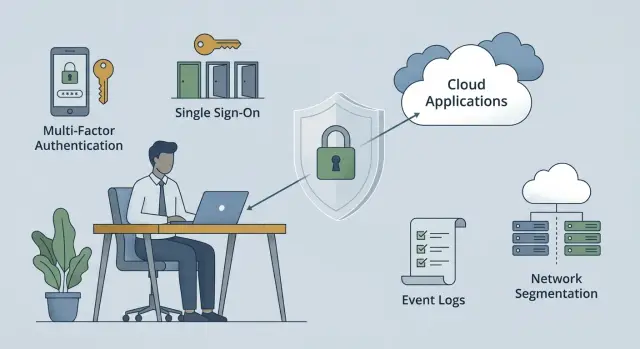
Why compare ZTNA at all and what usually hurts
ZTNA is usually chosen not because it’s fashionable, but because the old remote access stopped matching reality. Employees work from home and on business trips, contractors need time‑limited access, and there are long since more internal applications than a single portal on the office network. At that point companies need something simple: quick connections, no unnecessary exposure, and clear control.
The problem is that “VPN works” often only means one thing: the tunnel is up. Then the daily pains begin: signing in multiple times a day, strange disconnects, slow applications. Security teams don’t have a clear picture of who went where and why access was allowed. Worse, through a VPN a user can effectively get “into the network,” and a single mistaken rule gives far more rights than intended.
So start comparing ZTNA solutions not by brand, but by questions about user experience, security and manageability. Solutions may look similar at first glance but differ in details: how access to a specific application is granted, how convenient it is to live with an agent on a laptop, what appears in logs, how segmentation is configured, and how the integration with your SSO and MFA works.
A good rule of thumb: ZTNA should grant access not “to the network,” but to specific applications and only when conditions are met (user, device, context, policy). And it shouldn’t turn the regular workday into a battle with connectivity.
Before a pilot and budgeting, collect expectations from the business and security teams. A short set of questions is enough: who connects (employees, contractors, branches) and to which applications; what is an acceptable experience (sign‑in time, number of steps, frequency of re‑authentications); which incidents you actually investigate and which fields must be in logs; where the access boundary sits (by role, application, data, or segment); what SSO/MFA you have now and what is critical for integration.
If you work with an integrator deploying different platforms, it helps to fix pilot success criteria up front. That way the choice isn’t based on feelings but on verifiable scenarios. In infrastructure and security projects this approach is used by integrators like GSE.kz, and it usually saves time on disputed interpretations of results.
User experience: how to test without subjectivity
User experience in ZTNA is easily ruined by small things: an extra sign‑in step, an unclear error, a delay when a session starts. To avoid turning ZTNA product comparisons into a “I feel this” argument, agree on scenarios and what you will measure beforehand.
Minimal set of scenarios
Pick 4–6 everyday tasks people do and run them on each solution the same way. It’s good to include different roles: accountant, engineer, admin, support specialist.
A typical set covers: sign‑in to an internal web app (portal, CRM, intranet), RDP connection (Windows server or VDI), SSH connection (Linux host or equipment), access to a file share (SMB/file server) or corporate storage, and a mixed day of “SaaS plus internal resource” to observe SSO and policy behaviour.
Keep conditions identical: the same laptop, the same account, identical policies. Otherwise you’ll compare setups, not products.
How to turn impressions into numbers
Collect simple, repeatable measurements rather than only subjective feedback. Have testers record their screens and fill a short form after each scenario.
Useful metrics: number of steps to start working (from click to opened app), time to the first useful content (page loaded, desktop available, terminal visible), how often per day re‑authentication was requested, how clear errors are (is it obvious what to do next), how stable the client is (hangs, session drops, intrusive updates and notifications).
Also test network switching: office Wi‑Fi, home Internet, mobile hotspot. A decent ZTNA survives switching without “magic”: either the session restores gracefully or it asks for re‑authentication and explains why.
Practical test: an employee leaves the office with a laptop, opens RDP on the way, then continues work at home. If the client endlessly reconnects or always forces MFA “just because,” people will start bypassing controls and IT will get complaints.
If an integrator runs the pilot, ask them to enable “quiet mode” where possible: minimal notifications and updates during working hours. This often affects acceptance as much as performance.
Logs and investigations: what security must see
ZTNA logs are not for show. When someone can’t open a service, when login geography changes suspiciously, or when a regulator demands a report, you must quickly understand: who tried to access what, under which rules, and why it was allowed (or denied). This factor quickly splits convenient solutions from those where investigation becomes a quest.
A good baseline is that each connection leaves a clear trace: user, application, resource, time, outcome and the policy. It’s important that data is consistent across web apps, RDP/SSH, internal APIs and non‑standard ports.
Require at minimum these fields in the pilot: who (account, group/role, session ID), where (application/connector, target host, port, method for web), when and how long (start, duration, timeouts), from which device (type, OS, identifier, manageability, IP and geo), and under which policy (rule name, conditions, final allow/deny).
Critical is how quickly you can hunt incidents. Don’t just check “are there filters”; verify you can build an event chain by session ID, user and application, then export the data in a convenient format for investigation or retention. Also evaluate step correlation: authentication, device check, policy application, tunnel or proxy session establishment.
The worst case is a denial without explanation. On deny the log should show the exact reason and where it “failed”: MFA not passed, wrong IdP group, device not compliant, no route to connector, application not published, untrusted certificate. A good sign is when the log records the specific condition that didn’t match, not an abstract "policy denied".
For audit you also need change reports. Ask to show who and when changed policies, connectors, application groups and exceptions, and whether history can be restored. In regulated organisations (government, finance, healthcare) this often matters more than a pretty dashboard.
Access segmentation: how not to get a new VPN under another name
The main difference between “the old VPN way” and a real ZTNA is simple: VPN grants network access, ZTNA must grant access to a specific application. If, after sign‑in, a user can “see” a subnet, scan ports or reach any internal address, you’ve just renamed VPN.
When comparing ZTNA solutions, describe applications first, not roles. Not “access to the office,” but “access to CRM,” “to accounting,” “to admin console,” “to RDP on specific hosts.” The more precise the description, the less temptation there is to grant broad access “just in case.”
How to describe applications so policies remain manageable
In practice an application is defined by attributes: FQDN, IP, port and traffic type. Start with how users actually connect and record that in policy. For web apps FQDN and HTTPS are usually enough. For admin tasks you typically need RDP/SSH to a limited list of hosts.
Check whether the solution handles “grey” cases: one application on multiple domains, different environments (prod/test), legacy systems without clear DNS, and apps that unexpectedly call internal services.
Microsegmentation without burdening support
Real‑world microsegmentation equals least privilege plus clear exceptions. The working logic: grant access to the application, not to a subnet; make rare tasks temporary accesses; add context (managed device, current agent, required region, minimum posture); separate user and admin access with different policies; and limit lateral movement to specific hosts and ports.
Example: a support engineer needs to “fix accounting.” A bad approach is granting access to the department network. A good approach is granting access to the specific application server over the needed protocol, only from a corporate laptop and only for the ticket duration. For admins, exceptions should be separate roles with stronger authentication and mandatory logging, not “allow everything because they’re admin.” This keeps policy coherent and prevents ZTNA from becoming a new VPN under a different name.
Integration with MFA and SSO: what to test in practice
SSO and MFA in ZTNA often look the same in demos, but a pilot reveals details fast: how sign‑in flows, where scenarios break and who will support it. Here it matters not whether a feature exists, but how the IdP, directories and access policies behave together.
First decide which SSO model you need. If you already have a single account provider, test SAML or OIDC exactly as you use it (multiple domains, several organisations, partner federation). Also check how the solution handles access requests: can access to an application be tied to a group, role or user attribute rather than a manual list?
Practical pilot checks
Have 5–10 real users go through the same sign‑in scenarios and record each step. For example: sign‑in from a corporate laptop and from a personal device (where SSO triggers and where re‑auth is required), MFA behaviour (how often it asks for second factor, whether devices can be remembered and under what conditions), recovery when a phone/token is lost (who confirms and how long it takes), role changes (when rights actually change in ZTNA after group or attribute updates), and access to multiple apps in sequence (single sign‑on or repeated MFA prompts?).
Then review directory integration. A good sign is being able to build policies on dynamic attributes (division, position, employee type), not just static groups. If there are multiple identity sources, clarify in advance how duplicates, temporary accounts and service accounts will be handled.
Contractors and guests without friction
Contractors and guest users usually break the “ideal” scheme. Verify you can grant time‑limited narrow access and reliably revoke it in one action. The process should include approvals and audit trails: who requested access, who approved, what was granted and when it was revoked.
Simple example: in a hospital or university where shared workstations and servers are used, a contractor comes for two weeks. In the pilot it should be clear how to grant access to exactly one internal service, with MFA, only during working hours, and how to ensure access disappears everywhere afterwards, including active sessions. If hardware is purchased or updated simultaneously, it’s convenient when the supplier and integrator can cover both parts; for example, GSE.kz supplies computers and servers in Kazakhstan and provides system integration and support services.
Devices and context: who gets access and under what conditions
ZTNA is often chosen to replace VPN, but real gains appear only when the solution considers device context. Otherwise you move “flat” access into a new wrapper. Include tests with different device types and roles when comparing ZTNA solutions.
First, check which device checks are available and what happens on non‑compliance. Typical checks: OS version and patches, presence and currency of antivirus or EDR, disk encryption, firewall state and baseline security policies, and device ownership (corporate or personal).
It’s important not only that checks exist but how the system reacts. A good practice is to avoid hard blocks and instead shift the user to a safer mode: for example, allow only web access to one application and disable file downloads.
Next, separate corporate devices and BYOD. On a corporate laptop it’s reasonable to require more (agent, EDR, encryption, managed settings). For personal devices it’s better to limit access: only browser apps, session isolation, no internal file shares or admin consoles.
Agentless access is tempting, but it usually provides fewer device state signals. It’s often reserved for narrow scenarios (portals, internal web systems, one‑time contractors). For RDP/SSH and sensitive segments an agent is typically mandatory.
Check onboarding: how quickly can a user start working and how many IT steps are required. In a pilot measure install and first‑sign‑in time, number of support calls, client update behaviour, roaming (home, office, mobile) and the ability to restore access without reinstalling.
A small test scenario: the accounting team uses a finance system while a contractor needs access to a single service for two weeks. Corporate PCs with encryption and current patches get full role access. The contractor is allowed only browser access to the specific app and cannot reach other segments. If this is hard to configure or support, production will be even harder.
Performance and reliability: how not to spoil the workday
ZTNA performance is felt in small details: how long from click to app open, how often sign‑in hangs, and what happens when a route fails. When comparing solutions measure the same things under the same conditions.
Delays usually appear in three places. First — authentication: IdP -> MFA -> policy checks -> session issuance can add seconds, especially if the device is not recognised or posture checks run. Second — first app open: if the connector is far from the app or the route to a point of presence is bad, the start will be slow even on a good channel. Third — interactive sessions (RDP/VDI): here micro‑delays and packet loss matter, causing cursor lag and broken audio.
For branches and remote regions, geography and redundancy matter more than promised megabits. Test where traffic actually exits, whether there are nearby points of presence and what happens if one provider fails. Example: headquarters in Astana, a branch in Uralsk, application in a local data centre. One product may route the branch through a nearby node and keep stable RDP, another may send traffic on a longer path and users will complain.
Reliability means clear failure scenarios. Simulate: IdP unavailable, MFA not responding, loss of connectivity to a PoP, a connector near the app failing. Understand what the user sees (a clear error or endless loading) and what security sees (a clear reason and where it failed).
To assess capacity and growth, measure in peak hours and realistic scenarios: time to access (first auth and re‑login after idle), app open time (web and thick client), RDP quality (latency, jitter, drops over 30–60 minutes), behaviour under failures (IdP/MFA/channel/connector), and headroom (how many concurrent sessions at 9:00–11:00 and what happens with a 20–30% load increase).
If you run the pilot with an integrator, fix metrics in advance and test the same routes and branches. Then “fast” and “slow” become numbers, not opinions.
Step‑by‑step pilot plan: how to compare solutions in 2–4 weeks
A ZTNA pilot easily becomes a taste contest if you don’t agree on measurements up front. A good pilot answers a simple question: can an ordinary employee work without extra steps, and can security obtain control and proof of access?
1) Preparation (2–4 days)
Choose a small but representative set: 3–5 critical apps and 2–3 typical roles. Example: accounting (1С or a web service), support (portal and RDP/SSH to admin host), a doctor or call‑centre operator (thin client, internal web).
Then fix success criteria so they are verifiable: time to first access (from opening the laptop to getting into the app), how many times a user enters a password and confirms MFA per day, number of support calls and reasons, what security sees in logs (who, where, when, from what device, which policy), and how long an admin needs to grant and revoke access.
2) Pilot setup (3–5 days)
Connect SSO and MFA as you will in production. Test not only sign‑in but scenarios: password change, expired session, sign‑in from a new device, user lockout.
Enable logging and basic reports. Don’t stop at “events exist.” Verify you can quickly answer investigation questions: why was access granted, which rule fired, were there bypass attempts, and how did things conclude?
Also configure basic segmentation: not “access to the whole network,” but access to specific applications for the needed roles. If a product forces broad subnets for convenience, that’s a risk signal.
3) Run the pilot (2–4 weeks)
Run the pilot with live users but limit scale (for example, 20–50 people) and assign owners from IT, security and the business. Collect metrics and short feedback weekly.
Practical rhythm: week one — user onboarding and recording typical issues; week two — stabilization, policy tuning, log and report checks; week three — testing “bad” scenarios (stolen password, unmanaged device, access attempt to the wrong app); week four, if needed — final tuning and re‑measurement.
At the end produce a single document: what worked without compromises, where workarounds were required, and what will cost most in support. This report helps compare Zscaler ZPA, Palo Alto Prisma Access, Fortinet ZTNA and others based on real operation, not demos.
Common mistakes in choosing and deploying ZTNA
The most common mistake is reducing ZTNA comparison to price per user. Budgets then often omit daily necessities: MFA integration, log storage and export, support for different device types, analytics, and sometimes separate components for admin access. Pilots may look fine, but post‑launch critical features can be expensive or available only in higher tiers.
Second mistake — overly broad policies. To show quick results access is granted “by group” or “by subnet,” and segmentation is postponed. Later the application grows, new teams appear, and narrowing access becomes scary because no one is sure what will break. Then ZTNA becomes a VPN under a new name.
Third error — not testing failure scenarios. ZTNA relies on a chain: IdP (SSO), MFA, agent or client, provider PoPs, DNS, network. If one link fails, it’s important to know what the user and security will see. Test this beforehand or an incident will look like “everything froze” and the root cause will be unclear.
Before selection and deployment run a short checklist: separately test web, RDP, SSH and admin consoles (including unstable networks); ensure policies can be precise (by application, role, device, posture and time); evaluate logs (who, where, how MFA passed, why denied, can you quickly build an event chain); simulate IdP failure, agent failure, network switch and session expiry; and calculate total cost for 1–3 years (licenses, log storage, integration, training, support).
Admins are often underestimated. Pilots are done on one web app, then it turns out critical operations use RDP/SSH, jump hosts, service accounts and need different rules and audit levels. If you only tested web, you haven’t yet checked the riskiest parts.
If an experienced integrator runs the pilot, ask them to document negative scenarios and acceptance criteria up front. In projects run by integrators like GSE.kz this usually shortens weeks of disputes after launch when users expect access and security expects clear logs and manageable policies.
Short checklist and next steps
To avoid a taste contest, keep the same checklist for all candidates and run it on identical scenarios. The best approach is a short pilot with real users and typical applications.
Maintain one checklist for all vendors: scenarios and roles (3–5 tasks and who should access what), devices and context (managed and unmanaged PCs, corporate and personal, OS and posture requirements), SSO and MFA (sign‑in via your IdP, behaviour on password changes, MFA failures, disabled users), logs and audit (who signed in, to which app, from which device, which policy decision, what was blocked), segmentation and resilience (principle of “only what’s needed”, behaviour when nodes or channels fail, clear user messages).
After the pilot you should have artefacts, not just impressions: an access matrix (roles -> applications/services -> conditions), a UX report (time to first sign‑in, number of steps, typical errors, support calls), sample logs for investigations (successful logins, denials, bypass attempts, policy changes), a segmentation map (which applications are published, which ports and protocols are allowed, where broad rules remain), and a list of risks and assumptions (what wasn’t tested, provider dependencies, compensating controls needed).
Deploy in stages: start with 1–2 apps that have clear value (corporate portal and one internal service), then expand to groups and branches. Prepare user guides, support response templates and runbook entries for MFA or IdP failures.
Next step after the pilot — a short architecture and policy design session with the integrator to tie ZTNA into the network, IdP, logging and security requirements. If you also need infrastructure for resilience (servers, workstations, hosting, 24/7 support), this can be bundled: for example, GSE.kz can provide hardware and system integration under the same contract.
Frequently asked questions
When is ZTNA truly better than VPN, and not just “the new trendy thing”?
ZTNA is worth choosing when you need access **to specific applications**, not “into the network”, and when access must be controlled by conditions: user, device, context, policy. If VPN gives broad rights, makes investigations complex and causes stability complaints, ZTNA usually provides a more controllable model.
Which scenarios must be tested in a pilot so the comparison is fair?
Take a few everyday tasks people perform and run them the same way on each solution. It is usually informative to test sign-in to an internal web application, RDP to a Windows resource, SSH to Linux/equipment, access to a file share or storage, and a mixed day “SaaS plus internal service” to observe SSO and policy behaviour.
How to measure UX in ZTNA without subjective “like/dislike”?
Record measurable items: how many steps until work starts, time to the first “useful” screen, how often re-authentication is requested per day, how clear the errors are. Do this on the same laptop, with the same account and identical policies—otherwise you’ll compare settings, not products.
Which logs does security need to realistically investigate incidents in ZTNA?
Logs must show clearly who connected, to which application or resource, when, from which device, and which policy allowed or denied access. It is especially important that a deny contains a clear reason (for example, failed MFA, mismatched user attributes, non-compliant device, or no route to the connector).
How to know the solution won’t become “a new VPN” under another name?
Check that after sign-in a user doesn’t get a subnet overview and cannot connect to arbitrary internal IPs. A proper ZTNA publishes applications precisely and limits access to the needed hosts and ports — otherwise it’s just VPN with a different name.
What is important to check in ZTNA integration with SSO and MFA in practice?
First ensure ZTNA works correctly with your IdP over SAML or OIDC in the way you use it (domains, federations, multiple organisations). Then test whether access can be built on groups and attributes, and how quickly rights change in ZTNA after role or attribute updates so you don’t rely on manual lists.
How to safely grant contractors and guests access via ZTNA?
Issue contractor access as temporary and narrow: only to the required application, with MFA, on a schedule, and with clear revocation. In the pilot verify that revoking access actually closes active sessions and that logs show who requested, who approved, what was granted and when it was revoked.
Which to choose: ZTNA with agent or agentless?
Agentless access is convenient for quick web scenarios and one-time users but usually provides fewer signals about device state. For RDP/SSH and sensitive segments an agent is more common because it allows device posture checks and more reliable admin scenarios.
How to check ZTNA performance and reliability so users won’t complain later?
Measure first authentication time, application open time and the quality of interactive sessions like RDP on real networks, including switching between office, home and mobile internet. Also check where traffic actually goes and how the solution behaves if a point of presence or a connector becomes unavailable — this is what most often “ruins the workday”.
How to run a 2–4 week ZTNA pilot and what should it conclude with?
Agree success criteria before start: UX metrics, security logging requirements, time to grant and revoke access, and the list of applications and roles. A realistic 2–4 week pilot includes SSO/MFA setup, 20–50 users, regular metric collection and forced testing of “bad” scenarios; the result should be a fact-based document, not impressions.
