8 min read
Zero-downtime server-room migration runbook: plan and checkpoints
Zero-downtime server-room migration runbook: dependencies, maintenance windows, checkpoints and rollback. A clear plan for a predictable move.
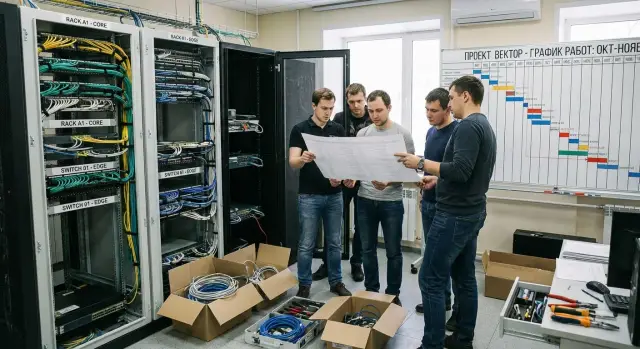
What goes wrong during a move and what “zero downtime” means
Server-room moves usually fail not because of moving the hardware, but because of small details that appear at the last minute. Somewhere a second power feed was forgotten, somewhere the boot order changed, somewhere a dependency turned out to be undocumented. The result is the same: services take longer to come up than planned, and the business sees downtime.
Unexpected downtime usually stems from three things: an incomplete picture of dependencies, no clear maintenance window, and no pre-agreed rollback plan. When the team acts "from memory" and in chat, any deviation turns into an argument: what to do next and who decides.
“Zero downtime” almost never means “literally zero seconds.” More often it means users and critical processes see no noticeable unavailability: traffic routes to a reserve, switching is quick, and risks are controlled. Compromises vary: a short slowdown, a temporary freeze on changes, disabling minor features, or moving some tasks to a night window.
The most migration-sensitive services are usually those with many external connections and strict timing requirements: AD/LDAP, DNS and DHCP, databases and queues, telephony and VDI, payment and integration gateways, as well as monitoring and backups (especially if they move together with everything else).
A good runbook provides predictability: what to do, in what order, who is responsible, and by which signs a step is considered successful. Most importantly, it makes risks manageable: at every checkpoint it should be clear whether to continue the migration or roll back.
A simple example: you move a rack with virtualization. If DNS or storage are “in the same rack” and are powered off early, dependent services will cascade-fail. A runbook is needed so such chains are known in advance, not discovered with a flashlight in the dark.
Inventory and dependency map
A runbook starts not with the schedule but with an exact list of what you are moving and what must keep working. If the inventory is "approximate," the move becomes a guessing game: the wrong cable, the wrong port, the wrong firmware version, and you lose hours.
Collect a single registry of equipment per rack: servers, storage, switches, UPS, KVM, SFP modules, patch cords and other "small things" without which the rack won’t be operational. Record serial numbers, port diagrams, power (how many feeds and which connectors), and current firmware versions and settings that are hard to reconstruct from memory.
At the same time, compile a list of services and responsible people. Each service must have an owner who decides "go/no-go" and confirms the business function actually works. The technical team can power hardware, but only the service owner will say the result is acceptable.
Describe dependencies in simple terms: what won’t start without what. Examples: "the portal won’t work without the database," "authentication is needed by everyone," "monitoring is required before starting work or you are blind." That’s enough to understand the migration order.
Minimum items to record in the dependency map:
- RTO/RPO and acceptable availability windows for each service
- data sources and write directions (replication, backups, queues)
- network dependencies: VLANs, subnets, ACLs, VIPs, DNS, NTP
- user access points: office, branches, external clients, integrations
- current state: configs, connection diagrams, versions, accounts and access rights
If you hire a systems integrator, ask them to deliver not just a "report" but a working dependency map the team can act on at night without extra calls.
Maintenance window and communications without chaos
A maintenance window is not just "Saturday night." Choose it so risk is minimal: low load, not month-end closing, no marketing launches, no major updates. And set expectations immediately: "zero downtime" usually means "no noticeable downtime for users," not "no switching seconds at all."
Who should be informed depends on scale. The business confirms acceptable risks and customer impact. InfoSec checks access, logging and physical security requirements. Network and ops are responsible for routes, addressing, power and cooling. Contractors are needed not "just in case" but for specific tasks with clear arrival times.
Communications are easiest with one coordinator and one main channel. The coordinator makes pause decisions, logs step times and prevents “fixing on the spot” without recording in the runbook.
To avoid drowning in messages, agree on short status updates:
- START: step started, expected finish time
- DONE: step completed, what was checked
- HOLD: pause, reason, what is needed to continue
- ROLLBACK: rollback, which checkpoint and who executes
Pre-agree rollback authority and success criteria before the window. Example: if authorization fails and queue length grows within 10 minutes after switching, we roll back.
Always build in buffers: time for the unexpected (wrong patch cord, delayed access, power failure) and separate time for checks. Without this the window becomes a race where mistakes are nearly guaranteed.
New site readiness and basic infrastructure
If the new site isn’t ready, no runbook will save you. Before moving hardware, achieve a simple thing: you must be able to power the rack, connect the network and get predictable results.
First check the physical base. This is not formal: a “flaky” power feed or weak cooling often shows up only under load after the move.
- Power: two independent feeds (if required), power capacity calculation, UPS/ATS test under load
- Cooling: temperature measurements at hot spots, headroom in cooling capacity, clear airflow
- Racks: mounting rails, free U space, weight and depth limits
- Grounding: single scheme, measurements, no "ad-hoc" jumpers
- Cable routes: trays, entry points, bend radiuses, space for labeling
Next — network and addressing. Agree on VLANs, routes and connection points so that when servers are powered on you don’t have to "improvise" IPs or rules. Separately test DNS and DHCP (or static addressing), admin access, ACL/firewalls and any remote access required for the maintenance window.
Close InfoSec requirements in advance: access control to the premises, entry logs, rack seals and clear zones (for example, separate network core area). If there are guest access policies or photo rules, include them in the plan and assign responsibility.
Before moving day prepare "consumables and geometry." A common situation: the rack with a critical service arrives but the needed SFPs are missing — you lose hours.
- Spare patch cords of needed lengths, SFP/DAC modules, cable ties, velcro, blanking panels
- Labeling: printer/labels, naming scheme for ports and cables
- Placement plan: where each rack stands and where power and network feeds run
- Spare ports: free switch ports and PDU outlets, spare power sockets
- Emergency kit: console cables, adapters, spare fans/PSUs (according to criticality)
If you work with an integrator or vendor, agree in advance who is responsible for measurements, acceptance and final confirmation of site readiness. For example, at GSE.kz, besides supplying locally produced equipment, there is systems integration and support — handy when you need clear distribution of responsibilities and don’t want to figure it out during the move night.
How a good runbook is organized: structure, roles, rules
A runbook for a migration is the single source of truth. It should be accessible to all participants but edited by rules: one document owner, clear versioning and a list of approvers. Otherwise, at night the network and server teams may follow different plans.
At the top state where the document is stored, who has read/edit access, and who gives the final "go". Usually the work lead and representatives of infrastructure and the business approve, since the business decides what downtime risk is acceptable.
Describe roles by responsibility, not job title. Minimum set:
- Work lead: keeps timing, makes decisions at checkpoints
- Network: links, routing, DNS, load balancers
- Servers & virtualization: hosts, storage, clusters, backups
- InfoSec: access, segmentation, logs, change control
- Service owner: confirms the service "works as intended"
The rule for confirmation is simple: each step is considered done only after a “done” mark and verification. Record start and end times and the name of the person who confirmed. This helps quickly find where time was lost and is important for post-incident review.
Step template
To make steps predictable, use the same format for each:
Цель: что именно должны получить
Действия: 2-6 коротких команд/операций
Ожидаемый результат: что изменится
Проверка: как убедиться за 1-3 минуты
Откат: как вернуть исходное состояние
Timing and decision points
Each step should have an estimated duration and a deadline after which you stop and decide: continue or roll back. For example, if the network doesn’t come up within 15 minutes after rack switch, that is a checkpoint. The work lead decides and teams follow the pre-described plan, with no improvisation.
If the move includes delivery and support of infrastructure, the same roles and rules help split responsibility between your team and the contractor without arguments during the operation.
Step-by-step migration plan: from preparation to go-live
Zero-notice downtime moves rely on one principle: you move not just the "hardware" but the service workload. So tie runbook steps to things you can check and confirm before moving on.
1) Preparation (days, not hours)
Start with what lets you recover if things go wrong: backups, config exports, VM snapshots. In the runbook record where backups are stored, who has access and what constitutes a "successful restore" (for example, restoring a database on a test stand and verifying a key query).
Next assemble a "migration packet" for each system: versions, licenses, network settings, list of critical ports and accounts. This saves hours at the start.
2) Change freeze
Introduce a change freeze 24–72 hours before: no updates, no network rule changes, no app releases, no domain/certificate changes and no ad-hoc fixes. The reason is simple: any change not in the runbook breaks predictability and makes rollback murky.
3) Pre-switch
To truly avoid downtime, prepare critical data in advance: replication, synchronization, warming up backups. For example, run the database on a replica at the new site so that at switch time you change roles and routing rather than transferring data from scratch.
4) Shutdown and packing
Follow a strict shutdown order: from top services down to fundamentals (application -> queues -> DB -> storage/virtualization, if applicable). Mandatory: label cables and ports, photo the cabling, and list what goes into each box.
5) Transport and rack-in
At the new site install and connect in the pre-defined sequence: power and grounding, then network (uplink, management), then compute and storage. Each step should have a quick check: link up, management accessible, time synchronized.
6) Bring-up
Power-up goes from fundamentals to upper layers: power/UPS -> network -> hypervisors/hosts -> storage -> databases -> applications -> background jobs. After each level perform a short check (e.g., "DB accepts connections", "main API returns 200", "logins succeed") before proceeding.
Checkpoints and rollback criteria
Checkpoints prevent the migration turning into "it seems to work". The runbook should fix moments when the team must stop, verify facts and either continue or roll back.
Usually four checkpoints are enough:
- Before shutdown/switch: backups confirmed, dependency map current, window agreed, decision owner assigned.
- After rack-in at the new site: power, network, port labeling, management consoles and remote access checked, critical cables and modules in place.
- After start: servers booted without errors, services started in correct order, monitoring sees hosts.
- After verification: users and integrations pass key scenarios, data in place, errors not increasing.
Set success criteria as numbers and record the acceptable "norm." Example: latencies not worse than baseline by more than 10–15%, share of 5xx/app errors not above usual, integrity checks (hashes, counter matches, sample transactions) without discrepancies.
Rollback criteria should be equally explicit. If after bringing up the rack the payment service responds but latency doubled and queues are growing, that’s a reason to act, not "wait another hour."
- Data failed integrity checks.
- Errors exceed thresholds and do not decrease within 10–15 minutes.
- No connectivity to a key dependency (DB, DNS, AD) and no quick workaround.
- Remaining window time is less than the agreed rollback limit.
Rollback is usually time-limited: specify the point after which returning to the old site is riskier than continuing. One person (shift lead or service owner) decides on rollback, and the event is logged: time, reason, metrics, who confirmed. In SI projects this is often formalized as a short protocol to avoid later disputes about causes and lessons.
Post-move checks and acceptance
After the move and powering on the new site a common mistake is assuming that if hosts "ping" everything works. The runbook should list minimal checks, who does them and what counts as normal.
Start with basic infrastructure hygiene. These quick checks catch most problems: network (VLANs, routes, MTU), DNS (internal name resolution), domain (login and policies), access (VPN, bastion, admin consoles), monitoring (agents and alerts), logs (events reaching the collector). If the company has 24/7 support, ensure the on-call shift sees the new hosts and can identify them.
Then check services from a user and integration perspective. Run a short scenario: an employee logs in, performs a typical operation (order, payment, DB write), generates a report and verifies data consistency. Separately test integrations: exchanges with 1С/ERP, mail, external APIs, printing, queues.
Allocate a post-start observation period of 2–24 hours. Assign responsible people from infra and app teams and agree which metrics to watch.
Acceptance should be formal:
- all critical services pass agreed tests
- no critical alerts and monitoring collects metrics
- backups run and restore test passed
- access and roles confirmed, temporary accounts closed
- changes documented (diagrams, IPs, cable maps) and handed over to support
“Tails” can be completed later, but only non-critical items: cable labeling, rack optimizations, secondary report migration, dashboard setup. Anything that can cause repeat downtime (re-routing, certificate changes, route modifications) should be scheduled in a separate maintenance window with the same control and rollback criteria.
Common mistakes and pitfalls
Even a good runbook can fail because of small things no one deems critical.
What breaks the plan most often
Problems usually start with organization and overlooked dependencies rather than heavy hardware:
- Only main systems are considered, while basics are forgotten: DNS, NTP, licensing, backup agents, monitoring, printing, integrations with 1С or medical systems.
- Rollback criteria are not fixed in advance. When failure happens people argue "wait 10 more minutes" or "let’s return" and lose time.
- Poor labeling. On site it turns out patch cords look the same, ports are swapped, and the diagram doesn’t match reality.
- No buffer in the window. No time for checks, warming, sync and stabilization.
- No single coordinator. Teams act in parallel, change settings on the fly, and checkpoints lose meaning.
A small real-life example
They move a virtualization rack: hosts boot, VMs start, but users cannot log in. The reason is banal: the old site had a time service and Kerberos errors start because of clock drift. If the runbook included "NTP reachable on the new network, drift no more than X seconds," the issue would be found in minutes, not after floods of support tickets.
If you work with an integrator, appoint one person in advance to be responsible for changes and for logging decisions. It’s cheaper than untangling the consequences of chaotic night-time edits.
Short checklist: before the move and after power-on
This checklist helps avoid the small things that most often break a migration. Keep it alongside the runbook and tick items off when actually done, not "seems done."
Before departure and shutdown
Before touching racks make sure you can recover and contact the right people if things go wrong.
- Test backups for restore: at least one test restore, record result and time.
- Collect contacts and on-call lists: service owner, network, power, security, carrier, site lead.
- Confirm access: VPN, accounts, hypervisor/cluster rights, iLO/iDRAC/console passwords.
- Before shutdown take a final state snapshot: replication status, task queues, disk usage, last sync time.
- Start the change freeze: stop deployments, forbid manual fixes, record the maintenance window in the log.
After this, prepare the equipment for transport. Labels must match the port plan and rack diagram.
Before power-on and immediately after go-live
At the new site check the basics first: power, network and hardware access, then application services.
- Before applying load check power and network: phases/UPS, VLANs, port speeds, uplink, DNS/NTP.
- Ensure console and remote management access so you don’t have to run to the rack for a single setting.
- After start validate key services with critical scenarios (login, DB write, queue processing), not just "it pings."
- Check monitoring: metrics, alerts, logging, backups, disk space.
- Keep a single work log: what was done, when, who confirmed, what went wrong and decisions made.
Example: moving a rack with a critical service
Scenario: one rack with two virtualization hosts, shared storage (or vSAN), a file service and 1С. The business gives a 4-hour night window but expects everything to work by morning. The main goal of the runbook is not to "finish fast" but to agree in advance what to do, in what order and when to decide to roll back.
Write the dependency map in simple phrases, not 20-block diagrams. Example: 1С depends on domain (AD), DNS, time (NTP), routes, access to file shares, licensing and printing. The file service depends on AD and the network. Virtualization depends on power, cooling, uplink and management network access.
A possible bring-up order:
- Bring basic network and verify routing to key subnets.
- Bring AD/DNS/NTP (or ensure they are available at the new site).
- Start storage and verify integrity/replication.
- Start hypervisors and then VMs: file service, then 1С.
- Verify user access and background tasks (exchanges, schedules).
Avoid arguments during the process by setting checkpoints with clear criteria. Examples: "after network start there is ping and DNS-resolve from 10 test nodes", "after file service start three control folders open with correct permissions", "after 1С start login and opening of a test database succeed within 5 minutes."
Describe rollback as a concrete action: move the rack back to the old site or switch services back to old IPs/routes, and who issues the command. It’s useful to state a time limit: e.g., if by T+120 minutes 1С fails tests, roll back; allocate 60–90 minutes for physical return considering site transit times.
For business acceptance keep short checks: log into 1С with a test user, post one document, print to a control printer, open three typical files from the network share, and have 2–3 key users subjectively confirm access speed is "not worse than yesterday."
Next steps: how to organize the move and who to assign
To make the move predictable, start with a minimal data package. It’s not for the report but so the team speaks one language and doesn’t argue on site about whose cable is which.
Collect and record the basics (even a spreadsheet) and then turn it into a runbook:
- Inventory: racks, servers, network gear, power feeds, ports, serial numbers, vendor contacts.
- Dependency map: which services rely on DBs, DNS, AD, networks, storage, licenses.
- Success criteria: what must work at the end (metrics, accesses, RTO/RPO, test list).
- Rollback criteria: when to roll back and how to return to the old site.
- Draft runbook and a short rehearsal: one test step (a non-critical service) with timing and issues logged.
Also plan a stabilization period after the move. You need an on-call shift not distracted by other tasks: monitoring, incident handling, business communication, and readiness to roll back quickly.
For small infrastructures an internal team is often enough, but roles must be clear: service owner (decides and confirms success), network and system engineers (make changes and keep the log), site responsible (access, security, power, contractors), communication coordinator (one status channel, one contact for management).
If you need maximum predictability or have critical services, involve an integrator: they help with planning, rehearsals and execution. In Kazakhstan GSE.kz can be a suitable partner when you need to combine supply, systems integration and ongoing support so the move doesn’t rest on the “heroics” of one night.
Frequently asked questions
What does a zero-downtime server room migration mean in practice?
In practice, it almost always means no noticeable downtime for users and critical processes. Traffic is switched to the backup setup in advance, and brief cutovers are performed within an agreed maintenance window.
How should you begin preparing for a server room move?
Start by compiling an inventory, a dependency map, service owner contacts, and backup verification results. Then agree on the maintenance window, sequence of actions, and rollback criteria.
What should a dependency map include?
Specify which services depend on DNS, AD, NTP, databases, storage, networks, and licenses. Add the service owner, acceptable downtime, and a validation method to use after startup.
How do you choose a maintenance window for a migration?
Choose a low-traffic period, avoiding month-end closing, releases, and major campaigns. Reserve separate buffer time for validation, troubleshooting, and a possible rollback.
What should a good runbook look like?
Each step should include its goal, actions, expected result, a quick validation, and a rollback method. Also specify the executor, time estimate, and the person who confirms the result.
What should be checked at the new site before moving the equipment?
Before transport, verify power, cooling, grounding, racks, cable routes, and access at the new site. Test VLANs, routes, DNS, NTP, ACLs, and remote management separately.
In what order should services be started after the move?
Start with power and networking, then bring up management, storage, and virtualization hosts. Next start databases, applications, and background jobs, validating each layer before moving to the next.
When should you stop the migration and roll back?
Initiate rollback if data diverges, errors rise persistently, a core dependency is unavailable, or there is not enough time left in the maintenance window. The conditions and authority for this decision should be approved in advance.
What checks should be performed after startup at the new site?
Ping shows only network reachability. Check user sign-in, database writes, queues, integrations, file permissions, monitoring, logs, and backup execution.
How can you avoid chaos during an overnight move?
Assign one coordinator, one primary communication channel, and an owner for each service. The team should record the start and completion of steps, validation results, pauses, and rollback decisions.
