7 min read
Windows Server Standard vs Datacenter Licensing: Examples
Practical guide: licensing Windows Server Standard and Datacenter, core-based calculations and VM rights for 1, 2 and 4 hosts with typical examples.
Why compare Standard and Datacenter
Buying Windows Server for virtualization usually comes down to a simple task: run the required number of virtual machines (VMs) without overpaying. The complication is that cost depends not only on the edition but also on host configuration, whether migrations are used, and how many VMs will actually run on each node in normal operation and during a failure.
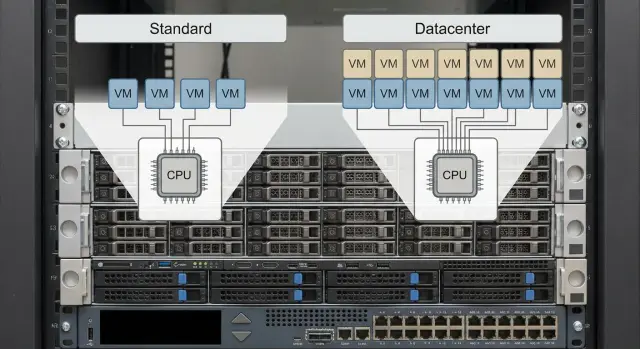
The main difference between Standard and Datacenter is virtualization rights. Both editions are licensed by the physical cores of the host, but Standard grants a limited number of VM rights and requires "stacking" layers, while Datacenter removes the VM count limit once the host cores are licensed. So the practical question is: how many VMs will be on each host now, and how many will there be in 6–12 months.
To avoid guessing, fix the initial data in advance: how many physical cores each host has, whether hosts in the cluster are identical, how many hosts are in the layout, whether migrations will occur, how many VMs are planned now and what growth is expected, and whether the host will serve only as a hypervisor or also run OS roles.
A common example that changes the math: two hosts in a cluster where, if one node stops, all VMs must be started on the second. In that case, VM rights must be provided on each host at the level needed for the "worst day."
Below are the rules for counting cores and VM rights for 1-, 2- and 4-host scenarios. CALs (client access licenses), RDS CALs and third-party product licensing are left out so we don't mix different budget lines.
Core-based basics: how Windows Server is licensed
Windows Server Standard and Datacenter are licensed not "per server" or "per socket," but by the physical cores on each host where virtualization will run. So the starting point of any calculation is the exact number of physical cores in the hardware.
Physical CPU cores are counted. The number of sockets (1 or 2) does not determine licensing on its own: what matters is the total core count in the system.
There are minimums that are often forgotten. Even if there are fewer cores, you must license at least:
- 8 cores per processor
- 16 cores per server
From this follows a practical rule: a server with one CPU of 6 cores is still licensed as 16 cores. A server with two CPUs of 6 cores each (12 total) is also licensed as 16.
Licenses are typically purchased in 2-core packs. In practice you cover the minimum (16 cores) with a base set and buy additional 2-core packs up to the actual number of cores. For example, a host with 24 cores = 16 cores + another 8 cores (four 2-core packs).
These rules are the same for Standard and Datacenter. The difference starts when you link host licensing to the rights to run VMs.
VM rights: Standard vs Datacenter in plain language
You license the physical host and the right to run a certain number of Windows Server VMs on it. So calculations always have two parts: how many cores the server has and how many VMs you plan to keep on each node.
Standard: after you fully license all physical cores of the host (respecting minimums), you get the right to run up to 2 Windows Server VMs on that host.
If you need more than two VMs, you "stack": you license the same cores on the same host again. Each full repeat adds rights for 2 more VMs. Growth therefore proceeds in pairs of VMs, and payment is for re-covering all cores again.
Datacenter: you also license all host cores, but then you get the right to run an unlimited number of Windows Server VMs on that server.
Quick summary:
- Standard: 1 fully licensed host = rights for 2 VMs; +2 VMs for every additional full coverage of the host cores.
- Datacenter: 1 fully licensed host = rights for any number of VMs.
Example: if you plan 6 Windows Server VMs on one host, Standard requires 3 "rounds" (2+2+2) of licensing all host cores. Datacenter requires one round with no VM limit.
Step-by-step algorithm to calculate virtualization licenses
It's easier to calculate per host and then sum and compare editions. This works equally well for a single server or a cluster.
1) Count cores on each host
For each server note the number of processors and physical cores, then apply minimums. Use the larger value: actual cores or the minimum.
2) Convert cores into license packs
Everything reduces to 2-core packs: buy enough packs to cover the cores on the host, rounding up if necessary.
3) Determine how many VMs will actually be on the host
It matters not only how many VMs you have now but also what happens during migrations and node failures. Note separately the maintenance and failure scenarios: how many VMs might move to neighboring hosts.
4) For Standard calculate "layers" of VM rights
Under Standard one full coverage of the host cores grants rights for 2 VMs. If you need more, add layers:
- VMs on the host / 2 = number of layers needed (round up)
- host core licenses x number of layers = total Standard requirement
5) Compare with Datacenter
With Datacenter you license cores once per host and then there is no VM limit. If Standard requires many layers (often 3–4 or more) or VM growth is hard to predict, Datacenter is usually simpler to manage and safer for changes.
Example 1: single virtualization host (1 server)
Take a single physical server for Hyper-V (or another hypervisor). Suppose it has 2 CPUs with 12 cores each, 24 cores in total. Minimums don't affect licensing here, so we count the actual 24.
Input data
Key parameters are cores and VM count:
- Host: 24 physical cores (license all 24).
- Standard: 2 VMs per single full license covering all cores.
- Datacenter: unlimited VMs after licensing all cores.
Scenario A: 2 VMs needed
If you need 2 VMs (for example AD/DNS and a file server), Standard usually looks economical: license the 24 cores once and you get rights for 2 VMs.
Datacenter also works here, but it is usually chosen when many VMs are expected or growth is fast.
Scenario B: 6–10 VMs needed
Here Standard stacking comes into play: every additional 2 VMs require another full Standard license of the same 24 cores.
Example for 8 VMs:
- 1 Standard set (24 cores) = 2 VMs
- to get 8 VMs you need 4 Standard sets (each covering the 24 cores)
At this level Datacenter becomes easier: license 24 cores once and add VMs without repeated calculations. The breakeven point depends on prices and purchasing conditions, but often appears when Standard needs 3–4 sets or more.
Practical tip: include a small buffer. Test or spare VMs often appear unexpectedly. If you plan 6 VMs, plan for at least 8.
Example 2: two hosts (cluster, migrations, node failure)
In a cluster licensing is not done "per cluster" but per host. VMs can move between nodes, so use the worst-case scenario for calculations: how many VMs may end up on one host during a failure.
Scenario: 2 identical hosts with 24 physical cores each. There are 10 VMs total. Normally they are distributed 5 and 5 with migrations enabled. If one node fails, all 10 VMs must run on the remaining host.
Under Standard rights are layered: one layer (full coverage of host cores) = 2 VMs on that host. So if in a failure one node needs to host 10 VMs, each host must have rights for 10 VMs, i.e. 5 layers.
Standard calculation for the worst case:
- 1 layer = license all 24 cores and get rights for 2 VMs
- need 5 layers per host
- total: 24 cores x 5 layers = "120 cores worth of licensing" on each of the two hosts
With Datacenter it's simpler: one set per 24 cores for each host, then you can run any number of VMs and migrate them freely.
Conclusion: with active migrations and the requirement that "all VMs survive a node failure," the calculation depends on how many VMs can be on one host at worst, not on an average 50/50 split.
Example 3: four hosts (scaling and maintenance without downtime)
For 4 hosts a typical setup includes a shared VM pool, planned migrations (updates, maintenance) and a requirement to avoid service downtime. Again, the maximum VMs per node in an N-1 scenario matters more than the average.
Example: 4 identical hosts, each with 32 physical cores (e.g. 2 CPUs with 16 cores). The cluster has 40 VMs total.
Accounting for migrations and maintenance
If one host enters maintenance, the other three temporarily accept its VMs. Practically one of two approaches is used:
- Average placement + buffer: 40/4 = 10 VMs per host, then add a buffer (for example up to 12 VMs per host).
- N-1: one host is unavailable, so 40/3 = 13–14 VMs per host, round up and fix a limit (for example 16 VMs max per host).
What this means for Standard and Datacenter
Standard: 2 VMs per host per full license covering all its cores. VM rights grow in layers as density increases.
If under N-1 you plan for a maximum of 16 VMs per host, that's 16/2 = 8 layers. So each of the 4 hosts would need their 32 cores licensed eight times. This has obvious budgetary and management implications.
Datacenter: cores are licensed once per host and there is no VM limit. In a 4-node cluster this is usually simpler to track and more flexible as VM density grows.
Common forks: different cores, different growth, different loads
Complex calculations start when infrastructure is "uneven": hosts with different core counts, different VM growth rates, some roles unrelated to virtualization. The basic rule doesn't change: licenses are counted per physical host, and VM rights depend on how completely you covered that host with licenses.
Uneven hosts by core count
If one server is more powerful, you can't average it out. Count each node by its actual cores and then look at the total. A typical case: three identical hosts and a fourth newer one with more cores. Under Standard the powerful host will drive costs first, because each additional layer requires re-covering all its cores.
VM growth: don't buy "just enough"
If you have 6–8 VMs now and expect 20 in six months, Standard can quickly turn into ongoing purchases. It's more practical to plan growth for 12–18 months and compare two numbers: "now" and "plan." If the plan requires many repeated coverages, Datacenter is usually easier for approvals and operation.
The reverse also happens: many cores but few VMs and slow growth (for example 2–4 stable VMs per node). Then Standard can remain a rational choice even on powerful servers.
Remember that Windows Server licensing does not include RDS CALs, SQL Server, antivirus, backup or hypervisor licensing. These are counted separately so you don't mix "cores and VM rights" with application services.
For procurement it's useful to record the calculation in a simple table: host (model and role), cores (and sockets for reference), how many Standard layers are needed, how many VMs are allowed and how many are planned, chosen edition and reason, plus separate licenses and subscriptions (RDS, SQL, etc.). If you select hardware for growth, tie the calculation to specific configurations so you don't have to recalculate when core counts change.
Typical mistakes and pitfalls in calculations
Licensing mistakes often look like "a couple of cores here or there" or "we'll buy a couple of VMs later," but in virtualization that quickly turns into extra costs or parts of the environment being formally unlicensed.
Common errors:
- Forgetting the server minimum: even with fewer cores you must license at least 16 cores per physical server.
- Counting VM rights but not covering all physical cores: under Standard VM rights only appear after full coverage of the host cores.
- Averaging VMs across a cluster: it's more correct to account for outage and maintenance scenarios (where will VMs go if a node is down).
- Choosing Standard for dozens of VMs and ending up with a "layered" license pie: many repeats, complex accounting, constant recalculation as growth occurs.
- Confusing server licenses and CALs: a Windows Server license does not replace user or device CALs, and RDS CALs and other dependencies are counted separately.
Practical rule: first fix each host's cores, then define the failure and migration scenarios, and only then calculate how many Standard layers are needed or when Datacenter becomes the better option.
Quick checklist before buying licenses
Before purchase check the worst day, not the average: maintenance or node failure when VMs temporarily consolidate on remaining hosts.
- How many virtualization hosts and how many cores on each (consider minimums 8/16).
- How many VMs can max end up on one host in normal mode and in N-1 mode.
- How many Standard layers are needed per host (1 layer = 2 VMs).
- Is there a growth plan for 12–36 months and is a buffer included.
- Does the chosen edition match the operating model: live migrations, maintenance without downtime, temporary VM consolidation.
Example for self-check: 2 hosts with a plan of 8 VMs on each. If one host is unavailable, all 16 VMs must fit on one host. Under Standard you must count rights for 16 VMs per host (8 layers) even if normally only 8 ran there.
If you buy servers for virtualization, keep a technical calculation nearby: exact core counts for the planned hosts and the VM plan. It's easier to do this alongside hardware selection and support planning.
Realistic scenario: how to choose an edition for your organization
Imagine a clinic or an educational institution: 2–4 virtualization hosts, 3–5 year planning horizon, and steady VM growth each year. Today you need 8–10 VMs, in a year 12–16, and later new services appear (telemedicine, electronic records, analytics).
Typical VMs: domain controller, file services, application server and database (often 1C), a separate VM for specialized software, plus backup. Test and temporary VMs almost always appear during migrations.
There are usually two options:
Standard is chosen if you’re confident that each host will have few VMs and growth is limited. Then the initial saving is clear and purchases are made as you expand.
Datacenter is chosen if virtualization is a core platform, many VMs are expected or growth is hard to predict. It offers not only long-term economics but also simplicity: fewer recalculations, lower risk when adding VMs, and easier upgrades.
Before finalizing a budget ask your supplier direct questions: how many cores in each host and are CPU upgrades planned, how many VMs per host in normal and failure modes, are live migrations required and what VM peaks they create, which VMs are mandatory day one and which will appear later, and how core-based licensing will be handled when the cluster expands.
To prevent scope creep during procurement, record the decision in a single document: host configurations (cores), chosen edition (Standard or Datacenter), VM limit per host and growth scenario.
Next steps: how to quickly prepare a calculation and specification
An accurate calculation starts with facts. Errors almost always stem from imprecise input like "about 20 VMs" or "I think 24 cores." It's convenient to prepare two variants (Standard and Datacenter) to see differences not only in price but also in growth buffering.
1) Collect input data (10–15 minutes)
For each host note the CPU model and total physical cores, how many hosts you have now and plan to have in 1–3 years, how many VMs will run on each host in normal and failure modes, which VMs are Windows Server and which run Linux or other OSes, and whether expansion is planned (adding CPUs, increasing core count, adding new nodes).
2) Make two calculations and check growth
Compare Standard (cores x number of layers to reach required VMs) and Datacenter (cores once per host). Also calculate an expansion scenario: what if you add a host or replace CPUs with a higher-core model.
Rule of thumb: if you currently have 12 VMs per host and expect 25 in a year, Standard often quickly approaches Datacenter in total cost due to added layers.
3) Prepare the procurement specification
A specification usually includes number of hosts, cores per host, chosen edition, VM rights calculation (including failure mode) and a small growth buffer. Add a separate line for what changes when another node is added.
If you tie procurement to hardware delivery and implementation, it's convenient to have one vendor responsible for hardware, integration, and support. In Kazakhstan such projects often rely on locally produced servers and a service network; for example GSE.kz (gse.kz) can supply S200 series servers and provide system integration for your virtualization layout.
Frequently asked questions
When should you choose Windows Server Standard versus Datacenter?
Choose Standard if each host runs few VMs and growth is predictable. Datacenter is more convenient for high VM density, migrations, and plans to expand the environment quickly.
How are Windows Server licensing cores counted?
First, count the physical CPU cores on each host. Then apply the minimums: at least 8 cores per processor and at least 16 cores per server.
How many virtual machines does Windows Server Standard cover?
After fully licensing the host’s cores, one Standard license layer grants the right to run up to two Windows Server VMs. Four VMs require two full layers, and six require three.
What should you do if a host needs more than two VMs?
You need to license all cores on the same host again. Each additional full Standard layer adds rights for two more Windows Server VMs.
Does Windows Server Datacenter have a limit on the number of VMs?
After licensing all physical cores on the host, Datacenter lets you run an unlimited number of Windows Server VMs on that host. The VM count does not require additional licensing layers.
How do you calculate licenses for a cluster with migrations?
Calculate the maximum number of VMs that could end up on each node if a neighboring host fails or during maintenance. The average VM distribution across the cluster is not suitable for this calculation.
Why does a two-host cluster need more licenses than expected?
For two 24-core hosts and ten VMs that must survive the failure of one node, each host needs rights for ten VMs. With Standard, that means five full 24-core layers for each host.
How do you account for maintenance on one of four hosts?
With N-1, one node is temporarily unavailable and the others take on its VMs. Divide the total number of VMs by the number of remaining hosts, round up, and use that maximum for the Standard calculation.
Does a Windows Server license include CALs and other products?
No. CALs for users or devices, RDS CALs, SQL Server, backup, antivirus, and hypervisor licenses are counted as separate line items.
What information should you collect before buying licenses?
For each host, record the number of physical cores, the maximum VM count in normal and failover modes, the required number of Standard layers, and the growth forecast for 12-36 months. Then compare this calculation with Datacenter for the same configuration.
