8 min read
VPN or SD‑WAN for Remote Branches: How to Choose
VPN or SD‑WAN for remote branches: selection criteria, common redundancy schemes, monitoring latency and loss, and practical deployment steps.
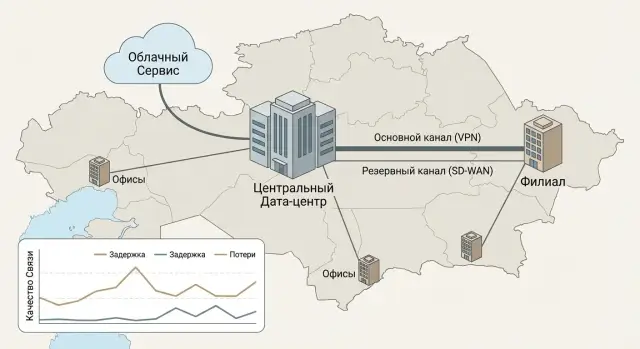
Where problems usually start in remote branches
In branches, issues rarely begin with “not enough megabits.” More often the picture is: there is internet, the VPN is up, but users complain that “sometimes it works, sometimes it doesn’t.” Today the CRM opens fine, tomorrow 1C freezes, and during a call the voice starts to sound robotic.
The weak point is usually not a single line but the whole chain: the local ISP, a congested link at peak hours, weak Wi‑Fi in the office, different latency to the headquarters or cloud, plus a lack of traffic prioritization. As a result, important services compete with each other: a video call fights for bandwidth with updates or backups.
The first thing people often do is buy a faster plan. That helps only if the problem is truly bandwidth. When the cause is packet loss, fluctuating latency or disconnections, added speed does not fix quality. The graph may show 200 Mbps, but VoIP calls still drop.
Usually several issues hurt at once: access to 1C/CRM and files “hangs” during the day, calls and video suffer from latency and loss, when a channel fails the branch partially “stops”, and IT cannot see where the problem is — at the provider, in the tunnel, or inside the office.
Then a practical choice appears: keep VPN or move to SD‑WAN. That decision is always about risks and priorities. For some, cash register downtime is most important, for others — security, for others — stable voice quality, and for others — predictable cost and minimal on‑site equipment.
Imagine a pharmacy in a small town: sales happen during the day, accounting runs in parallel, and backups kick in at night. If the connection “floats,” the cash register may still process sales, but accounting and syncs fail. At that moment it’s not about “how many megabits,” but how stable the connection is and whether IT can manage it.
When VPN is enough: clear cases
VPN often covers the needs of a remote branch if requirements are simple and predictable. It fits well where the network is small and you don’t need to fine‑tune routes and priorities for different traffic types.
Typically, VPN suffices when a branch has 1–2 key applications (for example, access to 1C and a file server), a single primary internet provider, and no critical real‑time services. If telephony, video and terminal workstations are not life‑critical, occasional drops in quality are usually tolerable.
The advantages of VPN are obvious: simple architecture, familiar technologies, predictable design, and a low barrier for administration. You can quickly set up a secured channel and give employees access without overhauling the network.
VPNs are most often used for site‑to‑site connections between a branch and headquarters for several internal services, for remote access by staff (home, travel), for role‑based segmentation (different rights for accounting, IT and contractors) and in small networks (roughly 1–5 branches) where manual settings are manageable.
Limitations should be accepted in advance. As the number of branches grows, so does the volume of manual configuration and the risk of errors. If a backup channel appears, failover often requires manual steps or complicated rules. And most importantly: VPN protects traffic but does not itself "fix" unstable internet.
A simple guideline: one branch with cash registers and email, one provider, generally stable connection — VPN provides the needed security and access; there’s usually no need to complicate the architecture.
What SD‑WAN gives you and how it differs from VPN
The easiest way to explain SD‑WAN: it’s “smart” network management where a branch has several links (for example, wired internet and LTE), and the system chooses the best path for each traffic type and switches quickly when problems occur.
Classic VPN usually solves one task: securely connect a branch to the headquarters or a data center. If there’s one link and simple applications (email, files, accounting), that’s enough. It gets harder when a second provider appears and you try to combine “two links + VPN” manually. Redundancy is possible but often crude: switching is noticeable, rules are hard to maintain, and it’s difficult to understand where the degradation happens.
The main difference: automation and visibility of quality
SD‑WAN does more than just bring up tunnels. It constantly measures latency, loss and jitter on each link and applies policies. In practice this looks like: voice and video go over the link with the lowest jitter (even if it’s more expensive), cloud services may go directly to the internet instead of through the office, the system moves traffic to a backup on degradation without manual steps, and the admin sees quality across branches and providers in one panel.
This is especially noticeable in networks of 10–20 sites where typical problems repeat every day.
Where SD‑WAN is stronger, and where it doesn’t replace the basics
SD‑WAN usually wins in scenarios with voice, video, cash registers, VDI, heavy cloud usage and many branches. But remember: SD‑WAN does not replace a firewall, does not remove proper access policies, and will not fix a poor provider. If both links are bad, “smart path selection” will mostly help you detect issues sooner and soften the impact of outages.
Practical example: a branch has a wired channel and LTE. With a regular VPN during evening congestion employees complain about calls and freezing meetings. With SD‑WAN you can pin voice to the more stable link and send heavy updates over the other link so they don’t interfere with work.
Selection criteria: how to understand what fits you
The choice is not about "what’s better" but about how your branches actually operate. For two small sites with accounting and email a simple solution is often enough. For a network where every hour of downtime costs money, requirements move toward a more manageable architecture.
Start with scale. If you have 3–5 branches and don’t expect more in the next year, configuring VPN and standard routing usually won’t be a problem. If the network grows every quarter, unified configuration templates and the ability to quickly onboard new sites without manually building each tunnel become more important.
Next — applications and their sensitivity to the network. Cash registers and payment systems respond poorly to outages, healthcare often requires predictable latency (telemedicine, imaging), video conferences and VDI don’t forgive jitter and packet loss. If such services are critical, the “tunnel exists — therefore it works” approach usually fails in reality.
A useful guideline is to answer five questions and record the numbers:
- How many branches do you have now and how many will be added in 12–18 months?
- Which applications must work without hiccups (cash registers, video calls, VDI, medical systems)?
- What downtime is acceptable: minutes, an hour, a working day?
- Do you need unified policies (access, segmentation, traffic priorities) for all locations?
- Which budget matters more: one‑time (CAPEX) or monthly (OPEX), and who will maintain the system?
If many answers are “strict” and you’re growing fast, a centrally managed approach with quality control and clear operations usually wins. If requirements are soft and the network is small, VPN remains a simple and economical choice.
Step‑by‑step assessment before choosing
The decision should be based on numbers and how a branch actually works. To choose a solution without surprises after deployment, run a short assessment.
5 steps that bring clarity
-
List the branch applications and mark which are critical and which are tolerant. For example: cash registers and telephony — critical; email — tolerant; updates — can run at night.
-
Measure current link quality during working hours and at peak: latency, loss, jitter and actual throughput. Look not at the contract “100 Mbps” but at what’s really available and how it changes.
-
Describe traffic routes: what goes to headquarters, what to a data center, and what goes directly to the cloud (1C, CRM, video conferencing, backups). If most traffic already goes to the cloud, a central VPN hub easily becomes a bottleneck.
-
Choose the level of redundancy. Often two different providers are enough, and for a small office a wired link plus LTE/5G as a spare is sensible. Decide what should happen on degradation: switch only on failure or also on growing loss and jitter.
-
Agree on security and access requirements: who can access what, is segmentation needed (guest, accounting, cash), how logs are stored and who reviews them.
Mini example
If a branch has one stable link and 2–3 internal services at headquarters, a standard VPN with clear access policies is usually enough. If the branch heavily uses the cloud, has telephony and requirements for failover when quality degrades, SD‑WAN usually offers more control and predictability.
These steps are convenient to record as a short 1–2 page document and agree with info security and business owners. If needed, a systems integrator (for example, GSE.kz) can help gather metrics and convert them into technical requirements for a pilot.
Typical redundancy schemes for a branch
Redundancy is not “just in case” — it’s so the business doesn’t stop during a line cut, provider outage or maintenance. It’s useful to draw a simple diagram first: which links exist, where traffic should go (DC, cloud, internet) and what downtime is acceptable.
Most common options
In practice these working schemes are most common:
- Two wired providers, active‑standby. The primary link carries all traffic; the second kicks in when the first fails. This is easier to configure and usually cheaper in terms of required equipment.
- Two wired providers, active‑active. Traffic is split between links (for example, office services on one, internet on the other) and on failure everything moves to the remaining link. Useful if one link regularly degrades.
- Wired + LTE/5G as backup. Reasonable for cash registers, terminals, basic email and messengers when you need “something” during an outage. Not suitable for heavy files, video surveillance and large updates: mobile networks are unstable and operator limits/prioritization can be unpleasant.
- Two routers and two providers. Required where device failure in the branch is as critical as a channel failure (for example, a bank branch or ER). For a small office this is often overkill: it’s simpler to keep one reliable router and a second as a cold spare.
Centre: one hub or two
If branches route through a central hub (data center or HQ), consider redundancy there too. One hub is simpler and cheaper but is a single point of failure. Two hubs in different locations provide geo‑redundancy but require clear routing rules and periodic checks.
To make redundancy work in practice, fix responsibilities in advance: who handles switching (the provider, your IT team, or an integrator), how often you test failover, which services must come up first (cash register, telephony, database access) and what thresholds count as an “incident” (loss, latency, BGP/PPP down).
If you have many branches, it’s more convenient when these rules are managed centrally and monitored 24/7, as integrators like GSE.kz typically offer.
Connection quality control: what and how to measure
Start simple: how will you know the connection is “good” or “bad”? Without measurements problems look like “the internet is lagging” and solutions are often bought blind.
Metrics that really matter
For a branch, a few indicators are usually enough and directly affect voice, video and application performance:
- Latency: how long a packet takes to the service.
- Packet loss: how many packets did not arrive.
- Jitter: how much latency varies — critical for voice.
- Availability: how much time the link was actually up.
- Recovery time: how quickly connection returns after a failure.
Measure quality under real load, not only with a speed test. If calls drop regularly, video breaks into blocks, or a remote desktop “flows,” the issue is not bandwidth but latency, jitter or loss.
Thresholds: what to consider an incident
Define thresholds as rules so all branches have the same criteria.
- Voice: loss above 1% or jitter above 30 ms is a reason to investigate.
- Video: loss above 2–3% or visible freezes longer than 2–3 seconds.
- Remote desktop: latency above 150–200 ms starts to interfere with work.
- Availability: if a channel drops more than 1–2 times a week, this is not normal.
Monitoring can be organized simply: a daily report per branch (availability, average latency, loss, top‑5 worst hours) and a separate incident list with time and duration.
Link quality and business impact are best shown with concrete events. For example: “during peak hours 18:00–20:00 packet loss rose to 4%, causing six payment freezes and three missed inbound calls.” Such facts lead faster to correct decisions on channels, redundancy and settings.
Security and access control in the branch network
Treat security as a basic part of the project, not an option. Branches often lack dedicated IT, so default safeguards should reduce human error.
Encryption and authentication are mandatory: modern algorithms, rotating keys, device and user verification — not just passwords. If you use VPN, ensure MFA and clear role‑based access. If you use SD‑WAN, ensure policies are applied centrally and uniformly across branches.
Segmentation limits damage if one zone is compromised. A minimal set of zones usually looks like:
- guest Wi‑Fi (internet only)
- office PCs and printers
- cash registers/terminals and critical workstations
- video surveillance and IoT
- admin network (IT access only)
A separate topic is cloud and SaaS access. It’s dangerous when a branch “sees everything”: accounting, CRM, mail and admin panels in one basket. Better to restrict access by “need to work”: which services are allowed, from which devices and in which hours.
Logs and auditing are often remembered after an incident. Better ensure in advance that you can answer simple questions: who connected, from where, to which segments and services, and what they did.
For government, finance and healthcare, role‑based access control, log retention, uniform settings across sites and regular updates are usually critical. For example, in a clinic branch it’s sensible to keep the medical system in a separate segment and fully isolate guest Wi‑Fi from internal resources.
Typical mistakes and pitfalls during deployment
The problem is often not the technology choice but how it’s deployed. Even the right solution won’t help if there are no objectives, rules and real‑world checks.
The first trap is skimping on the backup channel. They buy it “just in case” but don’t test failover, don’t document procedures and don’t assign responsibilities. As a result, when an outage occurs the branch is left without connection: the spare doesn’t come up or comes up with different routes and breaks access to services.
The second mistake is mixing everything in one flow: office internet, video calls, accounting, remote server access. Without priorities, critical services begin to choke at peak hours. A typical case: cash registers or medical systems slow down when staff start a video conference.
The third trap is lack of monitoring. Problems are learned from users after deadlines are missed or customers are turned away. Without basic metrics (latency, loss, jitter, availability) it’s hard to prove to a provider that the link is unstable and impossible to know if a configuration change helped.
The fourth mistake is an overly complex design for a small branch. Two appliances, many tunnels, manual routes and rules that only one person remembers — any small change becomes a risk of downtime.
The fifth trap is “SD‑WAN for the sake of SD‑WAN.” If rules aren’t defined (which traffic goes where, under what conditions to switch, what metrics are normal), you’ll end up with an expensive network without clear results.
To reduce risks, fix failover scenarios and how often you test them, which services are critical and their priorities, who monitors link quality daily, acceptable complexity for a branch (by number of links and devices), and pilot success criteria — in numbers, not “by feel.”
If an integrator handles deployment, ask not only for a diagram but also for a simple operations plan: what to do on degradation, who calls the provider, and which logs and reports are needed.
Short checklist before procurement and deployment
Before buying equipment and signing channel contracts, record answers to a few questions. This saves weeks of disputes after launch when it turns out the connection is “there” but the business is stalled.
Put the decisions in a 1–2 page document so contractors and your IT team have a shared understanding of goals.
- Scale: how many sites you connect now and how many may appear in the next 12–18 months (including temporary offices and warehouses).
- Critical applications: what must always work (cash register, 1C/ERP, telephony, video surveillance) and what downtime is acceptable — 5 minutes, an hour, a day.
- Channels and redundancy: what primary access will be at each branch and what backup (second provider or LTE/5G), and what should happen on failure (automatic switch in seconds or manual within 15 minutes).
- Quality and responsibility: which indicators you monitor (latency, loss, jitter, availability), how often, who receives alerts and decides on actions.
- Security: is segmentation needed (office PCs separate from cash and cameras), how access is granted, and what minimum access a branch has to the center.
Small example: a retail chain has 8 stores and in two of them the provider “floats” in the evenings. If you document that when loss rises cash register traffic should go to LTE while video may degrade, both the solution and budget become clear.
If a systems integrator connects branches, clarify in advance who runs the pilot and who provides 24/7 support. GSE.kz, for example, often records this as a separate responsibility area with a response playbook.
Example scenario: a mid‑sized company with several branches
Imagine a company with 8 branches in different cities. Each office has cash registers, staff frequently hold video calls, and key operations go through a central database at headquarters.
The problem starts when each branch relies on a single ISP. The connection exists overall, but every few days packet loss and drops occur. For cash registers this causes payment confirmation delays, and for video calls — robotic voice and disconnections.
The first option often chosen is VPN plus a second channel. They add a backup internet (another provider or LTE/5G) and failover is done with simple rules: primary down — switch manually or by timer to backup. Monitoring is minimal: “is it pingable or not.” This works, but video quality under partial loss still suffers, and IT spends time troubleshooting and constantly tweaking settings.
The second option is SD‑WAN. Both links at each branch operate simultaneously (active‑active), and traffic is distributed based on quality: voice and video get priority, while less sensitive tasks use the remaining capacity. On degradation SD‑WAN automatically moves flows without noticeable interruption for users.
Compare outcomes by metrics: monthly downtime and number of incidents, call quality (drops, delays, complaints), IT time spent on support (config tweaks, manual failovers, issue investigation), and total cost of ownership (equipment, licenses, links, support).
In practice VPN with a backup wins on simplicity and starting price, while SD‑WAN wins on predictable quality and reduced IT workload, especially as the number of branches grows and connectivity is crucial for operations.
Next steps: pilot, deployment and support
Start with a short but clear description of what you want from branch connectivity: which applications are critical (telephony, cash registers, CRM, video surveillance), acceptable downtime, and how the backup channel should behave. At this stage decide whether you just need a protected “pipe” or also quality management and routing across multiple providers.
A pilot is the practical next step. Choose 1–2 branches with different conditions: one typical, one problematic (for example, with unstable LTE). Collect metrics "before" and then repeat measurements "after" so the debate “does it feel better” becomes numbers.
Typical work plan looks like this:
- Fix requirements: applications, SLA, maintenance windows, main link failure scenario.
- Define redundancy scheme and failover criteria (by packet loss, latency, or unreachability).
- Run a 2–4 week pilot and compare metrics before/after.
- Prepare playbooks: backup channel tests, updates, who and how responds to incidents.
- Plan scaling: how many branches per week to onboard and how to train local responsibles.
Playbooks are as important as hardware. A common problem: the backup channel “exists” but isn’t tested for months, updates are applied without control and downtime happens in business hours. Assign responsibilities and a simple action flow: who confirms the problem, who opens the provider ticket, who switches the scheme, who closes the incident.
If you need a full project (equipment selection, central part in a data center, integration with access policies and 24/7 support), it’s often convenient to outsource to a systems integrator. In Kazakhstan GSE.kz (gse.kz) can assist as a vendor and integrator: selecting and supplying S200 servers for central services, workstations and PCs for users, and organizing round‑the‑clock support via a service network.
A simple indicator: if the pilot shows that after failovers users stop complaining about calls and cash registers, and IT sees clear reports on link quality and incidents, you are ready to scale the solution to all branches.
Frequently asked questions
When is a regular VPN sufficient for a branch office?
A VPN is usually sufficient for a small branch with one stable connection and a few internal services, such as 1C, email, and a file server. It encrypts traffic and provides access to head-office resources, but it does not manage connection quality.
What is the main difference between SD-WAN and VPN?
Choose SD-WAN when a branch has two or more connections and relies on calls, point-of-sale systems, video, or cloud services. It measures latency, packet loss, and jitter, then routes traffic through the more suitable connection.
Will faster internet help if calls and 1C keep freezing?
No. If the connection has packet loss, high latency, or frequent outages, a more expensive plan may change nothing. First measure connection quality during working hours, then decide whether you need another provider, a backup connection, or priority settings.
Which redundancy setup should a small branch office choose?
The most common setup is two wired connections from different providers. Smaller locations can use wired internet with LTE or 5G as a backup, if the mobile network provides acceptable quality for point-of-sale systems and core services.
Which connection metrics should you monitor?
For voice, packet loss above 1% and jitter above 30 ms already cause noticeable problems. For remote desktops, latency above 150-200 ms starts to hinder employees. Also monitor connection availability and recovery time after a failure.
How should you start choosing between VPN and SD-WAN?
Start with a list of applications and mark those that cannot be interrupted: point-of-sale systems, telephony, CRM, a medical system, or VDI. Then measure latency, packet loss, jitter, and connection utilization during normal and peak hours.
How can you secure the network at a remote branch office?
Separate the network at least into guest Wi-Fi, office devices, point-of-sale systems or terminals, cameras, and an administration network. Guests should not be able to see internal resources, and employees should have access only to the systems they need.
Which is cheaper: VPN or SD-WAN?
VPN is simpler and usually cheaper at the start, especially for 1 to 5 branches. SD-WAN requires more investment in hardware or licenses, but reduces manual work, provides a clear view of connection quality, and responds faster when it degrades.
How can you verify that backup internet actually works?
Test switching to the backup connection in a real scenario, not just by checking the availability indicator. Make sure point-of-sale systems, telephony, and access to required systems continue working, and that routes do not change unexpectedly after the switch.
How can you run a VPN or SD-WAN pilot?
It is best to run a pilot in two branches: one typical branch and one with connection problems. Compare the number of outages, latency, packet loss, user complaints, and IT time spent investigating incidents before and after. This assessment usually takes 2-4 weeks.
