5 min read
Vault + Inventor: Releasing Design Documentation — Statuses, Approvals, Specifications
Vault + Inventor drawing release: how to configure statuses, revisions and approvals, and release specifications and PDFs without manual renaming and common errors.
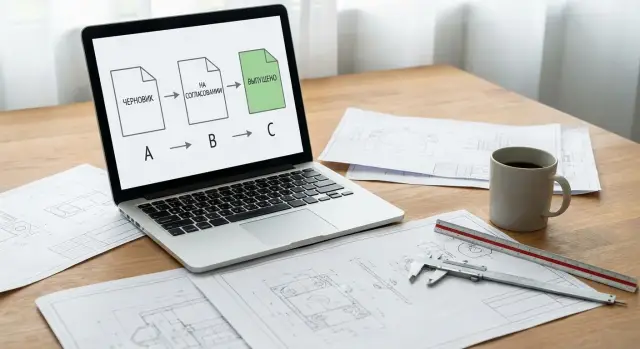
Why releasing drawings in Vault often becomes a manual routine
When Vault and Inventor are used "as-is", releasing drawing documentation (DD) quickly turns into habits: rename the file, copy it to a "Release" folder, add a suffix _R1, email the PDF. At first it seems fast, but after a couple of months these actions start to cause trouble: duplicates appear, links are lost, and errors are hard to trace.
Usually the routine begins with trying to manage a document's status via the file name and folder. An engineer renames a file to show "approved" or "released", while Vault just sees a new file or a new path. Search results show copies, the project gets files like "final_final2", and links between model and drawing easily break after copying.
Revisions are a separate pain. If only the drawing's revision is bumped while the 3D model remains unchanged, the BOM and PDF quickly live in different "versions of truth." Later someone opens the assembly and gets the current model, but prints an old drawing because it sits in another folder and has the "right" name. This creates confusion between model, drawing, and parts lists.
Parallel work by multiple engineers worsens the problem. Without clear statuses and approval rules the same patterns repeat: two people edit the same part, someone releases a PDF while another is still changing dimensions, assemblies pull in draft components, and the approver looks at the wrong file.
With proper configuration the process becomes predictable: status is visible without renaming, revision is recorded consistently for related documents, and PDFs and BOMs are produced by a single, repeatable flow. Documents are easier to find, errors are found faster, and time goes to engineering rather than moving files around.
Basic concepts: status, revision, and lifecycle
In Vault it's easy to get confused if you mix three different things: designation (document number), file name, and the name shown in the project. The file name is for the system and people to store and find the file. The designation is for release and usually goes into the title block. The designation can live as a property and does not have to match the file name. If you tightly link these things, any edit becomes manual renaming.
Status and revision answer different questions.
Status shows where the document is in the process right now: in work, under review, approved, released, obsolete.
Revision shows how many times you've released changes as an official DD version. Status can change many times without a revision change. Revision is incremented only when you record a change and release a new set.
A lifecycle in Vault is the set of statuses and rules for transitions between them. Rights and routes attach to the lifecycle: who can send for review, who can approve, who can return for rework. The fewer exceptions, the fewer manual actions and the easier it is to explain the process to a newcomer.
A release usually involves a bundle: 3D models (parts and assemblies), 2D drawings, the bill of materials (BOM), and derived files like PDF/DXF/STEP. It's important to decide up front what you consider the "release package" and to release it as a whole.
What to define before configuration: roles, rules and release format
Before configuring statuses and lifecycles, agree on the rules. Otherwise Vault will behave "correctly" but differently for each person, and that quickly leads to workarounds.
First define roles and responsibilities: who develops, who checks, who is responsible for standards control, who has the right to release. Decide in advance where the final "OK" is placed, because rights for changing statuses and releasing will be built around that.
Next fix the revision scheme. Choose one format (letters or numbers) and don't mix them. Then write a simple rule: when the revision is increased and when only the status changes. For example, a typo in a note that doesn't affect the product is usually the same revision, but the document can be returned "for rework." Changes to dimensions, material, fits, or composition of the product mean a new revision.
Also agree on output formats considered part of the release. Typically this is a PDF for viewing, a BOM in an agreed format, and if needed DXF/STEP for manufacturing or subcontractors. This is where manual exports, copies, and "correct" file names most often appear.
Finally, define mandatory attributes that must always be filled. Minimum: designation, title, material, mass, drafted/checked by, sheet/total sheets, format.
If you need starter questions for a regulation, five are enough:
- Who is allowed to change a document to "Released"?
- Which revision scheme is used and where is it stored (in properties, not in the file name)?
- What changes require a new revision and what only a status change?
- What output formats are mandatory?
- What properties must be filled before review?
Status scheme: short and clear
To prevent release from turning into endless emails and manual agreements, keep the lifecycle short and unambiguous. For most teams a chain where each status answers one question is enough: is editing allowed, who reviews, and what should be produced at the end.
A basic option:
- Draft: the designer edits, assembles the composition, fills properties.
- Under review: edits are possible only after returning; the reviewer records comments.
- Under approval: the document is ready and goes through formal approval.
- Released: changes are forbidden; available for production and for generating derived files.
- Archive: the document is removed from active work and kept for history.
Set transition rules immediately. If everyone can change any status, statuses become labels. In practice a simple split usually works: the designer sends for review, the reviewer advances or returns it, the responsible approver releases.
For returns it's convenient to have a separate status "For rework" and require a comment with the reason for return. This shows why the document was returned and what was fixed.
For the "Released" status it's sensible to include a ban on edits and on "silent replacement" of files. If a released document must be changed, there is only one path: process the change and release a new revision.
Revisions without confusion: when to bump and how to record changes
A revision should reflect a controlled change, not every file save. In Vault the version increases on every save, while the revision changes only when you deliberately record a new release.
Bump the revision when the package should be considered different from the perspective of production, procurement, or operation: material, dimensions, fits, composition, requirements, interfaces. Cosmetic edits (like a callout or spelling) are usually not a reason to increase the revision if the document's applicability doesn't change.
It's better to store the reason for the change where it won't be lost: in the Vault properties/card and in the check-in comment. The comment should be short and clear: what changed and why.
Model - drawing - BOM linkage
Confusion begins when a part is one revision, the drawing another, and the BOM "lives separately." A simple working rule: release a package, and it has a single revision.
Before increasing a revision, check that the 3D model and 2D drawing match, the BOM is recalculated, and all related files are moved to the correct status in one action (as a set/package, not one by one).
Archive and finding old revisions
Don't store old revisions in separate folders "just in case" and don't make manual copies. The correct archive is past states in Vault: accessible for viewing and comparison but protected from edits. Then it's easy to see what was released as Rev.A, how it differs from Rev.B, and why.
How to avoid manual renaming: properties and templates
Manual renames almost always start from one mistake: trying to keep designation and title in the file name. It's more reliable when key data live in properties (iProperties and Vault properties) and the file name remains stable.
Make sure title blocks, BOMs and PDFs pull fields like "Designation", "Title", "Material", "Mass", "Revision" from properties. Then when text or version changes you won't need to touch the file name and risk breaking links in assemblies.
Use templates and auto-numbering so new files are created consistently. A useful minimum: reserve a number on creation, required properties before sending for approval, and a rule "revision is increased through the release process, not by renaming the file."
Don't overcomplicate folder structure either. Keep basic discipline: one project — one root folder, standard components separate and read-only, no Explorer copies (only Vault operations).
Releasing PDFs and BOMs: make it repeatable
First agree what counts as the release package. Usually it's the sources (drawings and models) plus immutable derived files: PDFs and BOM in the agreed format. STEP/DXF may be added if needed.
Key rule: change to "Released" only after checking dependencies. Lost links, local files outside Vault, or outdated drawings will guarantee a package that can't be reproduced and is hard to prove.
Automation on status change helps: when moving to "Released" the system generates PDFs and exports the BOM and puts them where they cannot be edited manually (a separate "released copies" area with read-only rights). This removes the need to remember how it was done last time.
The most common trap is a mismatch between the assembly's revision and the BOM. The specification must be released from the same revision as the drawing package and stored as part of the release.
Common mistakes in configuration
The first cause of perpetual chaos in PDM is when the team hasn't agreed what status and revision mean. Status is the process stage. Revision is a recorded release. If mixed, people start bumping revisions "to show progress" and history loses meaning.
The second mistake is encoding revision into the file name. Rename a model or drawing and links will break somewhere: in an assembly, drawing, BOM or templates. Keep identifiers in properties and don't touch the file name.
The third problem is releasing only what the customer sees (PDF/DWG) and leaving the model in work, or the opposite. Check the link "model — drawing — BOM — publications" as a single package.
Finally, workarounds like downloading, editing outside the system and re-uploading kill trust in Vault. Define a clear path instead: comments, return for rework, re-review, and release a new revision.
A short checklist before release
Spend 3–5 minutes checking the package before moving it to "Released." This almost always saves hours of figuring out "why production has the wrong version."
- Check model and drawing properties: designation and title are filled in properties and appear in the title block.
- Ensure the assembly has no broken links and that the latest versions from Vault are retrieved.
- Verify revisions on key files: assembly/model, drawing, BOM should match.
- Check permissions: release should be available only to those who actually have the right to release.
- Make sure PDFs and BOMs are regenerated from the current state and placed in the agreed production/procurement area.
If traceability matters (for large enterprises and projects with formal control), make this checklist a mandatory rule.
Example scenario: release and revision without moving files
There is an assembly: 8 parts, 1 assembly, 1 drawing and 1 BOM. The task: release revision A, get comments, fix one part and release revision B without copying or renaming files.
Scenario:
-
The engineer finishes the model and drawing, fills properties and sends the package for review/approval. The file name doesn't change; properties and status change.
-
After approval the package is moved to "Released." At this step revision A is fixed, and PDFs and BOMs are generated as derived files and linked to the release.
-
Comments arrive. The engineer takes a working copy (check-out), changes the model, updates the drawing, checks in the changes and leaves a clear comment: what was changed and why.
-
The package goes through the same statuses again, and when re-released the revision is increased to B. Vault keeps both revisions, and derived files are regenerated for B.
From that point the correct version is found not by file name but by properties: designation, title, revision, status and release date.
Next steps: pilot and process enforcement
Start not with settings but with a short regulation: which output documents are mandatory, who signs, which fields must be filled, and what counts as a change requiring a new revision.
Then run a pilot on one product and release the full package. Based on the results adjust statuses, required properties and templates, then roll out to other projects.
If you need help describing the process, rights, templates and integrating engineering systems in your company, this is usually done with a system integrator. In Kazakhstan such tasks, including supplying and implementing vendor software and supporting infrastructure, are handled by GSE.kz.
Frequently asked questions
How does a status in Vault differ from a revision?
Status shows the current stage of work: draft, review, approval, or release. A revision records the official release of a change. The status can change several times without increasing the revision.
Do I need to include the revision in the file name?
No. Store the designation, name, status, and revision in Vault and Inventor properties. A stable file name preserves links between models, drawings, and assemblies.
Which statuses are needed to release design documentation?
A minimum workflow is: “Draft,” “Under Review,” “Pending Approval,” “Released,” and “Archived.” If needed, add “Rework” to track returns with comments.
When should I increase the revision of design documentation?
Increase the revision when a change affects manufacturing, procurement, or operation: dimensions, material, fits, composition, or requirements change. A routine text edit can be made without a new revision if the document’s applicability has not changed.
How do I synchronize a model, drawing, and bill of materials?
Release them as a single package. Before release, update the drawings, recalculate the BOM, and verify that related documents receive the same status and revision.
Can a document be changed after it receives the “Released” status?
Lock the released package against direct editing. If a change is needed, return the documents to work through the approved workflow, make the edits, complete the review, and release a new revision.
How can I automate PDF and BOM release from Vault?
PDFs and BOMs are usually generated when a package is moved to the “Released” status. Automation creates them from approved source files and saves them in an area where users can only read the files.
Which properties should be mandatory?
Use templates with completed iProperties and automatic numbering. Before sending files for review, Vault should require mandatory fields: designation, name, material, mass, designer, reviewer, and sheet data.
How do I store old revisions without copies in folders?
Do not create folders with manual copies. Vault stores previous states and lets you open or compare the required revision while preserving the change history and comments.
Who should move design documentation to the “Released” status?
Assign permissions by role: the designer sends files for review, the reviewer returns them or forwards them for approval, and an authorized employee releases the package. This ensures the status reflects an actual decision, not an action by any user.
