8 min read
Academic Process Management System at a University: Data Model
Academic process management system for a university: how to model schedules, groups, courses and gradebooks, and how to handle teacher and dean roles.
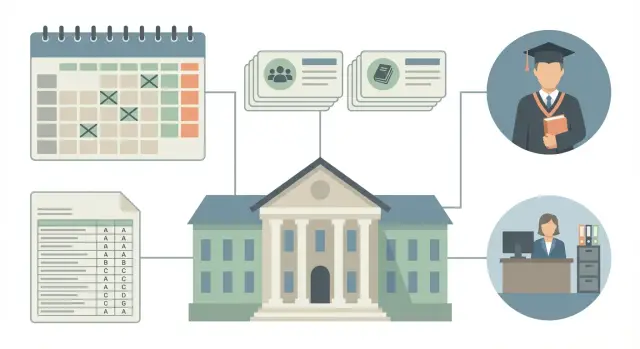
Why a single academic management system is needed and what problems it solves
When academic-process data live in different files, chats and spreadsheets, staff spend time reconciling versions instead of organizing learning. A single academic management system is needed so that schedules, workloads, gradebooks and reports rely on one source of truth, not a dozen “most recent” documents.
Spreadsheets are convenient at the start, but they quickly break in real conditions: rooms change, teachers travel, groups split into subgroups, academic debts appear. As a result, the same field (for example, “who leads the class”) is stored in multiple places and begins to diverge.
Most often the following are lost or duplicated:
- the current version of the schedule;
- the link between a course and the group/semester;
- actual teacher workload;
- grounds for retakes;
- the history of grade edits and who made them.
Then this turns into disputes: “my gradebook shows one thing,” “the dean’s office shows another,” “the schedule shows a third.”
A unified system solves key tasks without manual data copying: it helps plan and publish schedules with conflict checks, calculate planned vs actual workloads, manage gradebooks and retakes with clear change histories, and prepare reports for leadership and auditors without manual assembly.
Start automation where most errors and calls happen: schedules and gradebooks. A typical scenario: the dean’s office moves a class due to an event, the teacher posts grades according to the old schedule, and the class rep shares an outdated file. If the system stores unified entities and logs changes, such discrepancies become rare and quickly detectable.
Users and scenarios: who needs what
To keep the data model compact and consistent, start from roles, not tables. In an academic system different people make different decisions and each needs a specific set of data.
Students need daily answers: where and when a class is, who the teacher is, what assignments exist, what grades are already recorded and whether there are outstanding debts. They don't need internal administrative fields or reasons for approvals, but they must see current information and retake history.
Teachers need a working set: lists of groups for a class, attendance journal, gradebook for entering grades, topics and course materials. A teacher should not be able to change group composition, the curriculum, or move classes without approval.
The dean’s office and academic affairs handle rules and control. They need to create groups and streams, record transfers and academic leaves, assign courses and teachers according to curricula, approve schedules (including substitutions), open and close gradebooks, and view reports on debts, workload and completion of gradebooks.
Access rights are easier to model based on actions. For example, a teacher enters grades only in their own gradebooks and only before a gradebook is closed, while the dean’s office can reject an entry, request confirmation and reopen a gradebook with a mandatory comment.
Leadership usually needs a short set of reports: curriculum fulfillment by semester, debts and retakes, teacher workloads, an audit trail of grade and gradebook changes, and schedule quality (room conflicts and teacher overlaps). Consider these requests early so you don’t have to collect data manually from different sources later.
How to think about the data model: entities and relations
A good data model starts with a simple question: which data hardly change and which appear or change every semester. That makes it easier to separate reference data (stable entities) from documents (facts and events). This greatly reduces confusion and backdated edits.
Reference data live for years: faculties, departments, rooms, class types, positions, grade types. Documents are period-based: curriculum for an intake, workload distribution, weekly schedule, course gradebook, an order changing a group.
To keep relations stable, agree on identifiers in advance — what is considered unique. For example, a “group” is often not equal to a string like “IS-21”: codes can repeat across programs or years. It's more practical to store a unique key as a combination of program (major), intake year and group code. For a course the same applies: the same name can mean different versions, so course code and link to the curriculum matter.
Relations are convenient to build from a base path: group -> curriculum -> course -> teacher. Along this path academic events (classes) and control documents (gradebooks) appear. A class is usually unique by academic period, group or stream, course, class type, date and time slot, and room.
Historicity: don't overwrite the past
Changes are inevitable in academic data: class moves, teacher substitutions, retakes. Instead of overwriting, store versions with effective dates (valid_from/valid_to) and an active flag.
Example: a course’s teacher changes mid-semester. If you simply update the “teacher” field in one record, you lose who taught earlier classes. Versioning preserves both parts of history and helps correctly close gradebooks.
Quick resilience test for the model
- Can you reconstruct the state for any date of the semester without manual notes?
- Are there unique keys for group, course and class?
- Are reference data separated from documents so you don’t edit the wrong thing?
- Can you store reasons for changes (order, memo) as separate documents?
This logic will be useful later when the system is deployed on reliable infrastructure, for example on local servers or an organizational data center.
Entities for students, groups and streams
To keep schedules, gradebooks and curricula consistent, agree on terms from the start.
- Group — a stable set of students sharing a curriculum and administration.
- Year (course) — the year of study (1st year, 2nd year).
- Stream — a merge of several groups that attend a course together (for example, a common lecture).
A subgroup is needed when a group is split for practicals, labs or language classes. In the model this is not a “class type” but a separate entity (or an attribute within the group) so schedules and gradebooks are collected correctly.
Minimum set of entities:
- Student: full name, identifier, status (enrolled, academic leave, expelled), contacts.
- Group: code, year, study form (full-time/part-time), instruction language, campus, curator.
- Stream: name, academic year (semester), list of member groups.
- Subgroup: number (label), link to parent group, size.
A common mistake is storing a single “group” field on the student. It's better to keep a student-in-group history table with start and end dates, reason (transfer, reinstatement) and a “current” flag. Transfers between groups won’t break reports or gradebooks for past semesters.
Next are restrictions that affect scheduling and workload: capacities of groups and subgroups, allowed joint classes (two groups in one stream), bans on mixing by study form or language (if the university enforces this), campus constraints (if rooms are not shared).
Example: two second-year groups study in the same language but at different campuses. Lectures can be combined into a stream only for remote format or with a special “intercampus stream” rule, otherwise the schedule will create physically impossible classes.
Courses and curricula: how to describe academic content
To avoid a system of disconnected reference lists, separate levels: course, module and topic.
- Course (e.g., “Databases”) lives in the curriculum and has hours, assessment form and department link.
- Module is useful for large courses with logical blocks and milestones.
- Topic is helpful for a syllabus and class content, but usually does not participate in workload calculations or gradebooks.
Store the curriculum as a versioned entity. The same “program plan” changes by intake year — editing the current plan breaks history. A practical rule: have a plan header and then a “plan version” fixed for a specific intake year (and if needed for language and study form). Groups and students refer to that version so you can retrieve original requirements after 3–4 years.
Inside a course explicitly describe components so schedules and workloads are calculated consistently. Usually enough: lectures, practicals, labs, independent work, consultations (if the university counts them as hours).
Keep assessment forms separate from components: exam, pass/fail, term paper, project, differentiated pass. Also define what appears in gradebooks and how. For example, a course may have a “pass” as final but also a term paper as a separate grade that influences the final result (or not, if it’s an independent assessment).
Example: for the 2024 intake a plan version fixes that “Programming 2” is in semester 2, has 30 lecture hours, 30 practical hours, assessment form “exam” and a separate course project. The dean’s office then knows which gradebooks should open at the semester end and teachers know which grades are required.
Schedule: structure, constraints and versioning
Build the schedule from simple building blocks. The basic entity is a class (session): date, start and end time, type (lecture, practical, lab), course, group or stream, teacher and room. It’s often useful to store the format (onsite or remote) and a subgroup flag when one group splits into two.
The most common source of chaos is overlaps. Prevent them with rules checked on save and on publication:
- a teacher cannot have two classes at the same time;
- a room cannot host two classes simultaneously;
- a group (or subgroup) cannot have two classes in one slot;
- time slots must fit into the approved timetable grid;
- each class should have a clear owner (who created it and who approved it).
Changes to the schedule are inevitable, so treat them as events, not overwrites. It’s practical to have change types (teacher substitution, time change, room change, cancellation, addition) and store a reason, timestamp and initiator.
Versioning answers “what is the real schedule.” A convenient lifecycle: draft (editable), under review (frozen for edits, comments only), final (published), and if needed a new final version for a specific period.
Example: a teacher fell ill on Wednesday morning. The academic office creates a “substitution” event, the system checks overlaps and issues a new final version for that week without breaking already closed weeks of the semester.
Gradebooks and grades: tracking and change control
A gradebook is the document linking grades to context: group (or stream), course, period (module, semester), assessment form and responsible teacher. Immediately separate gradebooks by type: ongoing, milestone, exam and retake. That avoids mixing rules and deadlines.
A grade inside a gradebook should usually be more than a single number. That helps support different scales (5-point, 100-point, letter) and admission logic.
Store: scale and raw points, final value in the gradebook (rounded according to university rules), admission flag and basis, attempt (first attempt, retake N), date, and entry status (draft, submitted, confirmed, closed).
The most painful area is edits. Teachers should correct mistakes before gradebook closure; the dean’s office manages exceptions. A common practice: any edit after submission goes through a request and is recorded in a change log (who, when, what was, what became, reason). After final closure edits are either forbidden or allowed only by official decision with a mandatory comment.
Example: a teacher entered points for a milestone test, a student provided proof of a valid reason. The dean’s office opens a retake, a separate retake gradebook is created with a new attempt, and the original entry remains in history without being erased.
Roles and rights: teacher, dean's office and academic affairs
Build permissions not from job titles but from actions: who inputs data, who verifies, who approves and who can reverse a decision. That reduces conflicts and clarifies responsibility.
Teacher
Teachers need quick operations related to their classes. They usually see only the groups and courses where they are appointed as lead or co-teacher. They mark attendance, record ongoing grades and comments, and prepare final results.
Separate draft and final: before period closure teachers can correct entries, but changes should leave a trace in the log.
Dean’s office and academic affairs
The dean’s office is responsible for the academic process across programs: it assigns groups to courses and teachers, monitors deadlines, starts and finishes assessments, closes gradebooks and handles disputes (for example, admission to an exam).
Academic affairs sets general rules: timetable grid, class types, rooms, constraints on gaps, overlaps and workload, and maintains the semester calendar.
To avoid chaos, define a short permission matrix for key entities (schedule, course, group, gradebook): read, create, edit (until approval), approve, annul (with mandatory reason and log).
Example: a teacher submitted final grades and sent the gradebook for approval. The dean’s office checked deadlines and group composition, approved and closed the gradebook. If a mismatch is later found, the dean’s office annuls with a reason, the gradebook returns to work, and the system preserves the history of all versions.
Step by step: design the system without unnecessary complexity
Focus on the real life of a semester. Take one faculty and one semester and follow the process from the first schedule draft to gradebook closure. Record who initiates actions, which documents appear, where edits occur and what counts as final.
Then list entities in plain language: group, course, class, room, teacher, gradebook, grade, order. Next to each write key fields actually needed: academic year, class type, workload in hours, period, basis for change.
It’s useful to lock this in a small data prototype. For example: IT faculty, 1st year, two groups, one stream, course “Mathematics”, three teachers, 16 weeks. Verify you can change a room for one class, substitute a teacher for a week, move a class and not break the gradebook.
To avoid getting stuck in approvals, define statuses and control points:
- Draft, Under review, Approved, Closed.
- Who changes status.
- What is forbidden to change after approval.
- How corrections are recorded: new version or edit.
Also plan logging. Teachers typically need to view their schedule, enter grades and comments, and request retakes. The dean’s office needs to approve schedules, assign teachers, open and close gradebooks, and run reports. Log every action on grades and gradebooks: who, when, what changed and why.
Common design mistakes and how to avoid them
Problems in academic systems usually arise not from complex logic but from incorrect entity boundaries and lack of change control.
One typical trap is treating “course” and “curriculum item” as the same. Course is a reference (name, code, department). In the curriculum the course gets context: semester, hours, assessment form, program and stream link. Separate these levels or edits to the curriculum will break reports.
The second mistake is living without history. If you don’t record teacher substitutions, class moves and room changes as events with date and reason, after a month it will be impossible to explain why a group “lost” classes and who actually taught them.
The third is unlogged grade edits. Grades should change only through logged operations: who changed them, when, and for what reason (retake, appeal, correction).
Include from the start: statuses for gradebooks (draft, under review, approved, closed), overlap checks for teachers and rooms in schedules, roles (teacher inputs, dean’s office confirms and closes) and history for schedules and gradebooks (versioning instead of overwrite).
Example: a teacher was substituted for two weeks while the gradebook was partially filled. With versioning you can see who taught on which dates and why access to grades was temporarily with another person.
Short checklist before launch
Before launch run basic checks once, to avoid weeks of investigating “why everyone has different data” and “who changed the grades.”
Data, relations and responsibility
Reference data should be unified and stored in one place: groups, courses, teachers, rooms. Avoid duplicates like “Ivanov I.I.” and “Ivanov Ivan” as different people.
The schedule should be stored as an entity with version and status. It must be clear where the draft is, where the approved version is, and who changes status.
A gradebook should be linked to the curriculum, group (or stream), period and have a responsible person. That prevents accidentally attaching it to the wrong course.
Describe access rights with a simple role matrix (teacher, dean’s office, academic affairs, administrator) and test common actions: create a gradebook, set a grade, change a room, approve a schedule.
Change logs must be enabled for key objects: schedule and grades. It should show what was changed, when and by whom, plus a reason (at least a short comment).
Also check that reports and exports read data from the same entities, not from “temporary tables” or manual Excel files.
Pilot and readiness for support
Limit the pilot: one faculty and one semester, with 2–3 typical scenarios (for example, schedule approval, gradebook opening, retakes). After the pilot, record model and role adjustments.
Prepare a support plan for the first month: who receives requests, response times, and where documentation is stored. If infrastructure is local, assess load and reliability; if servers and 24/7 support are needed, include that upfront (for example, via a system integrator and a service network like those offered by GSE.kz).
Example scenario: one semester from the dean’s office and teacher perspectives
Faculty: 3 departments, 6 first-year groups (for example, IS-101...IS-106), 2 buildings. The dean’s office needs the full picture while the teacher needs only their classes, groups and gradebooks.
The semester starts from the curriculum: for each group courses, hours, class types and periods are already known. Based on this the dean’s office (or academic affairs) creates streams where lectures are shared and assigns workload: course + class type + group or stream + teacher + weeks. This provides the basis for the schedule and future gradebooks.
Next the schedule is built. For each class record date, slot, room, building, group or stream, course, teacher and class type. Store schedule versioning or at least a change history to explain why a class moved.
Mid-semester a teacher falls ill and a substitution is needed. Record the change as an event (teacher substitution or class move) with reason and confirmation time. The dean’s office sees this in the log and students don’t get duplicate entries.
After checkpoints gradebooks are opened. Distinguish gradebooks by attempt: main, retake, commission. Gradebooks should have explicit attributes: group, course, period (semester), type (exam/pass), attempt (1, 2), basis (order/admission) and status (draft, submitted, closed). Then retakes don’t overwrite the main one.
At semester end the system produces reports: closed gradebooks by department, list of debtors, teacher workload (plan vs fact), attendance, and summaries for group decisions on promotion or expulsion.
Next steps: pilot, infrastructure and support
Start with a pilot in one faculty or institute. Choose 1–2 typical curricula, several groups and a couple of departments. The goal: test scheduling, grade entry and gradebook workflows in real conditions, collect feedback and adjust rules while the scale is small.
Before starting prepare the base data, otherwise even a good model will stall: assign owners for reference data (groups, courses, rooms, teachers), approve roles and rights, agree on change rules (editing windows, approvers, how reasons are logged), prepare order and regulation templates, and decide the support channel and SLA.
For infrastructure prioritize reliability and predictability. You need servers with spare capacity, a stable network, workstations in dean’s offices and departments, and backups. Minimum set: daily backups, access control, action logging, and quarterly test restores from backup.
Engage a system integrator if you have tight deadlines, many campuses, complex integrations (HR, accounting, LMS), or strict availability and security requirements. They’re also useful when 24/7 support with clear response rules is needed.
GSE.kz can cover practical implementation: install servers and workstations of Kazakhstan production, assist with system integration and support. This is useful when a university plans to host the system on its infrastructure and wants a clear support scope from the start.
Frequently asked questions
Why does a university need a unified academic process management system?
It brings schedules, teaching loads, grade sheets, and reports together in a single data source. Staff see one current version instead of comparing several files and spreadsheets.
Where should academic process automation begin?
Start with schedules and grade sheets. These processes most often cause errors, calls, and disputes because changes quickly become inconsistent across the dean’s office, instructors, and students.
How does a group differ from a cohort and a subgroup?
A group brings together students with a shared curriculum and administration. A cohort brings together several groups for joint classes, such as lectures. A subgroup divides one group for practical, laboratory, or language classes.
How should a student’s transfer to another group be recorded?
Keep a history of each student’s group membership, including start and end dates and the reason for transfer. This way, the system retains data from previous semesters and does not distort old grade sheets.
Why should a course and a curriculum be stored separately?
A course stores permanent information: its code, title, and department. A curriculum item adds context: the semester, hours, assessment format, syllabus, and admission year.
What checks are needed for the schedule?
The system should check for conflicts involving instructors, rooms, and groups, as well as compliance with the approved timetable. Checks are needed both while editing and before publishing the schedule.
How should rescheduled classes and instructor substitutions be recorded?
Do not overwrite the old entry. Create a change event with its type, reason, date, initiator, and the new version of the schedule. This lets the university determine who moved a class or replaced an instructor, and why.
What data should a grade sheet contain?
A grade sheet links a grade to a group or cohort, course, period, assessment format, and responsible instructor. For each grade, store the scale, points, attempt, status, and reason for a retake.
Who can change grades in the system?
Instructors enter grades only for their own courses and before the grade sheet is closed. The dean’s office reviews and approves them, opens retakes, and documents exceptions with a comment.
Why is an audit log for grades and grade sheets needed?
Record the author, time, old and new values, and the reason for each change. Once a grade sheet is closed, allow edits only through a separate decision by the dean’s office.
