8 min read
Universal approvals in a system: statuses and escalations
Universal approvals in a system: statuses, timeouts, escalations, signing and delegation — add processes without rewriting core logic.
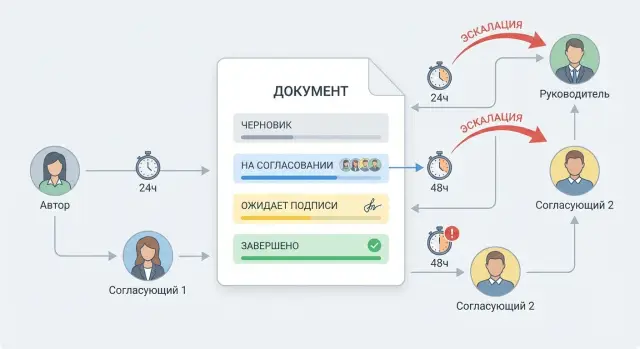
What "universal approvals" mean and why they matter
Universal approvals in a system mean the same mechanism routes different types of documents: requests, contracts, invoices, HR orders, IT changes, procurements. What changes are settings: who approves, in what order, what deadlines, and what happens on timeout — not code or core logic.
When document types multiply, hard-coded logic for a single template quickly becomes a problem. Today you implement a process for contracts, tomorrow you add server procurement, the day after — an internal regulation. Each time you end up copying rules, fixing exceptions and explaining to users why the same action behaves differently.
The same questions usually come up first: who and when will remind that a task is stuck; what to do if someone is on vacation; how to separate approval from legally binding signature; where to see who made a decision and on what basis.
In an organization where approvals run in parallel for supplies, IT infrastructure and service work, a universal approach brings predictability. Employees understand statuses, managers see delays, and security gets a clear audit trail.
A good outcome looks like this: one engine, processes defined by parameters. It has common rules built in — a unified model of statuses and return reasons, SLAs and escalations by role, a separate signing step with checks, delegation without losing accountability or history. Adding a new document type becomes a configuration task, not "rewrite the logic".
Basic entities: document, route, step and task
To avoid rebuilding approvals for every new process, first agree on simple entities and their boundaries. Then you can add new document types and routes without touching the core.
Document — the item that goes through approval: a request, contract, memo, procurement. It has an author (initiator) and final states, for example: Draft, In approval, Rejected, Signed, Withdrawn.
Route describes the rules for document movement: who takes part, in what order and under what conditions. Inside a route are steps, and a step contains one or several tasks. A task is always addressed to a specific performer (approver or signer). An observer can follow the process but does not make decisions. An administrator configures rules and handles exceptions.
A minimal set of objects usually looks like this:
- Document: data and the process outcome.
- Route: approval scheme and rules.
- Step: a logical stage (for example, legal, finance, security).
- Task: a concrete action for a specific person.
- Decision: result for a task (approved, rejected, needs revision) and a comment.
It's important to distinguish task and document states. A task can be new, in progress, completed, overdue, delegated. Meanwhile the document might remain "In approval" until all required tasks finish or move to "Needs revision" after a rejection.
Everything further is driven by events that change states predictably: sending a document to a route, a decision on a task, timeout expiration, delegation of a performer, or withdrawal by the initiator.
Example: a procurement request is a single document but many tasks — each task has its own lifecycle until the document reaches a final outcome.
Statuses: designing a clear model
To keep a universal scheme from turning into a set of special cases, statuses should describe meaningful states of an object or step, not specific people or departments.
Minimal set of document statuses
Start with a short set and stick to it. If you add a status for every role ("with legal", "with security", "with finance"), the model will quickly bloat and become hard to maintain.
Usually these states are enough: Draft, In approval, Awaiting signature, Needs revision, Cancelled, Completed. They answer the main question: is the document moving, waiting for action, or closed?
Step and task statuses
Define step statuses separately because a document can be "In approval" while a specific step is already "Rejected."
A suitable minimum for a step: Not started, In progress, Passed, Rejected, Skipped. "Skipped" is useful for rules like "if the amount is below the threshold, finance control is not required."
To make decisions auditable, store with each transition:
- reason (comment or reason code)
- who initiated it (user, system, delegate)
- time of the event
- source (web, mobile, integration)
Example: a school’s request to buy PCs went "In approval" then returned as "Needs revision" with reason "missing commercial offer." The initiator of the return was the manager, not the reminder system.
Approval routes: sequence, parallelism and rules
Design routes as configuration, not code. Then adding a new document type is just configuration: choose a route template, roles, completion rules and deadlines. The engine logic stays the same; only parameters change.
Step types and how to combine them
A route step is a "package" of tasks for approvers. In practice a few typical variants are enough and can be mixed within one route:
- Sequential step: tasks proceed one after another.
- Parallel step: tasks are sent to everyone at once; the step closes based on a completion rule.
- Mixed step: first parallel (e.g., experts), then sequential (managers).
- Conditional step: included only if a condition is met (amount, category, risk).
A good practice is to define steps as repeatable groups, not individual names. For example, "initiator’s manager", "budget owner", "security team." At runtime the system resolves actual people from the org chart. If a manager changes, routes need not be rewritten.
Step completion rules
To avoid parallel steps getting stuck, define what counts as "passed":
- All: responses from everyone required.
- Majority: N of M suffices.
- One key approver: step closes when a person with a specific role approves.
- Combined rule: key approver plus at least one expert.
Example: for server procurement, security and operations give parallel approvals first, then finance director and manager approve sequentially. For a different document type (e.g., an acceptance certificate), you pick another route template without adding special logic.
Timeouts: deadlines, reminders and expiration rules
Timeouts prevent approvals from stalling. Model them as part of the process, not as ad-hoc features.
SLA is convenient at two levels. Step SLA — overall time for the stage (for example, "Finance approval must finish within 2 business days"). Task SLA — time for a specific performer within a step (for example, each of two approvers has 1 business day). This makes it easier to manage parallel approvals and substitutions.
Typically three timeout types are enough: start (assignee must take the task within N hours), decision (make a decision before the deadline) and signature (a separate deadline when an e-signature or other signing form is required).
Most important is deciding what the system does when a deadline passes. Use a "soft first, then hard" approach: reminder, then escalation, and auto-decision only for low-risk cases and by explicit rule. For critical steps (for example, security) it may be appropriate to halt the process until a decision.
Example: a server purchase request for a public body goes to approval. Start: 4 hours; decision: 1 business day. If the deadline passes, the system first sends a reminder, after 2 hours it escalates to the manager. There is no auto-decision because the amount exceeds the limit.
Count non-working time simply: keep a working-time calendar by country and calculate deadlines in business hours. Deadlines that fall on weekends or holidays move to the nearest working day at the same time.
Escalations: raising the issue without manual tracking
Escalation is needed when a task stalls: the person is on leave, overloaded, or misses notifications. If you define rules once, they apply to any document type without per-process logic.
Usually three escalation types suffice: by role (change the role's performer), by level (task goes to the manager), by group (switch to on-duty staff or a queue, e.g., "financial controlling").
To avoid escalation becoming spam, set limits and intervals: first escalation after N hours or days overdue, repeats not more often than a set interval, max 1–3 escalations per task. After the last one — either auto-reject or mandatory manager decision.
The most common failure is loss of accountability. A task must have a single "owner" at any time. After escalation the owner changes (or expands to a group), but the system records the chain: who was assigned, who accepted, who refused, who passed it on. This prevents "I thought someone else would handle it."
Example: a server procurement request for a project (e.g., S200 racks for a data center) stalls at finance approval. After 24 hours a reminder is sent; after 48 hours the task goes to the finance manager and the original approver is notified that the task was escalated.
Keep logs and clear notifications: which condition triggered the escalation (overdue, absence, refusal), which rule was applied, who became the new performer and when.
Signing: a separate step with clear rules
Treat signing as a separate step, even if something was already "approved." Approval means a person checked the content and allowed it to move forward. Signing is different: the signer assumes legal responsibility, and the system must be able to prove this to an auditor. It’s convenient to model signing as a special task type with elevated rights and thorough logging.
The difference in rights is usually simple: an approver can comment and send back for revision but is not required to lock the final version. A signer works with the final version, and after signing the document must be protected from silent edits.
Signature variants are better supported as settings of one step rather than separate processes. In practice you see confirmations in the UI (for internal rules), e-signatures / qualified electronic signatures for legally significant documents, and server-side signatures — when a service signs according to a strict rule with limited access.
Key point — what exactly is signed. A signature must be tied to a version: either a specific file or a snapshot of form fields. If a document is updated after signing, the system shows that the signature applies to an earlier version and requires resigning.
For an evidentiary trail store at least: date and time (with timezone), who signed and in what role, version identifier and content hash, verification result and reason for refusal, certificate data (if applicable), and technical footprint (device, IP, session id).
Delegation: substitutions without losing control
Delegation ensures the process keeps moving during vacation, sick leave or business trips. Make it a clear rule: who can delegate to whom, for how long, and how it appears in the log — not a hack.
Usually two modes are distinguished. Manual delegation by the employee or manager when they know they'll be unavailable. Auto-delegation triggered by absence calendars or HR status.
Set limits explicitly to avoid risks and confusion: delegation only within the unit or by role (e.g., "manager’s deputy"), mandatory start and end dates, prohibition of "further delegation" where critical, and special rules for financial limits (amounts above a threshold require the manager).
Decide what happens to already created tasks. Practically, separate behaviors: "new tasks route to the deputy automatically" and "current tasks are either transferred or remain with the original assignee." For urgent processes (e.g., server procurement) active tasks are usually transferred while keeping history: who was assigned and who actually made the decision.
Users should see delegation in the UI and the report: "Decision made by Ivanova as deputy for Petrov (delegation until 2025-02-15)."
Changes during the process: withdrawal, revision, repeat
In reality processes almost always change: a document is withdrawn, sent back for edits, or a re-run is started. If you don't design these scenarios from the start, you'll later add logic per document type.
Initiator withdrawal is usually allowed only until the point of no return — often when signing begins or at least one approver has decided. On withdrawal you must not erase traces: active tasks move to "cancelled", reason and who withdrew are recorded, and completed decisions remain in history.
Revision after comments works as a managed cycle: "returned for revision" -> "initiator fixed" -> "re-approval." To avoid proliferating copies, store document versions (number or hash) and tie the re-run to a specific version. This shows exactly what changed and when.
Partial re-approval can be supported but only by rules. If a section affecting finance changed, it makes sense to re-send finance and legal, while technical approvals can remain valid. It helps to mark fields that trigger re-approval: "requires re-approval when fields X change."
To prevent endless returns, set discipline: cap revision attempts (for example, 2–3), require a return reason from a controlled list plus a comment, block re-submission without changes to key fields, and set a rule "after N returns — escalate to the process owner."
Example: a server procurement request was returned for incomplete justification. The initiator added calculations and re-submitted. The technical step stayed valid, finance re-ran because amount and deadlines changed.
Common mistakes when implementing universal approvals
The main issue almost always is this: teams build a universal process as a set of private cases. As a result, new request types can only be added by code changes, not configuration.
Typical mistakes:
- Mixing document and task statuses into one list. The document has its lifecycle (draft, in approval, signed); tasks have theirs (assigned, in progress, completed, overdue). If you merge them, it becomes unclear what happened.
- Introducing exceptions in code: "for contracts do this," "for procurements do that," "for IT requests do something else." You need configurable routes, rules, SLAs and escalations, not if-else branches in code.
- Enabling auto-decisions without transparent logs. If the system moves a step to "approved" (for example, by timeout), the user must see who/what, when and by what rule it happened.
- Losing versions. This often shows up at signing: edits are made after approval and the old version gets signed by mistake.
- Not answering "who is responsible now." This is critical for delegation, staff changes and parallel steps.
Before launch check the basics: are document and task statuses separated, is an immutable audit log enabled (decision, reason, rule, time), is version handling fixed (what is signed and where it's visible), is the step owner rule defined (one responsible person at a time), and are exceptions moved out of code into route and role settings.
Short checklist before launch
Before launch it's useful to check not features but clarity of rules. If a user can't quickly explain what's happening and why, the process will break into exceptions and workarounds.
1) Statuses: can they be explained in one minute?
Ask two people from different roles (an initiator and an approver) what each status means. If answers differ, statuses are too many or overlapping.
Check that statuses reflect the state of a task and a document, not the "emotion" of the process. "In approval" and "Awaiting signature" are usually needed; "In progress with Petrov" is better shown as an assignee, not a status.
2) Timeouts and escalations: what happens on silence?
There must be clear deadlines, reminders and consequences. A reminder without action rarely helps.
Quick questions to run through:
- When is the first reminder sent and to whom?
- What happens when a deadline passes: auto-escalation, change of assignee or a block?
- Who receives the escalation and what will they see in history (date, reason, who did not respond)?
- Can you distinguish "overdue" from "paused for a reason" (e.g., waiting for data)?
3) Signing and delegation: traces in the log
A signature must answer two questions: what exactly was signed (version, files, fields) and how it was proven (type of signature, timestamp, verification result).
Delegation must be transparent: the card and the log must show who acted, on whose behalf and on what basis (substitution, vacation, one-off assignment).
Example process: from request to signature
Imagine buying servers for a new project: the initiator creates a request with justification, amount, specification and deadlines. A single model handles the flow — only the route and roles differ, not the processing logic.
A document’s lifecycle can be described with statuses common to different types:
- Draft
- In approval
- Needs revision
- Awaiting signature
- Signed or Rejected
Example route: budget (finance) first, then security, then legal, after which the document goes to the manager for signature. SLAs work the same: each task has a 48-hour deadline. After 24 hours the system sends a reminder; after 48 hours it records an overdue and triggers escalation.
Escalation: if the security approver doesn't respond in 48 hours, the task status becomes "Overdue" and a new task goes to their manager (or the on-duty team). The original decision is blocked to avoid conflicting answers.
Delegation fits the general rules. If the lawyer is on leave, a substitution activates: the system reassigns the task to the deputy while preserving history of the original assignee and who made the decision.
The main benefit of a unified model: tomorrow you can add another step (for example, standards compliance check), but statuses, timeouts, escalations, signing and delegation stay the same. You change the route, not the process behavior.
Next steps: how to implement without rewriting logic
Start by agreeing the rules. Document which statuses are final, who can start the process, who approves, who signs, and which events move the process forward (created, sent, returned for revision, overdue, escalated).
A practical rollout path:
- Fix roles and step types (approval, check, signing, acknowledgment) and transition rules.
- Collect 2–3 pilot processes of different nature: simple (one approver), parallel (2–3 approvers), with signing and escalation.
- Run pilots on real cases: vacation requests, procurement, system access, contracts.
- Test universality: can a new process be added via settings without new statuses or code exceptions?
- Introduce metrics: share of overdue tasks, average step time, number of revision loops.
Prepare materials ahead to prevent disputes: role matrix, SLAs by step type and reminder rules, escalation rules, delegation policy, a route template for pilots and a list of unsupported exceptions.
Show the prototype early to several stakeholders: the business (usability), security (permissions and audit), legal (signature and storage), IT (integrations with directories and accounts).
If system integration and support are needed during rollout, sometimes it’s easier to engage an integrator. For example, GSE.kz (gse.kz) provides systems integration and infrastructure solutions, which is helpful when approvals are tightly linked to IT processes, procurement and support.
Frequently asked questions
What are universal approval workflows?
It is a single mechanism that routes different documents, such as requests, contracts, invoices, and HR orders. For a new process, you change roles, conditions, and deadlines in the settings instead of rewriting the system's logic.
Why is a unified approval mechanism needed?
They reduce the number of separate scenarios and make processes easier for employees to understand. Statuses, reminders, and action history work the same way even when the documents differ.
What is the difference between a document, a workflow, a step, and a task?
A document stores the data and the overall outcome, for example, "Under approval" or "Signed." A workflow defines the order of steps, a step groups tasks, and a task assigns a specific action to a specific person.
Why can't document and task statuses be combined?
Document statuses show the overall stage of the process: draft, approval, revision, signature, or completion. Task statuses show the state of the assignee's work: assigned, completed, overdue, or delegated.
How do sequential and parallel approvals work?
A sequential step launches tasks one at a time. In a parallel step, participants receive tasks simultaneously, and the system completes the stage according to a rule: after all responses, a majority, or a decision by the assigned role.
What should you do if an approver does not respond on time?
Set a deadline for the step and, if needed, for each task. The system first reminds the assignee, then sends the task to their manager or an on-call group. Enable automatic approval only for safe, predefined cases.
How does escalation work, and is accountability lost?
Escalation changes or expands the group of assignees after a deadline is missed, but it does not erase the history. The system should show who was assigned the task first, which rule was triggered, and who is responsible for it now.
How does signing differ from approval?
Approval confirms that a participant has reviewed the document and allowed it to move forward. A signature records a legally significant decision for a specific version of the document, so it is best handled as a separate stage.
What happens if a document is changed after it has been signed?
Tie the signature to a specific file or saved version of the form fields. If the content changes after signing, the system should require a new signature and retain information about the previous version.
How can tasks be delegated during a vacation?
A substitute receives the task for a specified period, either manually or based on employee absence data. The log retains the original assignee, the reason for the substitution, and the person who made the decision.
