8 min read
Unifying Cables and Power Supplies for a PC Fleet
Standardizing cables and power supplies for a PC fleet: how to choose standards, set up labeling, issuance and storage so repairs go faster and losses shrink.
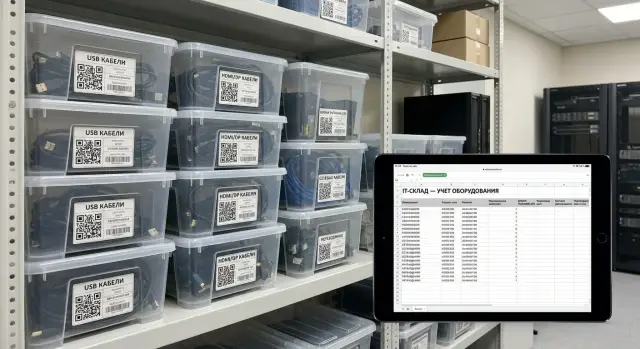
Problem: plenty of cables, but never the right one
In most offices there seems to be enough cables and power supplies. But when you urgently need to replace a PC’s power supply or connect a monitor, a strange thing happens: the exact right item isn’t available right now. That’s the main sign small items lack a standard.
Losses begin quietly. Different PC and monitor models arrive with different cords. Power supplies look similar but differ in connector or power rating. Everything is stored in boxes labeled “wires,” without tracking or clear issuance rules. Cables end up scattered across desks, moves, service bags and temporarily occupied meeting rooms.
The cost of a mistake is usually higher than it seems. The wrong power supply causes downtime due to repeat visits, extra diagnostics and waiting for the right part. Missing a cable means relocating workstations, delaying month‑end closing, stopping an accounting printer or breaking an online meeting because the correct video cable wasn’t found.
Three parties suffer most. The service or IT team spends time searching and checking compatibility instead of fixing things. Finance and procurement receive chaotic “buy anything urgent” requests. Users lose hours of work and start bringing “their” cables from home, which only increases diversity.
To stop this, you need to unify cables and power supplies for the PC fleet: decide in advance which types you support and move everything else into a separate stream.
It usually makes sense to standardize four groups: power (mains cords, power supplies, connector types, spare surge protectors), video (HDMI/DisplayPort and only necessary adapters), network (patch cords and simple USB adapters if needed) and peripherals (USB cables for keyboards, mice, printers, scanners).
Next, acknowledge: the problem isn’t lack of cables but lack of a clear standard, storage location and movement rules. This can be fixed faster than you think if you start with a minimal set of variants and lock them into procurement and issuance.
Inventory: what’s in the fleet and what fails most often
Unification starts not with purchasing but with an honest count of what you already have. Skip this step and you can “standardize” the wrong items and the storeroom will become a box of surprises again.
First, sort the fleet into clear groups: office PCs, all‑in‑ones, workstations and the server area. Within each group record not only models but also where they are located (floor, department, meeting rooms, server room). This quickly shows which devices are critical and where downtime is most expensive.
Then create a short card for each group. Include practical details: which cables are connected daily (power, monitor, network, peripherals), which connectors are most common (IEC C13/C14, DC plugs, USB‑C, DisplayPort/HDMI), which power supplies differ in wattage and type (external adapter or internal PSU), what can safely be replaced with a universal item and what cannot. Add the number of devices in the group and a responsible person.
Be strict with power supplies. Don’t confuse visually similar adapters: voltage, current, polarity (for DC) and connector compatibility matter more than “it looks the same.” For internal PSUs check form factor and wattage, and safety requirements—especially in the server room and in locations with 24/7 load.
Finally, add failure statistics for 3–6 months: what was replaced most often and why. Common causes surface: cable breaks near the plug, worn‑out power supplies, bent contacts, lost adapters. That list becomes your priorities for standards and spares.
Which standards to choose: minimal variants, maximal compatibility
The goal of unification is to keep 1–2 clear options for each consumable and remove all the “almost fits.” Repairs become faster and the storeroom stops being a lottery.
Start with power supplies. For office PCs one standard PSU and one beefed‑up variant with higher wattage usually suffice. A spare margin helps survive configuration changes: today basic graphics, tomorrow an added drive or card and a marginal PSU begins to fail. Separate power for all‑in‑ones: they often use external adapters, so unify by connector and wattage.
A simple rule for power cords and extension leads: two lengths cover most needs. One length for desk use, another for racks or lower outlets. Fix colors too: one color for regular cables, another for spares or the server area so cables don’t “wander” between zones.
To make the standard actually work, forbid items that create risk: non‑standard plugs and rare connectors without a clear source, cheap unmarked adapters without certification, power supplies without protection and without proper labels, cables with damaged insulation and DIY repairs.
Record compatibility in a single table: PC type, required wattage, connector, acceptable substitutes. This helps when the fleet includes typical series, for example desktop GSE L200 and all‑in‑ones M200: for each series you can immediately see what can be taken from stock without extra checks.
Stock norms: how many to keep on the shelf to avoid stopping work
Stock only works when you separate two stories: what is issued to the user as a workstation kit and what sits as a service spare for quick replacements. The user kit should be stable and rarely move between people. The service spare is there to fix failures today, not after the next delivery.
It’s convenient to calculate norms per 100 workplaces and adjust by actual failures and lead times. A typical starting point: mains cord (IEC C13 for PCs/monitors) – 5–10 pcs; laptop or docking station power cords – 3–5 pcs; power supply for a typical office PC – 2–4 pcs; monitor power supply (if external) – 1–2 pcs; adapters and rare cables – 1–2 pcs each type.
Between “normal” and “always required” there are critical positions: things without which a workstation won’t start and items that are frequently lost: mains cords, typical power supplies, one or two most used monitor cables. Set a minimum non‑depletable balance for these. If it’s reached, the storeroom stops issuing until a replenishment request is made.
Then comes the economics: is it cheaper to hold more stock or to reduce the number of models purchased? It’s almost always cheaper and calmer to reduce the “zoo” of power supplies and cables than to keep 1–2 pieces of ten different variants.
A practical guideline: for a fleet of 200 PCs start by doubling norms and review after 1–2 months what actually goes out. If you purchase PCs and servers to a single standard (for example, series from a local vendor), norms can often be lowered: compatibility is higher and positions fewer.
Labeling: so “looks similar” isn’t confused with “fits”
Labeling solves a simple problem: power supplies and cables often look the same but are not interchangeable. If you introduce a standard, labeling must be as mandatory as the list of allowed models.
Decide what to label. Expensive and critical items (power supplies, external adapters, docking stations) should be labeled individually. Cheap, mass items (like mains cords) can be labeled in the package or bundle, but only if they are actually issued in packs.
On the tag write what helps decide in 3 seconds: type and connector (C13, C5, DC 5.5x2.5), parameters (power in W, voltage and current), compatibility (which PC series/models it fits), date of receipt or test, inventory code or stock position code.
Color coding speeds up searches when many similar items are in storage. The simplest approach is to code by one attribute, for example by PSU power (90W, 120W, 180W) or by connector type. The main thing is to fix the legend and not add new colors every week.
To keep labels from peeling off and turning into blank squares, stick them on a flat part of the housing or 2–3 cm from the connector (where there’s less bending), protect with lamination or a transparent sticker, use large font and short designations. If the item is stored in a bag, duplicate the code on the packaging.
Example: if several types of all‑in‑ones and mini‑PCs exist, two adapters labeled “19V 6.32A” may have different connectors. One color and a large label “DC 5.5x2.5, 120W, series M200” removes disputes at issuance and shortens repair time.
Storage: simple organization that lasts for months
If storage is poor any unification falls apart in a couple of weeks: small items mix, “almost the same” is issued instead of the correct item, and good items sit with broken ones.
Start with zoning and make movement one‑way. Physically divide a shelf, rack or cabinet into five places: receiving (all new, not yet sorted), storage (only checked and labeled items), issuing (minimum working set for the day), returns (items brought back) and quarantine (suspicious, broken, unlabeled).
Use simple containers. Boxes and trays should be “by type, not by situation”: a separate tray for C13 power cords, a separate tray for HDMI, a separate tray for power supplies of one voltage. One type – one place. If space runs out it’s a signal to replenish or revise the norm, not to “stack on top.”
To make cables last longer set handling rules and hang them on the cabinet door. Four rules are enough: coil in a loop without a tight knot near the connector, secure with a Velcro strap (not a zip tie), don’t pull by the cable (pull by the connector housing), one cable — one package or cell, no knots.
Create a photo standard of the shelf: one photo of the correct view for each tray (how it lies, how many items, where the label is). Photos usually work better than long instructions.
Example: in an office with 200 PCs returns pile up after a couple of weeks. The quarantine tray immediately shows the problem: unlabeled power supplies. The solution is simple: everything from quarantine is tested, labeled and only then moved to storage.
Issuance and return rules: fewer disputes, more order
When the standard is chosen, order often breaks at the issuance stage. You need a simple procedure: who issues, who authorizes, who closes documents.
Split roles. The storekeeper (or person responsible for IT spares) issues and accepts returns. The IT manager or duty engineer approves issuance for non‑standard cases. Write‑off is done by a materially responsible person with an act, not “verbally.”
Define two scenarios in advance. Temporary replacement: a power supply is issued for the duration of repair, the old one will return or be written off after diagnostics. Permanent replacement: the power supply becomes part of the specific PC kit and will not be returned — only an entry in the device card.
A minimum set of records can be kept even in a simple table but should be uniform: code or serial number (if any), who it was issued to and for which PC (inventory number), date and reason (repair, replacement, new employee), planned return date (for temporary swaps), actual return or write‑off basis.
If “lost/broken,” handle it calmly and consistently. Usually three steps suffice: the employee writes a short note with circumstances, IT confirms it’s a work incident, the storeroom closes the position with a write‑off act or requests compensation according to company rules. This prevents scandals and gaps in records.
Example: a school replaced a power supply in a PC in the computer lab. If temporary, the old unit goes for diagnostics and the new one returns to stock after repair. If permanent, the device card records the new code and the old unit goes to “scrap” and is processed accordingly.
Tracking and replenishment: how not to fall into perpetual mismatches
Even a good standard collapses if consumables live “in a box without an owner.” The goal of tracking is simple: at any moment know how many critical items remain, where they are and when to reorder.
The most workable mode is a short weekly mini‑check. It doesn’t replace full inventory but catches problems before the storeroom suddenly runs out.
The minimal cycle that lasts for years
Choose 5–10 critical items (most used power cords, DP/HDMI, power supplies for typical PCs) and set a procedure:
- Once a week reconcile actual stock with recorded stock.
- For each item set a reorder threshold: “if below N, start procurement.”
- Appoint one person responsible for creating the purchase task and noting the expected delivery date.
- Any issue from stock is recorded immediately (at least in a table): date, who received it, for which device.
After replenishment do not “pour into the common box.” First check the new batch for connector type, power, length, then put it into its cell and update the balance.
Defective items — separate, with a reason
Do not return defective cables and power supplies to the main flow “just in case.” Set aside a “defective” box and record a reason for each unit: overheating, bend at the connector, play, poor contact, signs of repair. In 1–2 months you’ll see whether these are one‑offs or recurring issues.
Revisit the standard if defects repeat for one item, users regularly ask for “another type,” or compatibility is worse in practice than on paper. Then change the standard deliberately, not because the storeroom turned into a mismatch again.
Typical mistakes that make unification fail
The most common cause of failure is when the standard is nominally adopted but regularly circumvented in practice. It becomes a set of “rough recommendations,” not a working rule.
One local purchase of a “nearly the same” power supply quickly breaks the system. It may run some models but have a different connector, wattage or polarity. It then gets put in the “general box” and after a month nobody remembers what it is and what it fits.
The second mistake is storage without separation. When working, defective and “unknown” items lie together, equipment is idle not because of failure but because of searching and re‑checking. A common scenario: an employee takes a cable, it doesn’t fit, returns it to the same box and the problem multiplies.
Third — issuance without recording. “We’ll add it later” usually means “never.” In a couple of weeks power supplies have “disappeared” and the storeroom retains only what no one wants.
Another trap — adapters and extension cables without rules. They are useful temporarily, but if they cover a permanent need the standard unravels.
To avoid these, keep a minimum of constraints:
- Any non‑standard purchase only with approval and marked as “temporary solution.”
- Three storage zones: working, defective and unknown (for checking).
- Issuance and returns recorded immediately, even in a simple table.
- Adapters allowed only for specific models and with labeling.
Then order lasts months, not until the first urgent swap.
Quick checklist for IT and the storeroom
To make unification work it’s enough to regularly check a few things. Run this checklist monthly and after major purchases or moves.
Five checks that catch 80% of chaos
- Critical stock: at least 5–10 pieces of the most frequently broken or lost items are available.
- Storage locations are clear: all shelves and containers labeled, each cable or power supply type has one fixed place.
- Issuance is recorded: there is a form or log noting date, who received, what and expected return (or write‑off).
- There is a quarantine container: unknown, suspicious, unlabeled and defective items go there.
- Standards are visible to everyone: an up‑to‑date list of connectors, power ratings and compatible models is available to service and procurement.
Mini scenario to test in practice
An employee brings a non‑working PC. If the standard is in place, the storekeeper issues the correct power supply from the dedicated cell without guessing, records the issuance, and the old unit goes to quarantine for diagnostics. Repairs go faster and the dispute “who took what” almost disappears.
Example scenario: organizing a fleet of 200 PCs
An office with 200 PCs: about 120 relatively new, 80 older. Each room contains “their” cables, some unlabeled. When a user loses power or the PC won’t boot the admin first searches for a “similar” power supply across floors. Repairs drag on and small items quietly vanish.
They decided to tidy up on the principle “minimal variants, maximal compatibility.” Two PSU standards were chosen (type A for mass office systems and type B for more powerful workstations) and two lengths of mains cords: short for desks near outlets and long for runs through trays.
Implementation took two weeks:
- Day 1 gathered all “extra” cables and PSUs in one point and sorted by type.
- Days 2–3 checked compatibility on 10–15 typical PCs from different departments.
- Introduced unified labeling: colored tag + large code (A/B and cable length).
- Assembled on‑call kits for field work: 1 PSU A, 1 PSU B, two cables of each length.
- Set a simple exchange routine: issued — recorded, returned — tested and placed back in the cell.
After a month diagnostics noticeably sped up: technicians first try the definitely suitable standard kit. The habit of “go search across floors” disappeared, reducing losses and disputes.
What they did with old non‑standard power supplies and cables: some were written off (if damaged), others kept in a separate box “for legacy models” and forbidden to issue without a log entry. During planned PC replacements such models were phased out first so non‑standard items disappear naturally over time.
Next steps: lock the standard and enforce it in procurement
To prevent unification from being a one‑time cleanup it needs a short document and one process owner. Don’t write a 20‑page standard. 1–2 pages are enough: what is allowed, what is forbidden, exceptions and where the stock is kept.
Start with procurement alignment. Purchasing should buy only from the list. Security (or InfoSec) should ensure no “no‑name” parts get to workstations without clear origin. It’s convenient to approve the standard as an appendix to the internal IT consumables policy.
A practical rollout plan:
- Create a short standard: 3–5 typical power supplies (by wattage/connector) and 3–5 cable types (power, video, network) with allowed lengths.
- Set procurement rules: buy only by standard code, replacements only via approval.
- Run a pilot in one division for 2–4 weeks, logging every “didn’t fit” and why.
- Update the standard after the pilot and scale to the whole fleet.
- Isolate non‑standards: a box “only for old/special PCs” plus a write‑off plan.
If the fleet is regularly refreshed, include unification directly in purchase specs: identical power connectors, compatible PSUs, uniform cable kits and labeling requirements.
If you’re renewing the fleet to meet common requirements and want to reduce power and cable variance in advance, discuss it with the vendor and integrator during specification. For example, GSE.kz (gse.kz) as a manufacturer and system integrator can help select standard PCs, workstations and servers, and coordinate compatible PSUs and cable kits so the storeroom and service run from one list.
Frequently asked questions
How do I start unifying cables and power supplies in the office?
Start with an inventory: which connector types and power ratings actually exist in the fleet, and what has failed most often over the past 3–6 months. Then choose 1–2 options per group (power, video, network, peripherals) and move all the “almost compatible” items into a separate stream for old/special devices.
Why can’t I just use a “similar” power supply from the storeroom?
Because visually similar power supplies often differ in voltage, current, polarity and connector, and internal PSUs differ by form factor and wattage. Using a “similar” unit can cause downtime, repeat service visits and even equipment damage, so you can’t treat “similar” as “suitable.”
How many lengths of power cords should I keep?
Usually two lengths are enough: a short one for a workstation next to the socket and a long one for situations where power runs through a cable tray, rack or distant outlet. Keeping more variants quickly turns the storeroom into a collection of random items and the search for the “right” cable eats time again.
Which video cables and adapters are best to standardize?
Fix a minimum: HDMI and DisplayPort as primary types, and only the adapters you actually need for your fleet, in small quantities. Treat adapters as temporary: if they are required permanently, it’s a sign the monitor/video output standard should be revised.
How many cables and power supplies should I keep in stock?
Keep two levels: the workstation kit and a service spare set for quick swaps. As a starting point per 100 workstations you typically hold several mains cords, a few typical power supplies and a couple of rare items, then adjust by actual consumption and lead times.
What is a non‑depletable balance and why is it needed?
Set a minimum non‑depletable balance for critical items and a rule: when the threshold is reached, trigger procurement; otherwise stop issuing until a replenishment request is placed. This prevents the storeroom from silently running out and gives procurement a clear signal instead of chaotic “buy anything” requests.
What should be included on a cable or power supply label?
Put on the label what helps decide in seconds: connector type, parameters (W, V, A), compatible series/models, item code and date received or tested. Use color coding by a single attribute (for example, wattage) so the palette doesn’t grow confusing.
How do I organize storage so things don’t get mixed up again?
Divide the space into zones: receiving, storage of checked and labeled items, issuing, returns and a quarantine for unknown or unlabeled items. When defectives and “unknowns” are physically separated, the risk of issuing the wrong item drops sharply.
How do I prevent disputes during issuance and returns?
Introduce a simple issuance procedure: who issues, who approves non‑standard items, what counts as a temporary replacement and what is permanent. Every issue is recorded immediately: what, to whom, for which inventory number, date and reason, and for temporary swaps — a return deadline.
What to do with old non‑standard cables and power supplies?
Isolate non‑standard items into a separate box “only for specific models” and prohibit issuing them without journal entry. Then phase them out during planned replacements and require identical power connectors and compatible cable kits in new purchases so non‑standard parts disappear over time.
