7 min read
Unified Counterparty Directory: IDs and Merge Rules
Unified counterparty directory: how to choose unique identifiers, set merge rules, and avoid duplicate customers and contracts across systems.
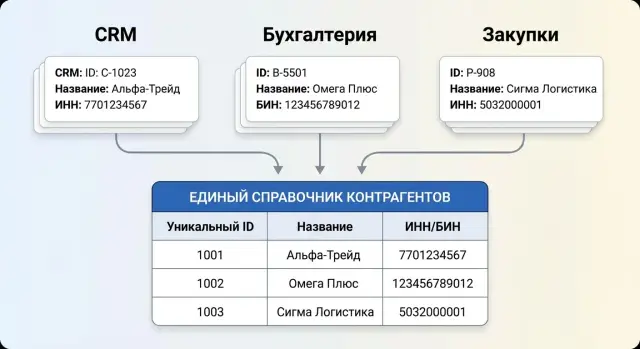
Why duplicates of counterparties appear in different systems
Duplicates appear when each system maintains counterparties by its own rules. In CRM a salesperson creates a client “as they hear it” and often without legal details. In ERP a counterparty is created based on a contract or invoice, taking the legal name from documents. Accounting relies on IIN or BIN, but even there you can end up with two records because of different spellings, address changes, bank details or other fields.
The problem quickly becomes chronic if there is no common key and no clear data owner. Then an employee finds it easier to create a new counterparty than to look for an existing one. Integrations between systems often transfer only part of the fields, so matches are not recognized.
The cost of duplicates is money and loss of control. The same client receives different payment terms, limits and discounts. Contracts are scattered across several cards, invoices go to the wrong place, and sales and receivables reports begin to contradict each other.
A one-time “database cleanup” barely helps because the root cause is usually the process, not the old data. If input, validation and synchronization rules don't change, duplicates will reappear within a week. A typical example: sales enters “LLP Alfa”, accounting creates “LLP "ALFA"” from a statement, and ERP gets a third record from an imported contract.
The problem has become systemic if you see signs like: the same client appears in reports as two or three different entries; phones, addresses and details diverge across systems; managers argue about which card is the “right” one; integrations cannot find a counterparty and create a new one; the number of manual corrections in invoices and contracts grows.
If you plan a unified counterparty directory, accept a simple truth: duplicates arise not because people are careless, but because there are no common identifiers and unified data rules.
What we mean by a counterparty and a contract
Before you start cleaning up, agree on meanings. In the master directory a “counterparty” is not a role (customer or supplier) but an accounting entity with which you have relations. Roles are better stored as attributes: the same organization can be both a buyer and a supplier.
A common confusion is between “legal entity” and “location/contact point.” The legal entity (or individual entrepreneur) is the top level. A branch or subdivision is often important for delivery, invoicing and approvals, but is not always a separate legal entity. A retail outlet or warehouse is the place of service or shipment, and mixing it with legal data is risky.
A practical rule: keep the legal entity separate, and store “where”, “to whom” and “who is the contact person” as separate records linked to it. Then a change of a sales point address does not become the creation of a new counterparty.
To make a card suitable for CRM, ERP and accounting, predefine a minimum set of required fields. Usually the official name (as in documents), an identifier (BIN/IIN or equivalent), status, country and legal address, plus one main contact channel (phone or email) are enough.
A contract is a separate object, not a field in the card. One counterparty can have many contracts, and a contract can be linked to a specific branch or location (for example, a supply contract for a branch in another city). In the data model these are usually the relations “counterparty 1 - N contracts” and “contract 1 - N appendices/specifications.”
Example: a holding has a head legal entity and five branches. If you create branches as separate counterparties you'll get duplicates in reports and different limits. If you create the legal entity once and store branches as subdivisions and delivery addresses, payments, documents and analytics will align.
Which unique identifiers to choose in practice
When building a unified counterparty directory, start with a basic rule: each record must have one principal internal ID that outlives any details and names. IIN, BIN, bank accounts and addresses change, but a counterparty card should remain the same.
The most effective approach is a combination of “official external identifier + internal persistent key.”
External identifiers: what to use first
For legal entities in Kazakhstan, BIN is usually enough. For individuals and sole proprietors, IIN is most common. If you work with foreign counterparties, store the registration number (VAT/tax number or other national identifier) and always record the country of issuance.
A common mistake is trying to make a universal external key from the name or phone. These fields are useful for search, but they're too unstable.
Internal key: one across all systems
An internal ID (often a GUID) is assigned once and used as the main key when integrating CRM, ERP, accounting and other systems. External numbers become attributes and there can be several for one counterparty.
A typical set is enough: Internal ID (persistent ID), counterparty type (individual, sole proprietor, legal entity), IIN/BIN (if available), country and external-number type (for foreign entities), source and date of confirmation (who and when verified).
A composite key (for example, “country + reg number” or “BIN + additional code” in other jurisdictions) is acceptable when there is no single reliable number. The risk is that some fields may be missing or entered inconsistently, and duplicates will reappear.
To prevent changes from breaking integrations, keep a history of identifiers. At minimum record start and end dates of validity, reason for change and a link to the supporting document or request. Then a details change won't create a new card.
How to organize a unified directory and data governance
To stop multiplying copies you need a clear answer to where the “truth” about a counterparty lives. The unified counterparty directory can be a separate service (MDM) or the “master” system that issues persistent IDs and accepts edits by rules.
A separate directory is usually chosen when you have several equal systems (CRM, ERP, accounting) and none is fit to be the owner. If one system already contains the most complete and verified data (often the ERP), it may be more efficient to make it the source of truth and turn the others into read-only consumers with limited rights.
Agree on a simple governance model in advance:
- where the master record is stored and who the data owner is;
- who can create a record and who can only request creation;
- how the persistent ID is issued (only from the source of truth);
- how changes propagate to other systems (by event or on a schedule);
- which fields are mandatory to publish.
The persistent ID should appear at the moment the counterparty is created and should not change afterward. A common scenario: a user in CRM creates a new client, the system sends a request to the master directory, the directory creates the record, assigns an ID and returns it to CRM, ERP and accounting. If the record already exists, the existing ID is returned rather than creating a duplicate.
Next, decide edit rules. For example, bank details are changed only by accounting, legal name and BIN by compliance, and contact persons by sales but only in their designated fields. Otherwise one system will overwrite another's changes.
Statuses help avoid confusing “similar” with “exactly the same”: active (usable), under review (created but not validated), closed (not used but history retained), duplicate (blocked and referencing the master).
Matching and merging rules: from simple to reliable
So the master directory does not become a duplicates warehouse, you need clear rules: how we search for matches, when to merge automatically, and when to ask for human review.
Start with fields that rarely change and reliably identify an organization. For Kazakhstan that's primarily BIN. Combinations of attributes also help, because a single field is often empty or recorded differently.
For matching people typically use BIN/IIN, full and short name, address (at least city, street, house), phone and email, and IBAN for bank details.
Normalize data before comparison. Remove extra spaces, unify case, standardize abbreviations (LLC/LLP), carefully handle transliteration and different keyboard layouts. For addresses agree on a single format — at least “city + street + house.”
Then set a confidence threshold. A simple rule: if BIN matches, merge automatically. If there is no BIN but name and phone match, send the record to a manual review queue. For the queue define in advance what counts as a “strong” match and what is only a hint.
Record every decision. In the merge card store: who made the decision, when, which fields matched, and why the records were merged or rejected. This helps a lot when investigating errors and disputes.
When merging, think beyond the card. You must not lose links to contracts, invoices and acts: the “winner” should retain all references, while the “loser” gets status “merged” and points to the master. After merging documents open from a single entity without manual reassignment.
Step-by-step rollout plan without stopping operations
It's easier to launch a unified counterparty directory gradually while keeping existing processes. Business continues to operate and data quality improves step by step.
Start with a short cycle: gather facts, normalize the minimum, enable matching rules and only then expand coverage. Agree in advance who decides on disputed cases (for example, finance or sales).
A practical plan:
- Inventory systems and export directories. Collect all places where counterparties and contracts live: CRM, ERP, accounting, service desk, Excel. Document fields, owners and update frequency.
- Minimal cleanup and standardization. Normalize the most common things that break search: IIN/BIN without spaces, phones in one format, unified rules for names (LLC/LLP), addresses without “noise.”
- Choose IDs and configure matching. Define the primary identifier (for example, BIN for legal entities) and add a master ID for cases without an external key or when it changes. Set thresholds: where merges can be automatic and where confirmation is required.
- Pilot on one process. Pick a process with a clear flow (for example, new sales or procurement). Run in parallel and measure: how many duplicates are caught, how many cards go to manual review, how long reviews take.
- Connect other systems and monitor quality. Integrate systems one by one, add reports on duplicates and empty fields, and create an exceptions queue. Plan a rollback in case of an incorrect merge.
A readiness indicator is simple: new cards are created according to one scenario, duplicates do not increase, and disputed cases are resolved within 1–2 business days under a clear procedure.
How to avoid multiplying contracts and details
A common reason contracts proliferate is mixing three different entities across systems: counterparty, contract and details. Then a new bank account becomes a “new client,” and a contract for another branch becomes “another card.” In the master directory separate what is common from what is history or a variant.
There should be one counterparty, and it can have many contracts. Search is different: a client is found by IIN/BIN and name, while a contract is found by number, date, status and service location. If contracts differ by branch or object, add a separate “location” node (branch, site, address, subdivision). The pattern “one counterparty + multiple locations + multiple contracts” then looks natural and does not require duplicating the card.
Store details as versions with validity dates rather than overwriting a single line. The counterparty card usually holds current data, while the contract records what was agreed at signing (for example, a specific bank account and legal address on the contract date). This preserves history and prevents changing an account from corrupting already closed documents.
Typical mistakes and traps when fighting duplicates
The most common problem is removing duplicates “cosmetically” while leaving the causes in place. In a month the directory grows again and trust in the data disappears.
A dangerous trap is merging by name alone. Companies have similar names, legal forms change, branches appear. If you don't rely on reliable attributes (for example, BIN) and don't add checks, it's easy to glue different organizations into one card.
Other frequent mistakes: each system has its own input rules; duplicates are deleted without transferring links (losing ties to contracts, invoices, requests); counterparties are auto-created from incoming documents without verification; details are updated manually without history; disputed cases have no owner because there's no data owner or review queue.
To keep the directory healthy, put simple safeguards in place: fix matching rules and field priorities in conflicts; archive instead of deleting and move all links to the master record; forbid auto-creation without a minimum set of fields and a similarity check; assign a data owner and a review queue for disputed matches.
Short checklist before going live
Before you put the master directory into production, run a short check. It takes an hour or two but saves weeks of investigating why copies reappeared.
One main rule: it must be clear where the “truth” about a counterparty is born. If different systems can create records as they like, duplicates will appear again even with good algorithms.
Check:
- A persistent identifier exists, and it is clear who creates it and how it flows into CRM, ERP, accounting and other systems.
- Required fields are defined and there are filling rules (what is always needed, what only for certain counterparty types, what to do if data is missing).
- Record statuses exist (draft, verified, archived) and deletion is prohibited. Instead of deletion use a closing procedure and maintain history of changes.
- Key scenarios are tested on a data copy: creating a new counterparty, changing a name, updating BIN/IIN or bank details, adding a branch, merging two records and rolling back an incorrect merge.
- Quality control is configured: reports on duplicates, share of empty fields, identifier conflicts, and there is a responsible person who reviews these reports.
Do a small run on real data: take 200–500 counterparties from different systems and check how many matches and conflicts your matching rules find. If “grey zones” surface (different spellings, old details, the same counterparty as supplier and client), refine rules and roles right away.
Example scenario: merging CRM, ERP and accounting
A company manages leads and deals in CRM, contracts and shipments in ERP, and payments and closing documents in accounting. Formally everything works, but when you need a complete customer view discrepancies appear: the same counterparty is entered 3–5 times.
Causes are usually mundane. In CRM a salesperson writes “LLP Alfa”, in ERP a purchaser creates “ALFA LLP”, and in accounting appears “LLP "Alfa" (branch)”. Add extra spaces, different case, confusion between IIN and BIN or old details — and limits are calculated incorrectly, contracts diverge, and some payments are attached to the wrong card.
The solution starts with a persistent ID in the master directory: one record — one client. Then configure matching between systems. The most reliable key for legal entities is BIN (for individuals — IIN), and name and address are used as supporting attributes.
A practical processing order:
- if BIN matches — records are linked automatically;
- if BIN is missing or doubtful — the record goes to a manual queue;
- if only name or a “similar” match occurs — the system suggests a candidate but does not merge without confirmation.
After merging contracts and payments are linked to one master record. CRM sees current limits and outstanding balance, ERP — the correct payer and shipment history, accounting — a single set of details without extra duplicates.
Next steps: regulations, control and support
A unified counterparty directory does not work by itself. New clients appear every day, details change, and someone may try to create a record bypassing rules. After implementation you need responsibilities and clear procedures.
The system stays healthy best with a directory owner. This is a role (not necessarily a single person) who approves creation and change rules, resolves disputes and ensures integrations do not create new copies.
Fix minimal regulations: who and where creates a new counterparty (source of truth), which fields are mandatory (for example BIN/IIN, full name, status), what counts as a duplicate and who approves merges, how disputed records are processed and within what timeframes, and how details change and how that is reflected in contracts.
To show progress, add 2–3 quality metrics: duplicate rate (sampled or full), average time to resolve disputed matches, number of manual corrections after integrations. For the first 1–2 months monitor them weekly, then monthly.
Don't forget infrastructure: change history storage, event logs, integration queues, reconciliations. Estimate peaks (for example, mass uploads from accounting) and plan capacity.
If internal resources are insufficient, consider an integration and support contractor. In master-directory consolidation and CRM–ERP integration projects the experience of GSE.kz (gse.kz) as a system integrator and infrastructure vendor can be helpful, especially when reliable integrations and 24/7 support are required.
Frequently asked questions
Why does the same counterparty appear multiple times in the database?
The main reason is that different systems create records using their own rules. A CRM uses the name, accounting uses the IIN or BIN, and an ERP pulls data from the contract. Without a shared ID, they cannot tell that they refer to the same organization.
Which identifier should I choose for a counterparty?
For legal entities in Kazakhstan, use the BIN first; for individuals and sole proprietors, use the IIN. At the same time, assign each record a permanent internal ID that all systems exchange with one another.
Why do I need an internal ID if there is a BIN?
BINs and IINs can change or be unavailable for foreign partners. The internal ID stays the same, so the CRM, ERP, and accounting system maintain the link to one record even after details change.
Can I merge records based only on the name?
No. The name, phone number, and address can help identify a potential match, but they do not prove it. Merge records automatically when a reliable identifier matches, and send similar entries for review.
Do I need to create a separate counterparty for each contract?
Store the contract as a separate entity linked to the counterparty. One organization can have several contracts, and each contract can have its own terms, appendices, details, and service location.
How can I account for branches without creating duplicates?
Usually, no. Create one legal entity and add branches as departments, locations, or delivery addresses if they are not separate legal entities. This keeps reports, limits, and payments in one record.
Where should the primary counterparty record be stored?
Choose a source of truth, such as a dedicated MDM service or an ERP. It creates the master record, issues a universal ID, and sends changes to the other systems according to agreed rules.
Who should update a counterparty's details?
Assign owners for each field. Accounting can update bank details, compliance can update the legal name and BIN, and sales can update contacts. Record all changes in the history.
What should I do with a record after merging?
Do not delete it immediately. Move contracts, invoices, payments, and other links to the master record, then mark the copy as a duplicate and retain a link to the primary record.
Where should I start when implementing a unified directory?
Start by exporting directories from the CRM, ERP, accounting system, and spreadsheets. Normalize BINs, IINs, phone numbers, and names, set up duplicate checks, then launch a pilot for one process.
