6 min read
Two-Stage Server Upgrade: What to Buy Now and What to Buy Later
A two-stage server upgrade helps spread the budget without losing compatibility. We'll review what to buy now and what to defer.
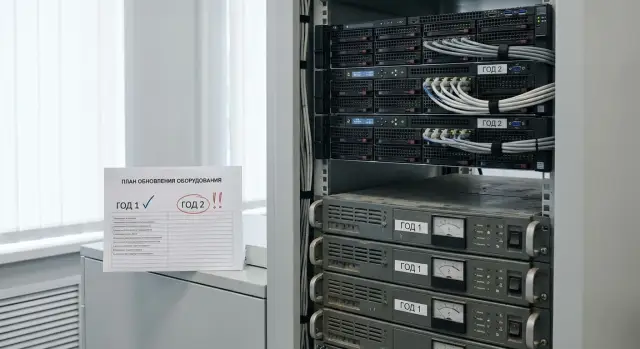
Why a two-year upgrade is harder than it looks
A two-stage server upgrade often seems simple at first. It appears that in the first year you can buy a basic configuration and in the second year add memory, drives, or processors. In practice, the first stage often sets strict boundaries for the second. Then the limitation becomes not the budget but the platform itself.
Servers are bought not as a collection of separate parts but as a foundation for growth. If in the first year you choose the wrong chassis model, too few memory slots, a weak power supply, or a limited RAID controller, the second year’s upgrade turns into an expensive rework. Formally there was room to grow, but the needed expansion either isn't supported or costs too much.
There is a second problem. Between budget years the market changes: server families are updated, some components are discontinued, and lead times for compatible modules grow. As a result, a configuration that seemed logical at the start may require a different set of parts or even a project rethink a year later.
For government organizations and large companies in Kazakhstan this is especially sensitive. Between the two stages not only prices change but also procurement approval rules. If the project wasn't initially described as phased, the second stage can easily become a new procurement with new restrictions.
Therefore, when choosing a server for two years, you don’t base the decision on "what’s enough now," but on "what will scale later without issues."
What to fix before the first purchase
A two-stage server upgrade begins not with selecting a model but with describing the initial conditions. Without that, the first purchase will look fine only on paper. After a year you may find there aren’t enough slots, rack units, power capacity, or required licenses for growth.
Start by documenting the current load. Not with vague phrases like "a database server" or "for virtualization," but with concrete facts: how many users are active, which systems are running, where peak loads occur, how much data is stored, and how fast it’s growing. Even a simple table with these details removes a large share of mistakes.
Next, describe expected growth over 12–24 months. What exactly should increase in a year: headcount, archive size, number of virtual machines, backup volume, new branches, or a new service? When this growth isn’t defined in advance, the first stage often results in a configuration that’s just barely adequate. That almost always makes the second stage more expensive.
Separately check physical constraints. Commonly overlooked items include chassis height, free rack units, power headroom, cooling, number of ports, and room for additional drives and expansion cards. These small details are frequently what break an otherwise good plan.
Another important block is licensing. Gather everything already in use: operating systems, hypervisors, databases, backup, monitoring, and security licenses. Sometimes a server can be expanded technically, but the new setup is blocked by licensing limits tied to cores, sockets, or connection counts.
Before the first purchase it’s useful to compile one short document containing:
- the server’s current tasks and actual loads;
- expected growth over the next 12–24 months;
- constraints for rack space, power, and cooling;
- a list of existing licenses and conditions for expanding them;
- one person responsible for the overall plan.
The last item is often underestimated. If different people handle the first and second purchases without a shared scheme, confusion quickly appears: redundant models, conflicting requirements, and support problems.
What’s better to buy right away
In the first purchase, the most important thing is not to skimp on the foundation. If you cut the budget in the wrong place, a year later new components may technically fit but the server won’t deliver the needed performance, won’t pass warranty conditions, or will require replacement of core modules.
It’s better to buy a platform that will comfortably cover both budget years, not individual cheap parts. This is especially important for critical systems in government agencies, banks, healthcare, and education, where downtime costs more than a reasonable initial reserve.
In the first phase it usually makes sense to secure the platform itself: the chassis model, CPU layout, motherboard, power supplies, and key controllers. These nodes define the growth limit. If the server model is chosen well, in the second year you simply add resources rather than rebuilding the project.
Consider processors separately. If one CPU is enough now, that doesn’t mean you should pick a platform with no headroom. In many cases it’s wiser to choose a configuration that allows a second CPU to be installed later. This preserves the upgrade path and reduces the risk of having to replace the entire server for more compute power.
Memory should also be planned two steps ahead. It’s important not only to think about current module counts but also maximum supported capacity, memory types, and how easy it is to expand later. If all slots are filled on day one, the second stage becomes replacing existing modules rather than a simple add.
The same logic applies to power supplies. If additional drives, a second CPU, accelerators, or expansion cards are planned later, it’s better to include power headroom from the start. Replacing a power supply after the system is running usually means extra approvals, downtime, and warranty questions.
Controllers are also better not postponed if they are hard to change later without risk. That includes RAID controllers, network cards, and other modules that define server architecture. Installing such components initially makes the second stage much smoother.
What can be left for the second stage
Not every component must be bought in the first budget year. If the base configuration covers current load, some expenses can be deferred without harming operations. But you should only postpone parts for which the platform already provides headroom.
Typically, second-stage items include additional memory modules, extra drives, a second CPU, added network cards, and spare parts for inventory. This is fine if the chassis, motherboard, power supplies, drive bays, and cooling were sized for future growth.
With memory, it’s important not simply to buy fewer modules but to leave the right expansion scheme. If the server starts with enough RAM for current virtual machines, adding compatible modules later can provide growth without a full reconfiguration.
Storage follows a similar logic. Initially there are often enough working drives for core tasks, and increasing capacity makes sense after real growth in databases, archives, or backups. This only works if the system was chosen so that new drives can be added later without redesign.
A second CPU is also commonly deferred. That’s reasonable when current load is moderate but growth is expected in users, new services, or analytics. This helps spread the budget across years without buying excess performance prematurely.
How to maintain compatibility and warranty logic
The most common mistake in phased modernization is assuming you can simply buy "the same thing" a year later. Even if the server model looks unchanged, its motherboard revision, controller firmware, or list of supported memory may change. So plan based on exact configuration and support rules, not just the server name.
Before the first delivery, request from the manufacturer or an authorized integrator a list of components compatible with your platform. This should include not only processors but memory generations, drive types, RAID controllers, network cards, power supplies, and any limitations tied to BIOS, BMC, and RAID firmware.
Also verify whether component batches can be mixed. Even with the same part number, memory from a different batch or SSDs with a different revision can behave differently under load. This doesn’t always cause immediate failure but often becomes a source of instability that’s hard to catch during acceptance.
A good practice is to create a single document that defines the system composition. It should list the initial configuration, permitted upgrades, firmware versions, occupied and free slots, and the responsibility boundaries of all parties. Such a file greatly simplifies the second purchase and helps IT, procurement, and the supplier speak the same language.
Clarify warranty terms in advance too. It’s important to know whether the warranty on the entire server is retained if the expansion is done by your contractor, or whether modernization must be performed only by an authorized service. Resolve this before the first purchase, not after the first malfunction.
If the project spans two budget years, it’s especially convenient to work with a supplier who can confirm compatibility, deliver equipment, and later support the expansion. In Kazakhstan such a scheme is often considered with local manufacturers and integrators. For example, GSE.kz can be consulted in advance not only about the server platform but also about the process of future modernization, service support, and a list of compatible components for the second stage.
Step-by-step plan for two budget years
A typical workflow is straightforward.
First, determine the minimal configuration for year one: the server, sufficient initial memory, system drives, required power supplies, and basic network interfaces. Then separately specify the second stage: how much memory will be added, whether new drives are needed, if a second CPU will be installed, and whether a faster network path or additional controller will be required.
After that, check both parts of the plan together. Are the components compatible? Are there enough slots? Can power and cooling handle the growth? Will licensing be a blocker? Will needed parts still be available in a year? Only after this check can you consider the project truly planned for two budget periods.
It’s useful to keep a simple three-column table: buy now, buy later, unchanged throughout the project. This document prevents the common mistake of trying to buy a component in the second year that has been discontinued or isn’t supported by the chosen platform.
If the procurement goes through public procurement channels, it’s important to fix precise specifications and rules for substituting equivalents in advance. Then in the second stage it’s easier to demonstrate that the expansion matches the original architecture and doesn’t break warranty terms.
Simple example scenario
Imagine a regional government institution launching a new internal service this year. The project must start now, but the full budget for expansion will only be available next year. A two-stage server upgrade can help in this situation, but only with a careful plan.
In the first stage the institution buys not a "server for today" but a platform with headroom: a rack server with the necessary number of memory slots, free drive bays, power reserve, and a controller that supports future expansion. Initially they install one processor, a minimally sufficient amount of RAM, system drives, and a basic storage array for current load.
That’s enough to get the service running without overspending. At the same time, the documentation specifies which memory modules, drive types, and controller parameters can be added later without changing the platform.
A year later, when load has grown and budget is available, the institution doesn’t replace the server. It adds memory and increases disk capacity within the same configuration. This is cheaper than migrating the service to another system and much less disruptive for the IT team.
This is how a good phased project should look: the chassis, platform class, maintenance logic, and service remain the same while only resource volumes change.
Common mistakes in phased modernization
The most frequent mistake is treating the first purchase as an isolated task. If the server is bought only for current load, with no headroom in slots, power, cooling, or rack space, the upgrade will soon hit physical limits.
Another typical issue is postponing decisions about the second stage. In practice that means a year later the team starts selection almost from scratch: checking compatible modules, revisions, availability, and warranty terms again. Such savings at the start almost always cost more later.
Budget allocation errors are also common. Critical items should be separated from non-critical ones. Buy the base platform that determines growth limits immediately. Defer what can be safely added later. When these groups are mixed, money goes to the wrong things: first you buy convenient extras, and later find you lack power, drive bays, or required licenses for the main upgrade.
Another risk is choosing components only by connector compatibility. That’s not enough for servers. Supported capacities, frequencies, firmware, controller versions, and even installation order matter. A single unsuitable element can fail to work and create warranty disputes.
If the project is important for public procurement in Kazakhstan, mistakes are even costlier. When the specification doesn’t describe phased expansion up front, the second stage may turn into a separate approval process with new restrictions on composition and origin of equipment.
Short checklist before approving the budget
Before the first purchase answer a few simple questions. Is there a single list of components covering both stages? Are there enough slots, ports, rack space, and power for future modules? Is upgrade compatibility confirmed for CPUs, memory, drives, RAID, and network cards? Has one person been assigned responsibility for the whole plan?
If these questions don’t have clear answers, the project isn’t ready. In that state a two-stage server upgrade almost always becomes a set of disjoint purchases that are hard to reconcile.
What to do next
A practical next step is to create a working document covering both stages. It doesn’t need to be a large project book. It’s enough to record the base configuration, permitted upgrade options, slot and drive limits, requirements for memory, networking, and power, and a list of components planned for purchase in the second year.
After that ask the supplier to confirm the upgrade path in writing. You need specifics, not general statements: which processors, memory modules, drives, and network cards can be added later, which items remain under warranty, and who should perform the work.
If your organization requires a local manufacturer or a unified service scheme within Kazakhstan, discuss these details before the tender and specification approval. For example, GSE has its own S200 Series server production in Kazakhstan, system integration, and a service network, so the expansion path and support procedures can be fixed in the project in advance. For phased procurement this is more useful than trying to save at the start and dealing with constraints a year later.
A good rule of thumb: the first purchase should not only cover current load but also leave a clear, confirmed growth path. If this is fixed in advance, the second budget year goes much more smoothly.
Frequently asked questions
Why can't I buy a server only for the current workload?
First, establish the platform and its growth limits. It must support the future capacity for memory, disks, processors, network cards, and power consumption.
What is best to buy first?
Buy the chassis, motherboard, power supplies, drive bays, and controllers needed for the full design from the start. These components are difficult and expensive to replace after launch.
Which components can be deferred until the second year?
Part of the RAM, additional disks, a second processor, and network cards are often deferred until the second year. This works only if free slots, power capacity, and confirmed support are already in place.
How should I plan for memory expansion?
Do not fill all slots in the initial configuration. Choose a supported module type, retain the installation layout, and find out in advance which memory options the manufacturer permits.
What should I check before expanding disk capacity later?
Check the available drive bays, interfaces, RAID controller, and capacity limits. Also decide in advance how the new disks will join the existing array and affect backups.
Can I install a second processor in a year?
Yes, if the server platform supports two CPUs, the power supplies have enough capacity, and the licensing system will not create extra costs. It is best to confirm the exact processor model and permitted pairings before the initial delivery.
How can I avoid losing compatibility between purchases?
Request a written list of compatible components specifically for the selected server configuration. It should cover memory, processors, storage drives, controllers, network cards, and firmware version requirements.
How does an upgrade affect the warranty?
Clarify who is authorized to perform the upgrade and whether the warranty remains valid after new components are installed. Record this in the contract or service terms before buying the server.
What data is needed before the initial purchase?
Gather current workloads, a 12-24 month forecast, rack, power, and cooling constraints, as well as licensing terms. Assign one person responsible for coordinating both phases.
What document will help manage the project over two years?
Document the base configuration, free slots, permitted upgrades, firmware versions, and the list of components for the second year. This table helps procurement, IT, and the supplier work from the same plan.
