7 min read
Tracking print consumables by meter readings: collection and procurement forecasting
Tracking print consumables by meter readings helps collect readings, forecast purchases and identify departments with abnormal printing through integrations.
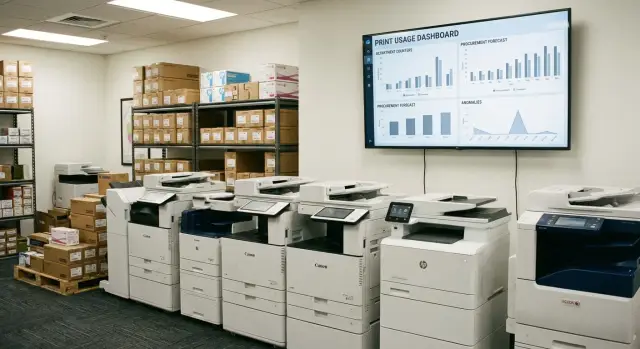
Why track consumables by meter readings
Print consumables often run out unexpectedly for a simple reason: requests and issuances are visible, but the real printing volume is not. As a result, cartridges sit as "dead stock" in one office while printers in another stop on the worst possible day.
Request-based accounting almost always distorts the picture. Someone takes a cartridge “just in case,” someone replaces it early, and someone uses it until the end and prints with streaks. In numbers it looks like chaos: you bought a lot, but complaints remain.
Tracking consumables by meter readings gives IT, finance and procurement a common language. The same questions usually come up:
- how many pages do departments and branches actually print;
- why costs are rising if headcount hasn’t changed;
- how many cartridges to buy next month so work isn’t disrupted;
- where are losses: overuse, “leaks,” wrong replacements, wrong models.
Practical benefits appear quickly, even if the print fleet doesn’t change. It’s enough to set up regular readings, link them to device models and consumable yields, and then introduce simple rules: remaining thresholds, expected replacement frequency, and tracking repeat service calls.
Example: a branch suddenly uses twice as many cartridges as usual. Requests don’t explain it, but meter readings show a spike in printing. Then you test hypotheses: a new report appeared, extra copies were enabled, drafts started printing in color, or the device is ejecting blank pages due to a driver issue.
A separate advantage: this tracking is easy to tie to service and procurement. A cartridge replacement becomes an event with a meter reading, and procurement forecasts rely on actual consumption and current stock rather than feelings and urgent requests.
What data you need for reliable numbers
To prevent meter-based accounting from turning into a dispute of “that can’t be happening here,” start with data that unambiguously links printing, the device and the consumable. The rule is simple: every fact must have a clear source and a single interpretation.
Minimal dataset
Five blocks usually suffice for calculation and forecasting. It’s better to collect them from the start, even if some fields are empty at first:
- meter readings for each device with date and time (total volume, separate mono and color counts, and if the device supports it — A4/A3);
- device card (model, serial number, network name or IP, installation location, responsible person);
- linkage to org structure (department, branch, cost center);
- consumables catalog (cartridge type, yield, compatible models, distinctions like original/compatible, standard/XL);
- replacement history (when it was changed, who performed the replacement, what was installed and why).
Commonly forgotten items
Without proper device identification, numbers scatter. If the same printer is named differently across systems you’ll get duplicates and “missing” replacements. Agree in advance what the key is: serial number or inventory tag.
The second frequent failure is missing replacement records. The meter rises, but the replacement is “not recorded” because the cartridge was changed bypassing the request process. Then procurement forecasts are understated and “anomalies” start looking like someone’s fault.
Practical example: a branch showed a sharp increase in color printing. It turned out the device was temporarily moved to another department, but the installation card wasn’t updated and the consumable was charged to the old cost center. One correct relocation entry solved the issue in five minutes.
How to collect meter readings: options and trade-offs
First choose the source of readings and a rule for what to do when data doesn’t arrive. A mixed approach often works best: automate where possible and have a simple fallback for “difficult” sites.
Main collection methods
In practice several channels are used:
- automatic network polling (SNMP or device web interfaces) — suitable for most office printers and MFPs;
- data from the print server or queues — useful for centralized printing, but can differ from physical meters (local printing bypassing the server, test pages);
- built-in MFP reports (periodic exports) — an option for models with limited network access;
- manual meter entry — fallback for remote branches, temporary sites and devices hard to reach on the network.
How often to collect so it’s accurate but not heavy
Weekly scheduled collection is often enough, while critical points (accounting, contact center) may require daily checks. Hourly polling rarely helps and only adds noise: temporary unavailability, queue delays, unnecessary alerts.
It’s important to record not only the numbers but the collection status: “device unavailable,” “meter unreadable,” “model replaced.” This makes it easier to distinguish real zero printing from an error.
Example: an MFP was replaced in a branch and its meter “reset.” If the device card has the replacement date and serial number recorded, the jump in reports won’t be mistaken for fraud or “anomaly.”
How to link meters to consumables and yield norms
For the accounting to work you must connect three things: the specific device, its meters (mono/color, pages/copies) and the consumables actually used for those meters. An error in any part produces neat but incorrect figures.
Mapping device models to consumables
Start with a catalog “device model -> set of consumables.” It’s convenient to keep this as a single card: you immediately see what belongs to mono printing and what to color.
Basic rules usually suffice: a model has a default cartridge (standard capacity), alternatives (e.g., XL) are listed as acceptable substitutes, and color devices have consumables specified separately per CMYK. If a device has separate print and copy counters decide in advance whether you sum them or track them separately.
If a model supports standard and XL, don’t try to guess the choice each time. Set a default split (for example, 70/30) and update it based on actual purchases. If a department moves to XL, change the rule with an effective date so forecasts don’t “float.”
Consumption norms: rated yield and a reality factor
A norm starts from the rated yield (pages per cartridge), but you almost always need a reality coefficient. Consumption depends on coverage density, share of graphics, duplex printing, and paper quality. A practical approach is to take 1–2 months of actuals and choose a coefficient so calculations match real replacements.
Example: accounting prints tables and letters, while marketing prints presentations. For the same printer, the black coefficient may be close to 1, while the color coefficient is noticeably lower due to heavy fills.
Fix exceptions early or they will break the overall picture. For example, a photoconductor (drum) follows its own life and replacement facts; service kits (rollers, fusers) depend on runtime and time; toner kits or bottles may be tracked by a separate counter or by total pages.
Step-by-step: how to start tracking in 2–4 weeks
Launch in short iterations. In the first month it’s more important to get stable numbers that IT and procurement trust than to have perfect analytics.
2–4 week plan
-
Inventory and department mapping. Collect a list of devices, serial numbers, installation locations, owners and owning department. Agree on how to treat shared devices in corridors.
-
Source of readings and quality check. Choose where meter readings will come from (SNMP, agent, manual collection, service team exports). For the first week check 10–20 devices selectively: gaps, backward jumps, duplicates.
-
Basic consumption model. Fix which counters you will use (color/mono, A4/A3), how you convert pages to consumables and how you treat high-coverage documents.
-
Replacement and return rules. Describe how issuances are documented, where replacements are recorded and what to do with returns (unused, defective, wrong issue). Without this, the warehouse balance will diverge from calculations.
-
Role-based reports. IT needs devices without data and frequent replacements, procurement needs a 4–8 week forecast and stock levels, managers need printing by department and deviations from norms.
Also assign responsibilities: who updates device-to-department links, who confirms non-standard replacements, who approves procurement based on the forecast.
A control check example: if a branch’s meter grows by 12,000 pages in a week and the warehouse issued one cartridge, investigate the reading source or unrecorded replacements. In the first two weeks these reconciliations quickly “clean” the process.
Procurement forecasting: how to calculate need without panic
Forecasting starts not from “how many cartridges to buy,” but from a clear consumption figure: how many pages each device and each department actually prints. When tied to meter readings, planning stops being guesswork.
First calculate average consumption: by device (pages/month) and by department (sum by device). A 3-month average is often useful to smooth peaks.
Then account for seasonality. Accounting peaks align with period closings, educational institutions peak during admissions, offices during reporting. This is not an anomaly but an expected wave. It’s easier to include it as a coefficient for the relevant weeks.
To avoid stopping printing, make forecasts taking into account lead time and buffer stock. A simple scheme: planned need for the forecast period + stock for lead time + safety stock. One-off spikes (projects, audits, mass mailings) are better recorded separately so they don’t spread into future months.
Reconcile forecast with actuals monthly and honestly ask “why did we miss”: wrong norms, missed seasonality, a device dropped from accounting, replacements bypassing the warehouse.
How to find departments with abnormal printing
To find overuse points, first agree what counts as normal for your organization. Comparisons matter more than absolute numbers: compare with the previous period and with similar departments.
Start with metrics easy to explain to managers and verify:
- pages per employee per month;
- share of color and share of single-sided printing;
- growth compared to the previous period;
- printing outside working hours;
- concentration of printing (1–2 devices doing most of the volume).
Usually three threshold rules are enough: a sharp spike (e.g., +50% or more), consistent overuse for 2–3 consecutive periods, and odd activity by time (night, weekends).
Compare similar groups: accounting across branches, registries in medical facilities, sales teams between each other. It’s easier to see where consumption truly stands out versus where workload is simply higher.
Before conclusions check common causes that hide as “anomalies”: device relocation, model change (and yield), a new process, default print settings changed, or printing moved to a neighboring MFP due to queues or breakdown.
It’s best to document findings in a short “checklist”: which departments/devices were flagged, which metrics triggered, hypothesized cause and action plan (ask process owner, control measurements, check settings, limit color printing or enable PIN printing if needed). This turns the conversation from “finding blame” to diagnosing causes.
Example: how a spike was resolved in one branch
In one project a branch showed nearly a twofold monthly increase in printing. On site they said “nothing changed,” but meter reports were stable and comparable to past periods, so we dug deeper.
We first identified which devices caused the spike. Two MFPs near accounting and sales accounted for the increase. One device barely changed; the other printed much more in color and handled large jobs.
We checked typical causes: new forms with extra copies, package duplication between departments, printing drafts entirely, color elements in templates, sending heavy jobs to an expensive device.
We found two facts: a new contract template printed a colored header on every page, and staff printed whole stacks while only the first and last pages were needed.
Actions taken: set default printing to black-and-white and duplex in problem queues, restricted color for a user group, and moved heavy jobs to a high-volume device. Changes were recorded in the service system with parameters and a date so they wouldn’t be reverted during maintenance.
Results were formalized in a regulation: who approves new templates, how to test a template before rollout and how often to check deviations. In six weeks volumes returned near previous levels and procurement forecasts smoothed out without urgent reorders.
Integration with service: replacements, incidents and work control
With meter-based tracking, service responds to signals rather than perceptions. A cartridge replacement becomes planned work, not a fire after someone says “nothing prints.”
How it works in practice
Typically thresholds are set by meter and by remaining consumable resource. When a device approaches a threshold a replacement request is created. It’s important that the request is linked to the specific device and location (branch, floor, room), otherwise confusion like “the one in accounting” begins.
To simplify service work, keep minimum mandatory fields in the request: device and inventory tag, location and owning department, consumable type and compatible model, current meter reading and reading date, and reason (threshold, complaint, repeat call).
Recording replacements and quality control
After a visit, the technician closes the request only with the replacement fact: who and when changed it, what consumable was installed and what the meter reading was at replacement. This provides an auditable history and helps investigate cases (for example, when a “new” cartridge ends in a week).
Track repeat calls on a device. If a printer needs intervention earlier than the norm it becomes "chronic": either the wrong consumable was chosen, a printing assembly has an issue, or the device prints a volume different from what you assumed.
Integration with procurement: from forecast to receipt and stock
When meter-based tracking is set up, the next logical step is to link forecasts with real purchases. Then procurement sees not “approximately need cartridges” but a clear plan: how many, by what date and for which locations.
It’s convenient to collect the forecast by departments and locations and then convert it into purchase format: catalog items, quantities, delivery dates, budget. A 1–3 month horizon plus a separate line for “unplanned replacements” often suffices.
To prevent chaotic requests, a basic order helps: each printer model has a default consumable and acceptable alternatives, limits are set by department (budget or pages), and exceptions (urgent purchases) are approved separately.
A key element is a consumables catalog with consistent names and compatibility rules. Otherwise the same cartridge will “wander” as multiple SKUs and stock will stop matching reality.
Control is easier by reconciling plan, delivery and replacements. If 50 items arrived by invoice but 70 were consumed per service records in the period, you will quickly spot either “gray” issuances, accounting errors, or old unclosed requests.
For stock management the rule “minimum and movement” works well: minimum levels for the warehouse and large branches, mandatory recording of issuances and transfers between points. Sudden downtime due to “cartridges ran out” disappears and procurement becomes predictable.
Common mistakes and traps that break accounting
The most common failure is when data “lives separately.” Meter readings are collected but not linked to a specific device, room or department. Consumption then spreads across the organization and disputed cases cannot be resolved. The minimum always required: unique device ID, installation location, owning department and reading date.
A second trap is not tracking consumable movements. Cartridges are returned “for later,” swapped between departments, or taken to another branch. If transfers aren’t recorded, procurement forecasts will always miss: somewhere appears overuse, somewhere a sudden zero.
Problems also come from compatibility issues. The same cartridge may fit several models, while similar printers can use different consumables. If the catalog is built “by eye” or not updated after fleet changes, the system will consume the wrong item and the warehouse will start buying “almost compatible” stock.
Another mistake is collecting meters too rarely. If data arrives quarterly you see only the total, not dynamics: spikes, deviations and seasonality are missed. In practice weekly or at least monthly collection works better.
Finally, avoid the bad habit of seeking “culprits” instead of causes. A department printing abnormally doesn’t necessarily misuse resources. There might be a new process, a temporary project, mass printing of contracts, or one MFP serving multiple teams.
The working focus is always the same: unified rules for linking devices to location and department, tracking issuance and transfers, an up-to-date compatibility catalog, regular meter collection and investigating deviations to adjust norms.
Quick checklist before launch and next steps
Readiness checklist
- All printers and MFPs are in the registry with an owner, location and department link.
- Readings are collected on schedule and failures are logged: what didn’t poll, why and how it was fixed.
- Recalculation rules are agreed: which counters are used (mono/color, A4/A3), how pages convert to consumables, how test and service prints are handled.
- Cartridge replacements are recorded in the service system (request, reason, who replaced) and issuances go through warehouse accounting so stock is real.
- Reports are sanity-checked: no sudden drops from lost readings, and total volumes match how the department actually operates.
If any of these are doubtful, close the gaps before expanding coverage. Otherwise the forecast will be noisy and anomaly investigations will turn into disputes.
Next steps
Start with a pilot on 1–2 departments for 2–3 weeks. Then expand coverage only after the full chain is tested: meters -> norms -> service requests -> warehouse movements -> procurement forecast.
If you need help building the process (reading collection, reporting, integrating service requests and warehouse accounting), a system integrator usually handles this. For example, the GSE.kz team can help set up such a connection within your IT infrastructure so data don’t have to be consolidated manually at month end.
Frequently asked questions
Why track supplies using printer counters?
It shows the actual print volume for each device and department. This makes it easier to see where supplies are being used up faster than usual and replenish stock in advance.
What data is needed to track supplies?
You need counter readings with dates, a device record, its location and department, a list of compatible supplies, and replacement history. A serial or asset number will help avoid confusing identical models.
How can you collect counter readings?
For most office devices, automated network polling via SNMP or the printer interface will work. At remote locations, you can use MFP reports or manual entry as a backup method.
How often should counter readings be taken?
Collecting data once a week is usually enough. For accounting, contact centers, and other locations with high print volumes, it is better to do this daily.
How do you calculate cartridge consumption by page count?
Link each device model to its compatible cartridges and specify their rated yield. Then compare the calculation with actual replacements over 1-2 months and adjust it for the real print type.
How do you forecast cartridge purchases?
Take the average print volume over the past 3 months, convert it into the number of supplies needed, and add a buffer for the delivery lead time. Account separately for expected peaks, such as period-end closing or bulk document printing.
How can you find a department with abnormally high printing?
Check the increase from the previous period, pages per employee, the share of color printing, and jobs outside working hours. First rule out device relocation, a new workflow, a model change, or data collection errors.
What should be recorded when replacing a cartridge?
Each replacement should include the device, counter reading, date, installed supply, and technician's name. This lets you identify early repeat replacements and determine why a cartridge ran out sooner than expected.
How do you connect tracking with service and procurement?
Service creates a ticket when a set yield threshold is reached or in response to a user request. Procurement uses actual consumption, stock levels, and delivery lead times, so the plan is not based on urgent requests from departments.
Why are supply forecasts often inaccurate?
The most common issues are duplicate devices, unrecorded replacements, cartridges moved between departments, and an outdated compatibility list. Introduce a single device identifier and always record the issue, return, and transfer of supplies.
