8 min read
Tracking Component Replacements in PCs and Servers Without Confusion
Keeping records of component replacements helps you quickly see the history of drives, memory and power supplies, detect recurring failures and preserve warranty evidence.
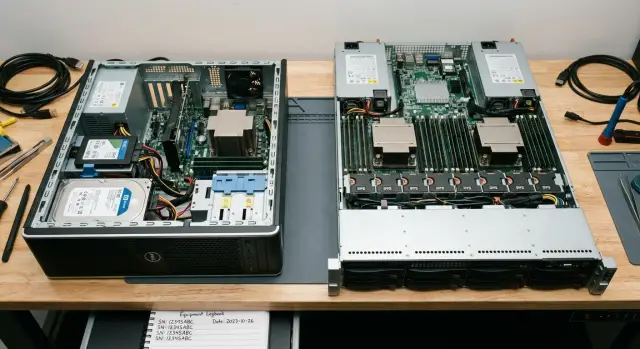
Why the lack of replacement history causes confusion
The same failure often comes back not because the fix was poor, but because nobody can see the full picture. Today a drive was replaced in a server, a month later another failure occurs, and two weeks after that it turns out that a power cable, a memory module or the power supply had been changed on that same node before. If these events aren't linked in one history, every new engineer starts investigating almost from scratch.
Four things are most frequently lost: what exactly was replaced, when it was done, why the decision was made and what happened after the replacement. Because of this, a recurring failure is easily mistaken for a new random problem. In practice this leads to unnecessary purchases, repeated diagnostics and internal disputes about what has already been checked and what hasn't.
Usually records miss serial numbers of removed and installed parts, the replacement date, the reason for the work, the performer's name and whether the component had been used in another device before. Without this, even a simple replacement stretches out the repair. The technician spends time searching old reports, messaging colleagues and checking invoices. The user or the department waits longer, and the equipment stays offline. For a work PC it's inconvenient. For a server it's a risk to multiple services at once.
Warranty situations are even more sensitive. Without a clear history it's harder to prove that a component was indeed installed in a specific device, replaced on time and used correctly. When serial numbers don't match or weren't recorded, the vendor or service center almost always asks for additional proof. That doesn't always mean a denial, but it almost always means a delay.
The problem is especially obvious where there are many technicians: schools, hospitals, banks, government agencies and large offices. The more identical devices you have, the easier it is to mix up drives, memory and power supplies between machines. In a server environment the cost of such a mistake is higher, because a recurring failure affects not a single employee but several workflows at once.
When replacement history is kept carefully, a recurring failure stops being a mystery. It becomes clear whether it's an isolated defect, a compatibility error or a sign of a deeper issue in the device itself.
What data to record for each replacement
If a part is replaced after a failure but the details aren't recorded, it's hard to understand what happened even a month later. Dates get lost, links between failures vanish and warranty disputes begin. That's why it's best to record replacements following the same scheme every time.
A minimal replacement record should answer five questions: what was replaced, where it was installed, when it happened, why the decision was made and who performed the work. If even one item is missing, the history quickly becomes incomplete.
Start by recording the part itself. It's not enough to write just "SSD" or "memory stick." You need the exact model, serial number and, if available, the internal inventory number. This helps avoid mixing identical devices from the same batch.
Next, dates are important. Record not only the day the new part was installed but also the day the old one was removed. Even a few weeks' difference can be important when you're tracking a recurring failure or checking the warranty period.
It's equally important to specify the exact installation location. For a server this may be the drive bay, the memory slot, power supply A or B. If a memory module fails twice in the same slot, the issue might be with the board, power or contacts rather than with the memory itself.
Separately note the condition before replacement: what the symptoms were, how they were noticed, what checks showed and why you decided to replace that particular part. You don't need a long technical report here — a short, clear statement is enough.
It's useful to record the performer: an employee, a contractor or a service company. Also note the source of the spare: stock, reserve, warranty supply or temporary swap. This removes questions later about the origin of the part and the terms of its installation.
A good entry looks simple: "SSD Samsung, serial number X, removed March 12, installed in Bay 3 of the accounting server, read errors and dropouts from the array, replacement performed by engineer Ivanov, new disk issued from stock." This format saves time both at the next failure and when talking to the vendor or service.
Where to store the history so people actually use it
The replacement history should live where staff go every day. If the file is hidden in an engineer's personal folder or data is scattered across email, the warehouse and tickets, records quickly stop being kept.
For a small fleet, a shared spreadsheet is usually enough. That's fine if you have dozens of PCs and a few servers rather than thousands of devices. The key is to have a single table with clear fields and shared access for those who repair equipment, issue parts and check documents.
If the fleet is larger, it's more convenient to keep the history in a service desk, CMDB or asset management system. The principle remains the same: each device should have one history and each replacement one record or one row containing all the important data.
There's no need to invent separate logic for PCs and servers. The basic fields are the same: which device, what was removed, what was installed, when, why and who did it. For servers you can add a couple of special fields, like slot or tray number, but the framework should stay common.
A minimal set of fields usually looks like this:
- device inventory and serial number
- removed and installed part with serial numbers
- replacement date and reason
- ticket number, service report and warehouse issuance
- who entered the record and who verified it
It's especially important to keep ticket number, service report and warehouse issuance handy. When a server has a repeat failure you won't need to search through different systems. Open one record and immediately see which memory, drive or power supply was changed, for which request and from which batch the part came.
It's useful to assign roles in advance. Typically the engineer or service specialist enters the replacement right after the work, and the asset owner, shift lead or team manager verifies the record the same day or the next morning. Without such verification, even a good system quickly becomes a gap-filled archive.
How to document a replacement step by step
Good tracking starts before the new part is installed. First be sure the problem really is the disk, memory module or power supply, and not a cable, slot, BIOS setting or overheating.
Follow this order so the record helps when investigating recurring failures.
- Confirm the fault. Briefly note the symptoms: the server doesn't see the drive, memory shows errors, the power supply goes into protection, the system reboots under load. Add the date, engineer's name and the affected device.
- Record data from the old part before removal. Capture the serial number, model, capacity, slot or bay position and current condition. For a drive, save SMART status or controller messages. For memory — channel and module position.
- Prepare the new part's record before installation. Immediately enter the new part's serial number, model, date issued from stock and the replacement basis: warranty, reserve, purchase or temporary swap.
- After installation, record the verification result. Instead of writing "works," note a short test summary: the server booted, the RAID assembled without errors, memory passed the test, the power supply sustained load for 20 minutes without faults.
- Don't close the record immediately. Allow a short observation period. For an office PC this can be one working day; for a server several hours or a shift under normal load.
This order saves a lot of time. If a disk subsystem error reappears in two weeks, the record makes it easy to tell whether it's a new failure, a tray or controller issue, or a mix-up with the part itself.
When multiple engineers are involved it's especially important they all fill records the same way. Then the replacement history becomes not a set of notes but a working log you can use to check warranty and spot recurring defects.
How not to lose warranty rights
Warranty is usually lost not because of the failure itself but because of gaps in the records. If after replacing a drive, memory or power supply you can't quickly prove what was installed, when and on what basis, the service case immediately becomes disputable.
The first rule is simple: every part should be tied to a specific purchase, delivery or receipt document. A serial number without a supporting document is weak. A document without a serial number is also weak. When they are linked, you get a clear chain: what was bought, where it was installed, when it was replaced and why.
In the replacement record it's useful to store the part model and serial number, purchase or delivery number, the device where it was installed, the installation date, the reason for replacement and the details of the person who did the work.
Also keep photos of labels and markings. This simple habit often saves the day. A label can wear off, the box can be lost, and a table entry can contain a single mistyped character. A photo helps quickly verify a serial number, part number and the part's condition at the time of replacement.
Another common mistake is assuming everything has the same warranty period. In practice the device's warranty and the installed component's warranty can differ. For example, the server might still be under warranty while the replaced SSD has its own warranty period from the delivery or service replacement date. If you don't note this, it's easy to get confused later about what is still covered.
It's convenient to keep two fields: warranty period for the main device and warranty period for the component. Then during a repeat failure you won't have to dig through all the correspondence manually.
Also record the date the part was sent to service and the date it returned. This is needed not only to track repair times. These notes show that the equipment was indeed sent under warranty, how long it was out of operation and whether the same part returned or it was replaced.
If a memory module fails again in the rack, the history should show: this is the third failure in the same slot, the part was sent to service two months ago and came back with a different serial number. For servers, including GSE S200 Series systems, such a transparent chain greatly simplifies proving a warranty case.
A simple example of a recurring failure in a server
Imagine a common situation. A file server raises another disk alert, even though one of its disks was already replaced a month ago. If no replacement history was kept the team starts checking everything again: which disk was there before, what slot failed, what exactly was replaced and under what warranty.
When a log exists, the picture comes together quickly. The record shows: on January 12 a disk was replaced in Bay 3 with a certain serial number, on February 18 an alert appeared in Bay 4, and on March 3 another failure occurred in Bay 3. At first this looks like three separate problems. But after cross-checking it turns out two of the removed disks are from the same batch.
To notice that, it's enough to record five things for each replacement: date and reason, serial number of the removed disk, serial number of the new disk, installation bay and the service report or ticket number.
Then the important part begins. By serial numbers you can see a pattern: two failed disks came from the same shipment. That no longer looks like a random single failure. You need to look wider: check other disks from the same batch and prepare a warranty claim.
Slot history helps rule out another common error. Sometimes a fault is blamed on a disk when the real issue is the drive bay, cable or controller. If the log shows a drive was changed in the same bay twice, attention shifts to the server itself rather than only to the component.
That's the benefit of tracking replacements. It doesn't just store dates. It shows the chain of events: what failed, where it was installed, what it was replaced with and what happened afterward.
Documents add separate value. If service reports, serial numbers and installation dates are saved, it's much easier to prove your right to a warranty claim. For an IT department that means fewer disputes with suppliers and less time spent on repeat investigations.
Mistakes that hinder investigations
The most common problem seems harmless: the log just says "replaced disk" or "changed memory." A month later such an entry is almost useless. You can't tell which component was there before, what it was replaced with and whether the new failure is related to the same chain of events.
It's also common to forget to note the exact installation location. For memory that's the slot, for a drive — the bay or controller port, for a power supply — the specific module. If the server fails again, the difference between "replaced module" and "replaced DIMM A2" can save hours of checks.
Another typical mistake is manually entering serial numbers without double-checking. One swapped letter, a zero instead of an O or wrong final digits and the database shows a different part. Later it's hard to prove that the part removed under warranty is the same one that was installed in the system.
Confusion grows when data are stored in different places. The work order sits in an email, the label photo remains on the technician's phone, the spreadsheet is kept by another employee and the comment about the replacement reason goes to a messenger. Formally the information exists, but during an investigation it feels like it's gone.
Another problem is not recording the status of the removed part. If you don't say what happened to it next, an important trail quickly disappears. The part could have been sent for warranty service, left in stock for inspection, written off or temporarily set aside as working pending further diagnostics.
Most investigations are broken by these issues:
- too general an entry without model and serial number
- missing installation location: slot, bay, port, module
- an error in the serial number
- documents and photos scattered across channels
- no note about where the removed part went and the outcome of checks
This is especially painful with recurring server failures. If a disk was replaced twice in one tray but the history only says "disk replaced," it's easy to treat the problem as a new case when the root cause may be the tray, power cable or controller.
A good record should answer three questions: what was removed, what was installed and exactly where it happened. If those data aren't there, the investigation almost always drags on and the warranty dispute becomes harder.
A short monthly check
When replacements are tracked regularly, troubleshooting takes hours not days. You don't need a big audit for that. Once a month open the log and check a few things that will later be useful for warranty, re-diagnostics and communication with service.
First, reconcile the log with the actual work done over the month. All tickets, service reports and internal requests should be reflected in one place, with no "I'll add it later" entries. Then check that each replacement has serial numbers for both removed and installed parts. For drives, memory and power supplies this is especially important because similar items are easy to mix up.
Next, check that the reason for replacement and the verification result are recorded. It's useful to see not only that work was done but also the symptoms, tests and outcome: the problem disappeared, it recurred or further diagnostics were needed. Also check whether the warranty period is visible in the record. If you have to hunt for emails, invoices or photos of the box, the card isn't ready.
The last step is to list repeat failures separately. That makes it easier to see that the issue may be in a slot, cable, power or a batch of components rather than a single part.
If you can't immediately tell what was removed, what was installed and how the check ended, correct the record the same day. After a month those details are often forgotten and the documents must be gathered again.
This review usually takes 15–20 minutes. But when a server fails again, the entire replacement history will already be assembled and you won't have to guess.
What to do next in practice
The best first step is not to try to perfect the whole fleet at once. It's much more useful to choose one simple record template and start using it consistently for all PCs and servers. If the form is the same everywhere, the log reads faster and replacement history doesn't fragment into reports, emails and messenger notes.
The template should include only necessary fields: date, device, serial number, which component was replaced, reason for replacement, who performed the work, what was installed in its place and where the removed part was stored. That's enough for tracking to work in practice, not just on paper.
Assign one person responsible for the completeness of the log. That person doesn't have to enter every record, but they should check that after each replacement the data are filled in. When there's no responsible person, records quickly start appearing with gaps.
If time is limited, start with the most frequent and most important items: drives, memory modules and power supplies. For servers it's worth tracking RAID controllers separately if they often appear in repairs. These are the components you most often need to investigate for recurring failures and warranty checks.
Another useful step is to pull old service reports and correspondence for at least the past year. You don't need to transfer everything — just add cases where there were repeat replacements, warranty disputes or downtime of critical equipment. Even a short retrospective often shows that the same server has lost drives repeatedly or that a power supply was previously replaced with a different serial number.
If your fleet is large, agree the single tracking procedure with your service partner right away. For companies using GSE.kz equipment this is especially convenient: consistent rules for recording replacements and requests help avoid losing data between operations, the warehouse and support. Considering that GSE produces servers, PCs and workstations and also supports projects as a systems integrator, having a unified history for components and replacements is particularly useful for maintaining large infrastructure.
The main thing is to start with one template, one responsible person and three categories of parts. In a few weeks such a log will begin to save time, reduce disputes and make recurring failures much clearer.
Frequently asked questions
What should be recorded when replacing a component?
Record the model and serial number of the removed and replacement part, the device, slot or bay, dates, reason for the work, technician, and test result. Also note where the replacement part came from and where the removed part was sent.
Why is a part's serial number needed?
The serial number links a specific part to the device, service record, and warranty. Without it, identical drives or memory modules are easy to confuse, and support has a harder time confirming the case.
Where is the best place to store replacement history?
For a small fleet, one shared spreadsheet accessible to engineers, the warehouse, and the asset owner will work. With a large amount of equipment, a service desk or asset management system is more convenient, with the history linked to each device.
Should the installation slot or bay be specified?
Record the exact slot, for example, DIMM A2, Bay 3, or power supply B. A repeat replacement in the same location can point to an issue with the cage, contacts, power, or board rather than the part itself.
How can a replacement be documented without omissions?
First, record the symptoms and diagnostic results. Before removal, capture the details from the old part, then enter the new part's serial number and, after installation, add the test result and observation period.
What records are needed for warranty purposes?
Link the part's serial number to the delivery note, purchase record, or acceptance report. Keep the installation date, reason for replacement, a photo of the label, the component warranty period, and service-shipment details.
How does replacement history help with a recurring failure?
Compare dates, serial numbers, batch numbers, and installation locations. If failures recur in the same slot, check the server node. If parts from one shipment fail, inspect the remaining components from that batch.
What mistakes most often hinder an investigation?
Do not write only “replaced the drive” or “changed the memory.” Such a record does not show what was removed, what was installed, where the part was located, or how the diagnostics ended.
How often should the replacement log be reviewed?
Once a month, reconcile the log with tickets and reports. Check serial numbers, the reason for replacement, test results, warranty periods, and the status of removed parts. Mark recurring failures separately.
How should a company start tracking replacements?
Start with one template and assign someone to check that entries are complete. Cover drives, memory, and power supplies first, then bring over cases from older documents involving repeat failures and warranty disputes.
