8 min read
Tower or Rack Server: Which Is More Cost‑Effective for Ownership and Growth
Tower or rack server: compare TCO, maintenance, noise and heat, room requirements and scaling to choose the right format for your organization.
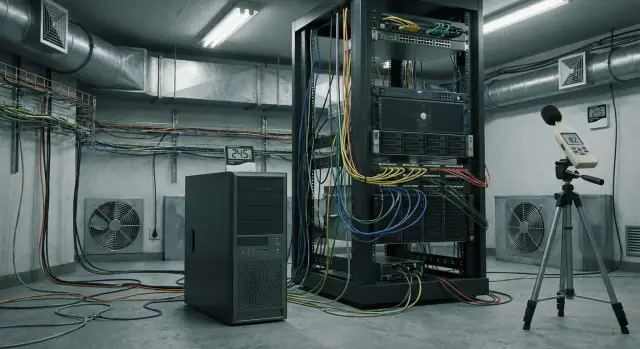
Where to start: what are you actually trying to improve?
Choosing a form factor (tower or rack server) is almost never about "which is better." It's about which problem you want to solve: lack of space, maintenance complexity, office noise, growing load, or availability requirements.
Start with two simple questions: where will the server be located and who is responsible for it. If it sits near employees, silence and heat control usually come first. If there are several servers that need quick servicing, manageability, standardized installation and tidy cabling become more important.
The purchase price can be deceptive. Cheaper on the shelf doesn't always mean cheaper to own. Add a rack, UPS, cooling, power consumption, engineer time, downtime during failures, and how fast you can scale.
To understand your priorities, fix 3–5 goals for the next year:
- what exactly is slowing work now (space, noise, overheating, lack of resources)
- how many servers are planned and how fast you are growing
- who maintains them (a single part-time admin or a team)
- which is more critical: quiet for the office or density and convenience in the server room
- what downtime is acceptable (minutes, hours, "can be tomorrow")
Example: a small branch keeps 1–2 servers for files and 1C. There, it's often more important that the equipment doesn't hum under the desk or heat the room. If an organization already has a server room or space for racks and plans to grow to 5–10 nodes, solutions that are easier to mount in racks and maintain by procedure usually win.
If you buy equipment for the public sector or large organizations, separately consider service and support requirements: diagnostic timeframes, spare parts availability and clear repair processes. For Kazakhstan this is often easier to solve through a local manufacturer with a service base in the country.
Quick definitions: tower and rack in plain words
Tower server looks like a regular PC case. It stands on the floor or on a desk, has its own enclosure and separate power. It's often chosen where there is one server or just a few and no dedicated rack.
Rack server is a flat chassis designed for installation in a server rack. Chassis height is measured in units (U): usually from 1U to 4U. The fewer U, the denser the equipment in the rack. But that raises cooling and installation precision requirements.
Rack (typically 19 inches) is a metal cabinet or frame for rack servers, switches, UPS units and cable organizers. It helps keep order, improves security and supports proper airflow.
Data center (DC) is a professional facility with racks, redundant power, cooling, security and regulations. Rack formats are usually hosted there.
Typical scenarios:
- Small office: 1–2 servers, silence and simplicity matter — tower is often chosen.
- Server room: multiple servers, need order and growth — rack and a rack cabinet are usually more convenient.
- Colocation in a data center: almost always rack, because space is billed in U.
Important: in terms of components, tower and rack are often the same. Both can have the same CPU, RAM, disks, controllers, OS, virtualization and backups. The difference is usually the case, placement, cooling, maintenance convenience and how easily you can scale later.
Total cost of ownership (TCO): what to count besides the server price
The purchase price is often only part of the budget. For a fair comparison between tower and rack servers, calculate TCO over 3–5 years: what you will spend to launch, operate and change as you grow.
Capital expenditures: what you need to buy to make everything work
Besides the server itself, additional purchases often forgotten in the estimate include:
- the server and disks (preferably with spare slots and power headroom)
- a 19-inch rack and accessories (if you choose rack)
- UPS of adequate capacity and required autonomy time
- rails, KVM or console access (if local control is needed)
- cables, patch panels, mounting hardware and power distribution
If the server sits in an office, towers often have lower upfront costs: you may not need a rack or rails. But once you add multiple servers, those expenses can appear later and in a rush.
Operational expenses: what accrues monthly
Then regular costs begin. It's convenient to estimate them from bills and staff time:
- electricity (server, UPS, networking gear)
- cooling: air conditioning, ventilation, filter maintenance
- support and engineer visits, spare parts, warranty work
- downtime: losses from service interruption and recovery
- space and order in the server room, including noise and access requirements
Plan for growth in advance. If you'll need a second server in a year, you'll add not only hardware costs, but also disks, expanded backups, sometimes licenses (virtualization, OS, backup), and more load on power and cooling.
A practical rule: plan upgrades and a second node in advance, even if you buy one server today. That way the choice of form factor and infrastructure won't turn into an expensive redo.
Also check how predictable delivery and repair are. If equipment is serviced in-country and spare parts are available with clear timelines, that directly reduces downtime costs and simplifies planning.
Money comparison: where tower is cheaper and where rack pays off
If you compare tower and rack servers only by hardware price, you can easily be mistaken. Scale almost always decides: how many servers now and how many will appear in 12–24 months.
Tower is often cheaper at the start. It doesn't require a rack, rails or a cabinet, and sometimes a regular office or a small server room is enough. But each new server costs you space, separate cabling and complexity of neat placement. Per unit of compute, tower usually consumes more space, which quickly becomes a hidden expense.
Rack is usually more expensive on the first invoice because of infrastructure. But when there are multiple servers, racks, power and cooling organization pay off: equipment is denser, it's easier to scale, and there's less cable chaos and better access.
Typical situations where money is wasted:
- a small server room without a rack: tower is cheaper and simpler
- buying a rack "for just one server": rack almost always costs more
- a plan for 3–5 servers and beyond: rack usually saves money at scale
- a temporary project for 6–12 months: tower may be more reasonable
Also calculate data storage costs. HDDs are cheaper per terabyte but require more bays, cooling and usually make more noise. SSDs cost more but generate less heat and fit compact cases better. RAID increases reliability but increases the number of drives and controller cost. And backups (a second copy) almost always cost more than expected, because storage, media and periodic checks add up.
Maintenance and repair: how much time and people it takes
The difference between tower and rack often becomes clear not at purchase but at the first failure. If the server sits in an office and you have no dedicated engineer, simple things matter: how quickly you can open the case, reach a drive or fan without disconnecting half the cables.
Rack servers usually have better-designed hot-swap access. Drives are often in front hot-swap trays and power supplies are modular. This reduces downtime: an engineer swaps a component from the front or rear of the rack without pulling the entire server or disassembling the case on a desk. Tower access can be literally simpler (open the lid and look), but replacements often require shutdowns, more manual steps and more space around the unit.
Before buying, clarify two things: what truly supports hot-swap, and which spare parts you are ready to keep on-site. A minimal kit that often saves hours:
- 1–2 spare drives of the same type
- spare power supply (if removable)
- a set of fans
- power cables and 1–2 network patch cords
- labels or tags for marking
Cables and labeling are a separate topic. In a rack it's easier to keep order: ports are visible, there is space for routing, and it's easier to label lines so nothing gets mixed up. In tower setups cables often become a "tangle behind the desk," and any replacement turns into a lottery.
Remote management (integrated console, remote power control and logs) is useful even in small server rooms. It lets you understand the cause of failure without a site visit, reboot the server, check temperature and disk health. This is vital when one person handles multiple responsibilities or when the service team comes by appointment.
Noise and heat: what the office feels and what the engineer sees
The difference between tower and rack is often noticed not by specs but by how the room changes. In the office you hear and feel it immediately; in the server room an engineer sees rising temperatures, dust and airflow issues.
Rack servers are usually louder. The reason is simple: 1U–2U chassis have small fans that spin faster to push air through dense layouts. If a rack sits near workstations, the noise quickly becomes irritating, especially in a quiet open space. Towers are often quieter because they have more internal volume and can use larger fans at lower RPM.
Heat logic is similar: tower and rack release roughly the same heat at equal load. But in a rack hot air is expelled in a concentrated stream. If the rack is in a small room without proper exhaust, temperature rises quickly, servers increase fan speed and noise grows.
You can check ventilation without complex calculations by answering a few questions:
- is there dedicated fresh air intake (not just an ajar door)?
- where does hot air go behind the rack or chassis?
- does temperature stay below 24–27 °C even in the evening when it's hot?
- is there space to avoid pressing equipment tightly against walls?
Simple discipline usually helps: put the rack in a separate room, install an air conditioner with margin, and don't block rear panels. For racks it's important to separate flows: cold air in front, hot air out the back.
Room requirements: server room vs data center
Choosing tower or rack often depends less on hardware and more on where it will live. Even a good server will start "failing" if it's in a dusty corner next to a printer and everyone touches it.
Server room in an office
For small organizations the server often sits near work areas. Here basic things matter and are easy to underestimate: access, cleanliness and power.
A minimal checklist to verify before purchase:
- access and security: a separate door, lock, access list, no storage of boxes or "temporary" items
- dust and cleaning: regular dry cleaning, no carpets or open windows nearby, filters or at least a closed cabinet
- electrical: separate circuits for servers and networking, clear load distribution across outlets, UPS with power margin
- network: place for a switch, tidy patching through patch panels, spare ports for the future
- noise and heat: if the server is near people, towers are usually easier to tolerate, while racks require isolation and clear ventilation
A simple example: accounting asks to "put a server in the storage room." If there is no separate circuit or ventilation, in a month you'll get overheating, accidentally tripped breakers and cable chaos.
If you move to a data center
In a data center many things become easier, but rules appear. You pay for rack space, power and sometimes heat limits. Access is often by request and passes, so decide in advance who visits and what can be done remotely.
A separate topic is "remote hands": an on-site engineer can reboot, replug a cable or replace a drive per your request. For organizations without 24/7 staff this often removes the main downtime risk.
If you plan to grow, a rack in a data center generally provides more predictable power, cooling and expansion than an office room, where every new server bumps into sockets, noise and space.
Scaling: choose a format so you don't redo everything in a year
If one server is enough today, the main question is not "what's cheaper" but how you will grow. The typical mistake is buying what's convenient now and in 12 months hitting limits of space, noise and cable mess.
Adding a second tower is often simple if there will be 1–2 servers, they sit in a separate room and loads are modest (files, 1C, a small virtualization host). But as boxes multiply, without a rack and standards it becomes hard: more power supplies, more cables, harder cooling and maintenance.
Resource growth isn't linear. CPU and RAM can be expanded in one server, but disks, backups and "suddenly we need another array" usually require extra space, power and tidy organization. Storage and backups often push you into a rack before compute does.
To avoid redoing everything in a year, estimate a 12–24 month plan:
- how many servers and network devices will realistically appear (including UPS and NAS)
- where will backups be and how many disks are needed with margin
- who and how will maintain (one person or a team, any shifts)
- do you need unified standards for cables, labeling and monitoring
- are there noise and heat limits in the room
If you expect growth to 3–4 devices or more, the rack format usually pays off not by the server price but by order: density, manageability and less engineer time spent "figuring out what is connected where."
Common mistakes in selection and installation
The most expensive problems often start not with model choice but with small installation details. A great server can fail if the surrounding infrastructure is missing: overheating, downtime and maintenance chaos follow.
A typical mistake is buying a rack server and then putting it wherever fits. Rack servers are designed for a 19-inch rack, directed airflow and proper power. If instead it lies on a shelf or in an unsuitable cabinet, overheating, vibration, inconvenient access and accidental cable pulls appear quickly. A second problem often emerges: a weak or consumer-grade UPS that can't handle the real load and won't allow graceful shutdown on power loss.
Tower servers are also often placed incorrectly. It seems logical to hide a tower in a closed cabinet to avoid clutter, but without ventilation it becomes an oven. Temperature rises, fans spin faster, noise increases and component lifespan decreases.
Noise is frequently underestimated. If a server is in a work area, complaints begin within a week and within a month it's rushed into a new location, usually without a plan and proper cabling.
Another pain point is backups. Having a backup solution on paper doesn't help if you've never tested recovery. In practice you may find not everything is backed up or recovery takes a day and business halts.
Before installation check:
- where hot air will exit and how you control temperature
- UPS capacity and runtime, and protection against spikes
- space for maintenance: sliding the rack out, replacing a drive, accessing ports
- how backups are organized and when you last tested recovery
- how cables will be routed and labeled so any engineer understands the layout in 5 minutes
For example, a small office puts a tower in a closet and six months later adds another server and network gear. Without ventilation and labeling this quickly becomes overheating and a tangle that must be untangled after hours.
Step-by-step selection: a simple algorithm for your situation
Choosing between tower and rack is easier if you start from tasks and constraints, not from the form factor.
5 steps
-
List which services will run on the server and how critical they are. Example: 1C and file shares can be stopped for 2 hours at night, but a medical system or cash registers must run continuously.
-
Assess the room. Is there space for the chassis and easy access, can the electrical handle it, is there cooling, and who will have access. In an office noise and dust are critical; in a server room cable order and security matter more.
-
Define a 2-year growth scenario: will it remain one server or grow to 2–3? If growth is likely, plan for a 19-inch rack, power margin and cooling. If growth is unlikely, a tower can cover the need more cheaply and simply.
-
Calculate total cost of ownership, not just the purchase price. Add UPS, rack or cabinet, shelves and rails, maintenance, power, downtime. Separately estimate the cost per hour of downtime.
-
Check support and spare parts lead times. Clarify who will repair, how long diagnostics take and if spare parts are stocked locally. For organizations in Kazakhstan this is especially important.
If doubts remain after these steps, growth and cost of downtime usually decide: the more servers and the higher the cost of an outage, the more often rack format wins.
Practical example: a small office and growing needs
Imagine a company with 10–20 employees. They use 1C, a shared folder for contracts and bookkeeping scans, and sometimes internal email. There's no server room: the server sits in a storage room or near desks and administration is done by a part-time specialist.
In this case the tower vs rack debate is usually decided not by power but by conditions: noise, space and maintenance time. One tower is easier to place and start: no need for a 19-inch rack, rails, cabinet or planned ventilation. If loads are moderate and growth isn't explosive, a tower gives a clear start with lower investment.
But the choice changes when virtualization and storage grow quickly. For example, within 6–9 months a second 1C database is added, file volume increases, backups to separate media appear, and then another service. Two towers side-by-side create more noise and cabling, and keeping order becomes harder: each has its own scheme and failures cause bigger impacts during maintenance.
Typical fork:
- tower now: if you need one server, there's no space for a cabinet, quiet is essential and minimal room work is required
- rack now: if 2–3 servers are already planned, separate storage, an UPS in the rack and a clear path to a data center
If you plan to move to a data center in a year, a rack usually saves nerves: equipment is easier to transport, place and service according to standards.
Short checklist and next steps
Before buying servers it's easy to get carried away by specs and forget simple things: where it will stand, who will maintain it and what happens on failure.
First ask yourself and your vendor a few direct questions:
- what's the goal for 12 months: one server for office tasks or growth to multiple nodes and a 19-inch rack?
- what downtime is acceptable, and is redundant power, disks and network needed (and who is responsible)?
- what's more important: silence near people or density and easy maintenance in a server room?
- what's the expansion plan: more disks, more memory, a second server, virtualization?
- what's included in support: response times, spare parts, on-site work?
Then do a mini-check of the room: is there space and secure access, are there enough outlets and power, will the ventilation cope? Separately assess noise: if the server will be next to people, it will become a problem faster than expected.
The plan for the first 30 days after installation usually looks like this:
- installation and basic setup (accounts, updates, security)
- monitoring configuration (temperatures, disks, load, alerts)
- schedule backups and store copies offsite
- recovery test: don't just make a copy, actually restore data
- document procedures: who applies updates, how incidents are logged
A practical next step is to request a configuration and implementation estimate from a system integrator. If you operate in Kazakhstan and value local production and service, consider discussing options with GSE.kz: the company has its own equipment lines (including rack servers S200) and system integration services, which is convenient when you want to plan support and ownership costs in advance.
Frequently asked questions
Which is better for a small office: a tower or rack server?
A tower server is usually suitable for a single server in a small office where quiet operation and low upfront costs matter. Choose a rack server when you already have a server room, a rack, or plans to grow to several nodes.
What is included in the total cost of server ownership?
Consider more than the server price. Add a UPS, rack, cooling, electricity, cables, maintenance, spare parts, and the cost of potential downtime over 3-5 years.
When does a rack server become more cost-effective than a tower?
Most often, when you need more than one server. A rack takes up less floor space per server, simplifies power and cable management, and provides clear room for new equipment.
Can I install a rack server in a regular office?
Yes, but rack servers are usually noticeably louder. Their compact fans run at high speeds, so this equipment is better placed in a separate server room or data center rather than next to employees.
Can I put a tower server in a cabinet?
Yes, if the cabinet has ventilation, free space around the chassis, and does not trap hot air. A closed cabinet without heat exhaust quickly leads to overheating and more noise.
What conditions does a rack server need?
Install a rack server in a 19-inch rack with suitable rails, a UPS, and access to the front and rear panels. Do not place it on a shelf or the floor: this worsens cooling and makes repairs harder.
Does a rack server generate more heat than a tower?
At the same load, both formats produce roughly the same amount of heat. A rack server exhausts it in a denser airflow, so it especially needs proper air intake and free space behind the rack.
Which spare parts should I keep on hand?
Check drive and power supply compatibility, as well as hot-swap support. For critical services, keep spare drives, cables, and fans on hand so you do not have to wait for delivery during an outage.
Which format is easier to maintain?
A tower server is easier to get started with: you can often install it without a rack or separate cabinet. A rack server is easier to service in a rack because its drives, power supplies, ports, and cables are arranged more neatly.
How can I avoid making the wrong choice for the next several years?
Start with the number of servers you expect over the next 12-24 months, along with noise, power, cooling, and acceptable downtime requirements. If you expect 2-3 servers, storage expansion, or a move to a data center, consider a rack format and rack in advance.
