7 min read
Tasks and Assignments in CRM/ERP: Model and UX Without Chats
Tasks and assignments in CRM/ERP: deadline, repeat and dependency scheme, clear statuses and execution control so work doesn't turn into chat.
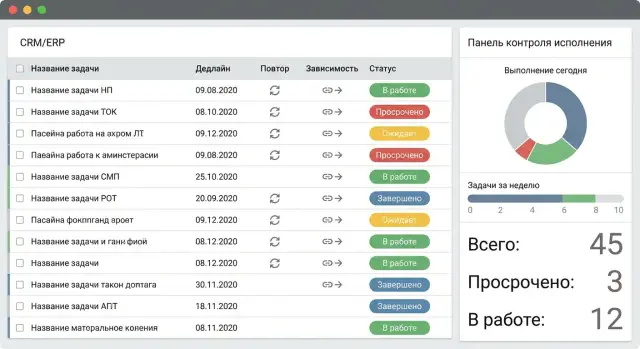
Why tasks in CRM/ERP turn into chat
Tasks in CRM/ERP often turn into a chat not because people like to discuss, but because the system has nothing to hold on to. If there is no single owner, clear deadline and simple rules for statuses, participants start asking in comments: who will do it, what exactly is needed, when to expect the result and what counts as done.
A second common reason is trying to put everything into one card. Assignment, discussion and a personal note mix together, and comments become the only way to understand what's happening.
The difference is simple:
- Assignment produces a measurable result (a file, a number, a confirmed fact) and has a responsible person.
- Discussion is needed to agree things but does not itself create a result.
- Note is useful for one person and does not require control.
If these are not separated, the card becomes a universal container, and everyone communicates inside it like in a messenger.
UX here helps not by adding fields but by making things clear. A working setup looks like this: the minimum required data but maximum unambiguity. Usually it's enough for a task to always have an owner, an expected result, a deadline and a simple progress indicator.
Below is a model where assignments become verifiable: you can see who is responsible, what needs to be done, by when, what blocks the work and how acceptance is recorded.
Basic task model: what to store in the card
Agree on one principle: a task is a commitment with a clear result, not a stream of messages. Discussion can be inside, but the card must answer: what will be done and how to know it's done.
A good rule: a task has one owner (executor) and one expected result. If there are several results, that's a set of tasks or a project. If many people are involved, appoint one responsible person and add others as watchers or verifiers.
Minimum fields that must always be filled
A basic set of fields forces purposeful task descriptions:
- Title with a verb and an object: “Prepare acceptance report”, not “Report”.
- Expected result (acceptance criteria): a document, a number, an approved item, a completed action.
- Owner (one executor) and validator (who accepts the result).
- Deadline (date and time). Use priority as a hint when there are many deadlines.
- Context: what the task relates to (client, contract, procurement, request, equipment).
Messages, files and comments are useful but secondary. If the task changes during discussion, update the result and deadline fields. Otherwise the card stops being a reference.
Boundaries: what is not a task
A question “What do you think?”, an idea “We should improve this” or an argument “Who’s to blame” should not be turned into a task. Notes, discussions or incoming requests are better for that. It becomes a task only when there is a measurable result and a responsible person.
Example: “Check specification for server S200” is a task if it has an owner and a criterion “specification approved and sent”. “Take a look and tell me” is better as a comment or a separate discussion. In integration projects these boundaries are often fixed in an implementation regulation so cards don't turn into chat.
Roles and responsibility: who does what and who verifies
To prevent endless clarifications, a task must have clear roles and permissions. Then comments stay about details and management lives in the card.
The most common mistake is blurred responsibility: one person assigns, another does, a third accepts, and the "ball" is actually with no one.
Minimal set of roles
Usually four roles are enough:
- Requester formulates the result, acceptance criteria and gives context.
- Executor (owner) is responsible for execution, keeps the plan updated and updates status.
- Validator confirms the result or returns it for rework.
- Watchers receive notifications and see changes but are not obliged to respond.
Watchers are especially useful in informational tasks: for example, when assembling a batch of workstations, an engineer does the work, a project manager watches, and procurement stays informed without joining discussions.
Who closes and who returns
A task should not be closed by just "anyone"—the validator should close it. The executor can mark it as "done", but the final "completed" is better left to the person who accepts the result.
Returning for rework should also be an action with a reason: short and concrete about what does not meet the criteria.
Replacing an executor without losing control
Replacements are inevitable (vacation, illness, redistribution). To keep control:
- assign a new executor explicitly, not via chat;
- keep history: it should be visible who worked before and when the handover happened;
- record deadline changes with a reason;
- notify the new executor and the validator so the handover is not silent.
Deadlines without confusion: dates, shifts, overdue
When there is a single "deadline" field, comments like “when to start”, “when to deliver”, “when will it be checked” are inevitable. Simple separation of dates removes ambiguity.
Three concepts are enough:
- Start date — when the executor can realistically begin.
- Due date — when the result must be ready.
- Review deadline — when the validator must give “accepted/needs rework”.
This creates a corridor of responsibility: the executor owns the due date, the validator owns the review date. These dates should be visible together in the card, not hidden in tabs.
It helps to distinguish two types of deadlines: hard (no lateness allowed) and soft (shifts allowed by agreement). The UI should show a small label next to the date, without color panic.
Show overdue as a counter: “+2 days” from the due date. Count the review deadline separately. If there is an SLA, show it calmly as well: “SLA: 24 hours for review”. This is not blame but planning data.
Changing a deadline must be controlled. A due date should be changed only with a required reason and a record in history: who changed it, when, from what date to what date and why. For example: "waiting for input from the security department." Often the delay is not the executor's fault but a dependency or missing input.
Mini-rule: if the due date is moved, the system should recalculate the review deadline. Otherwise the conflict just shifts to the next person.
Repeats and recurring assignments: how to set them up correctly
Recurring tasks usually break for two reasons: it's unclear when to create the next one, and moves are done manually without traces. If repeats are configured properly, a task functions like a calendar with control.
For most teams a few schedules are enough: daily, weekdays, weekly (with day choices), monthly (for example, "on the last working day"), and quarterly. The more exotic the options, the higher the chance people will bypass the system.
When to create the next task
There are two clear modes:
- On close: the next task appears only after the current one is completed. Suitable for maintenance and checks where the fact of completion matters.
- On schedule: tasks are created in advance by dates. Suitable for reports and regulations where the date matters.
Choosing the wrong mode creates either "gaps" (misses) or a "snowball" of tasks.
Holidays, vacations and shifts
A move should leave a trace: who moved it, by how much and why. For schedules on working days, the rule "shift to the next working day" is usually enough. For critical deadlines it's better not to shift but to create the task in advance and assign a substitute.
To avoid losing misses, reports on recurring tasks should keep at least: how many tasks should've been created, how many were closed on time, how many were overdue, how many are open, how many moves were made and for what reasons.
Dependencies: so it's clear who waits for whom
Dependencies are needed so the constant question “what’s happening?” doesn't appear. If the system knows who waits for whom and why, people write fewer comments and move work forward.
To keep it simple, three types of links are usually enough: a task blocks another, depends on another, or can run in parallel.
Each blocking link should have a one-sentence reason. Not just “waiting”, but specific: “waiting for signed act”, “need system access”, “need equipment delivery to warehouse”. It's useful to store two clarifications: what exactly must appear (document, decision, access, delivery) and who confirms it has appeared.
Notifications are better event-based: when a task is unblocked, when a dependent task's due date is at risk, when a blocking task is overdue. Three recipients are usually enough: the executor of the dependent task, the owner of the blocking task and the validator (if any).
Visualization should also be simple: a list “waiting from whom and what” right in the card and in the task list. Diagrams are rarely needed.
Statuses and transitions: the minimal set that works
Too many statuses confuse people. Too few statuses and no transition rules cause everyone to explain state in comments.
For most assignments this set is enough:
- New — task created but executor hasn't started.
- In progress — the executor is doing the work and owns the next step.
- In review — the result was handed to the validator.
- Blocked — cannot continue without an external condition.
- Completed — result accepted.
- Cancelled — task is no longer relevant, reason recorded.
Statuses work only with transition rules. Don't allow steps that blur responsibility. For example, "Completed" should appear only after "In review", not directly from "In progress".
Practical minimum rules:
- "New" -> "In progress" is moved by the assigned executor.
- "In progress" -> "In review" is moved by the executor, attaching the result.
- "In review" -> "Completed" is moved by the validator.
- "In review" -> "In progress" is allowed only with a reason for return.
- Any active status -> "Blocked" only with a specified blocker.
A separate status "Waiting for answer" is usually unnecessary. If you can't move without an answer — it's "Blocked" with who and until when noted.
Step by step: how to roll out the task scheme in CRM/ERP
Start with a pilot: one team, one process, 2–3 weeks. The pilot's goal is not "pretty cards" but rules: what counts as completion, who confirms, how deadline moves are recorded.
Minimal rollout plan
Create a scheme of five steps and embed it in settings and team habits:
- Split workflow into types (one-off work, recurring assignment, approval, incident) and predefine the final result for each.
- Make fields mandatory that can't be empty to send a task to work: executor, expected result, deadline, priority, internal requester.
- Configure reminders to help: notification before due date, mark "overdue", simple escalation after N hours or days.
- Add dependencies only where work truly stops without them (for example, "installation" after "delivery").
- Fix short rules: who moves to "in review", who accepts, how we move deadlines (reason required), where to record the outcome (in the result field, not in chat).
In practice the principle "one does it, another accepts" works well. Then execution control becomes part of the process, not a string of personal messages.
Common mistakes: why the system doesn't stick
The system "fails" when cards start living like a chat: many comments, forwarded screenshots and disputed details, while the result is not visible.
Typical failures:
- The card has no "Expected result" and the whole assignment moves into chat.
- Too many statuses (12–15), people choose randomly and status stops being a signal.
- No single owner: several "executors" and in the end the task belongs to no one.
- Overdues accumulate without reasons, so it's unclear what to do next: escalate, reassign, agree on a move.
- Tasks replace decisions and meetings: dozens of "discuss/clarify" instead of one task with the outcome "approved TOR".
Signs you're sliding into noise:
- many comments but no result (file, fact, document number);
- the status doesn't make clear what the validator should do;
- the task has 2–3 executors and no owner;
- moves are not recorded and not explained;
- tasks appear labeled "to talk".
Most often three rules are enough: each task has one owner, one clear outcome and any deadline change is recorded with a reason and a new plan.
Short checklist: task quality check in 2 minutes
Open the card and check a few points. If they're in place, chat clarifications are usually unnecessary.
- It's clear who is responsible for execution and who accepts the result. If acceptance is not needed, that's stated explicitly.
- The deadline is unambiguous (date and time), and it's clear whether it's hard or soft.
- There is an acceptance criterion: 1–2 simple signs that any validator can use to say "yes, done". For example: "report in file X for period Y, approved by Z".
- Dependencies are described concretely: "start after payment", "waiting for system access", "need a mockup from design". If work can proceed in parallel, don't add a dependency.
- If the deadline was moved, the history shows a reason and the new date.
Example: "Buy 10 PCs for a training class" becomes a clear task when there is an owner (procurement), a validator (facilities or IT), a hard due date (before semester start), acceptance criteria (delivery, acts, image setup) and a dependency (approved specification).
Example scenario: how an assignment goes from request to result
Imagine: the IT director asks to purchase and deliver a batch of workstations and some servers for a new project. IT, security, legal, procurement, warehouse and a mounting contractor are involved. If handled by chat, after a week it's unclear what was agreed and what is stalled.
The same work managed with tasks looks like a short chain with inputs and outputs:
- Prepare requirements (owner: IT). Result: requirements file and model list.
- Approve requirements (security and legal). Result: approval mark or rejection with a reason.
- Place order (procurement). Result: request/contract number and chosen supplier, for example GSE.kz (gse.kz) for locally produced equipment.
- Accept delivery (warehouse + IT). Result: waybill, acceptance fact, remarks.
- Commission (IT). Result: commissioning act, serial numbers, installation location.
Dependencies are used where the next step can't start without a fact. "Place order" is blocked until requirements are approved. "Commission" is blocked until acceptance is closed. Softer links are better handled with notifications: alert IT 2 days before delivery so they prepare racks, cables and server room access.
To prevent the assignment becoming chat, record outcomes in fields, not messages: request numbers, dates, documents, facts (accepted/not accepted, quantity, serial numbers). If there's a problem, make a separate task "Fix acceptance remarks" with a deadline and owner.
A manager doesn't need to read the discussion history. They need the current status and next step, the owner and the deadline, blockers (if any), the last confirmed fact and any moved dates with reasons.
Next steps: how to cement the process and scale
Start with one process (for example, invoice approval or preparing a commercial offer) and a pilot with 1–2 teams. Don't change all rules at once: in 2–3 weeks it will be clear where people get confused and what really helps.
Fix the rules in a short one-page memo: what counts as a task, when to set a deadline, who accepts the result, how to record moves and where to record the outcome. Training is best built on real cases: take 3–5 pilot tasks and review what went well and what hindered progress.
For scaling, look at execution discipline metrics, not the number of cards: share of overdue tasks, average time in "In review", number of moves, share of tasks without a clear result, time from assignment to completion for typical assignments.
Then you'll see whether settings are enough or CRM/ERP needs improvements. Most often issues are about roles and permissions (who can change deadlines and close tasks), notifications, reports and integrations (email, calendar, service desk, document flow).
If you want to lock the process faster, an external layer helps: setting up CRM/ERP together with regulations and infrastructure for steady operation (servers, workstations, support). In that format GSE.kz (gse.kz) can be helpful as a system integrator: from implementation and support of CRM/ERP to infrastructure for your processes.
Frequently asked questions
Why do CRM tasks turn into a chat?
A task should have one assignee, a clear outcome, a deadline, and a reviewer. Use comments for details, and record changes to the outcome or deadline in the card fields.
Which fields are essential for a well-defined task?
Write a title that starts with an action and state what the person needs to deliver. For example: "Prepare the acceptance certificate," outcome: the signed certificate is attached to the task.
How many assignees can one task have?
Assign one owner, even if several people are involved. Add the others as observers or reviewers so no one assumes the task belongs to someone else.
Who should close a task?
The assignee sends the task for review once the deliverable is attached. The approver confirms completion or returns the task with a specific reason for revision.
How can you avoid confusion over deadlines?
Separate the start date, completion deadline, and review deadline. This way, the assignee knows when the result is needed, and the reviewer knows when to respond.
What is the right way to move a deadline?
The system should retain the new deadline, the reason for the change, the date of the change, and its author. If the completion deadline changes, recalculate the review deadline so the delay does not pass to the next participant.
When should you use recurrence after completion versus calendar-based recurrence?
Choose recurrence after completion for work where completion itself matters, such as maintenance. Calendar-based recurrence works for reports and procedures with a fixed date.
How should you describe dependencies between tasks?
Specify exactly what needs to be received, who confirms it, and which task is waiting for that result. For example, "Place the order" waits for an approved specification, not the vague "waiting for a response."
Which statuses are needed in a CRM or ERP?
For most processes, the statuses "New," "In Progress," "Under Review," "Blocked," "Completed," and "Canceled" are enough. Each transition should have an owner and a clear condition.
How can you quickly check the quality of an assigned task?
Check the owner, reviewer, outcome, deadline date and time, status, dependencies, and history of deadline changes. If the card makes it clear who takes the next step and what is blocking it, correspondence is usually unnecessary.
