7 min read
Specification for Secure Web Gateway: SSL inspection, categories and AD
Specification for Secure Web Gateway: what to define about SSL inspection, categories, exceptions, logging, AD integration and on‑prem deployment.
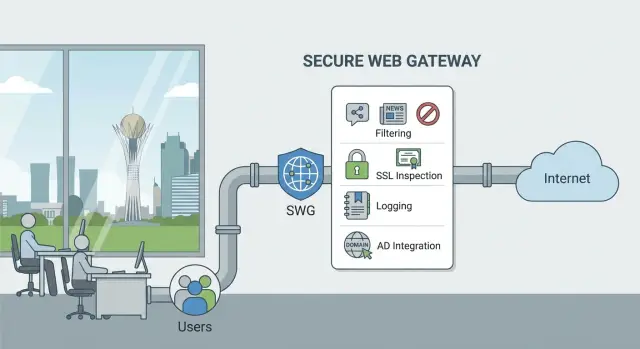
What a Secure Web Gateway solves in plain language
Secure Web Gateway (SWG) is a control point for employee web traffic. It checks where a user goes on the Internet, what they download and what data they try to send out, and blocks what violates company rules. In an SWG specification it's important to describe tasks, risks and expected outcomes, not the brand.
SWG addresses the most common threats: phishing (credential theft), malicious sites and downloads, and accidental data leaks when an employee uploads data to personal cloud storage or external email. A typical scenario: an employee receives an email with an "invoice", clicks a link, the site looks like a normal portal but actually harvests logins and passwords. SWG can stop navigation before credentials are entered or warn the user.
A single antivirus on a PC does not solve the problem. Some attacks work through the browser and social engineering without a "classic" file. Also, Internet access comes not only from corporate PCs: BYOD, contractors, terminal sessions, temporary devices. That's why control at the web access level is needed.
Filtering in an SWG is usually built in layers: blocking by URL and domain, filtering by categories (social networks, gambling, adult content, anonymizers, etc.), and control of web applications. For example, you can allow Teams but block file uploads to personal clouds.
Placement of SWG varies: at HQ (proxy/gateway), in branches (local node or tunnel to the center), and for remote workers (agent or forced proxy). In the spec, first define where the solution will be deployed and who it protects, then go into details about SSL inspection and policies.
FortiProxy, Blue Coat and on‑prem alternatives: how to compare
Before comparing FortiProxy, Blue Coat and other options, decide the deployment model: on‑prem, cloud service or hybrid.
On‑prem is usually chosen when full control, local log storage, predictable latency and data residency are crucial. Cloud is more convenient when there are many branches, no desire to maintain hardware, and fast scaling is needed.
Compare solutions by how they cover your real scenarios (office, branches, remote users, guest Wi‑Fi, server segments) and how they'll scale in 1–2 years.
Practical criteria to check across all options:
- Performance: throughput with SSL inspection enabled, not just "on paper."
- Scalability: clustering, high availability, multi‑site distribution.
- Policies: categories, exceptions, schedules, different rules for groups.
- Integrations: AD/LDAP, proxy authentication, SIEM, DLP (if required).
- Operations: reporting, signature/DB updates, support and response times.
Review licensing separately. Some solutions limit by users, others by throughput, others by modules (filtering, SSL inspection, sandbox). In the spec, list what must be included and which limitations are unacceptable (for example, "SSL inspection only up to N Mbps" or "categories available only in an expensive package").
Preemptively consider security and internal regulatory requirements without tying to specific laws: where logs are stored, who can access decrypted traffic, how exceptions are documented, and how log integrity is verified. If planning on‑prem, include requirements for the site and hardware. System integrators often cover this part—from server selection and inclusion schema to operations.
What initial data to collect before writing the spec
A good SWG spec starts from inputs. Without them, requirements for SSL inspection, categories and logs become either too vague or infeasible.
First, record how many users you have and where they work: HQ, branches, remote, contractors. Describe not only "400 people" but access patterns: who uses persistent VPN, who has direct Internet access, and whether there are separate guest/Wi‑Fi networks.
Next, collect load figures. Ask the network team for an estimate of peak traffic and the HTTPS share. Note "heavy" scenarios separately: video conferencing, video training, large downloads, software updates. These directly affect decryption performance and gateway placement.
List critical business services: government portals, Internet banking, cloud services, CRM, mail, accounting. In the spec, specify what matters for each: availability, minimal latency, or full logging.
Finally, describe existing infrastructure and how the SWG should cooperate with it. Usually this includes Active Directory (OU/group structure), SIEM (which events and how fast), DLP/EDR (need for user correlation), DNS filtering or an existing proxy. Example: if branches exit to the Internet via different links but AD is unified, this sets identification and centralized log collection requirements.
SSL inspection: what must be specified in requirements
SSL inspection is often the most controversial point. Without it, filtering is largely blind; with it, privacy, compatibility and performance questions arise. In the spec, define the level of control you want and where you consciously allow exceptions.
Start by specifying decryption modes. Typical options or combinations:
- full decryption of all HTTPS;
- selective decryption by user groups;
- decryption only for risk categories (malicious sites, anonymizers, phishing, newly registered domains).
State whether different departments can have different modes.
Then address certificates. Specify who issues the corporate root certificate, how it is deployed to Windows, macOS, mobile devices and thin clients, rotation frequency and success criteria (for example, percentage of devices trusting the certificate). Also state requirements for supported TLS versions and error handling.
Describe exceptions by rules, not ad hoc. For example, Internet banking, medical portals and personal accounts may be bypassed but with logging of access metadata. Also list categories that must never be excluded.
To avoid disputes after deployment, add measurable requirements:
- acceptable request latency and page load time increase;
- maximum load in concurrent sessions and throughput;
- what and how is measured in the pilot (before and after enabling decryption).
Include privacy as a separate item: which fields enter logs during SSL inspection, who can access decrypted data, retention periods for logs and how access is logged. Example wording: "do not store content, store only metadata and category; access to logs only by InfoSec on request with registration."
Categories, policies and access rules
Requirements should state not only "what to block" but also "for whom" and "when." Otherwise one vendor configures by categories, another by domain lists, and acceptance results are incomparable.
Minimal category set and decision logic
Start with base classes and specify action for each: block, warn, allow with logging. The starting set usually includes malicious/infected resources, phishing pages, anonymizers, circumvention services, adult content and gambling. Social networks and entertainment platforms are often not fully blocked but limited by time or mode.
Specify behavior for "unknown category" and classification errors: what does the SWG do if it can’t classify a site or misclassifies it.
Then describe policies by groups. Examples:
- Accounting – access to banks and government resources, but strict block on file sharing;
- IT – access to documentation and repositories, with upload control;
- Guests – restricted access under a simple rule set;
- Training classes – block social media but allow educational platforms.
Add a section for custom categories and lists: your organization’s domains, partners, critical SaaS. Specify who can add entries and how quickly changes take effect.
Don’t forget schedules. The spec should define different modes (work hours, exams, shift schedules) and what changes: categories, limits or list-based access.
Exceptions: how not to turn security into chaos
Exceptions are inevitable: some sites break under inspection, others are immediately needed for business. Problems start when exceptions exist only verbally and persist for years. Define not only technical flags but also governance rules.
Whitelists: who and for how long
Require that any whitelist addition go through approval and have an expiry. A simple workflow usually works best: requester (business), approver (InfoSec), implementer (SWG admin). After expiry, either extend with justification or remove.
To make this auditable, require minimum fields for an exception request: what is excluded (domain/URL/category/app), reason and expected risk, duration and owner, who approved and when, and how to verify the exception is still needed.
SSL inspection: exceptions for "breaking" services
Some critical services fail under decryption (e.g., due to certificate pinning or special clients). Require that these exceptions be precise: specific domains and user groups, not "turn off SSL inspection for everyone."
Describe temporary break‑glass: who can enable it at night or in a branch, maximum duration (e.g., 1–4 hours), and mandatory journaling.
Prohibit "shadow exceptions": no local edits, browser workarounds or separate proxies in branches. All changes only via central management with logging and a report of modifications.
Logging, reporting and investigations
If you don’t define what goes into logs in advance, you can get pretty reports that don’t answer "who accessed what and why."
Minimum fields to require per event (allowed, blocked, warning): user (or technical identifier if user unknown), group (from AD or local role), URL and domain (plus destination IP), category and trigger reason (category/reputation/rule), action (allow/block/monitor), time, source (IP, branch/site).
Then set storage and access rules. Specify retention (e.g., working logs 90 days, archive 1 year) and who can view or export them. Also require audit of admin actions: who changed policies, who added exceptions, who deleted data.
Define reports as task-driven, not vague: top blocks by users and groups, bypass attempts (proxies, anonymizers, unknown categories), spikes in suspicious categories. Specify frequency (daily/weekly) and export format.
For investigations, require SIEM integration: which events to send, in what format (syslog CEF/LEEF or JSON), frequency and time synchronization. Example: if accounting suddenly queries many newly registered domains, logs must show user, group, category, rule and exact time to quickly reconstruct the chain.
Formulate data storage requirements carefully: state that retention location and time must comply with internal policies and applicable norms, without promising specific legal articles or durations unless vetted by legal.
AD integration: users, groups and SSO
If you don't specify how SWG learns who the user is, reports will be by IP and the debate "it wasn’t me" will start. Begin with an identification model and check if it fits branches, NAT and remote users.
Common approaches or combinations:
- SSO via Kerberos/NTLM (transparent domain auth);
- Endpoint agent that sends user and group;
- Proxy authentication (explicit proxy) with domain credentials;
- Captive portal for occasional or guest devices.
Specify how policies map to AD structure. Indicate which groups or OUs are authoritative, and how conflicts are resolved (e.g., user in two groups). It’s useful to state a principle: access is determined by group membership, not by job title embedded in an account name.
Include failover behavior. Define what happens if a domain controller is unavailable: allow only basic categories, switch to a quarantine policy or block everything except critical services. Specify credential cache requirements and its TTL.
For guests and contractors, define a separate track: separate accounts, separate policy, short validity and a simple deprovisioning procedure.
In logs, require recording: user, group, device, IP before and after NAT, branch/site. Example: in a branch of 200 people sharing one public IP, without the link "user + workstation + source" investigations become guessing games.
Step‑by‑step: how to write the spec so it’s not interpreted differently
Start with a one‑page "project boundary": what SWG covers in your case (employee web access, server Internet access, guest network), and what’s out (e.g., mail or DLP if handled by other systems). This removes extra expectations.
Then capture requirements in a consistent form: "scenario → rule → expected result → how to verify." When a vendor sees acceptance criteria, fewer interpretations remain.
1) Outline structure of the spec (concise and to the point)
A convenient structure is five blocks:
- Roles and permissions: who is admin, who only views reports, who approves exceptions and within what timelines.
- Network scenarios: explicit proxy, transparent proxy, PAC, operation over VPN and outside the office.
- Resilience: clustering/failover, where config is stored, behavior on node failure, possibility of updates without downtime.
- Acceptance: list of tests and reporting format for results.
- Documentation and training: which guides are needed and who to train.
2) Define acceptance checks up front
"Should work stably" is not helpful on acceptance. List tests the vendor must run with you and what counts as "passed":
- Category access: 5–10 test sites in allowed and blocked categories.
- SSL inspection: checks for selected groups and verification of exceptions (e.g., banks/government portals if applicable).
- User identification: correct detection of user/group (AD) and application of the right policy.
- Logs and reports: user, site, category, action, trigger visible; exports for a period.
- Node failure: traffic continues according to the designed scenario if a device fails.
Finish with a "go‑live package": inclusion diagrams, config backup, update procedures and short training for admins and InfoSec. Without this, even a good solution is painful to adopt.
Common mistakes in SWG specs and their consequences
The most costly mistake is writing an SWG spec as a set of general wishes. Phrases like "filter dangerous sites" or "keep logs" sound clear but become disputes at acceptance: what is "dangerous", which logs, for what retention and with what detail and who can access.
SSL inspection often causes trouble. If the spec lacks expected HTTPS share, performance requirements and allowable latency, you may face complaints that "the Internet is slow" and unexpected failures in corporate services.
Typical errors that lead to operational chaos:
- No measurable acceptance criteria (speed, category coverage, log completeness) — the vendor "delivers" but the solution is unusable.
- SSL inspection enabled without rules for exceptions — bank portals, medical services and updates break.
- No exception process — a flood of "unblock" requests lives in chats without records.
- Branches, NAT and proxy chains not considered — logs show only external IP and investigations stall.
- Roles and permissions mixed — admins change policies without approval and no one knows why something stopped working.
A good spec fixes who approves exceptions, how they are documented, which changes require sign‑off and how to verify policies apply to a user, not an anonymous IP.
Short checklist: did you include everything in the spec?
Before sending the requirements for approval and procurement, run through this checklist. It helps ensure the document is read consistently by InfoSec and IT.
- Context and scale: number of users and devices, sites and links, branches and remote users, critical services (bank-client, EDI, gov portals, clouds).
- Access policies: which categories are allowed/blocked, AD group rules, schedules (e.g., social networks only at lunch), guest and BYOD handling.
- SSL inspection: desired mode (full, selective, risk‑based), mandatory exceptions (medical, banking, personal accounts), who issues and installs certificates, acceptable latency and errors (e.g., don’t break video calls).
- Logging and reporting: required fields (user, group, URL, category, action, reason), retention, access rights, SIEM integration.
- Acceptance: test plan and "done" criteria (category checks, AD user identification, exception handling, report quality, stability under load).
If any item is described vaguely, it will likely become a dispute during deployment. Better to clarify once in the spec than to fix policies in production.
Example scenario: SWG for 400 users and multiple branches
A company with 400 employees has an HQ and 6 branches. Internet egress is through a single channel in the DC; accounts and groups are in one Active Directory. The task is to define clear access rules so branches don’t rely on "manual exceptions" and InfoSec can investigate incidents quickly.
Policies are easier to manage by AD groups that represent real work: office users (standard access, strict block on risk categories), call center (only CRM, mail, knowledge base and allowed sites), IT (extended access with upload controls), contractors ("least privilege" and time limits). Branches should keep the same rules but with separate visibility in reports by site.
In this scenario, SSL inspection is usually selective. The spec should state that decryption is enabled for high‑risk categories (new domains, anonymizers, file sharing, malicious/phishing resources) and that sensitive services have exceptions. Define who approves exceptions and how often the list is reviewed.
Reports should be tailored by audience. Management needs a short weekly summary (top categories, blocks, trends by branch). InfoSec and admins need daily details: SSL inspection events, bypass attempts, executable downloads, new domains, search by user and device.
Before production, run acceptance checks to avoid day‑time disruptions:
- test access to key business and government sites from HQ and branches;
- verify SSO/authentication and correct AD group mapping;
- ensure SSL exceptions are not broader than necessary;
- reconcile logs: user, group, site, action, reason;
- perform load testing at peak times and have a rollback plan.
Next steps after the spec: pilot, deployment and support
After the spec is approved, define decision and operational roles. Typically three roles are needed: InfoSec defines rules and risks, IT manages network, certificates and integrations (e.g., AD), and the business confirms access to required sites and services.
Start with a pilot on a small user group rather than enabling filtering company‑wide. Pilots surface real exceptions (banks, government portals, specific SaaS), SSL inspection nuances and reporting requirements.
How to run a pilot that produces results
- Choose 30–50 users from different departments and 1–2 representative branches.
- Enable base categories and one or two AD group policies.
- Test SSL inspection on critical services and document exceptions in writing.
- Reconcile logs: can you see user, group, URL, category, action, reason?
- Record policy and reporting changes after the pilot.
Before rollout, prepare infrastructure: where the solution will be deployed (on‑prem), how traffic reaches the SWG (explicit or transparent proxy), which certificates are needed for decryption, and what redundancy is required. If high availability is expected, specify failover schemes and behavior on node failure.
Then establish a clear support plan: update frequency for categories and signatures, incident handling procedures, exception request workflow, SLA times and the format of regular reports.
If internal resources or expertise are limited, outsource parts to a system integrator: on‑prem SWG design, server selection and inclusion schemes, AD integration and log organization. For example, GSE.kz (gse.kz) as a server vendor and system integrator in Kazakhstan can build infrastructure to requirements and provide post‑launch support.
Frequently asked questions
What is a Secure Web Gateway in plain terms?
Secure Web Gateway (SWG) — a gateway that all employee web traffic passes through. It checks sites, downloads and attempts to send data out and applies rules: allow, warn or block.
Why is antivirus on a PC not enough and SWG needed?
Antivirus mainly detects malicious files on a device, while many attacks happen through the browser and fake pages without an explicit file. SWG mitigates risk at the web access level: phishing, malicious domains, unwanted categories, and controls actions in web applications.
Where to start when comparing FortiProxy, Blue Coat and other solutions?
Start by defining who you protect and from what risks, then choose the deployment model: on-prem, cloud or hybrid. Compare solutions by scenarios (office, branches, remote users), throughput with HTTPS inspection enabled, policy convenience, integrations and how the solution handles growth.
What traffic numbers should be collected before writing the spec?
Ask the network team for an estimate of peak traffic, the share of HTTPS and heavy scenarios like video calls or large downloads. These numbers directly affect performance requirements, especially if SSL inspection is planned, and help avoid “the Internet is slow” after deployment.
What must be specified about SSL inspection in the spec?
Specify the inspection mode: full, selective by groups, or only for high‑risk categories. Define who issues and deploys the corporate certificate, compatibility requirements for devices, and the list of exceptions to avoid breaking critical services and disputes after go‑live.
How to correctly describe categories and actions (block/allow/warn)?
Decide in advance which categories you block, which you warn on, and which you allow with logging. Also define behavior for “unknown category” and classification errors so users don’t get chaotic blocks and admins can see which rule triggered.
How to manage exceptions so security doesn’t turn into chaos?
Make exceptions only by request, with approvals and an expiration date so they don’t live forever. Require that each exception has an owner, reason, risk assessment and a test to verify if it’s still needed.
Why integrate SWG with AD and what is critical in that integration?
If users aren’t identified, logs turn into lists of IPs and investigations stall. Specify the identification method (SSO, agent, proxy auth or captive portal), how policies map to AD groups/OU, and behavior if a domain controller is unreachable.
Which fields should be in SWG logs and how to specify retention?
At minimum require: user or technical identifier, group, URL/domain, category, action, reason, timestamp and source (site/branch). Also set retention periods, who can access logs and an audit of admin actions, so it’s clear who changed policies or exceptions.
How to define acceptance so the vendor doesn’t interpret the spec differently?
Add measurable checks: category access tests, correct AD-based user identification and policy application, SSL inspection and exception checks, complete logs and failover behavior. Use the form “scenario → rule → expected result → how we verify” to reduce interpretation gaps.
