7 min read
Supermicro Ultra 2U: how to check compatibility before scaling
A practical guide to checking Supermicro Ultra 2U compatibility before upgrades: memory, backplane, controllers, BMC and firmware to avoid surprises.
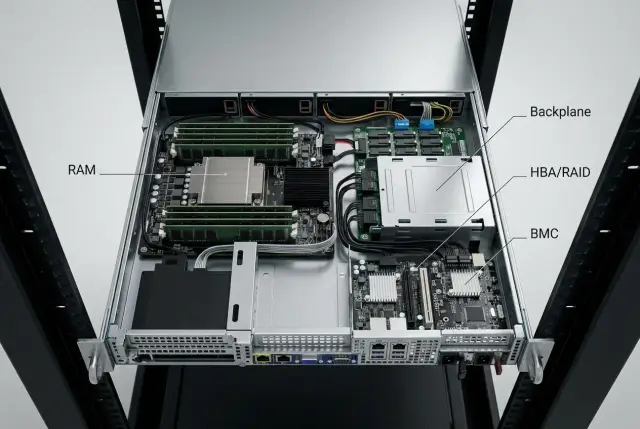
Why check compatibility before scaling
Upgrading a 2U server usually fails not on the "big" things but on the small details. You buy drives and discover the backplane doesn't support NVMe. You add memory and it doesn't meet rank requirements or isn't on the compatibility list. You update a controller firmware and suddenly disks disappear or boot order changes.
In the Supermicro Ultra 2U family these details matter even more: everything inside depends on specific chassis variants and trace routing. Some drive cages work only with SATA/SAS, others require a tri-mode controller, and NVMe often needs dedicated PCIe lanes. There are also "physical" limits: add a second controller and several hot NVMe drives, fans spin up to max and temperature still rises.
The phrase "vendor-independent" in practice means predictable replacements: you can use memory from another vendor, swap HBA/RAID cards, or choose drives without overpaying for "approved" SKUs. But this works only if you lock down critical compatibility parameters in advance and stick to them when buying more parts.
Before expanding, it's useful to fix a minimum specification:
- Memory: DDR4 or DDR5, RDIMM or LRDIMM, speed, ranks, allowed capacity per slot, and special modes (for example, mirroring).
- Storage: backplane type (SAS/SATA/NVMe), presence of an expander, support for U.2/U.3 and hot-swap.
- Controllers: HBA or RAID, tri-mode (if required), type of connection to the backplane (e.g., SlimSAS), and required PCIe lanes.
- BMC: IPMI/Redfish versions, compatibility with your access policies, and the ability to update without long downtime.
- Firmware: pinned versions of BIOS, BMC and controllers so new batches don't arrive with different behavior.
This way you see upgrade boundaries in advance and avoid situations where "the hardware seems to fit" but the system won't boot or runs unstable.
CPUs and platform: the foundation of scaling
Scaling a Supermicro Ultra 2U starts not with drives or memory but with the platform: socket, CPU generation and chipset. These determine whether you can put in faster processors next year or must replace the motherboard.
The first thing to check before an upgrade is supported CPU generations and BIOS requirements. The socket may match on paper, but the CPU won't run without the right firmware and model support. In practice this shows up like: the server ran on lower-end CPUs for a year, you add NVMe and 25/100GbE, and find the chosen processors don't provide enough PCIe lanes or the current BIOS doesn't support the upgrade.
Second is heat. A higher-TDP CPU might be "compatible on paper" but require a different heatsink, increase fan speeds and noise. If the rack is dense or the room lacks cooling margin, TDP becomes a real growth limiter.
PCIe is another separate topic. PCIe generation (Gen3/Gen4/Gen5) and lane count on the CPU directly affect how many NVMe drives, network cards and accelerators you can install without compromises.
Before expanding, verify:
- the supported CPU list and required BIOS minimum;
- TDP limits and cooling requirements for your 2U chassis;
- PCIe generation and lane distribution across slots and backplanes;
- memory limits and operating modes (they also depend on the CPU);
- expansion card compatibility with the platform.
Memory: what matters besides capacity
When upgrading a Supermicro Ultra 2U, surprises usually come not from a module "not fitting" but from the system booting in a slower mode or not seeing part of the capacity.
First, lock the memory type for your CPU and motherboard: DDR4 or DDR5, and module class RDIMM or LRDIMM. Servers almost always require ECC memory. "Regular" non-ECC memory may not boot even if it physically fits.
Next, frequencies and modes. A module's rated speed is not guaranteed in-system. With all slots populated the memory controller often reduces speed, especially when moving from 1DPC (one DIMM per channel) to 2DPC.
The third layer is ranks and density (1R/2R/4R, 16Gbit vs 32Gbit chips). Some platforms limit high-density or 4R modules per channel. Because of that, a configuration that "should" give 1–2 TB may hit layout limits in reality.
Before purchasing, check three things: supported combinations of RDIMM/LRDIMM and DDR4/DDR5, rules for mixing ranks and capacities, and the expected frequency for your 1DPC/2DPC layout.
On installation: populate memory symmetrically across channels. Otherwise bandwidth drops and instability can appear. Mixing batches may work but can deliver different SPD profiles and unexpected settings.
Example: you add eight modules to fill channels, the server boots, but frequency drops from 5600 to 4800 and some workloads slow down. This is not a failure but typical behavior when slots are fully populated and should be taken into account in advance.
Backplane and storage subsystem: SAS, SATA and NVMe without surprises
In the Supermicro Ultra 2U line most surprises hide not inside the drives but in how the chassis and backplane route signals and power. Two servers can look identical externally but one supports only SAS/SATA, another NVMe, and a third a mixed mode with limits.
First, identify the drive cage type. SAS/SATA backplanes usually connect with wide SAS cables to the controller (sometimes via an expander). NVMe needs PCIe lanes: either per-slot or grouped via OCuLink/SlimSAS. So "just adding NVMe" to a cage originally for SAS/SATA is often impossible: there aren't enough lanes, connectors or the correct routing.
Form factor affects growth planning too. 2.5" and 3.5" influence density and thermal behavior. U.2 and U.3 may look similar, but compatibility differs. U.3 can be more universal (SAS/SATA/NVMe on one connector) but only if the backplane and controller support it.
A separate choice is direct connection vs SAS expander. An expander helps increase drive count when ports are limited but can become a performance bottleneck and adds another failure point. If redundancy is important, confirm whether dual-path is supported by your scheme (controller + backplane + cabling).
Before buying drives and controllers verify: which protocols the specific backplane supports, whether an expander exists and what it limits, required connectors and cables, hot-swap support for chosen drives, and whether power and cooling are adequate for the planned number of drives.
Example: you add eight NVMe U.2 drives expecting higher IOPS. If the cage is actually SAS with an expander, NVMe may physically fit with adapters but won't work as planned or may not work at all. Fix disk compatibility to the exact chassis/backplane spec and wiring rather than to appearance.
Storage controllers: HBA, RAID and tri-mode
The storage controller often determines whether you can expand the server, move drives to another node, and change storage strategy without reworking the whole system. In Supermicro Ultra 2U this is very visible: chassis and backplane allow different setups and the controller becomes the "bottleneck."
HBA and RAID are chosen for different needs. HBA in IT/passthrough mode is suitable if you manage arrays at the OS level (ZFS, Storage Spaces, Ceph) and want easy drive migration between servers. A RAID controller is useful when you need hardware RAID with predictable behavior and minimal OS-side setup. But migrations depend on model and sometimes controller generation.
Check five points before buying:
- Modes: is IT/passthrough and RAID supported, and how switching affects data?
- Interface support: SAS, SATA, NVMe. NVMe often requires tri-mode and a compatible backplane.
- Ports and cables: internal connectors (e.g., SlimSAS) must match the backplane.
- Cache and protection: for RAID plan for a cache protection module (BBU/CacheVault) and space for it.
- PCIe and cooling: slot width, PCIe generation and actual thermal behavior in 2U, especially if a second card sits nearby.
Tri-mode is convenient for mixing SAS/SATA and NVMe in one chassis or leaving room for a future NVMe transition. But it works properly only when conditions match: the backplane must support the protocol and routing and cables must be rated for NVMe.
Networking and PCIe: avoid running out of slots and lanes
Even if the Supermicro Ultra 2U spec shows "lots of PCIe," you can hit limits not in slot count but in how they're occupied by risers, drive cages and cabling.
First, find which slots are actually available and which CPU they connect to. In single-CPU configs some PCIe may be inactive. Then check bifurcation: an NVMe card for four drives usually needs splitting x16 into 4x4. If the board or BIOS doesn't support the needed mode for that slot, the card may see only one drive or refuse to initialize.
Minimum checks before buying cards: slot width and PCIe generation (x8/x16, PCIe 4.0/5.0), whether the slot is wired to the CPU or chipset, bifurcation support for that slot, and riser limits (not every riser supports every lane configuration).
For networking, choose between OCP NIC and standard PCIe NIC. OCP avoids occupying the main slot and is convenient as a module, but check OCP generation and adapter support. PCIe NICs are more universal but can conflict for lanes with NVMe or RAID/HBA.
Don't forget drivers: when changing OS or hypervisor, ensure NIC/HBA drivers are supported by the target version. Otherwise an upgrade can leave network or storage unavailable after reboot.
BMC and remote management: features, versions, limits
BMC (Supermicro often uses IPMI) is the out-of-band controller that works even when the OS is down. The more identical nodes you have, the more you'll rely on remote console, monitoring and power control instead of visiting the server room.
The basic set of functions you need to avoid manual work: remote console (KVM-over-IP), virtual media for installs, sensors (temps, fans, power), power control and event logging. Verify these functions are present in your exact configuration.
IPMI and Redfish: what to check for automation
IPMI is convenient for basic ops and supported by many tools. Redfish matters if you want to manage the fleet with modern automation. For practical use check: consistent inventory, sensors, event logs and basic actions like power on/off.
If part of the fleet runs a different BMC version, automation can "trip up": one node returns correct inventory, another doesn't, and bulk operations fail. Before expansion, align versions and access policies.
Licenses, security and updates
Some BMC features depend on licenses (for example, enhanced remote console). This often causes surprises when a new server is nominally the same but managed differently.
Security involves more than passwords. Check for support of modern ciphers, disabling legacy protocols, user roles and, if possible, integration with corporate authentication.
Plan BMC updates separately, not "as part of everything else": record the current version, verify compatibility with BIOS and controllers, update one node first and observe, and allow a maintenance window for possible reboots and temporary loss of remote access.
Firmware and versions: what to update and how not to break compatibility
In Supermicro Ultra 2U firmwares act as a bundle: BIOS (and CPU microcode), BMC, backplane/expander firmware, HBA/RAID firmware and NIC firmware. Updating one item can change system behavior: from PCIe lane initialization to which NVMe and memory modules are detected.
A compatibility matrix matters more than "the newest version." Supported means a specific combination: board revision + BIOS version + BMC version + controller and backplane firmware versions. Before expanding, confirm components are in a consistent bundle, otherwise issues surface after hardware installation.
Common post-update symptoms:
- reset of BIOS/RAID settings (boot order, Secure Boot, VT-d, fan profiles);
- changed PCIe assignment (devices "moved", OS device mapping broken);
- changed NVMe requirements (bifurcation, hot-plug);
- reduced memory frequency or training problems;
- changed BMC sensor logic and fans running at max.
Prepare an rollback plan: keep previous versions, have BMC console access and a clear way to boot from external media. Save configuration snapshots: BIOS settings, RAID/HBA config, boot order.
To avoid guessing later, document versions: board model, BIOS, BMC, controller and backplane firmware, date and reason for changes.
Step-by-step compatibility check before upgrade
Upgrading a Supermicro Ultra 2U usually fails because of a combination of factors: memory, backplane, controllers, PCIe and remote management. Start with facts about the current hardware.
-
Record the current configuration: motherboard model, CPU generation, memory type and speed, installed backplane (SAS/SATA/NVMe), HBA/RAID, NICs, risers and occupied PCIe slots. Be sure to note firmware versions (BIOS, BMC, controller and expander firmware).
-
Define the growth goal and the likely bottleneck. More capacity focuses on backplane and ports. More IOPS requires checking NVMe readiness without changing the cage or conflicting lanes. More RAM needs checks on module types, ranks, speeds and slot-filling rules.
-
Compare platform limits in documentation: max memory, supported CPUs, available PCIe lanes, TDP and cooling limits.
-
Check the "physical" side: slot and riser heights, power connectors and budget, airflow and cable routing.
-
Plan firmware update order and a pilot. Before ordering a batch, update one server, verify disk visibility, stability under load, IPMI/Redfish functionality, and correct sensor readings. Then roll the change to the fleet.
Common upgrade mistakes and how to avoid them
Even if a platform seems universal, most upgrade problems come from small mismatches. Labels look identical but in practice the server won't boot, drives aren't visible or an array won't mount.
Common mistakes:
- choosing "similar" memory by speed and capacity but not checking RDIMM/LRDIMM, ranks, density and mixing rules;
- mixing NVMe with SAS/SATA without confirming backplane type and wiring;
- assuming RAID arrays can be moved intact between models and generations of controllers without checking metadata compatibility;
- underestimating risers and bifurcation: a slot exists but the needed lane split isn't available;
- updating BIOS and BMC without a plan and in the wrong order.
For critical infrastructure, build a test bench and validate compatibility before mass procurement.
Short checklist before purchase and installation
Before buying parts for a Supermicro Ultra 2U, run through these items:
- Memory: DDR4/DDR5, RDIMM/LRDIMM, ECC, ranks, expected frequency for your layout, slot filling rules.
- Drives and backplane: SAS/SATA/NVMe, U.2/U.3, expander presence, hot-swap, required cables and connectors.
- Controllers: HBA or RAID, IT/passthrough, tri-mode (if needed), backplane and OS compatibility.
- PCIe and networking: actual available slots, CPU lane sources, bifurcation, riser compatibility, resource conflicts between NIC and NVMe.
- BMC and firmware: current BIOS/BMC/controller versions, update and rollback plan.
Practical tip: list exact models and part numbers and compare them to what's already in the server. This is especially important for phased expansion and mixed deliveries.
Example scenario: expand without changing the platform
A 2U virtualization server has run well for a year but VM counts increased. Projects hit RAM limits, databases and caches need faster disks, and inter-node traffic grew. The task: expand the Supermicro Ultra 2U without becoming dependent on a single supplier or getting surprises after procurement.
Start by recording the current configuration and the goal: add memory, increase NVMe share and upgrade network speed. Check four risk areas before ordering: memory type and layout, actual NVMe readiness of the backplane and its wiring, controller modes and interfaces, and consistent BMC/IPMI/Redfish versions for automation.
Then build a pilot on one node, measure performance under load, record BIOS and firmware versions (backplane/controller/BMC) and only then replicate the configuration to other servers.
Next steps: lock compatibility and simplify future upgrades
To keep Supermicro Ultra 2U growth predictable, define a clear standard and don't deviate without reason. Otherwise in a year you'll have visually identical servers that require different memory, controllers or drives.
The most practical approach is a short "configuration passport": CPU and board models, memory requirements (type, speed, ranks), backplane type, controller model and mode, BMC and key firmware versions. Add 2–3 approved memory alternatives and 1–2 controller options in case suppliers change.
If you need predictable supply and support, involve an integrator at the specification stage. For example, GSE.kz (gse.kz) as a system integrator can help verify platform, controllers, backplane and firmware versions before procurement so fleet growth doesn't force wholesale node replacements.
Frequently asked questions
С чего начать проверку совместимости перед апгрейдом Supermicro Ultra 2U?
Начните с точной идентификации шасси, материнской платы и типа backplane, а затем зафиксируйте версии BIOS, BMC и прошивок контроллеров. По ним проще всего понять, какие CPU, память, диски и карты расширения реально поддерживаются без сюрпризов.
Как понять, можно ли просто заменить процессоры на более мощные?
Проверьте не только сокет, но и список поддерживаемых моделей CPU для вашей платы и минимальную версию BIOS. Дополнительно оцените TDP и охлаждение в вашем 2U-шасси: «совместимый» процессор может требовать другой радиатор или приведет к постоянному росту оборотов вентиляторов.
Какие параметры памяти важнее всего, кроме объема?
Зафиксируйте тип памяти, который поддерживает платформа: DDR4 или DDR5, а также RDIMM или LRDIMM, и убедитесь, что модули именно ECC. Дальше проверьте ранги и ожидаемую частоту при вашей раскладке по слотам, потому что при заполнении всех каналов скорость часто снижается, и это выглядит как «падение производительности после апгрейда».
Почему NVMe-диски могут не заработать в похожем с виду шасси?
Смотрите на протоколы, которые поддерживает именно ваш backplane: SAS/SATA или NVMe, и как он подключается внутри шасси. NVMe требует PCIe-линий и правильной разводки и кабелей, поэтому «поставить NVMe вместо SAS» часто нельзя без замены backplane или изменения схемы подключения.
Что проверить про U.2/U.3 и hot-swap перед покупкой накопителей?
U.2 и U.3 внешне могут быть похожи, но совместимость зависит от того, поддерживают ли U.3 ваш backplane и контроллер, а не только диск. Самый надежный путь — сверить спецификацию шасси/backplane и требования к контроллеру до закупки, чтобы не получить ситуацию, когда диски определяются частично или не поддерживают горячую замену.
Что выбрать для хранения: HBA, RAID или tri-mode?
HBA удобнее, когда вы хотите управлять массивами на уровне ОС и проще переносить диски между серверами, а RAID-контроллер — когда нужен аппаратный RAID с предсказуемым поведением. Для смешанных сценариев с SAS/SATA и NVMe часто нужен tri-mode, но он даст эффект только при совместимом backplane и правильных кабелях.
Какие ошибки чаще всего делают с кабелями и разъемами при апгрейде дисковой части?
Убедитесь, что разъемы на контроллере и backplane совпадают по типу, например SlimSAS, и что кабели рассчитаны на нужный протокол. Даже при правильном контроллере «не те» кабели или неверная схема подключения приводят к тому, что часть дисков не видна или работает нестабильно.
Почему «слоты есть», но карты NVMe или сеть работают не так, как ожидалось?
Проверьте, какие слоты реально активны в вашей конфигурации CPU, и от какого процессора они работают, потому что при одном CPU часть PCIe может не использоваться. Затем уточните поддержку bifurcation для конкретного слота и райзера, иначе NVMe-адаптер на несколько дисков может увидеть только один накопитель.
Что обязательно проверить в BMC/IPMI/Redfish перед расширением парка?
Минимально проверьте доступность удаленной консоли, виртуальных носителей, сенсоров и журнала событий именно в вашей комплектации, а также совместимость IPMI/Redfish с вашей политикой доступа. Если в парке разные версии BMC, автоматизация и массовые операции часто начинают сбоить, поэтому версии лучше выровнять до масштабирования.
Как обновлять BIOS/BMC/прошивки, чтобы не потерять совместимость и не получить простой?
Обновляйте прошивки как связку и по плану: BIOS, BMC, контроллеры хранения и элементы дисковой подсистемы должны быть в согласованных версиях. Перед массовым обновлением прогоните пилот на одном узле, сохраните текущие настройки и подготовьте откат, потому что после обновлений часто сбрасывается порядок загрузки и меняется поведение PCIe или вентиляторов.
