7 min read
Migration with the Strangler approach: rolling out modules and retiring legacy
Strangler-style migration lets you run new modules in parallel, monitor data quality, and retire the old contour using clear criteria.
Why move off legacy at all — and why it's hard
A legacy system persists not because it’s convenient, but because it’s embedded in daily work. It holds master data, familiar reports, integrations with accounting, warehouse, banks and government portals. Any replacement immediately affects people and money.
A full big-bang cutover often looks tempting: turn off the old, turn on the new. In practice this breaks processes because real work is always broader than the spec. Miss one manager’s report or one regulator file, and the team either rolls back or fills gaps manually.
The “old contour” rarely equals a single application. Usually it’s a set of modules, scripts, exchanges, tables, access rights and manual operations. A module may look unnecessary on paper but in reality it’s used as a source for reconciliations, document printing or exports to another system.
Pain typically appears in four areas: integrations, reports, data and deadlines. Integrations were built over years without a single scheme. Reports are tied to specific fields and rules. Data can be incomplete or inconsistent. And timelines are tight because the business must run every day.
For the business, the critical risks are process downtime, calculation and data errors (invoices, balances, contracts, penalties), security and access issues, loss of trust in numbers, and rising support costs when “temporary” turns permanent.
That’s why the Strangler approach is valued: it lets you retire legacy in parts and reduce the risk of a full stop. But the key difficulty remains: proving the new module does the same job, and that data and results match what the business considers correct.
The Strangler approach in plain language
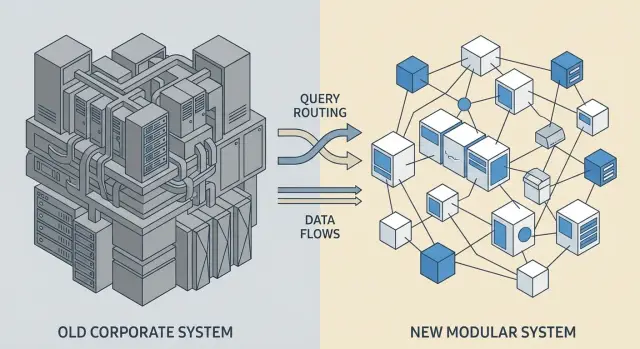
The Strangler approach migrates not in one big launch but in pieces. The new system gradually “grows around” the old: it takes one piece of work, then another, until legacy has no functions left and can be turned off.
At every moment the business keeps running, and the team introduces small, manageable changes instead of one risky switchover.
A “module” here usually means a concrete business function with its own data and rules — for example: receiving and processing requests, master data (counterparties, items, departments), billing, or reporting for a specific process.
Success in the Strangler approach is not “we wrote a new service.” Success is when users perform a task in the new contour, results match expectations, and the old path can be safely disabled. In other words, the new function fully replaces the old one in logic, data and operational indicators (speed, errors, support load).
The approach may not fit when legacy is a rigid monolith with rules scattered across many places and tightly intertwined data; carving a standalone module may be impossible without rewriting half the system. Then you first need to define boundaries: describe processes, data owners and integration points. Otherwise partial replacement becomes a series of endless workarounds.
Preparation: module boundaries and dependency inventory
Before you start, agree exactly what you will “strangle” in legacy and where each module’s boundary lies. Without this, parallel runs quickly become chaotic: the same operations live in two places and users don’t know where to go.
Begin with a function map: which modules actually exist today (even if they aren’t named that way), who uses them and which team supports them. Document how people work in practice, not just how the procedure says it should be.
Then describe key end-to-end flows so you can see where a module starts and ends. Examples: “request -> approval -> order -> acceptance -> invoice -> payment” or “ticket -> diagnosis -> repair -> closure.” These chains immediately show where the new module must correctly interface with others.
Collect integration and dependency points, including hidden ones: external systems (ERP/CRM, accounting, warehouse, HR), file exchanges and exports (Excel, CSV, email), manual operations (double entry, phone fixes), reports and data marts fed by legacy, and roles and permissions tied to specific screens.
Also define data owners and recipients for each dataset (clients, contracts, items, payments). Each dataset needs one person responsible for meaning and quality and one for technical acceptance. A simple test: if report numbers shift tomorrow, it must be clear who decides what is truth and where to fix it.
How to choose module order and success criteria
Order determines half the risk. Don’t start with the largest, most entangled piece, even if it seems the most important. Start with a module whose boundaries are easier to separate, where you’ll quickly see results and learn to operate in parallel.
There are two common paths. First: pick the most isolated modules — fewer integrations, fewer surprises, fast wins. Second: pick the most painful modules — the ones that break often or block the business. In practice, a compromise works best: a module with clear value and controllable links.
Before scheduling a module, check four things: how many integrations it has and who owns each dependency; the criticality of errors (finance, healthcare, government need stricter rules); whether a business process owner is ready to accept changes; and whether the module can run in read-only or pilot mode.
Lock success criteria numerically before parallel launch. Minimum: response time, error rate, incident count and data correctness (e.g., matching key fields and totals between contours). Add business metrics: share of operations without manual fixes and time to complete a typical scenario.
Agree in advance the parallel period length and support rules: who is on duty, how discrepancies are logged, and how much time is allowed for fixes.
Also define stop signals for rollback, for example: critical errors exceed a threshold, data divergence on key metrics, or inability to restore service within an agreed time. That way rollback is technical and fast, not emotional.
Parallel launch architecture: routing and integrations
With the Strangler approach, users should keep working as usual while the system decides where to send a request — to legacy or the new module. This reduces risk and allows incremental rollouts.
Single entry point and routing
Usually you need one “entry” for operations: an API gateway, integration layer or routing service. It accepts a request and routes it to legacy or the new module by rules that depend on operation type, company or branch, user role and pilot stage.
Routing must be explicit and observable. For each request you should quickly know which contour processed it and why.
Legacy adapters and gradual integration replacement
The main trap is trying to “rewrite all integrations at once.” It’s more practical to build thin adapters to legacy that translate new data formats and calls into old interfaces (and back). This way new modules can be connected to external systems gradually without massive rework.
For example, in accounting integration the new module sends a unified event format and an adapter decides whether to call the old exchange or the new one.
Feature flags help manage access and risk: enable the new module first for a test group, then a single division, then everyone. It’s also convenient for rollback: disable the flag and traffic returns to legacy without stopping the business.
Observability is mandatory. Minimum: a correlation ID for an operation in both contours, a mark of where the request was processed (legacy or new), key parameters without personal data, the result and the error code. Without this, parallel launch becomes guessing and integration issues are discovered too late.
Step-by-step Strangler migration plan for modules
Migration works best when each module follows the same cycle: identify it, run alongside, give it to real users, expand, then turn off the old part.
1) Define the module and fix the contract
Describe the module boundary in one sentence: what it does and where responsibility ends. Then fix the contract: what data it receives, what it returns, and which rules and validations are mandatory. If rules aren’t recorded, the new module will behave differently and that will show up during the pilot.
2) Launch the new module in parallel and connect via routing
Start the new module beside the old one without breaking the current chain. Plan how to quickly revert to legacy if needed: a feature flag, routing rule, and a clear list of rollback steps.
3) Run a pilot on a narrow segment
Limit the pilot so risk is controllable: by role (e.g., only operators), branch or operation type. Before launch agree on metrics: operation time, error count, percent of manual corrections, and support requests.
4) Increase traffic share and functionality gradually
Expand in increments. A simple rule: increase coverage only after a stable week (or another agreed window) without critical incidents and with a clear picture of discrepancies.
5) Fix criteria for retiring legacy and switch off the old part
Retirement should not be based on feelings. Typically 4–5 criteria are enough: all required operations are covered; no blocking data divergences; control reconciliations are completed; support knows typical incidents; and there is a short rollback plan. After switching, keep an observation period and only then remove old integrations and reports.
Parallel launch phases: from pilot to scale
Parallel launch lets the new module deliver value before the legacy is fully retired without harming neighboring processes. Usually you move through three modes: shadow, then canary, then segment-by-segment rollouts to 100%.
1) Shadow: the new module computes but doesn’t affect processes
In shadow mode you send the same events and requests to the new module as to the old one, but the new results aren’t used in business. This is useful to check logic, performance and data quality without risk.
If writes are unavoidable (e.g., the module must build caches or reference data), record changes in a separate contour or mark them as test so they don’t pollute production data.
2) Canary: a small share of real operations
Then enable the new module for a small percentage of traffic (1–5%) or a narrow operation type. Decide in advance how “double” work will be handled. Two common options are double write (both systems receive changes, with one being the source of truth) or dual processing (both compute results but business uses only one while you compare).
Discrepancies are inevitable. Appoint a decision owner in advance: who has the right to say where truth lies. Otherwise disagreements over each case will halt migration.
3) By segments: controlled coverage expansion
After canary, expand by segments: branches, client types, product groups, or user roles. This makes rollback and fault isolation easier. Keep a clear “switch” (feature flag or gateway route) at each expansion to quickly return traffic to legacy.
Release management to avoid breaking neighboring modules
Parallel launch often runs alongside integrations, so releases must be predictable. A simple rule works: first evolve interfaces (add fields or methods), then start using them, and only after stabilization remove old behavior. This reduces the chance that a new module will unexpectedly break dependent systems.
Data quality control and reconciliation between contours
With the Strangler approach the main risk is not code but that the new module will live on data that is slightly “different.” Reconciliation between the old and new contours must be regular and clear: what to check, how often, and who fixes differences.
What to reconcile first
Start with key entities and fields that affect money, statuses and operation availability. Rather than checking every row all the time, combine selective deep checks with daily control totals.
Priority checks: master data (codes, names, relationships), stock and balances (by warehouses, accounts, limits, quotas), lifecycle statuses (created, in progress, closed, transition dates, cancellation reasons), amounts and taxes (totals, rounding, currencies), and duplicates/missing values (repeated identifiers, empty required fields).
Record control totals daily (or per load): object counts, sums of key fields, control balances. If legacy “matches,” the new contour totals should align within a pre-agreed tolerance.
Quality rules and the fix process
Agree rules in advance: required fields, valid ranges (e.g., date not in the future), formats (ИИН/БИН, contract numbers), and uniqueness. Each rule needs an owner and a priority.
To avoid endless disputes between teams, use a simple process: a single discrepancies queue with type (data, logic, integration) and severity; assigned owners (who fixes the source, the transformation, or the new module); SLA for responses; and automatic re-check after fix.
Practical example: migrating equipment records across distributed sites often reveals varying serial number formats and duplicated items. Catch these with rules and reconciliation reports before the new module becomes primary.
Criteria to switch off the old contour for a module
Disable legacy for a module only when the new contour has proven it’s no worse in real operation. The decision should be evidence-based: quality, stability and manageability.
Minimal set of criteria
Before shutdown confirm five conditions:
- Functional readiness. Daily scenarios, rare exceptions and manual workarounds used in legacy are covered.
- Data. Reconciliations between contours produce stable results over several cycles, divergences are within tolerance and have clear causes.
- Load. The module survives peaks (month-end, mass calculations, batch exports) without degraded response times or rising errors.
- Operations and support. There are runbooks, metrics, alerts and a clear recovery procedure (who does what and in what time).
- Legal and audit requirements. Roles and access are configured, actions are logged, retention times and exports for audits are set up.
Practical signal that it’s safe to switch off
A good sign: users already work only in the new module, and support tickets are about convenience or small improvements, not missing features. In government or banking contexts in Kazakhstan it’s important that audits can reconstruct action chains. If action logs and access controls are verified and reconciliations pass, legacy becomes an unnecessary risk.
Make the switch reversible: prepare a short rollback plan and keep an observation window after switching so first incidents are handled quickly and predictably.
Example scenario: migrating one business module without downtime
Imagine a company where procurement records are in legacy and you only need to replace the purchase request module. Financials, warehouse and contracts remain in the old contour. This is a typical Strangler migration: the new module runs alongside and gradually takes traffic.
First the team sets boundaries: the new system handles creation and approval of requests, and legacy remains the source of truth for payments and closing documents. Then they run a pilot for one division (IT or a single branch). Users create requests in the new UI, but data still flows into legacy so accounting and warehouse work as before.
How parallel work looks during the pilot
During the pilot the rule is: the new module creates requests and legacy accepts them as “incoming documents.” Daily reconciliation checks key fields: statuses (created, under approval, rejected, approved), amounts and currency, VAT or no VAT, counterparties and contracts (identifiers, ИИН/БИН), delivery dates and terms (date, address, comments), attachments and spec links.
If discrepancies repeat, don’t expand the pilot. First fix mapping, rounding rules and reference data.
How legacy is retired for this module
When a pilot is stable (e.g., 2–4 weeks without critical divergences and normal processing times), change routing so all new requests go only to the new module. In legacy block creation of new requests (leave viewing and finishing old ones) to avoid duplicates.
After switch keep monitoring: for 1–2 months run intensified incident monitoring, integration queues and tail reports (open requests, stuck approvals, wrong counterparties). Only when tails are cleared and metrics are stable can the legacy module be considered decommissioned.
Common mistakes and pitfalls
On paper the Strangler approach looks simple: wrap the old, add the new, switch. In reality problems rarely stem from code; they come from module boundaries, data and unnoticed processes around the system.
Projects are usually delayed by five mistakes: choosing a module that’s too large and mixes different processes; lacking a data owner and unclear conflict resolution; running in parallel “on trust” with no reconciliations, monitoring or alerts; missing hidden dependencies (reports, exports, macros, manual sheets, email exchanges); or turning off legacy with operations still “in flight” (unfinished requests, exchange queues, delayed jobs).
A typical case: a division exported a weekly report from legacy, manually transformed it in a spreadsheet, then uploaded it to another service. The new module ran, but the report vanished, and people assumed “the new system is broken,” while the real issue was an unrecorded ritual.
Simple rules help: assign owners for key entities and a review process; require reconciliations (samples, totals, statuses) during parallel work; map dependencies including manual steps and reports; clean queues and unfinished statuses before shutdown; and record readiness criteria before switching, not after the first incidents.
Short checklist and next steps
Before retiring the next legacy module, tidy up the basics. Otherwise parallel work will devolve into endless calls and manual fixes.
Make sure the module has at minimum: clear contracts (what the module does, events and data it emits, who owns each field and reference); controlled enablement (request routing, feature flags for users and scenarios, logging of key operations); daily reconciliation (what we compare, where we log discrepancies, who investigates and SLA for responses); shutdown and rollback criteria (when the module is ready, how fast we return traffic to legacy, what to do with accumulated data); visibility into quality (error metrics, integration delays, share of operations served only by the new contour).
If you find gaps, don’t try to close everything at once. Pick one module and make the process repeatable: contracts, flag-based enablement, reconciliation, discrepancy resolution, decision. Then apply this template to the next module.
A practical next step is to assess infrastructure and support for parallel work. Load usually increases due to double writes, background reconciliations and extra logs. Check capacity for peaks (e.g., month-end) and whether support can operate 24/7 during critical cutovers.
If internal resources are lacking, engage a system integrator to design the parallel contour, integrations and support. In Kazakhstan such tasks are handled by GSE.kz: the company has system integration experience, and if needed you can rely on locally produced servers and workstations for required load and support mode.
Frequently asked questions
Why does “turn off the old — turn on the new” almost always end up causing issues?
Most problems hide in subtle dependencies: manager-specific reports, Excel exports, file-based exchanges, manual fixes and rare exceptions. In a big-bang cutover these details surface only in production and break flows, because real work is always broader than requirements.
What is the Strangler approach in simple terms and what is its main idea?
The Strangler approach means replacing legacy piece by piece: a new module takes over one specific function, then another, until the old contour has no useful work left. The goal isn’t just to “write a new service” but to have users complete tasks in the new contour and get the same correct results without manual workarounds.
How do you correctly define module boundaries so migration doesn’t turn into chaos?
Start from a map of actual functions: who uses what, which data is touched, and which reports and integrations rely on the area. Then define the module boundary in one sentence and list dependencies, including manual steps and “grey” exports — these are the things that most often break parallel runs.
Which module is best to start with for a Strangler migration?
A good first module delivers noticeable value but has controllable connections to other systems and a clear business owner. A practical guideline is the ability to run it initially as a pilot or in read-only mode to get rapid feedback without drowning in integrations.
What metrics and success criteria should be agreed before parallel launch?
Agree measurable criteria before start: correctness of key data and totals, time to complete a typical scenario, error rate and number of support requests. The sooner you fix “what looks correct” and acceptable tolerances, the fewer disputes will occur during the pilot.
How to arrange request routing between legacy and the new module?
Typically there is a single entry point — a gateway or routing layer — that directs a request to legacy or the new module based on rules. It’s important that for each operation you can see which contour processed it and why; otherwise incident investigation becomes guessing.
Do we need to rewrite all integrations immediately with the Strangler approach?
Avoid rewriting all integrations at once. Instead use adapters for legacy that translate formats and calls. This lets you connect the new module to existing external systems gradually and reduces the risk that one complex integration will stop the migration.
What’s the difference between shadow and canary modes, and when to use each?
Shadow mode is when the new module computes results but does not affect business processes — it’s useful for testing logic and performance without risk. Canary runs real operations for a small percentage of traffic or a narrow operation type; here you must agree how to record discrepancies and who decides which side is the source of truth.
What exactly should be reconciled between contours to control data quality?
Start with entities that affect money, statuses and operation availability: master data, stock and balances, lifecycle statuses and transition dates, totals and taxes, and checks for duplicates or missing mandatory fields. Regular control totals plus selective deep checks work better than trying to compare everything constantly.
By which signs can you safely disable legacy for a module and how to prepare for rollback?
You can safely remove legacy when the new contour covers real user scenarios, reconciliations consistently match, the module handles peak loads, and support can quickly recover service. Make the switch reversible: prepare a simple rollback plan and keep an observation window after the switch.
