5 min read
Storage for RAG: storage tiers for datasets and logs
RAG storage: how to split the index to NVMe, keep sources in a separate tier and set up log retention without overspending.
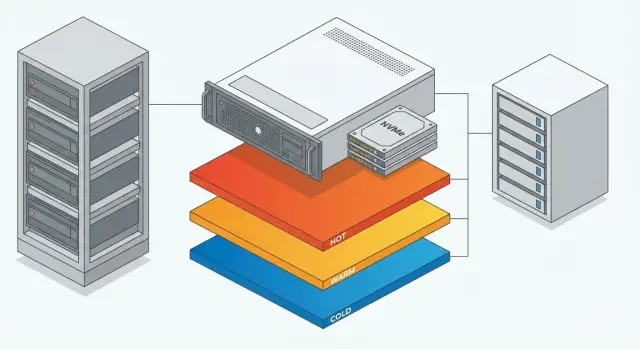
Why separate storage for RAG, datasets and logs
RAG, in simple terms, is when a system first finds relevant fragments in a knowledge base and then a model composes an answer based on them. To keep answers fast and predictable, it’s better to store the search data, source files and operational logs separately.
If you put everything in one layer, storage quickly becomes a compromise: you want low latency for search, cheap space for large files, and easy backups all at once. The result is usually poor performance, higher costs, and difficult recovery.
RAG generally has four data classes:
- vector index (what is used for fast search)
- source documents and versions (PDF, DOCX, emails, pages)
- datasets for training and evaluation (Q&A, annotations, gold standards)
- logs and traces (queries, errors, metrics, events)
When they all live in the same place, problems appear fast. Search slows down because fast disks are used for the wrong things. The expensive tier fills with logs that don’t need NVMe. Backups become heavy: you copy the index, raw sources and noisy logs as one monolith, and recovery time grows.
Separation by tiers solves this directly: the index gets the fastest access and stable latency, sources and datasets are stored reliably and cheaply, and logs follow clear retention and volume policies. This simplifies cost control, speeds up search, and makes recovery after failures a real procedure.
What types of data do you have and how they differ
A correct scheme starts not with choosing disks but with understanding the requirements of different data. If you put everything in one folder and one pool, you’ll almost inevitably end up with either slow search, expensive capacity, or chaos with permissions.
Vector index is usually much smaller than the sources but very sensitive to latency. Extra milliseconds of read time can easily turn into seconds of response time, especially under load.
Source files (PDF, DOCX, presentations, scans, images) are large and rarely read in full. They are needed for reindexing, citation checks and legal accuracy. They must not be lost and can’t be treated as ephemeral files.
Datasets for training and evaluation are versions, experiments and archives, sometimes containing sensitive data. Versioning, access control and the ability to roll back to a previous set are important here.
Logs are many small records that grow daily and lose value over time. Without retention rules, they quickly consume space and make investigations harder: important records will drown in noise.
To quickly separate data classes, answer five questions:
- What is more critical: latency, throughput or capacity?
- How often are the data read and overwritten?
- Can the data be restored from another source?
- Are strict access controls and audit required?
- What retention period is actually useful?
Also keep backups and snapshots in mind. They’re not “just another copy” but part of the recovery strategy. An index can often be rebuilt, while sources and datasets without backups can be lost forever.
Practical three-tier storage scheme
The idea is simple: use fast expensive storage only where it directly affects RAG response time. Move everything else to larger, cheaper tiers.
Tier 1: fast (NVMe) — index and search
Put here what participates in nearly every request:
- vector index files/segments
- small mapping tables (e.g., document ID to fragment ID)
- caches for hot queries and embeddings, if you have them
- frequently read engine service files
Keep this tier clean. Don’t place archives, raw files, full large datasets or old logs here. They hardly improve latency but quickly consume space and complicate maintenance.
Size it based on the index, but plan headroom for growth and rebuilds. A practical rule: reserve space for the current index, its growth and temporary rebuild files. For example, if the index is 400 GB, planning ~1–1.5 TB is often realistic: you’ll survive updates without hitting the disk during rebuilds.
Reliability matters even if the index can be rebuilt. NVMe loss causes downtime and hours of recovery. A reasonable minimum is mirroring (RAID1) across two NVMe drives.
Define update rules up front: how often you rebuild the index (daily, weekly, on change) and where rebuild temp files live. A convenient approach is to keep a temp folder on the same NVMe with a strict quota, while source files for reindexing live in tier 2.
Tier 2: capacity — sources and datasets
This tier holds source documents (PDF, DOCX, emails, OCRed scans), extracted texts and images, as well as datasets for training and testing. These are not needed on every request but are required for reindexing, quality checks and dispute resolution. Reliability and organization matter more than peak speed.
To avoid mixing “how we got it” and “what’s in production,” it’s useful to have three zones:
- raw: received originals (unchanged)
- processed: after text extraction, normalization and chunking
- published: what is allowed to be used in production
Versioning is needed even in small projects. Store sets as separate versions (v1, v2) and record what changed: source, cleaning rules, annotations. That way you can fairly compare quality and quickly roll back if a new version worsens results.
Set access controls in advance or order will break. A common scheme: raw is available only to source owners and security, processed to the data team, published to RAG services and test teams.
Link the index via stable identifiers. Each document and fragment gets an ID, and the index stores the ID of the version plus an integrity check (hash). If a published file changes, you’ll see it immediately and won’t search using an index that points to different data.
Tier 3: logging — lifecycle and retention
Logs in RAG are used for two things: quickly finding the cause of failures and proving the system behaved correctly (audit). If you store everything forever, cost rises while value falls.
Collect what helps answer “what happened, when, where and why”: requests (without unnecessary personal data), response status, prompt and model versions, technical errors, per-stage latencies (search, ranking, generation), and audit events (who changed datasets, who rebuilt the index, who changed policies).
Then set a lifecycle based on value. Example scheme:
- hot layer 7–30 days: events for fast investigations
- warm layer 3–6 months: only important fields, compressed, queried less often
- archive 12–36 months (if required by regulation): audit trail and minimal technical events
Mask sensitive fields before writing. Don’t log passwords, tokens, API keys, document numbers, national ID numbers or medical details. For investigations, hashes, categories and object identifiers are often enough.
Grant log access via a limited role with minimal rights: read only necessary indices, restrict by project, and require access auditing.
How to implement the scheme in 1–2 weeks
Treat this as a small project and you can roll out storage tiers in 1–2 weeks without stopping development. Agree who owns each stream: search (index), content owners (sources), MLOps (datasets and pipelines), security (logs and audit).
Start with a data map: where data come from, where they live, who owns them, daily growth and realistic retention needs.
Then make a short plan:
- record data flows and owners
- estimate growth and retention for each data type
- separate tiers (NVMe for index, separate capacity for sources and datasets, separate policy for logs)
- configure backups and perform one recovery test in a test environment
- document rules in one place: what lives where, who has access, retention periods and why
To avoid drowning in details, run a small pilot: one document type, separate source tier, index on NVMe and migration of old logs to cold storage. If search stays stable and backup recovery is clear, scaling up will go faster.
Common mistakes and pitfalls
Most often everything is stuffed into one fast tier. NVMe looks big and fast, but it fills quickly with sources, logs and temp files. The predictable result: search slows and failures start when the disk fills.
Another common problem is mixing test and production data. Today you upload drafts and experimental chunks, and a month later it’s unclear what can be deleted safely. This becomes painful when you need to prove which documents contributed to a model’s answer.
Logs are often left without limits. While the system is small that’s tolerable. Then someone enables detailed tracing, adds integrations, and in a few weeks the disk is full.
Backups are another frequent error: copying only the index and forgetting sources and metadata, or vice versa. In the first case the index can’t be restored correctly. In the second, restore takes too long because the index must be rebuilt from scratch.
One more frequent oversight: not allocating space for reindexing. When changing embeddings or chunking schemes you need to keep old and new indexes in parallel plus temporary files.
A simple indicator you’re at risk: NVMe usage jumps unpredictably and the team is afraid to delete data because it’s unclear what actually participates in answers.
Quick checklist before going to production
Before enabling RAG in production, run through the basics:
- index and search structures live on fast storage with enough space for at least one full rebuild
- sources and datasets are separated from the index, with clear raw/processed/published zones
- logs have retention and rules for movement between hot, warm and archive layers
- backup recovery is tested in a test environment and you know the recovery time
- an owner for storage policy is appointed and review cadence is set (e.g., quarterly)
A small test often gives the most value: delete a test index, restore it from sources and check answers remain as expected. If this takes hours instead of minutes, data are likely mixed or there’s no space for rebuilds.
Example: RAG for an organization with retention requirements
A bank or a large hospital runs RAG search over internal regulations, contracts, instructions and support knowledge. Requirements are clear and strict: fast answers for employees, traceable change history and logs for investigations — without bloating production storage.
A practical scheme: the vector index and everything needed for “here-and-now” search sits on NVMe. This gives stable response times when dozens of users search simultaneously. Sources (document versions, system exports, scans) are on a separate capacious layer where capacity and reliability matter more than peak speed.
Logs follow a retention plan: recent 7–14 days in the hot layer for quick investigations, then moved to a cheaper layer for audit and investigations, then archived or deleted per requirements. As volumes grow the scenario stays manageable: add documents, rebuild the index, and older versions and logs move to their tiers automatically.
If security requests the chain of queries for the last 90 days for a specific department, you don’t touch the production index or copy terabytes of data. You select the period from the log layer, generate a report, and search keeps the same response time.
Next steps: formalize policy and choose infrastructure
If it’s clear that index, sources and logs have different rules, the next step is to turn that into a short verifiable policy. A simple table is enough, where for each data type you record: growth and volume, SLA for response and recovery, retention period, tier (NVMe, capacity layer, archive) and access rights.
After the pilot, plan scaling as two separate tasks: performance (NVMe nodes and CPU/RAM for search) and capacity (nodes for sources, datasets and backups). That way you don’t buy expensive NVMe where you only need terabytes.
If you build this on your own infrastructure, check that the server platform supports a separate NVMe pool for the index and separate storage policies. In such projects teams sometimes rely on the experience of GSE.kz (gse.kz) as a vendor and systems integrator, especially when they need servers for compute and 24/7 operational support.
Frequently asked questions
Why can’t I store the index, sources, datasets and logs in one storage?
Usually yes: it’s better to store the vector index, source documents, datasets and logs separately because they have different requirements for latency, capacity and retention. Separation makes it easier to control search latency, storage costs and recovery after failures.
Why put the vector index on NVMe if it’s not the largest by size?
The vector index is involved in almost every query, so even a few extra milliseconds on disk can turn into noticeable response delays. NVMe keeps latency stable under load and reduces the risk that search performance will degrade due to background activity.
Do I need RAID for NVMe with the vector index if the index can be rebuilt?
You can usually rebuild an index, but that still means downtime and extra load, especially for large indexes. Mirroring two NVMe drives (RAID1) is a common minimum to protect against disk failure and reduce the chance of emergency recovery at a bad time.
Why store source documents separately if the index already contains fragments?
Source documents are needed for reindexing, citation checks and legal accuracy, and to explain where an answer came from. If you keep only chunks or just the index, you risk losing context, versions and the ability to quickly restore the system after changes.
What’s the benefit of raw/processed/published separation for documents?
Separating raw, processed and published reduces mixing of “how we got it” and “what is allowed in production.” That lowers the risk of drafts or unvetted data appearing in answers and makes it easier to roll back when a new version reduces quality.
Why version datasets for training and evaluation in a RAG project?
Datasets evolve: cleaning rules, annotations and test questions change. Versioning lets you compare experiments fairly and quickly identify what caused quality to improve or degrade.
How do I decide the retention period for logs?
Logs grow fast and lose value over time, so they need retention rules and a lifecycle; otherwise they consume expensive storage and complicate investigations. A practical approach is to keep detailed logs for a short period and retain only what’s needed for audits and root‑cause analysis longer.
What must not be written to RAG logs and what to use instead?
Don’t log secrets or sensitive personal data: passwords, tokens, keys, unnecessary personal identifiers and medical details. Usually it’s enough to store technical IDs, hashes, statuses, model and prompt versions, and latency metrics to investigate incidents without exposing secrets.
How to link the index to documents so I can later explain a model’s answer?
Use stable document and fragment IDs, link them to a version, and store integrity checks such as a hash. That way you can prove which data participated in an answer and immediately detect when a published file has changed while the index still points to an older version.
How to quickly check that the storage scheme is ready for production?
Run a recovery test: delete a test index, rebuild it from sources and compare answers to expected results. If it takes too long or requires manual steps, your data are mixed, there’s no space for rebuilds, or ownership and storage rules are unclear.
What common backup mistakes should I avoid?
Keep in mind backups and snapshots as part of the recovery strategy. Copying only the index without sources and metadata breaks recovery; restoring only sources without a ready index can be slow because the index must be rebuilt from scratch. Allocate space for parallel old/new indexes and temporary rebuild files.
