7 min read
SSO for a hybrid organization: how to choose Okta, Entra ID, Ping Identity
SSO for a hybrid organization: how to compare Okta, Entra ID and Ping Identity on SAML/OIDC, roles, integrations and audit‑log requirements.
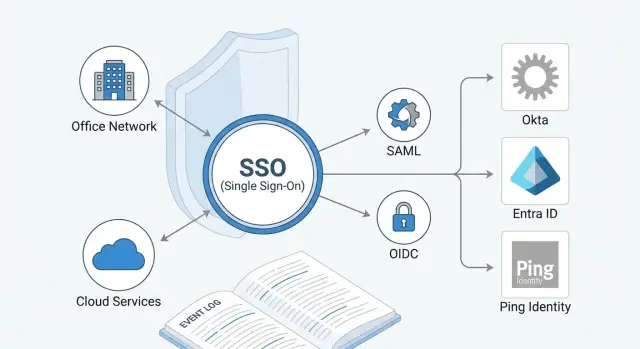
The goal of SSO in a hybrid organization, in simple terms
SSO (single sign‑on) is needed when a company has both on‑prem systems and cloud services, and people need one clear way to sign in. In a hybrid setup you usually pick a single identity provider (IdP): it authenticates users and issues access to the required applications.
Without SSO in a hybrid environment the problem is often process, not technology. A user ends up with multiple passwords, duplicate accounts, and rights kept “just in case.” Support requests grow, incidents are harder to investigate, and the risk increases that a former contractor still has access to some service.
SSO typically covers several goals:
- Convenience: fewer passwords and fewer repeated sign‑ins.
- Security: unified MFA, lockout rules and conditional access.
- Control: clearer visibility into who accessed what and why it was allowed.
- Compliance: easier to demonstrate to an auditor how access is managed.
In a hybrid environment there is almost always a backbone around which SSO is built: a local directory (often Active Directory), a set of cloud services (mail, collaboration, HR), and 1–2 critical on‑prem applications that were built long ago and don’t always play nicely with modern sign‑on methods.
That’s why solutions are often confused. Okta, Microsoft Entra ID and Ping Identity can sound like “the same SSO,” but in practice they are different platforms with different strengths. At the start it’s more useful to list which applications you need to connect, which user types exist (employees, branch staff, contractors) and which access rules are non‑negotiable, rather than debating brands.
Protocols: SAML, OIDC and what to check
Choosing an IdP usually comes down to which protocols your apps actually support and how well those protocols are implemented.
SAML is commonly a fit for classic enterprise systems: legacy web portals, HR and finance systems, many on‑prem apps, and older SaaS that appeared before the “API era.” It handles browser single sign‑on well but is usually less convenient for mobile scenarios and fine‑grained token settings. Typical issues: harder debugging, nuances around time (time zones, session lifetimes), and fragile integrations when an app expects very specific attributes.
OIDC is usually better for modern web apps, mobile clients and API‑backed services. It’s important not just that OIDC is available, but how it’s implemented: token lifetimes, refresh token handling, signature and audience checks. If you have many microservices or multiple frontends, OIDC often gives more flexibility.
OAuth 2.0 is frequently confused with SSO. OAuth is about delegated access (authorization) to resources, not user sign‑on. SSO is commonly built on top of OIDC (which adds authentication) or with SAML.
To quickly assess protocol support for your systems, ask application owners these questions:
- Which protocols does the application support: SAML 2.0, OIDC, or only OAuth 2.0?
- Is the entry point a browser sign‑in, a mobile app, or API access?
- Which attributes or claims are required (email, employee ID, roles) and in what format?
- Are groups/roles needed in the token and are there size limits?
- How are sessions and sign‑out handled (timeouts, forced re‑authentication)?
Simple example: if you have an old internal portal on SAML and a new mobile client on OIDC, plan a mixed scheme where one IdP handles both protocols but security rules and token lifetimes are defined separately.
Typical hybrid architecture: AD, cloud and a single IdP
In hybrid organizations there’s often an existing Active Directory (AD): employee accounts, groups, passwords and familiar policies live there. Cloud services (mail, HR, CRM, SaaS) and external users (contractors, partners, temporary staff) appear alongside. The SSO architecture’s task is to let a person sign in once and receive predictable, auditable access.
Usually AD continues to hold basic identity (login, attributes, group membership), while the cloud receives what applications need: name, email, department, role, and flags like “employee/contractor.” Decide in advance which groups are the source of permissions (AD groups, cloud groups, or groups in the IdP); otherwise roles will start to diverge across systems.
Three practical options
In practice, deployments boil down to a few clear patterns:
- Entra ID as the center: AD syncs into Entra, and Entra issues tokens for SaaS and some internal apps. Good if you have many Microsoft services.
- A separate IdP (Okta or Ping) as the center: AD stays the authoritative account store, the IdP pulls users from AD/directory and issues tokens to all apps, including Microsoft services.
- Two IdPs by zone: one for internal apps, another for cloud, with federation between them. This is sometimes required by regulation or administrative separation but increases support complexity.
Key question in any pattern: where does the account “live” and who issues the token. The account can be in AD, but the SAML or OIDC token is usually issued by a single IdP. Applications then trust the IdP rather than the user’s password.
MFA and conditional access are best applied where sign‑in happens — in the IdP. That makes it easier to enforce consistent rules (for example, require a second factor for sign‑ins from outside the office network or a new device, and always require it for privileged roles). Applications should retain only app‑specific checks, like confirming critical operations.
Complex roles and access policies: how to describe requirements
Roles get complicated quickly in hybrid environments. One person may have a job title, belong to a department and be on two projects, each with different access needs. To avoid SSO becoming a pile of manual exceptions, start by describing the rules that grant access, not by listing “who gets what.”
A practical starting point is RBAC: role‑based access (e.g., “Finance”, “Security Team”, “Call Center Agent”). As projects, branches, clearance levels and employment types multiply, add ABAC: attribute‑based rules. Attributes can be simple: department, city, employment type (employee/contractor), contract end date, project, risk level.
Example in plain language: “A user gets access to the procurement system if they are in the procurement department and work at headquarters; a contractor only gets the request portal and only until the contract end date.” Such rules are easier to validate and maintain than dozens of disparate exceptions.
A short matrix helps gather requirements:
- Which applications and data are critical (ERP, mail, finance, government systems).
- Which roles exist by job title and by project.
- Which attributes actually exist in catalogs (AD/HR) and which do not.
- Which separations are mandatory (for example, “finance” and “procurement” must not be combined).
- Which events should automatically revoke access (dismissal, transfer, contract end).
Document special cases separately: contractors, temporary access and role overlap. For temporary access require an expiration date and an owner who approves renewals.
Also map the lifecycle: who requests access (manager, HR, resource owner), who approves, who audits, and how quickly access will be revoked. Without this, any platform (Okta, Entra ID or Ping) will be configured “as it happens.”
Integrations and account lifecycle (SCIM, directories)
Integrations determine half of the project’s success, but distinguish a “real integration” from a checkbox on paper. An application must not only accept sign‑on via SAML or OIDC, it must support required attributes and groups, work with MFA and conditional rules, and provide clear diagnostics and recovery paths.
Check integrations for key services: Microsoft 365, VPN, VDI, corporate portals, plus HR and ITSM (these often expose domain, multi‑directory, guest account and branch policy nuances).
To know “how this will work in the real world,” ask vendors or integrators concrete questions:
- Which attributes and groups are sent to the application and how are they mapped?
- Is MFA and conditional access supported specifically for this application?
- What happens on department, role or manager changes?
- How is access disabled on the termination day and how long does it take?
- How are exceptions handled: service accounts, temporary contractors, shared workstations?
SCIM becomes critical when accounts are frequently created or changed and errors are costly (finance, medical records, project repos). Without SCIM you end up with manual actions, delays and access “tails.” SCIM makes provisioning, updates and deprovisioning easier to automate.
A separate class is legacy apps without SSO. There are typically three approaches: place a proxy/gateway, use an agent, or accept that migration is needed. For example, a legacy portal can be put behind a gateway temporarily while you reduce exceptions so you don’t maintain a zoo of logins for years.
Logging and audit: what to demand from an SSO platform
In a hybrid setup SSO often becomes the main source of truth about who accessed what and when. Incomplete logs turn incident investigations into guesswork. Define logging requirements before the pilot.
Events that must be logged
The minimum almost everyone needs:
- sign‑in attempts (success and failure) tied to user, application, IP, device and geography;
- MFA events: request, method, success/failure, and any bypasses;
- token/assertion issuance and refresh (OIDC/SAML): to whom, for which application, and lifetime;
- policy changes: conditional access, MFA requirements, exceptions, trusted networks;
- admin actions: adding integrations, changing attributes, granting admin roles.
Events should include precise timestamps (with time zone), a unique identifier and stable fields across versions. Otherwise SIEMs and reports will break.
What matters for audit and SIEM
For audit you need immutability and access controls: who can read logs, who can delete them, and how SSO admin rights are separated from security team rights. Set retention periods according to your regulations, not just the vendor default.
For SIEM verify completeness (all required events are actually sent), latency (seconds, minutes, hours) and normalization (the same fields for different event types). Request sample exports and run them through your parser.
Auditors typically ask:
- who had access to critical systems on a given date and why it was allowed;
- were there MFA bypasses and who approved them;
- who changed access policies and which applications were affected;
- how quickly do you detect mass failures or suspicious sign‑ins.
Prepare a report template in advance: which fields, which period, who approves the export. This saves weeks, especially in large organizations.
Operations and risks: administration, reliability, cost
SSO is often chosen for nice integrations, but the main challenges begin after go‑live. Understand who will administer the system daily, how to survive a provider outage, and the real cost of ownership a year out.
Administration: people, roles, changes
Check the admin role model and delegation. You typically need more than one super‑admin and several role levels: security, help‑desk, and app owners. The easier it is to grant and constrain rights, the lower the risk of accidentally exposing access to the wrong people.
Also require change control: who changed a policy, added an app, or updated group mappings. If admin audit logs are inconvenient or cannot be sent to SIEM, investigations will be slow.
Reliability and deployment model
Reliability is not just the SLA on a slide. Clarify what happens when the internet, DNS, an MFA provider, or the connector to local AD fail. For hybrid schemes it’s critical to have a plan to access key systems if the IdP is temporarily unavailable.
Ask practical questions:
- Is there regional redundancy and clear RTO/RPO for sign‑in?
- How are maintenance windows scheduled and can they fit your operations?
- What happens if a local agent or directory becomes unavailable?
- Can a risky rule be disabled quickly without rolling back all settings?
- How is break‑glass access for emergency admins organized?
Self‑hosted deployments add risks around updates, hardware, failover and 24/7 staffing. Cloud models remove some of that burden but increase dependence on the provider and network links.
Cost of ownership: more than licenses
TCO is not only licenses. It includes implementation and application migration, support and operations, admin and first‑line training, audits and logging integration.
In companies with branches and contractors support costs grow due to frequent role changes and access requests. Agree on runbooks and incident response in advance. If you hire an external team, confirm they provide 24/7 support and have a national service network. GSE.kz, for example, offers 24/7 technical support and a national service network, which can be important for critical environments.
How to choose a solution: a 2–4 week plan
To pick a solution without endless debate, fix a short plan and deliverables: an application list, a role model, security and audit requirements, and pilot results.
A practical 2–4 week route:
- Week 1: application inventory. Mark whether each app supports SAML, OIDC, both or no SSO. Highlight critical systems (finance, HR, mail, service desk) and contractor apps.
- Weeks 1–2: role and group mapping. Determine where attributes come from (HR, AD, cloud directories), who owns data and how often it changes.
- Week 2: MFA and conditional access requirements as simple rules: who, from where and from which devices can sign in.
- Weeks 2–3: logging requirements: which events you need, how quickly they should reach SIEM and retention periods.
- Weeks 3–4: pilot on 3–5 apps that include SAML, OIDC and at least one problematic app (no SSO or old SAML). Predefine success criteria: connection time, clarity of logs, admin usability, and group migration quality.
Example: an organization has a head office and branches, some employees in AD, some in the cloud, plus contractors. The pilot connects mail, a request portal, one internal web system and one contractor app. After the pilot you’ll see how roles are best modeled, how conditional access works, and whether audit logs have enough detail.
Example scenario: a mid‑sized company with branches and contractors
Company size: 800–1,200 employees, head office and 6–8 branches, some remote work. Active Directory, Microsoft 365 and several on‑prem systems: request tracking, HR and an internal portal. Some resources are accessed via VPN or VDI.
Roles are more complex than they look. Branches have different apps and permissions in the same application. Contractors work for 2–3 months and should see one service only, without mail or internal folders. Contractors are allowed access on weekdays from 09:00 to 19:00, and admin access to critical systems must use strong authentication.
A small but representative pilot is best. Usually three connections suffice:
- one SAML app (often an old corporate portal or HR system);
- one OIDC app (a modern web service or new internal portal);
- one remote access system: VPN or VDI to test external sign‑in and MFA.
In the pilot define a role model up front ("Branch A – Finance", "Branch B – Sales", "Contractor – Project X") and test how the platform enforces rules: by group, device, network, time, and what happens on dismissal or contract end.
Measure outcomes, not impressions:
- sign‑in time for a typical employee and for a remote worker;
- number of support requests (password resets, lockouts, “can’t access app”);
- log completeness: who signed in, where from, under which policy and why a denial occurred;
- how easily events can be exported for audit and investigation.
If the pilot succeeds, scale by adding apps, refining roles and onboarding more branches with a clear sense of likely bottlenecks.
Common mistakes when rolling out SSO in a hybrid environment
A common mistake is trying to turn everything on at once. Without an app inventory, owners, sign‑in types and criticality you’ll quickly hit exceptions and manual settings. Start where unified sign‑on will actually reduce risk and support load, and handle others separately.
Another frequent error is mixing up authentication and authorization. SSO establishes “who you are” and how you signed in, but it shouldn’t silently change business‑logic permissions inside apps. When IdP roles and groups start to substitute for application‑level permissions without a clear scheme, access becomes unpredictable.
Deprovisioning is often forgotten. Termination, transfers and contract ends must automatically close access including sessions and VPN/VDI where possible. Treat temporary roles as temporary: expire them and assign an owner.
Logging is another pain point. Logs are often reviewed late, and audits reveal missing admin events, unseen MFA failures, or too short retention. To avoid chaos, follow a few simple rules:
- start with an app inventory and choose 5–10 for the first pilot;
- separate requirements for sign‑in (SSO, MFA, protocols) and for permissions (roles, groups);
- document the account lifecycle: creation, update, suspension, deletion, guest access;
- check which events are logged and how long they’re retained;
- limit exceptions for key users and make them temporary and approved.
Quick checklist and next steps
When comparing Okta, Entra ID and Ping Identity keep a short checklist visible. In a hybrid world with AD/on‑prem and cloud apps it quickly reveals gaps.
Check these basics before demo and pilot:
- your app protocols: SAML, OIDC, plus LDAP/RADIUS and legacy form logins if you can’t avoid them;
- the source of groups and attributes: AD, cloud directories, HR and how conflicts are resolved;
- account lifecycle: SCIM, disable/delete, transfers between departments, guest and contractor accounts;
- MFA and conditional access: scenarios for office network, VPN, BYOD and privileged admins;
- logs and SIEM integration: sign‑ins, policy changes, token issuance, errors, export and retention.
Document a minimum set: a role matrix (who has access to what), a short access policy (how rights are granted and reviewed) and logging requirements (which events, format, who reads them, and how quickly they must hit SIEM).
Plan migration for apps without SSO or with old protocols. Typical approaches: proxy/gateway, replacement, or transitional separate login with strengthened MFA and monitoring.
Next steps for 2–4 weeks:
- pick 5–8 apps for the pilot (cloud, on‑prem, critical, problematic);
- agree success criteria: sign‑in time, incident count, log completeness, user experience;
- assess risks (IdP outage, admin access, fallback paths) and create a rollback plan;
- prepare rollout and training: who’s affected and where to report issues.
If you need help, a systems integrator can cover design, pilot, integrations and support. That’s especially useful in hybrid projects where infrastructure, monitoring and operations must be considered alongside SAML/OIDC integrations.
Frequently asked questions
Why is SSO needed in a hybrid organization?
SSO is when a user authenticates once with a chosen identity provider (IdP) and then gets access to the required applications without entering separate passwords. In a hybrid environment this is especially useful because some systems live on the local network (e.g., AD and on‑prem apps) while others are in the cloud, and without a unified sign‑on account and access management quickly become chaotic.
How to choose between Okta, Microsoft Entra ID and Ping Identity without arguing about brands?
Start with the list of applications and user types, not the vendor. Then check which protocols each application actually supports (SAML, OIDC), which attributes are required (email, employee ID, roles), and where the “source of truth” for permissions will be (AD groups, IdP groups, or cloud). Pick the platform by how well it meets your must‑have scenarios: MFA, conditional access, on‑prem integrations and the quality of logs.
Which to choose for SSO: SAML or OIDC?
SAML is often easier to connect to classic corporate web systems and many older SaaS products where browser‑based sign‑on and a set of attributes are needed. OIDC is usually more convenient for modern web apps, mobile clients and APIs because it gives finer control over tokens and session refresh. Practical rule: choose the protocol the application supports correctly, and plan a mixed scheme if you have both legacy portals and new services.
Why is OAuth 2.0 not the same as SSO?
OAuth 2.0 solves delegated access to resources, not the question “who are you and how did you sign in.” For single sign‑on you typically use SAML or OIDC, which include user authentication. If an application advertises OAuth, ask whether it supports OIDC for sign‑on—otherwise you’ll get partial authorization without a proper login flow.
What to do with legacy on‑prem applications that don’t support SSO?
First assess how critical the app is and how long it will remain in use. A common compromise is to place a gateway or proxy that adds a modern sign‑on layer, while planning to migrate or replace the app. If you keep a separate login, enforce stronger controls: strict MFA at the perimeter, minimal privileges and a clear access‑revocation process so a temporary workaround doesn’t become permanent.
Where should groups and roles be stored: AD, IdP or applications?
Decide on a single source of truth for permissions up front, otherwise roles will drift and break access. Typically the base identity and groups stay in AD, while the IdP issues tokens and adds attributes for applications. If some permissions are better kept in the cloud, document boundaries: what is managed in AD, what in the IdP, what in the application, and who owns each area.
How to safely onboard contractors and temporary staff into SSO?
Create a separate account type and policies for contractors so they don’t inherit employee rules. The safest approach is attribute‑based restrictions (contract end date, project, allowed hours) and automatic revocation tied to contract end. Ensure deprovisioning is automated and terminates active sessions where possible.
How to set up MFA and conditional access in hybrid SSO?
Configure MFA and conditional access in the IdP where sign‑ons occur so rules are consistent across applications. A baseline policy is: require a second factor when signing in from outside trusted networks, from a new device, and always for privileged roles. Make exceptions temporary, visible in logs, and traceable to the approver.
Which logs and events must an SSO platform provide?
At minimum you need sign‑on events (success and failure), MFA events, token/assertion issuance and renewal, policy changes, and administrator actions. Events must include precise timestamps with time zone and stable fields; otherwise audits and investigations fall apart. Before a pilot, request sample logs and verify they can be sent to your SIEM and retained for the required period.
How to run a quick SSO pilot in a hybrid environment and know the solution fits?
Pick 3–5 applications covering SAML and OIDC and at least one problematic case to surface real issues. Define success criteria in advance: connection time, clarity of logs, deprovisioning on termination, and the number of support tickets caused by the new sign‑on. If the pilot is clean, scaling up becomes predictable instead of ad hoc.
