7 min read
Storing SSDs and RAM: ESD, Temperature, and Inventory
How to store SSDs and RAM: ESD, temperature, humidity, packaging and inventory requirements to prevent component failures.
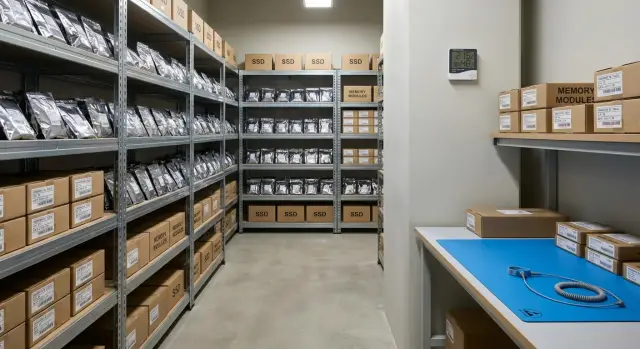
Why storage rules matter
SSDs and RAM modules often fail not at installation, but earlier — while they sit "in reserve." The usual causes are mundane: static electricity from clothing and packaging, overheating near a radiator or in a closed cabinet, high humidity, dust and careless handling during transport.
The problem is sneaky: it shows up only after installation. The component looks intact but suffered a micro-failure from an ESD event or contact oxidation from moisture. The system then boots inconsistently, shows random errors, corrupted data or freezes. Troubleshooting can take hours or even days because the root cause is not obvious.
Losses are almost always greater than the part cost. Downtime of people and equipment, missed deadlines, repeat purchases and urgent delivery, plus extra IT and service work to find the cause — these add up. Another headache is disputed returns when it’s unclear where the component was damaged.
Mistakes usually happen in four places: the warehouse (no basic ESD protection and rules), the service bench (parts left scattered on the table), internal transport (carried in a pocket or random box) and temporary storage "for a couple of days" near workstations.
A simple example: a spare SSD sits in a regular plastic bag on a windowsill. Sun heats the case during the day, cold drafts at night, and in the morning someone picks it up without antistatic measures. Installation goes ahead, but a week later failures start and the team wastes time reinstalling and swapping parts in circles.
Storage requirements for SSDs and RAM exist so these small things don’t become failures and downtime.
What is vulnerable on SSDs and memory modules
SSDs and RAM look like "solid-state" parts, but they have weak points in storage. Most pre-installation failures are related to storage: static, moisture, contacts and mechanical damage. When setting up storage, it helps to know what is easy to spoil.
On SSDs the connectors and the PCB are vulnerable. Contacts suffer if you frequently take the drive out "just to check," hold it by the connector edge, or store it unsecured. Bending is dangerous: an M.2 board is thin, and even slight compression in a box or pressure from above can create microcracks or detach components. Another risk is condensation: bringing a device in from a cold environment and opening it immediately can let moisture settle on the board and connector.
On RAM modules the gold contact pads are the most sensitive area. They’re easily scratched, smeared with fingerprints, or damaged by static. Even if the module looks fine, an electrostatic discharge can create hidden damage that shows later as random errors or boot instability. In high humidity and poor packaging, contacts can oxidize and small components corrode over time.
Temperature and humidity swings are dangerous not only because of condensation. They accelerate material aging, degrade contacts and increase the chance that packaging will absorb moisture.
That’s why factory antistatic packaging and trays are not just "for show." They reduce ESD risk during handling, protect contacts from dust and touch, secure the board so it won’t flex, and make it easy to issue parts without extra "hands-on checks."
The less you touch a board and the more stable the conditions, the higher the chance the component will be like-new on installation day.
ESD: the minimum protection for storage areas
Electrostatic discharge (ESD) often leaves no visible trace but can damage an SSD controller or memory chips. The component does not always "die" immediately: it can start showing intermittent errors only after installation.
For storage what matters is not "sterility" but a repeatable process: consistent actions, one place, and clear rules.
The minimum that is realistic to organize
Start with a single small antistatic point in the warehouse or service area. It’s needed to safely receive, open and repackage components.
A basic kit is enough:
- An ESD mat on the bench with a grounding connection (a dedicated point, marked and checked).
- A labeled area (an "ESD zone" sign) so other items are not dumped there.
- Antistatic bags: shielding (metalized) bags are preferable for SSDs and memory. Regular polyethylene and bubble-wrap bags are not suitable.
- An ESD wrist strap and a simple ground tester (a quick check before work takes seconds).
- Simple handling rules: hold by the edges, don’t touch contacts or components, and don’t place the board on cardboard, plastic or clothing.
Close bags without staples. Fold the edge neatly and secure with antistatic tape or a sticker. Inside the bag the component should not move, especially M.2 SSDs.
How to store opened components after unboxing
If a module is already opened, don’t leave it "on the shelf for a minute." Put it back into an ESD bag and a rigid box or an ESD tray with a conductive insert, and immediately label what the part is and where it came from.
A common mistake: a technician removed RAM for diagnostics, put it on a normal box and transferred it to a shelf. A week later the module went back into service and strange reboots began. ESD control in such cases is cheaper than chasing the cause and dealing with equipment downtime.
Temperature and humidity: realistic conditions to maintain
For storing SSDs and RAM stability matters most. They don’t usually require "laboratory" conditions, but sharp swings and dampness frequently cause problems at the installation stage: contact oxidation, condensation and intermittent failures.
A practical guideline for an ordinary IT storeroom is roughly 18–27°C and about 30–60% relative humidity. If the room is occasionally hotter or drier, it’s not catastrophic. The danger is when humidity is persistently high or temperature varies significantly during the day.
In real facilities the issue is often not the numbers but specific storage locations. Avoid placing boxes:
- near radiators and space heaters;
- on a windowsill with direct sun;
- next to cold exterior walls and corners where dampness appears;
- on the floor, especially near the entrance.
If you notice signs of condensation or moisture (smell, stains, "sweating" packages), move the location immediately rather than "see how it goes."
Monitoring can be simple. Place a thermometer/hygrometer at shelf level (not at the window or above a heater) and keep a short log of readings. Recording once or twice a day is enough, or at least on days when the weather changes or heating is switched on. Log date, time, temperature, humidity and a short note like "after airing."
A separate risk is delivery from the cold. If a box arrives in winter and you bring it into a warm room, don’t open it immediately. Let it acclimate for 2–4 hours, and longer after severe frost. A simple sign that it’s ready: the package is no longer cold and there’s no sign of "sweating."
Packaging and shelf placement
The simplest rule: don’t touch what is already well protected. If there is factory antistatic packaging and a tray, keep components in them until installation. Repackaging often leads to boards rubbing against plastic, getting dusty, or putting strain on connectors.
When factory packaging is absent, use an antistatic bag with a closure or a box that can be closed. Protection from household moisture and dust is just as important: over time they cause contact oxidation and errors that are hard to connect back to storage.
Shelf placement should prevent pressure and bending. Memory modules are easy to damage if pinched or placed under a heavy box. Cased SSDs are usually sturdier, but M.2 boards and connectors are especially sensitive.
Check a few basics:
- Don’t place anything on top of modules and M.2 cards, even light folders or cable coils.
- Store boards flat: no rubber bands, cable ties or pressure against drawer walls.
- Avoid pressure on the contact area and board edge.
- Keep packaging closed: the bag or box must actually seal.
- Don’t store loose small parts nearby that could scratch or dent the board.
Another time-saver is separate storage. Don’t mix different models and batches in one cell, even if they look similar. Assign separate cells and label them so staff pick the correct item at first glance and don’t open extra packages.
Inventory and labeling: avoid losing and mixing parts
Even with ideal storage conditions, inventory mistakes can turn a storeroom into a lottery. One mixed module or lost paperwork wastes time, causes disputes with suppliers and sometimes leads to wrong installations.
Label each unit, not just the box. Preferably put a sticker on the antistatic bag or the outer box (not on the module itself).
Minimum to label:
- Exact model and form factor (for example, M.2 NVMe or DDR4 UDIMM);
- Capacity and key parameters (SSD capacity, memory frequency or timings);
- Serial number (or your internal inventory ID);
- Receipt date;
- Link to the delivery document (invoice or order number).
To avoid installing a random part, mark status clearly — one sticker should be enough to know whether the part may be issued for work.
Five status labels are usually enough:
- new (sealed)
- opened (packaging opened but unused)
- for test (needs a check)
- return (returned from service)
- write-off or quarantine (do not use)
FIFO (first in, first out) is not only "for order." It reduces the risk of the same items staying on the shelf for years while only fresh stock is used. It also makes it easier to spot problematic batches and plan purchases.
Keep documents in one place and one structure: warranty, invoice, incoming inspection results, test notes and return records. If the supplier provides serial numbers and reports, attach them to each unit in the inventory — it saves hours during warranty claims and audits.
Incoming inspection and return rules
Many "mysterious" failures start at receiving. If you don’t inspect packaging and separate suspect items, you risk installing an already damaged module and losing time finding the cause.
At incoming inspection focus on simple signs: is the antistatic packaging intact, are seals present, are there signs of moisture (stains, smell, condensation) or impact (dented box, broken fasteners, bent contacts). Any questionable item is better moved to quarantine immediately than "put on the shelf till later."
Before storing, it’s useful to cross-check compatibility on documents: form factor (for example, M.2 or 2.5"), interface (SATA or NVMe), capacity, and for memory — type (DDR4 or DDR5), frequency and supported capacity for your specific PC or server models. Often the spare part is functional but simply incompatible with your equipment.
For returns and RMA create a separate zone and containers. The rule is simple: returns never mix with new stock. Mark the container with date, reason, where it was removed from and who accepted it. This prevents reissuing a component with an unknown history.
A minimal check before issuing can be done without complex stands:
- SSD: check that the drive is detected, view basic SMART parameters and run a short read test.
- RAM: run a quick memory test for 1–2 passes on a normal PC.
- For both: verify labeling against the request and check version or batch if that matters for your equipment.
This order is particularly useful where there are many similar deliveries and strict accounting, for example in government bodies and large enterprises that buy equipment and spares by batch.
Common mistakes that cause component failure
Problems in storage begin quietly: a memory module works in one PC but fails in another, an SSD suddenly reports errors and you cannot prove the cause. Almost always it’s not a "bad batch" but small violations of storage rules.
The most common damaging actions before installation are:
- Putting SSDs or RAM in regular polyethylene bags. They can hold static and a discharge can damage sensitive elements even if everything looks fine outwardly.
- Storing parts loose in a drawer. Contacts rub against each other, micro-scratches appear, board edges bend, and serial stickers are lost.
- Opening on the cold and installing immediately. Moving from cold to warm can create condensation on the board, and powering it then can cause a short.
- Mixing batches and serial numbers. Later it’s hard to trace origins and impossible to properly process returns.
- Stacking heavy boxes on top. Boards and connectors are not designed for pressure, especially when force is on an edge or connector.
A practical example: several RAM modules were kept on a "standby shelf" without ESD bags in a shared box. When a replacement was needed, a module delivered in winter was installed immediately. The PC booted, but a few days later intermittent reboots began. Diagnosis showed a combination of condensation and mechanical damage to contacts.
If reliable storage for SSDs and RAM matters to you, start with the simple: antistatic packaging, careful placement, an acclimation pause after cold delivery and clear labeling. This is cheaper than any "urgent purchase" and noticeably reduces the share of mysterious failures.
Short checklist: is the storage area ready?
This quick test helps identify the weakest point. It’s especially important if components sit for months and are regularly issued for requests.
Check basic conditions in 5 minutes
- Open (already unpacked) components are in ESD bags and stored in closed boxes or drawers, not "just on the shelf."
- A thermometer/hygrometer sits nearby and there’s a simple log (paper or spreadsheet) where temperature and humidity are recorded at least once per shift.
- Shelves are divided into cells and each cell is labeled (type, capacity, interface), and each position has a receipt or opening date.
- Returns have a separate container or shelf labeled "quarantine" to avoid mixing unknown-history parts with new stock.
- Staff follow one rule: discharge static first (ESD wrist strap or touch a grounded point at the ESD station), then handle the board or module.
If at least one item fails, start with it. These are the cheapest measures with the fastest effect.
A mini-scenario to reveal weak points
Imagine: a memory module was "set down for a minute" on a cardboard box, then returned to a shared cell without labeling. A month later it’s installed but already has micro-damage from static or is mixed up by characteristics. The failing part is blamed, while the real cause was storage and inventory.
Make a simple rule: any opened component immediately gets ESD packaging, a date and a place in a labeled cell. This reduces both failures and confusion.
Real case: how a storage detail becomes a failure
In one office they kept a small spare pool: several SSDs and a couple of RAM kits for quick fixes. Formally it was a "storage area," but in practice boxes were on a shelf in the service room near a window. Nobody wanted extra hassle: the parts were "in packaging and new."
Problems started quietly. After installation some SSDs were detected intermittently or disappeared in diagnostics. RAM was worse: sometimes the system failed POST, sometimes it ran for a day and crashed. The defects were intermittent and everyone argued: service, procurement, supplier.
When they investigated, three small issues came together. First — temperature swings: the window let in cold in winter, the room cooled at night and warmed by day. Second — no ESD zone: parts were taken out and handled on a bare table, sometimes while staff wore synthetic clothing. Third — mixed batches: identical models were stored together, labeling on boxes wore off, and it became unclear what arrived first and what had been handled.
They fixed it without a major overhaul or a "super-warehouse":
- Allocated a lockable cabinet for SSDs and memory away from windows and heaters.
- Introduced antistatic bags for anything opened and a rule to open components only in one place.
- Added labeling: receipt date, batch, status (new, opened, return).
- Hung a thermometer/hygrometer and recorded readings weekly.
Within a couple of months the number of "mystery failures" dropped noticeably. Disputed cases nearly disappeared: inventory now showed where a part had been stored, who opened it and which batch it belonged to.
Next steps: implement requirements without bureaucracy
To make storage safe you don’t need thick regulations. A simple approach works: minimal protective equipment, one clear instruction and a habit of doing things the same way.
Start with a set that covers most risks:
- An ESD mat at the receiving/issuing bench with grounding.
- Antistatic bags for every SSD and memory module (no loose storage).
- Lockable boxes or containers on the shelf to protect from dust and accidental touch.
- A thermometer/hygrometer in the storage area to monitor temperature and humidity.
- Simple stickers for status and date (when received, when opened).
Then write a one-page instruction answering five questions: who has access, where to open packages, how to repackage, how to label, and where to put "questionable" items. If a rule can be done in 30 seconds, people actually follow it.
Next, perform a one-time inventory: split stock into three groups — new/sealed, opened, returns/unclear. Assign each group its own shelf place and inventory status. This avoids situations where "almost new" items sit next to returns and end up being issued.
Reinforce procedures in three operations: receiving, issuing and returns. Any return without antistatic packaging goes to check, not back to the shelf.
If you need to organize storage and supply chains for projects (especially in public sector, healthcare or education), it can be easier to involve a system integrator: they’ll help link warehouse rules to choosing compatible workstations, servers and ongoing support. In Kazakhstan such tasks are often handled through GSE.kz (gse.kz) — as a manufacturer and system integrator with a 24/7 service network.
Frequently asked questions
Why can SSDs and RAM fail before installation?
If an SSD or RAM module is stored “carelessly,” it can receive hidden damage from static, moisture, overheating or board flex. Externally the part usually looks fine, but after installation you can see random errors, freezes and unstable boots, and diagnosis takes a long time.
What is ESD and why is it dangerous for SSDs and RAM?
ESD is electrostatic discharge. It’s often not felt and leaves no visible trace, but it can damage an SSD controller or memory chips. The danger is that the component may not fail immediately; it can start producing intermittent errors later in operation.
What minimum ESD protection can realistically be set up in a warehouse or service area?
A single ESD point is the minimum: an antistatic mat with grounding and a clear place where components are opened and repackaged. A wrist strap and a simple ground checker reduce the risk of accidental discharges during receiving and issuing.
Can SSDs and memory be stored in a regular plastic bag or bubble wrap?
Ordinary polyethylene or bubble wrap can accumulate static and do not protect sensitive boards. Use antistatic, shielding (metalized) bags for SSDs and memory, and ensure the part does not move inside the package or bend.
What temperature and humidity are suitable for storing SSDs and RAM?
A practical guideline for a typical IT storeroom is about 18–27°C and 30–60% relative humidity. More important than exact numbers is stability: risks arise when conditions near windows, heaters or cold walls change noticeably during the day and condensation appears.
What to do with SSDs and RAM delivered from the cold?
Do not open the box immediately after bringing it in from the cold. Let it acclimate to room temperature—usually a few hours. Opening and powering a device while condensation might form on the board can cause unstable behavior or damage.
How to handle unpacked SSDs and memory modules?
Keep them in factory antistatic packaging until installation. If already opened, return the part to an ESD bag and a rigid box or tray. Handle by the edges, avoid touching contacts, and don’t place the board on cardboard, plastic or clothing.
How to place SSDs and RAM on a shelf so connectors and boards aren’t damaged?
Don’t stack heavy boxes on top, don’t clamp boards between objects, and avoid pressure on the board edge or connector—M.2 boards are especially sensitive. Storing parts loosely mixed in a drawer often leads to scratched contacts, bent boards and lost serial stickers.
What must be written on labels to avoid mixing parts and batches?
Label each unit on the bag or outer box with model and form factor, key parameters, serial number or internal ID, receipt date and status (for example: new, opened, for test, return, quarantine). This helps avoid opening extra packages, mixing batches and speeds up warranty and return handling.
How to store returns and what to check before reissuing parts?
Returns must not be mixed with new stock: assign a separate area and mark date and reason. Before reissuing, do a short check: SSD — detection, basic SMART info and a quick read test; RAM — a quick 1–2 pass memory test on a regular PC. This avoids putting questionable parts back into service.
