8 min read
Spare Parts Request Process: From Need to Issuance and Return
How spare-parts requests move from need to issuance, including approvals, reservation, picking, issuance and returns — plus rules for scarce and critical parts.
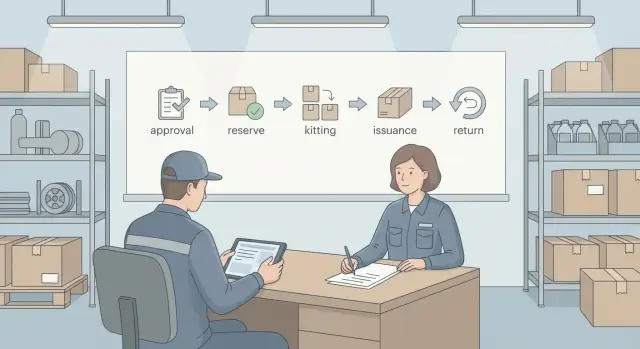
Why formalize spare-parts requests for repairs
A unified request process for spare parts is needed not only by technicians. It’s important for the warehouse to see priorities and avoid handing out stock without trace; for procurement to replenish in time; for finance to control expenses and write-offs; and for managers to understand where time and money are lost. When a common spare-parts request process works, repairs stop depending on personal arrangements and the “first come, first served” principle.
Without a clear process, deadlines usually fail. A part may be listed in stock but be allocated to another repair; or it’s issued “by word” and later it turns out it can’t be returned. Disputes arise: who approved it, why more than needed was given, where the leftovers are, who is responsible for defects and mis-sorting.
Agree in advance on basic rules: who approves a request (by cost, repair type, or the criticality of the unit), where a single record is kept (warehouse system, ERP, service system or a shared table), how reservation, issuance and closure are recorded (request number, dates, signatures, responsible person), what to do in an emergency repair (fast issuance with mandatory later documentation), and the allowed timeframes for checking availability, approving and picking.
Tools can vary, but the logic is the same: a request with a clear content, transparent approval, warehouse reservation, issuance upon confirmation, and control of returns. This is especially important for distributed service operations when multiple locations and warehouses serve shared equipment and one pool of parts.
Terms and classification: what we consider spare parts and what is critical
To avoid disputes and losses, first agree on terms. Spare parts (spares, tools and accessories) are items that replace a failed unit or component and restore equipment to working condition. Consumables (lubricant, cable ties, thermal paste, gloves) and materials (fasteners, packaging) are also needed in repairs, but their accounting and norms are usually different. Mixing categories bloats requests and confuses the warehouse about what to reserve.
Also define the repair type. Scheduled repairs follow the regular approval and picking times. Emergency repairs require acceleration but do not remove the need for accounting: you simply define a shortened set of checks and responsible persons in advance.
Agree on the unit of measure. A line item in the request must match the warehouse card: piece, kit, set. For example, “fan kit” and “fan 1 pc” are different items in stock, with different prices and replenishment lead times.
A critical part is one whose absence causes unacceptable or dangerous downtime. Criticality is usually approved by the equipment owner together with an engineer and the warehouse. Common signs include:
- stoppage of a key service or production
- safety risk or regulatory non-compliance
- long lead time or scarce supply
- no temporary substitute or workaround
- cost of downtime exceeds the part price
Such classification immediately sets rules for approving parts for repair and for reserving them in the warehouse.
From need to request: what should be in the query
A poor spare-parts request starts with “it’s broken, need a module.” A good one starts with facts: what exactly doesn’t work and how that’s proven. Before requesting, record the symptom (error, noise, overheating, performance drop), do basic diagnostics and, if possible, confirm the cause (log, test, measurement, visual inspection). This reduces the chance of ordering the wrong item and later arguing who is to blame for downtime.
To make sure warehouse, procurement and technicians speak the same language, a request needs a minimal dataset:
- equipment: model, serial number, inventory ID (if any)
- installation location: site, room/rack, responsible unit
- problem description: symptom and when it started
- confirmation: diagnostic result, photo/screenshot of error, ticket/act number
- requirement: required item, quantity, unit of measure
SKU issues often arise: no exact catalog number, a faded label, documentation not at hand. Then request the part “by characteristics”: specify the assembly (for example, power supply), parameters (power, form-factor, connectors), compatible models, and attach a photo of the plate or connector. If substitutes are allowed, immediately record replacement conditions: what is critical and what can be swapped safely.
Priority and required date are not “for show.” Set priority by consequences (shutdown of a key process, safety risk, a single workstation downtime, scheduled repair). Set a realistic date: account for diagnostics, time to reserve/pick and possible delivery between warehouses. The more accurate the initial data, the faster approvals and the fewer returns due to mistakes.
Approvals: roles, levels and deadlines
Approval is not bureaucracy — it’s how you quickly make decisions and fix responsibility: what we take, why, when and at whose expense. If the chain isn’t defined, requests hang between people and the warehouse issues “just in case.”
Typical roles include:
- initiator (technician/operations) who describes the problem, equipment, items and deadline
- engineer or site foreman who confirms diagnosis and nomenclature
- unit manager who approves priority and necessity
- warehouse who checks availability and issuing conditions (completeness, substitutes, shelf life)
- procurement who joins if an item is missing or must be ordered
- finance control who checks limits and justification for expensive items
Tie approval levels to three attributes: cost, criticality and urgency. Low-cost items can be approved by the foreman and warehouse, while expensive or safety-related parts should involve the manager and finance control.
Set deadlines as simple SLAs so it’s clear when to escalate:
- foreman’s check: up to 4 hours
- manager’s decision: up to 1 business day
- warehouse availability reply: up to 2 hours
- procurement decision: up to 1 business day
If a deadline is missed, escalate the request. Also enforce a rule of a single decision owner: assign someone who chooses the action (issue, replace with an approved substitute, order, decline) and records the reason.
Checking availability and reserving in the warehouse
After approvals begins the most accounting-heavy stage: determine what is actually available and secure it for the repair.
Check availability not only at the central warehouse but also where parts often “live” in practice: service crews, remote sites, emergency kits. Look not only at quantity but at status: free, reserved, in transit, written off, under inspection.
Place a reservation immediately after confirming availability and link it to the request (request number, equipment, site, deadline). Set reservation periods in advance: for example, 3–5 business days for planned work and 24–48 hours for urgent jobs. If the repair is postponed, extend the reservation by explicit decision. Otherwise the warehouse is left holding stock and shortages grow.
If stock is insufficient, choose a clear scenario: issue the available part and wait for delivery, approve a substitute (recording compatibility and reason), reallocate from another site with transfer documentation, place the item on purchase queue with an expected date, or cancel the line if diagnostics changed.
Releasing a reservation should be as managed as placing it: cancellation of the request, item substitution, expiration without extension, return of unused items to general stock. A short reason in the system and confirmation by the responsible person help avoid disputes and “lost” inventory.
Picking and issuance: step-by-step order
Errors in issuance usually stem from picking: wrong substitute, extra items, lost link to the repair. Keep the flow identical for planned and urgent jobs.
Picking procedure
The warehouse accepts the request and checks the request contains: equipment (inventory or serial), the failed assembly, reason for replacement, quantity and the desired date. Then:
- reconcile the request data with the catalog (SKUs and units)
- pick items and separately mark any approved substitute
- recalculate quantities by actual need, not by "per box"
- pack and include a pick list tied to the request and equipment
- hand over to the recipient against signature: name, date, work location and return deadline for unused items
Kits and labeling
If the same spare set is frequently used for a certain failure, store it as a kit: single container, single kit number, fixed composition. Issue the kit as a whole, and replenish missing elements upon their return so the kit composition remains intact.
Before issuance perform a quick quality check: compatibility (connector, revision), shelf life for consumables, external inspection and packaging integrity, absence of corrosion, and serial number matching when necessary. For example, for a power supply not only power matters but form factor and connector type — or the repair will fail on site.
Emergency repairs: how to speed up without breaking accounting
An urgent request is needed when downtime is critical: a POS stopped, a server, medical equipment or a production line is down. In such moments you may shorten approvals, but you cannot remove recordkeeping and responsibility. Otherwise you lose control over stock and reasons for write-offs.
To speed up spare-parts requests, define in advance what is allowed in emergency mode: for example, verbal confirmation by phone with mandatory registration in the system the same day.
What can be simplified and what is mandatory
You can reduce the number of approvers to one duty officer, but the minimum dataset must always be present:
- equipment and location (inventory ID, area)
- symptom and urgency (what is down, what’s at risk)
- required spare part and quantity (or approved substitute)
- who picks up and who issues (name, unit)
- basis for out-of-turn issuance (incident, order, SLA)
The right to out-of-turn issuance is usually given to the duty engineer, shift supervisor or site responsible. Record the basis briefly and unambiguously: incident number, downtime act, duty log entry.
Emergency reserve
Keep a minimal emergency stock of the most frequent and critical items and restrict access: issuance only by an emergency code or marked “emergency reserve.” A practical option is a separate bin with limits: how much can be taken without additional approval.
Post-fact documentation is allowed only by rules: request and waybill within 24 hours, closure with installation evidence within 3 business days. For example, if a server PSU was replaced at night, the duty officer files the request in the morning, and the technician records the removed unit’s serial number and attaches a photo of the label.
Rules for scarce and critical parts
Scarce and critical parts require a special regime. Otherwise the warehouse quickly becomes a “black box”: whoever gets there first takes what’s left.
Mark a scarce item in the directory with a flag and a reason (long lead time, single supplier, frequent downtimes caused by this part, unstable quality). Note expected delivery time and allowable substitutes, if any. Then when creating a request you don’t need to remember why the item can’t be issued like a normal part.
Separate critical items from scarce ones. Criticality relates to safety, key equipment downtime or SLA obligations. For these set limits and an elevated approval level. For example: the site foreman confirms the need, a reliability engineer checks justification, and the service manager approves issuance if it’s the last item in stock.
Prioritize issuance by consequences rather than request order:
- safety and regulatory requirements
- forecast downtime and cost per hour of downtime
- criticality of the site and SLA obligations
- availability of alternatives or temporary workarounds
- speed of replenishment
If stock is insufficient, first check alternatives: repair the assembly, interchangeability per spec, reallocation across sites, or temporary substitution with later replacement by the standard part.
Procurement triggers should be automated: minimum stock, reorder point accounting for lead time, rising failure rates, or frequent requests for the same item in a short period. Example: if a critical sensor has 2 units left and supply takes 45 days, a procurement request is created immediately after one unit is issued.
Post-issuance accounting: responsibility and request closure
After issuance it’s important not only to “hand it over” but to bring the request to a clear finish. Otherwise parts hang “in work,” system balances diverge from reality, and the next repair finds an unexpectedly empty warehouse.
Issuance is usually done “on accountability.” That means each item has a single responsible recipient (foreman, engineer, team lead) and a record: what was issued, quantity, which request, and to which object or equipment. If spares are passed on (to a shift or contractor), responsibility remains with the primary recipient until a transfer is documented.
Set closure deadlines in advance. For example: planned repairs — close the request within 5 business days after issuance; urgent — within 24–48 hours. The request should have a single final state: “installed,” “did not fit,” “canceled,” “replaced by substitute.” The faster the result is recorded, the more accurate warehouse accounting and procurement planning.
Agree in advance what counts as consumption and what as return:
- serialized items or counted-by-piece — either installed or returned
- consumables (lubricant, sealant, ties, gloves) — written off upon use
- fasteners and small parts — by norm or actual use, with a short comment
If a substitute was used on site, record it in the closing data: what was issued instead, why (no stock, incompatibility, revision change), and what happened to the original part (returned or unopened). This keeps transparency: you can see what went into repair, what returned, and why the result differs from the original request.
Returning unused items: procedure and checks
Return is needed when an item wasn’t used, was issued by mistake, or the defect wasn’t confirmed. The sooner it’s returned, the quicker it’s available for other jobs and the fewer “stuck” balances there are.
Set a return deadline in advance: usually by the end of the shift or no later than 1–2 business days after work closure. If the repair drags on, the item stays with the performer under accountability and the request notes the reason.
On return, the warehouse (or responsible person) performs a short check:
- quantity and identity (SKU, serial, batch)
- completeness (fasteners, cables, brackets, adapters, documentation)
- condition and usability (signs of installation, damage, contamination)
- packaging, seals, anti-static protection (if applicable)
- entry in the request: full/partial return, date and signatures
Then decide where the item goes. If all is well, it goes back to free stock. If there are doubts (opened packaging, signs of installation, unclear operability) move it to quarantine for testing. Clearly defective parts go to repair stock or disposal per company rules.
Process partial returns immediately: document exactly what was returned and what was installed. If quantities mismatch, record an act with the reason (mis-sorting, transport damage, loss) and start an investigation so the spare-parts process doesn’t become a dispute between warehouse and repair teams.
Example: for a server PSU replacement two power cables were issued “just in case.” One wasn’t used — it’s returned in factory packaging, SKU checked and marked “partial return 1 pc.”
Common mistakes and traps in spare-parts requests
Failures in repairs usually start not at the warehouse but in the request. If a request is written “as it comes,” all subsequent stages turn into manual agreements and disputes.
A common mistake is an incomplete request: no catalog number, manufacturer, revision, equipment serial, confirmed diagnostics or a clear symptom. As a result they pick the wrong item, order extra or spend time clarifying. A practical rule: a request without the minimum data doesn’t go to approval.
The second trap is “reservation forever.” A part is reserved just in case, the repair slips and the reservation isn’t removed. On paper the warehouse is empty while physically the items lie unused. Reservation time limits (e.g., 3–7 days) and reminders help: either extend with reason or release.
Another problem is issuance without tying to a specific repair. When parts go “to the shop floor” without request number, document, equipment and responsible person, later it’s impossible to know where a part is and why it was written off. Issuance must be only against a specific request, specific equipment and a specific recipient.
A dangerous situation is substituting parts without approval. Even a “very similar” module may not fit by revision, firmware, compatibility or safety requirements. A substitute is allowed only after confirmation by the initiator and a technical specialist, with a recorded reason and exact nomenclature.
Finally, lack of returns. If unused items aren’t returned promptly they gradually become “invisible” stock and are written off by default. Closing a request must require an outcome for each item: installed, returned, or written off with justification.
Short checklist by stages
Before approval check the request is clear and verifiable:
- equipment (inventory ID or assembly), symptom and reason for replacement are specified
- SKU/version/compatibility and allowed substitute conditions (if any) are provided
- quantity is justified: for one repair, several units, or per a norm
- priority and required date are set, with a short explanation of downtime risk
- for scarce and critical items limits are checked and priority confirmed by the responsible person
Before issuance and after repair check accounting:
- availability confirmed, reservation tied to the request and has an expiration
- kit completeness checked (fasteners, cables, consumables), labeling readable
- responsible recipient assigned, issuance document completed
- after work there’s a note about installation (where installed, serial number if any), request closed
- unused items returned on time: inspection, count, note “unopened/opened”, decision to return to stock or quarantine
If an item is scarce, add a replenishment plan: who initiates purchase or transfer and the expected restock date.
Example scenario: from request to return in practice
A packaging line stopped: a sensor wore out and the line won’t start without it. The shift foreman determines three items are needed: the sensor (critical), a cable connector and a set of fasteners. The sensor is marked as scarce in the warehouse.
The foreman files a request in the inventory system and attaches a photo of the sensor’s nameplate. He includes the minimum needed to close the cycle without clarifications:
- equipment and assembly (conveyor, sensor area)
- symptom and urgency (stop, downtime)
- three items with SKUs and quantities
- required date and pickup location
- responsible recipient
Approval follows: the site mechanic confirms nomenclature, production manager confirms priority, the storekeeper checks stock and reserves the two available items.
For the scarce sensor they follow critical-parts rules and look for options:
- select an approved substitute by parameters
- check reallocation from another site
- partially issue: substitute now, original on order
The storekeeper picks the kit, issues it and records the recipient. The repair takes 40 minutes; the connector and some fasteners weren’t needed.
That same day the foreman returns the two unused items in factory packaging. The warehouse performs an incoming check (integrity, labeling, no signs of installation), releases the reservation and closes the request noting what was installed, what returned, and why a substitute was used.
Next steps: how to implement and maintain the process
Start simple: define one clear request route and make it mandatory for all repairs except pre-described exceptions. Staff must know who decides, where to check status and what to do if a part is needed urgently.
A starter kit usually includes roles (initiator, approver, storekeeper, buyer, closure owner), forms (request, issuance act, return act, write-off/defect reason), statuses (draft, pending approval, reserved, picked, issued, closed), deadlines (for approval and picking, when reservation expires) and exceptions (emergency issuance, approved substitutes, partial kits).
Next, formalize rules for critical and scarce items: a separate warehouse category with minimum stock and issuance limits plus mandatory confirmation by the site manager or reliability engineer. For emergency issuance set a simple procedure: what can be given immediately, which documents to file later, and who must close the “loose ends” within 24–48 hours.
To keep the process under control, monitor metrics regularly: approval time and time from request to issuance, return rates and reasons (reorder, wrong diagnosis, excess stock), stuck reservations and overdue closures, frequency of shortages and emergency purchases, share of emergency-issued items.
When discipline works, link repairs, warehouse and procurement into a single chain: shared catalogs, unified statuses and notifications. If you also need to update the IT infrastructure of service units (PCs, servers, workstations, terminals), you can rely on the experience of GSE.kz (GSE.kz) as a manufacturer and system integrator to ensure stable, long-term process support.
Frequently asked questions
Why formalize spare-parts requests at all if you can just ask the warehouse?
Formalizing removes dependence on personal arrangements and makes issuance manageable. The warehouse sees priorities and reservations, procurement understands when to replenish, and managers get a clear picture of downtime and costs.
What counts as spare parts and what as consumables, and why does it matter?
As a rule, separate spare parts (replaceable components) from consumables, because they have different accounting and write-off rules. If you mix them in one request, the warehouse may reserve the wrong items and requests become bloated and harder to approve.
How do you determine that a part is critical, and who should approve that?
A part is usually considered critical if its absence causes unacceptable or dangerous downtime, there’s no temporary replacement, or lead time is long. It’s best to pre-approve criticality jointly with the equipment owner, an engineer and the warehouse so there’s no argument about priority during an incident.
Which data are mandatory in a spare-parts request?
At minimum — equipment and installation location, symptom and diagnostic evidence, the exact required item and quantity, plus priority and desired date. The more facts you provide up front, the fewer clarifications and the lower the risk of getting the wrong part.
What if there’s no SKU or exact catalog number for the part?
If there’s no catalog number, submit the request by characteristics: component, parameters, compatible models and photos of labels or connectors. If substitutes are allowed, record which parameters are critical (e.g., form factor or connector type) so an incompatible replacement isn’t issued.
How to organize approvals so requests don’t get stuck between people?
Define roles and a simple route: who confirms the diagnosis, who approves priority, who checks availability and issues the part, and who decides about procurement. A practical rule is to have a single decision owner for the request and clear deadlines after which the request is escalated.
How to properly check availability and place a reservation in the warehouse?
Check not only the quantity but also status: is the item free, reserved, in transit or quarantined. Set the reservation immediately tied to the request number and with an expiration time; otherwise stock is ‘frozen’ and creates artificial shortages.
How to speed up emergency repairs without losing inventory control?
Urgency can shorten approvals but must not remove accountability: record who issued, who received, for which equipment and on what grounds. Allowing post-fact documentation is acceptable only under strict deadlines; otherwise emergency issues turn into uncontrolled write-offs.
How to close requests after issuance to avoid “stuck” parts?
Assign a single responsible recipient and require a final status for each item: installed, returned, replaced with an approved substitute, or canceled. Close requests within set timeframes; otherwise system stocks diverge from reality and the next request may unexpectedly fail due to an ‘empty’ warehouse.
How to handle returns of unused items and what to do with questionable parts?
Accept returns with a quick check of item identity, completeness and condition; move doubtful items to quarantine until inspected. If you need to upgrade service department infrastructure during repairs, it’s convenient to work with a supplier who can provide equipment and process support together — in Kazakhstan this approach is often provided by the manufacturer and integrator GSE.kz.
