8 min read
Site Readiness Audit Before Equipment Delivery: Checklist
Site readiness audit before equipment delivery: a short checklist covering power, network, unloading, access and storage to prevent installation downtime.
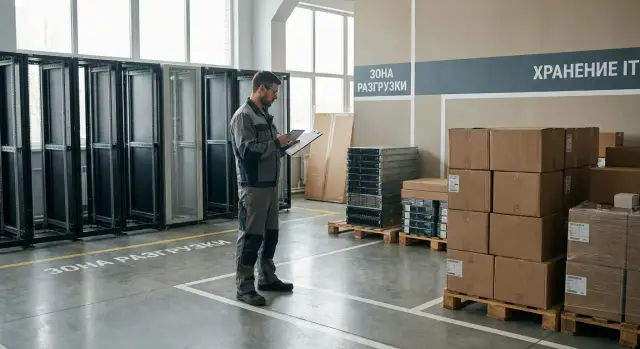
Why a readiness audit before shipment is needed
A site readiness audit before equipment delivery ensures that installation and commissioning can start on the day the equipment arrives, not after urgent on‑site fixes. A common scenario: the equipment is already en route and the installation team is on site, but the site lacks power, access to required rooms is closed, or unloading can’t be done at the agreed time.
Typical delays look the same: the truck waits at the gate because there is no pass, the server room is locked and nobody has the keys, narrow doors or a disabled freight elevator block the path to the installation point, or sockets and breakers can’t handle the load. Another common reason is there’s nowhere safe to leave boxes for a couple of hours while the room is prepared.
A unified checklist is especially important for regional deliveries. When there are many sites and multiple contractors, everyone understands “readiness” differently. A common checklist and consistent confirmations reduce disputes, speed approvals and make deadlines predictable. That benefits both the customer and the integrator — for example, when delivering workstations, PCs or servers to several locations.
To make the audit useful, collect a minimal set of data and confirmations in advance:
- Contact of the responsible person on site (with a substitute for holidays) and their availability hours.
- Photos of panels, sockets and the installation area, plus a list of available capacities.
- Access plan: checkpoint, elevators, corridors, restrictions by size and unloading times.
- Network parameters: where the nearest ports are, whether free lines exist and who provides access.
- Temporary storage location: room, keys, temperature and security conditions.
Most plans fail because of small details: extension cords “for the first time”, no free sockets near the rack, a ban on delivering through the main entrance, delivery windows only in the morning, or a requirement to provide serial numbers ahead of time for passes. Discovering this before shipment lets you adjust kit, schedule and team composition for the site.
Scope of work and roles: who checks what
To avoid the installation stalling over “little things”, agree on audit boundaries in advance. Essentially it answers one question: can the site receive equipment on a specific day and immediately hand it over to the installation team?
Typically five areas are checked: the room (space, walkways, mounting points), power (capacity, sockets, panels, grounding), network and communications (lines, ports, connection points, access to server rooms), logistics (approach, unloading, route inside the building) and access & security (passes, escorts, temporary storage).
Who is responsible for what
It’s best to assign roles up front; otherwise it’s easy to hear on site “that’s not our area.” A practical split looks like this:
- Customer (project owner) approves delivery date, unloading window, contacts and makes decisions on disputes.
- Facilities/maintenance handles the room, access to electrical panels, keys, opening technical zones, and readiness of drives and elevators.
- IT is responsible for the network: ports, VLAN/addressing as agreed, and access to racks and cross‑connects.
- Security handles passes, rules for bringing tools/equipment, inspections and escorting along the route.
- The installation contractor (or integrator team) verifies actual site conditions, takes measurements and compiles a list of required adjustments.
What to request before travel and how to record it
Before departure, collect a floor plan with installation points, a single‑line power diagram (or at least panel data and allocated capacity), access and unloading rules, contacts for shift coverage and time restrictions (noise, night work, weekends).
Record results consistently across regions: photos of key spots (panel, installation points, access, storage), measurements (voltage, distances, door widths) and a short list of “not ready” items. Crucially, assign an owner and a deadline for each task. For example: “Socket C13 not installed — Facilities, by 12:00 on the 18th.” Such a protocol is especially important for server and workstation deliveries when schedules depend on logistics and people.
Audit procedure step by step
It’s easier to run the audit with a single scenario for all sites: this makes regions comparable and reveals risks early. Usually the check takes 1–2 hours on site if basic data is gathered beforehand.
-
Gather inputs and appoint people who can actually resolve issues on site: building/facilities, IT, security, warehouse/operations, and a representative of the tenant or building owner. Confirm working hours, weekend access and emergency admission rules.
-
Walk the delivery route as if the vehicle has already arrived. Start at entry: where the transport will stop, where documents are checked and where it can turn. Then verify gates, ramps, elevators, corridors, doorways, turns and the final point (server room, office, classroom). A frequent regional problem: there is an elevator, but it’s a service elevator that’s locked or too small for the packaging.
-
Check the minimum technical items: power and network. The audit’s task is not to redesign systems but to confirm basic readiness and find blockers.
A convenient order that fits on one page:
- Confirm contacts and responsible people: who opens doors and who signs documents.
- Check the movement path: entry, unloading, vertical transport, and access to the room.
- Verify power and network availability at the required locations (not blocked, not behind racks, not sealed).
- Agree passes, unloading window, parking spot and acceptance procedure.
- Issue a readiness statement and a list of fixes with dates and owners.
After the audit, don’t leave everything “verbally agreed.” One sheet with checkmarks, photos of problem areas and clear deadlines greatly reduces the risk of the team standing idle.
Power: what to check on site
Power is a frequent cause of work stoppages: sockets are in the wrong place, breakers trip, no grounding or nobody knows which feed can be shut off. Include on‑site verification in the audit, not just “as built” diagrams.
Follow the installation route from the electrical panel to the points where PCs, all‑in‑ones, workstations or server racks will be placed. It’s important not only that power exists, but that sockets can be reached without running extension cords through walkways.
Mini checklist before delivery day
It’s useful to document the items below with photos and short notes (room, rack, breaker number):
- Dedicated lines and sockets in the right places: how many points, what type, and whether free sockets are near workstations and in the server room.
- Electrical panel: readable labeling, spare capacity, unobstructed access, keys and responsible person known.
- Load and margin: what is already on the circuit (printers, air conditioners, appliances), and whether there are plans to plug in temporary devices.
- Grounding: PE contact present on sockets, no adapters that remove grounding, and the grounding point in the panel is clear.
- UPS (if required): where it’s installed, which sockets are powered by it, whether capacity is sufficient and whether connection points are correct.
Commonly forgotten things
A typical mistake is calculating capacity only for the new equipment and ignoring existing consumers on the same line. In offices these can be kettles and printers; in server rooms, switches, additional PSUs and air conditioning. If you deliver several workstations or servers, confirm line reserves and correct circuit protection in advance.
For regional sites where a team travels, agree a plan for power outages: who’s on call for electrical issues, how quickly they can access the panel, when maintenance windows may occur, and who decides to postpone work.
Network and communications: readiness for device commissioning
Even if equipment arrives on time, setup often stalls due to small issues: no free port on the patch panel, VLANs not agreed, or Wi‑Fi not functioning in the setup area. Include a short network and communications check in the audit.
Start by visiting connection points. In each area where equipment will be placed (workstations, rack, office, temporary storage), there should be clearly labeled connection points: structured cabling outlets, patch panel ports and free switch ports. A common regional issue: a port “exists” on paper but is already in use, routed elsewhere, or labeling doesn’t match reality.
Check cable routes in advance. If cable runs must go through a corridor or above the ceiling, confirm that trays, entries and access to routes exist. On some sites, cabling during business hours is prohibited or requires additional permits. If this is discovered on installation day, the team waits for permissions and the work window can be lost.
Also evaluate connectivity for configuration: stable Wi‑Fi or at least reliable mobile internet in the work area is important for contacting an admin, downloading drivers, activating software or connecting to remote support. If signal is weak, arrange a temporary access point or a dedicated line ahead of time.
Then agree network parameters: who assigns addresses (DHCP or static), which VLANs are required, subnets and gateways, and what access rights are needed. If joining a domain or applying centralized policies, prepare accounts and permissions; otherwise installation becomes a series of “please grant access” interruptions that waste time.
Quick pre‑delivery checklist:
- Where each device will physically connect and whether a free port exists.
- Whether port labeling matches the actual connection in the cabinet/rack.
- Access to cable routes and clear rules for work (time windows, permits).
- Agreed VLANs, addressing, DNS, gateway and security requirements.
- Who provides patch cords and where network equipment will be located.
Practical example: a district hospital received workstations and a server. Plans showed ports available, but the switch had no free ports and patch cords of the right length were missing. Identifying this in the audit allowed the team to add a small switch or free up ports, procure patch cords and assign a VLAN. On install day everything was connected within hours instead of waiting two days.
Unloading and moving inside the building
A site can stop the installation over simple things: no delivery window, a lift is out of order, or a corridor is blocked by repairs. The audit should confirm the basic scenario: the truck arrives, unloading is done, and equipment safely reaches the installation point.
First, agree delivery windows: exact arrival and unloading times, noise restrictions, rules for weekends and holidays, and who on site will be available on the delivery day. If there’s a queue at the checkpoint or a prior application is needed, arrange it before dispatch.
Check approach and parking. Common obstacles are gate height, narrow driveways and lack of turning space. It’s useful to know the vehicle type and compare it with actual conditions: turning radius, boom gates, weight limits and temporary stopping space.
For unloading consider equipment and weather: is a ramp required, is a forklift or tail lift available, are trolleys and straps provided, and how many people are allowed to participate. If unloading is outdoors, plan a cover or a short indoor route.
Walk the route from unloading point to installation location. Check door and corridor widths, thresholds and steps, lift operation and freight elevators, and tight turns. For racks or large packaging, measure with a tape rather than guessing.
Short checklist for the delivery day:
- A person is assigned for entry, keys and access to lifts and rooms.
- Trolleys and a maneuvering area at the unloading point are prepared.
- Internal route is clear and doors open to the required angle.
- There’s an area for temporary placement of boxes without blocking corridors or exits.
- It’s clear where packaging will be stored and who removes waste.
Also decide in advance what happens to packaging: pallets, boxes, film and foam. Who removes it and when should be fixed so packaging doesn’t remain in corridors and disrupt acceptance.
Access control and site security
The most common reason for downtime is locked doors rather than a missing socket or network port. If the site has security (government bodies, banks, factories, hospitals), passes and access rules must be arranged before the team and vehicle arrive.
Prepare a list of people and equipment that will access the site: full names, ID numbers, vehicle plate numbers, driver details, and a list of tools/equipment (trolleys, pallet jacks, meters). Clarify timing for one‑time and long‑term passes and who on the customer side applies for them. Often a person’s pass is issued in a day, while vehicle passes are only processed during working hours.
On site, verify safety rules: required PPE (helmet, vest, safety shoes), whether unescorted access is allowed, and where movement is permitted across floors and in lifts. Agree rules for photography and video: some sites prohibit photographing corridors, server rooms and equipment nameplates, which complicates documenting serial numbers and making acceptance records.
To avoid delays in acceptance, arrange how documents and markings will be checked. Security and the accountable person usually check waybills, authorization letters and the number of packages. If serial number tracking is required, prepare a form and appoint someone to record numbers during unpacking.
A critical point is access to rooms and responsibility for keys. Clarify who opens the server room, warehouse and electrical room, who accepts the completed work and who signs acceptance reports. If access is only available during certain hours (e.g. until 6:00 pm), delivery and installation must be scheduled accordingly.
If responsible people change or access is temporarily denied, have a plan B:
- Contacts for an on‑call manager and security who can grant access quickly.
- A letter or order with a backup list of authorized personnel.
- Move work to another area (for example, pre‑assemble a rack and label cables outside the server room).
- Procedure for temporarily storing the cargo until access is restored.
Temporary storage and acceptance on site
Even if unloading is fast, installation can be delayed by simple issues: boxes left in a corridor, no keys to the room or damage noticed only a week later. The audit should resolve two questions in advance: where and how the shipment will be stored until installation, and how acceptance will be performed.
Temporary storage should be dry, lockable and have restricted access. Prefer a separate room or storage area rather than a corridor, lobby or an active server room.
Storage conditions: what to check
A minimal set of conditions that reduces the risk of damage and disputes:
- Stable temperature and normal humidity without sharp fluctuations (to avoid condensation).
- No water nearby (pipes, wet zones, cleaning) and no construction dust.
- Access by list: who may enter, who has keys and whether a visitation log is kept.
- Enough space to place boxes safely and leave inspection walkways.
- Clear instructions where to put packaging and waste.
It helps to separate zones: equipment, consumables and cables, installers’ tools, and packaging. This reduces confusion and simplifies inventory.
Acceptance: how to avoid losses and disputes
Acceptance should be quick but strict. Check not only the number of packages but also markings on boxes.
Recommended procedure:
- Count packages against the waybill and record discrepancies immediately.
- Verify markings and serial numbers if required by documentation.
- Inspect packaging from all sides and note dents, tears or signs of moisture.
- Photograph damages and attach photos to the acceptance report immediately, not later.
- Record transfer into storage: who accepted, where it is stored, from what time and who is responsible.
Assign responsibility for safekeeping in advance by order or letter (from the customer or security). The transfer document should specify the room, access rules and the moment responsibility returns to the installation team.
Example scenario: regional delivery without interruptions
Imagine delivering a batch of PCs and servers to three regions: a regional administration, a college and a district hospital. Each site has its own rules: some allow unloading only until 5:00 pm, some require passes three days in advance, and some have freight elevator schedules. Without accounting for this, the installation crew waits at the entrance and the equipment stays in the truck.
The audit uses a single template and a shared status table per site: “ready”, “at‑risk”, “blocked”, with a closure date and responsible person. With a unified template, details don’t get lost and sites can be compared easily.
Typical problems are very mundane: no free switch ports, no space for pallets in the warehouse, passes not issued for driver and loaders, sockets are distant and extension cords are not approved. Solutions are also simple if addressed ahead of time. For a site without a ramp, move the unloading window to morning when a forklift is available. For a hospital where corridors can’t be clogged, allocate a room for 24–48 hours and appoint a key holder and inventory manager. For an administration building, prepare lists of people and vehicles for passes and assign staff on delivery day: one meets the transport, another escorts it to the unloading point.
Update the delivery plan daily by status: if a site is “blocked”, shift its window and send the installation crew to a ready site. This prevents idle crews and turns logistics into a predictable process rather than a chain of emergency calls.
Quick checks and next steps
When time is tight, a short pre‑dispatch check often saves the day. It takes little time but frequently prevents crew downtime and repeat trips.
15‑minute checklist before dispatch
Five items that most often break plans:
- Power: free sockets of the required type, confirmed capacity and grounding.
- Network: active ports in the required room, access to the switch, agreed VLAN and addressing.
- Access: passes for people and vehicles issued, and rules for tools and work hours clear.
- Unloading: drive entry available, lift working, equipment fits through doors and turns.
- Storage: a dry lockable room available, and responsibility for keys and acceptance clear.
Then collect a minimal confirmation package: responsible contacts (site, security, IT, electricians), agreed unloading and work windows, the route from checkpoint to installation room, and the temporary storage point with access rules.
Typical mistakes repeat: everyone “checked by phone” but nobody walked the route; no authorized signer is present on delivery day; security has no list and the driver doesn’t know where to wait; the storage found on arrival is damp or in a walkway.
What to do in advance: 48 hours and 24 hours
48 hours before: confirm windows, final contacts and passes, perform a quick route check with a tape (doors, elevator), and check socket and network port readiness.
24 hours before: reconfirm the security list of people and vehicles, clear the unloading path and storage area, and hand over the route map and equipment placement plan.
If the project includes both delivery and system integration, it’s useful to fix a single audit procedure and a single readiness report format. In complex deliveries involving a manufacturer and an integrator (for example, GSE.kz, gse.kz), this helps agree unloading conditions and initial acceptance in advance so the installation doesn’t lose a day because the site wasn’t ready.
Frequently asked questions
Why do a site readiness audit before equipment delivery?
Normally it’s done so that on delivery day installation and commissioning start immediately, without urgent on‑site fixes. An audit identifies blockers in advance — missing power, locked rooms, missing passes or inability to carry bulky packages inside.
What problems does the audit usually find?
Most often small details that halt work come up: no responsible contact on site, the elevator is closed or out of service, unloading is only allowed at other times, no temporary storage space, sockets are far away or the circuit is overloaded. It’s also common that security requires serial numbers or a separate vehicle application.
How long does a readiness audit take at one site?
Typically 1–2 hours per site if initial information is collected in advance. The longest part is not measurements but walking the delivery route and clarifying who opens doors, panels and server rooms at the required times.
Who should be involved in the on‑site audit?
At minimum: a facilities/maintenance representative, an IT contact and a security representative, plus someone who can make decisions about schedules and access. Participants need keys, access rights or authority; otherwise the check becomes “we’ll confirm later”.
What data should be gathered before traveling to the site?
Collect responsible contacts with alternates, photos of key locations and clear restrictions for access and unloading. It’s helpful to have data on allocated power, socket points, network ports and temporary storage so on site you only need to confirm actual readiness.
What exactly should be checked for power before delivery?
Focus on actual availability and margin: where devices will plug in, whether the circuit will handle the load, and whether proper grounding exists. On site, check that other consumers aren’t already on the same circuit and that the electrical panel is accessible with known keys and a responsible person.
How to quickly confirm the network is ready for commissioning?
Verify there’s a free port at the installation point and that it actually leads where expected, and that labeling matches reality. Also agree on VLAN and addressing, and ensure there is reliable connectivity in the working area for configuration and contacting the administrator.
What to check for unloading and moving inside the building?
Walk the route as if the truck has already arrived: entry, stopping point, unloading, lifts, corridors, door openings and final installation point. For large packages (racks, servers) measure with a tape rather than estimating by eye.
How not to get stuck at the gate or locked out of the server room on delivery day?
Agree passes in advance for people and vehicles, and clarify rules for tools, escorts and time windows for technical zones. Also confirm whether photos are allowed, because without photo evidence it’s harder to document packaging condition and serial numbers in acceptance reports.
How to organize temporary storage and acceptance on site?
Designate a closed, dry room with restricted access and appoint a person responsible for keys and inventory. During acceptance inspect packaging immediately, record any damage and discrepancies so there’s no dispute later about when or where an issue occurred.
