8 min read
Single-socket or Dual-socket Server: How to Choose
Single-socket or dual-socket server: we break down licensing, virtualization scale, memory size and 3–5 year TCO so you can choose without overpaying.
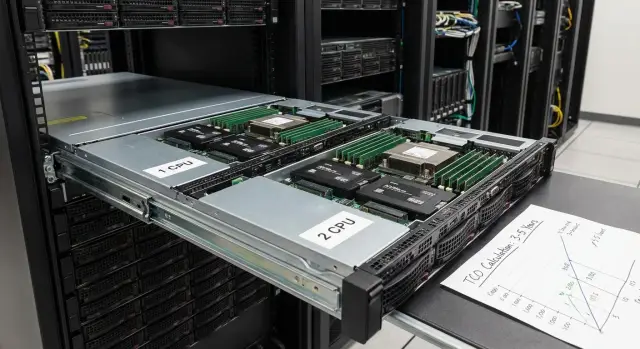
Where the choice really starts: what the server will be bottlenecked by
Choosing between 1 CPU and 2 CPU almost never starts with processor model. It starts with what becomes the bottleneck: for one project it’s licensing, for another — memory, and for a third — the number of VMs. Sometimes availability and the need to repair without downtime decide the choice.
Before comparing single-socket and dual-socket servers, fix the main scenario: will the server host several heavy databases, dozens of departmental VMs, VDI, or one or two application systems? That determines what matters most: core count, RAM capacity, memory bandwidth, or the ability to expand via a second socket.
Buying "for growth" doesn’t always save money. The extra cost appears immediately: a pricier platform, more memory modules, higher power consumption, and sometimes higher core-based licenses. If the growth doesn’t materialize, you pay for spare capacity that may sit unused for 3–5 years.
In real workloads CPU frequency is rarely the main factor. It’s usually more important to understand:
- how many cores you actually need at peaks;
- how much RAM is required and how quickly it can be increased;
- how many VMs will be active at the same time;
- what happens with licensing when you add cores;
- what the cost of ownership will be over 3–5 years (hardware, support, electricity, downtime).
A simple example: a typical organization runs file services, mail or collaboration, and 15 departmental VMs. If you’re limited by RAM and licenses, a 1 CPU server with a sensible memory cushion can be preferable to 2 CPU, which adds cores but won’t solve the memory shortage without an expensive upgrade. If you need a large pool of VMs and fast growth, a dual-socket platform often pays off thanks to expandability.
Next we’ll look at practical aspects: core-based licensing, virtualization scale, memory and TCO over 3–5 years.
What actually changes between 1 CPU and 2 CPU
The difference is not "twice the power." The platform changes: how many cores and threads you can fit, how many PCIe lanes are available for storage controllers, network cards and accelerators, and how many memory channels run in parallel.
A single processor configuration is simpler: resources converge to one point. With two processors you get more resources, but they are split across sockets. This is especially noticeable for memory: total RAM ceiling increases and usually the number of module slots grows. With two sockets it’s easier to combine "lots of RAM" and "lots of cores" without hitting slot limits.
NUMA: why 2 CPU isn’t always faster
Dual-socket systems introduce NUMA: memory is "closer" to its processor. If an application or hypervisor frequently accesses memory physically attached to the other CPU, latency increases. So the gain from a second processor depends on whether the workload can be placed properly across NUMA nodes and how VMs are configured.
A two-CPU layout delivers noticeable benefits when you need lots of compute and I/O simultaneously, and when expansion ceilings matter: dense virtualization with large aggregate CPU and RAM, databases and analytics, many PCIe devices (fast NICs, NVMe, RAID/HBA, accelerators), and highly parallel workloads (rendering, simulations, VDI).
If you have one or two heavy applications that depend on single-core frequency, or a mix of small services, a second CPU often brings less benefit than expected. In such cases a single stronger CPU with emphasis on fast memory and storage is more advantageous. For server lines like the GSE S200 it’s important to consider this up front: the platform can grow, but you should pay only for the expansion you will actually use.
Licensing: where overpayment hides most often
Hardware often looks like the main expense, but licensing can become the costly part—especially if you add cores "just in case."
There are three common licensing schemes: per-server, per-socket, or per-core. The worst is per-core. Moving from 1 CPU to 2 CPU usually increases core count and therefore license costs can grow faster than performance.
When calculating, don’t forget items that are often purchased urgently and at full price later: OS and client licenses (if required), hypervisor and virtualization rights, database and server application licenses, backup (often licensed by socket, core, or number of VMs), monitoring and management tools.
Sometimes it’s better to pick fewer cores but with higher frequency. This is typical for 1–2 heavy systems (e.g., databases or ERP) where single-core speed matters more than maximum VM count.
To avoid overpaying, decide how you will grow. Two practical approaches work: either buy exactly for current load and leave platform headroom (memory slots, drive bays, PCIe), or provision licenses only for the next 12–18 months rather than 5 years ahead.
If you’re evaluating GSE S200 Series servers, it makes sense to discuss a "license-aware" configuration upfront: how many cores are really needed, how many VMs are planned, and which products will be licensed. Savings here often exceed any discount on hardware.
Virtualization scale: how many VMs can one CPU handle
VMs are almost always limited by the narrowest resource in the set. Most often that’s RAM, then disks (IOPS and latency), and only then CPU.
One CPU can host many VMs if they play typical roles: domain controllers, file servers, small services, test instances, auxiliary apps. For 10–20 moderate VMs it is usually smarter to invest in RAM and fast storage rather than immediately moving to a dual-socket platform.
CPU overcommit (where total vCPU exceeds physical cores) is acceptable if VMs spike and rarely tax the CPU simultaneously. But under constant load (databases, VDI, analytics, dense ERP) overcommit becomes queues and stutters, even if average utilization looks fine.
Consider 2 CPU when you regularly see CPU queues and degraded responsiveness, peaks align across many VMs (morning, month-end, nightly jobs), low latency matters, you cannot add vCPUs without hurting other VMs, or you expect a rapid VM count increase within a year.
Important: "more processors" does not fix slow disks or network. If storage can’t handle IOPS, adding CPU only increases contention for the same I/O.
For a 12–36 month growth plan a simple reserve helps: 20–30% RAM headroom and 30–40% CPU capacity for peaks. If today 12 VMs use 256 GB RAM and choke on storage, it’s usually better to add memory and speed up storage first, then consider a two-socket class like rack solutions in the S200 family.
RAM: limits, slots and practical calculations
In the single vs dual CPU debate, memory often matters more than extra cores. If RAM is lacking you get swap, database latency, terminal "hangs" and inability to add new VMs. If RAM is sufficient, a moderate number of cores usually handles the load.
The most reliable way to estimate need is to rely on real metrics, not just "paper" requirements.
How to estimate how much RAM you need
Collect monitoring from current servers for 2–4 weeks: averages, peaks and peak days. Record peak RAM use and determine how much is cache. Then add growth reserve—usually 20–30% above peaks, more if new VMs are planned. For virtualization, sum VM memory plus hypervisor overhead and a small buffer to avoid swap. Account separately for roles that traditionally "eat" memory: databases, mail, analytics, VDI.
After that it’s a platform question: how many module slots and what maximum is supported. Don’t forget memory speed: it depends not only on frequency but also on how channels are populated. Mixed module sizes, uneven channel filling and high-rank DIMMs can lower effective speed. It’s better to plan a matched kit up front rather than adding "whatever is available" later.
When 2 CPU is used primarily for RAM
Two processors make sense when you need large total memory and many slots, not just "more compute." This is typical if you need lots of RAM for dozens of VMs or a large database, want dense DIMM population without speed drops, and need the option to add memory in 1–2 years without replacing the entire server.
If you’re short by only 32–64 GB it’s usually cheaper to expand RAM in a single-socket platform and remain in a simpler, lower-cost ownership model for 3–5 years. Many organizations push a single socket to its limits first and move to two sockets only when growth is stable and predictable.
Storage, network and expansion: will the platform have enough resources?
CPUs differ not only in core count. A major difference between 1 CPU and 2 CPU often comes down to how many devices you can attach without compromise. Think PCIe lanes and the number of NVMe slots, 10/25/100G NICs, HBA/RAID for storage arrays, and extra controllers.
Single-socket setups are easier and cheaper to start with but run out of PCIe lanes and physical card slots faster. This becomes obvious when you want a fast NVMe pool for virtualization, a separate adapter for storage, and several network ports for redundancy.
When a dual-socket platform is truly more convenient
If you know you will add many expansions, 2 CPU gives more freedom: more slots, less competition for shared resources, and an easier layout for high-speed networking and storage. This is especially true with GPUs and accelerators: they need space, power and sufficient bandwidth. In practice, companies often switch to 2 CPU because of expansion cards, even if a single processor is still sufficient computationally.
Before buying, consider not only "what you need now" but what you will add in 12–24 months: how many NVMe drives, whether you need a separate controller or backplane, expected network speed next year (10G or 25G and whether a second adapter will be needed), external storage via HBA, GPUs for VDI or analytics, and whether slots will remain free after those additions.
One big server or 2–3 nodes
Putting all roles in a single powerful server is convenient but increases risk: an outage stops everything at once. Sometimes it is better to buy 2–3 modest identical nodes and distribute roles, especially if availability is critical.
A compromise is to choose a platform with a clear upgrade path: reserve slots and network headroom, but don’t buy all cards and drives "in advance." In rack servers like GSE S200 this approach usually gives the best balance.
Cost of ownership over 3–5 years: what to include in the calculation
Purchase price can be misleading. It’s more honest to compare TCO over 3–5 years: what the system will really cost including operation, risks and upgrades.
CAPEX: what you pay upfront
Include not just the "box" but what is typically added along the way: the base server configuration (platform, CPU, controllers), RAM and slot headroom, drives and enclosures (bays, RAID, spare drive), expansion cards (network, HBA), rails and cables, warranty and extended support.
When comparing 1 CPU and 2 CPU, count the cost "to the required capability." Sometimes a dual-socket platform wins because it offers more PCIe lanes and memory slots. Other times the extra cost isn’t justified if you don’t need the growth.
OPEX and hidden monthly costs
Operational costs often catch up to the price difference between configurations. In OPEX and risk account for power and cooling (especially in dense racks), rack space and supporting infrastructure, regular maintenance and engineer visits, downtime (lost revenue, process disruption, penalties), component replacements and lead times.
A pragmatic way to calculate TCO is a simple 3–5 year table: year 0 (CAPEX) plus annual OPEX plus an "expected downtime cost" (probability of downtime per year × cost per hour × estimated hours). Assumptions can be coarse but must be the same for compared options.
For Kazakhstan: local manufacturing and service networks reduce TCO by providing more predictable delivery and repair times. When prioritizing local content and 24/7 support, having the vendor and service network in-country, like GSE.kz, helps lower downtime risk and simplifies spare parts planning.
How to choose: a step-by-step algorithm without complex math
To avoid overpaying for a second CPU "just in case," start not with hardware but with facts. Identify what limits the system: compute, memory or storage.
Five steps
-
Gather current-load numbers: averages and peaks, timing of peaks (e.g., month-end), growth plan for 12–24 months and how many real users work concurrently.
-
List server roles in plain language: virtualization (how many and what types of VMs), database, file services, VDI, backup, antivirus scans. One heavy role often matters more than ten small ones.
-
Roughly estimate licensing for both options: 1 CPU and 2 CPU. Surprises usually come from core-based licensing increasing total cost more than hardware.
-
Sketch 2–3 configurations and compare bottlenecks. If CPU has headroom but RAM is short, a second processor won’t fix the problem. If you need more memory capacity and more PCIe lanes for fast storage and networking, a 2 CPU platform may be more logical.
-
Choose an option and predefine an upgrade plan: what you will add in a year (RAM, drives, network card) and whether there are slots and bays to do so.
A simple guideline: for typical virtualization with a moderate number of VMs, 1 CPU with good frequency and sufficient RAM often wins. 2 CPU is usually justified when you hit memory or expansion limits and need guaranteed headroom for growth in 3–5 years. Vendors and integrators like GSE.kz typically help walk through these points before purchase so your money addresses a real bottleneck rather than a vague spare.
Common mistakes: where people usually overpay or lose performance
The costliest mistake is almost never the brand choice but a wrong assumption about what will become the bottleneck. People buy a second CPU and then run into memory, storage or licensing limits.
Frequent situations:
- Buying 2 CPU "just in case" when the actual limit is RAM or storage. Result: many cores sit idle while databases or file services are slow due to disks or memory shortage.
- Ignoring core-based licensing and receiving an unexpected bill, especially if the plan was "we’ll add cores to be safe."
- Installing too few memory modules and losing memory bandwidth: total capacity may look sufficient but channels are unevenly populated.
- Consolidating all services into one powerful server without an availability plan. Performance may be fine, but any failure or maintenance event stops the whole organization.
- Expecting more cores to speed up slow storage. If disk latency is high, adding CPU mostly makes the system wait faster for I/O.
A practical example: a company plans 25–30 VMs and immediately looks at a dual-socket configuration. Inventory shows half the VMs are light services while load concentrates on 1–2 databases and backup. In such cases it’s usually wiser to invest in RAM, fast disks and a clear backup scheme rather than a second CPU.
If you’re choosing a single- or dual-socket server, start with an honest list of applications and their "pain points": memory, storage, licenses, downtime. Manufacturers and integrators such as GSE.kz often help review these points so budget goes to the real bottleneck, not to vague spare capacity.
Quick checklist before purchase
Before deciding on single- or dual-socket, run through questions that most affect price and outcome. It’s best to record numeric answers.
Five questions that save money
- How many VMs do you need now and how many in 2–3 years — and what types are they (ERP, SQL, file, terminal servers)?
- How much RAM is actually used at peak: take metrics for 1–2 weeks and add 20–30% headroom.
- Which licenses are tied to cores or sockets: OS, hypervisor, databases, VDI and paid modules.
- Do you need expansions: extra NVMe for fast databases, 10/25/40GbE network, RAID controller, HBA for SAN, GPU or other accelerators?
- How much are you willing to spend per year on ownership: electricity, support, spare parts, downtime, updates, and adding memory and drives?
After this the comparison is fairer. Sometimes a second CPU is needed not for compute but for more memory slots and PCIe lanes. Other times it’s better to buy a single CPU with memory headroom and fast NVMe.
A small example: if you have 12–15 VMs that peak at 256 GB RAM and the database license is calculated by cores, adding a second CPU can sharply raise license costs even if performance doesn’t improve significantly.
If you purchase servers and timing matters, check availability and service plans with the manufacturer and integrator. For Kazakhstan, locally produced servers like the GSE S200 line and local 24/7 service often make delivery and spare parts more predictable.
Example: choosing a server for a typical organization
Scenario: a small clinic with 80–120 employees. Needs 20–30 VMs: domain and mail, file server, accounting, terminal workstations for registration, monitoring, backup. Growth is moderate: +5–10 VMs over 2–3 years.
A 1 CPU option typically covers this without extra cost. Typical configuration: 16–24 cores, 256–512 GB RAM, fast SSDs for VMs and a separate array for archives. This usually gives CPU headroom while you’ll hit memory and storage first. Logical upgrades: add RAM later, increase SSD capacity, expand network to 10/25G if file volumes grow.
2 CPU makes sense when many heavy VMs run concurrently. For example, 35–40 VMs, many terminal sessions or a database that consistently loads CPU. But license costs often rise unexpectedly: core-based server licensing can increase the bill even if load is modest.
On a 3-year horizon TCO often favors 1 CPU: cheaper hardware, lower power draw, simpler licensing. Over 5 years 2 CPU can become cost-effective if otherwise you’d need a full server replacement due to RAM or slot limits.
Simple decision criterion: choose 1 CPU if growth is predictable and there’s memory headroom; move to 2 CPU if you already need high VM density and large RAM capacity and accept higher licensing and operational costs. For those tasks GSE.kz usually proposes configurations that prioritize memory and storage headroom while keeping license costs under control.
Next steps: how to lock the choice so you won’t regret it in a year
Once you roughly know whether you need 1 CPU or 2 CPU, it’s important to put the decision into numbers and agreements. Otherwise in a year you may find unaccounted licenses, required memory growth or missing support.
The comparison must be fair. Request 2–3 configurations with identical logic: same drives (type and capacity), same network ports, and the same level of power and disk redundancy. Then the price difference reflects the platform, not minor differences.
Practical actions:
- Request commercial offers with the same composition and warranty terms.
- Ask for a separate line-item license calculation, especially if core-based licensing affects totals.
- Agree a 12–24 month growth plan: how much RAM you’ll add, how many drives, whether you need faster networking or a second server for availability.
- Clarify delivery times and transparency of components. In Kazakhstan it can be simpler and more predictable to consider locally produced servers like the GSE S200 line and confirm how 24/7 service is organized.
- Fix acceptance criteria: which performance tests you’ll run, acceptable noise and power limits, what counts as a failure and how fast it will be repaired.
To avoid regrets, document everything in a short 1–2 page note: target load (e.g., 25 VMs, a database, file services), acceptable CPU and RAM utilization thresholds, and the trigger for buying more memory or storage. It takes an hour and can save months of disputes and unexpected expenses.
Frequently asked questions
Where should I start when choosing between 1 CPU and 2 CPU?
Start from the bottleneck: not "how many cores", but what hits the limit first — licenses, RAM, storage (latency and IOPS), network, or the need to expand. Fix the scenario: how many VMs, which roles (DB, VDI, file services) and when peaks occur. After that, comparing 1 CPU and 2 CPU becomes meaningful.
When is a single-socket server the best choice?
1 CPU is typically best for standard virtualization with 10–20 moderately loaded VMs when it’s more important to add memory and fast SSD/NVMe than to increase core count. It’s also a good choice for 1–2 applications that need high single-core frequency and when you want to avoid higher core-based licensing costs. The key is having enough RAM slots and upgrade options for the next 1–2 years.
In which cases is a dual-socket server really needed?
2 CPU is justified when you hit the memory or slot ceiling and need greater expandability, or when you require a large aggregate resource for dense virtualization, VDI, analytics and heavy databases. A dual-socket platform is also useful if you plan many high-speed network cards, multiple NVMe drives and additional controllers. Make sure growth is realistic, otherwise paying for extra headroom won’t pay off.
Why isn’t 2 CPU always faster: what is NUMA in simple terms?
NUMA means each processor has "local" memory, and accessing memory attached to the other socket adds latency. If the hypervisor or application does not distribute load across NUMA nodes well, a second CPU can deliver less benefit than expected or reduce response-time predictability. Proper VM configuration, sensible vCPU sizing and ensuring hot data stays in local memory help mitigate this.
How do I avoid overpaying for licenses when moving to 2 CPU?
The most common extra cost comes from core-based licensing: adding a second CPU increases core count and can raise license costs more than hardware does. Consider OS and hypervisor licenses, databases, backup, VDI and any other products that may be licensed by cores, sockets or number of VMs. Practical rule: calculate license costs for both configurations before choosing hardware.
How to estimate how much RAM is needed and when do people add a second CPU for memory?
Collect metrics from current servers for at least 2–4 weeks and record peaks, not averages. Add headroom for growth (usually 20–30% above peak) and also account for hypervisor overhead and memory-heavy services. If you’re short by tens of gigabytes, it’s usually cheaper to add RAM to a 1 CPU platform; if you need a big jump in capacity and many slots, then look at 2 CPU.
How many virtual machines can 1 CPU handle, and what usually limits VMs?
Most virtualization environments are first limited by RAM, then storage (IOPS and latency), and only afterwards by CPU. 1 CPU can host many VMs when roles are typical and peaks don’t align, but with constant heavy load CPU overcommit quickly leads to queues and degraded responsiveness. If you frequently see high CPU Ready or CPU queues, concurrent peaks, and you can’t add vCPU without hurting others, it’s time to reconsider the platform.
How do disks, network and PCIe expansion affect the choice between 1 CPU and 2 CPU?
Single-socket systems run out of PCIe lanes and physical slots faster, which affects how many NVMe drives, network adapters and controllers you can install. If you need a fast NVMe pool, separate high-speed networking, HBA/RAID and perhaps GPUs at the same time, a dual-socket platform usually provides the extra lanes and slots without compromise. Sometimes 2 CPU is chosen not for raw compute but for expansion capability.
How to honestly calculate TCO for 1 CPU vs 2 CPU over 3–5 years?
Compare total cost of ownership over 3–5 years: hardware, support, power and cooling, downtime and repair times, plus future upgrades of memory and storage. Dual-socket servers are usually more expensive to buy and to operate and may increase licensing costs. A single-socket server often wins over a 3-year horizon; 2 CPU can become advantageous over 5 years if otherwise you’d hit the platform’s limits and need a full replacement.
What is better for reliability: one big server or several nodes, and how does local service help?
One large server is easier to manage but increases risk: one failure or maintenance event can stop everything. Two or three smaller nodes spread roles and reduce single points of failure, though they bring more licenses and infrastructure overhead. If repair time and predictable service are critical, discuss support and spare parts availability upfront; a local vendor and service network in Kazakhstan usually reduce the risk of long downtimes.
