8 min read
SIEM log sources: what to connect first
Which SIEM log sources to connect first: prioritization based on investigation value, quick wins and basic event normalization.
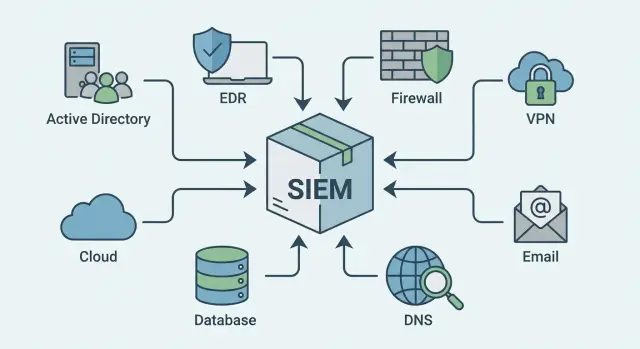
The SIEM goal: not to collect every log, but to deliver value quickly
SIEMs are often treated like a vacuum cleaner: collect everything and figure it out later. In practice that leads to noise, higher costs and disappointment. A better approach is value-first: which sources will most quickly reveal an attack and provide investigative answers before the situation becomes an incident.
Prioritization is always needed because time, people and licenses are limited. If you start with “convenient” logs (for example, minor apps), the SIEM will fill up with events but won't help answer key questions: who logged in, where the attack came from, what was changed, what might have been exfiltrated.
Before you start, agree on basics so connecting sources doesn't turn into an endless project:
- Which 3–5 scenarios you want to catch first: phishing, password brute-force, unauthorized admin actions.
- Which systems are most critical: accounts, mail, perimeter, servers, workstations.
- Regulatory and retention requirements.
- Who triages alerts and what the escalation rules are.
- What resources exist for normalization and ongoing support of sources.
A good result in 2–4 weeks looks less like “we connected 50 systems” and more like working initial detections and clear reports: logins from suspicious geographies, a burst of failed logins, execution of admin tools, group and permission changes. For example, in an organization with endpoints and servers (including GSE-level equipment) you can link the chain “account → device → server → network event” and quickly determine what happened and where to look next.
How to evaluate sources: simple value criteria
Choose log sources not by “what’s easiest to connect” but by which events will most quickly answer two questions: “what is happening” and “what to do next”. Otherwise SIEM becomes an expensive archive rather than a detection and investigation tool.
A 10-minute quick assessment
Go through each candidate source and give simple ratings (e.g., 1–5). It’s important this can be done by not only an engineer but also the person who will investigate incidents.
Usually five criteria are enough:
- Link to critical assets and accounts: domain, mail, VPN, admin access, key servers.
- Trust in the data: are there gaps, do timestamps align, is delivery stable.
- Investigative value: can you see who acted, where access came from, what was done and the outcome (success/failure/error).
- Total cost of ownership: licenses, storage, SIEM load, time to parse and support.
- Implementation effort: access, agents, approvals, changes in production.
A simple “value vs complexity” matrix helps:
- High value + low complexity: connect first. These yield quick detections and clear investigations.
- High value + high complexity: plan next steps, but agree on requirements in advance.
- Low value + high complexity: usually postpone to avoid buying noise.
Example: between endpoint logs (large and complex) and authentication logs from AD/VPN (usually easier and immediately informative), authentication often wins for early investigations because it quickly shows account compromise and lateral movement.
First sources that almost always give the most value
If you choose sources by “what gives quick answers”, start with systems that show user logins, code execution and outbound network activity. This triangle is fundamental for detecting attacks and investigating them.
In most organizations, the biggest impact in the first weeks comes from:
- Account directory (Active Directory or Entra ID): successful/failed logins, lockouts, password resets, group and permission changes.
- EDR or antivirus: detections, processes, command lines, file creation, attempts to disable protection.
- Border firewall or UTM: allowed and blocked sessions, NAT, category blocks, signature hits.
- VPN and other remote access: who connected, from where, success/failure, session duration, device changes.
- Mail and mail protection: phishing emails, suspicious attachments, link clicks, gateway blocks.
Why these: AD/Entra ID quickly answers “who was it” and shows permission changes. EDR explains “what ran on the host” and helps distinguish real activity from false positives. Firewall, VPN and mail add context: where the attack came from, what channels were used, and where it started.
Simple example: an employee enters credentials on a phishing page. Mail logs show the message and link, VPN or Entra ID shows a login from an unusual region, AD logs show addition to a privileged group, and EDR shows PowerShell execution and archive creation. Even without complex rules, this is a chain you can act on quickly.
Second tier: what to add after the basics
Once base sources provide initial detections (accounts, endpoints and perimeter), expand the picture. These logs are often not the noisiest but are where you find answers about “where the user or host went” and “what happened next”.
DNS: the fastest breadcrumb for domains
DNS frequently becomes a short path to compromise indicators: C2 domains, odd domains, rare TLDs, attempts to tunnel via long requests. Even without content analysis, the mere fact of a query and its frequency narrows the search.
Proxy or Secure Web Gateway: web context
If your company has a proxy or web gateway, it adds details: which URLs were opened, what was downloaded, site category, and policy blocks. In investigations this often turns “suspicious activity” into a clear chain: phishing -> click -> download.
After DNS and proxy it usually makes sense to connect sources that tie addresses to actions:
- DHCP, to map IPs to specific devices over time.
- Web servers and application servers, to see errors, login attempts and suspicious requests.
- Cloud logs (for example, Microsoft 365 and IaaS) to track admin actions, data access and logins from unusual places.
Short example: SOC sees a suspicious process on a laptop. DHCP shows which IP the device had in the morning and evening. DNS shows a rare domain, and proxy confirms a download a minute before the process ran. M365 then shows a mailbox login from a new region and a forwarding rule created. That correlation often saves hours.
Sources for investigations: where answers are usually found
When an incident has already occurred, the priority is rapidly answering three questions: who did it, what exactly was done, and what was the real impact. Investigations therefore value sources that show user and admin actions in systems where money, data and permissions live.
Business systems and databases
ERPs/CRMs usually show what happened with customers, contracts, invoices and exports. Suspicious signs include bulk operations by a single user, unusual refunds, deletion of records, or large exports outside business hours.
Databases add precision: successful/failed logins, privilege grants, heavy queries, export commands. In data loss investigations this is often key: who accessed which tables and how data left the environment.
Minimal event types to look for first:
- login/logout and failure reasons
- role and permission changes
- export/download operations
- bulk changes or deletions
- admin actions (create users, change settings)
Infrastructure, backups and physical access
On network gear (switches, routers) watch for config changes and admin access. Attacks often leave “repair traces”: new rules, bypass routes, enabled remote access.
Backup systems help see whether someone tried to hide traces: deleted restore points, failed jobs, retention policy changes. Physical access control logs (badge systems) help test the hypothesis “a person was in the building” and correlate, for example, a server room entry at night with admin actions in critical systems.
Minimum event normalization without which SIEM is blind
Even the best sources turn into noise if events arrive in different formats and with different names for the same entities. Normalization is not data prettification—it's how you make rules work consistently across Windows, VPN, mail and servers so investigations don't stall on manual matching.
The minimum to standardize right away (at least for core sources):
- event time (in UTC or with explicit timezone)
- host or device where the event occurred
- user (who acted)
- action and result (success/failure)
- object of access (file, process, account, policy, rule)
User identification commonly breaks: one log shows UPN, another sAMAccountName, a third just a name without domain. Agree in advance how to store this: separate fields for domain and login plus a canonical value. Tag service accounts and application accounts so you don’t waste time on false positives.
Hosts have similar problems: FQDN, short name, serial number, asset ID. It’s useful to have one primary field (for example asset_id or fqdn) and an attribute for criticality (server with personal data, accountant’s workstation, etc.).
Another common failure is “who was at this IP”. Without linking IP→device→user, detections from VPN, DHCP and NAT lose meaning. Store DHCP leases, VPN sessions and NAT data so you can reconstruct who used an address at a given time.
Separate topic: time. Check NTP on key systems, account for time zones and log delivery delays. Otherwise you may get an “attack that started after it ended” and correlations will miss real incidents.
Step-by-step plan to connect logs: from inventory to first rules
A fast SIEM start depends less on “connect everything” and more on discipline: pick initial sources, configure reliable delivery and agree on key fields. Then first detections arrive in weeks, not quarters.
A plan that fits most organizations:
-
Make an inventory and set priorities. Gather systems with authentication, perimeter, endpoints and critical apps. Choose 5–7 sources by criteria: they affect risk, cover many users/hosts, reveal who/where/what, and are available now.
-
Decide delivery method and owner. For each source decide how events will be sent (agent, syslog, API), what buffering exists on outages, and who owns updates and changes. Often you’ll discover logs exist but network or access isn’t ready.
-
Enable required auditing and verify completeness. Ensure you collect what’s needed for investigations: logins and failures, permission changes, admin actions, perimeter blocks. Estimate event volumes so the SIEM won’t be overwhelmed.
-
Configure parsing and minimal normalization. Agree on naming and field population: time (with timezone), user, host, source/destination IP, action (success/fail), object. Simple normalization speeds up search and correlation.
-
Validate and launch first rules. Check quality before writing dozens of detections:
- are test events sent and visible in SIEM
- does time match the source
- are there losses during peaks
- are key fields parsed correctly
- can you quickly find the primary log from an event
Example: you connected AD/LDAP, VPN, firewall and EDR. Make your first rule not complex but useful: many failed VPN logins, then a successful login from a new IP, then a PowerShell run on a workstation. Then keep a simple cadence: add 1–2 rules per week, fix parsing and refine exceptions so alerts remain rare but accurate.
Detections and investigations that will realistically work first
Early effective detections come where events form a chain: who logged in, from where, what ran, where traffic went. Value comes from sources that are easy to tie together and answer basic investigative questions within minutes.
Quick scenarios that start working immediately
With AD (authentication), VPN/remote gateway (entry point) and EDR (host activity), these cases start working fast:
- Login chains: successful AD login after VPN connection, then PowerShell, cmd or unknown process execution.
- Password brute-force: series of failed AD and/or VPN logins confirmed by firewall events (many attempts from one IP, unusual country, spike in failures).
- Phishing: mail with attachment or link, then a click via proxy/web gateway, then file execution and network connections per EDR.
- Suspicious admin changes: user added to privileged group in AD, remote access enabled on a server, network device configuration changed.
- DNS + firewall linkage: new domain requested in DNS, then the host makes outbound connections to a rare address or nonstandard port.
What accelerates investigations
Even without “perfect” rules you can answer: is this one incident or many, where was the entry point, which hosts are affected. For example, a user connected to VPN at night, logged into AD a minute later, and EDR shows an archive created in a temp folder followed by outbound connections. That’s often enough to isolate a host and check the account.
To enable these cases, standardize at least: user, host, IP, event result (success/fail) and action type (login, process start, network connection). Without that correlations break on small mismatches.
Common mistakes when connecting sources to SIEM
The most frustrating outcome: sources are connected, “lights are on”, but there’s no value. Usually the problem is not the SIEM itself but source data quality and basic settings.
Errors that make events useless
The first error is collecting logs but not enabling necessary audit categories on the source. For example, servers send only “successful logins” but no failed attempts, privilege escalations, service or scheduled task starts. The investigation hits empty events.
Second common issue is time. If NTP isn’t configured, events “jump” minutes or hours and correlation collapses. You see the attack in the wrong order and waste time chasing nonexistent links.
Third mistake is building complex correlations too early. When fields aren’t normalized, user names are recorded differently, and IPs/hosts are inconsistent, any complex logic becomes a noise generator. First achieve stable fields and minimal completeness.
Other mistakes that quickly hurt detection quality:
- Ignoring NAT and VPN: external IP visible but the actual user is unknown.
- Not separating service accounts and normal admin activity: rules fire constantly.
- No consistent naming format (user, host): the same entity looks like different ones.
- Connecting a source without assessing volume: important events drown in chatter.
- No delivery monitoring: gaps noticed only during an incident.
Tuning is a separate point. Without regular tuning rules become noisy: analysts ignore alerts and SIEM effectively goes blind.
Simple example: you see a suspicious VPN login, then PowerShell on a server and file share access. If VPN and server times differ, and NAT prevents tying IP to a user, the chain breaks and the investigation stalls at the first step.
Short checklist: readiness for launch and stable operation
Before connecting sources en masse, check basic conditions. They’re boring, but these are the things that most often break detections and investigations: time, ownership, delivery control and central reference data.
Organization and ownership of sources
Every critical service should have a clear owner and contact for approvals. Otherwise you’ll quickly run into access and format change issues.
- A list of key systems (AD, VPN, mail, EDR, firewalls, proxy) exists and owners are assigned.
- For each source document delivery method (agent/syslog/API), expected format, who handles access and who fixes outages.
- A change rule exists: any updates that could affect logging are pre-agreed with the SIEM team.
Technical basics without which SIEM errs
Time and delivery gaps create holes in event chains and false correlations. That’s critical when you’re chasing the first minutes of an attack.
- NTP and timezone checked on key systems and aligned with SIEM.
- A minimal set of normalization fields is defined (who, where, what, result) and user/host registries are established.
- Loss monitoring is configured: alert on flow drop, sudden volume falls/spikes, delivery queue issues.
- An alert handling process is agreed: who triages, response SLAs, and how tuning feedback is recorded.
If this minimum is covered, adding new sources becomes predictable and first investigations reproducible.
Simple scenario: how to reconstruct an attack from logs
A typical suspicion: a user claims they didn’t connect to VPN in the evening, but colleagues notice odd mailbox activity. This case quickly shows which sources help now and which can wait.
Situation: possible account compromise
Start by finding the entry point. VPN logs show a session for the username: time, external IP, authentication result, assigned internal IP and, if available, device ID or certificate.
Then assemble the chain by time without trying to cover everything at once:
- Confirm the type of entry: VPN (success/fail, MFA/none, country/ASN if available).
- Check AD events: interactive login, Kerberos/NTLM events, lockouts, password changes, group additions.
- Look at mail: mailbox login, forwarding rules, an email with attachment or link, file downloads.
- Correlate on the device: EDR shows whether a process ran after opening an attachment (e.g., Office -> script -> command shell).
- Reconstruct IP → user → device route: VPN assigned an internal IP, DHCP mapped that IP to a MAC and host, and NAT/proxy shows external connections made by that host.
What you need to confirm or refute
Strong evidence is built from simple fields: login result (success/fail), method (MFA/none), user privileges and actual actions. If AD logs show an addition to a privileged group and EDR shows a new service creation or PowerShell run, this is more than a “suspicious login”.
This scenario teaches two lessons. First: VPN, AD, mail and EDR are critical because they give entry, identity, action and consequences. Second: without DHCP/NAT you quickly lose the link “who was behind this IP” and the investigation becomes speculative.
Next steps: cement results and scale SIEM
Once base sources are connected and first rules provide findings, lock down the process: what to add next, how data is stored, who responds and how often rules are reviewed. Without this the SIEM’s value erodes.
A good guide is a 90-day roadmap. It keeps focus on investigation value rather than endless log collection.
90-day roadmap
Document the plan in simple blocks:
- Sources and priorities: what you’ll add next and which investigative questions each covers.
- Normalization: which fields are mandatory (who, where, what, result), which events are standardized and where gaps remain.
- Rules and reports: which detections to enable, which reports leadership and auditors need, what to check weekly.
- Operations: who is on duty, how incidents are recorded, SLAs for triage and escalation.
- Tuning: how to reduce noise (exclusions, thresholds, trusted lists) and how to verify rule quality.
Retention and scaling
Capacity and speed become limiting next. Calculate current daily event flow, peak loads (mass updates, scans) and retention: what is needed for quick searches vs. after-the-fact investigations. Decide how you will scale: cloud, databases, backups, and network device logging as the network changes.
Finally, formalize operations: monthly rule and source reviews, normalization quality checks, and verification that critical logs are arriving.
If you need turnkey infrastructure and implementation, GSE.kz can help as a system integrator: select the platform and servers for SIEM load, deploy the solution and provide 24/7 support.
Frequently asked questions
Which logs should I connect to SIEM first if time is limited?
Start with sources that answer “who logged in”, “what was run” and “where the traffic went": - **AD/Entra ID**: successful/failed logins, lockouts, password changes, group and permission changes. - **VPN/remote access**: who connected, from where, result, assigned internal IP, session duration. - **EDR/antivirus**: processes, command lines, file creation, attempts to disable protection. - **Firewall/UTM**: allowed/blocked connections, NAT, signatures/categories. - **Mail and mail protection**: phishing, attachments, link clicks, gateway blocks. This set is usually enough to quickly build an event chain and start responding.
How to prioritize log sources quickly and clearly?
Do a quick assessment of each source across five points (e.g., 1–5): - connection to critical assets and accounts - trust in the data (no gaps, correct timestamps) - usefulness for investigations (shows who/from where/what happened/outcome) - ownership cost (licenses, storage, SIEM load) - implementation effort (access, agents, approvals) Then use a **value vs complexity** matrix: first pick sources that give high impact with low effort (usually AD/VPN/firewall/mail).
Which fields must be normalized first so SIEM is not "blind"?
The basic minimum fields without which rules and searches often fail: - **time** (UTC or explicit timezone) - **host/device** (a clear identifier) - **user** (and separate fields for domain/login) - **action + result** (success/fail/error) - **object** (what was changed/accessed) - **source/destination IP** (where applicable) Practical approach: normalize these fields first for 3–5 key sources, then expand.
What should be done before connecting sources so events are useful?
Stabilize the basics before adding sources, otherwise you’ll collect noise: - enable the correct audit on the source (especially **failed logins**, privilege changes, admin actions) - check **NTP** and timezones on key systems - ensure parsing extracts user/host/IP/result - set up loss monitoring: alert on stream drops, queue/buffer issues Only after this add new sources and increase correlation complexity.
What is more important at the start: workstation logs or AD/VPN?
For initial cases, authentication logs (AD/VPN/Entra ID) usually win because they immediately show account compromise and movement. Workstation logs (via EDR or Windows audit) are valuable but: - they are larger in volume - harder to tune for noise - take longer to normalize A good compromise: deploy **EDR** on critical groups (admins, finance, servers) and phase in full endpoint coverage later.
Why do I need DHCP/NAT in SIEM if I already have firewall and VPN?
Because without them you can’t answer “who was behind this external/internal IP at that time”. Practical minimum: - **VPN sessions** (who, when, which internal IP was assigned) - **DHCP leases** (which host/MAC held an IP at the time) - **NAT on firewall/UTM** (how internal addresses were translated externally) Without this, perimeter detections exist but the investigation stalls on guesses.
How long until SIEM provides real value after starting?
Measure success not by the number of connected systems, but by outcomes: - having 3–5 working detections (e.g., brute force, login from unusual place, suspicious PowerShell) - being able to assemble the chain “account → device → server/network” in minutes - reports are clear and repeatable Often achievable in **2–4 weeks** if you limit sources and normalize key fields.
Which detections are easiest to start with to minimize false positives?
Start with short “chains” that are simple and meaningful to reduce false positives: - many failed logins → then a successful login (AD/VPN) - successful login → execution of PowerShell/cmd/script (AD/VPN + EDR) - mail with link/attachment → click/download → process execution (mail + proxy + EDR) - addition to a privileged group (AD) + admin actions on a server (EDR/audit) Make rules rare but accurate: use thresholds, exceptions for service accounts and known admin activity.
Which log sources make sense to add after the basic set?
Next, add sources that provide context and connect events: - **DNS**: rare domains, possible C2, anomalous frequency - **Proxy/SWG**: which URLs were visited, downloads, policy blocks - **cloud logs** (mail, admin actions): logins, forwarding rules, setting changes - **web servers/applications**: login attempts, errors, suspicious requests Add them when base sources are stable in time, parsing and completeness.
How to organize alert handling so SIEM doesn't become a noisy archive?
Two simple elements are required: **ownership** and **operating rules**. - assign who triages alerts and who owns each log source - define severity levels and response times (at least “immediate / within the day”) - establish a tuning cycle: weekly review of top alerts, add exclusions, fix parsing If SIEM runs on your infrastructure, provision storage and processing so event flow doesn’t drown useful signals.
What common mistakes make incoming events useless?
The items below break detection quality and investigations: - collecting logs but not enabling the right audit categories (e.g., only successful logins arrive) - incorrect or missing time (no NTP) so events are out of order - doing complex correlations too early when fields aren’t normalized - not accounting for NAT/VPN: external IP visible but user unknown - not separating service accounts and normal admin activity, causing constant alerts - adding a source without volume assessment and letting important events drown in chatter - no delivery monitoring: gaps are noticed only during incidents Regular tuning is essential: otherwise analysts start ignoring alerts and SIEM becomes blind.
