8 min read
Service Desk Ticket Classification with LLMs
Classifying Service Desk tickets with LLMs: categories, model confidence, escalation rules and how to measure faster ticket handling.
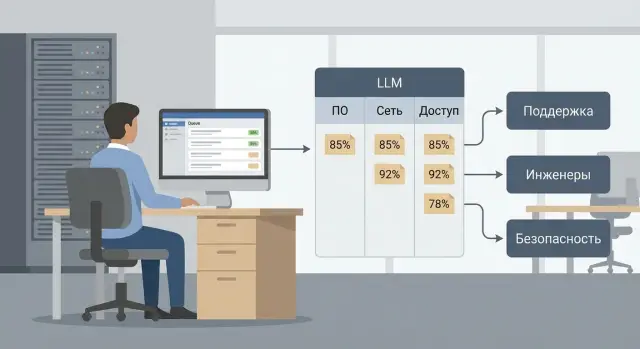
Why tickets are poorly classified and what LLMs bring
In almost any Service Desk, categories are filled out “however it goes.” The user picks the first thing that looks right, an agent rushes to clear the queue, and over time the service catalog grows many similar entries. As a result, a ticket lands in the wrong place and the team spends time forwarding it instead of solving the problem.
A wrong category usually has obvious consequences: the ticket is bounced between support lines and service owners, time to first response grows, and SLAs are missed more often. Context gets lost: each new handler asks the same clarifying questions. Analytics also break: reports show “a bit of everything” and don’t reveal root causes. Users start writing “urgent” in the subject and bypass the process.
Manual classification doesn’t scale. During quiet hours an experienced dispatcher can keep quality, but in peaks (mass incidents after an update, start of business day, night shifts) quality quickly drops. New staff learn slowly: they must remember subtle differences like “Workstation access” vs “Account issues” and understand where the line between an incident and a request lies.
This is where classifying Service Desk tickets with LLMs helps. The model reads free text and tries to understand the meaning rather than matching exact words. This is especially useful when descriptions are short, written in natural language, contain typos, or mix languages (for example, Russian and Kazakh in one message).
Where LLMs help and where they don’t
LLMs are most useful when a ticket contains at least 1–2 sentences that clearly describe the problem or request and when categories reflect real services and responsibility areas. A minimal history of past tickets also helps: without examples the model finds it harder to “grasp” your logic.
But it’s not a cure-all. If data and processes are chaotic, automation will fail not because of the model quality but due to lack of structure: empty fields, duplicate categories with different names, conflicting rules, or tickets that consist only of “doesn’t work, help.” A model won’t replace a service catalog owner or fix a poor intake form.
A common case: the user writes “Printer won’t print, urgent, 3rd floor” and doesn’t specify device or office. The agent may send the ticket to “Printers,” then discover the issue is network access, and the ticket goes to “Network.” An LLM can suggest the most likely category immediately and indicate which data is missing (printer model, PC name, room number). This reduces forwards and speeds up initial work, especially when support covers many workstations, servers and sites.
Categories and subcategories: how to build a usable scheme
Good classification starts with responsibility, not convenient labels. A category should answer: which team will actually take the ticket and by which process will they handle it. It’s best to tie the scheme to the service catalog (what we support) and ownership (who supports it). Otherwise automatic routing will constantly err.
For a start, collect a minimally viable set of fields and deepen later. An initial structure usually suffices:
- Type: incident or request.
- Service: e.g. “Workstation,” “Mail,” “Network,” “Servers,” “Service Desk access.”
- Component: detail within a service (VPN, printer, account, monitor, RAID, etc.).
- Priority: according to business rules (impact and urgency), not “by eye.”
A common mistake is making a tree too deep: 6–8 levels, dozens of similar branches and different names for the same thing. This degrades statistics and training data: each branch gets few examples and the model starts to confuse them. A practical guideline is 2–3 levels. At each level names should be mutually exclusive and understandable without internal jargon.
To agree on names and rules, don’t discuss them abstractly. Take 10–20 real tickets for each proposed category and review them together: “how would you name this” and “why does it belong here.” Then record rules so a newcomer understands:
- A short category name and one sentence what it includes.
- Several examples of “in” and “out.”
- An explicit owner team and a fallback route (if the owner is unavailable).
- A rule for choosing between similar categories: one deciding feature.
Be strict with “Other.” It’s acceptable to keep “Other” as an emergency bucket while you gather data or define the process. It’s harmful when “Other” becomes the usual choice: you hide new problem types and deprive the LLM of anchors. A simple rule: if “Other” stays above 3–5% for two weeks in a row, add a new category or clarify rules and examples.
Example from practice: in a manufacturing company’s support, “Workstation -> Won’t power on” and “Workstation -> Slow performance” are better kept as different components if different specialists handle them and different SLAs apply. That’s a sign the component is justified, not an extra level for its own sake.
Service Desk data: what to prepare in advance
Classification quality starts not from the model but from what you give it. For a scenario of Service Desk ticket classification with LLMs, collect a unified set of fields, agree on formats, and remove anything that shouldn’t be processed.
For each ticket, prepare a minimal “ticket passport.” Usually sufficient:
- Subject and full description (as written by the user).
- Short summary of attachments (file name, type, 1–2 lines, no content).
- Requester (prefer role or user type rather than full name).
- Department and location (if they affect routing).
- CI or service (what broke: server, workstation, mail, VCS, etc.).
- Channel (portal, email, phone, messenger).
Also include handling history: it’s needed for rule tuning and honest effect evaluation. Useful fields: category chosen by agent, assignee (team or support line), resolution outcome, time to assignment, time to close, and a reopened flag. These help separate model errors from process bottlenecks.
A separate step is cleansing and masking. Be strict here:
- Replace personal data (names, phones, addresses, e-mails) with markers.
- Hide numbers of documents, contracts, invoices, national IDs, bank details entirely.
- Remove or generalize sensitive details (passwords, keys, internal IPs, names of closed projects).
- Truncate long logs/dumps to 3–5 lines of “what the error is.”
- Mark duplicates and “empty” tickets (no text) separately.
To make evaluation fair, assemble a reference sample. A practical choice is the last 3–6 months and include different teams and ticket types: incidents, access requests, purchase requests, workstation and server issues. If you support locally produced PCs and servers (like GSE.kz), ensure examples include workstation and server tickets, not only “forgot password.”
Account for bilingual messages (ru-kz) and templated phrases. Don’t try to “fix the language” manually. Better store the original text and add a language flag (or language probability), treating templates as a separate type. The model then gets less confused by identical short phrases and relies more on context: CI, channel, department and history of similar tickets.
How an LLM outputs category and “confidence”
For automatic routing to work, the model should provide not “clever text” but clear signals for the Service Desk. It’s practical to ask the LLM to return three things: category (and subcategory if needed), a confidence score, and a short rationale the agent can quickly check.
Category is for routing, confidence is for handling rules, and the rationale helps a human understand the decision. Example: “Category: Access -> VPN. Reason: the user writes ‘VPN won’t connect’, ‘authorization error’.”
What to treat as “confidence” and how to read it
Confidence can be represented in different ways. The key is to agree on format and meaning in advance:
- Class probabilities (e.g. 0.72 for the chosen category).
- Normalized 0–1 score without strict statistical interpretation.
- Levels: high, medium, low.
- Top-2 or top-3 options with scores if categories are often confused.
Remember: confidence is not truth or a guarantee. It signals how similar the choice is to typical examples. The same score can behave differently on new topics, short messages, or poor-quality text (typos, jargon, mixed languages). Choose thresholds based on your data, not from someone else’s case study.
When to ask a clarifying question
If the ticket text is too vague, the model often “guesses” and returns medium confidence. In such cases it’s better to ask for clarification rather than route immediately. Typical triggers:
- The message lacks the object of the problem (what exactly doesn’t work: mail, VPN, printer).
- Conflicting indicators (several systems mentioned at once).
- The ticket says only “doesn’t work,” “urgent,” “help.”
Example: the user writes “Can’t log in, error.” Instead of assigning to “Access -> AD,” the model could ask: “Are you unable to log into Windows, mail, or the corporate portal? Please send the exact error text.”
What to log for audit and error analysis
To improve classification over time, save not only the final category. A minimal trace usually includes: original ticket text (masked), prompt version, request time, model response (category, confidence, rationale), and the final “ground truth” chosen by the agent (what they selected and why). This makes it easier to find typical misses: where the model confuses subcategories, overestimates confidence, or which words lead it astray.
Escalation and routing rules: decisions on thresholds
Rules aim to use model confidence safely without breaking existing Service Desk work. A good scheme is like a traffic light: with high confidence auto-assign, medium require confirmation, low send to manual triage.
Confidence thresholds: a simple traffic light
Pick thresholds once for the pilot and adjust based on errors. Three zones usually suffice:
- High confidence (e.g. 0.85–1.00): auto-assignment to the team/queue, set category, trigger standard reply template.
- Medium confidence (e.g. 0.60–0.84): category suggested as a default to the agent but requires confirmation or change.
- Low confidence (below 0.60): ticket goes to the general primary triage where a human clarifies and sets the category manually.
To avoid breaking SLAs, only change the first step (where the ticket lands), not deadlines or priorities. If everything currently begins at L1, keep it but add LLM hints and auto-assign only for safe classes.
Risk-based escalation: not everything should be automated
Some topics have high error cost. For them, even high model confidence should not mean full automation. “Always confirm” is usually justified for access, finance, personal data and security-related tickets (MFA reset, admin rights requests, suspected phishing, account lockouts, payment issues). In these categories the model can assist but the final decision stays with a person.
Conflicts should be recorded up front. If an agent changes the category, the agent’s choice wins and the change is recorded as annotation for training and analysis. Add a short reason field for category changes: “insufficient data,” “similar incident,” “wrong service.”
Fallback scenarios prevent surprises and reduce user frustration:
- Model unavailable: ticket follows existing routing rules.
- Empty or very short description: auto-reply asking for details (what broke, where, when), then manual classification.
- Nonstandard request without a suitable category: mark “Other” and send to primary triage.
- Too many categories with close confidences: show top-2 to the agent without auto-assignment.
- Sudden increase in errors for one category: temporarily disable auto-assignment for that category until investigated.
Example: the user writes “can’t get email code, code not arriving.” The model returns 0.92 for “Access -> MFA.” By risk rules, the ticket doesn’t go to direct execution but to L1 confirmation with suggested checklist. This keeps security while still speeding up handling.
Step-by-step rollout: from pilot to production
To get value from LLM-based Service Desk classification, start with a small measurable pilot. The goal is not to replace agents but to safely verify category quality, model confidence behavior and escalation logic.
Pilot: 2–4 weeks, narrow scope
First define success: less time for initial triage, fewer wrong assignments, faster routing to the right group. Limit the pilot to one or two services or queues with typical, repeatable tickets (access, workstations, printing) and clear owners.
Prepare the basics: category scheme and subcategories, typical phrasing examples and escalation rules. Predefine what to do when model confidence is low, when text contradicts the chosen category, and when sensitive data is present.
Build integration so critical parts are untouched. Usually form a request from subject, description, selected service (if any) and a couple of system fields. Define restrictions: which fields must not be sent, how to mask personal data, and maximum text size.
A practical route:
- Agree pilot goal, boundaries (1–2 services/queues), metrics and duration.
- Prepare categories, examples and escalation rules with thresholds.
- Set up integration (API or bus), request format and data filters.
- Start with suggestion mode (hints to agents) without auto-assignment.
- Enable auto-assignment for part of tickets and gradually expand.
In suggestion mode the agent sees the proposed category, a short explanation (1–2 indicators from text) and the confidence score. The agent confirms or corrects. Those corrections are the most valuable data for improving prompts and rules.
Production: expand and guard against errors
When the pilot clarifies model weaknesses, enable auto-assignment only where the cost of error is low. For example, auto-assign when confidence is high and the category has a clear owner. For medium confidence keep hints without action. For low confidence or sensitive signs send tickets to manual triage or a standby group.
Expand queues gradually: add one service at a time, record rule changes and compare metrics before and after. This yields a stable production deployment without abrupt spikes in wrong assignments and without losing Service Desk control.
Quality control after launch: checks and monitoring
After launching automated classification, it’s important not only to track speed gains but to verify every day that the system remains stable. The first 2–4 weeks usually reveal unexpected formulations, new problem subtypes and borderline tickets.
Daily checks: make it a habit
A short ritual works best: a daily sample of auto-classified tickets and review of disputed cases with decision-makers. Sample not only randomly but also target tickets with low confidence and tickets where agents changed the category.
To avoid bureaucracy, use a simple loop: find disputed examples, agree on the correct handling, update routing rules or refine the prompt. If you have several support lines (workstations, servers, access), keep a shared log of disputed cases so decisions stay consistent.
Quality metrics and signs of drift
Track metrics like you track SLAs. 3–5 indicators are enough, but they must be understandable to agents and managers:
- Top-1 category accuracy (on a validated sample)
- Share of auto-assigned tickets
- Share of returns (tickets bounced or reassigned)
- Share of manual category edits by agents
- Average time to first response and time to resolution (before/after)
Watch for drift: new ticket types, catalog changes, seasonal spikes (mass password resets at the school year start, software updates before reporting periods). Drift often shows up as increased returns and more low-confidence cases.
Human-in-the-loop can be nearly invisible: add a “Category incorrect” button with a choice of correct option and a short “why” field. It must be one click, otherwise feedback stops.
Have a change policy: when to change categories, prompt and thresholds. Practical rules:
- Change thresholds if returns increase but sample accuracy is stable.
- Change prompt if the same wording errors repeat.
- Change categories if a new service or support team appears.
- Retrain or expand examples if drift lasts more than 2–3 weeks.
This makes quality a managed process rather than a one-time tweak.
How to measure speed improvement: before and after metrics
To know if LLM-based classification helped, use metrics that reflect real handling speed, not just a pretty auto-categorization rate. The best method is a before/after comparison on comparable conditions.
Metrics to watch
Start with time-based metrics common in any Service Desk:
- Time from ticket creation to assignment (time to assignment)
- Time to first response
- Time to resolution
- Share of tickets closed within SLA
- Distribution across queues: median and 90th percentile (to see the tail)
Then add workload metrics. They show how much work was removed from L1:
- Share of tickets that required manual classification
- Average agent time spent triaging and routing (minutes per ticket)
- Number of reassignments between queues until correct assignment
How to compare fairly and calculate effect
Comparison is fair when you take the same queues, same ticket types and comparable periods. If the end of a quarter has a regular peak (mass password resets or reporting tasks), handle it separately to avoid skew.
A simple saving calculation:
"Minutes saved per ticket" = (average manual triage time before) - (average time after, including checks and corrections).
Multiply by the number of tickets in the period to get hours. Also show SLA impact: even a small assignment acceleration can noticeably reduce overdue shares.
Example: if an agent spent 2 minutes per ticket on triage and after implementation spends 30 seconds confirming, the saving is 1.5 minutes per ticket. For 4,000 tickets a month that’s about 100 hours.
Track side effects
Speed must not increase at the cost of quality. Track classification errors, unnecessary escalations due to wrong categories, increased reopen rates and user complaints about misrouting. If these rise, usually adjust confidence thresholds and escalation rules rather than push more automation.
Realistic example: how it works on a ticket stream
Imagine an organization with several support lines. L1 accepts all tickets and resolves simple issues. L2 holds service experts, and there are separate teams for workstations, network, business systems (for example, 1C/ERP) and VCS. Previously many tickets went to the wrong place: the requester chose “Other,” the agent rushed, and tickets were reassigned.
Typical requests include access (password reset, rights, VPN), mail (missing messages, full mailbox), workstations (won’t turn on, printer, software install), 1C/ERP (login errors, “document not posting”) and network or VCS (lost internet, low speed, camera/audio issues).
Now add LLM-based classification. The request comes as usual: subject, description, sometimes attachments or a selected service. The model reads the text and suggests a category, subcategory and numeric confidence (e.g. 0.92). It also suggests a route: which support group to assign.
How the ticket travels
The key point is thresholds that decide action:
- 0.85 and above: auto-assign to the team, L1 only samples.
- 0.60–0.85: agent sees a hint and confirms or edits.
- Below 0.60: manual classification and marked “complex” for training.
In practice: the user writes “After the update 1C won’t open, says ‘no access to the database.’” The model selects “Business systems -> 1C -> Access error” with confidence 0.88. The ticket goes directly to the 1C team and L1 wastes no time finding a category.
Another example: “Microphone in the meeting room not working, meeting with a client tomorrow.” The model suggests “VCS -> Audio” with confidence 0.72 because details are scarce. The agent sees the hint and short clarifying questions (which room, which app). They confirm the route to the VCS team and the ticket doesn’t get stuck in the “Untriaged” queue.
The effect is visible quickly: fewer reassignments, faster initial assignment, and clearer reporting. Instead of “90% – Other” you see where the pain is: access, mail or a specific 1C module. Conversations with service owners become factual: “network queue grew and confidence fell, let’s refine categories and escalation rules.”
Checklist and next steps: how to lock in results
After the pilot it’s easy to relax and slide back into chaos: categories spread, confidence thresholds get forgotten, and agents bypass automation because it’s faster. Locking in results needs a short rule set and clear roles.
Before rollout, check items that most often break automated classification:
- Categories and subcategories agreed, each with an owner (who changes rules and owns quality).
- Model confidence thresholds fixed and approved: what goes to auto-routing vs manual review.
- Fallback set: low confidence or disputed topics go to primary triage with clear SLA.
- Decision logs enabled (category, confidence, prompt/model version) and an “agent intervention” flag.
- A person responsible for quality and a schedule to review errors (e.g. twice weekly in month one).
Lock in security. No classifier is worth leaking data, so rules must be simple and verifiable:
- Mask personal data in ticket text before sending to the LLM (names, phones, IDs, addresses, card numbers).
- Access roles: who sees original text, who sees only final category and confidence.
- Retention: how long logs are kept, who deletes them, where approvals are recorded.
- Rules for sensitive topics (finance, health, HR): no auto-actions, only routing and manual check.
- Regular spot checks: 20–30 tickets a week for correctness and policy compliance.
A 30-day plan is helpful. Days 1–7: pilot on 1–2 popular categories and gather agent feedback. Days 8–14: adjust category scheme, refine thresholds, add examples of “how not to.” Days 15–30: expand queue coverage so the team can learn without losing control.
For scaling, prepare supporting artifacts: an up-to-date service catalog, a short knowledge base with typical fixes and operator training (how to work with model confidence and when to disable automation).
If your next step is Service Desk integration and LLM infrastructure, consider engaging a system integrator so you don’t piece everything together manually. At GSE.kz (gse.kz) you can discuss system integration, server infrastructure for LLM load and setting up 24/7 technical support for your support service.
Frequently asked questions
How does an LLM classify Service Desk tickets?
An LLM reads the ticket subject and description, identifies the most suitable category, and suggests a route to the appropriate queue. It is especially useful for short messages with typos, informal wording, or a mix of Russian and Kazakh.
How many category levels should we create?
Start with two or three levels: request type, service, and component. Each category should lead to a clear team or process, and similar names should be removed.
Will an LLM replace first-line operators?
No. The model can suggest a category, but it cannot fix empty descriptions, duplicate catalog sections, or conflicting rules across teams. First, organize the categories and responsibilities.
What model confidence thresholds should we use?
For a pilot, three zones work well: above 0.85, auto-assign only safe, standard requests; from 0.60 to 0.84, show the operator a suggestion; below 0.60, send the ticket for manual review. Then adjust the thresholds based on real errors.
What should we do with a ticket that has no proper description?
If the requester has not specified the affected item or has written only “it doesn’t work,” the system should ask for one specific clarification. For example, ask whether email, VPN, a printer, or Windows sign-in is not working.
What data should be hidden before sending a ticket to an LLM?
Mask full names, phone numbers, addresses, email addresses, IINs, BINs, document numbers, and banking details. Passwords, keys, internal IP addresses, and information about confidential projects should be removed or generalized before sending the text to the model.
Which requests should not be fully automated?
Access requests, finance, personal data, and information security require human confirmation even when the model is highly confident. An LLM can suggest a route and verification questions, but it should not grant permissions or perform sensitive actions on its own.
What should we log to assess quality?
Store de-identified text, the suggested and final categories, confidence, a short explanation, the prompt or model version, request time, and operator edits. These records help identify where and why the system makes mistakes.
How do we measure the impact of automatic classification?
Track category accuracy on a validated sample, the share of manual corrections, the number of reroutes, time to assignment, first response, and resolution, as well as SLA compliance. Compare the same queues and comparable periods before and after launch.
How can we launch a pilot safely?
Start with one or two standard queues, such as access requests, printing, or workstations, and enable suggestion mode for 2-4 weeks. Operators confirm or change the model’s suggestions, after which you can cautiously enable auto-assignment for simple categories.
