8 min read
Service Center Automation: Data Model and Repair Time Reports
Service center automation: how to build a data model for devices, statuses and parts, and set up repair time reports.
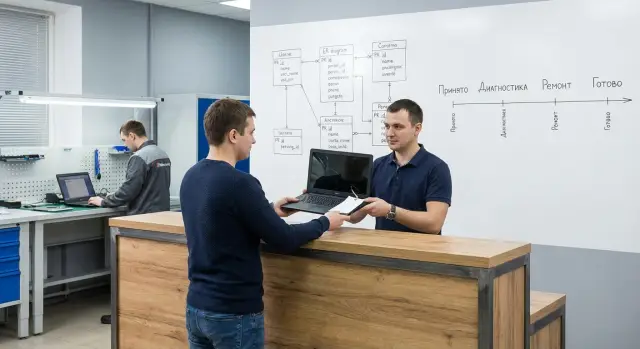
What problem does automation solve and how do we define success
When records are kept in chats, on paper and in separate spreadsheets, a device can easily “get lost.” It’s accepted from the client, handed to diagnostics, then sits on a shelf for a week with no note of who is responsible or what’s next. Arguments start: when it was accepted, what was promised, why the deadline shifted, who approved a parts replacement.
A second common pain is unnoticed delays. It may look like technicians are busy, the warehouse is working and intake is ongoing, but a queue builds at a single point: waiting for a part, for approval of an estimate, or for re-diagnostics. Without unified records this becomes visible only through complaints.
Most often automation is needed around four processes: intake, diagnostics, repair and issuance. It’s important to agree in advance what the system records at each step: who accepted the device, what was included and its condition, diagnostics results, what work was done, what was replaced, when and to whom it was returned.
A key point of the model is to separate device data and order (ticket) data. A device (serial number, configuration, ownership, warranty) can come to the service many times. An order is a specific visit with a specific problem, dates, statuses, responsible persons and parts consumption. If you mix these levels, history becomes confusing: one repair may overwrite another, and reports will start to “drift.”
Transparency on timings is not a single metric like “done in 5 days,” but an understanding of where time is lost. It is useful to measure multiple intervals: from intake to the start of diagnostics, from diagnostics to approval of works and estimate, from approval to the actual repair, waiting for parts (including reserved stock), and the time from repair completion to issuance.
Automation is successful when, for each order, you can tell in a minute: where the device is, at what stage, who is responsible, what’s done, what blocks completion, and when it will realistically be ready. In services for PCs, all-in-ones or servers (for example, in corporate parks at government agencies, schools or clinics) this quickly reduces the number of “lost” tickets and makes causes of delays provable rather than arguable.
Device intake: what to collect immediately
Intake is the main moment for quality of records. If there are gaps here, they turn into disputes, repeated calls and lost time later. So automation of a service center usually starts not with “smart diagnostics” but with discipline in intake data.
First, record who brings the device and under what conditions. You need full name or organization name, phone, a convenient contact channel and consent to data processing. Also note whether paid work can be performed without an extra call and what approval limit is allowed. This reduces delays.
Then record the device data so it cannot be confused. Model and serial number are mandatory. If there is no serial or it’s unreadable, note the reason and add an alternative identifier (for example, an inventory number or a service sticker number). Include all items the client expects to get back: power supply, cables, stylus, disk caddies, adapters.
To avoid disputes at issuance, record the “as is” condition. Photos and short notes about defects work best: cracks, chips, signs of opening, scuffs, non-original screws. Add a field “problem as reported by client” and a separate field “visible signs” — these are different things.
For fast intake keep a minimal set of fields filled in 2–3 minutes:
- Client and contacts, notification method, consents
- Device: type, model, serial number (or reason for absence)
- Contents and external condition
- Reported fault and urgency
- Preliminary conditions: warranty or paid, approval limit
Finally, introduce uniform marking rules. One order = one number repeated on the receipt, on the sticker and in the system. If there are seals and stickers (factory or service), record their presence and condition: “intact,” “damaged,” “missing.” Simple example: a client returns a week later claiming “there wasn’t a scratch on the side.” Two photos at intake and a note on the receipt settle the question in a minute.
Basic data model: entities and relations
To prevent automation of the service center from turning into a set of disconnected tables, start with simple entities and clear relations between them. The model should answer basic questions: who contacted, what was brought, what was promised, who performs the work, with what parts and when.
The backbone is usually: Client, Device, Ticket (or Repair Order), Employee. Client stores who contacts (individual or organization). Device stores characteristics of a specific hardware unit. Ticket records a specific visit with dates, conditions and results. Employee is needed to attach responsibility and an action history.
Important: do not confuse Device and Ticket. Device is an object that can come to the service many times. Ticket is a single visit and one work cycle. Mixing them loses history of repeat visits: for example, a laptop was repaired six months ago but in a new ticket that history is not visible.
Relations can be described like this:
- 1:N: one Client can have many Devices and many Tickets
- 1:N: one Device can have many Tickets (repeat repairs)
- N:M: one Ticket may involve several Employees, and one Employee handles many Tickets
The N:M relation is usually handled with a join table, e.g. “Assignments”: ticket, employee, role (diagnostics, repair, issuance), start and end times.
Some data is better stored separately to avoid duplicates. Addresses and client details should be separate records: they change and there may be several (legal, actual, delivery). Contact history (calls, messages, approvals) should also be kept separately to see who promised what and when. Then when a device returns you create a new Ticket while Client and Device remain the same, with a full history.
Statuses and work stages: a clear scheme and rules
Statuses are not for decoration in the ticket card. They provide a common language for intake, engineers, warehouse and call center, and they feed time reports. For automation it’s better to start with a short chain everyone understands: received, in diagnostics, waiting for approval, in repair, waiting for parts, ready, issued.
The main idea is simple: one status answers one question. The client needs to know why the device isn’t moving, and the manager needs to know where queues form. If a status mixes several reasons (for example, “in repair/waiting for payment”), investigations and reports quickly become a mess.
Transition rules: prevent chaos
Make statuses more than words — turn them into rules. That reduces errors and manual follow-up.
- Assign roles: intake staff set “received” and “in diagnostics,” an engineer sets “in repair” and “ready,” warehouse confirms “waiting for parts.”
- Forbid skipping key steps (for example, you shouldn’t move from “received” directly to “ready” without diagnostics).
- Allow backward transitions only with a reason (for example, from “in repair” back to “waiting for approval”).
- Record pause start for SLA: when a status is paused, the timer should treat time differently.
- Require mandatory fields at certain statuses: when moving to “ready” — final work results; when “issued” — issuance confirmation.
Pauses are better implemented as a separate status or a substatus with a reason. Typical reasons: client unreachable (track number of attempts and dates), no part available (expected date and source required), awaiting payment (invoice or amount and agreed deadline). This way you distinguish real workload from waits outside the service.
Status history: what to always save
Status history is needed both for investigations and for honest reporting.
- Date and time of status change (to the minute)
- Who changed it (user and role)
- From which status to which (old and new status)
- Reason, if this is a pause or rollback
- Short comment (e.g., “awaiting cost approval”, “motherboard ordered”)
Example: a service supports a school’s PC park. A device passed diagnostics quickly but got stuck on “waiting for approval” for three days because the responsible person was on a business trip. If that’s recorded in the history, you won’t blame the technician for delay; the report shows that the bottleneck is approvals, not repairs.
Parts and warehouse: accounting, reservation and write-off
The warehouse in a service center quickly becomes a source of errors: a part “exists” but has already been taken for another repair, or conversely a wrong item was written off and later it’s impossible to know what was actually installed. So parts accounting should be built around simple rules: each item has a clear card, all movements are recorded as operations, and the link to a repair is made by actual installation.
A part’s card should be equally useful to a storekeeper and a technician. Minimum fields: name (as on invoices), manufacturer SKU, compatibility (device models or series), unit (pcs, kit, meter, etc.). For serialized parts (SSD, motherboards, power supplies) store serial number and status for each instance. For consumables (thermal paste, screws, cable ties) serial tracking is unnecessary — it overcomplicates the warehouse.
Track movements via operations: receipt, reserve for repair, write-off, return. Reservation helps when a part is already allocated to a specific ticket but not yet installed. Another technician won’t take it by accident and repair time estimates become realistic.
To know exactly which part was installed you need to link the part to the repair: which item was installed, to which slot (if there are several identical ones), who and when. It’s useful to record the reason for replacement (failure, upgrade, preventive). This is especially important for serialized components in computers, all-in-ones or servers where later checks by SN may be needed.
A practical split helps:
- Serialized parts: tracked by instance, SN mandatory, movement history
- Consumables: tracked by quantity, written off by norm or by fact, no SN
- Kits: a “kit” as a separate item (e.g., fasteners) to avoid splitting inventory
Example: a PC arrives for repair; diagnostics confirm SSD replacement. The technician creates a reserve for the ticket. After installation the system clears the reserve, records the write-off and logs which SSD (with SN) was installed and by whom. If the part didn’t fit and was returned to stock, record the return so quantities are updated.
If you implement inventory from scratch, start with serialized parts and reservation for repairs. This gives maximum control with minimal data.
Diagnostics and repair: what to record for the works
If diagnostics and repair notes are kept “free-form,” it’s later hard to understand why a device was delayed, who decided on a parts replacement and why the client was given a particular price. Work records should be short but consistent in structure.
Diagnostics: record facts, not impressions
Store diagnostic results as a separate record tied to the ticket and the specific device. Inside, separate symptoms (what you see) from cause (what you found). Keep measurements so you can compare with a repeat visit later.
Usually the following set is enough:
- Symptoms: what fails and under what conditions (e.g., “won’t power on after 2–3 hours idle”)
- Checks and measurements: tests, voltages, temperatures, SMART, error codes
- Suspected cause and confirmation: “replacing PSU solved the issue,” “short circuit found on the board”
- Conclusion: repairable or not, recommended actions
- Attachments: photos, test screenshots, opening act (if applicable)
Important: “cause” should be a filled field, not only text. Then reports will show which failures repeat and where preventive measures or training are needed.
Work plan: who, what and how much time
Store the work plan as a list of operations: diagnostics, disassembly, cleaning, module replacement, flashing, testing, assembly. For each operation record the estimated time (planned) and actual time, performer, start and end dates, plus a comment if there were delays.
This lets you distinguish “repair took a long time” from “waiting for approval” or “part was reserved for another ticket.”
Client approval should be a separate event. Approvals are not for “the repair in general” but for specific items: list of works, cost, deadline, and what happens if additional faults are found.
Store approvals so they’re easy to find:
- Channel and date: call, email, messenger, signed receipt
- What was approved: final amount, list of works, list of parts
- Restrictions: “do not break seals”, “do not replace motherboard without re-approval”
- Who confirmed: full name, position (for organizations)
Warranty repairs and repeat visits should not get “lost” in new cards. Each device should have a persistent identifier (serial number or internal code) and each ticket should link to previous tickets (if it’s a repeat). Then you can see what was replaced, what measurements were taken, and how that relates to warranty conditions.
How to roll this out step by step: from simple accounting to a system
Start with a goal: fewer lost items and clear deadlines for each order. Automation works best when you don’t try to model all edge cases at once but first fix the basic flow and mandatory fields.
Begin by mapping the process on one page. Walk the path of a device from intake to issuance and leave only branches used daily. Often 5–7 stages suffice; rare situations are better handled as a comment or pause reason rather than an extra status.
Next, agree on reference lists; otherwise data will quickly turn chaotic. It’s important the same meaning is always recorded consistently, not in dozens of variants like “won’t power on”, “no power”, and “not turning on.”
Before launch agree a short set:
- Statuses and their order (what can follow what)
- Types of works (diagnostics, replacement, cleaning, configuration)
- Failure reasons and sources (mechanical, power, software, overheating)
- Device categories (PC, all-in-one, server, printer)
- Rules for naming parts and units of measure
Then build an MVP of forms. Leave only what is essential: client data, serial number, contents, external condition, reported problem, responsible person and date. Then add a work form: what was done, how long it took, which parts were used, and final test result.
Test the MVP on 10–20 real tickets. In services handling workstations and servers a typical issue quickly appears: the technician writes the diagnosis in free text and the manager has nothing to aggregate. Solve it with a simple rule: diagnosis is selected from a list, details remain in comments.
When forms “hold,” connect the warehouse and access controls. Start with part reservation and write-off on installation. At the same time separate roles: intake, engineer, warehouse, manager. Add fields and reports only if they are actually used.
The final step is training and input rules. Introduce a short standard: what is filled at intake, what after diagnostics, and what cannot be empty before closing a ticket. If a rule is critical, block the status transition rather than rely on discipline.
Time reports: SLA, delays and bottlenecks
Timings are visible only when the database contains precise time points. Minimum events per ticket: device intake, start of diagnostics, client approval (or rejection), start of repair, readiness, issuance. If any of these is recorded “by word,” reports will disagree with reality and automation becomes a set of pretty statuses without value.
How to count SLA and delays when there are pauses
A common mistake is to count SLA from intake to issuance without accounting for pauses. It’s more correct to split time into active and paused intervals.
Active SLA time = (ready or issued) minus intake, excluding intervals paused for client reasons. For this define a pause flag and interval types, e.g.: “waiting for approval,” “client unreachable,” “awaiting prepayment.” Then delay is calculated fairly: a ticket may be old by calendar days but not violate SLA by active time.
Example: a device is accepted Monday, diagnostics start immediately, an estimate is sent the same day. The client replies only on Thursday. Repair is done on Friday. By calendar five days passed, but active work was 2 days. These are two different metrics answering different questions.
Reports that help management
Managers need reports that show the picture, not isolated cases:
- Average and median times by work type and device model (median is often fairer than mean)
- Share of tickets meeting SLA and statuses where delays most often occur
- Queue by status: how many tickets are “in diagnostics,” “awaiting approval,” “awaiting parts,” “in repair”
- Reasons for delays: client pauses, parts shortages, repeat diagnostics, returns
- Time spent at each stage (how long a ticket “lives” in a status) to see where time is lost
Then bottlenecks become obvious: for example “waiting for parts” grows for certain models or suppliers, while “waiting for approval” often stems from incomplete defect descriptions at intake.
Operational reports should help day-to-day. Technicians and intake staff usually need:
- Tasks for today: what to start, what to finish, what to check after testing
- Personal load: how many active tickets, how many paused, how many overdue
- Parts waiting: what is reserved, what’s missing, which tickets risk SLA breach
- List of “stuck” tickets: in a status longer than N hours without actions
Any report must rely on events and statuses that are actually filled during the process. Otherwise it will quickly lose credibility.
Common mistakes in the data model and process
Main problems are often not the database itself but how people use it. If rules are inconvenient, staff find workarounds: they write in comments instead of fields, create duplicates, or set statuses “as they see fit.” In the end automation produces pretty cards but not controllability.
1) Too many statuses and exceptions
When there are 20+ statuses and each has an “edge case,” no one remembers what to select. Temporary statuses become permanent and time reports stop reflecting reality.
Practical guideline: 6–10 statuses for the whole cycle and clear transition rules. If nuance is needed, store it in a separate field (e.g., “waiting: client / supply / approval”) rather than adding statuses.
2) Intake without mandatory fields
If intake doesn’t record contents and condition, later you can’t prove what was in the box or which defects were preexisting. Typical conflict: the client says “the charger was there” but the service can’t confirm.
Signals intake is failing:
- Many “other” entries and empty fields in cards
- Serial number or model recorded as free text
- No photos of condition (or at least no notes on chips and cracks)
- Contents recorded “from memory” in comments
- Different technicians use different names for the same item
Example: a laptop is accepted “for diagnostics” without noting a second SSD. On issue the client demands everything returned “as it was,” but the system has no record, signature or date when that was checked.
3) Mixing warehouse and repair
Another common mistake: consumptions are recorded only in the repair order, not as warehouse operations (reserve, issue, write-off). As a result the repair shows completed but warehouse balances don’t match. Or a part is written off but the repair was canceled and the item “disappears.”
Rule of thumb: the warehouse uses its own documents and balances; repairs only reference them (what’s reserved, issued, returned, written off).
4) No change history
If a status is overwritten without a journal, you won’t know who set “waiting for approval” and why a ticket stood for three days. History is not for punishment but for management: where the process stalls, where extra people are needed, where clients take too long to respond.
5) Reports count one timepoint while the process uses another
Often SLA is measured “from ticket creation” while actual work starts “from intake” or “after prepayment.” Then reported delays do not match the team’s experience.
To fix this discrepancy:
- Agree clear timepoints: SLA start, SLA pause, SLA stop
- Store these flags explicitly (don’t reconstruct them from comments)
- Enforce one rule across branches and shifts
When data model and process align, time reports stop being contested and become a tool: you can see where time is actually lost and what to change first.
Short pre-launch checklist and next steps
Before launch agree a few basic rules. If skipped, the system will quickly become a set of disconnected records and time reports will be disputed.
Checklist: what to verify before the first real intake
Document decisions — it saves time on rework.
- Order and device are unambiguously identified: unique order number, clear device marking, intake photos and contents checklist (charger, box, accessories)
- Repair statuses are unified and clear for staff: short list, each status has meaning, transitions follow rules (for example, you can’t close a ticket without diagnostics)
- Dates used for calculations are defined and mandatory: intake, start of diagnostics, client approval, repair completion, issuance. Without these points SLA and delays are guessed.
- Parts are accounted both in the warehouse and in repair: a part is linked to a specific ticket (reserve, installation, return, write-off) so cost and delay causes can be explained.
- Responsible persons are assigned for each stage: who accepted, who diagnosed, who repaired, who issued.
Next steps after the checklist
When the database is ready, move from simple to useful. Choose a platform for your scale: some need a light accounting tool, others require a full service-accounting and warehouse integration with roles, access rights and reports. Then agree the minimal set of reports you will review weekly: SLA breaches, average time by stages, share of “waiting for parts,” repeat visits.
If you don’t have resources to design and implement this in-house, hire a contractor. Projects often involve a systems integrator — for example GSE.kz — to build the data model and processes, implement the solution and provide ongoing support. Agree acceptance criteria up front: which fields are mandatory, which statuses are considered correct, and which reports should match reality in the first month.
Frequently asked questions
How do I know the service center automation really worked?
Start from the point that within one minute for any ticket you can see: where the device is, what stage it’s at, who is responsible and what is blocking completion. If, after implementation, devices stop “getting lost” and causes of delays are visible in the data rather than in chats, the automation is working.
Why separate “device” and “repair order” in the database?
Because they are different accounting levels. A device is a persistent object with a serial number and history, while an order is a single visit with a specific problem, deadlines and statuses. Mixing them causes repeat visits to overwrite each other and makes time reports unreliable.
What data must be captured at intake to avoid disputes later?
Record the client and contacts, model and serial number (or reason it’s missing), contents, the “as is” external condition and the fault as reported by the client. Add work conditions: warranty or paid, approval limit without a call, and preferred notification method. These fields prevent most conflicts and speed up approvals.
Do I need a unified label and order number if I have few clients?
Yes. A single order number duplicated on the receipt, the sticker and in the system reduces the chance of mixing devices in the queue and helps quickly find the record when a client calls. The important thing is the marking must be applied consistently, not “sometimes.”
How many repair statuses should the system have to avoid confusion?
Typically a short chain that everyone understands is enough: received, diagnostics, waiting for approval, repair, waiting for parts, ready, issued. The fewer and clearer the statuses, the easier it is to train the team and keep reports clean. Use a pause reason for nuances rather than creating new statuses.
How to account for pauses so SLA is calculated fairly?
Make the pause a separate status or substatus with a reason and dates. That way SLA can be calculated on active time, excluding waiting for a client response or prepayment. This distinguishes an actual service delay from an externally caused stop.
How to organize parts management so we don’t see “part exists but it’s not there”?
At minimum, you need a reservation for a specific order and write-off on installation so a part cannot be taken for another repair by mistake. For serial components, record the serial number and link it to the specific installation in the order. This lets you quickly see what was installed and where each unit is now.
What must be recorded for diagnostics and client approvals?
Keep the diagnostic result as a structured record attached to the ticket and device: symptoms, checks and measurements, confirmed cause and conclusion. Separately record client approvals: what was agreed, price, deadline, who confirmed and via which channel. This prevents disputes and simplifies analysis of repeat visits.
How to prevent diagnoses from becoming a mess of different wordings?
Use a single shared list of causes and diagnoses for all technicians; leave details in comments. That way managers can aggregate statistics on common faults and see where delays occur. If diagnoses are always free-text, reports will be empty or unreadable.
When should we involve a contractor or systems integrator like GSE.kz?
If your team lacks the resources to design the data model, statuses, warehouse operations and reports internally, hire a systems integrator. For example, GSE.kz can help build the process, set roles and mandatory fields, and provide post-launch support. Agree acceptance criteria in advance: required time points, correct statuses and reports that match reality in the first month.
