7 min read
Server room noise requirements next to offices: practical guidance
Server room noise requirements near offices: how to measure dBA, account for vibrations and airflow, and reduce employee complaints.
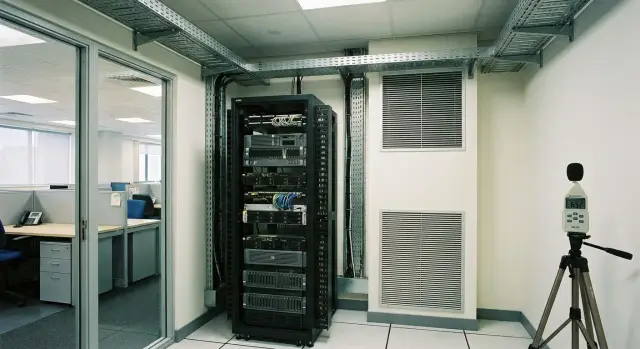
What’s the problem when a server room is next to offices
If a server room sits next to working offices, even a “not very loud” background can quickly become irritating. People take calls, hold meetings, try to concentrate. Server and engineering noise runs 24/7, and the brain can’t simply “turn it off.”
Complaints often start not because equipment suddenly got louder, but because conditions changed: furniture was moved, a rack was added, a door was closed, an AC filter clogged, or a partition began to vibrate. So noise requirements for a server room should be treated as a human-and-space problem, not only as nominal specs.
Sound sources are usually predictable. Server fans create a steady background and sometimes a high-frequency whistle. The UPS adds a low hum and occasional clicks during switching. Air conditioning and ventilation produce airflow noise and vibrations that travel through mounts and ducts.
The room itself can make things worse. Hard walls and ceilings reflect sound and raise the overall level. Gaps under doors, cable entries, and unsealed penetrations become acoustic “leaks.” A shared duct with offices acts like a pipe: sound and vibration travel further than expected.
Watch out immediately for: a low hum that’s stronger in the evening; a thin whistle near a door or grille; rattling of furniture or a suspended ceiling; periodic spikes (every few minutes or under load); complaints like “I can hear it but can’t tell where it’s coming from.”
If you note exactly what people hear and when it appears, it’s easier to link the sound to a specific device, vibration path or airflow direction.
dBA and practical noise targets: how to read requirements
dBA are decibels with A-weighting. Simply put, the instrument evaluates sound roughly as a person hears it: low frequencies weigh less, mid frequencies more. That’s why requirements usually use dBA, not plain dB.
It’s important to know where the limits apply. Rarely do regulations restrict noise inside the server room itself. Usually the concern is adjacent spaces: workstations, meeting rooms, corridors, reception areas.
Treat target values as ranges, not a single “magic number.” Practically, people often use these levels as guidance:
- offices and meeting rooms: roughly 35–45 dBA
- corridors and circulation zones: roughly 45–55 dBA
- technical rooms without permanent workstations: higher levels may be acceptable, but that doesn’t help if people sit on the other side of the wall
Even when the average level looks acceptable, complaints are triggered by peaks. Documents may describe them as maximum level (Lmax) or as “must not be exceeded” during events like UPS self-tests, fan spin-ups, or server restarts. A short jump of 5–10 dBA is more noticeable than a steady background.
Check multiple sources at once: lease conditions, occupational safety rules, local regulations and building standards. Sometimes there’s a day-night regime for spaces near security posts or 24/7 operations.
Example: A server room adjoins the accounting office. During the day the average noise is tolerable, but at 10:00 a UPS self-test runs, fans spike and staff hear a sudden “takeoff.” It’s important to record not only averages but also spikes, otherwise the report may say “within limits” while people still feel bothered.
If you buy racks and servers (for example, S200 series) or plan upgrades, ask suppliers not only for nominal dBA but also for the measurement conditions: load, temperature and fan profiles. That helps compare the numbers to your actual room.
How to measure noise correctly: locations, timing and records
To have a fact-based discussion about noise you need dBA numbers, not impressions. This is especially important when offices are nearby and the argument becomes “it’s noisy” vs “within limits.” Good measurements help quantify each source’s contribution: fans, UPS, rack vibrations, and airflow.
Start with an instrument. A Class 2 sound level meter is suitable for office tasks and gives repeatable A-weighted (dBA) results. Phone apps are only good for a preliminary estimate: they depend on the microphone and often underperform at low frequencies, where the “hum” appears.
Choose measurement points that help link the source and the complaint:
- outside the server room door (with the door closed)
- in the office at the wall shared with the server room
- in the workspace at seated head height
- in the corridor near the server room, if complaints come from there
Timing of measurements is as important as location. Office background is higher during the day (conversations, printers), while backups, scans and different cooling modes often run in the evening and night. Fans also spin faster in summer. Take several series at different times and note the equipment load and climate conditions.
Record measurements consistently, or you won’t be able to compare before/after. In the measurement log include:
- date and precise time
- point (description and distance to the door/rack)
- mode (door closed/open, people present/absent)
- equipment (which servers/UPS were running, was there a load spike)
- result in dBA and measurement duration (for example, 30–60 seconds)
Example: complaints occur “after 6:00 PM.” Measure at 5:30 PM and 7:30 PM at the same workstation. If evening dBA is higher and coincides with a backup schedule, it’s easier to find solutions: from adjusting cooling to moving tasks or replacing noisy components.
How to account for dBA in a real room, not on paper
An office is not a lab. There is always background: conversations, keyboards, ventilation. The server room adds its share, and it’s the difference between background and the server contribution that usually causes complaints. If a quiet office background is 35–40 dBA, even +5 dBA will be noticeable. In a noisy open-plan the same +5 dBA may go unnoticed.
Distance and barriers help, but not always linearly. A closed door, vestibule or a niche for a rack reduce levels, but gaps, imperfect seals and shared ceiling volumes often carry sound further than planned. The sound path matters as much as the meters.
A special trap is tonal noise. A narrow whine from fans or grilles irritates more than broadband noise, even at the same dBA. People describe it as “piercing” because the brain locks on a specific frequency.
Reflections also change perception. Bare walls, tile, glass and metal amplify perceived loudness and add a “boom.” A room can feel louder without an increase in dBA simply because sound decays more slowly.
A practical way to link numbers and perception:
- compare dBA in the office at minimum mode and under normal load
- note where it’s loudest: at the door, at the shared wall, or near the ceiling
- assess character: steady background or a distinct whistle
- check nearby surfaces: is there a lot of concrete and metal
This verifies requirements where people sit.
Vibrations: the hidden cause of hum and rattle
Sometimes dBA measurements look acceptable, yet complaints persist. A frequent cause is vibrations. They travel through racks, floors and walls, and then become hum, rattles and unpleasant low frequencies in the adjacent office.
Vibrations transfer easily through rigid connections: rack anchors into the screed, rigid UPS mounts to the floor, ducts in contact with walls, taut cables acting like strings. In the neighboring office this appears not as loudness but as annoyance.
How to tell if vibration is the issue
Problems are often described as “it rings,” “it hums,” “the door rattles,” or “shelves vibrate.” The sound usually changes with load: it increases when load rises or when the AC turns on.
Quick checks without instruments:
- place your palm on the server-room wall or door — if you feel a fine tremor, that’s a clue
- put a glass of water or a light object on a shelf in the office — ripples hint at resonance
- open the server-room door for a minute and listen: if the tone of the hum changes, mechanical transmission through structures is likely
- gently press a rack or panel: if the rattle changes, a loose fastening is indicated
What helps in practice
Isolation and securing are usually effective: vibration mounts under racks and heavy units, removing rigid contacts, tightening fasteners, and damping pads. Route cables so they aren’t taut and don’t strike metal.
In offices adjacent to server rooms, vibration mounts and neat cable routing often eliminate rattles without expensive soundproofing.
Airflow: how direction affects noise and temperature
Noise near offices often increases not because the equipment is inherently loud, but because it overheats. When hot and cold air mix, servers run hotter and fans speed up. Result: higher temperature means higher dBA.
The basic logic is simple: cold air should reach server fronts and hot air should exhaust away. If that loop is broken, racks overheat even if HVAC power is nominal.
Small details ruin the picture: open holes in the rack, missing blanking panels, swapped intake and exhaust grilles, a slightly open door, or a floor/wall opening that lets hot air escape to the corridor and return through gaps.
Example: two servers and a UPS sit in a rack but empty slots are left open. Hot air from the rear partly recirculates to the front, intake temperature rises and fans go into a noisier mode, even though “nothing was changed.”
Check with measurements in the right places:
- intake and exhaust temperatures at front and rear at lower, middle and upper units
- compare with door closed and ajar, and with blanking panels in place or removed
- look for hot spots above racks and in room corners
It’s normal for front intake temperatures to be lower than rear exhaust temperatures without large vertical swings. If intake is nearly as warm as the exhaust in spots, hot air is recirculating and noise will rise even with a working AC.
Quick measures often have a noticeable effect: install blanking panels in empty units, close unnecessary openings, separate supply and exhaust, and tune airflow so cold air reaches where it’s needed.
Step-by-step plan: from complaints to a technical solution
When a server room is next to offices, “noisy” can mean different things: evening hum, a whistle when the AC starts, or a wall rattle. To avoid treating the wrong problem, translate complaints into signs and measurements.
5 steps that usually work
-
Record complaints as a set of signs: exact location, time, sound character (hum, whistle, rattle, pulsing). If possible, ask for a short timestamped audio clip.
-
Measure dBA at the hours when people complain. Measure at the door, at the shared wall and at the workstation. Record both averages and peaks.
-
Simultaneously record temperatures and check supply/exhaust airflow. If the rack or room overheats, fans speed up and noise spikes.
-
Separate server noise from building engineering noise. Not only fans but also UPS, ventilation and structural vibration can be responsible. Do short checks by changing modes one at a time (without stopping critical systems) and note what changes.
-
Implement measures by priority: start with quick reversible fixes (seals, fasteners, vibration isolation, profile tuning), then move to more involved work (reconfiguring airflow, relocating racks, acoustic treatment). After each step, repeat measurements the same way.
Example: complaints occurred only after 6:00 PM. Measurements showed spikes with increased temperature: the AC switched to night mode and server fans went to max. The solution wasn’t “soundproof the wall” but adjusting cooling and adding vibration isolation under the rack. For turnkey remediation, systems integrators like GSE.kz typically start with measurements, engineering checks and repeat verification.
Equipment placement: racks, UPS and engineering without extra noise
Even moderately quiet equipment can become a source of complaints if placed poorly. In checks of “server room noise requirements” auditors often find not “bad servers” but a rack too close to a thin partition, structural vibration paths, and unsealed penetrations.
Place the rack so there is more mass between it and the office: a load-bearing wall, storage, corridor or restroom. The worst case is a rack right up against a gypsum-board partition behind which people sit. A corner can help (two walls shield sound) but can also amplify hum if walls are thin. If a common corridor is nearby, orient the rack so the noisy side (usually the rear exhaust) faces the corridor, not the office.
UPS and power components often produce low-frequency hum and rattles. Place the UPS separately from racks or at the rack base, but on vibration mounts or firm rubber. Choose PDUs with secure mounting and fasten cables so they don’t strike metal. Small network devices are usually quiet, but their power bricks and a “wall of cables” can rattle if everything is loose.
For AC and ventilation the rule is: don’t create a sound tunnel. Take intake air from a quieter room area and direct hot exhaust so it has no direct path to doors or gaps. If there is a dropped ceiling or shaft, check whether noise escapes into neighboring spaces.
Noise often passes through openings, not the wall itself. Make cable entries and trays with margin but seal them: tight grommets, brushes, fire-rated foam or mats. A leftover technical gap around a cable bundle acts like a small loudspeaker.
Quick checks before commissioning:
- the rack is not adjacent to a thin partition or facing an office door
- the UPS sits on vibration isolation and has no contact with pipes, ducts or walls
- air does not blow directly into a door opening or escape into shared voids
- cable entries are closed and sealed, no through gaps
- panels and rack fasteners are tightened, no loose parts
If the server room is built turnkey, incorporate these solutions with equipment supply and integration. In GSE.kz projects these details are usually planned so complaints don’t return after commissioning.
What actually reduces noise: quick wins and major fixes
When people sit nearby, noise usually comes not only from fans. It’s amplified by door gaps, reflective surfaces, grille whistles and vibrations transmitted into walls and ceilings. So “just add sound insulation” rarely solves everything. Better to assemble a set of measures and verify effects after each.
Quick fixes that often help within 1–2 days:
- seal the door and threshold, close cable entry gaps
- reduce reflections: add acoustic panels on the most “ringing” surfaces (often the door and the opposite wall)
- stop the whistle: replace unsuitable grilles, equalize pressure differences, add a silencer on supply or exhaust if noise comes from a duct
- tune maintenance and operating modes: clean filters, check fan profiles (where permissible), update firmware
- schedule noisy tests and flushes outside working hours and warn neighboring offices
Sometimes, after sealing the door and cleaning filters, complaints drop but a low hum remains. That almost always points to vibrations or ventilation rather than “loud servers.”
Major measures for reliably meeting requirements next to offices:
- build a vestibule or a second door
- mount racks on vibration isolators and decouple tray and pipe fixings
- redesign ventilation: choose quieter units, reduce air velocities, add silencers and flexible inserts
- separate noise sources: move UPSs, external fans or compressors away from shared walls
If the server room is designed from scratch, plan quiet ventilation and choose servers with suitable cooling modes. A systems integrator that combines acoustics, cooling and reliability into one project helps; GSE.kz provides such solutions for offices and institutions.
Common mistakes that make complaints come back
Complaints recur not because nothing helped, but because one factor was fixed while another worsened. In a server room next to offices everything is linked: air, vibrations, leakage paths and how you measure results.
Most common mistakes:
- sealing everything for quietness and blocking supply or exhaust — temperature rises and fans go to max
- taking a single favorable measurement and deciding the issue is closed — peak load tells another story
- placing a rack tight against a wall or in a niche — low-frequency hum and rattles appear
- not separating cold and hot air — air recirculates and noise becomes a steady nuisance
- leaving gaps under doors and cable entries — sound follows the simplest path and is louder than expected
Typical scenario: after acoustic work it’s quieter by the door, but a week later staff complain again. A check shows a temperature rise of a few degrees, fans now run more often, and the tone has become more piercing. At the same time the rack sits by a partition and vibrations couple into it.
To avoid loops, record measurement conditions (load, time, door state), check temperature and airflow after any changes, and don’t ignore small details like penetrations and fasteners.
Checklist and next steps: how to lock the result
Before commissioning a server room next to offices, record baseline numbers and check small details that later turn into complaints. This quickly shows whether the problem is air, vibration or “sound bridges.”
Short checklist before handover:
- measure dBA at the server-room door and in the nearest office (average and peaks)
- check intake temperatures and cooling stability
- assess vibrations: rack, floor, walls, AC pipes and trays — any rattles?
- inspect gaps and penetrations: cable entries, grilles, door seams and thresholds
- verify airflow direction: ensure no short-circuit of cold and hot air and no grille whistle
Priority usually goes: first airflow (to avoid overheating and fan spin-ups), then vibrations (they create low hum), and finally pure acoustics (panels, doors, insulation).
To discuss issues with a landlord or contractor on facts, prepare a data package: a plan with measurement points, a table of measurements (time, dBA, peaks, load modes), photos and videos of problem spots, a list of equipment and working schedule, and a list of what was tried and the effects.
If you need ventilation redesign, rack relocation, quieter servers or layout calculation, involve a systems integrator. GSE.kz can help in practice: select servers and racks for the required load, build a solution considering placement and airflow, perform integration and tuning, and then provide 24/7 support through their service network.
Frequently asked questions
What noise level is considered acceptable if the server room is next to an office?
Aim at the level in the neighboring offices, not inside the server room. For workspaces a common target is around 35–45 dBA, and it’s important that there are no noticeable spikes — those annoy more than a steady background.
What is dBA and why do requirements use it?
dBA are decibels with A-weighting — a measurement closer to how humans perceive sound. That’s why dBA better reflects the perceived annoying loudness than plain dB.
Where is the correct place to measure noise so the argument “noisy/not noisy” ends?
Measure in three places: outside the closed server-room door, at the shared wall inside the office, and at the workstation level (head height). Record both the average and the maximum over the same interval so you can compare before/after correctly.
Why do complaints often start in the evening even though it seems fine during the day?
Because operating modes change: backups often run in the evening, load and temperature change, and cooling can switch to a different profile. As a result, fans and engineering systems create peaks that are masked by daytime office background.
Which components usually make the most noise in a server room?
There are three common culprits: server fans (steady background and sometimes tonal whine), UPS (low hum and occasional clicks), and building ventilation/air conditioning (airflow noise and vibrations transmitted through mountings). Start by linking the sound to time and events to narrow the cause.
What to do if dBA seems acceptable but people are still annoyed by the hum?
Low-frequency hum and rattles often travel through structures: rack, floor, partitions, tray mountings and ducts. If vibration is felt, vibration mounts, eliminating rigid contacts and tightening fasteners usually help.
Why does noise seem louder at the door than the datasheet says, and how to fix it?
Small gaps under the door and around cable entries act as sound leaks and make noise feel much closer. Start by sealing door seals and thresholds and carefully sealing penetrations — this often gives a noticeable improvement without major works.
How can airflow increase noise even if the servers themselves are not loud?
When hot and cold air mix, servers run hotter and fans ramp up, increasing noise. Ensure cold air reaches the server fronts, blank unused units, and prevent hot air from returning to the intake.
Where to start reducing noise so money isn’t wasted?
Begin with quick reversible actions: seals, fixing rattles, tuning cooling profiles and cleaning filters. If that’s not enough, proceed to bigger steps like building an airlock, redesigning ventilation, or relocating noisy equipment away from shared walls.
What to ask the supplier when buying servers and racks to avoid a “noisy surprise”?
Ask for not only the nominal dBA, but also the measurement conditions: temperature, load and fan mode — otherwise the numbers are hard to compare to your room. For a turnkey project, a systems integrator like GSE.kz can combine server and rack selection, layout, cooling and support so noise is not a surprise after commissioning.
