7 min read
Monitoring server room engineering systems: minimum sensors and alert thresholds
Server room engineering monitoring: the minimal sensor set, alert thresholds and practical settings that help prevent downtime in advance.
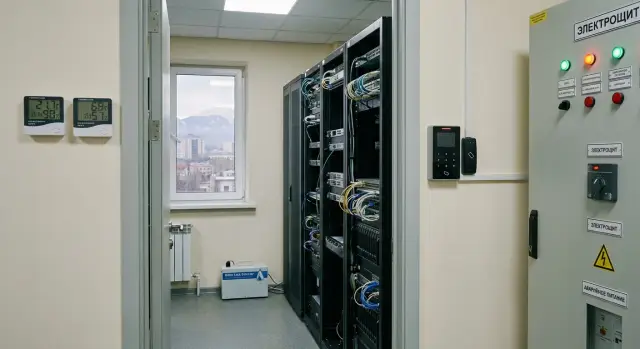
Why monitor the server room and what it actually prevents
Server rooms rarely fail neatly. Downtime usually starts with a small issue that goes unnoticed: the air conditioner errors out, water appears under the raised floor, a door is left open for a minute, and an hour later you smell overheated plastic. Monitoring engineering systems isn't for reports — it's to catch deviations early, when the problem can be fixed with a call to the on-duty person rather than by restoring after a disaster.
Typical causes of downtime boil down to a few scenarios: overheating from cooling failure or disrupted airflow, humidity problems (too dry or too humid), leaks, power failures, and human factors (an open door, accidentally unplugged socket, or tripped breaker).
The benefit is simple: early detection is almost always cheaper than the fallout. One leak sensor and an alert in the first minutes can save a rack that otherwise would be flooded. A temperature alert 10–15 minutes before a critical threshold gives time to shift load, enable backup cooling, or at least perform an orderly shutdown.
For small and mid-size server rooms, the "minimum set" is basic control of what most often breaks operations: temperature, humidity, leaks, access, and power. This kit doesn't require complex infrastructure but already provides clear signals when something goes wrong.
It's important to understand limits. Monitoring doesn't cool, extinguish fires, or replace UPS, power automation, air conditioner maintenance, or access rules. It does something else: it quickly reports that a deviation has started and records how it progressed so you don't repeat the same mistakes.
Five key risks: what to measure and why
Monitoring engineering systems is valuable not because "everything is visible," but because it gives an early signal before equipment starts to fail or shut down.
Heat. Temperature rises when an AC fails, a rack fan stops, vents are closed, filters are clogged, or airflow is otherwise disrupted. A sensor near the hot zone (for example, at the top of a rack) often shows the problem 10–20 minutes before users notice it.
Humidity. Too dry air raises the risk of static discharge during work with servers and cables. Too humid air risks condensation, especially during temperature swings and changes in AC modes.
Water. Leaks aren't always from pipes. Drain lines from ACs, cleaning, condensate, or false triggering of sprinklers can cause water. Water usually runs to the lowest point, so a sensor in the right place can save hours of downtime.
Access. Most server room incidents are accidental: the wrong cable pulled, a UPS button pressed, or a breaker turned off "for a check." Door-open monitoring and logging entry times help quickly identify where an incident began.
Power. Even a short sag or line overload can cause reboots. It's important to track not only presence of mains power but early signs of degradation (load, battery switchover, low charge).
If you take a practical minimum, measure:
- temperature;
- humidity;
- leaks;
- door openings;
- power presence and UPS events.
Example: in a small server room the AC lost efficiency due to a dirty filter. The temperature at the top of the rack crept up and, thanks to an alert, the filter was cleaned before servers shut down. That early warning is usually cheaper than any downtime.
Where to put sensors: locations that provide useful signals
The correct placement often matters more than the "most accurate" sensor. If you put a sensor next to an AC or in a draft, you'll get pretty graphs that say little about the actual situation in racks. Choose points where changes appear earliest and are truly linked to downtime risk.
Temperature and humidity
Measure temperature in at least two zones: where equipment draws cold air and where hot air accumulates.
- The first sensor — at the cold-air intake to the rack (front of the rack, at the level of server intakes).
- The second — in the hot zone (behind the rack or high near the exhaust).
This shows cooling performance, not just “room weather.”
Place humidity sensors at equipment level but not next to humidifiers, indoor AC units, or directly in an airstream. Those spots produce sharp spikes that aren't hazardous but will annoy you with false alarms.
Leaks, access and power
For leaks follow a simple rule: the sensor must meet water before it reaches cables, sockets, or the UPS. Usually this means the floor perimeter and zones under risk sources.
For reference:
- leaks — under the AC, at pipes and inlets, near drain runs, along walls, and around rack perimeters;
- access — a sensor on the server room door is mandatory; on cabinets/racks if there's a risk of unauthorized internal access;
- power — at the room mains entry, on the UPS (mains/battery/fault events), and, if needed, on PDUs or critical lines to know exactly what failed.
Example: in an office server room people often place a temperature sensor at the front of the rack and a second one high at the rear, a leak sensor under the AC and by the pipe inlet, a door contact, and UPS state monitoring. This gives early useful signals without extra noise.
If an integrator is doing the installation, agree sensor points early based on rack layout, ACs, and cable runs. In projects run by GSE.kz such points are usually fixed during survey so sensors don't end up "in a convenient spot" that is useless.
Alert thresholds: minimal settings that work
Thresholds exist not for charts but to provide time to act before servers go offline. A practical approach is two levels: warning (time to check) and critical (act now). That prevents alerts from becoming noise.
Below is a working minimum. Values are approximate: tie them to your room conditions and sensor locations.
- Temperature (at rack intake): warning 27°C, critical 30°C. On warning, check AC, filters, and airflow; on critical prepare load reduction or switch to backup. A short delay of 1–3 minutes is useful to avoid transient spikes.
- Humidity: warning below 30% or above 60%, critical below 20% or above 70%. Low humidity risks static; high humidity risks condensation and corrosion.
- Leak: binary "triggered/not triggered." Any water in cable entry zones or under the AC is immediate critical.
- Access (door): alert on opening outside working hours and if the door is open too long (e.g., 2–3 minutes).
- Power/UPS: alert on mains loss and on switchover to battery. You can also set battery and load thresholds: warning at battery charge below 30% (critical below 15%), warning on load above 80% (critical above 90%).
Example: at night an AC stops. Temperature at the rack intake rises and a 27°C warning gives 10–20 minutes for the on-duty person to restart cooling or redistribute load. Without that, the issue is often discovered only after a shutdown or morning complaints.
If in doubt, start with these thresholds, observe a week of real variation, and adjust. The main rule: an alert must demand action.
How to configure alerts so they aren't ignored
Alerts stop working not because sensors are bad but because people get tired of "red lights" for any reason. The goal is simple: detect a problem before downtime and deliver the signal to someone who can act.
Two levels: warning and critical
Define a clear escalation scheme.
- Warning goes to the responsible person (admin, engineer) to check during working hours.
- Critical goes to the on-duty person immediately. If no response, escalate to higher levels (manager, security).
- Repeated critical notifications are not sent every minute; use intervals and only repeat if the condition persists.
Also separate channels. Send warnings to chat and email with context (what, where, how long). Critical alerts should be duplicated to channels the on-duty person will definitely see: SMS or a call to the duty number if supported by your system.
Reduce noise and speed reaction
A few rules greatly reduce alert fatigue:
- one active event — one notification until it's resolved;
- "quiet windows" for planned work;
- hold-off 2–5 minutes where brief spikes are possible;
- acknowledgment of alerts (who accepted and when);
- clear distinction between an incident (risk of downtime) and noise (test or false trigger).
Example: a leak sensor under an AC may briefly get wet during maintenance. If you alarm on every moisture contact without logic, the team will stop trusting the signal. Better to keep leak alarms immediate but have a clear confirmation and logging procedure so "false" triggers are analyzed and fixed.
Commissioning and tests: ensure everything works
After installation a frequent mistake is assuming monitoring is ready. In practice, downtime happens because of small issues: a sensor is visible but doesn't update, an alert goes to the wrong person, or the UPS stays silent at the critical moment.
First, check all points are alive. In the dashboard each sensor should show current values and a clear name (e.g., "entry door", "under raised floor by AC", "rack 1 top"). If readings don't change, likely causes are power, battery, contact problems, or incorrect connection settings.
Safe alarm tests
Run tests one by one and record results: what triggered, where the alert went, and how long it took.
- Temperature: warm the sensor with your palm or warm air at a distance (not a hairdryer directly) and verify warning and recovery.
- Humidity: breathe near it or hold a damp cloth close (without touching) to see values rise and trigger thresholds.
- Leak: for a spot sensor use a moistened cotton swab; for a leak tape use a slightly damp cloth on a short section. Dry after the test and check recovery.
Access and power: common surprises
For door sensors test two events: "open" and "door left open too long." The second is often forgotten but catches situations where someone entered and forgot to close the door.
For power test the UPS switchover using its normal test mode (do not yank plugs without a plan) and confirm events for "on battery" and "power restored." If configured, test low battery alerts too.
After commissioning set a simple regimen: repeat key tests quarterly and check monthly that sensors update and alerts reach the right people.
Common mistakes choosing sensors and thresholds
The most frustrating situation is having sensors but still getting downtime. Usually the problem isn't complex settings but mistakes made at the start.
Mistake 1: placing sensors where convenient, not where the problem is
One temperature sensor on a wall by the door rarely reflects rack conditions. Hot zones are often at exhausts, near UPSs, and at the top of cabinets. The room may read 23–24°C while servers are already throttling.
Simple practice: even in a small room have at least two temperature points — at the intake and at the exhaust.
Mistake 2: thresholds set too high, alerts arrive too late
If the critical temperature is 35°C the message often means "it has already started." A better approach is to catch it when there is still time to respond.
Mistake 3: thresholds too low and everyone ignores alerts
Overly sensitive settings create noise. Humidity may vary when a door opens or AC mode changes, and you'll get tens of alarms with no real risk. Within a week those alerts are disabled or ignored.
Mistake 4: no warning level, only critical
If every deviation is immediately critical, people can't tell priority. Two levels help: an early signal for response and a critical one for immediate action.
If you want a simple logic to start:
- temperature — warning on a sustained rise for 5–10 minutes, critical if it keeps rising or crosses a hard limit;
- leak — immediate alarm, but with a clear confirmation and logging procedure for false triggers;
- access — critical outside schedule or in restricted areas.
Mistake 5: forgetting power and sensor maintenance
Batteries die, power gets disconnected during work, leak sensors are moved for cleaning. If there's no "sensor online" monitoring, the system can fail silently.
Minimum protection: an alert if a sensor is offline or low on battery, and a short monthly on-site check.
Monitoring maintenance: keep the system alive
Monitoring helps only while it is alive: sensors are in place, powered, alerts reach people, and thresholds are current. Often the issue isn't the lack of a sensor but that it has been silent for a long time and no one noticed.
The system needs a simple schedule and one owner. Without an owner small tasks are postponed and eventually you find a cut cable, a dead battery, or alerts still being sent to an old number.
Minimal regimen without heavy bureaucracy
Short scheduled actions are enough:
- monthly — inspect sensors and mounts, remove dust, check cables;
- quarterly — test each alarm type (temperature, humidity, leak, access, power) and confirm messages reach the right people;
- semiannually — review thresholds and delays considering seasons and real graphs;
- after an incident — briefly note what worked, what didn't, and what was changed.
Example: a leak sensor under an AC triggered "false" then was disabled and forgotten. A month later the drain leaked, water reached an extension and two switches shut down. If the first event had been recorded and the sensor returned to service, that downtime could have been avoided.
Responsibility and staff turnover
Silent failures often happen during personnel changes. Check three things: who gets alerts, where system access is stored, and who makes night decisions.
- assign an owner (by role, not a name) and a backup;
- keep contacts and instructions in one place and update them with personnel changes;
- run a short training alarm with a new on-duty person every quarter.
If internal support is insufficient, an external on-call line helps. GSE.kz offers 24/7 technical support and a service network across the country — useful when you need to maintain response outside working hours.
Practical example: minimal set for a small server room
Small office room: one rack, one AC, a UPS, and a locked door. Budget is limited, but even a few hours of downtime impacts accounting, telephony, and file access. Monitoring should catch early signs, not aim for perfection.
Start with sensors that provide the earliest, clearest signals: two temperature sensors (front at intake and high at the rear hot zone), one humidity sensor in the airflow zone (not directly in the AC stream), leak sensors on the floor under the AC and at the entry, a door contact with an "open longer than N minutes" event, and UPS/power monitoring.
Set thresholds to avoid excess alarms: e.g., warning at 27°C at rack intake and critical at 30°C; humidity warnings below 30% or above 65% and critical below 20% or above 75%; UPS alerts on switchover and a warning if battery runtime exceeds 2 minutes.
Typical scenario: the AC loses cooling because the filter is clogged. Temperature rises slowly but steadily. A warning arrives first, then it nears critical. The on-duty person cleans the filter, checks the drain, and temporarily reduces load (move some tasks to the cloud, turn off a test server). No shutdown occurs.
After a couple of "near incidents" teams often add a second stage: a smoke detector, cabinet open events, and another temperature point near the AC to distinguish supply problems from circulation issues.
Short checklist: minimal server room readiness for incidents
If you need monitoring, start with the set that covers typical downtime reasons: overheating, condensation, leaks, unauthorized access, and power problems.
Consider the minimum ready when:
- temperature has 1–2 measurement points (at cold-air intake and at the hot side or top) and alarms are tested;
- humidity has a working range and early warning;
- leak sensors are under the AC and in the wettest zone, with immediate alarms;
- access logs are kept and notifications go outside working hours and for "door left open too long";
- UPS events are visible in monitoring, with alerts for switchover and low battery.
To keep alerts from being ignored, agree on rules before launch: who accepts the first alert and when, after how many minutes escalation occurs, what is considered critical (call/message), and run a short monthly test of all alarm types.
If a contractor implements monitoring, ask for test results and final thresholds. System integrators, including GSE.kz (gse.kz), usually use these scenarios, but your checklist should be verified with facts.
Next steps: how to scale and who to trust with implementation
The minimal set covers basic risks, but server rooms change faster than expected. As racks, thermal load, or availability requirements grow, expand monitoring in advance.
It’s time to scale if alerts are frequent and some are false, if hot spots appear, if racks/UPS/PDUs increase or a second power feed is added, or if there are unattended night periods and downtime costs rise.
Expand monitoring by focusing on the most likely causes, not "everything." Useful next steps usually include: smoke detection and fire events, AC status (fault/mode), airflow control in trouble zones, per-line or per-rack energy accounting, and power quality monitoring.
Link sensors to an action plan. For each alarm type define a short response: who confirms, who goes on-site, who may shed load, where the key is, and how outcomes are recorded. For instance, on a leak first confirm (camera or walkthrough), then follow the agreed scenario: cut power in the risk area if needed, then find the cause.
An integrator is useful when the job is more than installing sensors — when you need a trusted system: design sensor points, install neatly, set thresholds and channels, run tests, and support it afterward. If you plan server or infrastructure upgrades, GSE.kz can help choose equipment and perform system integration so monitoring grows with demand.
Frequently asked questions
What does server room monitoring actually protect against, and what not?
Monitoring is needed to catch deviations before servers start failing or shutting down. Most often it prevents overheating from HVAC failures, leaks, power problems, and accidental human actions like leaving a door open or switching off a breaker.
What is the minimal set of sensors for a small server room?
To start, monitor temperature, humidity, leaks, door openings, and UPS/power events. This covers typical causes of downtime and provides clear alerts without complex infrastructure.
Where is best to place temperature sensors so they are useful?
Place sensors where the problem appears first, not where it looks neat. For temperature, have a point at the cold-air intake for the rack and another in the hot zone (for example, high at the rear) to see the true cooling situation.
Where should humidity be measured to avoid false alarms?
Install humidity sensors at equipment level but not directly under an AC outlet or next to a humidifier. That way readings stay stable and alarms indicate real risk rather than brief drafts.
Where to place leak sensors to get ahead of failures?
A leak sensor must detect water before it reaches sockets, the UPS, or cable entries. Useful locations are under the AC, by drains, at pipe inlets, along walls, and around rack perimeters.
What alert thresholds to set if you have no experience or historical data?
A practical starting point: temperature warning near 27°C and critical around 30°C at the rack intake, with a short delay of a couple of minutes to filter spikes. For humidity, warnings around below 30% or above 60% and critical below 20% or above 70%. Treat any leak as immediate critical.
How to configure alerts so they aren't disabled after a week?
Use two levels: a warning for checks and a critical alarm for immediate action, with clear escalation if no response. Send alerts to the person who can act; otherwise notifications become ignored.
How to properly test monitoring after installation?
First check that every sensor is alive: values update, names are clear, and devices are online. Then simulate events safely and verify the whole chain: the threshold triggers, notifications reach the right people, and recovery is logged.
What are the most common mistakes when choosing sensors and setting thresholds?
Common mistakes are placing sensors where convenient instead of where the issue occurs, and setting thresholds too late or too sensitive. Either causes missed incidents or notification fatigue.
How to maintain the monitoring system so it doesn't "die quietly"?
At minimum, regularly confirm sensors are in place, online, and sending alerts. Monthly quick checks and quarterly alarm tests, plus updating contacts after personnel changes, prevent the system from "dying quietly."
