7 min read
Designing a Server Room: Minimum Requirements
Designing a server room: minimum requirements for racks, cable routes, climate, fire safety and maintenance access.
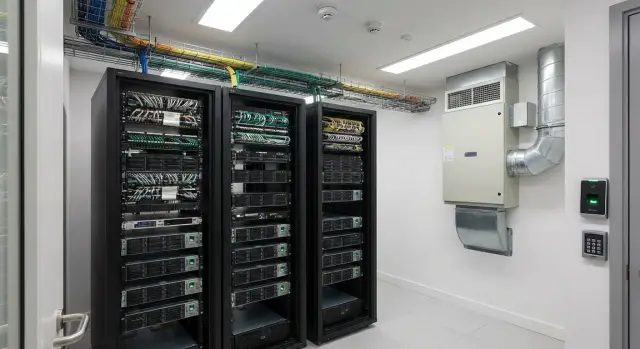
What a server room needs to run reliably
A server room is not just a place to put a rack. It's a space where heating, power, cabling and access are planned in advance so equipment can run 24/7 and be serviced safely.
Outages usually happen not because of "weak servers" but due to everyday issues: overheating from poor ventilation, dust and dirt, leaks from above, careless cleaning, accidental power shutdowns, or uncontrolled access — all of which can quickly turn into hours or days of downtime.
If the budget is limited, the basic set usually looks like this: a proper rack with service clearances, tidy cable routes (power and low-voltage separated) with labeling, stable climate control, minimal fire safety (detection and alerting) and a clear access policy.
There are things worth planning now so you don't redo them in a year: spare rack space, separate power circuits for critical units, points for temperature and smoke sensors, and a clear cable routing plan. In a small clinic you can start with one rack and a couple of servers, but if you reserve space for a second AC and an extra power feed up front, expansion can happen without downtime.
This foundation is practical server room design: minimal cost today, without the risks that later cost more than the equipment.
Quick requirements gathering before design
Server room design often stumbles not on racks and cables but on a few simple unanswered questions. Collecting them in advance prevents overspend and the situation where "everything worked" until you added one more server.
-
Fix the equipment list. Count what you will install now (servers, storage, switches, UPSs, panels) and add a 1–3 year forecast. It helps to prepare two growth scenarios: "realistic" and "if a new project appears."
-
Determine service criticality: accounting systems, mail, file storage, video surveillance, telephony, cash registers or reception. For each, state plainly what happens if it stops for an hour, a day, and a week.
-
From that come RTO/RPO-type requirements: what can be turned off in an emergency and what must run continuously. This directly affects redundancy level, UPS sizing and maintenance planning.
-
Understand who will maintain the room: an in-house admin or a contractor. This sets requirements for access, work schedules, documentation, labeling and spare parts.
-
Gather room constraints: area, aisle width, neighboring rooms (noise and dust), cable entry points and shaft access. Often these determine where the rack will sit and how routes run.
Room and layout: location, aisles, cleanliness
When designing a server room you pick the location before the racks. A mistake at this stage becomes a constant source of downtime: leaks, dust, crowding and inability to service equipment.
Avoid rooms next to wet zones (bathrooms, kitchens, heating risers) and rooms located below them. If the building has occasional leaks from the facade or roof, don't place the server room on an external wall or under technical floors. Even rare water ingress is a major IT risk.
Plan aisles so a technician can safely open doors, pull server rails, remove a server or UPS without acrobatics. You need front and rear access to each rack and space for two people to pass and carry equipment out. Tight aisles lead to less frequent and rougher maintenance and more mistakes.
Designate a cable entry point and an electrical area where possible. Separation reduces confusion and helps quickly find the fault during an incident.
Minimums for cleanliness and lighting:
- bright, even lighting with no dark corners at patching areas;
- regular cleaning without "kicking up" dust (damp cleaning is usually better than dry);
- sealed openings and tidy entries so corridor dust isn't drawn in;
- no boxes or temporary storage inside the server room.
Racks and mounting: minimum requirements
A rack in a server room is not just a "cabinet for hardware" but the basis for safety and convenient servicing. It's better to spec a proper rack and mounting from the start than to hold servers on shelves and deal with cable strain later.
What to check when choosing a rack
A 19" rack with 42U fits most needs. Look beyond height at depth and load: modern servers and UPSs can be long and heavy. Perforated front and rear doors help airflow through equipment rather than around it. Removable side panels, adjustable feet and anchoring options are useful.
Before purchase check:
- depth with margin for the longest devices and cables (often 1000–1200 mm);
- rated load with a margin (servers, UPS, shelves, cabling);
- top and bottom cable entries that match the room's actual routing;
- mounting kit: server rails, cage nuts, screws;
- spare U space: leave empty units and blanking panels for future growth.
Inside the rack keep things simple: cable managers, separate zones for power and low-voltage, and clear labeling of ports and cords. This saves hours when swapping a disk or moving a service.
Grounding is not for show. Connect the rack to protective earth and implement equipotential bonding (jumpers on doors and removable panels). This reduces static damage and interference risk.
Typical mistakes: rack pushed against a wall (then you can't open the rear door) and a rack that becomes a dust trap. Even in a small room leave roughly 1 m in front and about 0.8 m behind, and keep ventilation grilles clean.
Cable routes and patching: order and serviceability
Cables become a source of problems not because they're complex but because they're messy. Plan cabling so any engineer can quickly find a line, swap a patch cord and not disturb neighboring connections.
Run power and low-voltage separately. This reduces interference, simplifies fault-finding and is safer. If space is tight, at least separate them by tray or by rack side.
Choose trays based on how you service racks: trays and ducts should allow access along the whole run, and top or bottom entry should match the room routing. Mind bend radii, especially for fiber and thin patch cords: a sharp bend may not fail immediately but will cause errors.
Keep patching tidy with patch panels. Leave spare length but avoid long "tails": prefer short cords of correct length and clear routes inside the rack.
A practical minimum that pays off on the first incident:
- unified rules for where power, network and fiber go;
- patch panels and cable organizers in every rack;
- labels on both ends: rack, U, port;
- a simple map of ports and routes in a single file;
- a change log: what was changed, when and by whom.
Climate and ventilation: prevent overheating
The feeling "the room is cool" is often misleading. Servers heat the air locally and quickly; a sensor on the wall can show normal while behind the rack it's already overheating.
Minimum to plan for: stable temperature and humidity, and — most important — predictable airflow through equipment. For most small rooms aim for 20–24°C in the intake zone and around 40–60% relative humidity without condensation.
Hot spots appear when exhaust air returns to the intake or when grilles and aisles are blocked. Simple logic works: cold air is taken in at the rack front, hot air exhausts at the rear and should not mix immediately.
Check basics:
- don't place equipment flush against the rear wall or block grilles;
- use blanking panels in empty U spaces so air doesn't short-circuit through holes;
- don't route cables in ways that block perforations or airflow paths;
- keep front and rear aisles clear.
Even minimal monitoring greatly reduces risk. Place temperature and humidity sensors where the risk is: at the intake level in the upper third of the rack, and another at the rear exhaust. If you have one rack, start with at least two points.
When choosing an AC look beyond raw capacity: prefer 24/7-rated units that maintain setpoints without large cycles and consider internal unit airflow direction. A bad choice is a unit that blasts directly at one rack while leaving the rest of the room uncooled.
Power and UPS: minimum reliability level
If power in the server room is arranged "like the office," issues will come quickly: accidental breaker trips, voltage sags, UPS overheating or abrupt server shutdowns. Treat power as a separate subsystem with its own logic and documentation.
Start with a dedicated feed and a clear panel. Practically this means a separate input (or group) for the server room, labeled breakers, a diagram near the panel and spare capacity. Immediately separate loads: servers/storage on one group, network on another, and do not feed ACs through the UPS.
A UPS protects only what must not fail instantly: servers, storage, switches, routers and controllers. Choose autonomy per your scenario: short ride-through and graceful shutdown, or enough time to start a generator if present.
Use PDUs in racks and plan load balancing in advance. Good practice: avoid running lines to their limits and distribute load evenly.
A short outage plan saves nerves:
- who calls the power company and records the time;
- what is switched off first (noncritical loads);
- which systems need graceful shutdown;
- where the panel diagram and list of critical breakers are stored.
Example: if a rack contains a server and a switch and the UPS also feeds the AC, the battery will be drained in minutes during an outage. It's better to leave only IT loads on the UPS and provide a separate feed for climate equipment with surge protection.
Fire safety: detection, alerting, extinguishing
Fire safety in a server room has two goals: detect a problem early and respond correctly. Early detection is often more important than extinguishing: electrical equipment can smolder in a cable or PSU without open flames. Learning about this within 2–3 minutes usually means less damage and shorter downtime.
The minimum set starts with smoke detectors and clear alerting. Place detectors where smoke would appear first: under the ceiling, near cable entries and next to power distribution if it's in a separate cabinet. Alerts should reach people who can respond: security, on-call engineer, or building administrator.
Extinguishing must be suitable for electrical installations. Don't rely on water in a server room. For initial response keep extinguishers that don't leave conductive residues and won't harm equipment more than the fire itself.
Minimum manual firefighting tools:
- CO2 or another class-appropriate extinguisher for electrical fires;
- clear labeling and instructions nearby;
- storage at the server room entrance;
- unobstructed access.
One often-forgotten item: fireproof cable seals through walls and floors. If the cable entry isn't sealed, smoke and flames quickly spread to corridors or shafts.
A common mistake is trying to use water or placing an extinguisher behind a locked door. In a real incident every second counts.
Access and servicing: don't break things during maintenance
Server rooms often "fail" not from overheating but from accidental actions: pulling the wrong cable, dropping a tool, blocking ventilation with boxes. Access and maintenance rules matter as much as racks and ACs.
Access control should be simple but mandatory. For a small room a lockable door, a limited list of authorized people and a visitation log is enough. Card access is nice, but a keyed system with accountability and lock replacement on loss also works. The key point is knowing who entered and why.
Define roles: who may enter alone and which tasks must be done by two people. A second person is needed for power switching, panel work, moving heavy equipment, racking devices and any operation with safety or service interruption risks.
CCTV and alarm sensors are useful when they serve a purpose: confirm authorized access and help investigate incidents. In a small room one camera at the entrance and a door sensor are usually sufficient.
Minimums for safe work:
- good lighting at racks and in aisles;
- a stable step ladder (no standing on chairs);
- clear aisles with no boxes or cable coils underfoot;
- labeling of cables and ports to avoid guessing.
Keep maintenance procedures short: what to check weekly (temperature, errors, cleanliness), monthly (dust, fastenings, UPS batteries) and how to record changes.
Step-by-step plan: how to produce a minimal project in a week
If you need a quick server room design without bureaucracy, follow a short plan.
-
List equipment and estimate growth for 1–3 years: how many U, ports and watts. Mark what is critical and must always run.
-
Choose the room and assess risks: leaks above, dusty zones, proximity to wet points, and clear internal access.
-
Draw a simple diagram: rack positions, aisles, cable routes. Verify that the rack and equipment can be brought in and rear access is not blocked.
-
First design power and UPS (feed, breakers, outlets, reserves), then cooling (heat load and hot-air path) and basic monitoring (temperature, humidity, power).
-
Confirm fire measures and access rules: detection and alerting, extinguishing type, who has keys, how the work log is kept. Then produce one clear room diagram and a list of assumptions.
If in a week you can present one page with a diagram, power figures, cooling approach and access rules, the project already "stands on its feet" and can be detailed further.
Common mistakes that are expensive to fix later
Server room problems usually start not with "complex gear" but with small organizational lapses. Costly issues include:
- placing equipment tightly without space or power margin;
- running power and low-voltage cables in one bundle, causing interference and instability;
- no labeling or up-to-date diagrams, turning any replacement into a guesswork exercise;
- choosing an office-style AC without thinking about airflow and filter access;
- leaving doors open and allowing "just for a minute" access to everyone.
A simple example: a rack placed against a wall with patch cords and power bundled "for neatness." When it was time to replace the UPS, rear access was impossible, cables had no tags and the AC blew into the aisle rather than the equipment. The repair impacted half the network.
When building a server room from scratch, plan spare capacity, separate cable routes, label everything immediately and restrict access. These measures cost little but prevent the most common failures.
Short checklist before go-live
Before switching equipment to production, run a quick 30–60 minute check — it often prevents overheating, cable confusion and untimely downtime.
- Rack: spare U and power capacity, heavy equipment mounted correctly.
- Labeling: patch-panel and switch ports labeled, cables labeled at both ends, breakers and power lines identified.
- Sensors and alerts: temperature and humidity normal, alarm test works, destinations of alerts clear and actionable.
- Access: aisles clear, rear rack access available, doors and panels open fully.
- Fire readiness: extinguisher in place and accessible, service dates valid, simple action steps recorded.
If a PSU fails the first night, these checks help you quickly find the right breaker, avoid cable confusion and not dismantle half the rack.
Simple example and next steps for your organization
Imagine a small clinic or school: 40–80 staff, 1–2 racks, basic services (accounting, files, video surveillance, telephony, Wi‑Fi). The goal is not a "perfect" data center but predictable operation without overheating, cable chaos and downtime during minor repairs.
One rack layout works well:
- top — patch panels and organizers so patching is visible;
- middle — switches and router;
- below — servers and storage;
- bottom — UPS and battery modules for resilience.
The simplest measures that often give the biggest effect: label lines and ports, reserve power and route capacity, install a temperature sensor in the rack, and leave space for a second UPS or additional breakers. Also set clear access rules: who opens, who records work, and where spare patch cords and SFPs are stored.
To expand without a full rebuild, keep 20–30% margin in U space, switch ports, PDUs and UPS capacity, and add 1–2 spare cable channels.
If local supply and single accountability for hardware and deployment are important, consider GSE.kz (gse.kz) as an option: the company manufactures servers in Kazakhstan and provides system integration, including infrastructure solutions for data centers and 24/7 support.
Frequently asked questions
What is the minimal setup needed for a stable server room?
The basic minimum is: - a proper 19" rack with service clearance; - separate power and low-voltage cable routes + labeling; - stable climate (temperature/humidity) and clear airflow paths; - dedicated power, a UPS for the IT load, and PDUs in the rack; - fire detection and alerting; - restricted access and a simple work procedure.
Where do I begin gathering requirements for designing a server room?
Start with three figures: - how much equipment you have now and in 1–3 years (in U and in watts); - which services are critical and how much downtime is acceptable (hour/day); - who will maintain it (in-house admin or contractor). These answers immediately define requirements for racks, power, UPS, cooling and access.
Where should a server room not be located and why?
Avoid locations: - under bathrooms, kitchens, risers and any "wet" zones; - near exterior walls if there is a risk of leaks from the facade/roof; - next to dust and dirt sources (storage, workshop, busy corridor). Ideally — a dry room with clear access, the possibility of a separate power feed and a well-organized cable entry.
How to choose a rack so it won't need rework later?
A 19" 42U rack fits most needs, but the important parameters are: - extra depth for the longest devices and cables (commonly 1000–1200 mm); - rated load with a margin for heavy UPS and servers; - perforated front and rear doors and removable side panels; - proper top/bottom cable entry. Also reserve empty U spaces and blanking panels so airflow goes through equipment rather than short-circuiting inside the rack.
Why separate power and low-voltage cabling?
Because it reduces interference, makes maintenance easier and is safer. Practical tips: - route power and network on different trays/ducts or at least different sides of the rack; - label cables at both ends (rack/U/port); - use patch panels and cable organizers. This saves time during incidents and lowers the chance of unplugging the wrong cable.
What temperature and humidity are normal for a server room?
A reference for small server rooms: about **20–24°C** at the intake air and **40–60%** relative humidity without condensation. What matters is stability and absence of hot spots, not how "cool" the room feels. Place sensors in the rack: at least one at the intake level in the upper third and one at the exhaust — this shows overheating earlier than a wall sensor and prevents errors and shutdowns.
How to organize power and UPS correctly?
A reliable basic setup: - a dedicated line/group for the server room with labeled breakers; - separate groups: servers/storage separately, network separately, AC not on the UPS; - UPS powering only the IT load (servers, storage, switches). Choose UPS autonomy based on the goal: ride out a short outage and perform graceful shutdowns, or sustain until a generator starts (if available).
What fire safety is required in a server room at minimum?
The minimum is detection and alerting: - smoke sensors where smoke would appear first (ceiling, cable entry zones, near power distribution); - a clear procedure for who receives alarms and who responds; - a fire extinguisher suitable for electrical equipment placed at the server room entrance. Also check cable firestopping: an unsealed cable entry lets smoke and fire spread quickly to corridors or shafts.
How to organize access and maintenance to avoid accidental outages?
Practical rules that actually work: - door locked, access limited to an approved list, visits recorded; - power switching and heavy equipment moves done by two people when needed; - no storage of boxes in aisles or in front of ventilation; - mandatory labeling of cables and ports so nothing is unplugged at random. The simpler the rules, the more likely they will be followed — and the fewer accidental outages.
What to check before putting the server room into operation (checklist)?
In 30–60 minutes check: - rack secured, heavy items mounted low, spare U and power capacity available; - breakers, power lines, ports and cables labeled on both ends; - temperature/humidity sensors show normal values, alarm test works and recipients know actions; - aisles clear, rear of the rack accessible, doors and panels open fully; - fire extinguisher in place, valid service date and accessible. If any item fails, fix it before going live — downtime later is usually more expensive.
