8 min read
Server Power Supply Redundancy: Capacity, 1+1, Titanium
Server power supply redundancy: how to calculate capacity, choose a 1+1 scheme, account for load spikes and determine when 80 PLUS Titanium is cost-effective.
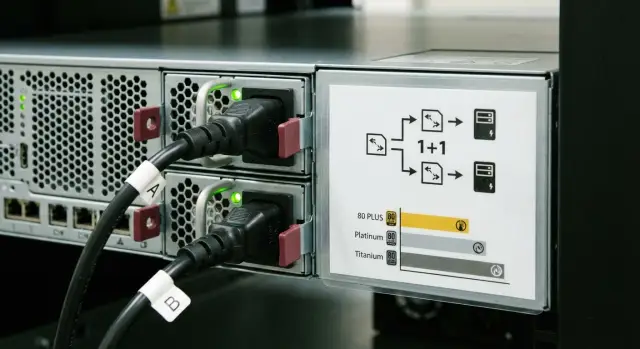
Why think about server power supplies and redundancy at all
Servers most often "fail" not because of the CPU or disks, but because of power. A power supply can fail suddenly. Even more often the problem is somewhere in the chain before the server: a breaker trips, mains voltage sags, or someone accidentally pulls a cable during rack work.
When power is lost, the server turns off immediately. Even if the hardware is otherwise fine, that means service downtime, risk of data corruption during writes, and then a long restart: filesystem checks, bringing up VMs, restoring dependencies.
Redundant server power supplies give a simple benefit: one unit holds the load while the other is replaced or while the cable, PDU, or input is fixed. In hot-swap models this is done without stopping the server: you remove the faulty module, insert a new one, and work continues.
Imagine a rack in a hospital: at night the network is being updated and a technician brushes a power cable. Without redundancy the server running the medical system would simply shut down. With redundancy it keeps running and the issue is fixed calmly.
Before buying, honestly answer a few questions:
- How much does one hour of downtime cost, and how long do approvals and recovery take?
- Do you need to service the server without shutdown (PSU replacement, scheduled maintenance)?
- What is the electrical setup in the server room: a single feed or two, is there a UPS, how are PDUs arranged?
- Are there budget or power-consumption limits (rack or circuit limits)?
- Do you need monitoring to spot overheating, degradation, or loss of a module in advance?
Vendors and integrators, including GSE.kz, usually clarify these questions during configuration. They affect not just PSU selection but the whole rack power scheme.
The 1+1 scheme: how it works and how it differs from others
A 1+1 power scheme means a simple thing: the server has two power supplies and each is powerful enough to run the entire server on its own. That's the point of redundancy: failure of one unit should not stop operation.
In normal operation the two PSUs usually share the load. For example, if the server consumes 600 W, each supply provides roughly 300 W. This lowers heating, keeps fans quieter, and improves efficiency at medium load.
If one unit fails or is removed for replacement, the other must take the full load without interruption. To the user it looks simple: the server keeps running, you get an event in monitoring and swap the faulty module at your convenience.
Without redundancy it's simpler and riskier: one power supply is a single point of failure. If it dies, the server shuts down even if you have a perfect UPS and a tidy rack feed.
Don't confuse 1+1 with N+1. N+1 usually refers to a group of supplies where one extra is a spare for the rest. For example, 3+1: three units carry the load, the fourth is a spare. In 1+1 the spare equals the working unit, so each PSU must be rated for 100% of consumption.
Practical example: if the server can peak at 900 W, in a 1+1 setup you need two units each rated at least 900 W, not two at 500 W. Otherwise, if one fails the other won't cope and the server will still go down.
How to determine the server's actual power draw
A server has two important numbers: typical load (what it consumes most of the time) and peak (short spikes). For selecting PSUs and redundancy the peaks matter more: during those seconds a power supply, PDU, or UPS may overload even if "on average" everything seemed fine.
Power draw comes from more than just CPUs. Several subsystems contribute and some cause nasty spikes at startup or under load. Common contributors:
- CPU (especially with turbo frequencies and AVX workloads)
- Disks and controllers (inrush currents, RAID rebuilds)
- Expansion cards (25/100G NICs, HBAs, GPUs)
- Memory (smaller but steady)
- Fans (surges during warm-up or when dusty)
Spec-sheet numbers or rough guesses often mislead. Descriptions may list PSU wattage, not actual draw, or provide averaged values without considering your exact configuration: add a second CPU, more DIMMs, some NVMe drives and a 100G NIC and the load profile changes.
The most reliable way is to measure. Check power readings in the server management (BMC/IPMI), on a smart PDU or at the UPS input. Ideally capture the maximum during typical stress events: nightly backups, updates, index rebuilds, RAID rebuilds.
Account for upgrades in advance, but avoid an excessively large "safety" margin. A practical approach: calculate current peak and add a reasonable buffer for planned changes (say +20–30%). If you plan to add a GPU or more drives, budget for those specifically rather than doubling power for no reason. For rack servers like the GSE S200 Series this is especially important: configuration strongly changes peaks.
Step-by-step power calculation for 1+1 redundancy
Redundant PSUs are often implemented as 1+1: two identical PSUs in the server, each partially loaded in normal operation. The key check is simple: if one PSU fails, the other must carry the entire peak without overheating or sagging.
Quick 5-step calculation
Base calculations on the real configuration and the worst realistic load scenario, not on "typical" setups.
-
List server components and estimate the peak: CPU, RAM, disks, expansion cards (GPU, HBA, NIC), number of fans. If you have monitoring for a similar server, use the maximums and add a margin.
-
Add a safety margin: usually 15–30% for aging, dust, rack heat and future upgrades.
-
Check the 1+1 rule: one PSU must be able to sustain the entire calculated peak by itself. It's not "two 800 W make 1600 W", but "a single 800 W must be sufficient."
-
Aim for comfort: a good target is that after one PSU fails, the remaining unit runs at roughly 60–80% of its rated capacity.
-
Verify the power feed: voltage, plug types, PDUs, and circuit currents. Often wattages add up but plugs or breakers don't match.
Example: server peak 650 W, plus 20% margin = 780 W. For 1+1 it's better to use two 1000 W units rather than two nearly maxed 800 W units, so the remaining PSU doesn't work on the edge and lose efficiency.
If you're choosing servers and PSUs for a project (for example rack systems like S200), ask the vendor for calculations for your configuration and confirmation that a single PSU will hold the full peak under your supply conditions.
What to check besides watts: compatibility, hot-swap, monitoring
Power rating matters, but in real life failures often come from other details: wrong form factor, inability to replace a module without downtime, or discovering a PSU fault too late.
Compatibility: why a "similar" PSU may not fit
Server PSUs are often tied to a specific chassis. Externally similar units can differ in connectors, pinout, revision, firmware, or support for load-sharing between modules.
Before purchase check the exact server model and the manufacturer's list of compatible PSUs. For 1+1 it's important the modules are identical (same series and revision). Mixing different units may "work on the bench" but later cause false alerts, uneven load sharing or loss of redundancy.
Hot-swap: replacing without downtime—what matters
Hot-swap is useful only if conditions are met: the server has two independent feeds, the second PSU is healthy and there's spare capacity. Otherwise unplugging one module can overload the other and cause a shutdown.
Points to verify in advance:
- Clear status indicators on the PSU (LED statuses)
- Latches and guides that allow replacing the module in-rack without hassle
- PSU access not blocked by cables or PDUs; the module can be removed without acrobatics
Monitoring: useful signals vs noise
Monitoring aims to catch degradation before failure. Useful events: "PSU lost input power," "PSU faulty," "PSU operating out of spec," "PSU removed," plus per-module power and temperature readings.
Ensure these signals go into your alerting system (email, messenger, NOC), not only the server management UI. Have a simple rule: a PSU warning becomes a work order the same day. Otherwise redundancy exists only on paper.
Noise, heat and rack conditions
Choose PSUs with rack inlet temperature and ventilation in mind. Efficiency drops in heat, fans spin faster, noise increases and parts age faster. If a rack is dense or the room is dusty/hot, keep margin and avoid running PSUs constantly near their limit.
Example: in a small server room near staff, noise from high-RPM PSUs and hot exhaust is a real problem. Discuss this before purchase along with monitoring and hot-swap requirements.
80 PLUS Titanium: when it's actually worth it
80 PLUS is about PSU efficiency: how much of the input power becomes useful power for the server and how much is lost as heat. Higher tiers mean fewer losses. Simply put: Gold is good, Platinum better, Titanium is the highest efficiency.
Savings depend not only on the certificate but on the server's operating point. Efficiency matters where the PSU runs at that particular load. If a server is mostly idle, the table looks nice but electricity bill savings may be negligible.
Titanium makes sense when several conditions coincide: servers run 24/7 with significant load, the fleet is large, electricity and cooling are costly, and heat density in the rack is already an issue.
A simple rule: if you have a single standby server mostly idle, paying extra for Titanium is unlikely to pay off. The same applies when servers run only sporadically or you have a very small fleet where savings dilute.
When racks run many servers continuously (including rack series like S200), Titanium becomes about money and thermal headroom, not prestige.
Rough payback calculation for Titanium
To judge whether 80 PLUS Titanium pays off, you need four numbers: average server power (not peak), hours per year it's on, electricity tariff, and the price difference between PSUs (or configurations) with different efficiencies.
Average power is easiest from monitoring (IPMI/iDRAC/iLO or OS) over a typical week: day, night and maintenance windows. If you don't have data, estimate: servers rarely stay at 100%, more often at 20–60%.
Quick energy calculation using efficiency
Logic: if the server needs 500 W "output" from the PSU, it draws more from the wall because of losses.
- Input power = output power / efficiency
- Losses (W) = input - output
- Annual energy savings (kWh) = difference in losses (kW) x hours per year
Example: average load 500 W, 24/7 (8760 hours). Suppose one PSU option is 94% efficient and Titanium 96% at your operating point.
Losses at 94%: 500/0.94 - 500 ≈ 32 W.
Losses at 96%: 500/0.96 - 500 ≈ 21 W.
Difference ≈ 11 W = 0.011 kW. Per year: 0.011 x 8760 ≈ 96 kWh. Multiply by your tariff to get monetary savings.
Estimating payback period
Payback (years) = price difference / annual savings.
If the result is 4–6 years and you replace servers every 3–4 years, the gain is doubtful. If servers live long, run 24/7 and are heavily loaded, Titanium is more likely to make sense.
One more practical point: lower losses mean less heat in the rack, lowering cooling load (especially in dense racks). And correct redundancy and quality hot-swap PSUs reduce downtime risk, which usually costs more than any efficiency difference.
Rack power: PDUs, UPS and dual independent feeds
PSU redundancy works only if the path from the wall to the outlet is redundant as well. Otherwise a 1+1 scheme can be an illusion: a single breaker or UPS trip cuts power to both PSUs.
One feed or two: where real resiliency begins
A single feed to the rack is a single point of failure: circuit, breaker, PDU, UPS. Two independent feeds (A/B) let you survive a failure in one leg: for example, breaker on A trips or UPS A goes to bypass.
For A/B to be meaningful, components must be separated into two chains: server PSU1 -> PDU A -> UPS A -> feed A, and server PSU2 -> PDU B -> UPS B -> feed B. The most common mistake is plugging both hot-swap supplies into the same PDU or even the same outlet group.
Quick rack checks that catch weak points:
- Separate breakers (ideally different distribution panels) for A and B
- Two PDUs with separate input cables, no shared extension
- Two UPS units or one UPS with truly separate outputs and a clear failover behavior
- Phase separation (in 3-phase power) and control of load imbalance
- Power headroom on circuits, not running at 95–100% continuously
Often-forgotten constraints
Nameplate watts are usually higher than real draw, but breakers and PDUs are chosen for worst-case. Include in planning inrush currents, future upgrades, and the fact that if one feed fails the other must be able to handle nearly the whole rack load, not just its usual share.
When designing for critical systems an integrator (like GSE.kz) often starts with feed design, breakers, phases and UPS capacity, then chooses server configurations to fit those boundaries.
Tests and maintenance: how not to lose redundancy in practice
Redundancy can seem like "set and forget," but in practice it often "breaks" because of small things: one PSU died long ago, the other runs alone and no one noticed. So redundancy must be regularly validated with tests and simple maintenance rules.
Quick check that 1+1 really works
Perform tests during low-load windows with management console access.
- Ensure both PSUs appear in monitoring and show OK.
- Record current load and temperature.
- Carefully remove power from one PSU (unplug or switch off) and check the server keeps running.
- Verify the remaining PSU has taken the load and that the system raised an alert.
- Restore power and check both PSUs share the load again.
If the server can't survive that test, redundancy doesn't exist even if both units are physically present.
Keep a spare and use identical models
Keep a compatible spare PSU on hand; otherwise replacement becomes downtime. Important: PSUs should be the same model and revision—different batches may have different firmware, connectors, load-sharing behavior and sensor sets. Mixed pairs often cause "false healthy" states where one unit is persistently underloaded or intermittently drops out.
Set alerts so a PSU failure is not discovered after a month. Minimum: notification on PSU loss, transition to single-PSU mode, and failure to return after power restoration.
Example: in an accounting rack a PDU cable is accidentally pulled during maintenance. The server didn't crash, but one PSU lost power. If the alert arrives immediately, the problem is fixed in minutes instead of being discovered only after the next real failure.
Common mistakes when choosing PSUs and 1+1
Redundancy is often bought "for the record," and later it turns out that when one PSU fails the server still goes down. The usual reason: 1+1 exists on paper but not in the rack.
The worst mistake is installing two PSUs where neither alone can handle the peak. In correct 1+1 one PSU must run the entire server at the worst-case load (startup, CPU peak, disk spindowns, GPU load). If that's not true you have 2+0 priced as 1+1.
Another common error is plugging both PSUs into the same PDU or UPS. On paper two cables exist, but the actual failure point is single.
There's also the "too much headroom" mistake: choosing massively oversized units so they run at 10–20% load. Low-load operation can be less efficient, increase losses and noise as fans spin up. That leads to overspending on hardware and electricity.
Rack-level omissions
Even perfectly chosen PSUs can behave poorly if installed badly: hot exhaust at the back, clogged filters, blocked airflow, or mixing hot and cold aisles. This reduces effective capacity and accelerates wear.
Maintenance mistakes
Redundancy disappears when there's no fast replacement plan. Check in advance if spare hot-swap modules are available and who handles on-site replacement. Projects using servers like GSE S200 often include spare parts and replacement procedures in the contract so 1+1 remains real.
Short pre-purchase checks:
- One PSU can sustain 100% of the calculated load with margin.
- Two independent power feeds are truly separated (different lines/UPS/PDUs).
- Nominal PSU rating keeps typical load near the midpoint of its range.
- Rack conditions (temperature, airflow) are checked, not left to chance.
- There is a replacement plan and known delivery times for PSU modules.
Short checklist before buying
Before ordering PSUs, don't rely on datasheets—quickly verify a few practical conditions. This saves money and reduces downtime risk, especially when adopting a 1+1 scheme.
Mini-checklist for each server type in a batch:
- Peak load estimated: CPU, RAM, disks, cards (including GPU) and short spikes included. Add a reasonable margin, not "double."
- 1+1 condition met: one PSU actually pulls the entire server peak. If peak needs 900 W but one unit is 800 W, it's not 1+1 even if there are two units.
- Two independent feeds planned: A and B connected to different PDUs and breakers (preferably different UPS), cables labeled to avoid disconnecting both during work.
- 80 PLUS level chosen for your pattern: if a server runs mostly at 10–30% the benefit from Titanium differs from running at 60–80%.
- Operational plan: hot-swap supported, compatibility confirmed for your server model, spare PSU delivery times and replacement procedures clear.
Example: if a rack mixes heavy GPU nodes and regular service servers, they often need different PSU sizes but the same A/B logic and a unified monitoring approach. An integrator like GSE.kz can pre-agree compatible lists so you don't hunt for "that exact" PSU in an emergency.
If you have doubts on any point, stop and double-check: power issues rarely show up immediately and usually appear at the worst moment.
Practical example and next steps
Imagine a small server segment in a clinic: 2–3 rack servers running a patient database, file server and virtualization. Shutting down even for an hour is hard: recordings, lab systems and payment terminals rely on IT. Thus power redundancy becomes hygiene, not an option.
For such a rack teams often deploy two identical standard servers and one storage or backup node. The rule is simple: pick PSUs so a single unit handles the real server load with margin and the second is a reserve (1+1). For example, if the server averages 350–450 W, a pair of 800 W PSUs usually gives comfortable headroom: one PSU won't run at the limit and the server stays up if the other fails.
How to decide about 80 PLUS Titanium
Titanium makes sense when servers run round-the-clock and loads are significant. Quick rule: more hours per year and a higher electricity tariff shorten payback. If servers are 24/7 and you have 3–5 such nodes, improved efficiency can yield noticeable savings and reduce rack heat. If servers run only business hours or have low load, invest in reliability (1+1, dual feeds, a proper UPS) rather than the highest 80 PLUS class.
Next steps
- List servers and their roles, mark operating modes (24/7 or scheduled).
- Collect consumption data (measure at PDU/UPS or estimate by configuration) and add 20–30% margin.
- Verify that one PSU can handle the peak without tripping protections.
- Define maintenance requirements: hot-swap, monitoring, spare module in stock.
- Align specifications with an integrator: GSE.kz can select and deliver S200 servers for 1+1 schemes and help with rack infrastructure and 24/7 support.
Frequently asked questions
What does 1+1 server power redundancy mean?
A 1+1 configuration means two power supplies, each able to handle the server’s full rated load on its own. If one module fails, the other immediately takes over the entire load and the server keeps running.
Why can’t I install two lower-wattage power supplies?
If one power supply cannot handle the server’s peak power draw, there is effectively no redundancy. If the other module fails, the remaining one will be overloaded and the server may shut down.
How do I calculate the required power supply wattage?
Use the maximum readings from the BMC or IPMI, a smart PDU, or UPS during backups, RAID rebuilds, and other demanding tasks. Then add roughly 15-30% for planned upgrades and rack conditions.
Can I replace a power supply without shutting down the server?
Yes, if the server supports hot swap, the second PSU is healthy, and one module can already handle the full load. Before replacing it, check both power supplies’ status and the current power draw through the server management system.
How should I connect two PSUs to rack power?
Connect one PSU to power path A and the other to power path B: separate PDUs, breakers, and, where possible, UPS units. Two cables plugged into the same PDU do not protect against failure of that PDU or the shared feed.
When should I choose 80 PLUS Titanium?
Gold or Platinum is usually sufficient if you have only a few servers or they are often idle. Titanium makes sense with substantial around-the-clock load, a large fleet, and expensive electricity, when the lower losses offset the price difference.
How do I assess the payback period for Titanium?
Compare the average load, annual operating hours, electricity rate, and the cost of each option. Calculate the difference in input power using efficiency, convert it to annual kWh, and divide the extra cost by the annual savings.
Which power supply alerts do I need?
Monitor for loss of input power, PSU failure or removal, and the temperature and load of each module. Configure notifications in your alerting system so the team can address an issue on the day the alert appears.
How can I verify that redundancy actually works?
Test during a low-load period: disconnect power from one PSU and confirm that the server does not reboot, the other module takes the load, and monitoring sends a notification. After restoring power, verify that both modules are operating normally again.
Can I use different power supplies in the same server?
You need exact chassis compatibility and the same module series for the pair. PSUs that look similar in size may differ in connectors, firmware, and load-sharing behavior.
