7 min read
Server expandability in the SOW: how to build headroom without overpaying
A practical checklist for specifying server expandability in the SOW: PCIe, drive bays, power and network ports so you can grow capacity in a year without replacing the platform.
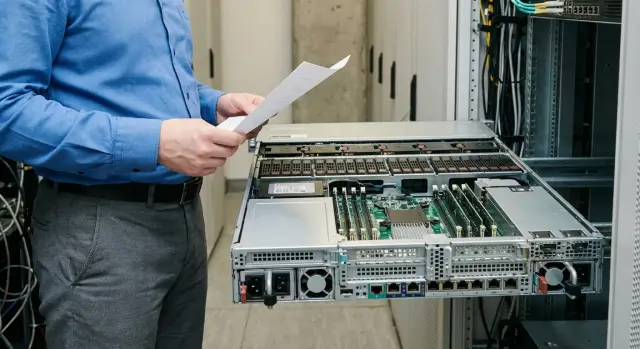
Why plan for upgrades in advance and where money is lost
Servers often get replaced entirely after 12–18 months not because they failed, but because there’s nowhere to grow: no free NIC slots, all drive bays filled, insufficient PCIe lanes for accelerators, or the PSU can’t handle added load. A cheap initial choice turns into a platform replacement, migration and downtime.
The most common upgrades after a year are predictable: adding drives (or switching to faster NVMe), increasing RAM, installing a second 10/25/100G NIC, and sometimes adding a GPU or HBA/RAID controller. Almost all of this can be foreseen at the platform level without buying the components immediately.
Money is lost in two ways. First, buying “everything with headroom” up front: extra disks, maximum CPUs, expensive NICs that sit idle. Second, skimping on the base: choosing a chassis with no spare bays or without hot-swap, a board lacking required slots, or a PSU with no headroom. Then upgrades can cost more than a new server.
To make expandability in the SOW actionable, separate measurable requirements from options. At minimum, specify numbers: how many free PCIe slots of the required generation/width must remain, how many drive bays must be available and which types are supported (SAS/SATA/NVMe, hot-swap required?), what PSU power reserve is needed, and how you’ll scale the network (free ports, SFP+/QSFP, additional NICs).
What to actually buy later (GPU model, network speed, disk capacity) is best left as an option or phase 2. That way you pay for readiness to grow, not for hardware you don’t yet need.
Build a growth forecast: what will change in a year
To include expandability in the SOW without overpaying, make a simple 12–24 month forecast. Don’t write “we’ll grow sometime”; state what will change and why: new users, new services, database growth, video monitoring, heavier reports.
Start with two numbers: current load and expected growth at month 12. If the forecast is uncertain, give a range (for example +30–50%) and set a review date.
Which metrics matter most
Pick 2–3 primary metrics for your scenario so the headroom is targeted rather than “maxed everywhere”:
- CPU — growth in parallel tasks, virtualization, encryption, analytics.
- RAM — caches, databases, number of VMs/containers.
- IOPS and capacity — drives often run out before CPU.
- Network — throughput and number of connections.
Agree on review points and what you measure (for example at 3, 6 and 12 months). If metrics exceed plan, trigger an upgrade: add memory, disks or a NIC while keeping the same platform.
Site constraints that block upgrades
An upgrade won’t happen if there’s no rack space or you’ve hit electrical limits. Record how many U are available, power limits per rack, cooling headroom, and whether noise matters (e.g., a server room next to offices).
Example: today 1GbE and a couple of SSDs suffice, but in a year there will be more branches and network backups. Note the planned move to 10/25GbE and increased storage in the forecast. That makes it easier to justify port and bay headroom in the SOW rather than buying the biggest server on day one.
Step-by-step: how to document expandability in the SOW
Specify a growth path, not “the most powerful option”: what you buy now and what must be addable later without replacing the platform.
5 steps that work almost always
-
Describe the baseline configuration for today: minimally sufficient for current tasks with a small buffer, but not “maxed out” in every component.
-
Fix the target configuration for 12–18 months: how many CPUs, RAM, drives, network ports and accelerators the platform must support.
-
Separate requirements into mandatory and optional. Mandatory items are required for acceptance; optional items can be added later (for example additional NICs or HBA) without automatically increasing delivery cost.
-
Check upgrade compatibility by class, not by brand: slot types, drive form-factors, card heights (full-height/low-profile), GPU lengths, hot-swap support, and PSU/cooling headroom.
-
Record site constraints: rack U, available power on the PDU, resilience requirements (for example dual PSUs), and who will perform component replacements.
Then add acceptance criteria so “expandable” becomes a testable fact, not a promise.
Acceptance criteria (what to check at delivery)
Verify four things: how many PCIe slots remain free after installing the base cards, whether physical space exists for additional drives and required trays/backplane, whether the PSU has enough reserve for planned cards and drives, and whether free ports or a clear upgrade path exist for the network.
Example phrasing: “Server is delivered in the base configuration but must support expansion to X drives and installation of Y cards without replacing the chassis or motherboard.” This format is convenient for suppliers or integrators (including GSE.kz): it defines a growth corridor and simplifies budget-driven configuration alignment.
PCIe slots: how to specify headroom for cards and accelerators
PCIe are the expansion connectors in the server used for NICs, HBA/RAID controllers, AI accelerators and other cards. If the SOW doesn’t reserve PCIe headroom, an upgrade may stall not for budget but simply because there’s nowhere to plug the needed card.
Describe not just “number of slots” but their types and accessibility. x16 vs x8 affects compatibility and bandwidth. Card physical width (1‑slot, 2‑slot, 3‑slot) determines whether an accelerator will block neighboring slots.
Practical requirement examples:
- Minimum N free PCIe slots after the base configuration is installed.
- At least one free x16 slot (for an accelerator) and one or two x8 slots (for network or SAS/NVMe adapter).
- Support for cards of required height/length and space reserved for 2‑slot (and for GPUs, specify 3‑slot if required).
- Provide a slot placement diagram and riser map showing which slots share lanes and what is disabled in certain configurations.
Example: today 10GbE and one controller suffice, but next year you’ll add 25GbE storage connectivity and a GPU. If you request one free x16 and one x8 with physical space reserved, upgrades become card swaps rather than platform replacements.
Drives: bays, hot-swap and the path to more storage
Storage is where mistakes happen most often: buy a server for current capacity and next year discover you must change the chassis or the whole server. First decide whether capacity (HDDs) or performance (SSDs) will grow faster.
If capacity growth dominates (archives, video, backups), plan for many 3.5" HDD bays. If performance grows (virtualization, DBs, analytics), plan for SSDs (2.5" provides more IOPS but higher $/GB). Often you need a hybrid: fast SSDs for hot data and HDDs for cold.
In the SOW state not only “how many drives now” but “how many must remain free.” Example: start with 4 drives and require at least 4 empty bays available for expansion without downtime.
What to specify: total number of bays and how many are occupied at start, hot-swap requirement, supported form-factors (2.5/3.5), interfaces (SAS/SATA and NVMe if needed), presence of a backplane for the chosen type, and room for a RAID controller or HBA.
Practical example: deliver 4 x 3.5" HDDs for file storage, but specify an 8–12 bay chassis with hot-swap so you can add drives later and expand the RAID or pool without replacing the server.
Memory: avoid replacing modules when increasing RAM
Overpaying on RAM upgrades often comes from having to throw away modules to reach the required capacity in correct channel groupings. In the SOW specify not only how many GB now, but how you will grow.
Start with slots: record total DIMM sockets and a minimum number of free sockets after delivery. That excludes configurations where growth is possible only by replacing modules.
Require that RAM increases be achievable by adding modules without mandatory replacement of installed DIMMs (except failed parts). This prevents vendors from filling all slots with small modules that can’t be sensibly expanded.
Also set a year-ahead target and growth steps. Example: start at 256 GB, target 512 GB in 12 months, permitted step +128 GB. The platform will be chosen so channel balance is preserved.
Ask the vendor for platform limits: maximum memory, and the conditions (memory type, ranks, modules per channel) to reach it. That’s more useful than “supports up to X TB” because conditions affect performance.
If reliability matters, require ECC and note memory resilience modes (mirroring, sparing) and their impact on usable capacity.
Mini template:
- At least N DIMM slots total, with at least M slots free after delivery.
- Initial config: X GB; 12‑month target: Y GB.
- Upgrade to Y GB by adding modules without replacing installed ones.
- State platform maximum and conditions to achieve it.
- ECC required; memory resilience modes if needed.
Example: for virtualization take 256 GB (8x32), leave at least 8 free slots, and add another 8x32 a year later to reach 512 GB without touching the original modules or the platform.
Power: redundancy, wattage headroom and PSU requirements
Power issues often surface after a year when drives or an accelerator are added and the PSU has no headroom. In the SOW set two things: redundancy level and numeric power reserve.
First decide redundancy. For critical services choose 1+1 (two PSUs, each able to handle full load). For less critical setups N+1 at the rack or system level may be acceptable. Require that one PSU failure not force a shutdown.
Then specify wattage headroom. List current estimated peak and the target peak after upgrades. It’s common to require 20–30% headroom for future PCIe cards, drives and CPU power growth. Example: if current peak is ~450 W and you plan two NVMe and a NIC, require PSU capacity to handle 650–750 W peak without thermal issues or throttling.
Don’t forget rack compatibility: power input type (AC, 220V), number of power cables, plug types and PDU requirements. Small details on paper often delay deployment.
Short PSU requirement block for the SOW:
- PSU redundancy: 1+1 or N+1 with continued operation on one failed PSU.
- Hot-swap PSU and failure indication (LED/management event).
- Total wattage and expected peak considering future expansion.
- Power cap setting if you must fit a rack limit.
- Efficiency class: specify a standard, e.g. 80 PLUS Platinum.
Network: port headroom and the path to faster interfaces
Network is often written in the SOW as “as-is” (e.g., 2x1G) and a year later you need separate channels for backups, replication or fast storage access. Describe the current scheme and one growth step: which speeds and how many ports you’ll need when load increases.
A good phrasing is “network today” and “network on growth.” Example: today 2x10G is enough for user traffic, but in a year you’ll move to 25G and add a separate replication network. Require that base ports can be 10G but the server must support adding or replacing adapters up to 25/40/100G without changing the platform.
Specify how many ports must remain free after commissioning. Otherwise any growth becomes a rework.
What to specify in the SOW
A few precise points are enough:
- Minimum ports and reserve: how many ports are occupied at delivery and how many must remain free.
- Upgrade scenario: today 10G, ability to move to 25G (and higher) by installing an additional NIC.
- PCIe requirement for NICs: a free slot of the correct format and no conflicts over lanes or physical space.
- Out-of-band management port, if required.
- Network separation: at least two networks (user and backup/replication) on separate ports.
Example: in a medical center daytime access to the patient DB is critical while backups run at night. If both use the same 10G ports, maintenance windows grow and daytime latency appears. Adding separate ports and reserving a path to 25G solves this without replacing the server.
Common mistakes in SOWs for expandable servers
The main mistake is buying “maximum” instead of describing what specifically will be added in 12–18 months. You get an expensive platform and still fail to record the items that enable upgrades (free slots, bays, PSU headroom).
What leads to overpaying or a dead-end:
- Requesting maximum specs “just in case” without a growth scenario (e.g., “we might add 2 NVMe, a second NIC, GPU, +256 GB RAM”).
- Forgetting physical constraints: chassis height (1U/2U), depth, cable space, card length and cooling.
- Not accounting for power and cooling headroom: the server works now but hits limits when drives or GPUs are added.
- Buying all options immediately though it’s often cheaper to select the right platform (bays, slots, second PSU) and add disks/cards later.
- Failing to fix acceptance checks: how many free PCIe slots, how many empty bays, which ports are available, PSU scheme and wattage reserve.
Simple example: if you buy a server for today’s virtualization workload, state in the SOW that in a year you’ll add 2–4 SSDs and a second 25G NIC. Then at delivery (for example an S200 Series from GSE) you can verify physical spare bays, appropriate risers/slots and sufficient PSU reserve.
Short checklist for the SOW (copy and adapt)
To make expandability testable, record measurable items: how many free spaces must remain after delivery, which formats are supported and what can be changed without downtime.
- PCIe (cards and accelerators): at least X free PCIe slots after base card installation; specify generation (Gen4/Gen5), form-factor (Full-height/Low-profile), and that the slot must be physically accessible (not blocked by shrouds/heatsinks/neighboring cards).
- Drive subsystem (bays and trays): total X bays with at least Y free at delivery; supported drive types (2.5"/3.5", SAS/SATA/NVMe), hot-swap (yes/no), presence of trays/backplane for the chosen type.
- RAM (growth without replacing modules): total X DIMM slots with at least Y free after delivery; initial capacity A GB and 12‑month target B GB; achieving B GB by adding modules without replacing existing ones.
- Power (wattage headroom and redundancy): redundancy scheme (e.g., 1+1), hot-swap (yes/no); current estimated power P W and required reserve Z% for future drives/cards.
- Network (ports now and upgrade): initial ports: N x 1GbE/10GbE/25GbE (underline as needed); ability to expand to S GbE via free PCIe or module swaps and required number of ports after upgrade.
If you’re unsure of numbers, use a one-year plan plus one major addition (for example one more NVMe tray or one accelerator). That usually prevents overpaying while leaving real headroom. Ask the vendor to confirm compatibility and physical availability of slots and trays in the specification.
Example scenario: server today and growth in a year
An organization launches an internal system: 120 users now, 250–300 in a year, plus an analytics module may be added. Budget is limited now but replacing the platform in a year is not acceptable.
Start with a base server: single CPU (or minimal CPU family needed), RAM sized with a small buffer, drives for the working dataset, one 10G network adapter; no GPU for now. The goal is not to overpay for idle hardware.
A year later the plan is to add storage capacity, install a second network adapter (or increase network resilience) and keep the option to add a GPU if analytics demand it.
Split requirements into two parts for clarity:
- Delivered now: current CPU/RAM, actual number of drives, installed NIC, PSUs.
- Platform readiness: free PCIe slots of the right form-factor, free drive bays and compatible trays, PSU reserve, option to add a second CPU if planned, and support for faster NICs.
At acceptance ask for facts, not brochure text: how many PCIe slots are truly free and unobstructed, how many hot-swap bays are available, PSU wattage and redundancy, which network ports are exposed and which modules/cards can be installed without replacing the chassis.
Next steps: quickly finalize the SOW and choose a platform
To avoid lengthy approvals, summarize decisions on one page as “now + in a year.” That shows where headroom is needed and where it isn’t.
Make a one‑page sheet with baseline and target configs (CPU, RAM, drives, network), site constraints (U, available power, power type, noise/temperature), launch and planned upgrade dates, resilience requirements, and a list of what you buy now versus what you keep as an option.
Ensure requirements are measurable: replace “with headroom” by “at least” and give numbers: free PCIe slots by generation and form-factor, number of bays and tray types, minimum wattage reserve and PSU scheme, number of ports and supported speeds.
Before purchase, review the checklist with operations: is there enough PDU and power feeds, rack space, who will replace drives/cards, do you need a sliding rail, and how will warranty and service be organized. Ask the integrator for written confirmation that planned upgrades are compatible with the chosen platform (supported drive models, HBA/RAID, NICs, GPUs, second CPU). If local delivery and support in Kazakhstan matter, discuss with GSE.kz: as manufacturer and integrator they usually provide a specification and help build a realistic upgrade path.
Frequently asked questions
Why is a server often replaced after 12–18 months even though it still works?
Usually it’s not a hardware failure but physical limits: no free PCIe slots, all drive bays filled, no NVMe lanes or power headroom. The upgrade becomes a chassis replacement and migration with downtime, which often costs more than buying an expandable base up front.
What upgrades are most commonly made about a year after buying a server?
Most often teams add drives or move to NVMe, increase RAM, install a second NIC for 10/25/100G, or add an HBA/RAID card or GPU. These changes can be planned in the SOW by specifying slots, bays and power, even if you don’t buy the components immediately.
How to describe “expandability” in the SOW so it can be verified?
Record measurable parameters: how many free PCIe slots of which version and width must remain after the base configuration, how many free drive bays and which interfaces are supported, required PSU power reserve and the allowed network upgrade path. A phrase like “must support expansion to X without replacing chassis and motherboard” makes the requirement verifiable.
What should be mandatory and what left as an option or phase 2?
Define “now” and “in 12–18 months” and leave the specifics (exact GPU model, exact disk models, NIC models) as optional or a second procurement stage. That avoids paying for hardware that would sit unused.
How to state PCIe requirements so NICs, HBAs or GPUs will fit later?
Specify the minimum number of free slots after the base cards are installed, not just the total slots in the chassis. Also require at least one available x16 for an accelerator and one or two x8 for network or storage controllers, and confirm that cards will fit by length and height and won’t block adjacent slots.
How to avoid mistakes with drive bays and hot-swap when scaling storage?
Decide whether capacity (HDDs) or performance (SSDs) will grow faster. In the SOW set the total bay count and how many must remain free at delivery, require hot-swap if needed, list supported form factors (2.5/3.5) and interfaces (SAS/SATA/NVMe), and confirm a backplane for the chosen type. This buys a growth path rather than just current capacity.
How to plan RAM growth so you don’t have to replace modules entirely?
Require the platform to allow adding memory by inserting modules without mandatory replacement of already installed DIMMs, and specify a minimum number of free DIMM slots after delivery. Also ask the vendor to state the platform limits and conditions (memory type, ranks, modules per channel) because those affect achievable capacity and performance.
What power requirements should be included so upgrades don’t hit the PSU limit?
Set the redundancy scheme (commonly 1+1 for critical services) and require hot-swap PSUs so one failure doesn’t stop the server. Then specify current peak power and a target peak after planned upgrades, and require a power reserve (often 20–30%) to cover future cards, disks and CPU consumption without throttling or overheating.
How to plan a move from 10G to 25/40/100G without replacing the server?
Describe both the current network and the next growth step: which speeds and how many ports you’ll need without changing the platform. Require that base ports can be 10G but the server must support adding or replacing adapters up to 25/40/100G via free PCIe, and leave free slots for those NICs. Also specify how many ports must remain free after delivery.
How to verify at acceptance that the server is truly ready to be expanded?
Ask for a delivery checklist with facts: how many PCIe slots remain free and are not blocked, how many empty drive bays are available and which backplane type they use, the PSU power and redundancy scheme, which network ports are exposed now and what upgrades are possible. The integrator or vendor, including GSE.kz, can confirm compatibility in a specification.
