8 min read
Separating dev, test and prod environments in SMBs: a minimal, low-risk approach
Separating dev, test and prod for SMBs: how to build a minimal infrastructure to test safely, avoid blocking releases and avoid overspending.
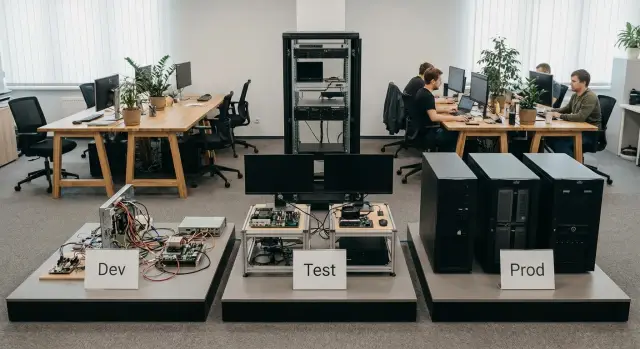
Why should SMBs separate dev, test and prod at all
When a small team uses one environment for everything, problems come not from “complex IT” but from a task queue. A developer updates a library, a tester runs a check, and at the same time accounting closes the day. Any change interferes with someone else.
The main trouble with a shared environment is that mistakes become shared. Test settings leak into production services, temporary code lingers, and “quick fixes” are made directly in prod because it’s easier. The result is outages and conflicts that consume more time than just organizing environments properly.
Three common risks usually surface.
- Data: tests accidentally alter real records, and database copies leak "to a laptop" without control.
- Access: a single shared login or keys "for everyone" make it impossible to know who did what.
- Updates: a dependency is upgraded for one task and suddenly something that was stable yesterday stops working.
Separating dev/test/prod doesn’t have to mean three identical clusters and huge costs. For SMBs it’s enough to achieve two things: experiments must not affect users, and the path to production must be predictable.
In practice, the roles of the environments are simple:
- Dev — a place to break and quickly fix things while exploring ideas.
- Test — where the team verifies that everything works as intended in conditions close to production but without risk to real data.
- Prod — where stability, change control and clear responsibility matter most.
Example: in a small clinic a developer adds a field to a patient record. In dev they change schema and code. In test they verify recording and printing using anonymized data. Only then does the update reach prod without interrupting reception.
What exactly should differ between environments
Having three identical servers is not enough for separation to work. Environments must differ in several areas, otherwise testing will be either dangerous or useless.
Data
The cardinal rule: test must not contain real personal or financial data. If you need "similar" data, anonymize and reduce the set. A common SMB practice is to keep a small slice in test (e.g., 1–2% of records) without names, phones and national IDs, and use synthetic data in dev that can be thrown away.
How data are stored also matters: test databases should have separate accounts, separate backups and separate retention policies. That way a developer mistake doesn’t become an incident.
Configurations and integrations
Many post-release failures are not caused by code but by settings. Each environment should have its own service endpoints, its own keys and its own external integrations. For test it’s useful to have sandboxes for payments, SMS, email and analytics. If a sandbox isn’t available, it’s better to disable the integration in test than accidentally send real notifications to customers.
Access and observability
Rights should be split so prod does not become a shared playground.
- Deploy to prod is done by 1–2 responsible people.
- Prod logs are available only to those who need them for support.
- In dev developers can experiment freely without business risk.
- Database access is granted per task and for a limited time.
Reliability and “what survives a restart”
Prod must make it clear what is preserved: database, files, queues, keys and settings. Fast rebuilds are acceptable in dev. Test should behave closer to prod: restart, upgrade and rollback should work without data loss or manual magic.
Simple example: an SMB online store tests a new discount. In dev the developer runs logic on synthetic data. In test they verify the “place order” flow on an anonymized DB and with a test payment gateway. The feature is enabled in prod only after keys, access and monitoring are confirmed.
Minimal infrastructure options without unnecessary costs
Separating dev/test/prod does not have to start with an expensive cluster. For SMBs it’s more important to quickly achieve isolation for safe testing while keeping the team’s life simple.
Easiest start: one host and 2–3 VMs
A common minimum is one virtualization server and several VMs: dev, test and prod (sometimes dev and test are combined if changes are few). This is cheap and clear: different VMs, different networks, different permissions. The obvious downside: if the host needs maintenance or fails, everything stops.
Slightly more reliable: two hosts without a “real” cluster
If the single-host approach is unacceptable, add a second host. You don’t need full high-availability initially. Agree on rules: prod lives on the primary host, dev and test on the secondary, and during maintenance you migrate VMs manually according to a plan. This helps when updating a hypervisor, replacing a disk or diagnosing hardware.
Containers are suitable when the application is stateless and state is kept in a separate database or storage service. Then dev and test can be spun up quickly and cheaply. But separate VMs are usually better if you have OS/dependency conflicts, a heavy database that needs predictable performance, isolation requirements (e.g., test must not see the prod network) or many legacy services that are hard to containerize.
What to split strictly and what can be shared
Sharing is acceptable where there’s no risk of data leakage or accidental impact on prod. For example, centralized monitoring and log collection can stay shared, but with separate access rights and clear environment tags.
You must not share the production database and secrets. Even if test needs similar data, use a separate test DB and separate keys. A real scenario: accounting asks for a quick report fix, a developer tests on the shared DB and accidentally runs a migration. With separated environments this becomes impossible.
If you choose hardware for a minimal start, one or two mid-range servers with extra memory and fast disks is usually enough. For companies in Kazakhstan it’s often convenient if a supplier can assemble servers, deploy virtualization and then provide 24/7 support so the team doesn’t spend time on hardware tasks.
Step-by-step: how to set up environment separation in 1–2 weeks
For a small team it’s important not to overcomplicate. The goal is to make testing feel like production while keeping prod closed and predictable.
1–2 week plan
Start with network separation. Ideally use separate subnets or VLANs for dev, test and prod. If network gear won’t allow that yet, implement minimal firewall rules: block direct access to prod from the office and from dev/test, leaving only necessary ports and sources.
Next, provision three environments as separate resource sets: databases, queues, storage, configs. Dev can be lighter (fewer resources), test should match prod configuration as closely as possible, and prod should be reserved for users and a limited number of admins.
Practical work order:
- Day 1–2: document which services make up the system and which ports are actually needed between them.
- Day 3–4: separate the network (VLAN/subnets or firewall) and allow prod access only via VPN or a dedicated admin point.
- Day 5–7: provision dev and test as separate environments and verify they do not use production databases or keys.
- Day 8–9: create separate accounts and roles: for services, admins and developers (least privilege).
- Day 10–14: formalize the standard for creating a new service and run a trial release using the new scheme.
Minimal access rules
Prod should be available only to those who need it for support. For example: developers work in dev/test; prod is accessed only by on-call admins; services talk to each other by whitelists; access is role-based, not "shared logins."
To avoid relying on memory, capture a short one-page standard: environment naming, required variables, who creates service accounts, how access is checked. If infrastructure is on-prem, decide in advance where dev/test/prod nodes will sit and how they are separated physically and logically (for example, different network segments or even different racks).
Test data: safe and painless
The most common failure is copying prod into test "as is." This transfers real phones, IINs, addresses, payments and passwords. One extra access or a dump posted in a chat is enough to create an incident rather than a test.
Treat the test environment as less protected: more people, more experiments and more temporary rights. Test data must be useful but not live.
Simple anonymization approach
You don’t need a perfect system from day one. Start with rules that give most of the benefit:
- Mask personal fields (name, phone, email, IIN): keep format but change values.
- Remove extras: document scans, attachments, operator notes, logs, old events.
- Replace sensitive directories: card numbers, tokens, keys, passwords, answers to secret questions.
- "Shift" dates and amounts if dynamics matter (for example, add 30 days to all dates) without tying them to reality.
- Generate a small set of "reference" cases (5–20 customers/orders) to check edge scenarios.
If you need a guideline: a small clinic testing appointment scheduling can use 200 anonymized patients and 2–3 months of schedules rather than years of history.
Access, dumps and quick test recovery
Each environment should have its own DB accounts and privileges. Even on a single server, separate roles: dev must not have access to prod data and test apps must not be able to write to prod.
Treat dumps as secrets: restricted access, issuance logs, and clear retention periods. Prefer storing dumps apart from team working folders and avoid including them in general backups.
To recover test quickly after experiments, keep a simple rollback plan: a fresh anonymized dump, short restore instructions and an initialization script. Then a test stand can be up in an hour instead of taking two days to "fix."
Access and secrets: minimal rules that save you
Most incidents in SMBs start not with attackers but with everyday habits: password in a config, token in chat, key in README, accidental commit. Fixing this is easier than it seems if you agree on a few rules and follow them.
The main rule for separating dev/test/prod: different secrets for each environment. Even with minimal infrastructure, DB keys, external service tokens and platform credentials must not be shared. A leak in dev then won’t become a prod breach.
Minimal secret storage without complex systems
You don’t have to buy expensive tools immediately. The important thing is secrets do not live in code or get sent in messengers.
A typical starter set is:
- store secrets as environment variables on servers or in CI (role-based access);
- keep separate config files for dev/test/prod but without embedded secrets;
- use a protected channel for secret transmission (for example, a password manager) and enforce "no chats";
- rotate secrets when someone leaves, a contractor changes, or a leak is suspected;
- do a quick pre-release check for secrets in commits and logs.
Separate rights: who can do what
Secrets often leak through excessive permissions. If one account can view logs, deploy and read prod DB, any mistake becomes costly.
A minimal role model:
- view logs and metrics (no secret access and no deploy rights);
- deploy to dev/test (no prod access);
- deploy to prod (1–2 people, by agreement);
- DB access: separate read and write accounts.
Start auditing changes manually: keep a short journal of who changed a secret, when, why, where the new secret is stored and who approved. Example: a developer updates a test payment provider token, records the task in the tracker, and a tech lead confirms prod token wasn’t touched. This discipline prevents quiet breakages and accidental leaks.
Deploy without delays: a simple CI/CD scheme for SMBs
CI/CD’s goal in an SMB is simple: the team quickly rolls out changes to test, catches errors earlier and releases to prod calmly. With dev/test/prod in place, the next step is to make deployments consistent and predictable.
Automate what repeats most and wastes the most time: build and deploy to test. This yields quick benefit even without complex tooling.
Minimal pipeline that works
Keep the process short and clear. One commit should produce the same result regardless of who pressed the button.
- A commit to the main branch triggers a build and basic tests.
- The built artifact (container or archive) is versioned and stored in a registry or storage.
- Auto-deploy to test using the same steps as prod.
- Auto-checks in test: health-check, short smoke tests, log scan for critical errors.
- Manual approval before prod (approve), then deploy.
Prod gates should not be a mere formality. Two conditions usually suffice: passing test checks and a person who takes responsibility for the release (on-duty or a team lead).
Versions and configs: one language for the team
Simple rule: version code and configs consistently. Use semantic versions (for example, 1.8.3) and tag releases in the repo; keep environment-specific config values separate via env vars or parameter files. Then any release can be reproduced rather than rebuilt "by eye."
For on-prem infrastructure, keep the pipeline on a dedicated server and ensure test deployment has no access to prod.
Rollback should be verifiable. Treat rollback as successful if the service responds, a key scenario passes, and the time fits an agreed limit (for example, 10–15 minutes).
- Keep at least 2–3 previous artifacts.
- Rollback with the same command as release (just another version).
- Use only "safe" DB migrations or prepare reverse steps.
- After rollback, run the same smoke tests.
- Record the reason and the restore point to avoid repeating mistakes.
Typical mistakes when separating environments
The common problem is not wrong names for environments but that they behave like the same prod. Then tests become dangerous and the team loses trust in dev and test.
Integrations that were not isolated
If test talks to production services, it will eventually do something for real. Classic examples: test sends real emails or SMS, creates payments, or triggers CRM actions.
Simple rule: every environment has its own integration endpoints. For external services use separate accounts or sandboxes; if they don’t exist, add stubs and explicit safety flags (for example, disable outgoing messages in test).
Secrets and access identical everywhere
Identical passwords, tokens and keys in dev/test/prod turn any mistake into an incident. A developer might connect to the prod DB by accident and a leak from test becomes a prod breach.
Minimum that actually works:
- different secrets per environment and regular key rotation;
- prod access only when necessary and via separate accounts;
- forbid copying prod.env into test to make things start faster.
“Quick check” directly in prod
Testing in prod under the pretext of a "small check" breaks discipline. It starts with one query to the DB and ends with manual data edits and unexpected side effects. If you must check prod conditions, use safe mechanisms: feature flags, canaries or at least a separate test user and a constrained scenario.
No resource limits
If dev/test run next to prod without limits, test load can consume CPU, memory or disk and bring down production. This often happens during night runs, imports or load tests.
Set simple boundaries: quotas, limits, separate queues, and schedule heavy runs in a dedicated time window.
Backups exist, but recovery was never tested
Backups don’t help if nobody tried restoring. Test restores on the test environment: bring a DB from backup, ensure the app runs, and measure real recovery time. Then the first incident won’t become an experiment.
Short checklist: is your environment separation ready?
Check how things work by default, not how they were intended. Problems often begin where one convenient access slowly becomes a permanent hole.
Quick checks (should be “yes”)
- From dev and test there is no direct network or account access to prod. Exceptions are documented (for example, metrics read-only).
- Each environment has separate secrets and accounts. Passwords and keys do not match even if that would be simpler.
- Test data is separated from production: either a separate dataset or a clear update procedure that avoids unnecessary personal data.
- Deploy to prod is not done "quietly": approval is required and the release is recorded (who, when, what).
- Rollbacks are time-bound and have been practiced. Not "sometime" but actually tested and known to take, for example, 10–30 minutes.
Don’t skimp on backups: production copies should be automatic and recovery should be exercised occasionally. A backup that was never restored is often just a file on disk.
Red flags (if any of these apply — pause releases)
- Prod keys sit in dev “temporarily” for weeks.
- A developer can access prod “for a few minutes” without a request and without logs.
- Rollback depends on a single person who "knows how" but hasn’t documented it.
If the checklist is green, the team releases more often and more calmly: errors are caught in test, access doesn’t spread, and prod stays predictable.
Example: how an SMB tests changes without breaking prod
Imagine a 50-person company with one customer-facing website and one internal sales system. The development team is three people plus a half-time admin. Releases were weekly and previously everyone checked directly in prod because there was no dedicated test stand.
Their minimal setup looks like this: one virtualization server and another small server (or the same one with strict limits) for prod. On the virtualization host there are three VMs: dev (daily work), test (acceptance) and prod (for users only). Crucially, the production database is separate and not shared with dev/test even if everything runs on the same hardware.
Release checks are simple and repeatable:
- a developer deploys a build to test;
- a business user performs a short acceptance scenario (5–10 steps);
- if all is well, the same package is installed in prod during a pre-agreed window;
- if not, fixes go back to dev and test remains clean.
To reduce risk, test uses anonymized data: names replaced, phones and IIN masked, amounts rounded. Integrations are separate: test connects to sandboxes or stubs (test payments and test email), while prod uses real keys and endpoints.
After a month the main effect is predictable releases. Previously each deployment required 2–3 hours of troubleshooting and rollbacks. Now a typical release takes 30–40 minutes and emergency fixes have almost disappeared because most bugs are caught in test.
Next steps: lock the gains and scale
When basic separation works, the main risk is rules slipping over time. Document boundaries: which services belong to dev, test and prod, which integrations and background tasks must be separated, and what counts as a violation.
Start with a short inventory. Not only applications, but everything behind them:
- services and databases, queues, caches, S3-like storage;
- integrations: bank, government services, mail, SMS, analytics, 1С, BI;
- automated jobs: mailings, billing, data exchange, schedulers;
- entry points: domains, VPN, admin panels, partner APIs;
- data and its sources: where test data comes from and who is responsible for cleanup.
Then choose a growth rule: what to harden first as the team or load grows. Typical order: access and secrets (to eliminate shared passwords), then CI/CD (to make releases repeatable), then observability (logs, metrics, alerts), and only after that hardware scaling.
Also agree roles and rituals or speed will drop. Who can deploy to prod, who approves releases, how many people are needed to decide, when to roll back, and where the cause is recorded. A simple approach: one release owner, one verifier, rollback by a ready scenario without discussion.
Example: a small fintech team mandates that every change goes to test first with similar integrations via sandboxes and stubs, and only after a checklist is cleared it goes to prod. After a month they add separate prod monitoring and reduce incident reaction time.
If current resources are near capacity, plan which hardware will host test and prod so they don’t compete for CPU and disk. For a reliable on-prem option in Kazakhstan this can be discussed with GSE.kz (gse.kz): the company manufactures computers and servers in Kazakhstan, provides system integration and offers 24/7 technical support through a national service network.
Frequently asked questions
Do we really need to separate dev, test and prod if the team is small?
Yes — if you have real users and frequent changes. The minimal purpose of separation is to ensure experiments and checks cannot affect business operations, and that releases to prod follow a clear, repeatable path.
Where to begin separating environments if everything is on one server now?
Start with separate accounts and different secrets for each environment, separate databases, and network restrictions so dev/test cannot directly reach prod. Even on a single physical server, VM/network/permission isolation removes most risks.
Can we just copy the prod database to test so everything is "as in production"?
By default — no. Copying prod as-is brings personal and financial data into a less protected zone. Better to keep a small anonymized slice or synthetic data that can be recreated quickly, and have separate backups and retention policies for test.
How to anonymize data for test quickly without big projects?
Mask data so formats stay realistic but values are not real, and remove extras like scans, attachments and tokens. If dynamics matter, shift dates and adjust amounts so tests remain useful but data aren’t tied to real people.
Who should have access to prod and how to do this without bureaucracy?
Give deploy rights to one or two responsible people and remove shared logins. Developers can use dev/test; prod logs and DB access are issued only when needed and under separate accounts so actions are traceable.
How to manage secrets if we don't have Vault or other complex systems?
Keep separate secrets for dev/test/prod and don’t store them in code, READMEs or chats. Early on, environment variables on servers or CI with role-based access usually suffice, plus a simple rule to rotate keys when staff change or a leak is suspected.
What is the simplest CI/CD pattern for dev/test/prod in an SMB?
Automate build and deployment to test so it mirrors production steps, and keep a manual approval before prod. The key is that the same artifact goes to prod that was tested in test; otherwise you test one thing and release another.
What to choose for minimal infrastructure: VMs or containers?
Containers work well for stateless apps with external storage. If you have a heavy DB, legacy services, strict isolation needs or OS/dependency conflicts, separate VMs usually offer more predictable behavior.
Can we keep shared monitoring and logs for all environments?
A shared monitoring/log collection is acceptable if environments are tagged and access is controlled: dev/test must not gain extra access to prod data or secrets. Prod keys, DBs and admin access must remain strictly separate.
How to be sure backups and rollbacks actually work and are not just "for show"?
At minimum — automated prod backups and periodic recovery tests on test so you know real restore time. Treat a rollback as ready only if it can be reproduced by a documented procedure and doesn’t rely on one person’s memory.
