7 min read
Scheduled business-systems support for SMBs: how to set it up
Scheduled support for business systems: how to choose maintenance windows, set up notifications, define roles and escalations so an SMB runs reliably without 24/7 duty.
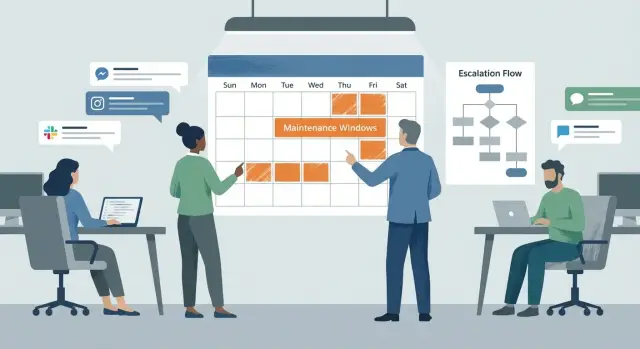
Why SMBs should use scheduled support instead of 24/7
For most SMBs, round-the-clock duty sounds like the "right" way to care for the business, but in practice it often becomes an expensive habit. Night incidents are rare, yet you pay constantly: shifts, overtime rates and mistakes caused by fatigue.
There is also a human side. When the same person is "always on the phone," burnout rises and turnover follows. Support becomes unpredictable: someone responds "when they can," tasks get lost, and decisions are made in a hurry.
At the same time, SMBs usually don’t break in every possible way; there is a predictable set of key items: 1С/ERP and integrations, mail and calendars, file resources, the office-to-branch network and VPN, POS systems and workstations at retail points.
Scheduled support means predefined hours, clear rules for handling requests and well-defined responsibilities. For example: requests are accepted from 09:00 to 18:00, critical incidents during those hours have priority, and outside those hours there is a separate workflow only for truly "red" situations.
A good business outcome is not having someone available 24/7. It’s making expectations clear: what counts as an incident, when a response will come, who makes decisions and what to do before support replies. That reduces downtime because there’s less chaos.
Example: the accounting team can’t process payments because 1С failed at 16:30. Under the schedule the incident gets high priority, an owner is assigned, and users immediately receive a short message: "we are working, next update in 30 minutes." If the same issue appears at 22:00, a different scenario kicks in: record the event, apply a safe temporary workaround and move full recovery to the next maintenance window.
For SMBs this is often the fairest balance: controlled costs, real people in support and predictable service reliability.
Defining severity and request types
For scheduled support to work, start with simple rules: what’s critical for you and what kinds of requests happen. Without that any queue turns into an argument about who is louder.
Define severity by impact, not by system name. If a service outage directly stops sales, shipments, payments or production, it’s critical. If it’s inconvenient but the business can continue (a report won’t build, printing is flaky, a form is misaligned), it’s non-critical and should be handled in the normal plan.
Then split requests by type. Usually three categories are enough:
- Incident: something is broken or degraded.
- User request: access, guidance, "how to," minor help.
- Change: upgrade, configuration, migration, enhancement—anything that may affect system operation.
Add urgency levels. It’s convenient to keep three: emergency, high, planned.
- Emergency — critical process stopped or risk of data loss.
- High — process is severely degraded, there is a workaround but it’s costly or risky.
- Planned — everything else that can wait for the next window.
Preassign who decides priority. For SMBs a good pattern is: IT records facts (what broke and how it affects work), and the final priority is confirmed by the business system owner (head of sales, accounting, warehouse). That makes "urgent" measurable.
Example: at 16:30 a POS terminal cannot print receipts — that’s an emergency. If a CRM report won’t open but deals are progressing, it’s high or planned depending on deadlines. A request to add a user or change a print template is a user request/change and goes into the next agreed window.
How to choose maintenance windows without disrupting the business
A maintenance window only works if it’s based on facts, not the habit of "after six it’s convenient for everyone." Start simple: when do people actually need the system? Often you’ll find accounting works late at month-end and the warehouse starts earlier than the office. If there are branches, account for their schedules and time zones.
Map usage by department and location: short interviews, system access peak data, shift schedules, reporting dates. This takes 1–2 days but saves weeks of debate.
Pick 1–2 regular windows and make them predictable. For SMBs it’s better to be consistent than to be random. For example: a short slot on weekday evenings and a longer slot on weekends.
Divide windows by work type: short (15–30 minutes) for minor changes and restarts, long (2–4 hours) for upgrades and migrations, plus a separate monthly "overflow" slot if a job runs over.
Check that windows don’t conflict with scheduled tasks. Backups, month-end jobs, report exports, bank exchanges or labeling often run at night or early morning. If you update at the same time, problems will look like "everything froze" when the cause was scheduling.
Agree on acceptable downtime in numbers. Not "no long interruptions," but for example: "during business hours no more than 10 minutes" and "evening window up to 60 minutes." Example: an office in Almaty and a regional branch share 1С and a file server. On normal weeks 20 minutes in weekdays is enough, but during close-of-month week a longer window is better scheduled for the weekend so accounting isn’t stopped.
Basic rules: support hours, roles, service levels
To keep scheduling from turning into chaos, fix the rules in advance. They resolve the main disputes: when you can be bothered, who decides and what’s considered urgent.
Start with support hours in two dimensions: request intake and work execution. For example, requests are accepted 09:00–18:00 on weekdays, and planned work is performed in the next maintenance window by agreement. This is fairer than promising "we’ll fix it immediately" for any request.
Next define channels. For SMBs one primary channel for all requests (so nothing gets lost) and one emergency channel for critical cases is usually enough. The emergency channel must be loud and rare, otherwise people will use it for everything.
Document roles, even for a small team. Minimum set:
- Dispatcher: receives the request, clarifies details, sets priority and keeps users informed.
- Performer: diagnoses, fixes and writes a short summary.
- System owner: confirms business priority and makes trade-offs.
- Change approver: authorizes risky changes and windows.
- Backup responsible: covers vacations, sick leave and travel.
Service levels are easiest to express with two times: response and recovery (or workaround). Don’t overcomplicate: three urgency levels are usually enough. Example: critical (sales/payments down) — response 15–30 minutes in business hours, recovery 2–4 hours; medium — response within 4 hours, recovery 1–2 business days; low — response next day, handled per plan.
Record exceptions: holidays, month-end closings, seasonal peaks, inventory days. During these periods rules often change: fewer planned changes, more control and pre-agreed windows.
Step-by-step: roll out scheduled support in 2–4 weeks
The transition is easier if you organize information first and then introduce restrictions. The plan below usually fits in 2–4 weeks even with a small team.
Week 1: gather the basics
Create a single register: which systems are supported (mail, 1С, files, VPN, POS, Wi‑Fi), where they are, who the business owner is and who is responsible from IT or the vendor. Keep emergency contacts and clear availability hours nearby.
Introduce a simple request template. An employee should know what to write: what’s not working, who is affected, when it started, what was already tried, and what to attach (screenshot, error text, workstation number). This drastically reduces back-and-forth.
Weeks 2–4: implement the calendar and controls
Fix maintenance windows and a "freeze" rule: during month-end or before a major shipment no updates except emergencies.
To keep the schedule from falling apart, add short daily checks and minimal bureaucracy:
- A calendar of maintenance windows for the next month.
- Clear freeze rules and who can lift them.
- A unified request format (text, time, contact, screenshots).
- A daily 10‑minute sync: what’s critical, what’s in progress, what blocks the business.
- A monthly review: recurring incidents, time peaks, where new rules are needed.
Example: if branches complain that "1С is slow on Mondays," a review will quickly show the pattern. Then move heavy updates to midweek and strengthen monitoring on Mondays.
Communications: how to notify without overloading people
Communications solve half the problems when switching to scheduled support. If people know in advance what changes and what to do, there are fewer requests and almost no conflicts.
First identify who needs to be informed. This usually includes not only users but department heads (so they can plan), external vendors (for example outsourced accounting), and those physically on site outside working hours: security or on-duty building administrators.
Use a simple cadence of notifications:
- 3–5 days before — to let teams reschedule tasks;
- 24 hours before — so no one plans critical operations;
- 1 hour before — a short reminder to those directly affected;
- after completion — confirmation and where to report any issues.
Keep the message simple: what will be unavailable, when, for how long and what to do in advance. Example: "From 19:00 to 20:00 printing of waybills will be unavailable. Save drafts by 18:50. If urgent printing is needed, submit a request by 17:00."
Two formats of the same message
Keep two versions: short and detailed. Send the short one to everyone and the detailed one only to those affected (managers, key users, vendors). The detailed one should include affected services, rollback plan and a contact for escalation during business hours.
Feedback without chaos
Separate questions from post-work issues: one channel for clarifications before the window, another for reporting problems after work using a template (what’s not working, who, when it started). That prevents mixing discussion with incidents.
Example: for an office with a couple of branches, send a short notice to all and a detailed one to branch admins and the head of sales. Cashiers won’t get unnecessary details, while responsible people are ready for risks.
Escalations without 24/7: clear triggers and a decision chain
With scheduled support the danger isn’t "no engineer at night," it’s fuzzy rules: who decides the situation is really serious and who to wake up. Escalation must be short and prearranged, otherwise people will either bother everyone or wait too long.
Escalation triggers
Define 4–5 events that immediately raise priority and start the contact chain. For example:
- Sales stopped: accounting/CRM unavailable and deals cannot be processed.
- POS terminals don’t print or fiscalization fails.
- Risk of data loss: disk/DB errors, file corruption, backups unavailable.
- Security incident: suspected intrusion, ransomware, data leak.
- Failure to meet obligations: payments failing, a key communication channel to a branch is down.
There should be one owner for the escalation decision: often a duty manager from the business side (not IT) who understands the cost of downtime. Appoint a backup for vacations and sick leave.
Keep the contact tree simple: 1st line (intake and immediate actions), 2nd line (admin/engineer), then vendor/integrator, and only after that IT lead and the business owner. Include availability windows and communication channels along with names.
What to do at night without a duty engineer
Have a minimal emergency plan: what can be done safely without an expert and when to call someone out of hours. A common example: restarting a POS application by following instructions is allowed; if ransomware signs appear, immediately disconnect the device from the network and escalate.
After every out‑of‑hours action, record a short report (10–15 minutes): what happened, which trigger fired, who decided, how long the outage lasted, what was done now and what changes are needed to prevent recurrence.
Common mistakes and traps when switching to scheduled support
The most frequent problem is trying to "carry over" the 24/7 approach into scheduled support without changing the rules. The result: nobody knows when work can be done, where to submit requests and who decides if something goes wrong.
Typical traps:
- A maintenance window without backups and a rollback plan. Even a small update can break an integration. You need a backup, a restore test and a pre-agreed rollback criterion.
- Too many channels. When requests come partly by email, partly by messenger and partly by private messages, tickets get lost and response times become random. Keep one main intake and one emergency channel.
- No business system owner. Then IT and departments argue about priorities because "important" means different things to everyone.
- Ignoring the business calendar: month-end, seasonal peaks, inventory.
- Updates without a pilot test on a small group (3–5 workstations or a single branch).
One mistake that quickly kills trust is hiding downtime. People accept a day‑ahead notice and a one‑hour reminder. After the fact you have to explain not only the failure, but why no one knew about it.
Quick checklist: are you ready to operate without night duties?
Scheduled support works only when rules are clear in advance. This checklist helps spot gaps before the first evening fire.
Readiness checklist
- Maintenance windows are in the calendar for 1–2 months and known to all departments (not just IT).
- Each key system has an owner (decision maker) and a backup for vacations and illness.
- Channels are separated: where to write for normal requests and where for emergencies (described in one paragraph, no "figure it out").
- Three urgency levels exist and each has an expected response time during business hours.
- Backups and a simple rollback plan are performed before any planned work (who, what and how many minutes to restore).
After this, walk through one concrete example so everyone understands the rules the same way. For example: "At 19:30 a POS at a branch stops printing. Is this an emergency or a request? Who decides if it can wait until morning? How quickly will the person get a response and what should they do right now?"
Mini ritual after an incident
Agree on a short post‑incident review: 10 minutes of facts. What happened, why it wasn’t noticed earlier, what to change in settings, instructions or maintenance windows.
Example scenario for an SMB with an office and branches
A company with 80 employees: head office, warehouse and two small branches. Main systems are 1С for sales and accounting, mail, shared files and printers. IT resources are small: one admin and a contractor for complex tasks.
Previously updates were applied "when convenient": in the evening after work, at lunchtime, sometimes on Friday. Users learned about downtime at the last minute and managers only saw the consequences: POS stopped, the warehouse couldn’t ship, branches couldn’t print waybills.
The company fixed a calendar and a notification rule:
- Tuesday and Thursday, 19:30–21:00 — short windows (patches, restarts, minor tweaks).
- First Saturday of the month, 10:00–13:00 — long window (1С updates, server maintenance, restore tests).
- Changes outside windows are forbidden except for emergencies.
Communications were simplified. They use one channel for tickets and a separate notice to department managers. They notify 24 hours and 1 hour in advance. The short template states: what will be done, who is affected, how long it will take, what must not be done during this period and where to report problems after the window.
For rare emergencies they kept one emergency phone with clear triggers: sales/shipments stopped, mail unavailable for everyone, a branch completely offline. If only one PC is affected, that’s not an emergency and goes to the queue.
In 3–4 weeks results were visible: fewer unexpected outages, staff plan work around windows, managers know when to expect changes and who decides on escalation. Even when things go off-plan expectations are transparent and conflicts are fewer.
Next steps: formalize the process and check infrastructure
To make scheduling work, record it not only in chat but also in documents, calendars and settings. Start with an inventory: list business systems (1С, mail, telephony, CRM, files, VPN), owners and dependencies. Then agree severity with managers: what can be fixed in the morning and what stops sales immediately.
Approve a maintenance calendar at least a quarter ahead. It should be clear to everyone: when interruptions may occur, who notifies and what counts as planned work.
To avoid panic outside business hours, make a one‑page escalation rulebook and run a short briefing. Answer five questions:
- What is an emergency and who decides.
- How fast to report and by which channel.
- Who decides on urgent intervention.
- What to do if the responsible person is unavailable.
- How to record the outcome and update knowledge.
At the same time check infrastructure. Scheduled support without night duty relies on prevention and early signals, not heroics: backup with restore tests, monitoring for disk/memory/network and critical services, a plan to quickly replace key equipment, secure remote access and up‑to‑date documentation (diagrams, provider contacts, serial numbers).
Simple example: if branches depend on a VPN, add tunnel availability monitoring and prepare a replacement router. Then most failures get resolved in a working window, not at night.
If you lack hands or experience, it makes sense to involve a system integrator to help set up processes and infrastructure. In Kazakhstan this is often done by GSE.kz: system integration, data‑center infrastructure solutions and local supply of PCs and servers, including the L200 and S200 series, with lifecycle support.
Frequently asked questions
Who is scheduled support suitable for?
Scheduled support suits companies where overnight outages are rare and key processes can be protected through rules and preventive measures. It helps keep costs under control without overloading a small IT team.
What counts as an incident outside business hours?
An incident is an event that stops sales, shipments, payment processing, production, or creates a risk of data loss. A problem on one computer or a failure of an individual report usually goes into the regular queue.
How do you determine a ticket's urgency?
Three levels are usually enough: incident, high priority, and planned. Assess the impact on operations rather than the system's name: whether sales have stopped, whether there is a safe workaround, and how many people are affected.
What support hours should an SMB set?
Set separate hours for receiving requests and separate windows for planned work. For example, accept tickets on weekdays from 9:00 to 18:00, and perform updates in the evening or on weekends according to an agreed schedule.
How do you choose a time for system maintenance?
Gather department schedules, shifts, month-end closing dates, and peak transaction times. Do not schedule updates at the same time as backups, bank data exchanges, or reporting.
How should tickets be submitted so they do not get lost?
Keep one primary channel for regular tickets and a separate emergency channel. In the ticket, the employee should state what is not working, who has the issue, when it started, and attach the error text or a screenshot.
Who should decide how urgent an issue is?
IT describes the technical facts and solution options, while the system's business owner confirms the priority based on its operational impact. For 1C, this may be the chief accountant; for sales, the head of the sales department.
How do you inform employees about planned work?
Notify affected employees in advance: a few days before, one day before, and briefly one hour before the work. The message should include the time, affected services, expected duration, and any steps users need to take beforehand.
How do you reduce the risk of an outage during an update?
Before starting, create a backup, verify that recovery is possible, and agree on a clear rollback plan. First, test major updates on a small group of computers or in one branch office.
What should you do during a nighttime incident without an on-call engineer?
Prepare a short instruction: who makes the decision, whom to call, which safe actions are allowed, and when to call a specialist. If you suspect ransomware, disconnect the device from the network and escalate immediately.
