8 min read
SBOM in CI/CD: adopting CycloneDX, SPDX, and Dependency-Track
A practical plan for adding SBOM to CI/CD and procurement: choosing CycloneDX or SPDX, generating, storing, analyzing with Dependency-Track, and quick checks.
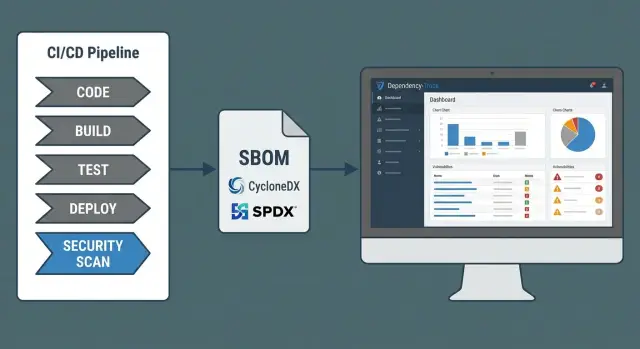
The problem: dependencies exist, but there is no visibility
Almost every application today is built from dozens or hundreds of third-party components. When a new vulnerability appears in a popular library, the first question is simple: are we affected? In practice the answer often turns into days of back-and-forth, because there is no exact list of components at hand.
Without an explicit inventory three things usually get lost. First, exact versions: the repo has package.json or pom.xml, but something different may have been deployed. Second, transitive dependencies: you did not pick them directly, but they were pulled in through other packages. Third, provenance: where did the artifact come from, which source was used during build, what are the hashes and metadata for the binaries.
SBOM fills this gap. It's a single document that records the composition of a delivery: what is inside, which versions, and how components relate. If SBOM is embedded in CI/CD, you don't guess from logs or search repos manually — you quickly match a delivery to a specific vulnerability and understand the scope of work.
Teams that benefit most are those that must act in a coordinated way:
- Development finds where to update and what might break faster.
- Security assesses risk and prioritizes patches faster.
- IT operations understands which services and environments are actually affected.
- Procurement gets transparent requirements about supplied software composition.
A simple scenario: a critical vulnerability is disclosed in component X. Without SBOM you check dozens of projects and containers and some dependencies are hidden. With SBOM you filter by component and version and immediately see which builds are affected and which are not. That saves hours and reduces the risk of missing an affected service.
What an SBOM is and what it should contain
SBOM (Software Bill of Materials) is a clear list of what your application consists of: which libraries, modules and packages are included and what versions they have. The easiest way to imagine an SBOM is like an ingredients list on packaging: not how you prepared the product, but which components it was actually built from.
A good SBOM answers the main security question: where exactly is this component used and what version is it? This is crucial when a new vulnerability in a popular dependency surfaces and there is no time for manual repo searches.
What should be inside an SBOM
A minimal set of fields that typically helps in incidents and audits:
- component name (package/library) and its version
- component identifier (for example, Package URL) to avoid confusion between similarly named items
- license to understand usage risks and restrictions
- checksums (hashes) or other integrity indicators to distinguish the same file from a tampered one
- source (where the component was obtained: registry, repository, internal artifact)
Dependency relationships are especially valuable: not only a flat list but who depends on whom. This shows why a vulnerable package made it into your build: was it direct or pulled transitively via another library.
SBOM as a delivery artifact
SBOM is useful for internal builds and for deliveries from contractors. For internal releases you attach SBOM to every application version as a release artifact. For suppliers you require SBOM together with the delivered software and use it during acceptance.
In practice SBOM answers common questions: which products and environments are at risk, where to update a dependency, and what you can show an auditor as proof of composition and licensing control.
CycloneDX and SPDX: choose a format without unnecessary theory
CycloneDX and SPDX solve a similar task — describing software composition — but they are usually chosen for different needs. If rapid identification of vulnerable libraries without slowing releases matters, CycloneDX is often simpler to start with. If legal completeness, licensing and document exchange are primary, SPDX is more convenient.
CycloneDX fits well into AppSec and DevSecOps: many tools support it for CI/CD intake, dependency graphing, and mapping components to vulnerabilities. It is handy when the goal is to quickly answer "where is this package version used?".
SPDX is stronger on compliance: licenses, authorship, suppliers and provable provenance. It is useful when you procure software from vendors or deliver solutions to large customers and need to formally confirm composition and licensing.
When choosing format, don't focus on popularity but on which fields are critical for you:
- precise component identification (name, version and preferably purl)
- license and delivery type (important for procurement and audits)
- hashes/signatures for integrity
- dependency relationships (dependency graph)
- build metadata (how and with what it was built, to reproduce)
To keep the start simple, pick one format for your main goal. A common path: CycloneDX for day-to-day dependency scanning and SPDX as the documentation package for contracts and acceptance.
Supporting both formats makes sense when you need to satisfy licensing requirements, regularly exchange SBOMs with external suppliers, and want different internal tools to interoperate without constant conversion.
Preparation: inventory, scope and rules
SBOM works well only when you decide in advance what you describe. Start with boundaries: which products and artifacts count as an "accounting unit" and where SBOM is mandatory.
Define the scope. Typically it includes applications (backend, frontend, desktop), container images, libraries you publish internally, and base infrastructure packages (agents, utilities, OS components in images). Record this as a rule. Otherwise one team will produce SBOM only for code while another makes it for the whole container.
Map technologies: which languages and package managers are actually used (npm/yarn/pnpm, Maven/Gradle, NuGet, pip/Poetry, Go modules, etc.). This affects tooling and output quality. If some builds are excluded due to "exotic" stacks, blind spots appear.
Agree on depth. For vulnerability hunting you almost always need transitives, not only direct dependencies. Otherwise a new CVE will show a "clean" list while the problem is deeper.
Introduce identification rules to avoid duplicates: a consistent way to write component name, version, vendor and type. Small differences like case or "react 18.2.0" vs "[email protected]" later break search and reports.
Assign owners. Each product should have an SBOM owner (often the team lead or release engineer), and security should have a policy control role. Example: the team makes a release, CI produces the SBOM, and the owner confirms it was created for the correct artifact and according to agreed rules.
How to generate SBOMs for different build types
The most reliable approach is to generate SBOM from the files that actually drive dependency resolution: manifests and lock files. A lock file is especially important: it pins exact versions; without it an SBOM is often "approximate" and not suitable for investigations.
For libraries and applications (Java, .NET, Node.js, Python, etc.) rely on the manifest, lock file and build tool data. That yields direct and transitive dependencies and their exact versions.
Containers are trickier: you need to account not only for your app but also the base image and OS packages inside it. A common mistake is producing SBOM only for code and forgetting OpenSSL, glibc or system utilities that can also be vulnerable. A practical approach is two layers: an application SBOM and a container SBOM, stored together as a single release artifact set.
To make SBOMs easy to work with, agree on one output format across projects (for example, CycloneDX or SPDX) and a simple artifact structure: project name, version, build number, commit hash, environment.
Automate quality checks. Minimum checks:
- no empty versions or "LATEST"
- package names match ecosystem conventions (group/artifact, npm name, etc.)
- transitive dependencies are present
- for containers, OS packages and base image are accounted for
Recreate SBOM on every build that goes beyond development and always on release and hotfix. Otherwise you'll be investigating an SBOM from a "almost the same" build, not the one actually in production.
Step by step: introducing SBOM into CI/CD
SBOM in CI/CD is best introduced as part of the normal build, not as a separate manual document. Then SBOM matches what was actually produced, and you can quickly retrieve it during incident handling.
Minimal pipeline pattern
Start with a simple, repeatable flow:
- At build time, generate SBOM with the same tool that sees your dependencies (package manager, build tool, container build).
- Save SBOM as a build artifact so it can be downloaded for any version.
- Attach SBOM to the release bundle (next to the binary, image or installer).
- Publish SBOM to an internal artifact repository or registry where it lives as long as releases do.
- Include automated SBOM quality checks.
Quality rules pay off quickly. For example, forbid dependencies without fixed versions, packages from unapproved sources, empty metadata (name, version, vendor), and unexpected licenses if licensing matters to your organization.
Decide in advance what fails the build and what only warns. Typically a failure is something that makes SBOM unreliable: couldn’t collect the dependency list, components with unknown version, or SBOM not matching the artifact. Warnings cover issues that need review but do not block release: incomplete fields, new licenses needing manual approval.
Example: a library is pulled as "latest". The SBOM generator marks it as an unspecified version, a quality rule fails the build before release. You avoid shipping a version that cannot be quickly mapped to a vulnerability.
Storage and integrity: make SBOMs trustworthy
SBOMs are useful only when it's clear which release they belong to and they cannot be silently replaced. Store SBOMs as disciplined as you do binaries and images.
The most practical approach is to keep SBOM next to the release artifact in the artifact repository. Optionally keep a copy in the code repository (for example in a release metadata folder) or in a separate internal SBOM catalog if that simplifies access control.
Binding to a specific build must be unambiguous. Record identifiers in SBOM metadata and file names so there is no guessing:
- commit SHA and/or tag
- version (SemVer) and CI build-id
- component name and environment (prod, stage)
- build date and pipeline identifier
Integrity is ensured with hashes and signatures. At minimum store a SHA-256 for the SBOM and verify it in the pipeline at publish and download. Better is to sign the SBOM (or sign the release bundle) and restrict publishing rights to a CI service account — no manual uploads.
Separate access: read by development, security and operations; modify/publish only by automation. Any post-release change must leave an audit trail: who, when and why.
Retention should have margin. Vulnerabilities surface months later, so SBOM for old releases is as important as the artifacts themselves. For example, if your organization supports deliveries for years, keep SBOM at least as long as the supported release lifetime plus time for audits and incident response.
Dependency-Track: analyzing SBOMs and triaging vulnerabilities
Dependency-Track ingests your SBOM and turns it into a clear risk picture: which components are used, where, and which vulnerabilities map to them. It complements other scanners (SAST, container and IaC scanners): those find issues in code and images, while Dependency-Track focuses on dependencies and versions over time. This becomes very convenient when SBOM is generated in CI/CD for each release.
Importing CycloneDX and SPDX: projects and versions
A practical pattern that works best is creating a separate project per application or service and uploading SBOMs as versions (release, build, tag). Then you see when a vulnerability appeared or disappeared and which release was affected.
If you have multiple builds of the same product (for example on-prem and cloud, different platforms), separate them into different projects or version branches. Otherwise triage turns into an argument about what was actually impacted.
Triage, alerts and recording decisions
When a new CVE arrives, triage is easier with a simple order of actions:
- Are we affected: does SBOM contain the component and vulnerable version?
- Where is it used: which service and which release?
- Is there an exploitation path: is the vulnerable module or function actually used?
- Priority: severity, external exposure, presence of public exploit.
- Plan: who fixes it and by which date.
Tune alerts to avoid noise: critical events to the main channel, medium ones into a daily digest, and group repeated notifications for the same component.
Record decisions as you work: update dependency, replace component (if no update), or accept risk with a clear rationale and review date. If a library is present but a module is unused, assign low priority but keep the record for audit.
SBOM in procurement: supplier requirements and acceptance
If SBOM only appears after an incident, it is not helpful. In procurement require it as explicitly as manuals and support terms. Then security and operations have a basis: what was supplied, what it consists of, and how it will be updated.
In tender and contract annexes fix several points:
- SBOM is mandatory for delivered software and for every update (patch, minor and major release).
- Acceptable formats: CycloneDX or SPDX, with a specified schema version.
- Minimum fields: component name, version, supplier/source, type (library, image, package), license, hashes, dependencies.
- Rules for commercial modules: what may be concealed and how to mark it (for example, a component without a public name but with a unique identifier).
- Timing: SBOM is delivered with the product and retained for the support period.
At acceptance it's important not just to receive the file but to check it matches the delivery. Usually three checks suffice: SBOM exists, it belongs to the correct version, and it can be trusted.
Quick acceptance checks:
- Match product version and build with SBOM metadata.
- Verify integrity (signature or hash) and that it was not altered after transfer.
- Ensure key dependencies are listed, not only the top level.
- Mark closed-source components as separate items so they can be considered in risk assessments.
- Record the SBOM as an acceptance artifact (as part of delivery documentation).
Example: you buy an update for an internal portal. The vendor sends the release and an SBOM. The SBOM shows a newly added library with a known vulnerability. You hold deployment until a patch is available instead of discovering the composition only after installation.
Example: how SBOM speeds up reaction to a new vulnerability
Imagine a critical vulnerability is published in a popular JSON parser and the advisory says simply: update to version X.Y.Z. The crucial question for your team is: are our products affected and where?
If SBOM in CI/CD is set up, you don't start with manual repo searches. You open the latest SBOM for each build and within minutes find the component by name and version. Tools like Dependency-Track usually make this even faster: they show which applications and builds include the library and highlight vulnerable versions.
Then prioritize calmly. The same library can be:
- actually executed in production (direct import, code is invoked)
- a transitive dependency but not used in practice
- present in dev/test tools and not included in prod artifacts
- included in an image or distribution but never loaded
A simple first-day plan:
- confirm which builds are vulnerable (via SBOM and versions)
- assess exposure: internet access, affected services, data criticality
- release a patch or update the dependency and rebuild artifacts
- if no patch exists, apply mitigations (config change, WAF rule, feature disable)
- inform system owners and record status for leadership
After the incident SBOM also helps. Save which SBOMs were used for checks and update SBOM generation rules: ensure SBOM ties to the exact build, is stored with a signature or hash, and always includes transitives. Then the next urgent CVE becomes hours of clear work instead of a week-long hunt.
Common mistakes and pitfalls when adopting SBOM
The most common problem: teams start generating SBOMs but do not treat them as managed artifacts. The file sits somewhere and no one can confidently say which release it belongs to or whether it is trustworthy.
What usually breaks adoption
- SBOM not tied to version and build. Without a release identifier (tag, build number, hash) you waste time guessing which SBOM is correct during incidents.
- Incomplete dependency coverage. Reports often include only direct libraries while transitives are missing. When a new vulnerability appears it seems like you are unaffected until a deeper scan finds the component down the tree.
- Inconsistent naming and coordinates. One team writes "log4j", another "org.apache.logging.log4j:log4j-core". Search, deduplication and CVE matching produce chaos.
- Blind trust in vendor SBOM. Even if a document came with the product, without acceptance checks you may receive an outdated file or an SBOM generated with different flags and repos.
- Too-strict rules from day one. If you block builds on any warning, teams will circumvent the process or disable generation.
A good starter tactic: prioritize coverage and comparability, then gradually tighten rules. For example, in month one record SBOM for every release and check completeness; only later block releases for serious findings. This reduces resistance and delivers quick value for incident response.
Quick checklist before going to prod
Before release, ensure SBOM is not only generated but trustworthy and usable. This checklist catches common gaps that turn SBOM into a formality.
Check key points:
- Every release has an SBOM and it is available to those who will handle incidents: security, DevOps, product owners, support.
- SBOM contains exact versions and unique component identifiers (for example, Package URL or CPE where appropriate) so there is no guesswork about which library landed in the build.
- Transitives are included, and for container deployments the image components (OS packages, base image) are added. Otherwise some risks remain hidden.
- SBOM is tied to a specific build: build-id, commit or tag, and stored immutably. After release the document is not overwritten; a new SBOM is produced for the next version.
- A clear response process exists: who watches alerts, who decides (update, mitigate, accept risk), deadlines for critical vulnerabilities and how results are recorded.
For procurement and contractors: record SBOM requirements in advance and make acceptance include format, completeness and match to the delivered artifact. Then when a new vulnerability appears you will quickly identify affected releases and the response plan instead of piecing together composition manually.
Next steps: pilot, standards and rollout support
Start with a small but complete pilot. Pick 1–2 products where dependency transparency brings real value (for example, a public service and an internal API) and close the loop: SBOM generation, upload to storage, vulnerability search, triage, fix, re-check.
A good SBOM pilot in CI/CD looks like this:
- appoint an owner for the process (development + security) and SLA for alert handling
- fix SBOM generation points (build, release, container)
- set a rule: release without SBOM does not pass
- test the scenario: a new CVE in a popular library and the reaction time
- prepare a report: what failed, blockers, what to automate
The most important next step is agreeing on company-wide rules, otherwise SBOM will be a collection of files no one trusts. Embed the standard at the company level and make it part of acceptance.
Typical standard items to agree on:
- format and profile (CycloneDX or SPDX), required fields and identifiers
- storage location, access, retention period
- how to ensure integrity (signatures, checksums, immutable artifacts)
- what risk is acceptable and when to block a release
Also prepare a procurement and contract template: SBOM delivery timing, updates on change, rules for transitives and the response procedure for new vulnerabilities.
Don't skip training: developers need to know how to fix dependencies, procurement how to accept deliveries, and operations how to use SBOM in incidents.
If internal resources are insufficient to configure pipelines, artifact storage, security policy and infrastructure, consider engaging a systems integrator. For example, GSE.kz (gse.kz) as a manufacturer and systems integrator in Kazakhstan runs comprehensive IT projects and can help set up processes, infrastructure and support, including 24/7 service.
Frequently asked questions
What is an SBOM in simple terms and why do we need it?
SBOM — a document listing the components that actually went into the delivery: libraries, modules, packages and their versions. It lets you quickly answer “are we affected by a vulnerability in component X” without manual searches through repositories and logs.
Which to choose: CycloneDX or SPDX?
Start with one format and one goal. For day-to-day work with vulnerabilities and dependency graphs, CycloneDX is usually easier to adopt first. For contracts, licensing and document exchange between organizations, SPDX is often preferred.
Which fields must an SBOM contain?
A minimally useful SBOM contains the component name, exact version, a unique identifier (for example, purl), license, checksums and source. Adding dependency relationships makes it clear why a component ended up in the build and whether it is transitive.
Why can't SBOM be built only from package.json or pom.xml?
Because a manifest shows what you want to install, not what actually got installed and shipped. Lock files record exact resolved versions, including transitives, and make SBOMs suitable for investigations and mapping to vulnerabilities.
How to properly integrate SBOM into CI/CD so it matches the real release?
Generate the SBOM as part of the build, then save it as an artifact of the specific build and attach it to the release alongside the binary or image. It must be regenerated for every release and be unambiguously tied to version, build-id and commit/tag.
Why does a scanner find a vulnerability but it does not appear in the SBOM?
Usually because the SBOM missed transitives, lock-file dependencies, or OS packages inside a container. Another common issue is inconsistent naming of components, which breaks CVE matching and makes vulnerabilities appear missing.
Do containers need SBOMs and what should they include?
For containers you need to consider two layers: your application and the image contents (base image and OS packages). Practically, keep two SBOMs together — one for the application and one for the container — so you can see whether the risk is in the code, dependencies, or system packages.
How to store SBOM so it can be trusted?
Store SBOMs where your release artifacts live and prevent manual tampering: publishing should be done by CI. Minimum protection is SHA-256 with verification at publish and download; better is to sign the SBOM or the whole release bundle and record which build it belongs to.
How to use Dependency-Track with SBOM in practice?
Create projects per service or product and upload SBOMs as release versions so you can see exactly when a vulnerability appeared and in which builds. Configure alerts so critical issues go to the main channel and others into digest, and always record the chosen remediation: update, replace, or accept risk with a review date.
How to require SBOM from suppliers and verify it on acceptance?
Require SBOM as a mandatory document for every delivery and update, with a clear format and minimum fields (versions, source, licenses, hashes, dependencies). At acceptance, verify the SBOM corresponds to the delivered version, was not altered after transfer, and contains more than just top-level dependencies.
