7 min read
Sales & Marketing Data Mart: Transparent ROI
A sales and marketing data mart helps combine leads, deals and ad spend into one model and accurately calculate channel ROI.
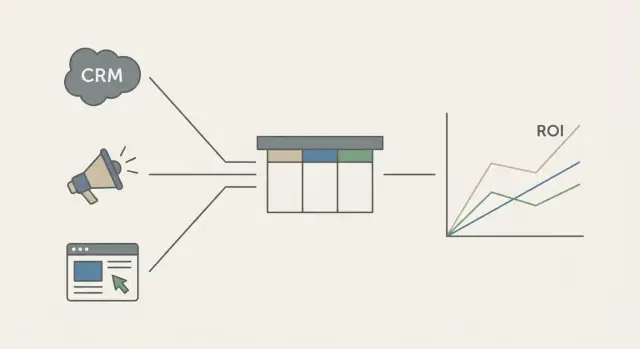
Why transparent ROI is impossible without a data mart
ROI almost always “doesn't add up” when marketing looks at clicks and ad spend in ad accounts while sales live in CRM and count revenue by deals. Each report can be correct on its own, but together they answer the same question differently: how much money did a channel bring.
Usually the link between three parts is lost: spend, leads and revenue. Spend can arrive late or in a different currency. Leads get duplicated (site form, call, chat). And revenue “escapes” into deals without a source because a manager didn't fill a field or the source got overwritten on repeat contact.
Manual spreadsheets and scattered reports rarely save the day. A spreadsheet quickly turns into an argument about whose numbers are “right” instead of a management tool. Departmental reports don't help either: everyone counts by their own rules. Different date windows, different statuses, different definitions of lead and conversion.
A sales and marketing data mart plugs that hole: you get a single version of the numbers where spend, inquiries and final money are linked by clear rules. A good mart documents in advance which systems provide spend, leads and deals, how duplicates are removed and what counts as a “unique” lead, which deal stages are included and when revenue is considered realized, and by which key a lead is tied to channel and deal.
When these rules are fixed in the mart, the conversation changes. Instead of “why doesn't it match again?” you discuss which channel to scale and where money is leaking in the funnel.
What data to gather: leads, deals and spend
For the mart to work you need to collect not everything, but what can be stitched into the chain “click → lead → deal → payment.” If at least one link is missing, ROI starts to jump and the team argues about numbers instead of insights.
Required sources
Four groups of data are often enough: CRM (leads, contacts/companies, deals and statuses), ad accounts (impressions, clicks and spend by campaign), website analytics (sessions, traffic sources, UTM, forms) and call tracking (calls, duration, number, source tags if used).
Sometimes some lead data lives outside the CRM — in sales spreadsheets or email. That's also a source, but it must be formalized: who enters it, which fields, how often it updates.
Minimum fields that must match
Formats can vary, but the minimum should match. Make sure each block contains:
- event date and time (click/lead/deal/payment)
- channel and campaign (preferably also source and medium)
- UTM tags or another source identifier
- unique lead ID and deal ID (or a key for stitching)
- amount and currency, plus status (won/lost/in progress)
Spend usually comes from ad accounts. If an agency works for you, part of the costs may only be in their reports (including fees). And the final “truth” on payments sometimes comes from accounting, especially if you measure ROI by cash received rather than invoiced amounts.
If data is missing, don't postpone the project. Note what's absent (for example, no UTM for calls), set a temporary rule (e.g., tie to the last site source) and simultaneously set up collection for the future. Mark such places as “estimated” so you don't make hard decisions from them.
Agree on terms before building
Most ROI errors come not from formulas but from words. If marketing, sales and finance have different understandings of “lead,” “deal” and “spend,” the mart will calculate consistently but not what the business expects.
Record a glossary on one page
Start with simple definitions and immediately decide what counts for measurement and what remains “for reference.”
- Lead: a new potential opportunity that appears in your system for the first time (form, call, chat). One person shouldn't become two leads because of different entry points.
- Contact: a person or organization in the CRM. A contact can be created after a lead but shouldn't be counted as a new lead.
- Inquiry: a specific request (e.g., a quote request). A contact can have multiple inquiries, and that's fine.
- Deal: a sales unit with a win/loss decision. Agree which stages count as active, what “closed” means, and which date you use: creation, win date or payment date.
- Revenue for ROI: what you plug into the calculation — contract amount, invoice amount or cash received.
A typical conflict: marketing counts every site inquiry as a lead, while sales create a lead again in the CRM on a call. On paper leads double, conversion falls and cost per lead rises.
Spend and time windows
For spend define what to include: VAT, platform commissions, agency fees, creative production, test budgets. And most importantly — when a cost is considered incurred: invoice date, charge date, accrual or payment.
Also set time windows: how many days after a click or inquiry you link a lead to spend, and how long you allow a deal to “mature” into revenue. Without these rules the same money will “move” between months and channel ROI calculations will always be disputed.
Minimal mart model: what to link to what
The minimal sales & marketing mart doesn't need to be large. It must answer one question: how much money did each channel bring versus how much it cost. For that you need a scheme where ad spend can be linked to touches, and touches to leads and deals.
Usually five tables are enough:
- spend (costs by day, campaign, ad)
- touches (visits, clicks, calls, inquiries, sources)
- leads (contacts and CRM status)
- deals (funnel, amounts, stages, payment date)
- reference tables (channels, campaigns, regions, managers, products)
Links rely on keys. Ideally there is a stable client_id (or contact_id) everywhere, and the chain lead_id -> deal_id. In practice you often assemble the puzzle from several attributes: UTM tags, phone/email, event date and time. Keep ad identifiers (campaign_id, ad_id) too so you retain precision when aggregating.
Reference tables are not “just nice to have.” They enforce a single classification: the same channel shouldn't be called both “Paid Search” and “Context.” The same applies to regions, managers and products — without unified references reports diverge.
A good rule: don't alter raw data; give calculations separate fields. In raw store original UTM, original campaign names, phone as received, deal amount as in CRM. Next to that keep calculated fields: normalized channel, unified client_id, unique lead flag, paid revenue, first/last activity dates. That way you can re-run logic without losing source data.
How to standardize data
For the mart to calculate ROI fairly, all sources must speak the same language. Otherwise the same channel appears as “google,” “Google Ads,” “gads” and “search,” and deals live independently in the CRM.
Start with naming rules. The most painful area is UTMs and campaign names. Agree on a template that can be validated automatically: consistent case, one separator (e.g., underscore), clear values for source, medium and campaign. If different teams and contractors run ads, comparison becomes guesswork without this.
Next normalize sources. In the mart keep two attributes: “as arrived” (raw source) and “as reported” (normalized channel). For example, all Google variants (including auto-tagging) map to one channel. Separate Meta from Instagram. Do not mix Yandex with organic. Offline and partners should have distinct rules.
Prioritize normalizing:
- channel directory and groups (paid search, social, partners, offline)
- UTM and campaign naming rules
- currency, VAT and unified dates (time zone)
- identifiers: lead_id, deal_id, client_id
- funnel statuses and stages (only from an approved set)
Decide how to store CRM history. For ROI you need not only the current state but changes: stage, amount, owner, close date. The most reliable approach is an events journal or history table that records every field change with a timestamp.
Another common distortion is repeat purchases and upsell. If a client buys again, don't attribute all revenue to the original acquisition channel. Separate metrics: acquisition ROI (first purchase) and expansion ROI (upsells). That way marketing won't appear as a “wizard” thanks to an old customer base.
Example: in a B2B company like GSE.kz a lead came from ads, entered a long tender, and after 4 months the deal amount grew due to an upsell. If the mart records stage history and amount changes, you can see when and why revenue increased and which channel truly brought a new customer.
Step by step: how to build the mart
A mart's value comes from converging numbers you can explain, not from the number of tables. You need a short build-check-adjust cycle: gather, validate, fix.
Steps that work in real teams
-
List sources: CRM, ad accounts, web analytics, billing, call tracking, sales spreadsheets. For each source record the data owner, access method and what is considered “truth” (e.g., payments only from accounting).
-
Define how data will land in the store and how often it updates. Typical cadence: ad spend daily, leads and deals hourly, payments daily. Frequency should match how you make decisions.
-
Build a draft mart for 1–2 channels, not all at once. For example, start with paid search and organic, and test logic on 10–20 real deals: where the lead appeared, when it became a deal, when payment arrived, whether statuses were lost.
After the first check expand carefully. Connect other channels and references: unified campaign and channel lists, regions, products. This stage usually reveals duplicates and mismatches.
What to check when scaling
- how identifiers stitch together (phone, email, client_id, deal_id) and what to do when there are several
- dedupe logic for leads and contacts so conversions don't inflate
- how returns and partial payments are handled so ROI isn't overstated
The final layer should be “for reporting”: fixed fields, clear names, consistent calculation rules. Set access controls: marketing needs aggregates by campaign, sales needs lead and deal details, finance must confirm payments. Then everyone sees the same reports and number disputes become rare.
How to calculate ROI and which metrics to add
ROI in the mart is simple, but agree which revenue to use. Basic formula: ROI = (revenue - spend) / spend. In B2B it's common to use cash received or closed-won revenue rather than the quoted amount.
The common mistake is counting ROI on “expected” revenue. If you use the deal amount, fix a rule: it must be the same revenue type for all channels (e.g., “Closed Won amount” or “Paid”). If margins differ a lot, calculate ROI on gross profit instead of revenue.
ROMI differs by including only marketing costs (ads, contractors, tools). ROI is broader: you may include sales costs (salaries, bonuses, calling) and operational expenses. Use ROMI to compare acquisition channels, ROI to assess whether the funnel as a whole pays back.
Metrics to keep next to ROI to explain what's breaking the economics:
- CPL (cost per lead) and CPA (cost per acquisition/deal)
- CAC (customer acquisition cost) with a chosen spend composition
- conversion lead -> qualified -> deal -> payment
- average order value and win rate
- deal cycle length (days) and stage velocity
If the deal cycle is long, don't compare January spend to January revenue directly. Two approaches help: cohort analysis by first-touch month and lagged comparison by payment/close date (e.g., a 60–90 day window).
Returns, cancellations and partial payments should be recorded as adjustments. For ROI it's convenient to use net revenue: payments minus returns. Partial payments can be counted by actual receipts (cash approach) or allocated over a schedule, but the rule must be consistent across channels and periods.
Attribution without overcomplication: how to link a lead to a channel
To report transparent ROI you must answer which channel “brought” the lead. A practical approach is to assign each lead a single default channel by clear rules and store alternative attribution models alongside for comparison.
At start four models are usually enough: first click, last click, linear (equal share) and position-based (e.g., 40% first, 40% last, 20% middle). For long deal cycles keep two calculations: first touch for top-of-funnel impact and last click for closing contribution.
Problem number one: leads without UTM. Don't guess—set priority rules and implement them in the mart:
- if there is gclid/yclid or an explicit ad identifier, use that
- if not, but UTM exists, use UTM
- if no UTM but referrer exists, classify as organic or referral
- if no referrer (direct visit), mark as “direct”
- offline leads (call, exhibition) should come with a separate source tag
Also set an attribution window. For fast products it might be 7–14 days; for B2B usually 30–90. Too long a window inflates ad contribution; too short underestimates it because the lead may forget the first touch.
And most importantly — honestly use an “unattributed” status. It's better to see the share of such leads and improve data collection than hide them in “direct” or another channel and get a pretty but incorrect channel ROI.
Example: a mart for a B2B funnel from lead to payment
Imagine a B2B company in Kazakhstan selling complex solutions: servers, workstations and implementations. Inquiries come via site forms and phone, and customer work is tracked in CRM: leads, deals, invoices, payments.
Marketing uses several traffic sources. Search brings people who are ready and looking for a specific model. Social targeting often creates first touches and “rawer” leads. Partners (integrators, resellers) bring fewer inquiries but sometimes with high average order value.
Before the mart, reports argued: ad accounts show clicks and inquiries, CRM shows deals and money, and tying them into one chain often fails. Typical mismatches emerge:
- duplicate leads: a client submitted a form and then called; CRM has two leads
- deals without a source: a manager created a deal manually and didn't fill the “channel” field
- spend “hanging in the air”: there's cost by campaign but no identifier to link it to inquiries
- different statuses and dates: marketing counts by lead date, sales by deal creation or payment date
After building the mart the chain becomes transparent: spend -> lead -> deal -> payment. Budget decisions change not because a channel is “bad” but because it's clear where money is lost. Search may give fewer leads but more payments, so it should be protected from cuts. Social may remain valuable if sales work leads quickly and qualification rules are clear. Partner channels may show high ROI but need a separate plan: joint events, quality control of transferred contacts and agreed responsibilities.
Frequent mistakes that make ROI unreliable
Even a well-built mart can show attractive but wrong ROI if incorrect accounting rules are embedded. Usually the problem is teams misunderstanding the same numbers.
Typical causes:
- confusing leads and contacts: a contact appears in multiple deals while the lead converts, and metrics diverge
- choosing the “wrong” date and not agreeing on it: ROI by lead creation date and ROI by revenue date answer different questions
- not recording changes in deal amounts: B2B amounts shift and without history yesterday's ROI can differ from today's for no visible reason
- incomplete or double-counted spend: commissions, agency fees, VAT, bonuses and returns often scatter across systems
- hiding “unknown” source: when source is empty it gets quietly assigned to direct or the apparently best channel, losing a signal about data quality
Simple protection: fix date rules, keep deal change history, maintain a unified spend reference, and track the share of “unknown” as a data-quality metric rather than a catch-all bucket.
Pre-launch checklist and next steps
Before showing numbers to management make sure the mart is ready for production, not just a pretty demo. Errors hide in small things: field name differences, lead duplicates, incorrect time windows.
Short pre-launch checklist:
- all required sources connected: CRM (leads, deals), ad accounts (spend), references (product, region, manager)
- key fields and terms agreed: what is a lead, MQL/SQL, deal, revenue, currency, payment status
- duplicates resolved and stitching rules set (email, phone, national ID, client_id, utm)
- time windows defined: when spend is attributed to a lead and how long a channel “lives”
- linking identifiers set: unified lead_id/deal_id, and for ads — campaign, ad, utm_source/medium
Then run two checks. First: total spend in the mart should match ad account reports for the same period and currency. Second: deal updates should not “disappear” or change history (yesterday had revenue, today zero) without a clear reason and change log.
To avoid getting stuck, start small: one product, one region, 2–3 channels (search, social, partners) and one clear report — spend, leads, deals, paid revenue, ROI. It's easier to spot where the chain breaks. A common case: a channel yields many leads but zero payments. Often the issue isn't the channel but that payments are recorded in another system and didn't make it into the mart.
Next steps after the pilot:
- automate scheduled updates and add data-quality monitoring
- set access controls for marketing, sales and finance so everyone looks at the same numbers
- version the model and rules (what changed and when) so ROI remains comparable
If you need infrastructure and implementation, you can rely on GSE.kz system integration: choose S200 servers for storage and workloads and organize support for stable mart operation.
Frequently asked questions
Why does ROI not match if advertising and CRM reports seem correct?
Most often the issue is that spend, leads and revenue live in different systems and are not tied together with unified rules. A data mart documents exactly how you stitch clicks, inquiries, deals and payments, and provides a single “source of truth” so marketing and sales stop getting different numbers.
Which data sources are needed first for the mart?
Start with CRM (leads, contacts/companies, deals, statuses), ad accounts (spend, campaigns), web analytics (UTM, sessions, forms) and, if available, call tracking (calls and their sources). If payments are confirmed in a separate system or by accounting, better to take the actual money from there so ROI is calculated on real receipts.
What fields are mandatory so the click → lead → deal → payment chain doesn't break?
You need event date and time, channel/campaign, source identifier (UTM or ad click IDs like gclid/yclid), and stable IDs for stitching (lead_id, deal_id, client_id or a substitute key). For money, store amount, currency and status, and decide which date you use for revenue: deal close or payment.
What terms should be agreed before building the mart?
Agree on what counts as a lead versus a simple inquiry or contact so one person does not become two leads because of a form and a call. Then fix which revenue you use in ROI (contract amount, invoice amount or cash receipt) and which deal statuses are included. Without this, the mart may calculate correctly but not what the business expects.
How to choose time windows so ROI doesn't "move" between months?
Choose the window that links a lead to a source and spend in advance—e.g., 30–90 days for B2B. Also decide how you assign spend to periods: by invoice date, charge date or payment date. Otherwise you'll compare one month's spend with another month's revenue and get swings in ROI even when the funnel is stable.
What minimal mart structure usually works?
At minimum: tables for spend, touches (visits/clicks/calls/requests), leads, deals and reference data (channels, campaigns, products, regions). Keep raw data separately and add calculated fields like normalized channel, dedupe flags, paid revenue, first/last touch dates. That lets you change logic without losing the source data.
How to normalize channels and campaigns so reports don't fragment?
Set unified UTM and campaign naming rules and validate them automatically so “google”, “Google Ads” and “gads” don't become separate channels. In the mart keep two fields: “as arrived” (raw source) and “as reported” (normalized channel). Also normalize currency, timezones and funnel statuses in a shared reference.
Which attribution to pick at the start and what to do with leads without UTM?
Initially assign one default channel to a lead by clear priority: ad click IDs first, then UTM, then referrer, then direct, with offline leads only by explicit tags. At the same time, keep alternative attribution models (first click, last click, linear, position-based) for comparison so you can see both top-of-funnel impact and the closing influence. Keep an explicit “unattributed” status instead of quietly assigning such leads to “direct.”
How to calculate ROI in the mart and which metrics to track alongside it?
Decide which revenue to use and apply that rule consistently across channels and periods; in B2B it's common to use payments or closed-won revenue. Alongside ROI, monitor CPL/CPA, funnel conversion rates, average order value and deal cycle length to understand why ROI looks the way it does. If margins vary widely, calculate ROI on gross profit rather than revenue.
What mistakes most often make ROI unreliable even with a mart?
Common issues are duplicate leads, deals without a source, mismatched dates for calculations and incomplete spend tracking (commissions, VAT, agency fees). Another frequent gap is no CRM history: if deal amount or stage changes and you can't see the history, yesterday's ROI can differ from today's without any real event. Basic protections are dedupe rules, unified spend and status references, storing deal change history and tracking the share of “unknown” as a data-quality metric.
