8 min read
RPA vs API Integration: Choosing by Risks and Support
RPA vs API integration: compare risks, support costs and interface stability to choose the right approach for your organization.
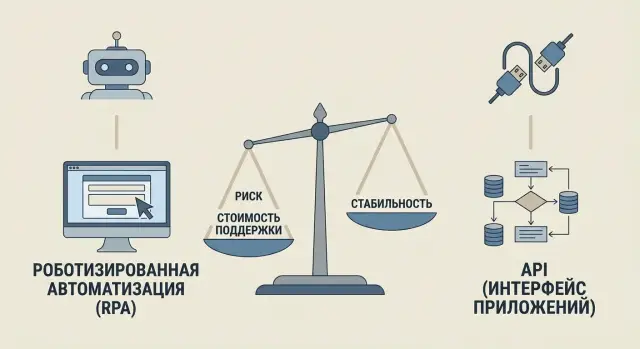
The dilemma: RPA vs API
Choosing between RPA and API integration often seems obvious: automate a process — deploy a bot; connect systems — build an API. In practice the line is blurry. The same business process can be implemented in two ways, and both may work on day one.
Problems start when you clarify what problem you're actually solving. If the goal is data exchange between systems (sending a request, a status, documents), that's integration. If the goal is to replicate a person’s actions in an interface (enter data in a form, click buttons, download a report), that's closer to RPA. But data exchange is sometimes "emulated" via the UI, and UI actions can sometimes be replaced by direct service calls.
Because of this, companies often compare only launch speed and implementation budget. That's a trap. It's important to evaluate support in advance: what will happen in a month, six months, a year when interfaces are updated, new fields appear, rules change or another system is added.
The cost of a mistake here isn't only "redoing" the solution. Automation failures often lead to a chain of consequences: processes stall (requests hang, deadlines slip), incorrect data appears (duplicates, gaps, wrong statuses), staff revert to manual workarounds (Excel and emails), and support and user load grow.
This is especially visible in organizations with strict reporting and availability requirements (public sector, finance, healthcare, education). There any failure quickly turns into a stream of reports and manual fixes.
The key question isn't "what is easier to do", but which approach will reliably work through changes. Usually three things decide: where it breaks, how much support costs, and how stable the interface or contract is.
Quick overview: what RPA and API are
When people say "RPA vs API integration" they compare two different ways to connect systems: one works through the screen, the other through official data exchange endpoints.
RPA (Robotic Process Automation) is a software "bot" that repeats human actions in an interface: opens windows, clicks buttons, copies field values, saves files. The bot relies on screen elements (text, positions, identifiers, images), so it needs the UI to be predictable.
API (Application Programming Interface) is an integration "by contract." One system sends commands and data to another in a predefined format: which fields to send, what responses to expect, and which errors are possible. If the contract is respected, exchange happens without the UI and without imitating clicks.
In practice both approaches appear in the same processes: accounting and finance, procurement, HR, document flow, banking operations. The difference is less about industry and more about whether a system has a proper API and how quickly a solution is needed.
Example: in procurement a request is created in one system and must be entered into another (for example, an accounting system). RPA fits if the second system has no available API or access cannot be obtained quickly. API integration is better if both systems can accept and provide data in a defined format and it’s important the process keeps working after UI updates.
Before starting it’s almost always useful to check basics: access and roles (no shared logins), logging (who sent what and where an error occurred), error handling (retries, notifications, task queues, exception handling), security (secret storage, access control, audit), and a test environment (so updates don’t break production silently).
Summary: RPA automates the path "how a person does it"; API automates the path "how systems agree."
Risks: where things usually break and why
RPA and API have different failure points. A bot’s weak spot is what it "sees" on the screen. An API’s weak spots are the agreements between systems (the contract), access, and service-side limits.
Where RPA usually breaks
RPA often fails due to small but frequent UI changes. Today a button moved a few pixels, tomorrow a field is renamed, the day after a new confirmation step appears — and the script no longer finds the needed element.
Common causes of failures:
- page layout and element identifiers change (buttons, fields, tables)
- popups, new warnings, extra confirmation steps appear
- CAPTCHA or stricter login checks get enabled
- timing issues: the system responds slower, a different window opens, the bot clicks too soon
- different application versions on workstations produce different UIs
Example: accounting used a system with no surprises, but after an update a “Save draft?” dialog appeared. A person will notice and click; a bot may hang.
Where APIs usually break
APIs tend to fail not "suddenly" but after changes on the service side. A method version changed, a field was renamed, validation rules were tightened, or a new authorization header became required. Sometimes the API is stable, but rate limits are introduced: too many requests per minute cause errors.
Another class of problems is contract mismatches. One system sends a date in one format, the other expects a different format. Or a status like "Canceled" suddenly arrives as "Cancelled", and processing logic fails.
Security and operational risks
RPA often requires storing logins and passwords for UI access. If these are embedded in scripts or left on a workstation without control, leakage risk is higher. APIs also have secrets (tokens, keys), but they are usually easier to rotate, restrict by permissions and audit centrally.
Operationally, the important question is who can quickly fix the integration. RPA often becomes "knowledge of a single person," especially if the bot was built for local settings. API integrations also depend on a team, but with proper documentation and tests they are generally easier to hand over and maintain.
To reduce risks, apply simple rules: limit privileges, store secrets centrally, keep error logs, and agree on who notifies changes to the UI or API versions.
Maintenance cost: what will cost more in a year
At the start RPA often looks cheaper: you can quickly assemble a script and get results without waiting for system developers. But after a year the picture often changes, because the main expense is not building but keeping it from breaking.
Typical costs include development, testing, licenses, infrastructure (VMs, accounts, access, logs, monitoring) and business time for approvals, training and acceptance. These apply to both approaches. After that, costs diverge.
RPA maintenance: many small fixes that eat the budget
RPA lives at the UI level. Any change to the screen, roles, popups, or even field order may require adjustments. Support often becomes constant "small repairs": update selectors, tweak waits, add a workaround for a new window, or redo the login.
Spending also goes to operational discipline: monitoring bots and queues, investigating failures and reruns, manual result checks, supporting users when a bot hangs. If interfaces change often, RPA maintenance costs within a year can easily exceed development costs.
API maintenance: fewer "fires", more rules
API integration is usually more expensive to build because you need agreements on data, access and error handling. But support is often more predictable: with a contract, changes can be planned.
Key maintenance costs for APIs are versioning, backward compatibility and automated checks. With contract tests and proper logging, most issues are visible before production. Errors still happen (limits, timeouts, schema changes), but they are usually visible in metrics and fixed without manual clicking.
Both approaches have hidden costs: incidents during business hours, manual reconciliations after failures, first-line support time, and unhappy users when "it works sometimes, it doesn’t sometimes." A practical rule: if the process is critical and must be stable, maintenance costs often favor API. If you need to quickly close a gap and changes are rare, RPA can be cheaper even after a year.
Interface stability: UI vs API contract
Debates about RPA vs API usually come down to stability. A bot runs on top of the screen and depends on how the UI looks and behaves. An API relies on an agreement about fields, error codes, and what counts as success.
UIs usually change more often than expected. A design update, new layout, font change or different tab order can break bot steps. Add varying screen resolutions, display scaling, localization (Russian/Kazakh/English) and user roles: the same form can look different for an accountant and an admin, and some fields may be hidden.
APIs are more stable if there is a contract. It defines fields and types, validation rules, error codes, timeouts, rate limits and versioning (e.g. v1/v2), and ideally a clear deprecation window. If availability is set by SLA, it’s easier to agree what happens during outages and how fast they are fixed.
To compare approaches objectively, agree on a few metrics and track them for at least a month:
- change frequency (how many UI or API releases in the period)
- availability (percentage of uptime)
- percent of successful runs (without manual help)
- mean time to recovery after an incident
- share of "silent" errors (process completed but data is wrong)
Signs of high break risk: no test environment, no documentation (for API) or no described scenarios (for UI), no logs or clear error messages, updates deployed without notice, and different system owners not coordinating releases.
Example: a bot fills a web form, but after an update a new mandatory checkbox appears visible only to some roles. For a human it's a minor detail; for an RPA bot it’s a stop. With an API such a shift is usually noticed earlier: a new required parameter breaks the contract and prompts a new version or a default value instead of a silent behavior change.
How to choose: a step-by-step algorithm
Choosing between RPA and API almost always comes down to what will run reliably in six months. Here’s a simple algorithm to decide by risks, support and stability.
1) Define the goal and process boundaries
Describe the process as it is: start and end points, participating systems, and common exceptions. Separately state the measurable goal: reduce processing time, cut errors, speed approvals, or increase control.
2) Check for a legal and secure path to data
Find out if systems have an API, integration module or officially supported export. It’s important not only whether you can connect, but whether it’s allowed: access rights, information security requirements, audit, personal data rules. If API access is impossible for policy or legal reasons, RPA often becomes a temporary bridge.
3) Assess criticality and acceptable downtime
Ask the process owner: what happens if automation stops for a day? If downtime is unacceptable (payroll, medical, finance, public services), relying on UI automation is riskier: any UI update can stop the bot.
4) Compare total cost of ownership for 12–24 months
Put development, testing, maintenance, licenses (if any), monitoring and change handling in one table. RPA usually costs more after launch: selector fixes, UI adaptations, incident investigations. API has a higher start cost, but maintenance is often cheaper if the contract is controlled.
5) Pick a pilot and agree support in advance
Select one flow with clear boundaries and run a pilot. Define an owner, system update windows and metrics: cycle time, error rate, manual intervention share, time to recover from failure.
Practical rule: if UIs change often and the process is critical, API usually wins. RPA is better when you need to quickly offload manual work and integration access is unreliable, but then monitoring and a clear fix plan are essential.
Real-life example: a request flows through two systems
Imagine this procurement scenario: an email arrives to a shared mailbox with subject "Purchase request." The email contains text with an amount and a deadline, and an attachment with specifications. These data must be entered into an accounting system (for example, an ERP or internal portal), attach the file and get a request number to send back to the requester.
How this looks with RPA
A bot behaves like a person: opens mail, finds new messages, copies fields (requester, amount, account, comment), opens the accounting web form and inserts values. Then it attaches the file, clicks "Create," copies the request number and replies to the email.
The advantage is a quick launch, even if the accounting system has no API or it’s difficult to get access.
Drawbacks appear in detail: the form changes (button moved, a new mandatory field, tab order changed) — and the bot stops. Other frequent failures are CAPTCHA, unexpected logout, changed email templates, or a new attachment type.
How this looks with API
Instead of screen clicks a small service runs. It receives the email (for example via a corporate mail gateway), parses subject and body, reads the attachment, validates required fields and creates a request via the accounting system’s API. The service then returns status: request number, validation errors, and what failed.
Stability wins here: if the API contract doesn’t change, the process continues to work even if the web form UI changes. But the start is usually harder: you need access, agreements, and sometimes changes in the target system.
Before choosing compare on this example:
- failure points (RPA — UI and auth; API — access, rate limits, contract changes)
- repair time (RPA often fixed quicker but more often; API breaks less often but may require dev work and coordination)
- audit (RPA must log steps and results; API makes it easier to store requests, responses and error codes)
- access control (RPA often runs under a user account; API fits service accounts and role-based access better)
If transparency and local IT control are important, this comparison is especially useful. In the public sector and finance predictable audit and clear access rules are valued, and API is easier to defend during inspections.
Common mistakes and traps when implementing
The common problem starts not with technology but with expectations. Teams pick "RPA or API" and then both options appear in the project without clear boundaries. As a result it’s unclear who is responsible for data quality, where to look for failure causes, and what to change when a system updates.
A typical trap: some steps are done by bots via the UI and some by API, but there’s no simple rule like "API handles data exchange and RPA only covers what the API cannot." When the UI changes the whole business process can break even though the API continued to work.
Another underestimated risk is maintenance. After launch you think the job is done, but the real work begins: app updates, new fields, role changes, password rotation, increased load. Without time and budget for support, automation becomes a firefight in 3–6 months.
Security mistakes are common too: passwords in scripts, robots given admin rights "just in case", logging disabled to "not annoy". In corporate environments this quickly leads to incidents, especially if a bot handles personal or financial data.
What people usually forget to check
Before launch, run through the minimum:
- Split responsibilities: what the API does and what RPA covers, and why.
- Plan support: who is on duty, how quickly you fix failures, and how changes are documented.
- Secure credential storage and give the bot only the rights it needs.
- Test on different workstations and accounts, including the most inconvenient setups.
- Set up monitoring and alerts: failures, hangs, execution time increases, input errors.
Small practical example
Suppose a bot transfers data from a request portal to an accounting system. On the test PC everything is perfect. In production you find another employee has different display scaling and interface language, the "Save" button shifts, the bot clicks in the wrong place and creates duplicates. With monitoring, alerts and multi-workstation tests you’d catch this on day one instead of at month-end.
In large organizations it’s crucial to agree in advance on support and control rules. As a system integrator, GSE.kz often sees that project success depends on these "small details", not on the tool choice.
Short checklist before starting
Before choosing RPA or API integration, spend 30 minutes answering a few questions. They quickly reveal higher risks and where maintenance will be costlier.
Start with the integration’s "official status." If a system has a documented API, find out who owns it and who is responsible for its stability: your contractor, an internal team, the vendor or a government platform. When "nobody is responsible" any change becomes an urgent rework.
Then assess how often interfaces change and how releases are published. For RPA it’s critical how often the UI changes: buttons, fields, step order, mandatory checks. For API the key is contract changes: versions, required fields, error codes. Ask a simple question: how are change notifications delivered and is there a period when the old version still works?
Check testing and safe execution capability:
- is there a test environment (staging) and data to verify integration without risking production?
- can you run automated checks before release, at least basic ones (create, update, get status)?
- is there a release schedule and a compatibility check window?
- who signs off on tests: business or IT?
- how are rollbacks handled if something breaks?
Discuss security and action control:
- where will secrets be stored (not in files or code)?
- how are accesses separated (separate accounts for robot/service, minimal rights)?
- will action logs record who started what, what changed and which data were accessed?
- how is personal data handled and where are logs stored?
Finally, readiness for incidents:
- who is on incident duty (your team, contractor, vendor) and how fast do they respond?
- what’s the recovery target (SLA) and what counts as "recovered"?
- is there monitoring: alerts for failures, queue growth, authorization errors?
Mini-scenario: imagine one night the authorization form changed in a system. With RPA the bot may stop until morning when someone fixes it. With API, if a contract was changed without backward compatibility, the service may fail but the cause is usually easier to find in logs. This checklist helps see which risk is closer for you and what to prepare before starting.
Next steps: a 30-day plan and where to get help
Start with a clear process map. Take 10–20 operations that hurt most and mark for each three things: business criticality, frequency (how many times per day or week), and the number of exceptions. Often this already shows which tasks are better solved by API and which can be temporarily handled by RPA.
A simple 30-day plan reduces the risk of "launched but nobody maintains it":
- Days 1–5: list processes and choose a pilot candidate (clear benefit, moderate exceptions).
- Days 6–10: assign a process owner (business rules) and an integration owner (technical changes).
- Days 11–15: for API, agree versions, error formats and change notification rules (who notifies, how many days in advance, what’s critical).
- Days 16–20: for RPA, standardize workstations (app versions, rights, screen resolution) and enable monitoring with clear alerts.
- Days 21–30: run the pilot, measure time, error rate, manual interventions and decide whether to expand, change the approach or combine methods.
To avoid an endless experiment, agree success criteria in advance. For example: no more than 2% failures per week, recovery within 30 minutes and a clear plan for UI or regulation changes.
Where to find help depends on scale. Small teams may only need an analyst and an engineer. Complex projects benefit from a systems integrator who ties security, infrastructure, support and change management together.
If you need a full stack (integration plus infrastructure and support), consider a model where one partner provides hardware and operations. GSE.kz, for example, offers system integration, managed workstations and servers, and 24/7 technical support through a service network. This format is convenient when you need not just to launch automation but to keep the process stable for months.
Frequently asked questions
When is API a better choice and when is RPA?
If you need reliable data transfer between systems (create a record, update a status, get a result) and there is a supported data exchange interface, choose API. If there is no API, access cannot be agreed quickly, or you need a temporary way to remove manual work done through the screen, it makes sense to start with RPA.
Why does RPA often break after updates?
RPA breaks more often because of interface changes: a button moved, a new mandatory field appeared, the step order changed, a confirmation dialog popped up, or the login flow changed. Small changes a human handles automatically can stop a bot.
What most often causes API integrations to fail?
API usually breaks when the contract or rules on the service side change: method versions, field formats, required parameters, new authorization requirements, or rate limits. Another common issue is mismatched expectations: one system sends data in one format, the other interprets it differently, producing wrong statuses or duplicates.
Which is usually more expensive after a year: RPA or API?
Compare ownership cost over 12–24 months, not just the launch budget. RPA often has a cheaper start but higher maintenance costs due to frequent fixes and incident handling; API tends to be costlier to set up but usually cheaper to maintain if the contract is managed and tests are in place.
Can RPA and API be combined in one process?
Combining them is fine if the boundaries are clear: use API for data exchange and RPA only for things that can’t be done officially. If you mix them without rules, it becomes unclear who is responsible for data quality, and a UI change can break the whole process even though the API still works.
Which metrics help show that a solution is unstable?
Start with simple metrics: availability, percent of successful runs without manual intervention, mean time to recovery after an incident, and the share of “silent” errors where the process completed but data went wrong. These metrics quickly show whether the weak point is the UI, authorization, the contract, or load.
How to securely organize access for RPA and API?
Do not use shared logins or store passwords in scripts or files. Give the bot or service the minimal required privileges, enable action auditing, centralize secret storage, and decide in advance what can be logged—especially when handling personal or financial data.
What testing is needed so updates don’t break automation unnoticed?
A test environment where you can run scenarios without risking production, and basic checks before a release. For APIs, validate request and response formats; for RPA, run tests with different roles, UI languages and workstation settings so changes aren’t discovered at the last moment.
How to choose for critical processes where downtime is not allowed?
If downtime is unacceptable (payments, reporting, medical processes), prioritize predictability: API with clear error handling, task queues, retries and monitoring. Use RPA as a temporary bridge or for noncritical steps that won’t block the whole process if they stop.
How to organize support after launch so you’re not always fighting fires?
Assign a business owner for the process and a technical owner for the integration, agree change windows and notification rules. Also define incident on-call responsibilities and recovery times. That governance matters more than the tool choice. If you need full-service (infrastructure, security, 24/7 support and integration), working with a systems integrator is often simpler.
