8 min read
Resilience of on-prem applications: sessions and cache
Practical techniques to improve resilience of on-prem applications: sessions, sticky sessions, state, cache, feature degradation and actions during failures.
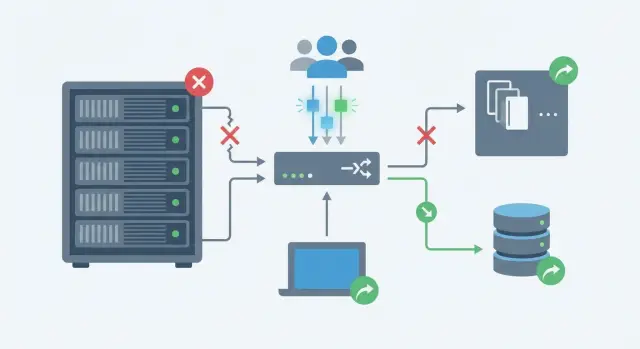
Where state is usually lost and why it matters
A failure rarely looks like a complete system outage. More often a single application node crashes or a dependency starts to fail. State is what makes the problem visible: a user has logged in, selected something, clicked a button, and the service suddenly “forgets” them.
The most painful spots are almost always the same. During a brief connectivity glitch a user sees a logout, the cart becomes empty, payments show "please try again", search sometimes returns results and sometimes not. Usually this is not because the code got worse but because the state was tied to a specific process, node memory or an unstable dependency chain.
There’s an important difference between a node crash and degraded dependencies. If one instance dies, the load balancer routes requests to another, but you lose local session, local cache and in-memory counters. If nothing dies but the cache, database or external service responds slowly, the app is technically "alive" while the user experiences timeouts, retries and strange delays.
Typical symptoms:
- Login succeeds, but the next request asks for authorization again.
- Cart or filters are reset after a page refresh.
- Payment hangs or returns an error and order status is unclear.
- Search and catalog sometimes show nothing or stale data.
- Errors come in waves during traffic peaks.
The problem is that these scenarios are hard to reproduce locally. They surface in production on real on-prem clusters and servers where network glitches, process restarts and dependency delays happen regularly, even if briefly.
Goals and boundaries: what we count as failure and what must be preserved
To prevent resilience work on an on-prem application from turning into a never-ending project, agree the goal first. Not "so it never fails", but that key user actions keep working even if individual nodes fail.
Start with critical flows. For an internet bank that’s "log in and see your balance", for a government portal it's "submit an application", for an internal system it’s "create a ticket and not lose data". For each flow define what counts as failure for the user: 500 error, long load, logout, lost cart.
Then pick two metrics:
RTO — how long the service can be partially unavailable while you switch or recover (e.g. 5 minutes).
RPO — how much data you can afford to lose in a failure (e.g. 0 for payments, 5 minutes for analytics).
List components where failure can occur to avoid arguing later whether the load balancer is considered. Typical chain: load balancer and DNS, web nodes (application), session store and cache, database, external services (mail, SMS, payments, LDAP).
Finally, categorize state by importance:
- Session — "who you are" and sometimes "which step you’re on".
- Cache — an accelerator that can be rebuilt but affects latency and load.
- User data — things you cannot lose (orders, documents).
- Temporary data — things acceptable to lose (drafts, non-critical progress).
Example: if the cache fails you can temporarily disable recommendations and advanced search, but login and saving an application must work, albeit slower. That compromise is the boundary: what you keep at all costs and what you degrade to keep the service alive.
State model: sessions, cache and data you mustn't lose
Resilience often breaks not on hardware but on state. It's useful to split application data into three layers: session, cache and the "source of truth" (persistent data).
A stateless approach better survives node failures: any request can be handled by any server. Fully stateless isn’t always possible, but a practical step is to make stateless everything that doesn’t need memory between requests: page rendering, reading reference data, fetching product lists, search, generating reports from already saved data.
Session is what the user needs "right now": who they are, their permissions, what step they’re on. Sessions can be stored in different ways, and the choice affects behavior on failure:
- Node memory (fast, but everything is lost on restart and requires sticky sessions).
- Shared store (distributed session storage) — survives node failures but adds network dependency.
- Tokens (e.g. signed) — minimal server state, but harder to revoke and control.
- Database — reliable but higher latency and load.
Cache is an accelerator, not the source of truth. It can be local (in-process), distributed, an HTTP cache on a proxy, or an application-level cache. Decide ahead what happens if the cache is cleared or unavailable: the system should slow down but not rewrite history.
A simple rule about losses on restart: it's acceptable to lose search result caches or warmed reference data; it’s unacceptable to lose confirmed operations, access rights, payment statuses or voting results. If a user fills a long form, the draft should live in the DB (or a reliable draft store), not in node memory — otherwise server failure becomes data loss.
Sticky sessions: when they fit and what they cost
Sticky sessions are a load balancer setting where the same user is routed to the same application node. This is usually implemented by cookie, IP or a special identifier. Often it’s the fastest way to make an app that stores state in-process work.
The benefit is obvious: fewer dependencies. You don’t immediately need a shared session store, fewer network calls, simpler debugging. For on-prem resilience this is attractive because you can survive increased load without big code changes.
The cost is also clear. If a node fails the user loses their session and must log in again or repeat steps. Scaling becomes less predictable: you can’t freely redistribute traffic and a "hot" node may become overloaded while others sit idle. Rolling updates are harder: some users are “stuck” to a node so you can’t gracefully drain it.
Sticky sessions are justified when the risk of session loss is acceptable: sessions are short, re-login isn’t critical, the feature doesn’t handle money or affect security, traffic is relatively even, and you have a migration plan.
Plan the migration so the temporary fix doesn’t become permanent:
- Move sessions to a shared store and keep only a key in the cookie.
- Minimize session payload: token, roles, a few flags — not large objects.
- On session loss persist drafts and steps in the DB.
- Test node failure: what breaks for the user and how many requests must be retried.
- Roll out gradually: some users without sticky, some still with sticky, track error metrics.
With a plan, sticky sessions become a controlled transition rather than a trap.
Step by step: making sessions resilient to node failure
Resilient sessions start with a simple rule: a web node must be replaceable. If one server dies, another should continue as if nothing happened. This is vital for on-prem resilience where updates, power outages and network issues are more common than you'd like.
Steps to configure
-
Choose a session store model. Either a shared session store (separate service or DB) or stateless sessions via tokens verifiable on any node. Shared stores are simpler for complex scenarios; tokens suit small-session payloads.
-
Keep sessions minimal. Store only identifiers: user_id, roles, cart_id or draft_id. Keep heavy items (cart contents, form steps, files) in the DB or a dedicated draft store so node restarts don’t wipe progress.
-
Configure TTL and refresh rules. TTL should match real user behavior (longer for long forms). Rotate session identifiers after login and sensitive actions, and clearly invalidate on logout or password change.
-
Limit size and write frequency. Growing sessions cause latency and errors. Set a size limit (e.g. kilobytes) and write changes only when needed, not on every request.
-
Plan behavior on store failure. If the session store is temporarily unavailable, it's better to return a clear message and switch some features to read-only than to create uncontrolled new sessions and duplicates.
How to verify it works
Simulate a real failure: a user fills a 5-step form, you force one node to stop (or restart the service) and continue on another node. The correct outcome: the user remains logged in, the draft is intact, and at most one request retry happens without data loss. If you run on-prem infra and integrations (as many GSE.kz customers do), include such tests in regular pre-release runs.
Cache without surprises: TTL, warming and avalanche protection
Cache speeds up frequent reads and shields the DB from peaks. But a poorly configured cache causes incidents: mass key expiry, avalanche of DB queries and flaky availability.
First agree what you cache and why. Good candidates: reference data, access rights, product cards, heavy report results. Bad candidates: rapidly changing critical values like balances or transaction statuses.
For writes choose among three patterns. Cache-aside (app reads cache and on miss fetches from DB and populates cache) often fits on-prem. Write-through (write to cache and DB synchronously) offers fresher reads but is more complex. Write-behind (write to cache and persist to DB asynchronously) is risky when data loss isn’t tolerable.
TTL and warming without mass expiry
TTL should reflect data meaning: minutes or hours for reference data, seconds for dynamics. Add jitter (random add/subtract to TTL) so keys don’t expire simultaneously and cause a spike.
Warm only truly hot keys. After a node restart prefill cache for top reference data and roles; let the rest fill on demand.
Avalanche protection and plan for cache failure
When a key expires hundreds of requests may hit the DB at once. Use simple techniques: single flight (one request recalculates while others wait), short key locks with timeouts, soft TTL (serve slightly stale value while recalculating), limit DB parallelism on cache misses, negative caching for not-found.
If cache is unavailable, fall back to DB reads but with limits: rate limits, queues, simplified responses for heavy pages. It’s better to slow down and trim secondary features than to take down the DB and the whole service.
Consistency: what you can relax and how to avoid data loss
Consistency is an agreement: which data must be exact now and which can be slightly stale. For on-prem resilience decide these rules in advance; otherwise cache or node failures result in double charges or complaints about "missing" changes.
Where strict consistency is required
Strict consistency is needed where an error creates legal or financial risk: payments, limits, access rights, order confirmations, token issuance. These operations should use the source of truth (usually the DB) and be protected from retries.
Elsewhere moderately stale data is often acceptable: product catalogs, news feeds, available slots, aggregated metrics. Serve these from cache even if updates lag, provided you’ve agreed an acceptable staleness window.
How not to lose data with cache and retries
Main risk is cache-DB divergence and duplicate writes. Don’t make the cache a second source of truth. If a write reaches the DB, refresh the cache from the DB or update it by rule.
Working practices:
- Idempotency for writes: an operation has an idempotency key (e.g. UUID). Retry won’t create duplicates and returns the original result.
- Invalidate by event: after DB commit publish "object updated" and readers clear cache by key.
- TTL as backup: if an event is lost, the cache entry will expire on its own.
- Versioning: store entity version or timestamp. If cache has an older version, don’t treat it as current.
- Use write-through carefully: update cache after DB commit and be prepared for occasional cache misses.
Example: in an on-prem cluster (for example in racks with GSE S200), a node restarts and a client retries "create ticket". With idempotency the ticket isn’t duplicated and the cache updates on event. If the event is lost the TTL ensures the list corrects itself in time.
Document tolerances: what can be stale, by how many seconds or minutes, and what the user sees (e.g. "list updates within 30 seconds", "payment status only from DB").
Functional degradation: keeping the service alive when components fail
Functional degradation is a planned mode where some features are turned off but the core remains available. The idea: better return a core operation in 1–2 seconds than hold a connection for 30 seconds and then fail.
Define degradation levels and the core. For an internal portal core might be login, viewing a card, creating a ticket. Recommendations, history, hints, advanced search and heavy dashboards can be the first to go.
Modes are convenient to describe as:
- Normal: all features available, cache and external dependencies operating.
- Light degradation: disable secondary features, keep reads and basic creates.
- Heavy degradation: disable heavy operations (search, reports), keep basic flows and simplified screens.
- Emergency: only critical actions, everything else closed with a clear message.
Ensure one failing component doesn’t ignite others. Use short timeouts and limits so requests finish quickly instead of piling up. Circuit breakers stop calling a dependency that’s already down and switch to fallback (cache, simplified response, queue).
Practical example: search depends on a separate service and cache. If cache fails switch search to "minimal" or hide it from the UI, while order placement continues to work.
Prepare timeouts for each dependency, an overall request time budget, circuit breakers with clear thresholds and recovery times, queues for non-urgent tasks (notifications, indexing), clear user messages, and safe retries (idempotency or request keys).
Common session and cache mistakes that surface in production
The most common state problem is unnoticed growth. Sessions accumulate profiles, rights, carts and query results — all stored in a node’s memory. On restart users get kicked out and load spikes as every request recalculates what used to be in session.
Sticky sessions are often treated as insurance though they’re a convenient crutch. While nodes are healthy everything looks stable. When a server dies some users land on another node without their session. Without regular failure tests these scenarios are only discovered in production.
A typical cache mistake is a single TTL for everything. Data of different nature (reference, auth, stock, tariffs) expires simultaneously and the cache drops to zero. Without jitter you get a DB avalanche.
Another category: failure behavior. No timeouts, infinite or too-aggressive retries multiply problems: instead of one slow component the whole chain fails. Ensure code and clients have safeguards: timeouts for each network call and cache access, limited retries with backoff and total time limits, thundering herd protection (key lock, single flight, queues), and clear fallbacks.
The most costly error is treating the cache as the source of truth. If critical data lives only in the cache, restart, flush or node change becomes data loss. Rule: cache accelerates but does not store what you cannot afford to lose.
Short checklist before release and load tests
Before release run checks that quickly show whether the app survives node failure, cache problems and peak load. Do this on a staging environment close to production and record what breaks, recovery times and which features to cut under failure.
Quick resilience checks
Verify you can restart a single node without side effects for users. Scenario: a user logs in, adds an item to the cart, opens another tab and acts further. Restart one node. Expected: login persists, cart remains, retries don’t create duplicates.
Also test cache unavailability or slowness. Implement strict timeouts and default behavior: show slightly older data, disable secondary blocks, but don’t hang the whole request. Measure latency changes and how many DB queries occur during degradation.
Under load: what fails first
Under load the key expiry avalanche often surfaces: many requests recalc the same value. Verify protections (TTL jitter, recalculation locks, stale-while-revalidate) and ensure recalculation doesn’t exhaust DB connection pools.
Separately test idempotency of critical POSTs (payments, ticket creation, debits, reservations). Simulate retries from load balancer or client and confirm no duplicates.
Finally confirm monitoring and alerts are actionable: p95/p99 latencies, error rates, cache and DB timeouts, queue lengths, and clear thresholds. For on-prem infra ensure alerts arrive before users notice issues.
A real example: surviving a node crash and cache problems
9:05 AM. Employees flood the internal portal: timesheets, tickets, approvals. Peak lasts 20–30 minutes. The app runs on-prem on two nodes behind a balancer and a separate cache cluster. The DB is single and tends to slow down at peaks.
That day one application node crashes (e.g. memory leak). Almost simultaneously the cache responds slower: request queues grow and some cache writes time out. User impact depends on session design.
With sticky sessions and in-memory sessions some users immediately see a logout or lost draft. They retry login and repeat operations, further loading cache and DB. The balancer routes new users to the healthy node, but those stuck to the failed node lose state.
Without sticky sessions and with sessions in a shared store (cache or session store), a node crash looks like a short pause and a single retry. The user stays logged in and the healthy node picks up the session.
Degradation then helps. When monitoring detects rising cache errors and latency, the app disables secondary blocks: news feed, widgets, suggestions, background recalculations. Core features remain: login, main forms, submitting applications. If cache is down, reads move to simplified DB queries (no personalization) and critical writes go directly to DB with frequency limits.
Success is visible in metrics: share of 5xx and timeouts on key endpoints (login, form submit), p95 response time, forced logouts and session recreations, cache hit ratio and latency, operation error counts, DB load (QPS, locks, query time). If users mostly continue and DB stays out of the red, the chosen state and degradation scheme held up.
Next steps: implementation plan and infrastructure checks
To make on-prem resilience more than paperwork, start with a short work plan. Goal: map where state lives, how it survives failures and what users see if a component disappears.
First, create a map of components and dependencies. Don’t draw a perfect architecture — honestly note where state lives: sessions, cache, local service memory, files, queues, background jobs. Focus on the 2–3 riskiest places that break the experience.
Then define an implementation sequence:
- Pick 2–3 state points that affect login, cart, access or payments.
- Describe what happens on node failure: how sessions recover, sticky sessions plan, what users see.
- Define degradation modes: what to disable first and what to keep always.
- Add "economy rules": on rising errors or latency reduce load, shorten timeouts, enable simplified responses.
Plan failure tests as repeatable procedures: stop a node, disable cache, inject network delay. These tests quickly reveal if your on-prem resilience matches reality or is just luck.
What to check in on-prem infrastructure
Session and cache resilience depends on hardware and platform: redundancy, clustering, spare CPU/RAM/disk, separate networks for storage and services, limits and monitoring.
Practical benchmark: if losing one node prevents you from sustaining required load, degradation will be chaotic rather than graceful.
If you need an outside view on architecture and server selection, system integrators usually handle this. GSE.kz provides supply, integration, 24/7 support and experience building infra on domestic hardware — convenient for organizations requiring local vendors and supply transparency.
Frequently asked questions
Почему при сбое одного узла меня разлогинивает или пропадает корзина?
Most often what’s lost is what’s stored in a particular node’s memory: the session, local cache, counters and temporary form steps. When the server restarts or the load balancer directs the user to another node, the state stays on the old node, which causes logouts, empty carts and unclear repeated operations.
Стоит ли включать sticky sessions в on-prem кластере?
Sticky sessions are a reasonable temporary measure when the app keeps state in memory and you can’t quickly refactor. But if a node fails, some users will inevitably lose their session and load balancing becomes less effective. It’s better to plan migration to a shared session store or tokens.
Что именно можно хранить в сессии, чтобы не было сюрпризов при рестарте?
A simple rule: keep only identifiers and minimal flags in the session, and store everything heavy in the database or a reliable draft storage. That way a server restart won’t erase progress and another node can pick up the user without data loss.
Что выбрать для сессий: общий стор, токены или базу данных?
If the session contains little data and you don’t need fast revocation, signed tokens are convenient because any node can verify them. For complex scenarios, revocation, step-by-step workflows or centralized control, a shared session store is easier — but design short TTLs and clear behavior for outages.
Как настроить кэш, чтобы он не создавал инциденты сам по себе?
Start from the principle that cache is an accelerator, not the source of truth, and cache failure must not break critical operations. Use different TTLs depending on data meaning and add jitter so keys don’t expire simultaneously and trigger a thundering herd.
Как избежать thundering herd, когда один ключ истек и все пошли в БД?
Simple protections work: single-flight (one request recalculates while others wait), a short lock on the key with timeout, and serving slightly stale data while recalculation happens. Also limit parallelism to the database on cache misses so you don’t exhaust connection pools.
Что делать, если кэш стал медленным или недоступным?
By default switch to reading from the database with limits and trim heavy features rather than trying to endure and crashing the DB. Set strict timeouts for cache and dependencies and enable a degradation mode with simplified responses and rate limits.
Где нужна строгая консистентность, а где можно позволить устаревшие данные?
Decide up front where strict accuracy is required: payments, access rights, confirmations and limits must be sourced from the truth (usually the DB) and protected from retries. Other areas can tolerate slightly stale data if you accept and document the window.
Как защититься от дублей при ретраях и непонятных статусах операций?
Make critical writes idempotent with an operation key so retries don’t create duplicates. Update or invalidate cache after DB commit and use TTL as insurance so the cache self-corrects if an event is lost.
Какие тесты нужно сделать перед релизом, чтобы убедиться в отказоустойчивости?
Test practical scenarios: log in, fill a form, restart one node and continue on another without losing drafts or being logged out. Separately, disable or delay the cache and verify the system degrades gracefully while monitoring p95/p99, timeout rates and DB load.
