8 min read
Life cycle of a repair work order: statuses and quality control
Repair work order life cycle: statuses, control points, acceptance checklist and escalation of delays for operations teams.
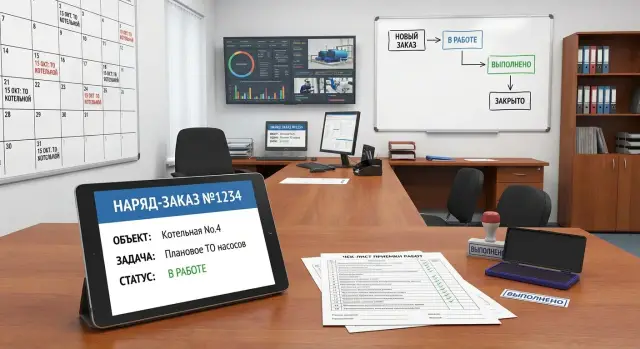
Why a clear work order life cycle is needed
Repairs usually "break down" not because of tools or even people, but because responsibility gets passed around. A request arrives by phone, the technician switches to another site, a part is ordered "verbally," and then no one can say: what has been done, what hasn't, and why the deadlines slipped.
When statuses are undefined, chaos begins: one person thinks the job is already in progress, another waits for approval, a third is sure it's "almost done." Verbal agreements leave no trace. As a result, downtime, conflicts with the requester, repeat visits and rework increase.
A clear repair work order life cycle turns a set of actions into a manageable process. One work order links the request, diagnosis, work plan, materials, performers, quality control and closing documents. This helps keep deadlines, see bottlenecks and honestly assess workload.
A good order regulation answers practical questions: who and how accepts a request and what is considered "complete"; who confirms priority and deadlines and what to do when things change; where diagnosis, work plan and parts needs are recorded; at which points quality checks are required and who decides; according to what rules the order is closed and what counts as "accepted."
Even a simple scheme with standard statuses and control points reduces losses: fewer requests "get lost", waiting becomes transparent, and quality is easier to verify before the asset goes back into downtime.
Roles and responsibilities in the work order system
Clear roles in a repair work order are not about bureaucracy but about always knowing: who accepted the task, who is responsible for deadlines, and who confirms quality. If this is not fixed, statuses start to "jump", deadlines move without reason, and it's hard to find where the delay originated.
Key roles
A work order usually passes through several participants. It's important that each has a clearly defined responsibility:
- Initiator (user, shop floor, division) creates the request and describes the problem: symptoms, location, priority.
- Dispatcher (Service Desk) checks request completeness, assigns a performer, sets a target deadline and manages the queue.
- Technician/engineer performs diagnosis and work, records actions and actual time spent.
- Warehouse/procurement confirms availability, issues parts, marks reservations and delivery dates.
- Contractor (if engaged) accepts the task and reports by stages.
- Acceptor/quality controller (often shift supervisor or the customer's representative) inspects the result and authorizes closure.
Responsibility is best recorded directly in the order: full name, shift, division, time of acceptance into work and time of handover between roles.
Who can change what
Change rights should be governed by rules, not "agreements":
- Statuses are changed only by assigned roles (for example, the performer sets "In Progress", the acceptor sets "Closed").
- Deadlines are moved by the dispatcher or manager, but only with a reason (waiting for parts, access to the site, approvals).
- The performer can request a deadline change but cannot approve it.
Simple example: an engineer finds the repair impossible without a new part. He moves the order to "Awaiting parts", the warehouse confirms the date, and the dispatcher updates the deadline and records the reason. The history shows who held responsibility at each step.
Work order statuses: a basic set and the meaning of each
To prevent a work order from bouncing between people and chats, a short set of statuses is enough. The main rule is that each status should answer one question: what prevents closing the job right now and who is next in the chain.
A minimum set that usually works almost everywhere:
- New: the request is registered; assignment and initial assessment have not been done.
- In progress: the performer has started; diagnosis or repair is underway and a clear next step exists.
- Awaiting parts: work is stopped due to material supply (order, delivery, issue from warehouse).
- For acceptance: repair is complete and quality check and confirmation are required.
- Closed: result accepted, facts recorded (what was done, with what, time spent, which parts).
- Canceled: closed without execution for reasons (duplicate, wrong request, no longer relevant, client refusal).
"Paused" and "Awaiting parts" are not the same
Use "Awaiting parts" only when there is a concrete need for parts and a clear supply process. "Paused" (if you use it) means a pause for any other reason: no access to the site, pending approval, waiting for a downtime window, priority lowered.
If you mix reasons in one status, later it becomes impossible to understand where the real problem is: in the warehouse, in approvals, or in planning.
How not to drown in statuses
A common mistake is creating statuses for every little nuance. It's better to keep 6–8 states and store details in fields: reason for waiting, responsible party, date of next action.
A practical rule: add a new status only if it changes the work order's route (who is next) and the control deadlines.
Step-by-step life cycle: from request to closure
A clear repair work order life cycle helps avoid lost requests, assign technicians on time and close jobs with confirmed quality.
Start with proper intake: record the asset, exact location, symptom description, contact and preferred access time. If possible, add a photo or equipment number. Then make an initial classification: category (electrical, IT, HVAC, etc.), criticality, impact on people and process, signs of an emergency.
Then move to planning: assign a performer, set a work window and deadlines, check materials and tools, note permits and approvals.
The key is to manage the order so that the course of work and the result can be reconstructed. In "In progress" record actual actions, replaced parts and consumables, reasons for deviations from the plan, and downtime (including waiting for access). At acceptance confirm the result on site: safety (no exposed conductors, no leaks, no overheating), cleanup, return of equipment to normal mode, signatures or confirmations.
Closure is not just a status but a recorded outcome: what was done, how much time was spent, what materials were used, the root cause (if known) and what should be done to prevent recurrence.
Example: a request "printer not printing" becomes a work order categorized as "IT", priority "medium" and planned for 2 hours. The history shows that the cause was not the cartridge but paper jam and dirty rollers. This is useful for prevention and reducing repeat requests.
Mandatory control points and quality checks
To avoid turning the process into a "black box," the order needs fixed control points. These are moments when someone must check quality and risks, and the result of that check must remain in the order: a mark, a comment, an attachment, a signature.
Control points that keep the process running
Below is a set of checks suitable for most jobs—from office equipment to engineering systems:
- Request intake check: address, contact, symptoms, priority, photo/inventory number (if applicable).
- Before starting work: permits and safety confirmed, downtime agreed, materials and parts understood, plan approved.
- During work: intermediate check after a key step (for example, after replacing a module), with photos if needed.
- Before handover: performer's self-check using a checklist, clean the area, return access and seals.
- After closure: monitor repeat requests and analyze causes.
Each checkpoint must have an owner. For example: the dispatcher is responsible for intake, the technician for self-check, shift supervisor for permits and risks, and the customer or site representative for final acceptance.
What counts as "proof of quality" in the order
Words alone are not enough, especially if disputes or repeat failures are possible. Require a minimum set of confirmations depending on the type of work:
- "Before/after" photos or screenshots of settings when repair involves configuration.
- Measurement results, tests or a short diagnostic note.
- Serial numbers of replaced parts and what was installed instead.
- Safety note: permit, power isolation, return to normal operation.
- Signature or acceptance confirmation (with comment if there are issues).
If a repeat request arrives within an agreed period after closure, use it as a reason to check quality at the previous checkpoints: where was the root cause, risk or verification missed?
Acceptance checklist for completed work
Acceptance ensures the order is closed based on facts, not words. The approach is the same for a small request (replace an outlet) and for complex repairs. The end of the process must rely on clear answers: what was done, how it was checked, and who accepted it.
Minimum checks before closing
Five blocks that resolve most disputes:
- Compliance with the task: what was completed, what was not done, which changes were approved and by whom.
- Safety and order: the location is safe, electrical parts are de-energized or protected, the area is cleaned, waste and old parts disposed of according to rules.
- Functionality: tests/measurements were performed, trial run, short observation after start (e.g., 10–15 minutes).
- Work quality: no play, leaks, overheating, or strange noises; all covers and housings are in place.
- Communication: the initiator understands the result and limitations (what not to do, what to monitor, when to recheck).
If there's a question in any block, return the order for rework with a comment and a deadline.
Documents, records and signatures
Even for small repairs leave traces of the work. This helps with warranty cases and analyzing repeat failures:
- Documents: an act or a record in the system, "before/after" photos if needed, serial numbers and a list of replaced modules.
- Accounting: materials (actual vs planned), labor hours, contractor work and confirmation of its volume.
- Signatures: performer and acceptor; initiator or equipment owner if the node is critical.
Example: when replacing a PC power supply the acceptor records old and new serial numbers, runs a short stress test, confirms no errors at boot, and only then closes the order.
Deadlines and SLAs: how to set and honestly track them
SLA in work orders is needed so everyone knows when to expect action and when to involve management. Instead of one overall deadline, it's convenient to keep several separate deadlines.
Usually five are enough:
- response (time to first contact or acceptance of the request),
- assignment of the performer,
- start of work (when the technician actually started),
- recovery (when the asset is back in operation, even as a temporary fix),
- closure (when results are documented and acceptance confirmed).
Set deadlines by criticality and asset type. For a non-working POS or server the recovery SLA is usually shorter than for a planned office PC repair. Rules should be the same for everyone and clear in advance.
Deadline changes are allowed but only as a formal operation, not a "silent" shift. Allow a change if there's a brief reason, a clear approver (process owner or client), a recorded realistic new deadline and what exactly is blocking the work (access, supply, shutdown, external contractor). Notify the user or responsible person.
When the order is overdue, record facts not emotions: at which step it got stuck, how long was spent waiting, and what was done before the stop. This helps compute metrics honestly and avoid blaming the performer for external causes.
A separate rule: do not close an order without confirmed result. Minimum — a record of performed work, the test (what exactly was checked) and acceptance confirmation from the client or asset owner.
Escalation scheme for overdue work: rules and scenarios
Escalation is not about punishment but about preventing missed deadlines and quality loss. It's best when built into the work order life cycle and triggered by time and events.
Triggers and who to notify
It's convenient to tie escalation to a share of the planned deadline:
- 50% of the deadline passed and work not started or no confirmed plan — notify the technician;
- 80% passed and progress below expected — notify the technician and area manager;
- deadline passed — notify the area manager and operations, and inform the client;
- a risk causing delay is identified (no parts, access blocked, permit needed) — escalate immediately, don't wait for 80%.
After escalation there should be a new plan, not just "noted."
Message template and what to record
The message should be short and consistent. Minimum:
- work order number and asset/node;
- what exactly is at risk (deadline, safety, equipment downtime);
- delay reason, confirmed by a fact;
- action plan: who does what and by when;
- new expected deadline and what is needed from the recipient (decision, resource, access).
If delays repeat, rules should become stricter: change the performer or crew, raise priority, involve a contractor, analyze causes at management level. Each recurrence must be recorded in the order: who made the decision and why.
Exceptions are possible but must be documented: reason, who approved, new deadline, compensating measures (for example, a temporary fix or bypass). This keeps discipline and prevents delays becoming normal.
Metrics that show the real picture
Metrics are not for reports alone. They show where time is lost and where quality suffers, even if everything "feels" like it's working. Indicators should be read the same by all participants and tied to statuses, otherwise the process becomes a set of scattered actions.
Basic speed and discipline indicators
Minimum to answer "how fast and predictably do we close work orders?":
- average and median time to close (separately by work type and assets);
- share of SLA breaches (by performer, shift and contractors);
- share of repeat requests for the same problem;
- time spent in waiting statuses (how long orders stand without actual work);
- first visit without result (if applicable).
To keep metrics honest, record the reason for moving to waiting and require a comment for pauses longer than, say, 2 hours.
Quality indicators, not "feelings"
Quality shows through acceptance and returns: how many works fail acceptance, how many defects are found after closure, how many warranty cases appear within the defined period.
Also look at workload: orders per person, by shift, by site. High load without a rise in breaches is good; high load with rising returns indicates overload and risk of mistakes.
Record downtime reasons as a top-4 list (for example: parts, access, approvals, lack of specialists). Then it's clear what to improve first.
Example scenario: one work order from request to closure
A packaging line stopped: an industrial PC at the operator station won't boot, preventing the shift from starting tasks. The dispatcher creates a request and immediately assesses the impact: downtime costs money, so priority is high.
The request is filled briefly but fully: symptoms ("won't boot, cyclic reboot"), location (shop, section, station number), contact, access conditions (when to approach, permit needed) and attachments. A photo of the error screen and the inventory plate often save time on site.
Planning takes a few minutes: assign a technician, set an immediate window, check parts availability (SSD, power supply) and agree the shutdown with the shift supervisor. If parts are missing, record a plan B: temporary replacement or transfer.
Statuses change along the chain and comments keep decision traces:
- New -> accepted for work ("called the section, access confirmed")
- diagnosis ("SMART: drive degrading, recommend replacement")
- awaiting parts or approval ("replace SSD, approved by technician")
- In progress ("replace SSD, deploy image, boot test")
- ready for acceptance ("line started, observe 15 min")
- Closed (after acceptance)
Acceptance is on site: the section representative confirms the line runs, errors do not repeat, and settings (accounts, network, printer) are restored. The final report records the cause, what was replaced and why, time spent on diagnosis, repair and waiting, materials used and who accepted the work. Such a life cycle makes disputes rare and clear.
Common mistakes and how to avoid them
Work order problems usually stem not from "bad technicians" but small habits in filling and controlling orders.
1) Too vague a description of the work
Entries like "fix the pump" or "eliminate the fault" don't explain what to do and how to check the result. Acceptance becomes a dispute and repeat calls increase.
Rule: the description must always include "action + measurable result". For example: "replace the belt, check tension, run a 15-minute test without overheating or abnormal noise."
2) No reason for downtime or pauses
If an order stood for two days without a recorded reason, later it is impossible to fairly analyze the missed deadline. You also can't distinguish a technical delay from an organizational one.
Record at minimum: what stopped the work (no access, waiting for a part, pending approval), who owns the block and when removal is planned.
3) Closing orders "so they don't hang"
Closing without confirmation breaks quality control. The problem will appear later, but reports will show "completed."
Simple rule: close only after acceptance by the initiator or responsible person, with a verification mark (test, photo, measurement, control run). If acceptance cannot happen immediately, set a waiting status and a concrete date for review.
4) Moving deadlines without agreement or reason
When deadlines are quietly shifted, SLA becomes fiction and escalation doesn't work. You can't find who is responsible later.
Discipline starts with simple limits: move a deadline only with a reason and a new promise time; mandatory agreement with the asset owner/client; record what changes (waiting for materials, access, additional work).
5) Not accounting for materials and actual labor
If materials and hours aren't recorded, you can't understand repair cost or real workload. It's also hard to plan inventory and procurement.
Agree on a minimum record: key materials (what and how many), actual hours per performer and a short comment "why more/less than planned." It's quick to fill and greatly improves manageability.
Quick checks: mini-checklists for dispatcher and technician
Short checks help keep the process clear and manageable. They take 1–2 minutes and prevent hours of rework and disputed closures.
Dispatcher: 5 questions before starting the order
- What exactly is broken and where is the asset (address, room, inventory number)?
- What is the priority and why (safety, downtime, critical service)?
- What has already been tried and what was the result?
- Who approved access and the work window (contact, time, pass, keys)?
- What restrictions exist (cannot stop equipment, information security/health & safety requirements)?
Technician: 5 signs the job is ready for acceptance
- The result is measurable: it works, tests passed, parameters are normal.
- The fault cause is recorded in plain words, not just "fixed."
- Materials and parts are listed (quantity, serial numbers if needed).
- The work area is cleaned, risks mitigated (covers closed, labeling, cleanup).
- The client agreed on what counts as "done" and it's reflected in the order.
Record quality in the change history: date and time of changes, who changed the status, what changed, a comment "why", test results and attachments (before/after photos, act, readings). Without this, disputes are rarely resolved.
Mini-check for delays: owner assigned, SLA set and not zero, notification sent before the deadline, escalation executed by rules (technician -> manager -> dispatcher/quality), delay reason recorded in the order, not passed verbally.
Next steps: regulation, pilot and support
To make the repair work order life cycle work consistently, start with a minimal but clear set of rules. Agree on statuses, roles and response times. Then embed this in request and order templates: what fields are mandatory, who confirms, where acceptance is recorded.
A practical rollout is a short regulation of 2–3 pages. It should list statuses and transitions, role responsibilities, SLA by work type, quality control points and escalation rules. With this document it's easier to run a pilot on one area (for example, one shop or equipment type) and not get lost in details.
2–4 week launch plan:
- fix 6–8 statuses and forbid bypass transitions;
- assign a process owner and a backup for vacations;
- introduce SLAs by priority and a simple escalation rule;
- prepare 2–3 request templates (breakdown, maintenance, emergency);
- run short training for dispatchers and technicians (30–40 minutes).
Managers will benefit in the first month from reports that show discipline and quality, not just quantity: share of overdue orders and reasons, time from request to start of work, percent of returns after acceptance, workload by performer and area.
Automation is usually needed where errors occur most: overdue notifications, mandatory fields control, before/after photos, materials accounting and integration with ERP and warehouse.
If you plan to implement from scratch or migrate to a new environment, assess infrastructure in advance. Stable work order service and reporting need reliable servers and workstations. In Kazakhstan this is often handled via system integration and equipment from GSE.kz, especially when local production and nationwide service are important.
Frequently asked questions
What minimal repair work order life cycle actually works in most cases?
Start with a short chain: request registration, assignment of a technician, work execution, acceptance, closure or cancellation. At each status it should be clear what prevents closing the order right now and who is next to move it forward.
What must be in the request so the work order doesn't stall at the start?
Describe the issue so the technician can arrive and begin diagnosis immediately: exact location, asset or inventory number, symptoms, contact, access conditions and priority. If something is missing, better return the request for clarification right away than waste time on site.
Who should change statuses and deadlines to avoid chaos?
Fix roles directly in the work order: who accepted it, who performs it, who is responsible for deadlines, who issues materials and who accepts the result. Change rights must be clear: the performer changes work statuses, only an authorized person moves deadlines (with a reason), and only the acceptor closes the order after verification.
How is the status "Awaiting parts" different from "Paused"?
"Use "Awaiting parts" only when the work is genuinely blocked by a specific part and there's a clear procurement process and date. Use "Paused" for other reasons: no access, pending approval, or waiting for a downtime window. This helps identify whether the bottleneck is in the warehouse or in coordination."
How many statuses should the system have so you don't drown in details?
Keep 6–8 states and don't add new ones for the sake of it. A new status is justified only when it changes the order's route (who's next) and the control deadlines. Put details in fields: reason for waiting, responsible party, next action date.
Which quality control checkpoints are mandatory to make repairs manageable?
At minimum — intake check, safety and readiness check before start, recording of key steps during work, and acceptance before closure. Each checkpoint needs an owner and a trace in the order: a mark, short comment, and, if needed, photo or test result.
What counts as acceptable "proof of quality" in a work order besides the words "done"?
Record verifiable facts: what exactly was done, how the result was checked and what was replaced. For disputed cases, "before/after" photos, a short diagnostic note, measurement or test results, and serial numbers of replaced parts are very helpful for accounting and warranty purposes.
How to quickly and properly accept completed work before closing the work order?
Acceptance should answer three questions: does the result meet the task, is it safe and tidy, and does the object work according to the check. If there are issues, return the order for rework with a comment and an agreed date rather than closing it prematurely.
How to set SLAs and move deadlines so it's honest and transparent?
Split deadlines at least into response, start of work, recovery (when the object is back in operation, even if temporarily), and closure with documents. Allow deadline changes only with a reason, a new realistic date, and notification of the responsible person; otherwise SLA becomes meaningless.
How to set up escalation for overdue work so it helps rather than turns into punishment?
Trigger escalation by time and events: when work hasn't started, when there's no plan, or when a risk appears due to lack of access or parts. After escalation there must be a new plan with an owner and deadline, and the order must record the reason for delay so organizational issues aren't confused with technical ones.
