8 min read
Repair and Warranty Module in ITSM: data, statuses, SLA
A practical guide to the repair and warranty module in ITSM: minimal data model, statuses, example SLAs and reports on timelines and repeat failures.
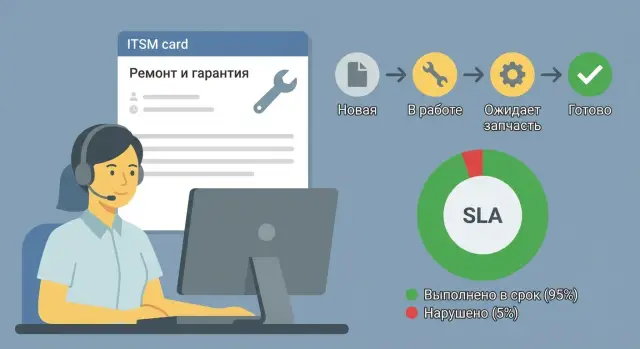
Why separate repair and warranty in ITSM
Repair and warranty cases almost always fall between the service desk, IT, the warehouse and the vendor. Because of that, timelines slip, devices move between offices, and root causes stay buried in messages. A dedicated module in ITSM keeps repair requests, warranty cases, replacements and returns in one manageable history.
Without a single repair card it's hard to answer basic questions: where is the device now, who is responsible, when will it return to the user, and what exactly failed. Staff tend to ask “when will it be ready?” and IT answers by feel. Analytics suffers too: repeat failures aren't linked, and identical issues look like separate incidents.
A good module should quickly answer three groups of questions:
- Where the device is: with the user, in diagnostics, at a service center, waiting for a part, returned.
- Who is responsible for the current step: service desk, engineer, external service, warranty vendor.
- When it will be ready: planned date, SLA promise, actual return date.
Define process boundaries early. ITSM should record the request, diagnostics, the decision (repair/replacement/return), statuses, timelines (SLAs), approvals and communications. The warehouse or ERP usually handles stock levels, batches and serial numbers at the shipment level, financial documents, write-offs and purchases. Mixing these areas turns the module into an accounting system and reduces the convenience of repair control.
Practical example: a workstation fails in a government office. An ITSM repair card is created, the asset (serial) is linked, warranty status and a target restoration date are recorded. Even if the device goes to an external service or the manufacturer, the user and manager keep a single clear track: what is happening and when it will be returned.
Minimal data model: entities and relations
To get a repair and warranty module working fast, use a simple model where each action is tracked and timelines and repeats are calculated without spreadsheets. Start with a data "skeleton" that both users and service staff can fill.
A minimal set of entities is usually:
- Asset (device): specific PC, server, MFD, all-in-one, etc.
- Incident or request: the user's report with symptoms.
- Repair case: the unit of work for restoration.
- Warranty case: warranty flag and conditions for a given repair.
- Part or spare: what was replaced or installed.
- Contractor or service center: who performed the repair (internal or external).
Make relations direct and predictable. The key analytic relation for repeats: one asset — many repairs. An incident often leads to one repair case, but allow "one incident — multiple repairs" (for example, when two independent faults are found). Inside a repair keep the list of tasks and parts: one repair — multiple tasks/parts, even if initially these are just simple lines.
Keep reference data separate to avoid a "zoo" of text values and messy reports. At the start, models, locations and common defect types are usually enough: device model/series, visible defect (how it manifests), cause (what led to it), work type (what was done), location.
What you can skip in the first weeks: a detailed parts catalog with batches and serials, financial postings, a WBS-level plan of works. The important thing for a basic version is to see: which device failed, how many times, who repaired it, when it was accepted and returned, and whether the case is covered by warranty (for corporate PCs and servers, including locally produced models).
Repair card: fields people will actually fill
A good repair card is short. If users see 40 fields they start to bypass the process or enter "unknown." A practical target is 8–15 fields needed for search, timeline control and repeat analysis. Leave the rest optional and fill them as events occur (for example, when sending to an external service).
Start with identifiers so the record links to the asset and request: repair case number, linked request (incident/request), inventory and serial number. This is the basis of the asset history.
Next add context to know where the equipment is and who owns it: organization/division, branch/address, installation place (room, rack, floor), owner (user) and IT responsible person.
Classification helps route the case. Three items are usually enough: repair type (warranty, paid, internal), defect category (power, drive, screen, network, etc.), and criticality. Separate diagnostics into "symptom" (how it looks to the user) and "confirmed defect" (what the technician or service found). Root cause is often unknown at the start, so keep it optional but include a field for later.
When logistics are involved, add fields "sent to" (internal section, external service, manufacturer), handover date, consignment or RMA number, and service contact. Even if tracking numbers are not always used, these fields help quickly investigate delays.
For closure you need result and verification: performed work, replaced units (part number or just "SSD 512 GB"), test passed/failed, return date and who accepted it.
Minimal mandatory set to consider:
- Linked request and device (inventory/serial).
- Repair type (warranty/paid/internal).
- Symptom (short, no long descriptions).
- Current owner and location.
- Dates: created, transferred (if any), returned/closed.
Example: "PC in room 214, Branch A. S/N ... Symptom: powers off randomly. Type: warranty. Sent to service 10.01, returned 17.01, power supply replaced, test passed." That is enough to calculate timelines, find a repeat after a month and see where time was lost.
Statuses and transitions: simple and manageable
To avoid turning the repair module into a swamp, have only as many statuses as needed to show: what is happening, who is next, and what blocks progress.
A basic flow is usually: "New" -> "Diagnostics" -> "In repair", with separate waiting states, then "Ready for pickup" and "Closed." Waiting states are typically two: parts and approvals.
For warranty cases it is helpful to add two explicit states: "Warranty check" and "Warranty denied." In the latter, a reason should be mandatory (e.g., signs of tampering, liquid damage, expired term).
Transition rules
Do not allow everyone to move a card to every state. Typically the user creates the request and confirms receipt, the engineer performs diagnostics and repair, and a manager or service manager approves costs and closes disputed cases.
Make a few fields mandatory at key steps, otherwise the status change should be blocked. A handful of rules is sufficient:
- Moving to "Diagnostics": symptom and completeness notes.
- Moving to "In repair": confirmed defect and plan of works (even as a comment).
- "Waiting for part": what is awaited and expected date.
- "Waiting for approval": proposed solution and approver.
- "Ready for pickup": test result and what was done.
When to consider it finished
There are two practical approaches: close after an internal test (faster for IT) or after user confirmation (fewer disputes). A common compromise: set "Ready for pickup" after testing, and "Closed" after user confirmation or by timeout if the user doesn't respond.
Status history must store who, when and why a card was moved back. Returning without a reason almost always breaks timeline reports and hides repeats.
SLA: what to measure and target setting
SLAs in the repair and warranty module are not for show but to make clear: when the first contact must happen, when the device should be back in service, and where time is lost.
What to measure
Three timers and clear stop-clock rules are usually enough:
- Reaction SLA: from registration to first contact or start of diagnostics.
- Recovery SLA: from registration to return of the device to working condition.
- Logistics SLA: from handover to service center to confirmation of receipt.
Make SLA pauses explicit: waiting for parts, waiting for approval, waiting for the user, waiting for contractor response. Record the reason and who is holding the pause. You can add a closing SLA later to avoid lingering tails.
To calculate SLAs automatically, the repair card needs timestamps for key events: registration, start of diagnostics, handover to service center (if any), service center acceptance, restoration, issue, and closure. Plus a flag "SLA on hold" and the pause reason.
What targets to set
Separate targets by criticality and device class: server, workstation, manager's laptop, printer. For servers recovery time matters more; for workstations reaction and a clear forecast are often more important.
Example targets that are easy to adapt: reaction 2–8 business hours; logistics 1 business day; recovery 1–3 business days for typical PCs and 5–10 business days for complex repairs or warranty cases awaiting parts. If you manage a mixed fleet (workstations, all-in-ones, servers), assign separate SLAs per class — their downtime impact differs.
The rule that most improves manageability: any extension of deadlines must become a data point (a pause with reason), not silence in messages.
How to implement the module in 2–4 weeks: step-by-step plan
Fast rollout works if you agree on the minimum up front: who owns what, which fields are mandatory and which routes are actively used. Add the rest after the pilot.
Start with a 60–90 minute session and lock basic decisions: roles and boundaries of responsibility; mandatory fields and reference lists; statuses, permissions and required fields; 2–3 typical routes (warranty repair, paid repair with approval, replacement/loaner); notifications and short comment templates ("what was done", "what is needed from the user", "what we wait for and by when").
Then run a pilot in one division or for one asset type (for example, workstations). This prevents drowning in exceptions.
What to gather during the pilot (and improve immediately)
Review a sample of closed and returned repairs weekly:
- Why cases were returned for rework (missing data, wrong status, no part).
- Where time is lost (warehouse wait, approval wait, contractor logistics).
- Which fields are often empty and break reports.
- Which statuses are redundant and where an extra state is needed (for example, "Awaiting confirmation").
Update mandatory fields and status rules after the pilot. This usually produces a workable scheme in 2–4 weeks without overloading the team.
Timeline reports: what to check weekly
A weekly report should answer: where time is lost and who can fix it. With a minimally configured module, useful numbers are gathered without complex analytics.
Start with metrics everyone understands: mean and median TTR for closed repairs this week, % SLA breaches, average time in key statuses (diagnostics, waiting for parts, repair, logistics), top requests with biggest SLA overruns including reason and owner, and share of "No Fault Found" closures.
Then add slices that help locate the source: model/series and defect type, branch and location, contractor/service center and engineer, criticality, warranty/paid case.
A bottleneck report is simple: compare time spent in statuses. If 60% of overall TTR is in "waiting for parts", the problem is usually inventory, purchasing or logistics. If it stalls at "waiting for approval", there are missing rules: who approves, within how long, and what counts as silent approval.
Monitor No Fault Found separately. A rising share usually means poor initial diagnostics, incomplete symptoms in the request, or wrong categorization. A practical trigger: if the metric is above 5–10% for a specific branch or model, review examples and update the diagnostic checklist and card fields.
Repeat failures: accounting rules and useful metrics
A repeat is not just "it broke again." Define a clear rule: a repeat is a request for the same asset and the same component (or category) within a set window after repair closure.
Choose windows to catch bad repairs and faulty parts but not label normal wear as service fault. Common windows: 30 days for user PCs and all-in-ones, 60 for printers/peripherals, 90 for servers and storage. If the vendor has warranty obligations, tie the window to repair type: warranty or paid.
To be fair, link repeats not only to the asset but also to specifics: "drive/memory/power supply", "overheating", "BSOD", "bad sectors." That way a keyboard replacement isn't counted as a repeat of power problems.
Metrics that help
A few indicators are enough and can be calculated without magic: share of repeat requests by model and component, mean time to repeat, top "serial" defects (model + component + cause), repeats after a specific contractor or part replacement, and the impact on downtime and repeat workload.
Causes: which tags to add
Don't bloat the lookup. Usually 5–7 cause tags suffice and lead to action: wrong diagnosis, low-quality spare, operating conditions, batch defect, user error.
If the system shows increased repeats by model or batch, act: recall the batch, change contractor/supplier, update the diagnostic checklist, or adjust operating rules (power, ventilation, dust). Each repeat needs an owner and a response deadline, not just a mark in a report.
Dashboards and work lists: the minimum for control
To keep the module alive you need two layers: dashboards for oversight and work lists for daily action. Dashboards answer "what's on fire"; lists answer "what to do now."
Minimum dashboards that work
Usually three screens are enough:
- Recovery SLA: share of repairs on time, average time to return to service, number of breaches.
- Repair queue: count of items in "in repair/waiting for part/with contractor", plus queue age (0–2, 3–7, 8+ days).
- Repeat failures: count of repeats for 30/90 days and top causes.
Keep filters short but useful: model, serial, status, contractor/service center, cause/defect type, branch/location.
Daily work lists
Two lists cover most routine work:
- "Waiting for parts > 3 days" prioritized by criticality.
- "No updates > 24 hours" (no comment, status change or event).
For management provide a concise report: total repairs this week, on time/late, average recovery time, current backlog, breaches by branch, repeat share, top causes.
To keep analytics honest, record key event dates in separate fields: "accepted for repair", "handed to contractor", "ready", "issued to user." These four timestamps give honest timelines even if statuses are imperfectly changed.
Example scenario: warranty repair of a workstation
A workstation in a branch won’t turn on. The user creates an ITSM request (or calls the service desk). The operator registers the case and links it to the specific asset.
First is a warranty check: the service desk confirms serial and commissioning date, verifies warranty status and terms. If the device is under warranty the case goes immediately to the "warranty repair" route to avoid budget approval delays.
The engineer performs basic on-site diagnostics: power, cables, power supply test, visual inspection. If a service center is required, create a linked "Repair" record and change status to "Sent to SC." It's more convenient to keep one case with sub-tasks so history isn't lost.
Fields are filled along the way and responsibility is clear: user and location (service desk), asset (model, inventory, serial — service desk), request type and symptom (user or service desk), diagnostic result and likely cause (engineer), warranty decision yes/no and basis (service desk), SC and RMA/act number, handover date and completeness (engineer/logistics).
Divide SLA into stages: reaction time, time to diagnostics, time to restoration. SLA pauses are represented by a waiting status and reason: "waiting for part", "waiting for loaner approval", "waiting for SC response." Record pause start and end dates or reports will be contested.
Final result is usually one of two: "Repaired and returned" or "Replaced with equivalent/loaner." On closure add a comment and act number, mark repeat (flag "repeat in 30/90 days" and link to the previous case). This gives an honest picture of quality and support load.
Common mistakes and how to avoid them
The repair and warranty module usually fails not because of settings but because of trust. If the card is clumsy, statuses unclear, and SLA timers flag issues that aren’t real, people will bypass the process: call directly, message in chat, or close a case casually.
Common mistakes and simple fixes:
- Too many statuses and fields. With 40 fields and 15 statuses people fill by feel or not at all. Keep what is needed for control and reports: asset, symptom, cause, warranty, contractor, dates, outcome.
- No stable asset identifier. Without Asset ID (serial, inventory number or barcode) you can’t count repeats or know if a specific PC is problematic. Make this field mandatory and don’t allow closure without linking the asset.
- Mixing "repair" and "replace/purchase" in one status. Then decisions and date points are unclear. Separate decisions: "repair" or "replace" and record decision date and owner.
- SLAs without pauses. If a device is with a contractor or waiting for a part, the clock keeps running and reports show false breaches. Implement pause states and rules when the timer stops and restarts.
- Closing without verification. "Fixed" by word of mouth often leads to returns in 1–3 days. Add a control step: test, user confirmation or a "checked in workplace" checklist.
Also watch the cause list. If half of repairs are filed as "Other" analytics becomes useless. Prefer 8–12 clear causes with regular review rather than a perfect 200-item list.
Short checklist and next steps
Check not the "beauty of the form" but whether you can quickly answer: where is the device, how long has it taken, who is responsible, and is the failure repeating?
Minimal control checklist
- Key events have mandatory fields and dates: accepted for repair, handed (to service/warehouse), ready, issued to user.
- One asset shows full history: all repairs, warranty cases, replacements and diagnostics results.
- SLAs for reaction and recovery are set, plus pauses (waiting for part, waiting for confirmation, with external contractor).
- A repeat failure report for 30/60/90 days exists with a clear rule for what counts as a repeat.
- A work list exists to control stuck cases: "waiting for part" and "no updates N days."
Next steps
If at least two items are not in place, it’s better to reach a working minimum than to add new statuses and fields.
-
Define 10–15 mandatory fields and rules who fills them at each step.
-
Approve a simple status and pause scheme so SLAs are calculated fairly.
-
Agree on 3–4 weekly reports: timelines by stage, SLA breaches, repeat failures, cases without updates.
-
Hand this to an integrator to configure processes and reports. If system integration, infrastructure support and hardware services are needed, it makes sense to involve the GSE.kz team (gse.kz) as a partner for implementation and support.
A sign of maturity: by serial number you can see in one minute what failed, how many times, how many days it took, and what was done to prevent repeats.
Frequently asked questions
Why have a separate repair and warranty module in ITSM if there are regular incidents?
A separate module ensures repairs, warranty cases, replacements and returns are kept in a single history with clear statuses, owners and timelines. That way you can see in one case where the device is, who holds it and when it will return, instead of hunting through chats and emails.
What should be kept in ITSM and what should remain in the warehouse or ERP?
Keep process control in ITSM: requests, diagnostics, the decision (repair/replacement/return), statuses, SLAs, approvals and communications. Leave stock balances, batches, financial documents, write-offs and purchases to the warehouse or ERP — otherwise the repair form becomes an accounting system and stops being convenient for tracking timelines.
Which entities are needed in the minimal data model for repair and warranty?
At minimum: an asset (device), request/incident, repair case, warranty flag, contractor or service center, and lines for works/parts. The key analytic relation is one asset having many repairs so you can see repeats and actual timelines for a specific serial number.
Should multiple repairs be allowed for one incident?
If one request can reveal two independent faults, allow "one incident — multiple repairs." This preserves the user's original complaint while keeping a clear work history for each problem without confusion.
Which fields in the repair card should be mandatory?
Keep the form short: 8–15 fields that help locate the device, control timelines and analyze repeats. The most important are usually: linked request and asset (inventory/serial), repair type (warranty/paid/internal), short symptom, current owner and location, and dates (created/transferred/returned or closed).
How to record "symptom" and "defect" correctly so reports stay accurate?
Separate them: "symptom" is how the problem appears to the user; "confirmed defect" is what the technician or service found. This preserves initial information and later allows building honest reports on causes and repeatability without guessing.
Which repair statuses should be in the first version and which are definitely unnecessary?
A practical basic workflow: "New" → "Diagnostics" → "In repair" → "Ready for pickup" → "Closed", plus waiting states for parts and approvals. For warranty, add clear states "Warranty check" and "Warranty denied"; if denied, require a reason (e.g., signs of opening, liquid damage, expired term).
Who should change statuses and how to avoid chaos with transitions?
Define transition rules and roles: the user creates the request and confirms receipt, the engineer runs diagnostics and repairs, a manager or service manager approves paid work and disputed cases. Tie mandatory fields to key statuses so a card cannot be moved forward without the data needed for timelines and control.
Which SLAs make sense to measure in repair and warranty?
Usually three timers are enough: reaction (from registration to first contact or start of diagnostics), recovery (from registration to device return to working state), and logistics (from handover to service center to confirmation of receipt). Always include pauses with reason and owner, otherwise SLA will show false breaches when you are honestly waiting for a part or contractor response.
How to count repeat failures without confusing them with normal wear?
Set a rule: a repeat is a request for the same asset and the same component (or category) within a chosen window after repair closure. Common windows: 30 days for user PCs and all-in-ones, 60 for printers/peripherals, 90 for servers and storage. Then track repeat share by model/component, time to repeat, and links to contractor or replaced part.
