8 min read
Remote attestation via TPM: boot integrity in a LAN
Remote attestation via TPM in closed networks helps confirm boot integrity and reduces the risk of BIOS and bootloader tampering without heavy deployments.
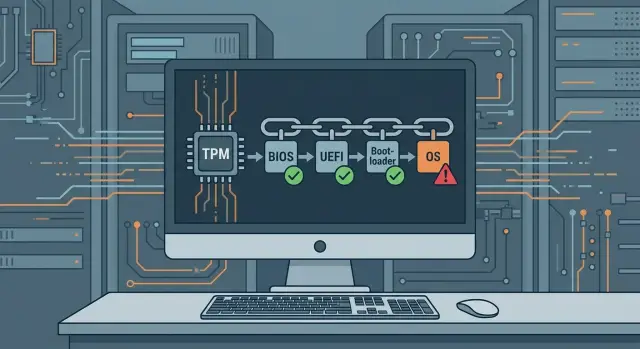
The problem of BIOS and bootloader tampering
Tampering with BIOS/UEFI and the bootloader is an attack at the very earliest stage of a computer’s startup—before Windows or Linux loads, when antivirus and monitoring agents are not yet running. An attacker tries to persist where regular defenses rarely look.
Most often attackers target three areas:
- UEFI firmware: injecting a malicious module or changing settings so the system trusts the wrong components;
- the bootloader and early boot components that launch the kernel;
- Secure Boot settings: disabling it, swapping keys, or configuring it to allow unsigned components.
Being in a closed network does not eliminate the risk. In a LAN there are still USB drives and external disks that bring updates, drivers, or reports. Field service and scheduled maintenance can give someone physical access to a machine. Supply chains also matter: firmware can be updated from a package that looks trusted, or settings can be changed manually when a system must be brought up quickly after a failure.
The danger of such tampering is its stealth and persistence. Malicious code living in UEFI or early boot can survive OS reinstallation, disk replacement, and some recovery procedures. It can also subvert what security tools see: hide processes, disable checks, and present “clean” logs.
IT usually sees only indirect symptoms, and not always:
- Secure Boot is suddenly disabled or UEFI settings were changed;
- a workstation behaves oddly after maintenance or a firmware update;
- periodic boot failures without a clear cause;
- mismatched versions or checksums compared to the reference configuration;
- strange exceptions in policies or execution rules.
The worst thing is what IT doesn’t see: tampering that happens before the OS starts. That creates the need to control boot integrity, and it makes remote attestation via TPM a logical way to verify that a machine started as expected.
Remote attestation and TPM in plain terms
TPM (Trusted Platform Module) is a protected chip in a computer that helps prove the machine booted “as it should.” It’s often called a root of trust: it stores keys and, importantly, records measurements of key boot components so they are hard to falsify retroactively.
During startup, components measure each other (compute hashes) and record results into special TPM registers called PCRs (Platform Configuration Registers). PCRs do not store files; they store fingerprints of state, and entries are accumulated. If something changes, the final fingerprint changes.
PCRs typically include measurements of:
- UEFI/BIOS firmware and settings that affect boot;
- the bootloader and early OS components;
- Secure Boot parameters (what is allowed to run);
- drivers and modules that start very early;
- sometimes policies and configurations considered part of trusted boot by the OS.
Remote attestation via TPM is the remote verification of these measurements. The idea is simple: there is a reference of the correct configuration for a particular model and OS image, and a workstation, on request, proves what PCRs it produced during an actual boot. A server compares the values to the reference and decides whether to trust the machine: grant network access, allow entry into sensitive systems, or send the device for investigation.
This is not the same as antivirus or file integrity checks. Antivirus runs in an already-loaded system where an attacker may hide traces. Attestation checks an earlier state, before usual protections start, so it’s better at catching BIOS/UEFI and bootloader tampering.
A practical example: after servicing a PC in a closed network, an administrator runs a check. If PCRs don’t match the baseline for that role (for example, an accounting workstation), the device is denied access to critical resources until the cause is investigated.
What to prepare for this to work
To prevent remote attestation via TPM from becoming a checkbox exercise, you must first agree on what counts as normal and ensure consistent startup conditions.
First and mandatory: TPM 2.0 must be enabled in BIOS/UEFI and visible to the OS. It’s not enough that the module exists; the OS must actually be able to read boot measurements (measured boot) and the event log. In practice this often fails because TPM is disabled, firmware is old, or settings were reset after service.
Next, check the boot mode. Modern scenarios require UEFI. Enable Secure Boot if it does not conflict with your policy and OS images. Secure Boot does not replace TPM measurements, but it increases the chance that a bootloader swap will not go unnoticed.
The third block is change management. Attestation works well when changes are controlled: BIOS/UEFI updates, microcode, drivers, bootloader and OS image updates should follow a unified procedure. Otherwise you will see constant red deviations simply because of configuration drift.
Define the baseline in advance: which device models, firmware and OS images are allowed. For a fleet of workstations it’s common to fix a baseline for a standard office PC configuration and separately for machines with elevated privileges (administrators, accounting, access to medical systems).
Before a pilot, collect the minimum:
- an inventory of devices (model, BIOS/UEFI version, TPM 2.0 status, UEFI mode);
- agreed firmware settings (TPM enabled, Legacy/CSM disabled, Secure Boot policy);
- a base OS image and a list of allowed boot components;
- update rules: who, when and how updates to BIOS/UEFI and drivers are applied;
- where the baseline and check results will be stored (even in a closed network).
If equipment is frequently serviced on-site and physical work is common (board replacement, firmware reflashing, recovery after failures), establish a simple regulation: any maintenance either updates the baseline by procedure or puts the device into a verification mode after the work.
What exactly to check: scope and strictness
To make remote attestation via TPM actually reduce the risk of tampering, decide in advance two things: what to measure and which changes are acceptable. Otherwise the system will either be silent where it should alarm, or flood you with false positives after every update.
What to measure first
Follow the boot chain from earliest to later components. The earlier the component, the higher the cost of tampering and the more useful the control.
Priority typically goes to:
- UEFI/BIOS and key secure boot settings (Secure Boot, boot order, disabling external media);
- the boot manager and its signature (Windows Boot Manager or equivalent);
- critical bootloader files and early drivers;
- OS components that affect trusted boot;
- policies that change the meaning of checks (for example, enabling test modes).
At the start, covering UEFI and the bootloader is often sufficient. Controlling everything at once rarely helps in a pilot and only adds noise.
Boundaries: what is acceptable and what’s suspicious
TPM records measurements, but policy makes the decision. A convenient model is “allowed states” (baseline) for each group of devices.
Consider acceptable only changes you can explain and reproduce:
- a planned firmware update from the vendor;
- OS updates that alter boot components;
- authorized changes to Secure Boot settings or keys;
- replacement of a drive or motherboard as part of documented maintenance.
To avoid alerts after every patch, manage baseline updates: test on a small group, approve the new golden state, then roll it out broadly.
One more point is different workstation models. For lines like GSE L200 (PC) and M200 (all-in-one), it makes sense to keep separate profiles: firmware and driver differences will produce different measurements even with the same OS. This is fine if each device is compared to its own baseline, not a universal one.
Choose strictness by risk. Policies for accounting and other desks with access to critical systems should be stricter than for a classroom. Ensure deviations always lead to a clear action: restrict access, quarantine, or send for manual review.
Step-by-step: implement without large projects
If the goal is simple—know that a workstation booted “as usual” and spot BIOS or bootloader tampering—remote attestation via TPM can start with a 10–20 machine pilot. The pilot’s goal is to record the baseline first.
Minimal implementation plan
-
Define the base image: BIOS/UEFI version, Secure Boot (if used), driver set, OS version and key policies affecting early boot. In closed networks it’s helpful to split the fleet into 2–3 clear groups (same model and image) to avoid drowning in exceptions.
-
Enable measurement collection. Typically this is PCR values and the measured boot event log, plus signals important to you: Secure Boot status, UEFI setting changes, microcode version, and BitLocker status or equivalent.
-
Capture baselines on "clean" machines. Take a few workstations from each group, fully update them per procedure (BIOS, OS, drivers) and record allowable values. Store baselines as sets of trusted profiles because legitimate updates will change some measurements.
-
Turn on regular checks. At first, checking on each boot and once a day is often enough. In a closed network this is conveniently done via a local service or a dedicated server in the LAN, without external dependencies.
-
Define reactions to deviations in advance so you don’t handle every event manually.
In short:
- pilot: 10–20 PCs, 2–3 groups of identical configurations;
- collection: PCR + measured boot log + Secure Boot status and basic policies;
- baseline: 3–5 clean machines per group, several allowed profiles;
- schedule: on boot + daily check;
- reaction: alert, restrict access, quarantine until checked.
A stepped reaction model works well: first mark as "suspicious," then restrict access to critical segments, and only after repeat or confirmed deviation move to full quarantine.
Example: after maintenance an engineer updated BIOS on some workstations. If you have an allowed profile for the new BIOS version, the system will accept the change as planned. If one machine’s boot chain suddenly changes without a maintenance window, that’s a reason to automatically block access to financial systems until investigated.
If you procure new workstations with TPM 2.0, require measured boot capabilities in the procurement spec. For fleets assembled and supported locally, make this part of the issuance procedure and keep consistent profiles within batches and models.
What counts as a red flag initially
Some deviations almost always require attention:
- the set of boot measurements changed without scheduled updates;
- Secure Boot is suddenly disabled or its state is unclear;
- new early-boot entries appear that were not in the baseline;
- the deviation repeats after reboot and is not explained by an update.
This approach yields quick results: record the baseline, check it automatically, and take clear actions on violations.
How to organize checking in a closed network
In a closed network the main question is where trust will reside. You need a local center that collects boot measurements from workstations and compares them to the baseline. This enables remote attestation via TPM without sending data outside.
A practical LAN setup is to run an attestation server in the same segment as the workstations (or in a separate protected segment with access limited to necessary ports). Workstations send measurements at boot or on a schedule (PCR values, Secure Boot status and similar signals), and the server decides: "trust" or "quarantine."
Where to store baselines and logs
Store baselines centrally on the attestation server, not on workstations. Also keep verification logs on the server: in a closed network the log is often the only source to understand when and on which machine changes began.
To avoid losing history or allowing it to be tampered with, follow simple rules:
- separate roles: who updates baselines and who reads logs;
- store logs with integrity controls and backups;
- record which PC model and firmware version a baseline refers to;
- don’t mix different station types and boot modes in one baseline.
Pre-access checks and baseline updates
The clearest scenario is checking before granting access to critical resources. For example, before connecting to a financial system or an admin segment, the station is attested and only then gets access.
A second scenario is scheduled checks (for example, on startup each morning) with extra checks triggered by events: after reboot, firmware change, or servicing.
A common problem is that planned patches change measurements and "good" machines become suspicious. The solution is to make baseline updates part of the change process. For example, after a planned BIOS update on a batch you first confirm changes on 1–2 control machines, create a new baseline for that version, and only then expand the update to others.
The rule for closed networks is simple: baselines are updated only after a confirmed change, and access to critical resources is granted only after a successful attestation.
Common mistakes and how to avoid them
Remote attestation via TPM often fails not because of cryptography, but due to organizational details. The system will show red where hardware or firmware simply changed, and the team will lose trust.
Typical mistakes:
- Using one baseline for different models and revisions. Even similar stations may have different UEFI versions, boot options and measurements. Fix: split baselines by family and configuration (model, UEFI version, boot mode, Secure Boot enabled). If the fleet is large, start with at least 2–3 biggest groups.
- Updating BIOS/UEFI and forgetting to recapture the baseline. After firmware updates fingerprints change, and that’s normal. Use the rule: any planned firmware change goes through a change window and ends with a baseline update and a short verification of a few devices.
- Leaving Secure Boot off or switching to Legacy for compatibility, but not documenting the risk. If Secure Boot can’t be enabled, treat those devices as an exception: separate group, different policy and more frequent checks.
- Ignoring service work: board or SSD replacement, reflashing, OS reinstallation. For TPM these are distinct events and some change measurements. Require a regulation: after service the device either returns to a known-good state or goes to quarantine until the baseline is re-recorded.
- Not having a scenario for a red status. Then alerts turn into a debate: attack or false positive.
To avoid long-lived red states, use a short reaction process:
- Isolate the device from sensitive segments (at least temporarily).
- Check whether there was a maintenance window or service work.
- Repeat the check after reboot and ensure the status is stable.
- If unexplained, compare with the group baseline and open an incident.
- Return to service only after restoring trusted boot (for example, reflash UEFI/settings, reinstall bootloader) and recording the new status.
Example: after service an employee had a motherboard replaced. The next day attestation shows a deviation. With a regulation this is not treated as a hack: the device goes to a service group, the replacement is recorded, a baseline for the new configuration is captured, and the workstation returns to use without panic.
If you use homogeneous batches of workstations and servers (serial purchases from one vendor), discipline with baseline groups and change windows gives the fastest effect.
Short checklist before rollout
Before enabling remote attestation via TPM across the fleet, check basic things. This saves time investigating why some computers have mismatched boot measurements.
Minimum that must be ready
Ensure TPM is recognized on every machine and enabled in settings. Confirm it’s TPM 2.0, not an older module or compatibility mode.
Check boot mode. For predictable integrity checks use UEFI. Secure Boot should be either enabled or deliberately chosen to be off, with an understanding of what will and will not be measured.
Prepare baselines not for the whole organization but for combinations: PC model, BIOS/UEFI version, disk and OS configuration, set of critical drivers and boot policies. Even two identical model stations can give different values if firmware version or controller modes differ.
Operational things that will break everything if missing
- For each model and typical configuration there is a baseline (or baseline policy) and a clear way to update it after legitimate changes.
- A checking schedule is set: when we check (on boot, daily, after updates) and who has access to logs.
- Logs storage is defined: where they live, retention, and how to retrieve history for a specific PC.
- A response scenario for noncompliance: who acts, required response times, and what happens to the user and device.
- A thought-out "safe failure": what is critical (suspicion of BIOS/bootloader tampering) and what is ground for rechecking.
If the fleet is standard, start with one model and expand coverage later. For corporate supplies rely on standardized configurations assembled and supported centrally.
Example: checking a workstation after service
A workstation in accounting returned from service: the SSD was replaced and the contractor reportedly updated the BIOS to fix instability. Everything looks normal visually: Windows boots and antivirus is silent. But post-service is when risks often appear: boot settings may have been changed, the bootloader swapped, or an unknown firmware installed.
You run remote attestation via TPM and compare results to the baseline captured for this model and configuration before the intervention. Attestation shows not just a generic “OK,” but specific measurement changes: firmware (BIOS/UEFI) related values, boot chain, and Secure Boot settings changed. This is a useful signal: the system sees changes rather than being blind to them.
Next, distinguish planned updates from tampering. Planned changes usually match the service ticket: a new BIOS version, expected setting changes, a clear reason (for example, Secure Boot was enabled where it had been off). Tampering looks like an unexpected deviation without explanation or a set of changes that shouldn’t appear after a simple disk swap.
Practical steps:
- Temporarily restrict the workstation’s access to important resources until you resolve the differences.
- Check the changes against the service ticket and the firmware version the contractor claimed.
- If uncertain, reflash BIOS from a trusted source and restore approved boot settings.
- Repeat attestation: values should either return to the previous state or consistently match the expected update.
- If the update is confirmed, record the new baseline for this station (or batch) and document it in the regulation.
This way accounting gets back to work quickly, and security doesn’t have to take the service provider at their word. Decisions are based on facts, and the risk of silent BIOS or bootloader tampering is significantly reduced.
Next steps: pilot, regulations and support
Start remote attestation via TPM with a short pilot. This quickly reveals which measurements are useful, how often false positives occur, and who in the company decides on a "failed" machine.
Pilot: whom to include and how to measure success
Choose groups where boot tampering risk matters and downtime is unacceptable: administrators’ workstations, accounting, operators with access to critical systems, plus some devices that frequently go to service.
Define success criteria in advance:
- the share of PCs that pass checks consistently after normal updates;
- time from an alert to a decision (allow, restrict, send for inspection);
- number of noisy events and their causes (BIOS update, disk replacement, key reset);
- a clear service process;
- reporting: who and when approved exceptions and why.
Regulations and support: make it work day-to-day
After the pilot, turn it into routine. Assign roles and responsibilities. Typical participants: InfoSec (policy and incident decisions), IT (platforms, updates, device inventory), service or outsource (physical work), and a system owner (priorities and acceptable downtime).
Integrate attestation into two processes.
First — acceptance of new PCs. When issuing a device, record the clean configuration, enable TPM 2.0 and trusted boot, and verify measurements are captured and pass checks.
Second — update regulation. Any BIOS, firmware, bootloader or boot policy change must have a clear scenario: who initiates, who approves, how baselines are updated and how quickly to roll back if problems occur.
Engage a system integrator if you have many models, multiple domains or sites, need strict isolation rules, or want to tie attestation results to network admission.
If you work with standard batches and centralized support, it’s easier to maintain consistent measured boot profiles and update them per regulation. In Kazakhstan such tasks may use equipment and integration services from GSE.kz (gse.kz) when you need to combine supply of workstations and servers with ongoing support and maintenance.
Frequently asked questions
Why is BIOS or bootloader tampering dangerous?
Tampering with the BIOS/UEFI or bootloader lets malicious code run before Windows or Linux. It can survive an OS reinstallation and disk replacement, while security tools within the OS may not detect it.
How does TPM verify boot integrity?
During startup, TPM 2.0 stores measurements of boot components in PCR registers. An attestation server requests this data and compares it with the approved profile for the specific workstation.
Does Secure Boot replace remote attestation?
No. Secure Boot verifies whether components with the required signature are allowed to run, while the TPM records what actually happened during boot. Together, they provide more reliable control.
What is needed to run attestation in an isolated network?
To get started, you need TPM 2.0, UEFI mode, an available measured boot log, and baselines for groups of identical devices. It is advisable to enable Secure Boot if it does not conflict with the OS image in use.
How can you run a pilot without a large project?
Start with 10-20 computers and divide them into 2-3 groups with the same model, firmware, and OS image. Capture baselines from several clean machines in each group, then configure checks at boot and once per day.
Why can’t you use one baseline for all PCs?
Do not use one profile for the entire fleet. Create separate profiles for different models, UEFI versions, boot modes, and important configurations. For example, GSE L200 and M200 should be compared with their own baselines.
What should you do if PCR values do not match?
First, temporarily restrict the workstation’s access to financial, administrative, and other sensitive resources. Then check whether there was an update, maintenance work, or hardware replacement, and repeat the check after a reboot.
How do you update baselines after a BIOS update?
After the update, first check several control machines and confirm the expected measurement changes. Then add the new approved profile, and only then update the rest of the fleet.
Can you use remote attestation without internet access?
Place the attestation server and log storage inside the LAN, preferably in a protected segment. Workstations send it PCR values, Secure Boot status, and the boot log, and the server decides whether to grant access to the required resources.
How do you check a computer after maintenance?
Compare the results with the maintenance ticket, BIOS version, and approved Secure Boot settings. If the changes cannot be confirmed, reflash UEFI from a trusted source, restore the bootloader, and repeat attestation before returning the workstation to service.
