8 min read
Registry of Technological Instructions and Procedures: Version Control
Registry of technological instructions and procedures: how to manage versions, approve changes, record employee acknowledgements and place QR codes by machines.
Why a single registry is needed and what it solves
Without a single registry of technological instructions and procedures, chaos appears quickly: one version lies at the machine, the supervisor has another, and quality control keeps a third. People start doing things "the way they've always done," and the debate over which edition was current emerges only after a defect, incident, or inspection.
The registry usually contains not only "instructions" in the narrow sense. It also includes procedures, SOPs (standard operating procedures), operation sheets, routing cards, setup and inspection instructions, packing and safety rules. If a document affects quality, safety, or work order, it needs a clear card in the registry and a managed version.
Paper copies at the machine are convenient but become outdated the fastest. They were printed "just in case," then a parameter, tolerance, or check order changed, and the sheet on the board remained the same. In a week no one remembers who and when updated it.
A single registry of technological instructions and procedures closes key risks. It reduces defects caused by working with old parameters, helps keep current safety requirements at hand, reduces downtime caused by investigations and re-adjustments. During audits you can quickly show the active version, the change history, and the rationale for corrections.
Roles and responsibilities: author, reviewers, approver
The registry works only when each document has an owner and a clear decision chain. Otherwise versions change "on request," and later it's impossible to explain who approved it and why.
Author (document owner) is responsible for the content and relevance. Usually this is a technologist or section supervisor who knows the process best. They initiate changes, compile facts (operator remarks, causes of defects, new safety requirements) and ensure the registry contains the actual version.
Reviewers look at the document from their area. Most often these are:
- production manager or workshop chief (practicality on the floor),
- chief technologist (unified rules and standards),
- occupational safety and industrial safety specialist (risks and safe work methods),
- quality/QA (compliance, records, traceability).
It's better to fix in advance who is mandatory for a given type of instruction so approval doesn't start "with everyone at once."
Approver takes responsibility for putting the document into effect. The registry must show who approved it, when, and from which shift or date the document is mandatory.
Registry administrator is responsible not for content but for order: cards should be filled, versions not confused, statuses changed correctly, and access managed. This role is often handled by records management, the QMS team, or IT if the registry runs in a system.
To prevent the process from stopping because of vacations and shift changes, assign deputies. A simple rule: the author and approver have an appointed deputy, and the registry records who acted as a substitute.
Registry structure: codes, cards and search
A good registry starts not with a table but with search logic: where the instruction applies and how a person will find it. The most practical scheme is to tie documents to place and job: section (or workshop), equipment, operation, document. Then an operator searches by familiar words, and an auditor can easily verify that each area has the necessary set of procedures.
To avoid mixing documents, set a single code. Make the code short and stable, and put meaning into the title. Write the title in simple words without internal abbreviations: a new employee should understand it at a glance.
Document card: what to record as mandatory
The card is the "passport" of the instruction in the registry. There may be few fields, but they should be the same for all documents:
- code and title;
- version and date of introduction;
- status (draft, under review, active, archived);
- place of application (section, equipment, operation);
- owner and department.
Search is convenient when built on three keys: code, place of application and status. By default only active documents should be shown, and the archive opened separately.
Store related materials with the card: setup diagram, photos of parts, a checklist, a results recording form. A simple rule helps: one folder per document, and attachment names that are consistent and clear (for example, "Diagram", "Photo", "Checklist"). Then nothing is lost when a new version is released.
How to store versions and keep the change history
Versions should be stored so anyone can quickly answer three questions: which version is active, what changed in it, and where the previous one is stored. This removes disputes on the shop floor and helps during inspections.
Version numbering rules
A convenient scheme is 1.0, 1.1, 2.0.
- 1.0 — first approved release.
- 1.1 — minor edits without changing the process essence (clarified a step, added a note on PPE, corrected wording).
- 2.0 — a noticeable change to the process or requirements (new mode, different sequence of operations, new control points, equipment change).
Even small edits in production documents are safer to record as a new version (for example, 1.1) so the situation "it was different yesterday but there is no trace" does not arise.
Change log: what to record
Each instruction needs a change log (in the document card or on the first page). Usually 4–5 fields are enough: version number, date, what changed (1–2 lines), reason (for example, "after an incident" or "after an audit"), who initiated it.
Store archived versions according to a retention period that fits your requirements (often 3–5 years) or longer if a document is related to safety and investigations. Access to the archive should be limited: viewable by quality, safety and section managers, and editable only by the registry owner. On the shop floor only the current version should be accessible so people don't print old copies and work "by memory."
Change approval process: simple and traceable
To prevent changes from turning into chaos, you need a clear route: who changes, who checks, who gives the final signature, and from which day the document becomes mandatory.
Start with simple statuses and a ban on skipping stages: draft, under review, approved, active, archived. Changing status should leave a trace: date, who changed it, and on what basis.
Record the reason for change in one short card field. A few typical options are usually enough: after an incident, improvement suggestion, new equipment or materials. If necessary, add a request number, an act, or a commission protocol, but avoid long descriptions.
Tie the approval route to the type of edit. Then the document won't "go in circles":
- if technology changes — the technologist and production manager approve;
- if safety requirements change — the occupational safety specialist approves;
- if control operations or criteria change — quality/QA is involved;
- for combined changes approval runs in two directions, but the final decision point remains one.
The approved version must show the start date. Also plan what to do with paper copies: who removes old sheets, where they were posted, and by when they must be replaced. If printed copies or QR plates are at the station, only the active edition should be available from the start date.
Access to current instructions: show only what's needed
The main rule: each instruction must have one "single source of truth" where the current version is stored. This can be a corporate portal, a document management system, or a shared server catalog — but not folders "on every operator's PC." On site, only read copies are allowed, and it's always clear where they were obtained from.
Divide rights by roles rather than by people. A minimal set:
- reader sees active documents for their section;
- author prepares drafts and edits but does not activate them;
- reviewer checks for safety, quality and technology;
- registry administrator manages cards, statuses and access.
Reading should be simple; editing restricted. A regular employee opens a document only to view it; edits go through a draft and approval process.
Don't give contractors and temporary staff broad access. Use a separate group: access only to required instructions and only for the contract period. If on-site access is needed, a dedicated terminal at the area often helps.
If the network is unavailable, appoint an offline set: a printed copy or a local PDF marked "copy," with the version number and export date nearby. As soon as connection is restored, the responsible person updates the offline set and records it in the update log.
QR codes at the machine: quick access to the current instruction
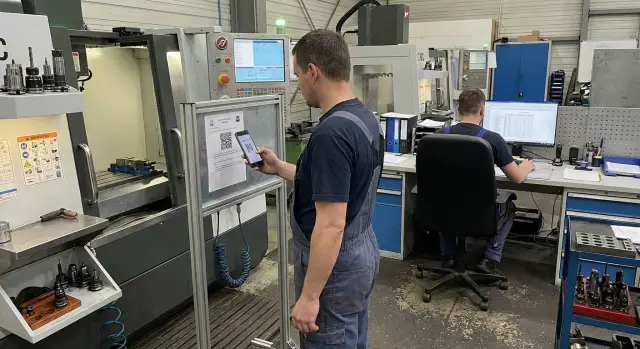
A QR code near the workstation solves a simple problem: the person opens not what was printed once, but what's current now. This is especially important when instructions are updated regularly and clarity is required on the shop floor.
Place QR codes where the operator actually makes decisions or performs operations: on the machine or protective screen, at the inspection post by measuring tools, on tooling cabinets, at the section entrance (as a quick "catalog" of key documents), or at the supervisor's or shift technologist's station.
It's important that the QR opens the document card, not "a file from a chat" or an old PDF. The card should show title, code, current version, introduction date and who approved it, and then link to the current edition. That way the QR doesn't change after an update — only the card content does.
To keep printed copies from becoming a museum, add a short line on the plate beside the QR: "Check currency on the card. Printout is not a controlled copy." On paper copies print the version number and print date prominently, and a review deadline (for example, "check by: 01.05.2026").
What the plate should look like
The plate must be readable from an arm's length and withstand dust, oil and cleaning. Usually enough: a large QR, a short caption "what opens," a durable material (plastic or lamination) and space for the document code and section. A unified format across the enterprise helps employees recognize such plates immediately.
If phones are banned on the shop floor, there is still an option: a secured tablet in a protective box, a terminal at the line entrance, or a dedicated PC for the supervisor. Speed of access matters: if opening takes more than 10–20 seconds, people go back to "old paper."
Example: on an assembly area the tightening torque was changed. The technologist updates the document; after approval the card shows the new version and date. The QR at the machine remains the same, but when scanned the operator sees version 3.2 is active, not the printed 3.1 in the folder.
Employee acknowledgement: what to record and how
Acknowledgement is not "for the checklist" but so you can prove at any moment that a person saw the active version and understood what to do. A practical rule: without an acknowledgement mark the document is considered not implemented.
Acknowledgement is mandatory for new employees, transferred staff, and anyone affected by a version change. For critical operations (safety, electrical safety, machine setup) confirmation should be stricter.
Formats vary: a signature in a paper log at the area, electronic confirmation in the system or a spreadsheet, QR-based view logging, a short test after reading, or a supervisor-led briefing with an attendance mark.
To make the record useful as evidence, record at minimum:
- full name and employee ID (or another identifier),
- document code, version number and effective date,
- date and time of acknowledgement, format (signature, test, briefing),
- responsible person who conducted the briefing or checked the test.
A practical workflow: after releasing version 3.2 the supervisor places the QR at the area, and by shift end checks the list of those who confirmed. For key processes run a refresher acknowledgement quarterly.
Step-by-step launch: from document list to working process
Without a clear list of documents and responsible persons, the registry becomes an "empty folder." Start with an inventory of instructions and procedures by area and immediately assign an owner (who is responsible for relevance) and the place of application (line, machine, office).
Then fix a single card template: code, title, section, status, version number, introduction date and next review date. Agree on versioning rules: what counts as a "major" change (process steps, safety) and what is "minor" (formatting, typos).
To avoid delays, move in short steps. First collect documents for 1–2 areas, set up the card and naming rule, describe a short approval route (who checks the content, safety, who approves, and typical deadlines). Then run a pilot on one area and check how easy it is for people to find the current version. QR plates at machines or area entrances often work best.
After the pilot, fix day-to-day actions: provide short training, enable acknowledgement, and after 1–2 months run a review (what slows approvals, which plates need replacement, what people bypass) and formalize the procedure as a standard.
Common mistakes and how to avoid them
The most costly mistakes are usually not about file formats but lack of clear rules.
QR code links to an outdated file. Often the QR points to a specific PDF that was renamed or moved. Simple rule: QR should point to the document card in the registry where only the active version is available and status, introduction date and archive are visible.
No document owner. When "anyone can edit," in the end no one is responsible for accuracy. Assign an owner (usually a section supervisor or technologist) and record them on the card. Any edit should go through a change request, even if it takes "five minutes."
Approvals backdated or without a start date. Then it's unclear which version was in effect yesterday. Make fields mandatory: approval date, start date, reason for change. A new version becomes effective only after approval.
Acknowledgement without a version reference. A signature "I acknowledge" proves nothing if it doesn't show what the person acknowledged. Records must include document code, version, date, name and format.
Too complex approval, so people bypass it. If the route is long, people start "throwing PDFs into chat" or printing without registration. Keep only necessary roles: one author, 1–2 content reviewers, one approver. Others can be consulted without blocking the route.
Monthly check: what to look for in the registry and on the shop floor
A monthly check helps catch small failures before they become problems. It usually takes 20–30 minutes.
In the registry check that each instruction has an owner and approver assigned, that active documents have introduction date, version and status filled in, and that recent edits have a clear record (what changed, who approved, when it took effect). Also review access settings: the archive should be visible only to those who need it.
On the floor pick 2–3 points (a machine, a workstation, an inspection post) and check in the field: scan the QR, compare the version with the registry, and look for old printouts without a version mark. Also verify new hires in the last month: they should have confirmed acknowledgement of key instructions in their active versions.
Record results in one line: what was checked, what was found, who will correct it, deadline.
Practical example: updating an instruction on the floor
At an assembly area they decided to change the operation order: previously the supervisor tightened fasteners after checking cables; now tightening is done first, then inspection and labeling. The reason was a rise in errors with missed fasteners found only at final control.
The process technologist makes the edit and creates a new version in the registry with a revision number and date. In the card they briefly describe what changed and why, and note which workstations are affected. The document then goes through the approval route: the area supervisor checks clarity, quality assesses risks and control points, and safety confirms safe methods. The production manager (or appointed approver) signs off.
After approval the status changes to "Active" and the previous version is archived and remains available for inspections and investigations. At the machine the plate is updated: the old one is removed and the new plate with current data is installed. Old printouts from area folders are removed so there are not "two truths."
Acknowledgement is recorded by shift: employees open the current instruction via QR and sign a sheet or confirm in an electronic log. During an inspection they show the document card with version history, the approval route, the introduction date, and the acknowledgement log.
Effectiveness is tracked with simple metrics: number of operation errors, defect and rework rate, time to find the right document, share of employees acknowledged within 24–48 hours, and number of cases using an outdated version (goal — zero).
Next steps: solidify the process and prepare infrastructure
If a registry does not yet exist, start with rules for 2–4 weeks. The goal is simple: stop living in folders named "Instructions_final_new" and always know which version is current, who approved it and who has acknowledged it.
For a start you usually need: a registry owner and a clear channel for submitting changes; a single document code and version rules with an effective date; a ban on using printouts without version and date (or marked "for reference only"); and a change log (what changed, why, who reviewed and who approved).
Next decide where this will live. For a small volume a spreadsheet with a document card and a file store is sufficient if you include fields for version control, approvals and acknowledgement. When there are many documents or auditors demand more, move to a document management system with access rights and approval workflows.
On the shop floor fast access to current procedures with minimal clicks matters most. Plan viewing points (a terminal at the area, an all-in-one at the supervisor, a tablet in a protective case) and QR codes that point to the document card.
If you need a reliable platform for this process, the infrastructure can be built on solutions from GSE.kz: work PCs and all-in-ones for areas, servers for storage and backups, and system integration and round-the-clock support services so the registry doesn't depend on a single computer and remains available across shifts.
Frequently asked questions
Why do you need a centralized register of technical instructions?
The register brings together all operating instructions, procedures, SOPs, operation sheets, and safety documents in one controlled location. Employees see the current version, while managers can quickly find the change history.
What information should an instruction record include?
Include the document code and title, version, status, effective date, work area or equipment, owner, and department. This is enough to find the document and understand whether it can be used for work.
Who is responsible for revising and approving an instruction?
The author prepares and updates the content. Reviewers check the technology, quality, or safety aspects within their role. The approver puts the document into effect, while the administrator maintains the order of records, statuses, and access rights.
How should technical instruction versions be numbered?
Use clear numbering: 1.0 for the first approved release, 1.1 for a minor clarification, and 2.0 for a change to the process, equipment, or control operations. Every revision should receive a separate version number.
What should you do with old instruction versions?
Keep the previous version in the archive together with a record of what changed, why, when, and who initiated the revision. Make only the current version available at workstations so an outdated document does not get used.
Where should a QR code by a machine lead?
The QR code should lead to the document record in the register, not to a specific PDF file. In the record, the employee sees the code, current version number, effective date, and the instruction itself. When updated, the record's content changes while the QR code stays the same.
Where should QR codes for instructions be placed?
Place the QR code where the operator performs the operation or makes a decision: on the machine, at the inspection station, on the tooling cabinet, or at the entrance to the work area. The label should include the document title, its code, and a short note that current status is checked in the record.
What should be recorded when employees acknowledge an instruction?
Record the employee, document code and version, date and time, method of acknowledgement, and the person responsible for the briefing or check. A signature without a version number does not confirm which revision the employee read.
When should employees be familiarized with an instruction again?
Conduct acknowledgement for new employees, employees transferred to another work area, and everyone affected by a new version. For high-risk work, add a short test or supervisor briefing to check their understanding of the procedure.
Where should you start when implementing a register in manufacturing?
Start by collecting instructions for one or two work areas and assigning owners. Then set up records, statuses, versions, and a short approval workflow. Test the pilot in the work area, add QR access, and after one or two months fix any issues you find.
