7 min read
Regional Service Support: Contract Clauses to Include
Regional service support: which contract clauses to include on service geography, arrival times, spare parts (ZIP) with engineers and reporting.
Why define regional support in the contract at all
Regional service support often seems “understood” until the first failure at a remote site. Then expectations collide: the customer expects a visit “today,” while the vendor assumes “when possible, when resources allow.” A contract exists so parties don’t argue during downtime but act according to pre-agreed rules.
The most dangerous phrases are those you can’t measure: “when possible,” “as soon as possible,” “within the region.” If a metric isn’t measurable, you can’t enforce it. Deadlines slip, losses grow, and correspondence replaces action.
Conflicts usually revolve around four things: where service is provided, how fast they respond and arrive, what the engineer brings, and what reporting the customer receives. For branches, remote sites and district units this is critical. If, for example, a server fails at a district hospital at night, it’s important to know in advance: will someone come, how soon, with which spare parts, and what happens if access requires passes and prior approval.
Clear terms protect both sides. The customer understands what level of service they’re buying, and the provider can plan staff, warehouses and routes. If your supplier has its own production and a national service network, it’s easier to lock these rules in from the start so expectations align.
Service geography: how to describe zones and sites
Geography is the main reason regional support “drifts” in practice, even when other SLA items look tidy. The contract must remove ambiguity: where exactly is covered, which sites are within scope and what counts as a “remote site.”
Start with an exact list of sites. Better to include not just the city but the full address, site name (branch, data center, clinic, bank office) and an on-site contact. If there are many sites, put the list in an appendix and set the rule: how new addresses are added (email or amendment) and from which date the conditions apply.
Then describe service zones. It’s practical to divide them into 2–3 levels and fix in advance how travel times and travel costs are calculated so you don’t argue later whether “this is still our city or already a business trip.” For example:
- Primary zone: addresses within the specified cities and agglomerations.
- Remote zone: settlements outside the primary zone, with separate arrival times.
- Exceptions: hard-to-reach sites (e.g., rotational camps) with a special approval procedure.
If the provider has no permanent representation in a region, define the dispatch mechanism: who confirms the need, how an engineer is assigned, whether substitution by a certified partner is allowed and who is responsible for quality.
Also fix the servicing schedule by region: working days and hours, rules for weekends and a 24/7 regime for critical systems. Even if the supplier claims a wide service network, the contract must contain concrete zones and addresses, not general promises.
Reaction and arrival times: how to phrase SLA
SLA often mixes two different metrics:
- Reaction time — when the provider acknowledged the request and started work (phone call, ticket, remote diagnostics).
- Arrival time — when an engineer physically reached the site and can work on location.
For regional support this difference is key: reaction can be fast, but travel may take much longer.
Immediately separate incident levels. For critical incidents (service outage, POS downtime, server unreachable) deadlines are usually stricter; for non-critical ones (partial degradation, a single workstation) they’re more relaxed. In the contract it’s better to tie priority to consequences: downtime, risk of data loss, impact on safety, number of affected users.
To make SLA workable, record in advance factors that affect timing: time of day, weekends, weather, pass procedures, and who and how quickly must grant access. If a site is controlled, it’s convenient to state: arrival time is counted from confirmed access, and the provider will supply the engineer’s details in advance.
A typical SLA structure looks like:
- Reaction: X minutes or hours to register and make first contact.
- Remote work: Y hours for diagnosis and an action plan.
- Arrival: Z hours for critical incidents and Z2 for non-critical, specified by city and district.
- Service window: separately for 24/7 and for 8/5.
- Exceptions: force majeure and lack of access, with rules for documentation.
Penalties and service credits should be simple and measurable: for example, a percentage of the monthly support fee per violation, with a cap. Always state how a breach is recorded: ticket opening time, confirmation time, arrival time (security checkpoint stamp or confirmation by the site contact).
Example: if a POS terminal at a district branch failed at 19:30, the SLA could require a 15-minute reaction, a remote attempt within 1 hour, and arrival within 6 hours given access. Then both sides have clear expectations.
Site access: often-forgotten details
Many SLA disputes aren’t about the repair itself but about the engineer being unable to start work. So define separately in the contract what counts as “arrived” and what’s needed to begin.
First, fix the point from which “engineer arrival time” is counted. Options vary: checkpoint stamp, security registration, contact with the responsible person, or actual presence at the reception or server room. The clearest approach is to separate two events: “arrived on site” (checkpoint or reception) and “granted access to equipment” (installation location). That shows where any delay happened.
Passes and escorting are usually the customer’s responsibility, but with clear deadlines. Otherwise the service is formally “on site” but work doesn’t start.
It’s useful to collect a short table in an appendix:
- who issues a one-time or permanent pass, how many hours in advance and in whose name;
- who meets the engineer and escorts them to the work site (role, primary and backup contact);
- what documents are required for entry (ID, power of attorney, covering letter);
- service windows — when work can be done without stopping processes;
- access rules for restricted areas (server room, POS area, medical cabinet).
If access is allowed only at night or on weekends, link that directly to SLA timing and cost. Otherwise you’ll see “arrival” met but the work deferred “until the next window.”
Practical example: the branch requests an engineer but the server room admits only with the administrator who is on leave. The contract can require the customer to provide a replacement escort within, for example, 60 minutes. If they don’t, it’s recorded in the report and is not counted as service delay.
Spare parts and tools an engineer should carry: what to actually specify
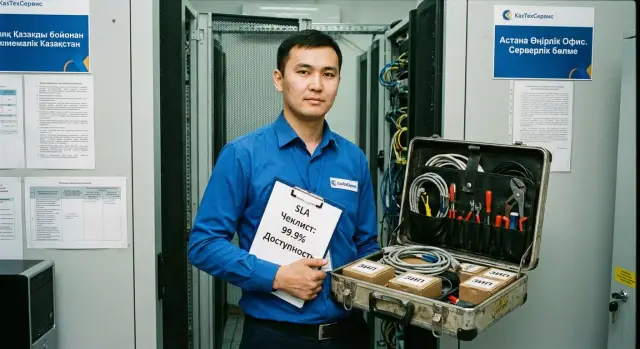
Spare parts, tools and accessories (ZIP) are often described with a single phrase. Later it turns out the engineer arrived with a minimal kit and the needed module ships from another city. Regional support loses its value if the repair only starts after a second trip.
What to reasonably require of the engineer
Request not a “complete ZIP,” but a clear kit for typical failures. It depends on equipment models and site tasks. For office PCs and all-in-ones a kit for diagnostics and minor repairs usually includes:
- basic tools and a multimeter, bootable media for diagnostics;
- power cables and standard interface cables;
- mouse and keyboard for checks;
- consumables (thermal paste, fasteners, CMOS battery);
- 1–2 most probable replacement modules by agreement (e.g., a power supply or SSD for a specific product line).
Record that this is the minimum kit and its absence counts as a failed dispatched visit.
Next, list an extended ZIP in a separate appendix: exact part numbers, compatible alternatives and quantities. Also state where it’s stored (regional warehouse, central warehouse or onsite) and swap rules: can the replacement be done immediately and the faulty part taken later, and within what timeframe it must be returned.
To make this practical, add specifics:
- delivery time from warehouse to site (by region);
- replacement timeframe after diagnosis (e.g., “within N hours”);
- who holds the safety stock and who is responsible for replenishment;
- actions if a part is unavailable (substitute, postpone, notify).
Example: for a critical cashier PC the contract provides a spare SSD on site and the rule “replace first, document later.” That prevents a day-long halt waiting for a shipment.
Escalation and remote support: avoid silent waits
Silence during an outage is more frustrating than the problem itself. The contract should define remote diagnostics and escalation: who connects, when, and how you’ll be informed of status.
Remote support speeds repairs when used properly: collect logs, clarify symptoms, run tests and prepare spare parts before dispatch. The SLA should state how remote work is counted. For example: remote diagnostics — a separate stage with a limit of X hours, after which dispatch is automatically triggered if there’s no result. Otherwise you get “we reacted” but no one shows up.
To prevent lost requests, assign a single ticket ID and mandatory communication channels. For regional support it’s particularly important to have one request number and clear statuses: accepted, in progress, access required, field visit scheduled, spare parts awaited.
Escalation procedure
Describe a short chain and times for each step:
- 1st line (ticket intake, initial diagnosis);
- field engineer (on-site work);
- lead engineer (complex cases, decisions on part replacement);
- vendor/manufacturer (defect confirmation, warranty solution).
For each level set two rules: when the case escalates and who notifies the customer.
Roles and responsibilities
Specify who decides on equipment or module replacement and on what basis (test results, photos of serial numbers, diagnostic report). That reduces warranty disputes.
Example: a hospital server won’t boot. 1st line confirms within 30 minutes that remote recovery isn’t possible and triggers a dispatch. The lead engineer pre-approves replacing the power supply so the visit is “with a solution,” not just “to take a look.”
Reporting: require useful documents, not formal letters
Reporting in regional support isn’t “for the record.” It’s a control tool: what was done, why the failure happened, did the SLA hold, and what to change to avoid repetition.
It’s enough to define three reporting levels: an operational report after each visit (or remote intervention), a periodic summary of tickets and a deeper analysis of failure causes when there’s repetition or critical downtime.
To make reports useful, define the minimum fields below which a document is incomplete:
- ticket ID, site and on-site contact;
- timestamps: registration, start of work, arrival, recovery, closure;
- actions taken: diagnostic steps and concrete measures;
- parts used: part name or SKU, serial numbers of replaced modules;
- result and recommendations: what was restored and what the customer should do (firmware update, power checks, server-room conditions).
Define format and frequency. A short visit report within 24 hours and a monthly SLA summary (reaction, arrival, recovery) work well. For large infrastructures a quarterly trends report with recurring issues is appropriate.
Assign acceptance responsibility. The contract should name the unit or role that confirms incident closure and accepts the report, and set a time for comments (for example, 3 business days). After that the report is considered accepted.
How to prepare conditions for the contract: a step-by-step order
To make regional support work without surprises, start from facts, not a “pretty SLA.” Realistic deadlines and costs appear only when you know where systems are, how critical they are, and what the business considers downtime.
-
Compile a site list: addresses, access rules, contacts, windows for work. Mark critical systems (reception, POS, server room).
-
Split incidents into 3–4 classes. For each class set expectations in advance: reaction, arrival, recovery times and allowable workaround solutions (temporary swap, load shift, remote recovery).
-
Agree ZIP and logistics. Separate what the engineer must carry, what stays onsite and what is at the warehouse. Also agree delivery rules for rare parts.
-
Describe the ticket and escalation process in simple terms: who to call at night, how requests are logged, when a senior engineer is involved, how delay notifications are made.
-
Plan a 1–2 month pilot. It helps test rules in real conditions and adjust wording before penalties and disputes start.
Then ask the provider for a draft procedure and sample reports. A good sign is when they show how the final document will look: timeline, causes, actions, replaced parts, recommendations.
If you buy equipment and support from one supplier, it’s convenient to link the contract to the product lineup and spare-part availability. For example, when procuring workstations and servers from a manufacturer with local production in Kazakhstan, clarify which components are kept in-country and how on-site replacement is organized.
Typical contract mistakes for regional support
Even if the vendor promises “we’ll fix it fast,” without precise wording regional support often turns into a dispute about what was agreed. Mistakes usually come from vague words and omissions, not from technology.
Most frequent failures are:
- Confusing reaction time with recovery time. Reaction may be 15 minutes but recovery two days, and that’s “by contract” if the latter isn’t specified.
- Not recording where spare parts are stored and who is responsible for availability. The engineer arrives “to take a look” while the needed module is shipped from another city.
- Describing geography in general terms (“across the region”) without addresses, access regimes and site priorities. Later a remote branch is declared “out of scope.”
- Not defining criticality criteria. Without clear conditions (full outage, key service unavailable, risk of data loss) priority is always disputed.
- Not specifying report format and closure criteria. The vendor sends a formal note while the customer expects a clear result: what was done, what was replaced, next recommendations.
A simple test: imagine a server in a regional office fell over on a Friday evening. If the contract can’t clearly answer “when will they start,” “when will they arrive,” “what will they bring” and “what counts as recovery,” the document is weak.
Quick checklist before signing
Before signing a regional support contract run through this one-page check — it takes ten minutes and often saves days of downtime.
- Geography and sites: listed (addresses or site codes), dispatch zones and exceptions. Seasonal or temporary sites noted separately.
- SLA broken into stages: reaction time, arrival time and target recovery or workaround time. It’s clear when SLA pauses (e.g., due to lack of access).
- ZIP and spare parts: minimal kit defined for the engineer and storage location for the rest. Swap and return rules specified.
- Access and work windows: entry rules, escorts, contacts and agreed windows (including nights/weekends if needed).
- Reporting and escalation: incident report template and submission deadline. Single registration channel, escalation levels and decision procedure described.
Even if the vendor promises a wide service network, put these points in writing so expectations match reality.
Practical example and next steps
A branch finishes its working day and a server suddenly fails: users lose database access, POS and reporting stop. With clearly described regional support the process that follows is straightforward.
The ticket is registered through one channel, given a number and a priority. Remote diagnostics start: the engineer requests logs, photos of indicators, clarifies symptoms and confirms if part replacement is needed. If a visit is required, the arrival rule for the specific city and access conditions (pass, on-duty contact, service windows) apply.
A key time-saver is an agreed ZIP with the engineer or a nearby warehouse. In this example the contract allows replacement of a common part (e.g., power supply or drive) on site without waiting for delivery. After replacement, results are recorded and monitoring adjusted, restoring operation.
To avoid after-the-fact disputes, reports must contain verifiable facts: registration and first response times, remote diagnosis conclusions, actual arrival time, exact parts replaced (with serial numbers), source of spare parts and recovery time.
Next steps before negotiations are simple: collect a list of sites with addresses and access rules, define service criticality and acceptable downtime, prepare spare-part requirements by equipment type. Then discuss with the provider the support model: where engineers will be stationed, where spare parts are warehoused and which metrics will appear in reports. If you consider a Kazakh manufacturer and integrator with its own lineup of PCs, servers and 24/7 support, check with GSE.kz in advance how their service network and procedures fit your SLA.
Frequently asked questions
Why can’t regional support be taken as “given”?
You clarify terms so that, during an outage, there is no argument about what was meant by “quick” or “in the region.” The contract should fix measurable deadlines and rules: who accepts the ticket, when remote diagnostics start, when a field visit is triggered and how actual times are confirmed.
How do you correctly describe the service geography in the contract?
Start with an exact list of sites including addresses and the type of facility, and if there are many sites put them in an appendix. The contract must state how new addresses are added and from which date the SLA applies, so there’s no dispute that “this branch wasn’t included.”
Should sites be split into “primary” and “remote” zones?
Yes. Divide the service area into levels and set separate arrival times and rules for each. This removes ambiguity when a site is technically “nearby” but practically treated as a trip with much longer response times.
What is the difference between reaction time and engineer arrival time?
Reaction time is when the request is registered and the provider begins actions (call, ticket, remote check). Arrival time is when the engineer physically reaches the site and can start work. For regions these are different metrics and should be specified separately.
How to set incident priority so it’s not disputed every time?
Tie priority to consequences, not subjective words like “urgent.” The most practical approach is to define what counts as critical downtime (service stop, unavailable server, POS outage, risk of data loss) and set stage times for each class.
What should be specified about passes and site access?
Define in advance what counts as “arrived on site” and what is “granted access to equipment,” because delays often happen at the checkpoint or due to a missing escort. Also specify who issues passes and in what time frame, who meets the engineer and what documents are needed, otherwise the SLA might be technically met but work never starts.
How to define spare parts so a site visit isn’t just “to take a look”?
Specify a minimal kit for common failures for your device types, not a vague “ZIP available.” Then list extended spare parts in an appendix with exact part numbers, where they’re stored (regional or central warehouse or onsite) and rules for swaps; otherwise the engineer may arrive to diagnose and repair only after a long delivery.
How to set up remote support and escalation so there isn’t silence?
Make remote diagnostics an explicit stage with a clear time limit, after which a field visit is automatically initiated if the issue isn’t resolved. Also assign a single ticket identifier and clear statuses so requests don’t stay “in progress” with no updates.
What incident reporting is actually useful for the customer?
Require a minimum set of fields that make a report usable: ticket ID, site and contact, key timestamps, actions taken and spare parts used with serial numbers. A short visit report within 24 hours and a regular SLA summary (monthly) are practical: you’ll get facts, not formal replies.
What contract mistakes are most common in regional support?
Common failures come from vague wording and mixing metrics: reaction time may be specified while arrival and recovery are not. Also problematic are undefined spare-part locations, unclear geography and missing access rules. A simple test: if the contract can’t give a clear answer to “when will they start,” “when will they arrive,” “what will they bring” and “what counts as recovery,” it’s weak.
