7 min read
RAM and SSD Compatibility Matrix for Server Upgrades
RAM and SSD compatibility matrix: how to avoid conflicts of ranks, frequencies, thermal profiles and firmware, and which tests to run before mass procurement.
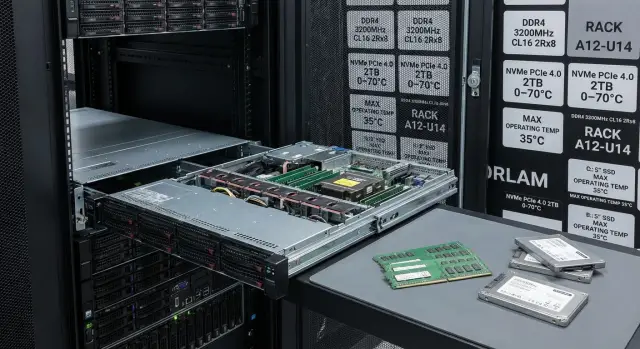
Why a server needs a compatibility matrix
Identical RAM and SSD modules can behave differently across servers, even when frequency and capacity on the box match. The platform and its limits define the real picture: the CPU memory controller, board channel topology, BIOS/UEFI versions, and memory mode settings. For SSDs, firmware, PCIe modes, and how the controller handles sustained load matter.
If you rely only on datasheets, issues often appear after installation. The server boots, but memory drops to a lower frequency. You see rare ECC errors that appear intermittently. Under load there are unexplained reboots. For drives the pattern is different: the first days look normal, then I/O errors grow in the logs, write speed falls, temperature changes, and sometimes an entire batch shows degradation due to the interaction between SSD firmware and the driver or controller firmware.
A compatibility matrix isn't a checkbox. It reduces the risk of downtime, returns and rebuilds—especially when you buy modules in batches for an upgrade. One wrong assumption in a spec can multiply across dozens of nodes, and the cost of a server failure is almost always higher than the cost of verification.
To avoid guessing after installation, record a minimum for each platform up front: server or board model and revision, BIOS/UEFI and microcode versions, installed CPU and its memory limits, the current DIMM population by slot, and for storage — connection type, controllers, firmware and real thermal conditions.
Once this base is assembled, choosing parts becomes a rule you can verify: what will definitely boot, under which settings, and which combinations should be banned from mass procurement.
What to record about the server platform before choosing modules
A matrix starts not from the parts catalog but from an accurate description of what's already in the server. Missing a detail risks strange failures, reduced memory frequency, or loss of some disks behind a controller.
Minimum platform passport
Create a short "passport" for each server model (or each revision if the fleet is mixed). One page is enough, but it must be verified by inspection, not by memory.
Record:
- exact server model, system board revision, BIOS/UEFI and BMC versions, and enabled modes (power profiles, thermal policy);
- which processors are installed and which memory modes they actually support in this configuration (max frequency, number of channels, limits on modules per channel);
- memory type (DDR4/DDR5, RDIMM/LRDIMM, ECC), supported voltages and platform limits on ranks and mixing;
- storage subsystem: SATA/SAS/NVMe, where drives are connected (HBA/RAID/backplane), form factor (2.5", U.2, M.2, AIC) and PCIe lane/slot restrictions;
- real operating conditions: rack inlet temperature, packing density, airflow quality, presence of blanking panels and how often servers run at peak loads.
Next, separate what is "hard" platform behavior from what can be changed. The same server with a different CPU generation may drop memory frequency when four modules per channel are installed, even if the modules themselves are fast.
Short example: when upgrading nodes in a rack with dense NVMe populations, drives often overheat before users notice. So in addition to disk interface notes, record physical placement (hot zone or near a fan) and measured temperatures under load.
RAM: ranks, frequencies and mixing rules
Memory issues often look like this: "everything boots", but the server runs slower or becomes unstable under load. Usually it's about ranks, chip organization, and how the memory controller chooses frequency.
A rank (1R/2R/4R) is a logical group of chips the controller sees as a memory layer. More ranks per channel increase controller load and platforms are more likely to reduce frequency or tighten timings. Sometimes more ranks help throughput in specific scenarios, but for upgrades predictability matters more.
Equal capacity doesn't mean identical modules. Two 32 GB sticks can differ in chip density and organization (for example x4 vs x8) and in the number of ranks. One will be "easier" for the controller, the other "heavier", and mixing them can cause frequency drops or initialization issues.
When different modules are installed together, the server usually selects the mode of the weakest module: frequency and timings fall to the minimum among all modules and the CPU/board limits. This is acceptable if you know in advance how low you can go.
Rules to lock in immediately:
- do not mix different ranks in the same channel if the platform is frequency-sensitive;
- install identical modules symmetrically across channels and, on dual-socket systems, symmetrically across sockets;
- do not mix modules with different chip density/organization without dedicated testing;
- check CPU and board limits for "ranks per channel" and "modules per channel";
- predefine the target frequency and acceptable degradation (for example, "we accept one step down").
XMP/EXPO profiles are rarely a procurement baseline for servers: they are overclocking profiles and server platforms often ignore them or enable them only in limited modes. It's safer to rely on JEDEC standard modes that are officially supported.
Example: in a dual-socket server you planned for 3200 MT/s but added new 2R modules to existing 1R modules of the same capacity. The system booted, but frequency fell and occasional memory training errors appeared under peak load. Such pairs are better marked in the matrix as banned or "only after stress testing".
Thermal profile: where hidden problems are born
Even if specs match, thermal behavior often breaks plans. In a rack you must consider not only whether a module "can withstand temperature" but how it behaves when the cabinet is densely populated, under heavy load, and with imperfect airflow.
Memory and drives have operating ranges and different tolerance to heat. The same configuration can be stable in one rack and produce errors in another if inlet temperature or airflow is worse.
SSDs are especially sensitive: when overheated they throttle and cut performance. From the outside this shows as fluctuating throughput during peak hours, rising latencies, and long backup windows. Often the solution isn't changing the model but adding a proper heatsink, increasing airflow, or moving drives to a better-cooled slot.
There is also an integration trap. Tall memory modules, dense DIMM populations and cable routing can block airflow to PCIe and drive bays. Problems may not appear immediately but after an upgrade when heat load increases.
Check telemetry, not "feel": capture CPU, DIMM and NVMe temperatures via BMC at idle and under load, inspect BMC and OS logs for overheating and frequency drops, and record where throttling begins (temperature and load scenario). If possible, compare results across slots.
If your data center has "cold" and "hot" zones, account for that when distributing batches. Hotter racks should get drive and memory configurations known to tolerate higher sustained temperatures.
SSDs and firmware: how to avoid surprises in a batch
Even if the model name on the box is identical, the internals may differ. Manufacturers sometimes swap controllers or NAND without changing the model name, affecting speed, heat and behavior under load. A matrix should record not only model but hardware revision and firmware version.
Unpleasant surprises often show up not as total failure but as small things: command timeouts, drives dropping out of RAID under peak load, odd SMART spikes or unstable wear indicators. In a server these quickly become false alarms and night-time escalations.
Separate area of risk: compatibility with RAID controllers and HBAs. The same SSD can behave differently in command queuing, TRIM/UNMAP handling, power modes and timeout behavior. Sometimes controller tuning helps, sometimes only a different firmware or different batch will do.
To make deliveries predictable, agree on a policy for versions and lock it in procurement. Minimum items to record:
- exact model and lot code, controller and NAND type (if available);
- firmware version and release date;
- connection mode (SATA/SAS/NVMe), RAID/HBA model and its firmware;
- UNMAP/TRIM requirements and allowable power-saving modes;
- acceptable timeouts and expected behavior during RAID rebuilds.
Example: after a new NVMe shipment, some drives kept dropping out during nightly backups. It turned out the controller stayed the same, but firmware altered timeout handling so the RAID saw pauses as failures.
Update firmware on a plan and only after checking on a pilot configuration so that fixing a "minor" issue doesn't turn into a separate project.
How to build a compatibility matrix step by step
The point of the matrix is to test combinations once and then buy the same parts with confidence.
-
Start with an inventory per server model: CPU (and generation), number of memory channels, DIMM type (RDIMM/LRDIMM, DDR4/DDR5), occupied slots, storage controllers (HBA/RAID), backplane and bay type (SATA/SAS/NVMe), BIOS/UEFI and microcode versions.
-
Lock candidate parts for procurement with exact part numbers and revisions. "32 GB DDR4" is not enough — you need the exact P/N.
-
Describe allowed memory combinations: modules per channel, which ranks may be combined, and what real frequency is expected with your slot population.
-
Add thermal constraints: airflow requirements, maximum allowed SSD controller temperature, cases where a heatsink or slot change is mandatory.
-
Enforce SSD firmware control and procurement rule: revision or firmware changes only after retesting.
Put everything in a table usable by engineers and procurement. Typical columns: configuration, status (allowed/conditional/forbidden), notes (frequency, ranks, thermal conditions, firmware versions) and test results (dates, load scenario, outcome).
Tests to run before mass procurement
Before a mass buy, run a short and clear set of checks on 1–2 servers of the same model with identical BIOS/UEFI settings. This proves the chosen combinations work in practice.
Minimal one-day checks
Start with tests that quickly catch obvious conflicts in ranks, frequencies, ECC and drive firmware:
- memory stress test with ECC monitoring (any correctable error matters; uncorrectable errors are a stop condition);
- verify actual frequency and timings (compare BIOS/UEFI settings with OS-reported values);
- basic data integrity test on a test volume: write large files, verify them, then re-check;
- quick SSD tests: sequential and random read/write plus SMART before and after;
- basic stability checks: several reboot cycles, cold start, and review memory and disk controller logs.
After that, invest time in longer runs. Otherwise a 24-hour test will just stop at the first ECC error.
Extended tests and thermal stability
Plan 24–72 hours under representative load: virtualization, database, file services. Test with the chassis closed and normal fan speeds. Thermal profile often changes latencies and triggers SSD throttling.
Predefine pass criteria:
- 0 uncorrectable memory errors, ideally 0 correctable errors across the run;
- no reboots, hangs or critical log messages;
- performance degradation under prolonged load stays within an agreed threshold;
- SMART counters show no critical increases (write errors, sudden wear spike, etc.);
- SSD latencies do not spike into long tails when heated.
If the pilot passes, the risk of incompatible ranks, frequencies or firmware surfacing in a large delivery is much lower.
Common mistakes when choosing RAM and SSD for servers
The worst part of upgrades is that visually similar parts behave differently. The matrix should record not only model but the details often overlooked.
Typical RAM mistake: buying modules of the same capacity but different chip organization and ranks. Two 64 GB kits can be 2Rx4 and 1Rx8. That causes different controller load, unpredictable frequency drops and failures under load, even if the server passes a short POST.
What usually breaks expectations for memory:
- mixing RDIMM and LRDIMM in the same system (usually unsupported and leads to no boot);
- ignoring module voltage or profile when mixing batches;
- expecting max frequency with all slots populated (platforms almost always reduce frequency under full population);
- focusing only on memory spec frequency without accounting for CPU and board limits;
- procuring without exact P/Ns (modules with the same name can have different internals).
SSD issues often appear later. A common story: a batch is bought without locking firmware versions, and some disks start timing out under RAID/HBA or peak writes. Another mistake is testing SSDs on an open bench where it's cool, then installing them in a dense chassis and seeing overheating and throttling.
Before tests, tidy your baseline: BIOS/UEFI and CPU microcode versions, power-saving settings, RAID/HBA modes. Otherwise results will vary and fixing firmware post-purchase becomes a separate task.
How to scale checks across dozens or hundreds of servers
When you have many servers, testing becomes a repeatable process. A good matrix makes it predictable: what to test, what to record, and what deviations are acceptable.
Start with a pilot. Don’t hit the whole fleet even if configurations look identical. Usually 1–2 servers per model and 2–3 assembly variants are enough with the same test suite and BIOS settings.
To detect variability within a batch, sample size matters: for memory, keep several modules of each P/N (for example 4–8), for SSDs take several drives (for example 3–5). In large fleets the pilot pays back by avoiding the first failure.
Plan rollback procedures: how you restore a server to working state and how fast. This is more critical for RAM because incompatibilities may be rare and manifest in production. Hot-swap SSDs are easier to replace, but firmware surprises still occur.
For procurement, require exact P/Ns, revision requirements when important, minimum acceptable SSD firmware version, allowed substitutions without re-piloting, and unified acceptance criteria.
Example: upgrading a fleet and choosing a configuration
Imagine a rack of eight dual-socket servers: some run virtualization (many VMs, memory-dense), others host storage and journaling for several databases. The upgrade goal is to add RAM and replace SSDs without post-delivery surprises.
Memory choice often boils down to more smaller modules or fewer larger modules. More modules improve parallelism across channels but increase the chance of hitting frequency limits when all slots are filled. Fewer modules are easier for the controller but can harm channel balance and leave less expansion room.
A practical compromise for virtualization: keep symmetry across channels, avoid mixing ranks in a channel if the platform is sensitive, calculate expected frequency at 2DPC and leave room so systems don’t swap.
For SSDs, predictable latency matters more than peak benchmark speed. For DBs and journals, latency drops during background operations (GC, SLC-cache flush, TRIM) hurt more than a 10% loss in sequential read.
Record outcomes with three statuses:
- allowed: configuration passes tests and meets target parameters;
- allowed with restrictions: for example, lower frequency at 2DPC or only identical ranks and lots permitted;
- forbidden: instability, memory correction errors, SSD latency failures or firmware conflicts.
Next steps: turning the matrix into procurement rules
A matrix is useful only when procurement follows it. Turn the engineer’s table into clear rules for sourcing, IT and acceptance.
Start with an inventory: which server models are in the fleet and their BIOS/UEFI, RAID/HBA, NIC and SSD firmware versions. Record not only models but board and controller revisions because these often change memory and storage behavior.
Then set a few target configurations and operating conditions. For example, define 1–2 RAM options (minimum and maximum), 1–2 typical SSD types (OS and data), and expected rack temperatures and fan modes. This reduces the chance that parts pass bench tests but fail in a hot cabinet.
Write rules succinctly and unambiguously: allowed items with exact part numbers, mixing restrictions (ranks, frequencies, modules per channel), acceptable firmware versions (BIOS/UEFI, controllers, SSDs), pilot requirements and stop conditions (memory errors, array drops, overheating, speed degradation).
Add acceptance criteria for deliveries: check revisions and part numbers on a sample, verify SSD and controller firmware versions, run short test cycles and read SMART/logs on several servers, and check temperature under load.
If you regularly perform upgrades and want to institutionalize the process, it may be easier to maintain matrices with an integrator or vendor. For example, GSE.kz (gse.kz) as a manufacturer and system integrator can help lock tested combinations for procurement and support pilot tests and ongoing operations.
Frequently asked questions
What is a RAM and SSD compatibility matrix and why is it needed?
A table or knowledge base where, for a specific server model and its BIOS/UEFI revision, you record which RAM and SSD modules actually run stably and under which settings. It prevents discovering compatibility issues after installation and avoids rare failures under load.
What can go wrong if modules are chosen only by specs?
Relying only on frequency and capacity often ends with reduced real memory frequency, intermittent ECC errors, or reboots under load. With SSDs you can see timeouts, I/O errors or drops in write performance later due to firmware, controller behavior, or overheating.
What server data should be recorded before choosing RAM and SSD?
Start with a platform 'passport': exact server and board model and revision, BIOS/UEFI and BMC versions, installed CPU and its memory limits, current DIMM population. For storage note how disks are connected (HBA/RAID/backplane), the interface used and controller firmware versions.
Can you mix different memory modules of the same capacity in one server?
Mixing modules usually forces the system to the "weakest" mode: frequency and timings drop to the minimum that works for the whole set. For predictability, keep identical modules in the same channel and maintain symmetry across channels and sockets; any mixes should first be validated on a pilot.
Why do ranks (1R/2R/4R) affect RAM stability and frequency so much?
A rank is a logical group of chips that the memory controller sees as a layer. More ranks per channel increase controller load, so platforms often lower frequency or tighten timings. That’s why the matrix should record not just capacity but ranks and chip organization to predict resulting modes.
What to do if the server boots but RAM runs below expected frequency or intermittent ECC errors appear?
First check the actual operating frequency shown in BIOS/UEFI and the OS, and verify DIMM population follows the board guidance. If errors persist, consider that module combination and settings unsuitable for mass procurement, even if the server passed POST.
Why are SSD revision and firmware important if the model is the same?
The same SSD model may have different hardware revisions and firmware that change latency, heat and behavior under queue depth. The matrix must record firmware versions and require that any change of revision or firmware is allowed only after retesting on your platform.
How to avoid SSDs dropping out under RAID/HBA load?
Often the cause is timeouts and nuances in command queue handling, power-saving features, or TRIM/UNMAP behavior across the "SSD—controller—firmware" chain. Sometimes controller tuning or a firmware update helps, but the reliable approach is to confirm the specific combination with tests and lock it as allowed.
How to account for thermal profile to avoid throttling and instability?
Use telemetry rather than feel: compare DIMM and NVMe temperatures at idle and under sustained load and check for throttling or overheating messages in logs. If overheating starts in a specific slot or area, solutions may include moving the device, improving airflow, or adding a heatsink rather than changing model.
What tests should be performed before mass purchasing RAM and SSD?
Run a short smoke set on 1–2 servers of the same model with identical BIOS/UEFI settings to weed out obvious conflicts in ECC, frequency and firmware. Then validate with 24–72 hour runs under representative load and predefine pass/fail criteria so decisions — allowed/conditional/forbidden — are unambiguous.
